Beko BEKOMAT 32 Manuale utente

TABLE OF CONTENTS
1Important Information ........................................................... 1
1.1 Cleaning the screen and cabinet... .............................................. 1
1.2 Disposing of your TV at the end of service life.............................. 1
2Features of your new television ........................................... 2
2.1-Special Features ......................................................................... 2
3Important Safety Instructions............................................... 3
4Start......................................................................................... 6
4.1-Antenna connection .................................................................... 6
4.2-Powering on your device and the initial use ................................. 6
4.3-Batteries ..................................................................................... 6
5Your new television ............................................................... 7
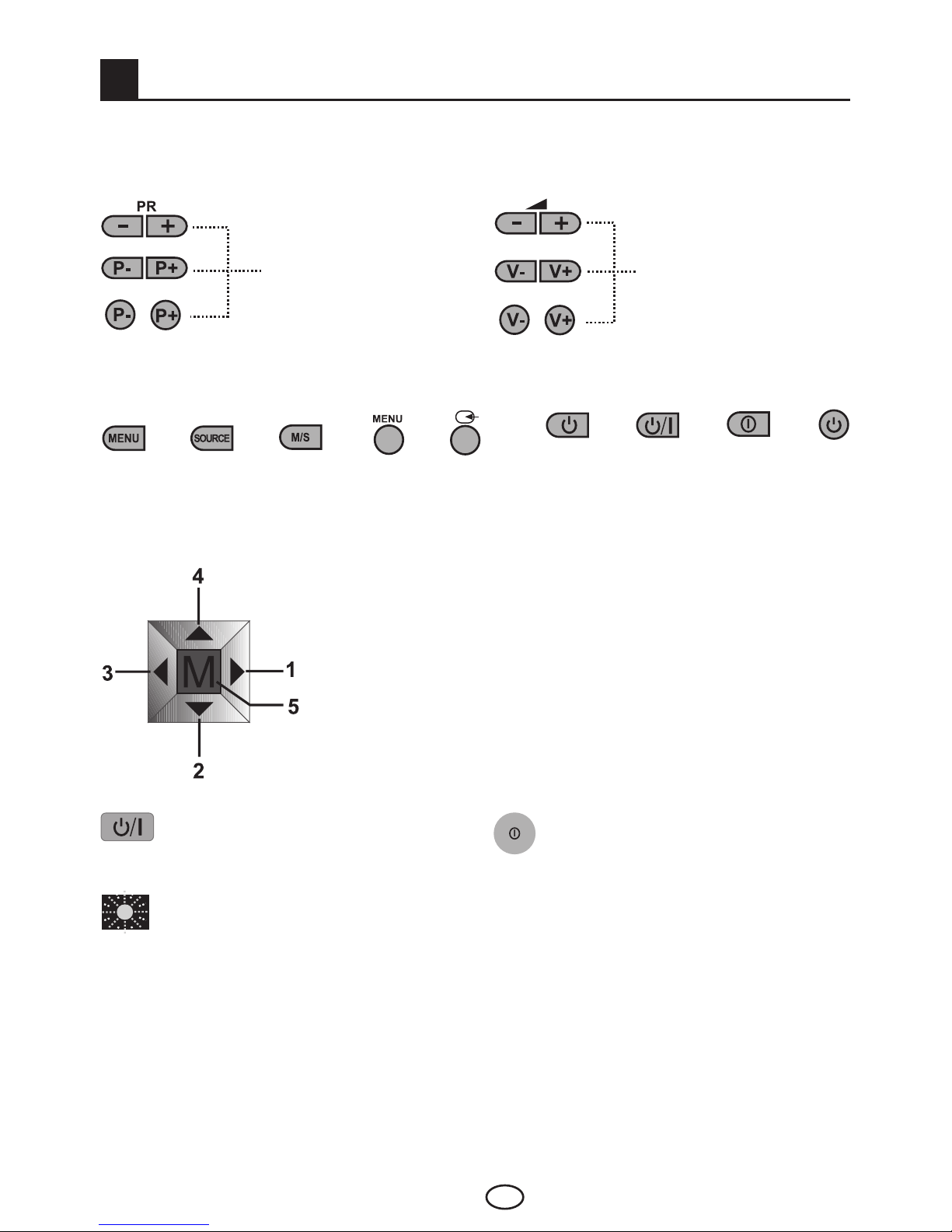
5.1-TV Control Panel......................................................................... 7
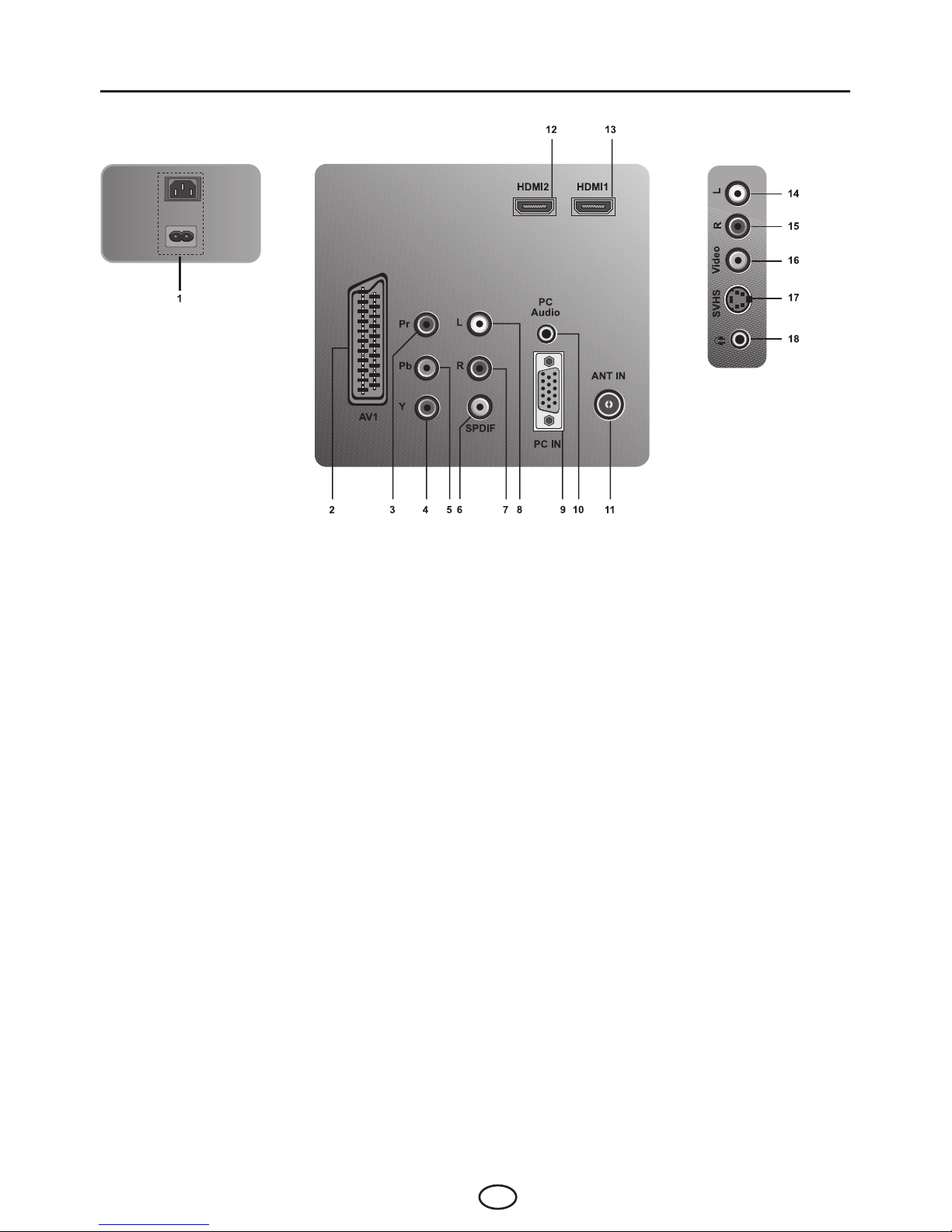
5.2-External Connections .................................................................. 8
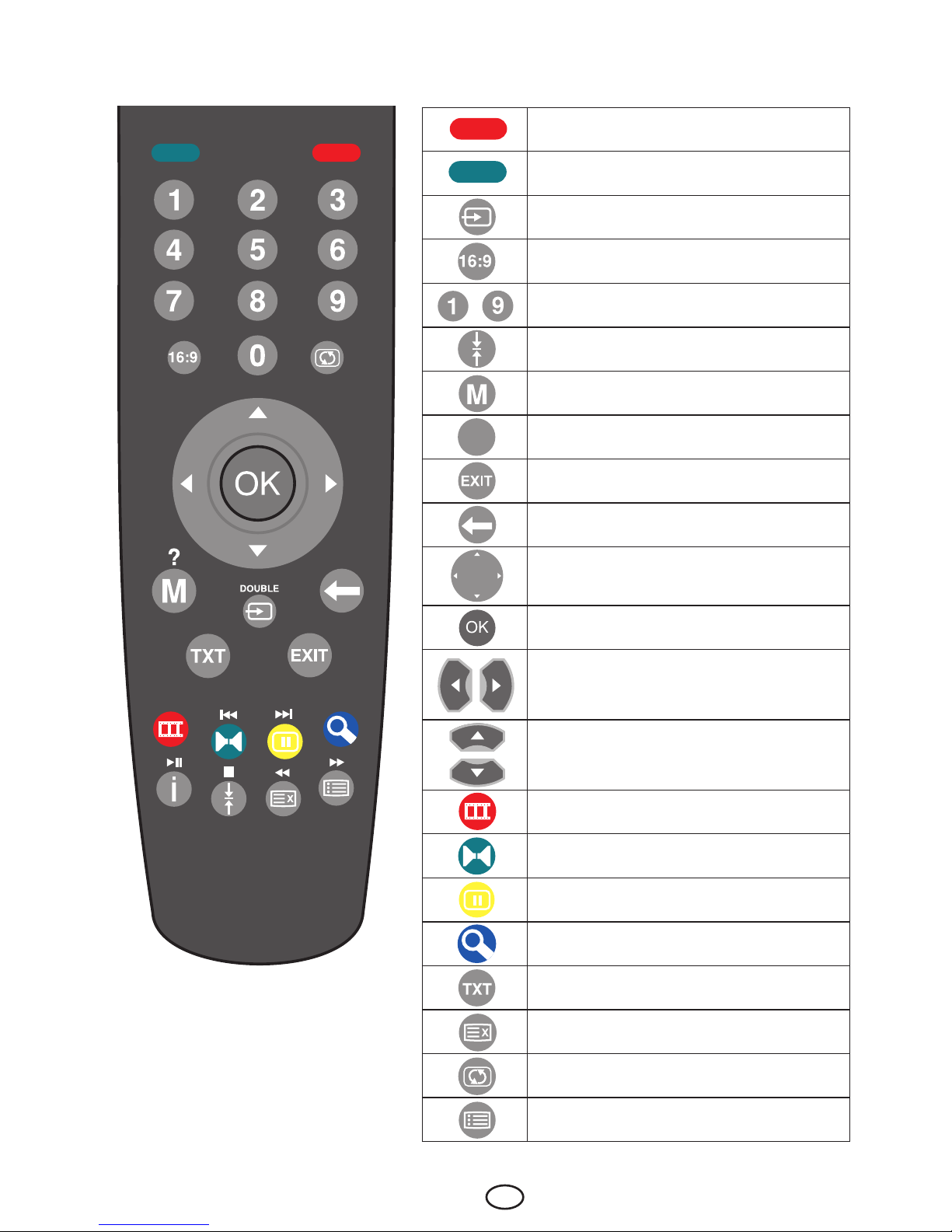
5.3-Remote Control .......................................................................... 9
6Performing the initial power-on settings........................... 10
6.1-TV controls ............................................................................... 10
6.2-Turning on the TV and Setting the Channels ............................. 11
6.3-Program Table .......................................................................... 13
7Settings of Your New Television ........................................ 14
7.1- Sound Menu Settings .............................................................. 14
7.2-Picture Menu Settings............................................................... 15
7.3-Features Menu Settings ............................................................ 17
7.4-Other Picture Features .............................................................. 18
8Teletext ................................................................................. 19
9External equipment connection ......................................... 21
10 Help and tips ........................................................................ 26
11 Technical specifications chart ........................................... 27

1 IEN
1
LCD panels are produced with state-of-the-art technology. However, there may be black or lit spots on
the screen under certain circumstances. That does not mean that the product is faulty.
1.1 Cleaning the screen and cabinet...
After powering off, wipe the screen and the cabinet clean with a soft and dry cloth.
We recommend that you do not use patented polishes or solvents to clean the
screen or cabinet since they may cause damage.
1.2 Disposing of your TV at the end of service
life...
The cold cathode fluorescent lamp found in your LCD screen contains a very
small amount of mercury. Once your TV set has completed its physical life, please
dispose of it in accordance with local government regulations or leave it at a
recycling centre.
Important Information

2 IEN
We would like this product, which has been manufactured in modern facilities in accordance with total
quality principles, to offer you the best performance. Therefore, we would like you to read this entire
manual carefully before you use your product and keep it for future reference.
2.1-Special Features
• FullHDfeature
• HD-Ready
• 2HDMI1.3connectioninput
• HDCPfeature
• PAT(PictureandTeletext)
• Compatiblewithcablebroadcasts
• Wideangleofvision
• ScartandAVconnection
• S-VHSandCinchinputsforS-Videoconnection
• PCconnection
• Lowenergyconsumption
• AVL
• Programmablepoweron
• Programmablepoweroff
• Toptext(*)
• SRSTruSurroundsound
• Graphicequalizer
• SharpnessfeatureinColorTransitions(CTI)
• Sharpnessfeatureandpictureresolution(LTI)inblack-whitetransitions
• AclearerPicturemadepossiblewithaDigitalCombFilter
• DNRNoisereduction
• Returningtothelastviewedprogrambysinglebutton(SWAP)
• ManualFineTuning
• 100Programmemory
• Infraredremotecontrolequippedwithallfunctions
• ParentalControl
• PanelLock
• Renaming,deleting,skippingandrelocatingtheprograms.
• AutomaticbroadcastdetectingsystembymeansofWSSfeature
• FeatureofviewingtheNTSCbroadcastviaScartinput
• Easyperformanceoftheprocesseswiththeadvancedmenusystem
• Multilanguagemenuoption
• 4:3,16:9,14:9Letterbox,Subtitlepictureformats
HDMI,theHDMIlogoandHigh-DefinitionMultimediaInterfacearetrademarksor
registeredtrademarksofHDMILicensingLLC.
(*):Thesefeaturesareoptionalandtheyarenotavailableonallmodels.
2Features of your new television

3 IEN
3Important Safety Instructions
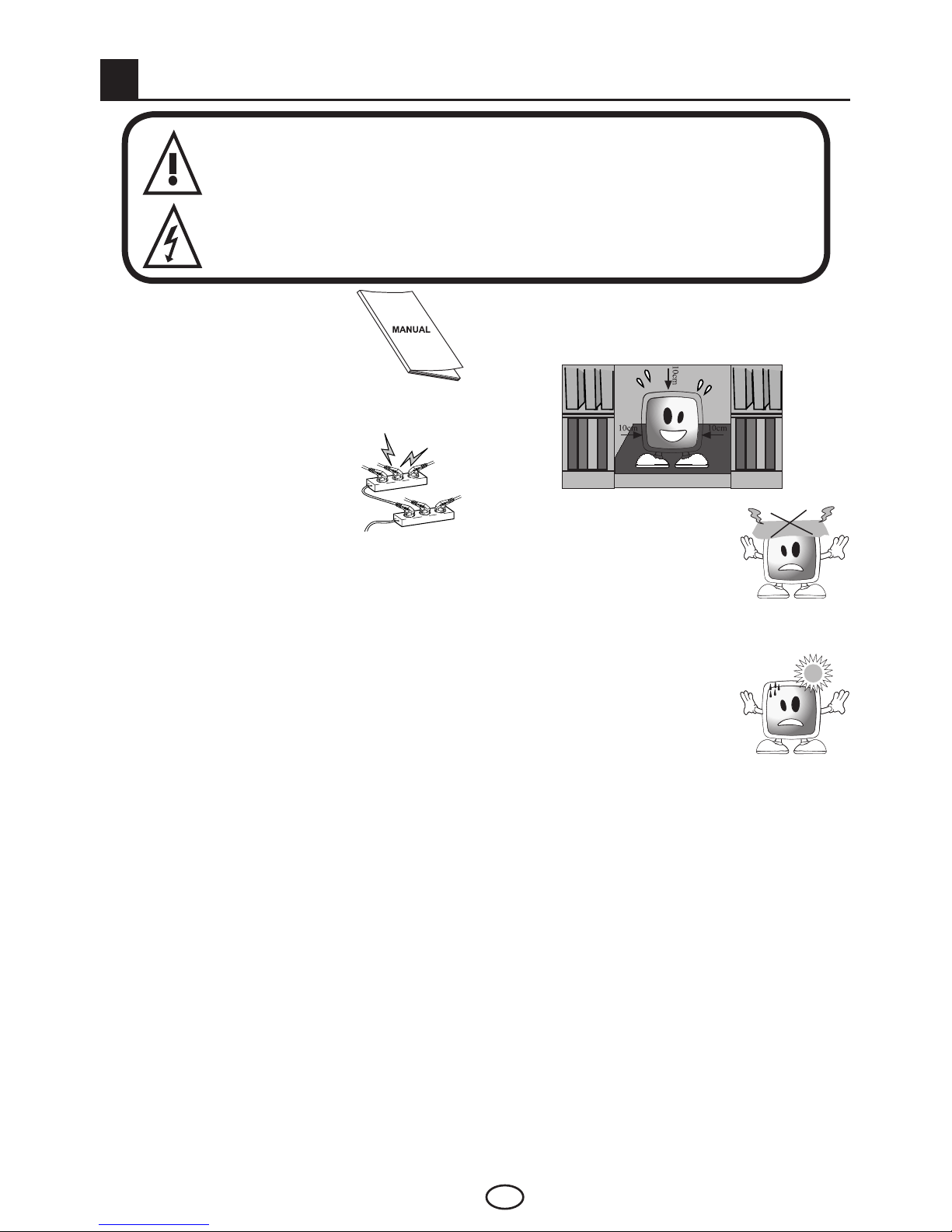
This symbol is used to warn the user about the “dangerous voltage” contained
inside the housing of the product that may create a risk of electrical shock.
This symbol is used to remind the user important usage and service instructions
supplied with the device.
1) Please READ the operating
instructions before using the
device for the first time.
2) Please observe the instructions
contained in the Operating
Instructions.
3) Please consider all warnings.
4) MAKE SURE that all power
connections(extensioncables
and the connections between
thedevicecomponents)
have been made properly
and in accordance with the
manufacturer’s instructions. Before making
or changing the connections, power off the
device and unplug the mains connection plug.
5)Ifyouhaveanydoubtsregardingtheinstallation,
operation or safety of the device, please
REFER to the vendor.
6) BE CAREFUL with glass panels and covers on
the device. The screen glass may break and
cause serious injuries if something hits it.
7) To ensure adequate ventilation, please leave
a clearance area of at least 10 cm around
the television. This clearance prevents the TV
from overheating and consequently causing
damage.
• Usingthedeviceindustyenvironmentsshould
also be avoided.
• Neverblocktheslotsandopeningsbyplacing
the TV on a bed, sofa, pillow or other similar
surfaces.
• NeverinstalltheTVintoclosedplacessuch
as bookcases or cabinets unless adequate
ventilation is provided.
8) DO NOT COVER the
ventilation openings of the
device with items such as
newspapers, table-clothes,
curtains, etc. Overheating
causes damage and shortens
the service life of the device.
9) Your TV may be damaged
if you place it under direct
sunshine or close to a heater.
Please abstain from using the
product in very hot or humid
locations or in places where
the temperature is likely to decrease below
5°C(41°F).DO NOT PLACE on or near the
device any hot objects or items with open
flame such as candles or any night lamps. The
high temperature can melt plastic parts and
cause a fire.

4 IEN
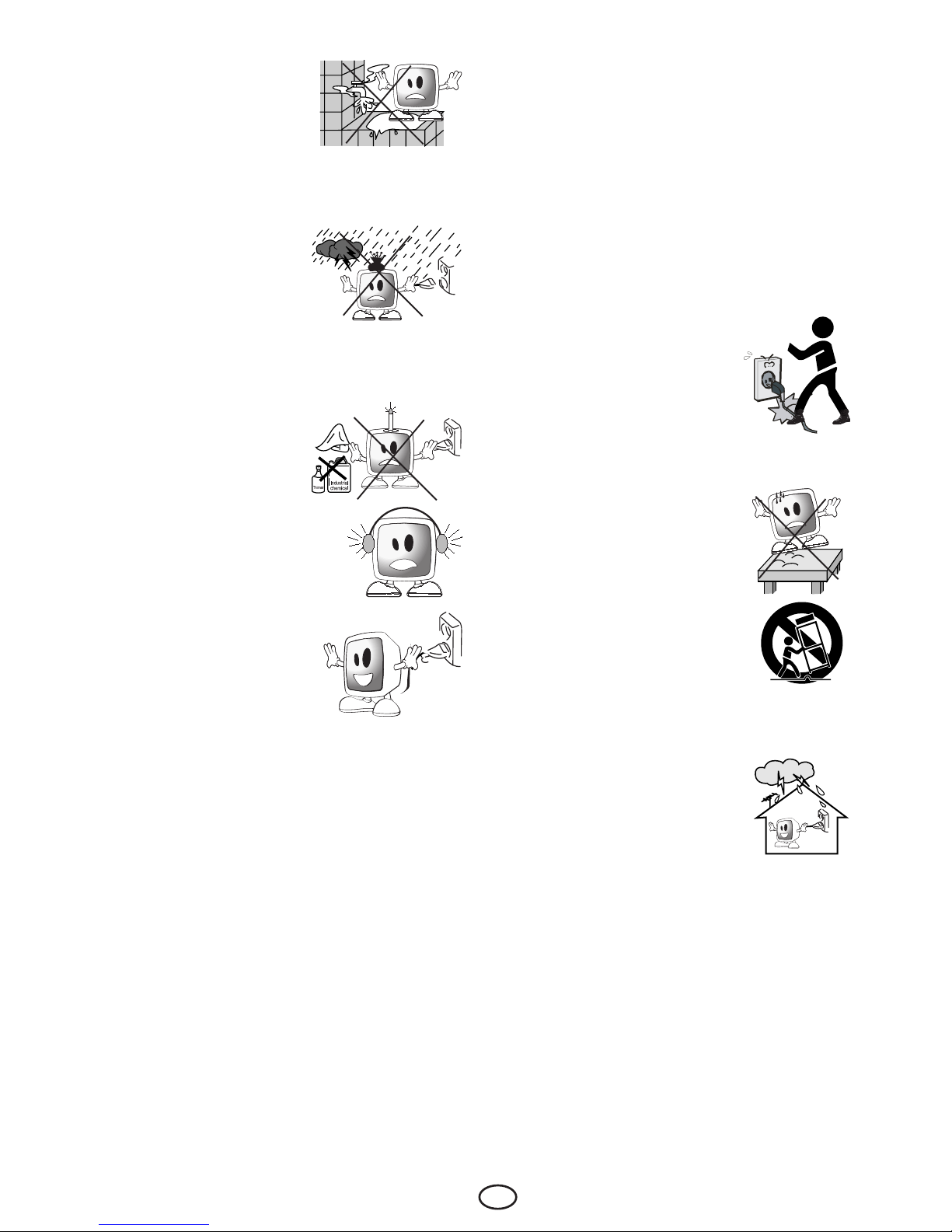
10)Neveroperateelectrical
devices close to water.
Operating such devices,
for example, near a
bathtub, washbasin,
kitchen washbasin, washing basin, wet
basement and swimming pool can cause fire
or electric shock.
• DonotallowyourTV
togetwet.Neverpour
any liquids onto the
TV. Do not operate
your TV if any solid or
liquid substance enters
into it. This can cause electric shock and
your TV may be damaged. Have it checked
immediately by qualified personnel.
• Keepopenflame
sources(suchas
candles)awayfromTV
in order to avoid risk of
fire.
11) DO NOT USE
headphones at extremely
high volume levels since this
may cause permanent loss of
hearing.
12) Operate your TV only in
the220-240V~50-60Hz
voltagerange.Usethe
AC power cable supplied
withtheproduct.Ifyour
TVisagrounded(Class
I)product,thenitmust
certainly be connected to a grounded socket.
• The socket into which you plug in the
AC power cable or the adaptor must be
within easy reach.
• Turn off your device with the ON/OFF
button and then unplug it in order to
disconnect it from mains.
Note 1: If you would like to operate your
television by means of the lighter cable
in a car, then use the cable supplied with
the product. Using a different cable may
damage your appliance.
Note 2: If your device has an adaptor, then
use the adaptor and AC power cable
supplied with your product. Do not use
defective sockets. Make sure that the
plug is firmly inserted into the socket. If
the plug remains loose, then it can cause
fire due to arching. Refer to an electrician
to have your socket replaced.
13) Make sure that the power
cable is not stepped on and
that there is no bending at the
plug sections, plug heads and
device output point.
14) Useonlytheadd-ons/
accessories specified by the
manufacturer.
15)Useonlytogetherwiththe
carts, bases, tripods, brackets
or stands specified by the
manufacturer or sold along
with the product. When using a
cart, pay attention that it won’t
overturn while carrying the
cart/devicecombinationand
cause injuries. The device must
be fixed to the floor or wall
as indicated in the installation
instructions in order to avoid
any possible damages. Place your device on a
level surface.
16)Unplugthepowercableduring
thunderstorms or when you will
not use your device for a long
period of time.

5 IEN
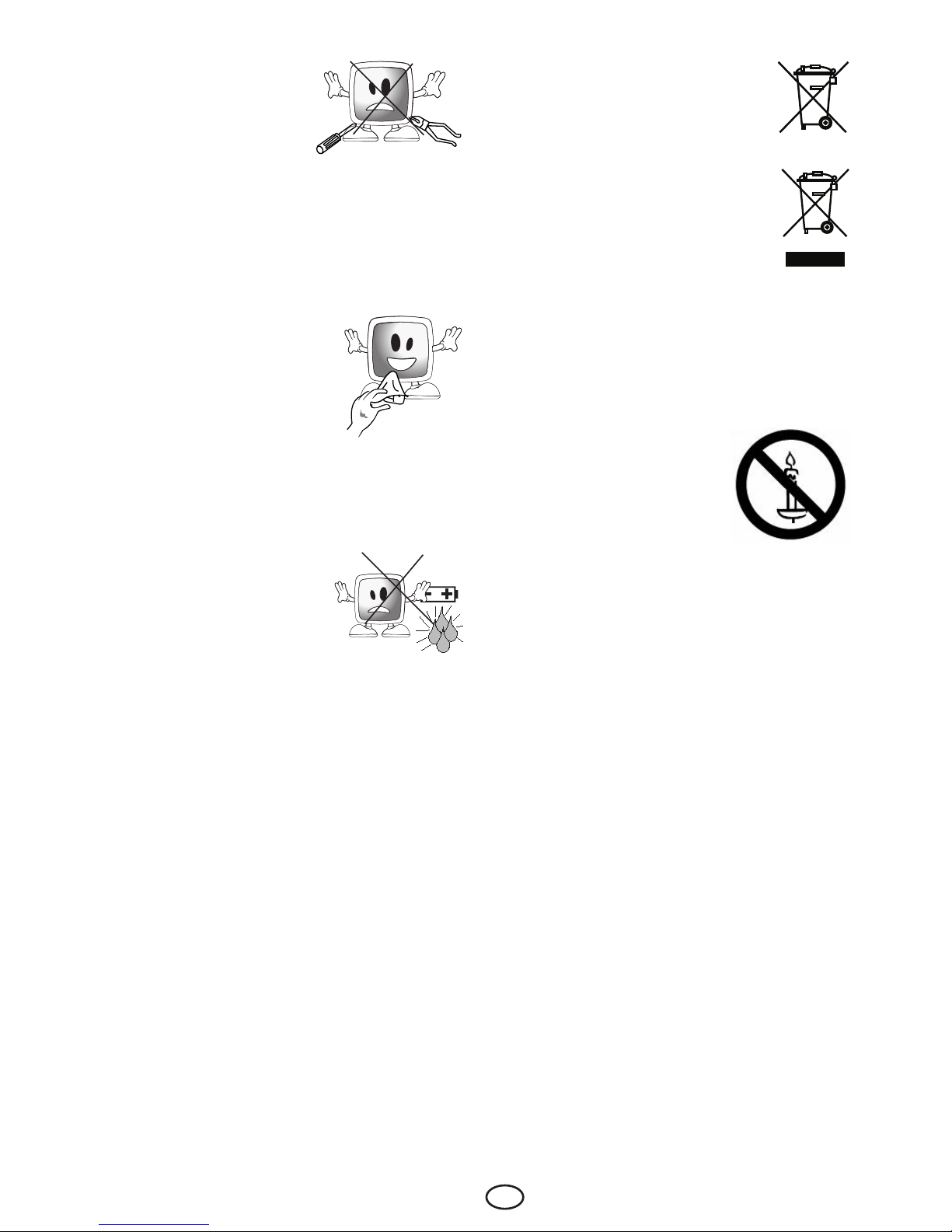
17) Consult authorised
service personnel for
service requirements.
Neverattempttorepair
the device yourself.
Opening the cabinet
can expose you to dangerous voltages or
otherhazardoussituations.Serviceisrequired
in situations such as damage to the power
cable of the device or its plug, water spills or
substances falling into the device, the device
is subjected to rain or moisture, it does not
operate normally or it is dropped.
18) Wipe the TV cabinet clean
with a soft and dry cloth.
Wipe dust from the screen
gently with a soft cloth.
Stubborn stains can be
cleaned with a cloth slightly
moistened with soap and
lukewarmwater.Neverusesolventssuchas
thinnerorgasolineforcleaning.UnplugtheAC
power cable from the socket when cleaning
the TV. Otherwise, there is the risk of electric
shock.
19) Do not dispose of the
batteries in fire.
• Donotshortcircuit,
dismantle or overheat
the batteries. There is
the risk of explosion if
the batteries are not replaced correctly.
Replace only with the same or equivalent
type batteries.
20) Disposing of the exhausted
batteries:
Dispose of the exhausted batteries in
accordance with the local laws and
regulations in order to protect our
environment.
21) Do not dispose of your TV with
regular household waste. Observe
local laws and regulations for
disposal.
Note 1: This is a Class A product.
During operation, the device can cause radio
interference.Inthiscasetheusermayhaveto
remedy this. Please contact your specialist dealer.
Note 2: Electromagnetic fields can cause
temporary performance degradation. This can be
distinguished as noise in the image.
WARNING!!
To prevent the spread of fire,
keep candles or other open
flames away from this product at
all times.

6 IEN
4Start
Remove your television carefully from its box. You
can keep the packaging of your television to use
in future.
Contents of the box
Powercable(*)
Adaptor(*)
Remote control
2 batteries
Note:TheScart,VGA(*)andRCAcablesarenot
supplied with the device.
(*)Thesefeaturesareoptionalandmaynotbe
available on all models.
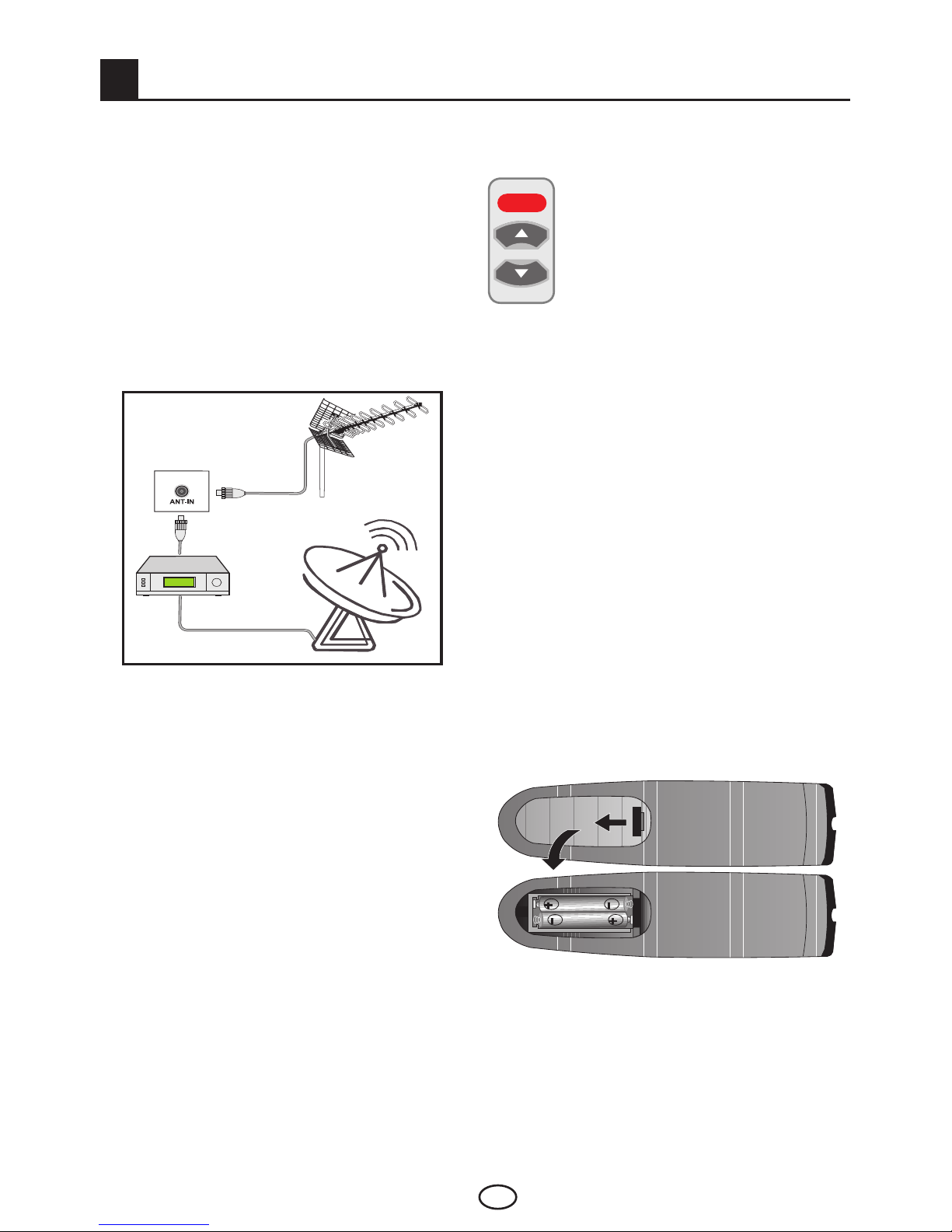
4.1-Antenna connection
Note 1: Your TV will switch to the stand-by mode
in five minutes if there is no broadcast signal from
antenna.
3.Pressthepoweron/offbuttonlocated
on the LCD TV.
4. To power on your television, press
any numerical key or POWER, PR+ or
PR- keys on the remote control. For this
process, you can also use the buttons
on your TV. The picture will appear on
the screen after a short while.
Note:Ifyouarenotgoingtouseyourtelevision
for a long time, unplug its power cable from the
socket.
Initial power on and performing
settings
To set up your television, read the sections on the
TV controls and making the channel settings.
4.3-Batteries
Open the lid of the battery compartment and make
sure that you have placed the batteries in the
correctdirection.Forthisremotecontrol,UM-4,
IECR03orAAA1.5Vbatteriesaresuitable.
Do not throw your old batteries into the fire,
discard them in a dedicated waste area for this
purpose.
Do not mix used batteries with new ones or
different types of batteries together.
The performance of the remote control will be
reduced at a distance of 8 meters from or at an
angle of 30 degrees beyond the centre of the TV.
Ifyouusea75Ohmcoaxialcable(roundcable)
as an antenna cable, connect the antenna plug
directly to the antenna input located on the TV.
Motorizedvehicles,energylinesand
telecommunication lines affect your antenna.
Therefore, be careful to install your antenna away
from these and metal surface in such a way that it
shall not swing. Do not make your antenna cable
longer than required and do not coil it. Make sure
that it is not crimped passing through a window or
door. Your antenna and cable might be affected
by natural phenomena such as rain, wind, smoke
and humidity over time. Periodically check your
antenna and equipment.
4.2-Powering on your device
and the initial use
1.Insertthepowercableortheadaptorintothe
appropriate power supply input located on the
back panel of the LCD TV.
2.Inserttheplugofthepowercableoradaptor,
supplied with the device into the mains socket.
POWER
or

7 IEN
Your new television
5.1-TV Control Panel
Stand by indicator
Bright light: TV is in Stand-by
Dimmed light: TV is On
No light: Power Cable is not connected.
or
or
ProgramDown/Upbutton
or
or
VolumeLevelDown/Up
button
or or or or
or or or
1-Submenuselectionbuttoninmenu/VolumeUpbutton
2-Downmovementinmenu/Programdownbutton
3-Submenuselectionbuttoninmenu/Volumedownbutton
4-Upmovementinmenu/Programupbutton
5-Confirminmenu/Menubutton/SourceMenubutton
Standby button MainPowerOn/Offbutton
5.1.1- 26” – 32” – 37” – 42” TV Control Panel
5.1.2- 32” – 37” – 42” TV Control Panel
5
Menubutton/Sourceselectionbutton Power/Standbybutton

8 IEN
5.2-External Connections
1- Power input
2- AV scart input
3-Componentvideoinput(Pr)
4-Componentvideoinput(Y)
5-Componentvideoinput(Pb)
6-SPDIFOUTDigitalaudiooutput
7-Componentaudioinput(R)
8-Componentaudioinput(L)
9-VGA(PCconnectioninput)
10- PC audio input
11-Antenna input
12-HDMI2input
13-HDMI1input
14-SoundinputCINCHconnector(Left/L)
15-SoundinputCINCHconnector(Right/R)
16-VideoinputCINCHconnector
17-S-VHS input
18-Headphone input
(*):Thesefeaturesareoptionalandtheyarenotavailableonallmodels.
Note 1:RGBinputviaScartoffersthebestpicturequality.
Note 2: Above drawing for external connections is representational. Their order and places on your TV
may be different.
Please see Technical Specifications Table on page 27 for the available external connections on your
television.
or

9 IEN
5.3-Remote Control
MUTE POWER
Stand-bymodeOn/Offbutton
Temporarysoundmute(Mute)button
Source menu button, Teletext page enlarge
button(Double)
PictureFormatselectionbutton,PAT(Picture
andTeletext)Mode
Numericbuttons
PageStopbuttoninTxtmode(Hold)
MENUbutton,Question/AnswerbuttoninTxt
mode(Reveal)
Informationbutton
IndexpagebuttoninTxtmode
Exit menu button
Return to previous menu button
Upmovementbutton(Menu)
Downmovementbutton(Menu)
Right/Leftmovementbuttons(Menu)
Menu selection confirm
Volume down button, Volume up button
Program forward selection button,
Program backward selection button
Red teletext button, Picture Mode selection
button
Greenteletextbutton,SoundModeselection
button
Yellowteletextbutton,FreezePicturebutton
Blue teletext button, ZOOM mode selection
button
Teletext/Mixselectionbutton
PageupdatebuttoninTxtmode(Update)
Lastviewedprogramselectionbutton(SWAP)
SubpagebuttoninTxtmode(SubPage),Time
display button
POWER
MUTE
‹
Altri manuali per BEKOMAT 32
1
Questo manuale è adatto per i seguenti modelli
2
Indice
Altri manuali Beko TV LCD

Beko
Beko B43 A 670 A Guida di riferimento

Beko
Beko B65 D 986 S Manuale utente

Beko
Beko 65 BLE 7530 BP Manuale utente

Beko
Beko 19WLM550DHID Manuale utente

Beko
Beko 19WLM550DHID Manuale utente

Beko
Beko 23WLC450B Manuale utente

Beko
Beko 32" HD READY Manuale utente

Beko
Beko 20LB330 Manuale utente

Beko
Beko 15LB450S Manuale utente

Beko
Beko 17WLB450S Manuale utente