
BelFone BF-TD512 Manuale utente

Digital FM Transceiver Model
-TD512


THANK YOU!
Notice to the user
We are grateful you choose BelFone series professional radio
communications products!
Since 1989, BelFone has been always engaging in research and exploration
of radio communications technologies, In order to lead intelligent technologies
in the industry. We still make every effort to research and design products
according to modern complicated communications environment, and we offer
complete and customized communication solutions to clients. Our products
will satisfy you because of its excellent performance and outstanding
communications strength. No matter what field you are in. You will be Satisfied
with the radio.
This manual is applicable to
VHF/UHF digital FM transceiver model: BF-TD512
Government law prohibits the operation of unlicensed radio transmitters
within the territories under government control.
Illegal operation is punishable by fine or imprisonment or both.
Warning!
◆ In explosive atmospheres(inflammable gas, dust particles, much powder
area,etc.),please turn the power off.
Precautions
It’s important that the operator is aware of and understands hazards
common to the operation of any radio .Please observe the following
safety precautions to prevent radio damage or personal injury. The
following precautions shall be observed during operation, service and
repair of this radio.
◆ The recommended usage rate is 1 minute for TX and 4 minutes for RX,
when the radio is used for transmission for many hours continuously, the
radiator and chassis will become hot, allow the rear panel of the radio to
contact surface of low melting point /low Ignition point object;
◆ Don’t leave the transceiver in direct sunlight for a long time, don’t place the
transceiver on extremely heat, damp, dusty area, and don’t put it on unstable
surfaces;
◆ When restriction or warnings are posted regarding the use of radio devices,
please obey the regulation turn the transceiver power off;
◆ Use of the radio while you are driving may be against traffic laws, please
prohibit using it ;
◆ If you notice any problems on the radio, please turn off at first. Then contact
with local dealer. Do not modify this radio unless instructed by this manual or
refer service to a qualified licensed or certified technician only;
◆ If you want to use the machine for secondary development, please contact
with BelFone’s technical engineer or dealer for technical assistance;
◆ Please keep the surface of radio is clean and dry, clean the radio using a
cloth moistened with clean water and a mild dishwashing liquid.

Content
Supplied Accessories······················· · ·····················01
Installation of Accessories········································02
Getting Acquainted···············································06
Basic Operation·················································07
LCD Icons·····················································07
Turning the power on /off··········································08
Adjusting the volume·············································08
Selecting a Channel·············································08
Selecting a Zone·········································· · ·····08
Call··························································09
Button Setting··················································10
Functions and Operations·········································12
Contacts ·····················································12
Scan·························································13
Zone·························································14
SMS·························································14
Call Logs·····················································15
Setting·························································15
Digital Emergency··············································17
Alone Worker·················································18
Man Down····················································19
GPS Positioning ········································· · ·····19
Voice Encryption········································· · ·····20
Dual Capacity Direct Mode······································20
Radio Priority-Based Interrupt····································20
Time-Out-Timer(TOT)········································ · 20
TX Permission··········································· · ···· · 21
Battery Saver··················································· · 21
Low Battery Warning············································ · 21
Voice Recording········································· · ·····22
Analog Mode··················································22
CTCSS/CDCSS·············································· · · 22
CTCSS Frequency Table···········································23
CDCSS Standard Code Table·······································24
Specifications················································ · · · 24
Statement················································· · · · · · 26

Supplied Accessories
Notes: The accessories listed below are covered by BelFone dealer, authorized
BelFone agents or factories.
After carefully unpacking the transceiver, identify the items listed in the table
below. If any items are missing or have been damaged during shipment please
contact with dealer immediately.
Accessories
Number Quantity
1
1
1
1
1
1
1
1
1
Items
Antenna
Strap
Belt Clip
Charger
Li-ion Battery
Screws
User Manual
Warranty Card
Certificate
01
StrapAntenna
Belt Clip ScrewsLi-ion Battery
Charger
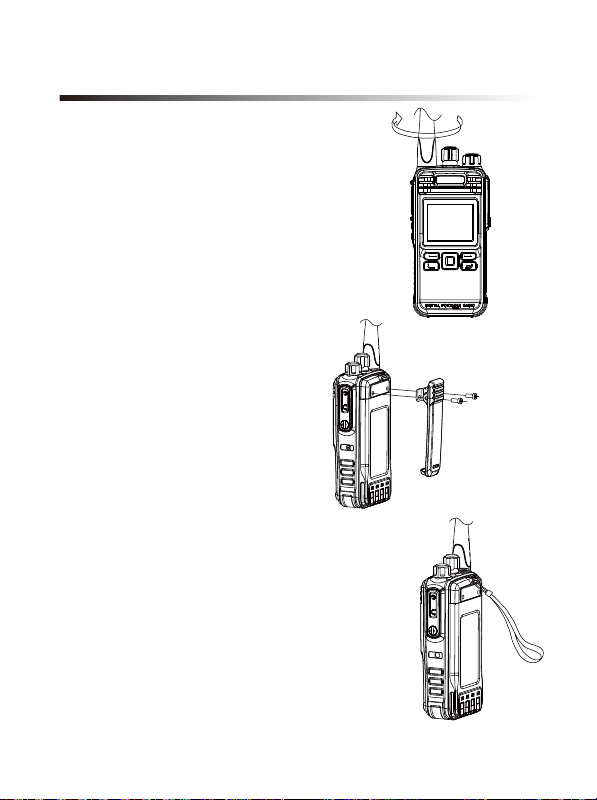
Hold the supplied antenna by its
base, then screw it into the connector on
the top panel of the radio until fasten.
Turn the antenna anti-clockwise to
remove it.
Attaching/Removing the
belt clip
Installation/ removing the
antenna
Attach the belt clip using the two
supplied3*4mm binding screws.
Attaching/Removing the Strap
Thread the hand strap to the loop back
of your two-way radio.
Installation of Accessories
02

Warning!
Don’t short-circuit the battery, it may cause the battery damaged or burst into flame;
Never attempt to remove the casing from battery, that avoid to short the battery terminal;
Battery is flammable objects, don’t throw it into fire or don’t use it on dangerous area.
Attaching/Removing the Battery
Match the guides of the battery with
the corresponding grooves on the upper
rear of the radio, then press the battery
until a click is heard to lock it in place.
To remove the battery, please turn the
power off then press the release latch to
unlock the battery pull the battery away
from the radio.
Note: Don’t attach / remove the battery if
the transceiver turned on.
Battery Information
New battery is shipped not fully charged from the factory, please charge your
battery before using it, charging a new battery for 5 hours before initial use. The
maximum battery capacity and performance is achieved after three full
charge/discharge cycles. If you notice the battery power runs lows, please
recharge the battery.
03

To reduce the risk of injury, please only use the battery and charger specified by
BelFone, other batteries may burst, causing bodily injury and property damage.
Applicable Battery
● When charging your battery, keep it at a temperature among 5 -40 .
Temperature out of the limit may cause battery leakage or damage.
● When charging a battery attached to a radio, turn the radio off to ensure a full
charge.
● Do not cut off the power supply or remove the battery when charging a battery.
● Never charge a battery that is wet, please dry it with soft cloth prior to charge.
● Even if the battery is full charged, the operating time is noticeably shorter than
normal performance; it is time to buy a new battery.
Battery Tips
To Prolong Battery Life
1. Battery performance will be greatly decreased at a temperature below 0 , a
spare battery is necessary in cold weather, the cold battery unable to work in this
situation may work under room temperature, so keep it for later use.
2. The dust on the battery contact may cause battery breakdown, please use a
clean dry cloth to wipe it before attaching the battery to the radio.
Battery Storage
1. Fully charge a battery before you store it for a long time, to avoid battery
damage due to over-discharge.
2. Recharge a battery after several months’ storage, to avoid battery capacity
reduction due to over-discharge. (NI-MH batteries: 3 months, Li-Ion& Li-polymer
batteries: 6 months)
3. Store your battery in a cool, dry place under room temperature, to reduce
self-discharge.
04

Use only the charger specified by the manufacturer, the charge indicator indicates
the charging progress.
1. Plug the AC connector of the switching power into the AC outlet socket.
2. Place the battery or the radio is attached with a battery in the charger.
3. Making sure the battery is connected to the charger, the charging process
initiates when the charger indicator glows red.
4. The charger indicator glows green when the battery is fully charged, please
remove the battery then.
Note: While charging the temperature out of the limit the LED indicator
of charger will flash red and green; if battery has damaged or battery is
not connected to the charger correctly,
The LED indicator of charger also will flash red and green
Charging the battery
Charge Steps:
Attaching the
Speaker/Microphone
Open the accessory jack cover, then align
the plug with the accessory jack and tighten
the screw on the plug.
05
Charger Status
Standby(No-load)
Battery is charging
Battery is fully charged
Charger Indicator
Charge Indicator glows green
Charge Indicator glows red
Charge Indicator glows green
Indice
Altri manuali BelFone Ricetrasmettitore


