
Bellman BE1345 Manuale utente

User manual, Bellman Alarm clock (GB)
Bellman Visit Alarm clock, model BE1345, is a table top clock with extra functions:
● It signals when one of the transmitters in the Visit system is triggered; when the door bell or telephone
rings or the Baby-cry or fire alarm is activated
● Snooze function
● Wake-up alarm with a sound signal with increasing intensity and volume and/or clear flashes.
● The number of flashes and their interval is automatically adjusted depending on the surrounding light
● Two Bellman Visit Bed-shakers (accessory) can be connected for wake-up through vibrations.
● The clock face is illuminated and lights up for wake-up and also when the snooze button is pressed.
● The alarm clock can be connected to a telephone outlet to signal for incoming calls, and also to an
external trigger.
● It has a built-in, rechargeable back-up battery that is activated upon power failure or when the clock is
not connected to the mains supply.
How to get started:
1) Power supply:
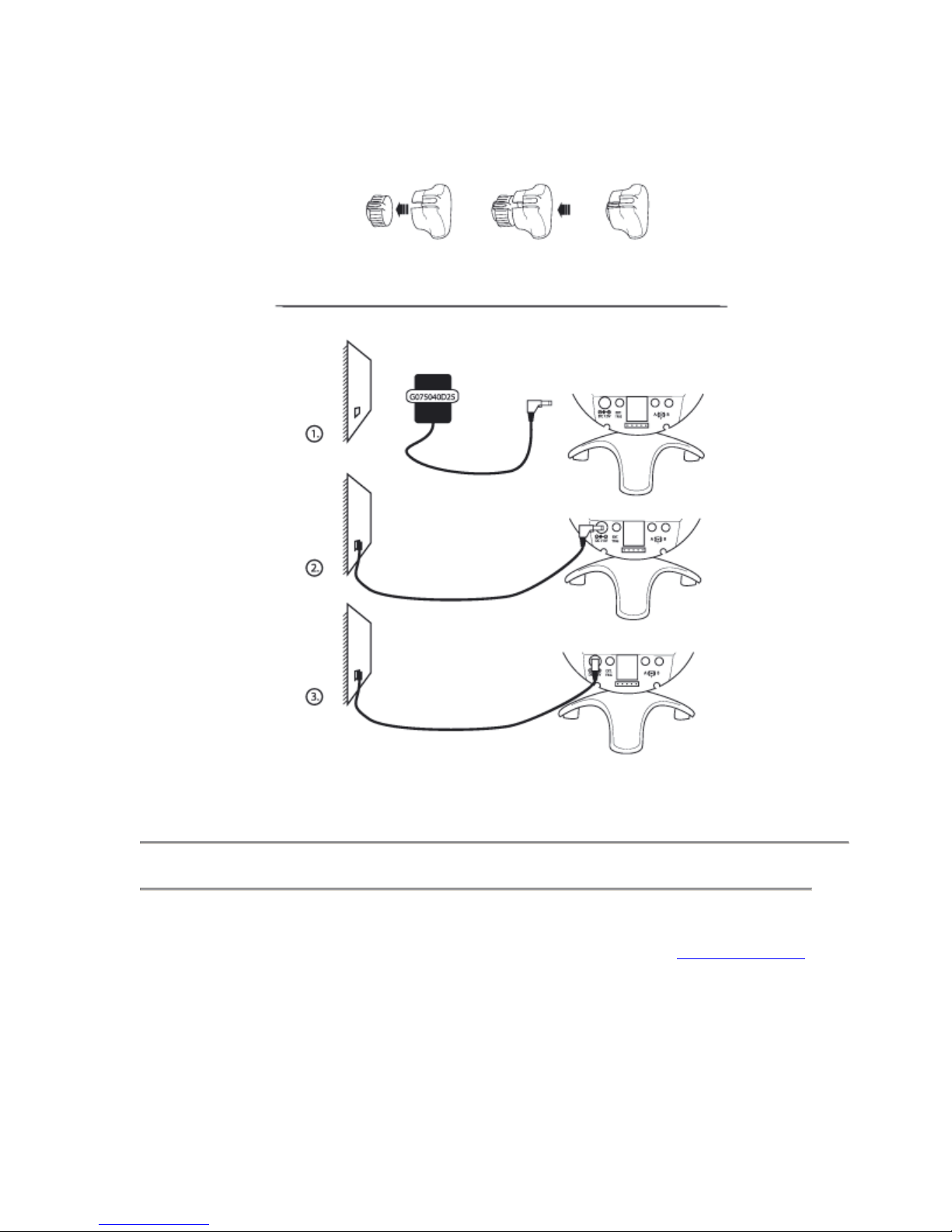
Connect the power adapter to the inlet (13) marked DC IN 7.5V on the backside of the unit.
Let the unit be connected for 24 hours first time of usage to allow the back-up battery to fully charge. This
will increase the life span of the battery. Normally, 16 hours is required to fully recharge an empty battery.
Please note! Use only the attached power adapter type G075040D25.
The rechargeable battery (NiMH) steps in when the clock no longer is powered via the power adapter.
A fully charged battery lasts approximately one week of normal usage, but it is recommended to always let the unit be
connected to the adapter.
Power supply indicator (2)...
... shines with a constant green light during normal usage when the power adapter is connected.
... flashes with green light during power failure or when the power adapter is not connected.
... flashes with a red light when the back-up battery is low and needs to be recharged.
2) Adjusting time
Use the knob (12) on the back of the unit to set the correct time.
3) Adjusting time for wake up
1) Set the time for wake up using the knob (11) on the back of the unit.
2) The wake-up alarm is turned on or off using the knob (6) marked ‘ALARM’ on the right side of the unit.
3) When the alarm is on, a red indicator inside the snooze button is lit.
Please note! Only available when the unit is connected to the mains supply.
4) Wake-up can happen through sound and/or flashes as well as through vibrations (accessory). The sound and the flashes are
activated through the switches marked (8) and (10) on the back of the unit.
Set these in desired mode.
Wake up
Wake up happens through a sound signal with increasing intensity and volume, with clear and distinct flashes and through
vibrations if the Bellman Visit Bed-shaker, model BE1270, (accessory) is connected. If the alarm is not turned off within 30

minutes, it will stop automatically. Upon wake-up, the clock face is illuminated. The snooze function, which turns the alarm
on again after about 3.5 minutes, is activated when the snooze button (5) is pressed down. The indicator inside the snooze
button will then flash (if the unit is connected to the mains supply).
Miscellaneous
The flash
There is a light sensor (4) mounted on the clock face which regulates the number of flashes and their interval to about 12
during the day and about 8 at night. When indicating ring signal (if the clock is connected to a telephone outlet), the clock
sends about 5 flashes, day or night
Extra knob for turning the alarm On/Off
There is an extra knob that can be mounted on the regular knob (6) for alarm On/Off to increase usability.
Illumination of clock face
The clock face can be illuminated at any time by pressing the snooze button (5).
The clock face is automatically illuminated at wake up.
Signal indication from the Bellman Visit System
There are 4 differently coloured LED indicators (3) on the clock face that indicates the following:
Orange (baby) Green (door) Yellow (telephone) Red (Fire)
The indicators on the clock face shines for a while during the alarm. Meanwhile, the flash and Bed-shaker outlet is activated.
The flash and the Bed-shaker will stop when the snooze button (5) is pressed. For safety reasons the fire alarm signal cannot
be turned off.
Radio channel
Upon delivery, all units are set to the same radio channel. If you need to change, or already have changed, the radio channel in
your transmitters (see each manual), you will need to change the channel in your clock too.
For safety reasons, the Bellman Visit Fire alarm transmits on all channels.
How to change radio channel:
1) Place the clock next to a transmitter
2) Hold the snooze button (5) pressed in for approx. 5 seconds until the indicators for the door bell (green) and the telephone
(yellow) flashes alternatively. Release the snooze button.
3) Press the test button of one of your transmitters. As confirmation, all the LED-indicators (3) on the clock will start to flash
alternatively.
Connection of Bellman Visit Bed-shaker
One or two Bellman Visit Bed-shakers can be connected to the outlets (17) the back of the clock.
The vibration pattern during wake-up is short vibrations with long pauses. When indicating ring signal (see ‘Connection to
telephone outlet’ below), it is repeated short vibrations. These vibrations continues until the snooze button (5) is pressed (or
for no more than 30 seconds when indicating ring signal).
Connection to telephone outlet
On the back of the clock there is a modular outlet (16) for connection to the telephone line. When there is an incoming call,
the alarm clock will signal with an acoustic ring signal and clear flashes.
The connecting cable is an accessory which can be obtained at your nearest Bellman & Symfon retailer. The sound and the
flashes can each be turned On or Off using the switches marked (8) and (10) on the back of the clock. Make sure they are set
in the desired mode.
External triggering
The alarm clock can be triggered by an external source via the inlet Ext. trig (14) on the back of the clock. The sound and the
vibration patterns of connected bed-shakers are set via the switches 1-4 (9) marked ‘EXT.TRIG’.
To reset or turn the signal off, simply press the snooze button (5). See further technical information.
Trouble shooting

Follow the troubleshooting instructions below before calling for service.
Symptom
Procedure
There is no flash
Check the switch(10) that turns the flash On/Off
Check that the power adapter is connected and/or that the
back-up battery is charged - see ‘Power supply indicator’
There is no sound
Check the switch(8) that turns the sound On/Off
Check that the power adapter is connected and/or that the
back-up battery is charged - see ‘Power supply indicator’
It doesn’t receive any signals
from the Bellman Visit
system
Make sure it uses the correct radio channel –see ”Radio channel”
It indicates signals from the
Visit system for no reason
Change radio channel –see ”Radio channel”
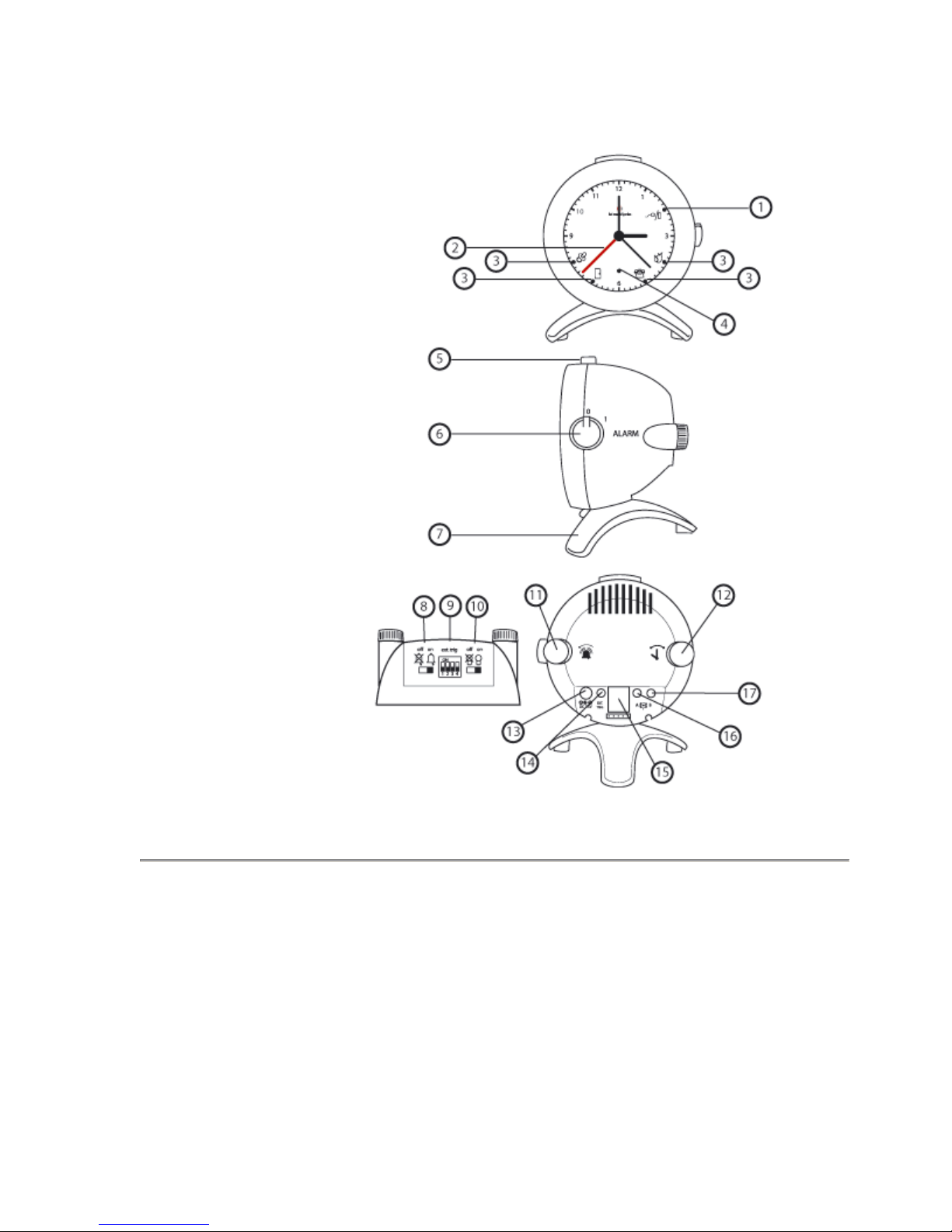
Product description
1) Power supply indicator
2) Alarm hand
3) Signal indicators
4) Light sensor
5) Snooze button
6) Alarm On/Off
7) Stand
8) Sound signal On/Off
9) Settings for signaling when for
external triggering
10) Flash On/Off
11) Alarm adjustment knob
12) Time adjustment knob
13) Inlet for power adapter
14) Inlet for external triggering
15) Programming socket
16) Modular connector for the
telephone (accessory)
17) Outlet for 2 Bellman Visit
Bed-shaker (accessory)
Address:
Bellman & Symfon AB
Södra Långebergsgatan 30,
421 32 VÄSTRA FRÖLUNDA
Sweden
Our office hours are:
Mon-Fri 08:00-12:00, 12:45-16:30
Telephone: +46 31 682820
Fax: +46 31 682890
Homepage: www.bellman.com
Sending us company e-mail: info@bellman.symfon.se
Indice
Altri manuali Bellman Sveglia


