BenQ GH800 Manuale utente

GH800 / GH888
Digital Camera
User Manual

Copyright
Copyright 2012 by BenQ Corporation. All rights reserved. No part of this
publication may be reproduced, transmitted, transcribed, stored in a retrieval system
or translated into any language or computer language, in any form or by any means,
electronic, mechanical, magnetic, optical, chemical, manual or otherwise, without the
prior written permission of BenQ Corporation.
All other logos, products, or company names mentioned in this manual may be the
registered trademarks or copyrights of their respective companies, and are used for
informational purposes only.
Disclaimer
BenQ Corporation makes no representations or warranties, either expressed or
implied, with respect to the contents hereof and specifically disclaims any warranties,
merchantability or fitness for any particular purpose. Further, BenQ Corporation
reserves the right to revise this publication and to make changes from time to time in
the contents hereof without obligation of BenQ Corporation to notify any person of
such revision or changes.
This user manual aims to provide the most updated and accurate information to
customers, and thus all contents may be modified from time to time without prior
notice. Please visit http://www.benq.com for the latest version of this manual.

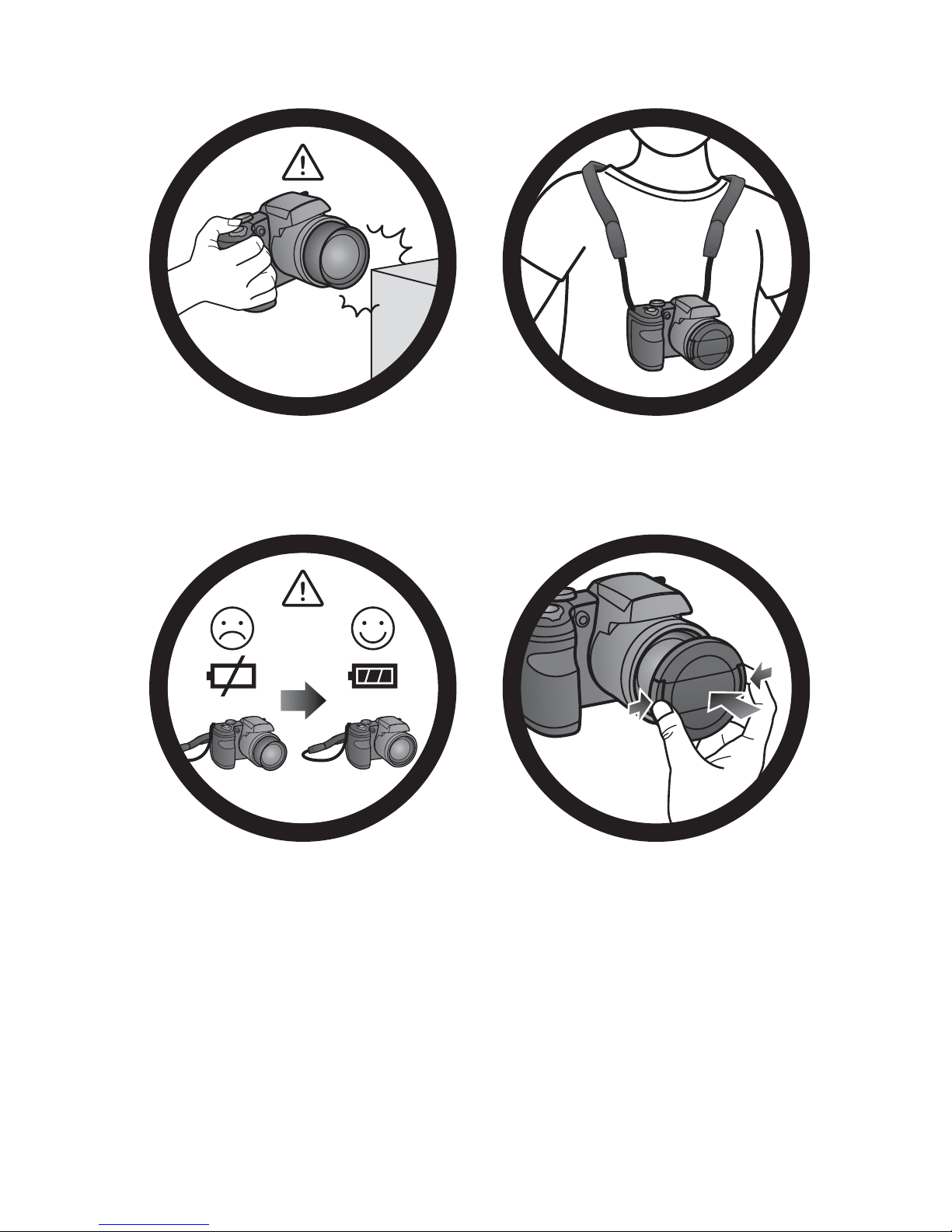
Do not hold the camera by excessive
force. Plus, be sure to protect the
camera from strong impacts.
To avoid accidental falling, please attach
the neck strap to the camera and always
put the camera around your neck.
If the batteries suddenly depleted and
caused the lens fail to retract, please
carefully protect the lens to avoid
collision and insert batteries with full
power ASAP..
When the camera is not in use, always
turn the power off. Plus, before storing
the camera in its case, make sure the lens
has retracted successfully and you put the
lens cover back. If you do not intend to
use the camera for a long time, please
remove the batteries from the camera and
store the batteries carefully.

Keep your camera away from sharp
objects and avoid collision.
When the camera is not in use, please
place it in the pouch and a steady place.
Plus, always keep your camera away from
pressure to avoid possible damage.
20130527

English
Table of Contents
Touring the camera .............................................................................................8
Checking the package contents ...............................................................................8
Camera ..........................................................................................................................9
Front view .............................................................................................................................. 9
Back view ............................................................................................................................... 9
Top view ...............................................................................................................................10
Bottom view ........................................................................................................................11
Right view .............................................................................................................................11
Left view ...............................................................................................................................12
LED Indicator light .............................................................................................................13
4-way control and OK button ...............................................................................14
Preparing the camera for use ........................................................................ 15
Attaching the strap ...................................................................................................15
Installing the battery .................................................................................................16
Charging the battery ................................................................................................17
Installing an SD card .................................................................................................18
Using the LCD display .............................................................................................19
Turning the Power On and Off .............................................................................20
Switching the LCD Monitor to Viewfinder .........................................................20
Opening the Flash .....................................................................................................20
Initial setting ....................................................................................................... 21
Setting language .........................................................................................................21
Setting date and time ...............................................................................................21
Operating the camera ...................................................................................... 22
Capture mode ................................................................................................... 24
Flash mode ..................................................................................................................26
Using the Self-timer ..................................................................................................27
Focus mode ................................................................................................................27
Using the AE/AF Lock (AE-L/AF-L) button .........................................................28
Using the Jog Dial ......................................................................................................28
Mode Dial ...................................................................................................................29
Using Smart Scene mode ..................................................................................................30
Setting the Scene mode ....................................................................................................30
Using Panorama mode ..............................................................................................32
Love Portrait ...............................................................................................................34
Using Handheld Night Shot .............................................................................................34
Using Night Portrait mode ..............................................................................................35
Using Continuous Shooting mode .................................................................................35

English
Using HDR mode ...............................................................................................................36
Using Manual Exposure mode .........................................................................................36
Using Aperture Priority mode ........................................................................................37
Using Shutter Priority mode ...........................................................................................37
Recording Videos ..................................................................................................... 38
Using PIV function ..............................................................................................................38
Using the Capture Menu ........................................................................................ 39
Photo size ............................................................................................................................ 39
Quality ..................................................................................................................................40
Refine Image ........................................................................................................................ 40
White Balance ..................................................................................................................... 40
ISO ......................................................................................................................................... 41
Metering ...............................................................................................................................42
AF Area ................................................................................................................................42
AF Lamp ...............................................................................................................................43
AE-L / AF-L ..........................................................................................................................43
Digital Zoom .......................................................................................................................44
Date Stamp ..........................................................................................................................44
Auto Review ........................................................................................................................44
Stabilizer ...............................................................................................................................44
Motion Detection .............................................................................................................. 45
Using the Movie Menu ............................................................................................ 45
Movie Mode .........................................................................................................................45
Wind Cut .............................................................................................................................47
Continuous AF ....................................................................................................................47
Battery status ............................................................................................................ 47
Other settings ................................................................................................... 48
Playback mode ................................................................................................... 51
Options for playback and editing .......................................................................... 52
Enlarging an image ..............................................................................................................52
Trimming ..............................................................................................................................52
Rotating an image ...............................................................................................................52
Viewing multiple files at a time .......................................................................................53
Playing back video clips .....................................................................................................53
Using Movie Edit .................................................................................................................54
Adjusting the playback volume ........................................................................................55
Deleting files ........................................................................................................................ 55
Slideshow ............................................................................................................................. 56
Protecting files ....................................................................................................................57
Voice memo ........................................................................................................................58
Filter Effects .........................................................................................................................59
Resizing ................................................................................................................................. 59

English
DPOF ....................................................................................................................................60
Copy ......................................................................................................................................61
Movie Paste ..........................................................................................................................62
Making connection ........................................................................................... 63
Bundled software ......................................................................................................63
Connecting the camera to a computer ...............................................................63
Connecting the camera to a TV ............................................................................64
Printing images ...........................................................................................................65
Printing with PictBridge ....................................................................................................65
Troubleshooting and service information ................................................... 68
Technical support .....................................................................................................70
Specifications ...................................................................................................... 71

8 Touring the camera
English
To u r i n g t h e c a m e r a
Checking the package contents
Carefully unpack your kit box and ensure that you have the following items.
1. Quick Guide
2. Digital camera
3. USB cable
4. Li-Ion battery
5. Neck strap
6. Software & User Manual CD
7. Pouch (optional)
8. Lens cover
9. Lens strap
10.USB adapter (The type of plug may vary depending on the country or region)
• All pictures, screen captures, and icons used in this manual are for illustration
only. Actual and available products, accessories, as well as their appearance may
vary depending on sales region.
• If any items are missing or damaged, contact your dealer.
• Save the packaging for future shipment or storage.
Quick Guide
1
2
3
4
5
7
8
9
6
10

Touring the camera 9
English
Camera
Front view
1. AF Assist Lamp / Self-timer LED indicator
2. Speaker
3. Lens
Back view
4. LCD display
5. EVF/LCD button
6. Dioptric Correction knob
7. Viewfinder
8. Movie Record button
9. Jog Dial
10.AE/AF Lock button
1
2
3
8765
4
9
10
11
12
1314

10 Touring the camera
English
11.Menu button
12.OK button / 4-way navigation control
13.Delete button
14.Playback button
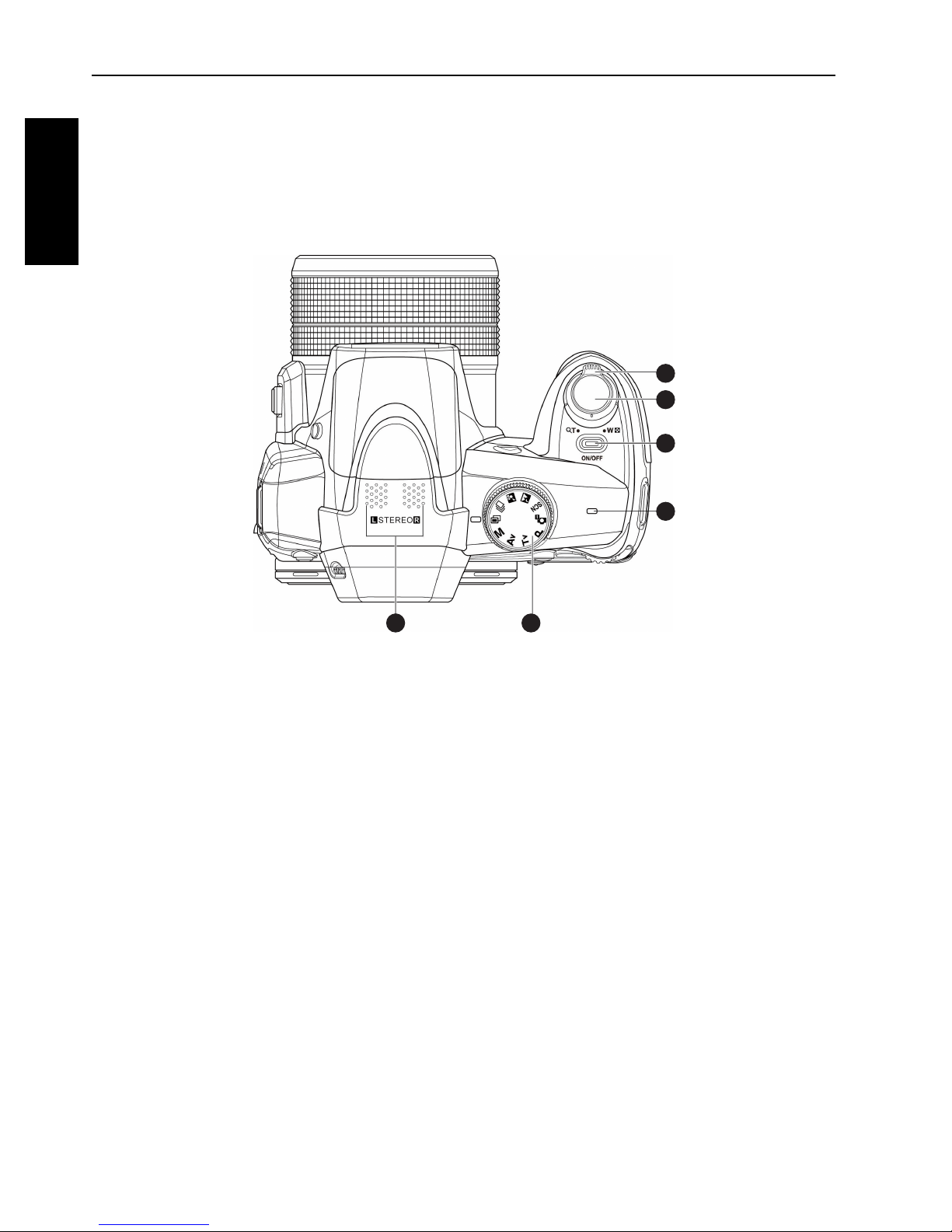
To p v i e w
15.Zoom lever
16.Shutter button
17.Power button
18.LED indicator light
19.Mode dial
20.Microphone
15
16
17
18
1920
Questo manuale è adatto per i seguenti modelli
1
Indice
Altri manuali BenQ Macchina fotografica digitale

BenQ
BenQ DC C520 Manuale utente

BenQ
BenQ DC 1016 Manuale utente

BenQ
BenQ DC E53+ Manuale utente

BenQ
BenQ E1460 Series Manuale utente

BenQ
BenQ DC E43 Manuale utente

BenQ
BenQ DC C700 Manuale utente

BenQ
BenQ DC E1050t Manuale utente

BenQ
BenQ DC C640 Manuale utente

BenQ
BenQ C1480 Series Manuale utente

BenQ
BenQ DC T1260 Manuale utente

BenQ
BenQ DC X800 Manuale utente

BenQ
BenQ E103X Series Manuale utente

BenQ
BenQ C1250 Manuale utente

BenQ
BenQ DC 3400 Manuale utente

BenQ
BenQ DC E53 Manuale utente

BenQ
BenQ GH680 Manuale utente

BenQ
BenQ C1420 Manuale utente

BenQ
BenQ DC 4330 Manuale utente

BenQ
BenQ DC P860 Manuale utente

BenQ
BenQ DC C840 Manuale utente