Besta CD-326PRO Manuale utente


I
Contents
Attention ................................................................................................. 1
Preface
1. Layout .............................................................................................. 2
2. Keyboard ......................................................................................... 4
3. Key Description.............................................................................. 14
4. Touch Panel ................................................................................... 14
5. Indicator ......................................................................................... 15
6. Hot Key Functions ......................................................................... 15
7. The Stylus ...................................................................................... 16
8. The Panel ....................................................................................... 16
User’s Guide
1. Power Source ................................................................................ 17
1.1 Battery Replacing ............................................................................... 17
1.2 Battery Recharging ............................................................................ 18
1.3 Battery Power Checking .................................................................... 18
2. Card Inserting/Removing ............................................................... 19
3. Main Menu ...................................................................................... 20
4. Input Methods................................................................................. 21
4.1 English Keyboard Input Method ......................................................... 21
4.2 Special Symbols Keyboard Input Method .......................................... 22
4.3 Chinese Keyboard Input Methods ...................................................... 22
4.4 Japanese Input Method ....................................................................... 27
4.5 Korean Input Method .......................................................................... 27
4.6 Handwriting Recognition ..................................................................... 28
4.7 Tips for Handwriting Input ................................................................... 29
4.7.1 Improving the Recognition Rate ......................................................... 29
4.7.2 Writing Chinese with Standard Strokes ............................................. 29
4.8 On-screen English Keyboard ............................................................. 29
4.9 On-screen Symbol Keyboard ............................................................. 29

II
Contents
5. Data Editing ................................................................................... 30
6. Data Search .................................................................................. 31
7. Date Selecting ............................................................................... 32
8. Numeric Inputting ........................................................................... 32
9. Time Setting ................................................................................... 33
10. Initializing ....................................................................................... 33
10.1 Reset the Device ................................................................................ 33
11. USB Disk ....................................................................................... 34
12. Menu Management ......................................................................... 35
Dictionary
Features ............................................................................................... 37
1. Sentence Translation ..................................................................... 40
2. Data Index ...................................................................................... 43
2.1 Index Screen ...................................................................................... 43
2.1.1 Item Index ............................................................................................ 44
2.1.2 History .................................................................................................. 45
2.1.3 Language Selection ............................................................................ 45
3. Explanation .................................................................................... 45
3.1 Explanation Screen ............................................................................ 46
3.1.1 Font Size .............................................................................................. 47
3.1.2 Syllable Pronunciation ........................................................................ 47
3.1.3 Repetition ............................................................................................ 48
3.1.4 Read after the Device .......................................................................... 48
3.1.5 Other Data ............................................................................................ 49
3.1.6 Data Storing ........................................................................................ 51
3.1.7 Pronunciation ...................................................................................... 51
4. Data Search .................................................................................. 52
4.1 Smart Input Search ............................................................................ 52
4.2 Wildcard Search ................................................................................ 53
4.3 Cross Search ..................................................................................... 54
4.4 Secondary Search ............................................................................. 55

III
Contents
4.5 Multi-layered Search .......................................................................... 57
4.6 Other Data Search ............................................................................. 58
4.7 Special Data Search .......................................................................... 58
5. Professional Use Dictionary ........................................................... 59
6. Word Search ................................................................................. 60
7. Extended Card ............................................................................... 61
Study
Features ............................................................................................... 63
1. Animated Grammar ........................................................................ 67
2. Animated Phrases ......................................................................... 69
3. General English Proficiency Test ................................................... 72
3.1 Mock Exam ........................................................................................ 72
3.2 Practice Room ................................................................................... 72
4. Interactive English .......................................................................... 74
4.1 Situation ............................................................................................. 74
4.2 Content .............................................................................................. 74
4.2.1 All ......................................................................................................... 75
4.2.2 Role Play ............................................................................................. 76
5. Listening&Speaking Classroom ..................................................... 76
5.1 Reading Studio ................................................................................... 77
5.2 Audio Studio ...................................................................................... 78
5.3 Vocal Studio ....................................................................................... 79
5.4 Baby American English ...................................................................... 79
6. Words Studio ................................................................................. 80
6.1 Words Browse ................................................................................... 80
6.2 Recite Word ....................................................................................... 81
7. Word Component .......................................................................... 82
8. Synonym-Antonym Dictionary ........................................................ 83
9. Travel Dialogue .............................................................................. 84
9.1 Dialogue ............................................................................................. 84

IV
Contents
9.2 Search ............................................................................................... 85
10. Slang Dictionary ............................................................................. 86
11. Extension Dictionary ...................................................................... 87
12. DIY Dictionary ................................................................................ 87
12.1 New Data ............................................................................................ 87
13. Review and Test ............................................................................. 89
13.1 Review ................................................................................................ 89
13.2 Test .................................................................................................... 89
13.3 Word Browser .................................................................................... 90
13.4 Sentence Making ............................................................................... 91
13.5 Sentence Review ................................................................................ 92
PIM
Features ............................................................................................... 93
Function Introduction
1. Data Input ...................................................................................... 95
1.1 Input Data in Field .............................................................................. 95
1.2 Custom Category ............................................................................... 96
1.3 Edit Category ..................................................................................... 96
2. Data Index ...................................................................................... 97
3. Detail View ..................................................................................... 98
Function Application
1. Name Card .................................................................................... 99
1.1 Portrait ............................................................................................... 99
1.2 Lock/Unlock Data ............................................................................. 100
2. Memorandum ................................................................................100
3. Schedule .......................................................................................101
3.1 Period ............................................................................................... 101
3.2 Index ................................................................................................ 102
4. To Do List ......................................................................................102
5. World Time ...................................................................................103

V
Contents
6. Calendar .......................................................................................104
7. Anniversary ...................................................................................105
8. Class Schedule.............................................................................105
9. Paint Brush ................................................................................... 106
10. Calculator .....................................................................................106
11. Conversion ...................................................................................107
12. Private Information ........................................................................108
System
Features .............................................................................................. 110
1. Communication with PC ............................................................... 112
2. Memory ......................................................................................... 112
3. Password Setting .......................................................................... 113
4. Power Management ...................................................................... 113
5. LCD Setting .................................................................................. 114
6. Music Setting ................................................................................ 114
7. Menu Setting ................................................................................. 115
8. Startup Picture .............................................................................. 115
9. Input Setting .................................................................................. 116
10. Phonetic Repeat ........................................................................... 116
11. Handwriting Setting ....................................................................... 117
12. After Service ................................................................................. 117
Multi
Features .............................................................................................. 118
Data Retrieve from Folder ...................................................................120
1. MP3...............................................................................................120
2. Video Learning ..............................................................................121
2.1 Key Function .................................................................................... 121
2.2 Play List ........................................................................................... 121

VI
Contents
3. Digital Recorder ............................................................................122
4. eBook ............................................................................................123
5. Text Browser .................................................................................124
6. Flash Sprite ...................................................................................124
7. My Album ......................................................................................125
8. Games World................................................................................125
9. File Management ...........................................................................126
9.1 Create New Folder ............................................................................ 126
9.2 Rename ............................................................................................ 127
9.3 Put Folders in Order ......................................................................... 127
9.4 Format ............................................................................................. 127
PCLink Contents.........................................................................................128
PCLink Operation Guide.........................................................................129
Maintanence...........................................................................................147
FCC NOTICE.........................................................................................148

1
Data Backup
All your personal data should be copied to separate permanent printed records.
Resetting the device will cause permanent personal data loss. Such loss is not
covered by warranty.
Touch Panel & Display
* To avoid scratching the screen, use the stylus that comes with this device only.
* When cleaning, rub the screen lightly with a dry, clean and soft cloth (do not
use volatile liquid).
Extended Card
* Insert the Secure Digital Card/Multi Media Card into SD/MMC slots. Turn off the
device before removing/inserting card. Otherwise, the memory of the device
may be lost and the card may be damaged.
* Do not remove the battery, turn off the power or insert/remove card during data
saving to avoid abnormality of the device.
Non-waterproof
The device is non-waterproof. Please keep it away from any liquid. In case it
gets wet, please dry the surface and send the device to our service center for
checking.
Magnetism
The product is magnetic. Please do not place it with other magnetic products to
avoid losing some functions.
Note:
We are obliged to charge user maintenance fee if the device is damaged due to
liquid percolation, improper placement of the device (such as eroder by moths), or
breakage in the screen (such as screen scratching or breaking) such man-made
damages.
Attention

2
Layout
1. Layout
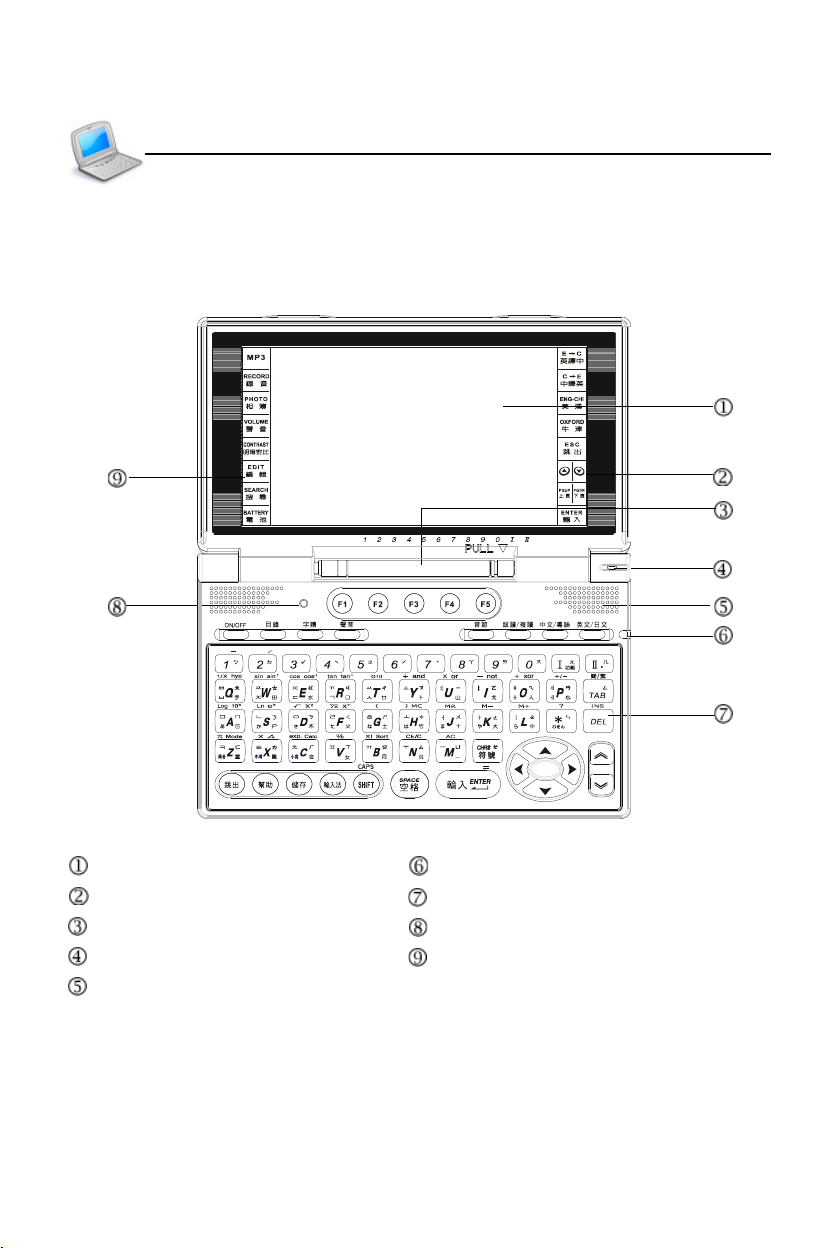
* Obverse Side:
Screen LED Indicator
Touch Panel (Right) Keyboard
Stylus RESET Key
Hidden Microphone Touch Panel (Left)
Speaker
Preface

3
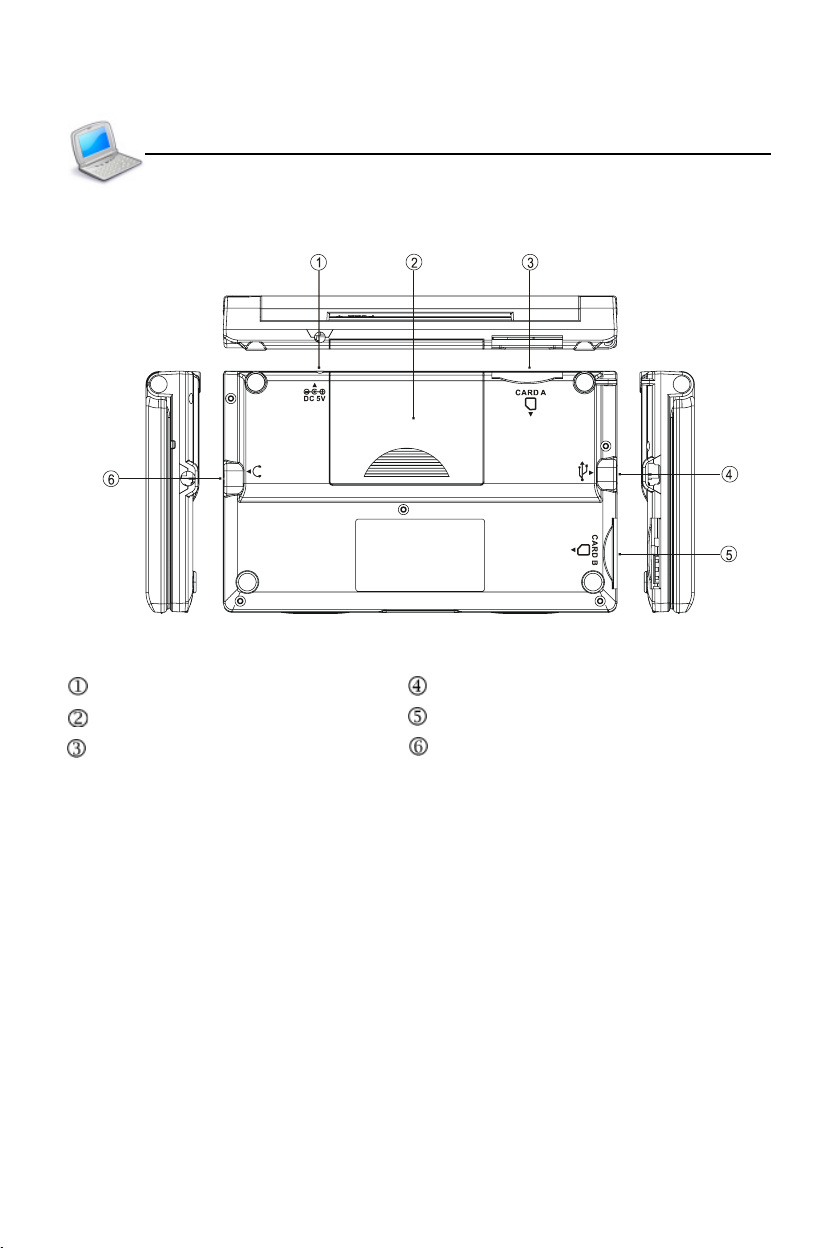
* Obverse Side:
DC Adaptor Socket Mini USB Slot
Battery Cover SD/MMC Slot B
SD/MMC Slot A Earphone Socket
Layout
Preface
Indice