
BGates LT Manuale utente

Open your gate by mobile phone!
Installation and user’s manual
Release 3.0 Firmware 2.2.4

A PRODUCT MADE IN ITALY
2

BGates comes with the Smart Start feature active.
This means that the device does not need any programming for use. Simply ring the number of the
inserted SIM card and BGates LT will activate the relay. Deactivate this feature if you prefer to have
BGates LT open only for memorised numbers.
SMART START
CAUTION
This function is only available for devices with rmware 2.1.2 and above. To know the version of your device, use the “13” function
on page 17.
3

BGates LT
Open your gate with an APP or by calling your BGates LT
Open a motorised gate, such as your front gate,
from any distance using a mobile telephone or
landline phone and without any remote control,
providing access to a maximum of 500 users.
Open the gate simply by dialling the number of
the SIM inside BGates LT or use the appropriate
APP available for smartphones free of charge.
BGates LT works by inserting a SIM1from Europe’s leading telecom
operators, excluding SIM cards that use only VOIP technology
(for example, operator 3).
Phone calls are always toll-free: BGates LT recognises the caller’s
number and opens the gate, thus refusing the call. The only costs
are those relating to SMS reply messages, corresponding to the
fees of your service plan for the SIM inserted into BGates LT.
Be sure to pay attention to the SIM expiration date and make sure
that it is enabled to send and receive SMS.
1Sold separately. The SIM card should be standard size. A dedicated adapter is
required if owning a Micro SIM or Nano SIM.
4

Installation
PRECAUTIONS FOR INSTALLATION
• Make sure that the product is intact after removing the
packaging.
• The system must be installed in compliance with current
safety standards.
• An appropriate disconnector and protection switch should be
installed upstream of the actuator.
• Before connecting the device, make sure that the rating plate
data corresponds to that of the distribution network.
• Disconnect the device from the mains power supply before
attempting to clean or service it.
• Disconnect the device and do not touch it in case of failure
and/or malfunction.
• Do not let the device come into direct contact with water
or extreme heat, moisture or heat shock: see the chapter
“installation”.
• Do not obstruct the ventilation or heat dispersion openings or
ns.
• Contact the manufacturer for repairs.
Take note that:
• Failure to comply with the above may compromise the safety
and warranty of the device.
• The manufacturer can not be held responsible for any damage
caused by improper, incorrect and unreasonable use.
5

INSIDE THE BOX
• BGates LT device
• This instruction sheet
TECHNICAL FEATURES
• Power supply 230V - 50/60 Hz.
• The transformer is electronically protected against overloads
and short circuits.
• Absorbed power: 10VA.
• Relay: 230V maximum voltage, maximum current 1A with
resistive load (0.4A inductive load).
• Action Type: 1 B-U.
• Dimensions: 9-unit module for DIN rail.
• Dual mode operation: pulse (default) or bistable.
LOCATION
Install the device in an area where there is a good GSM/GPRS
signal. This area can be identied in the vicinity of the automation
that you want to connect, though its proximity to the gate is not
an essential factor. It is advisable to perform simple eld strength
checks before installing the actuator.
INSTALLATION
The device is equipped with a relay to process the open command.
The device can be installed in an electrical panel or alternatively
in the box tted with DIN rail (EN 50022). Outdoor installations
require the use of a suitable sealed container such as an IP65
weather sealed box.
BGates LT can operate in two modes:
• Pulse (factory default setting): the device closes the relay for
the number of seconds set (factory settings: 2 seconds).
• Bistable: the device closes the relay until the next command.
6
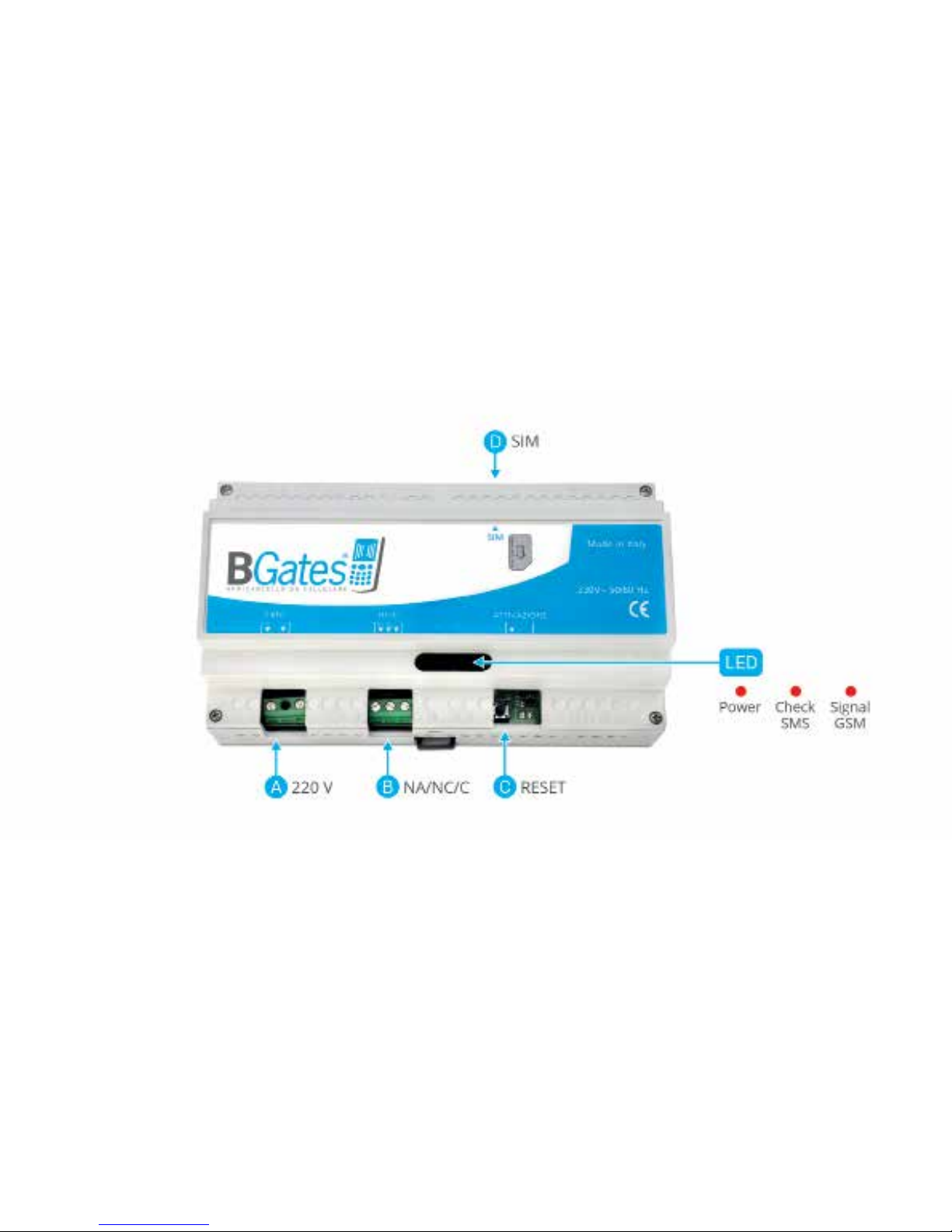
Figure 1
7

OPERATION OF THE BGates LT TERMINALS (Fig. 1)
A) Terminal board M1
220V power supply
B) Terminal board M2
Automation open control relay. Relay contacts:
- NO normally open
- NC normally closed
- C common
C) SW1 button - Reset to factory settings
Turn on the module, wait for the three LEDs to light up at the
same time and then press the C button (SW1) within 5 seconds.
Acceptance of the command will be conrmed by the rapid
ashing of the right LED (looking at the label and reading BGates).
CAUTION:
This process deletes all registered telephone numbers and restores
messages and settings to the initial values (including passwords to
0000).
D) SIM Card insertion seat
The SIM inserted must be congured without the PIN number. The
device will not work if a SIM congured with the PIN request is
inserted.
The connections to the control relay must be provided in function
of the type of apparatus that must be automated. The simplest
approach is to identify the button/key to open the device to
automate and make a parallel connection. If the plant is not tted
with any, refer to the manual of the plant to be automated to
determine the correct connection with the control unit in order to
automate the opening.
Once powered, BGates LT will proceed with registration on the
GSM network. Registration may last a few minutes.
The system is ready for use after this operation.
8
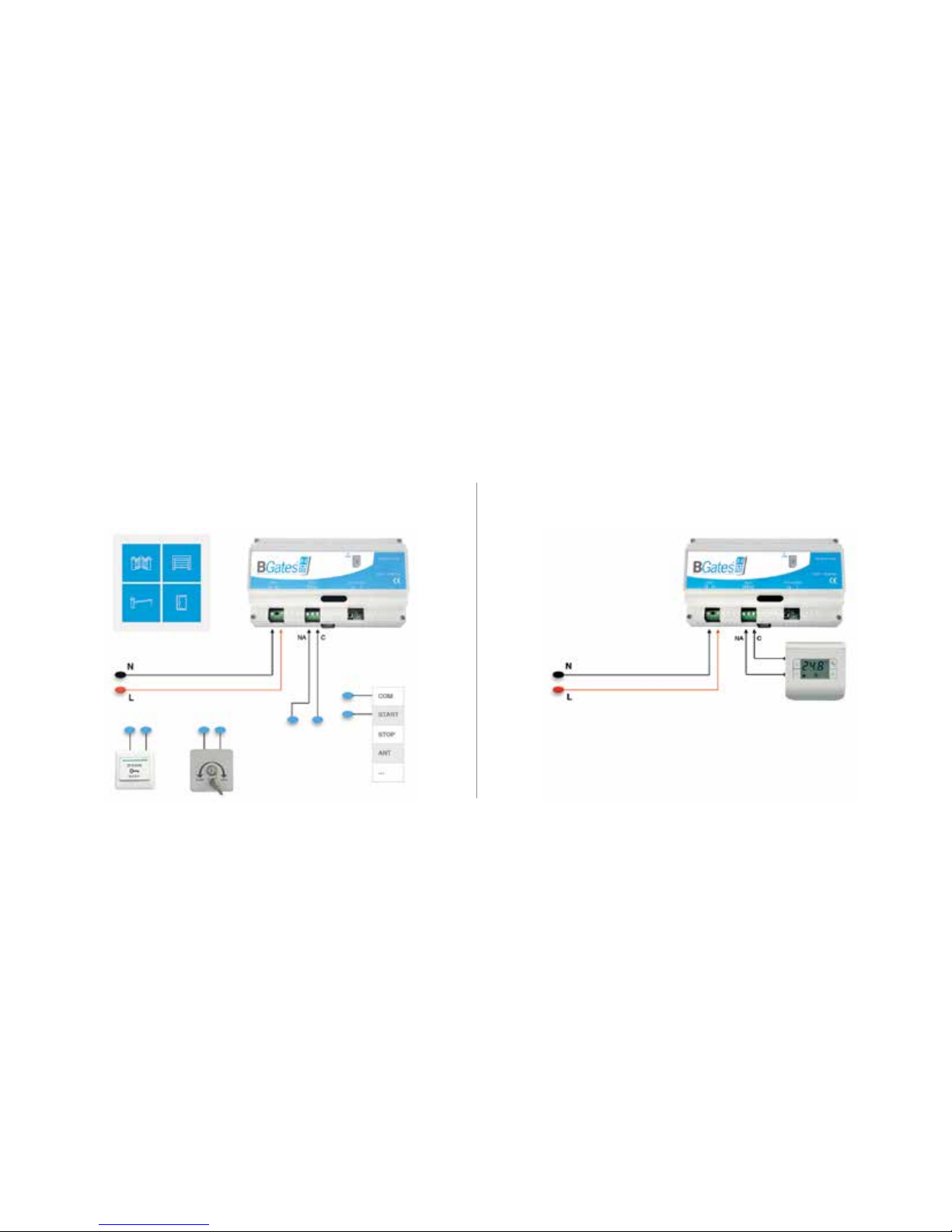
WIRING INSTRUCTION BGates LT
BGates LT - Pulse Bistable/Timer for thermostat consensus
9
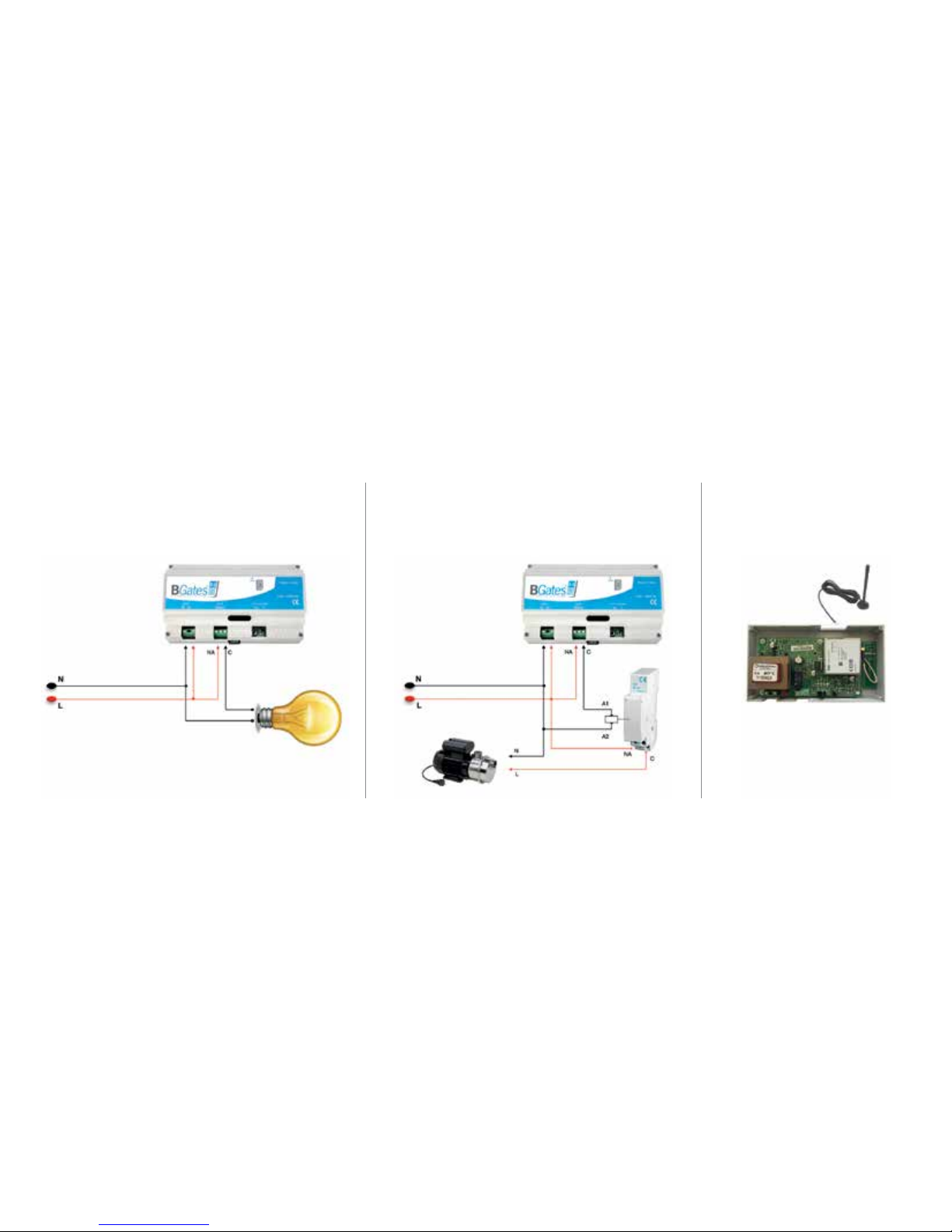
Bistable / Timer for resistive load
less then 230V/1A
WIRING INSTRUCTION BGates LT
Bistable / Timer with additional Relay for
inductive load more then 230V/0.4A
Poor signal < 9,0 - to use
MMCX GSM external antenna
10
Indice
Altri manuali BGates Sistema di apertura della porta


