
Bigassfans SmartSense Manuale utente

INSTALLATION
GUIDE
SmartSense
For help, call 1-877-BIG-FANS
or visit www.bigassfans.com
Manuel d’Installation
Guía de instalación
Installationsanleitung
Guida all’installazione
Installation Guide
July 2017
Rev. N
Original English Instructions
This product was manufactured in a plant whose Management System is certified as being in conformity with ISO 9001.
Legal
Improper installation, delivery, or maintenance, including, but not limited to, any of the following actions by the customer or agent of the
customer will constitute a breach of and will void all warranties:
• Failure to follow the required installation procedures specified in this Installation Guide and in all other documentation supplied with
the fans and related equipment including documentation provided by the manufacturers of the individual fan and control components;
• Failure to follow all relevant codes and ordinances, including, but not limited to, the National Electric Code (United States), applicable
national and local electrical codes, and state and local building codes;
• Failure to follow electrical engineering industry standards regarding the approved method of installing solid-state electrical equipment
having the characteristics of the fans, the fan controls, and their related components, even if such standards are not specifically
referenced in any instructions or literature supplied by Big Ass Solutions or provided by manufacturers.
SmartSense is a trademark of Delta T Corporation. All other trademarks used herein are the properties of their respective owners. No part
of this document may be reproduced or translated into a dierent language without the prior written consent of Big Ass Solutions. The
information contained in this document is subject to change without notice. For the most up-to-date information, see the online installation
guide at www.bigassfans.com.
www.bigasssolutions.com/patents ▪www.bigasssolutions.com/warranties
READ AND SAVE THESE INSTRUCTIONS
WARNING AND CAUTION SYMBOL
Indicates a hazard with a medium level of risk that could result in injury or death or damage
to property if not avoided
ELECTRICAL WARNING SYMBOL
Indicates an electrical hazard with a medium level of risk that could result in death or serious
injury if not avoided

CONTENTS
Introduction Important Safety Instructions ii
Technical Specifications 1
Dimensions 1
Pre-Installation Parts 2
Power Cord Plugs 2
Mounting
SmartSense
SmartSense Overview
Mount the Upper Temperature Sensor (to I-Beam) 4
Mount the Upper Temperature Sensor (to Wood Beam) 5
Mount the Wall Controller 6
Installation SmartSense With Powerfoil®X2.0 and Powerfoil®X2.0Plus Fans 7
SmartSense With Powerfoil®X3.0 and Powerfoil®X3.0Plus Fans 8
SmartSense With Basic 6®, Powerfoil®8, and Powerfoil®8Plus Fans 9
SmartSense With Essence®Fans 10
Electrical Installation Wall Controller 11
Upper Temperature Sensor 11
Single Fan Installation for Powerfoil®X2.0 and Powerfoil®X2.0Plus Fans 12
MultiFan Installation (Daisy Chaining) for Powerfoil®X2.0 and
Powerfoil®X2.0Plus Fans 13
Single Fan Installation for Powerfoil®X3.0 and Powerfoil®X3.0Plus Fans 14
MultiFan Installation (Daisy Chaining) for Powerfoil®X3.0 and
Powerfoil®X3.0Plus Fans 15
Single Fan Installation for Basic 6®, Powerfoil®8, and Powerfoil®8Plus Fans 16
MultiFan Installation (Daisy Chaining) for Basic 6®, Powerfoil®8, and
Powerfoil®8Plus Fans 17
Single Fan Installation for Essence®Fans 18
MultiFan Installation (Daisy Chaining) for Essence® Fans 20
Alternative Wiring Methods 22
Operating the
SmartSense
Starting and Stopping the Fan 23
Modes of Operation 24
Programming the
SmartSense
Selecting a Mode 25
Programming Winter Mode Maximum Fan Speed 25
Programming Summer Mode Minimum and Maximum Temperatures 25
Adjusting Manual Mode Fan Speed 25
Troubleshooting Wall Controller 26
Upper Temperature Sensor 26

IMPORTANT SAFETY INSTRUCTIONS
WARNING: This guide is intended to provide a basic overview for integrating a SmartSense with a Big Ass
Fan. Consult the Installation Guide included with the fan for additional installation and operation instructions.
WARNING: Disconnect fan and controller from power supply before installing the SmartSense.
WARNING: To reduce the risk of electric shock, wiring should be performed by a qualified electrician! Incorrect
assembly can cause electric shock or damage the motor and the controller! Hazard of electrical shock!
WARNING: Installation must be in accordance with the National Electrical Code, ANSI/NFPA 70-2011, and all
local codes. The procedures and techniques outlined in this manual are merely a guide for proper installation.
Code compliance is your responsibility! Failure to comply with these codes could result in personal injury or
property damage.
WARNING: The fan controllers contain high voltage capacitors which take time to discharge after removal of
mains supply. Before working on the fan controller, ensure isolation of mains supply from line inputs at the
fan controller’s disconnect (L1, L2/N, L3). Wait three minutes for capacitors to discharge to safe voltage levels.
Failure to do so may result in personal injury or death. Note: Darkened display LEDs are not an indication of
safe voltage levels.
WARNING: When service or replacement of a fan component requires the removal or disconnection of a safety
device, the safety device is to be reinstalled or remounted as previously installed.
CAUTION: The Big Ass Fans product warranty will not cover equipment damage or failure that is caused by
improper installation.
ATTENTION: If installing the fan in the United States, the fan must be installed per the following National Fire
Protection Association (NFPA) guidelines:
• The fan must be centered approximately between four adjacent sprinklers.
• The vertical distance from the fan to the sprinkler deflector must be at least 3 ft (91.4 cm).
• The fan must be interlocked to shut down immediately upon receiving a waterflow signal from the alarm
system.

WWW.BIGASSSOLUTIONS.COM © 2015 DELTA T CORP. ALL RIGHTS RESERVED. 1
TECHNICAL SPECIFICATIONS
Wall Controller
Supply voltage +24 VDC, 100 mA
Power consumption ≤ 1 W
Output 4–20 mA DC current loop
Wiring 18–22 AWG
Max wiring distance (ft) ((Vsupply-10 V)/0.02 A) / (Wire Ohms per Foot x 2)
Operating temperature 32° to 100°F (0° to 38°C)
Humidity 95% Relative humidity. Board is conformal coated
Storage temperature 14° to 122° F (-10° to 50° C)
ESD withstand voltage +/- 4 kV Air, +/- 4 kV Contact
Upper Temperature Sensor
Supply voltage +10 VDC to +24 VDC
Power consumption ≤ 1 W
Output 4–20 mA DC current loop
Accuracy +/- 1° @ 77° F (+/- 0.5° @ 25° C)
Non-linearity +/- 0.5° F
Wiring 18–22 AWG
Operating temperature 32° to 100° F (0° to 38° C)
Humidity 95% Relative humidity. Board is conformal coated.
Storage temperature 14° to 122° F (-10° to 50° C)
ESD withstand voltage +/- 4 kV Air, +/- 4 kV Contact
Dimensions
Wall Control
5.1” (13 cm)
2.8” (7 cm)
Depth: 1" (2.5 cm)
Mounting Plate
3.86” (9.8 cm)
7.25” (18.4 cm)
Upper
Temperature
Sensor
Depth: 1" (2.5 cm)
4” (10.2 cm)
1.9” (4.8 cm)

WWW.BIGASSSOLUTIONS.COM © 2015 DELTA T CORP. ALL RIGHTS RESERVED.
2
PRE-INSTALLATION
CAUTION: The wall controller and upper temperature sensor contain sensitive electronic PCBs. Use
extreme care when handling! ESD precautions recommended.
The SmartSense is shipped in a single box and packaged in static shielding materials for ESD protection. Review
the information below to ensure you have received all necessary components for installation and operation.
Note: Drawings are not to scale.
Parts
Wall Controller &
Mounting Hardware
Upper Temperature Sensor
& Mounting Hardware
Power Cord1500 Resistor2
1. Install the appropriate plug type for your region.
2. The resistor is needed only for 0–10 V devices controlled by a 4–20 mA analog signal when connected.
Power Cord Plugs
Install the appropriate plug type for your region.
Install plug Remove plug

WWW.BIGASSSOLUTIONS.COM © 2015 DELTA T CORP. ALL RIGHTS RESERVED. 3
SMARTSENSE OVERVIEW
The SmartSense wall control relies on air temperature readings at the locations of the wall controller and upper
temperature sensor. Proper mounting locations are essential to the successful adjustment of the room temperature.
Refer to the diagram and guidelines below.
Upper Temperature Sensor
mounting location
Wall Controller mounting
location
The upper temperature sensor must be mounted in the upper portion of the zone in order to obtain an accurate
temperature reading at the ceiling level.
The wall controller must be mounted in the lower portion of the zone to obtain an accurate reading at the floor
level.
Install the wall controller and upper temperature sensor on flat surfaces that are free from vibration and where there
is adequate distance from foreign objects or moving equipment. The wall controller should be readily accessible.
Do not mount the wall controller or upper temperature sensor in the following locations:
• Adjacent to or above radiant heaters
• Near HVAC ventilation intakes or exhausts
• On poorly insulated exterior walls
• In roof decking
• Near radiant heat sources
• In an area outside of the fan zone

WWW.BIGASSSOLUTIONS.COM © 2015 DELTA T CORP. ALL RIGHTS RESERVED.
4
MOUNTING SMARTSENSE
WARNING—TO REDUCE THE RISK OF FIRE, ELECTRIC SHOCK, OR INJURY TO PERSONS, OBSERVE THE
FOLLOWING:
• Installation work and electrical wiring must be done by qualified person(s) in accordance with all
applicable codes and standards.
• When cutting or drilling into a wall or ceiling, do not damage electrical wiring or other hidden utilities.
CAUTION: The wall controller and upper temperature sensor contain sensitive electronic PCBs. Use
extreme care when handling! ESD precautions recommended.
Mount the upper temperature sensor (to I-Beam)
ATTENTION
Do not lose the rubber grommet during installation.
1. Route power wiring to the mounting location.
2. Loosen the (4) screws and remove the front cover.
3. Insert pan head screw (a) through the mounting hole and secure i-beam clamp (b) to the back of the sensor.
4. Mount the upper temperature sensor to the i-beam as shown. Tighten i-beam clamp until securely mounted.
Before reattaching the front cover, complete the wiring. See "Electrical Installation" for details and wiring diagrams.
Note: The upper temperature sensor can be mounted in any orientation.
c
bI-beam
Side View
Front
Cover
Upper
Temperature
Sensor
I-beam
Clamp
a

WWW.BIGASSSOLUTIONS.COM © 2015 DELTA T CORP. ALL RIGHTS RESERVED. 5
Mount the upper temperature sensor (to wood beam)
CAUTION: The wall controller and remote temperature sensor contain sensitive electronic PCBs. Use
extreme care when handling! ESD precautions recommended.
ATTENTION
Do not lose the rubber grommet during installation.
1. Route power wiring to the mounting location.
2. Loosen the (4) screws and remove the cover from the remote sensor.
3. Using the back of the sensor as a template, mark the (2) screw locations on the mounting surface.
4. Loosely install the mounting screws on the mounting surface in the hole locations.
5. Slide the remote over the screws, and then tighten the screws.
Before reattaching the front cover, complete the wiring. See "Electrical Installation" for details and wiring diagrams.
Note: The upper temperature sensor can be mounted in any orientation.
Front
Cover
Upper
Temperature
Sensor
Front Cover
Screws
Mounting Screws
(for wooden structures only)
WWW.BIGASSSOLUTIONS.COM © 2015 DELTA T CORP. ALL RIGHTS RESERVED.
6
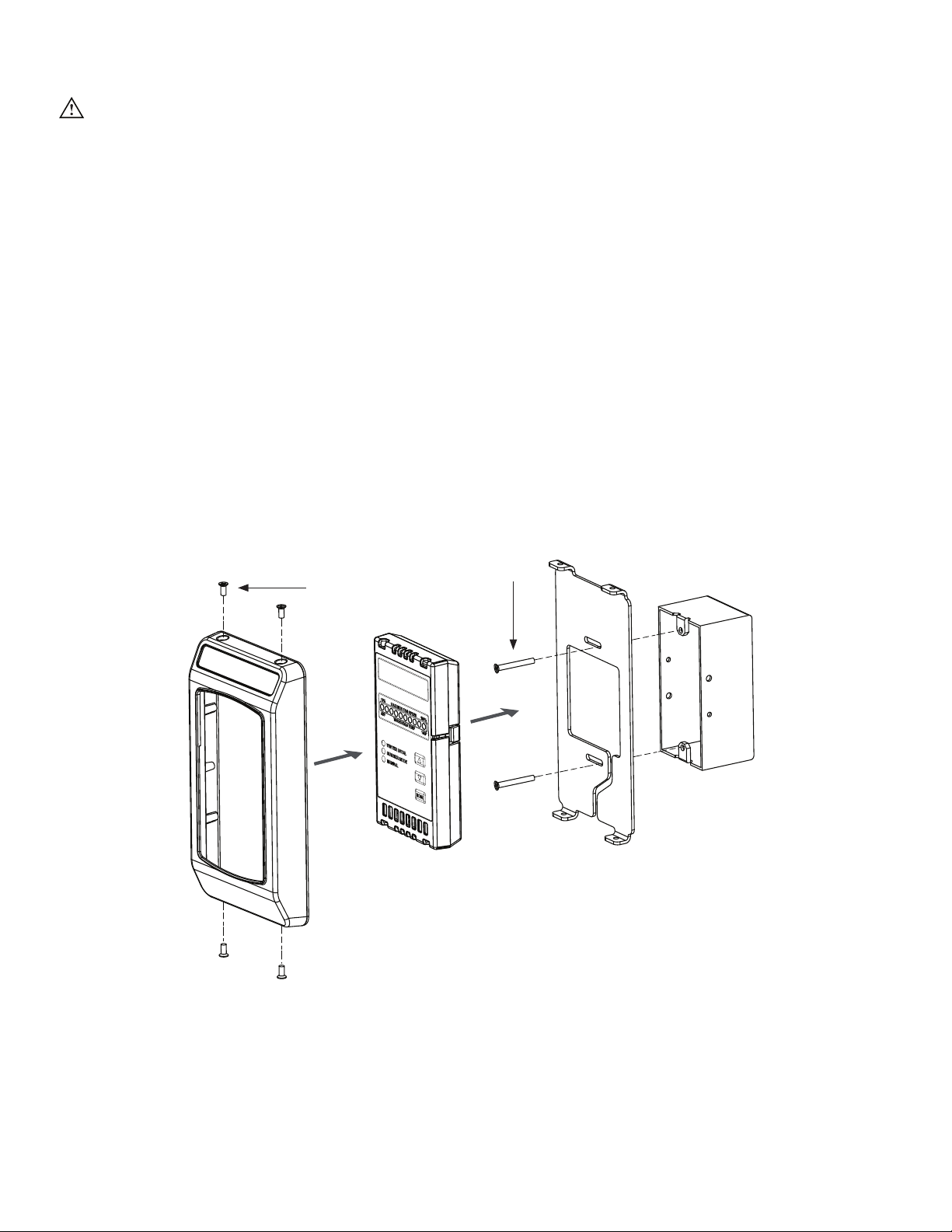
Mount the wall controller
CAUTION: The wall controller and upper temperature sensor contain sensitive electronic PCBs. Use
extreme care when handling! ESD precautions recommended.
The SmartSense wall control incorporates an internal temperature sensor and should be mounted within the same
zone as the upper temperature sensor. The wall controller can be mounted to a standard 2 in. x 4 in. (5.08 cm x
10.16 cm) electrical switch box or surface-mounted on a wall or column. It does not have to be located adjacent to
the fan controller; each controller is independently wired to the fan. Note: A junction box is not supplied with the
wall controller.
To install the wall controller:
1. Route power wiring to the mounting location.
2. Attach the mounting plate to the junction box in the wall with the two (2) provided 6-32 x 7/8” Phillips screws.
3. Route the wall controller power cord through the opening in the center of the mounting plate. Guide the
power cord down the bottom of the mounting plate in the slot provided.
4. Rest the wall controller in the wall controller cover, and then secure the controller cover to the mounting plate
with the four (4) provided 6-32 x 3/8” Phillips screws as shown below.
Mounting Hardware:
a. (2) 6-32 x 1-1/4” Phillips Screw
b. (4) 6-32 x 3/8” Phillips Screw
a
b
Junction Box
(in Wall)
SmartSense
Wall Controller
Mounting Plate
(fits standard junction box)
Controller
Cover
Indice
Lingue:
Altri manuali Bigassfans Controllori


