
Blue Point Engineering RX-8 Manuale utente
Copyright © 2011 Blue Point Engineering All Rights Reserved
Blue Point
Wireless Radio Control of Puppets
Engineering Inc.
RF Control C
Pointing the Way to Solutions!
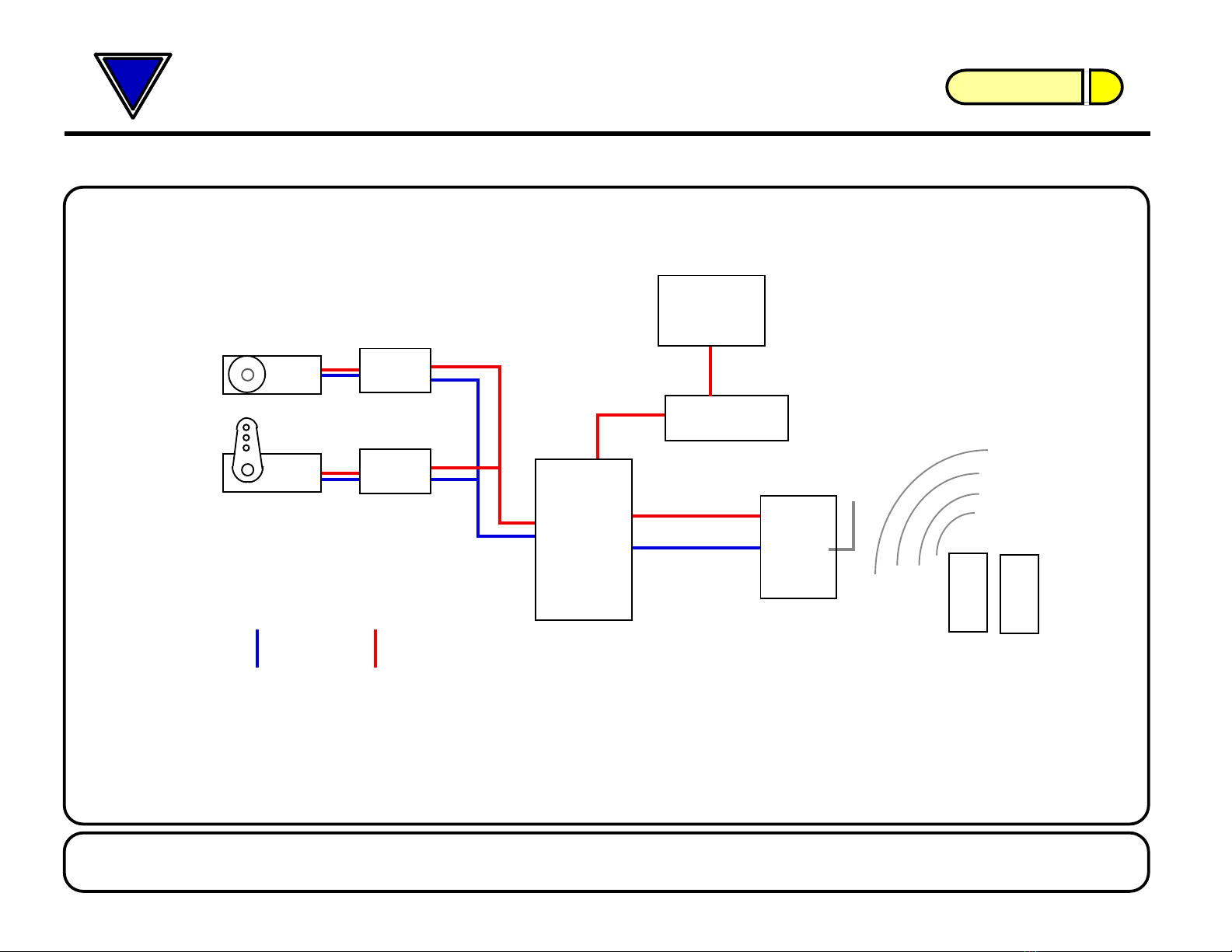
Hardware Setup Overview
Blue Point Engineering Inc. Phone (303) 651-3794www.BPEsolutions.com
For more information on these products or to place an order
Page 1
RF
Transmitters
RX-8
RX8-PT
RX-LT
RX8-ch1,2
RX8-ch3,4
On/Off
Switch Board
Control Signal
Line Power Line
DC Voltage
RX8-ch1-8
VDC
Setup Overview
No.1
No.2
9VDC
Battery
2600 mAh
RF Receiver
Servo
Board
WIZ-12
Servo
Board
WIZ-12
Servo
Servo
Servo
Relay
Driver
Board
DB-SRD
Page 2
Copyright © 2011 Blue Point Engineering All Rights Reserved
RX8-PT
RX-LT
RX-8
RF Receiver
Board
SRD Board Power / On Off -
Distribution Board
Battery
Servos
Servo Driver
Board (Wiz12)
Servo Driver
Board (Wiz12)
Power Connector Battery
Power Connector Hook-up
Wire
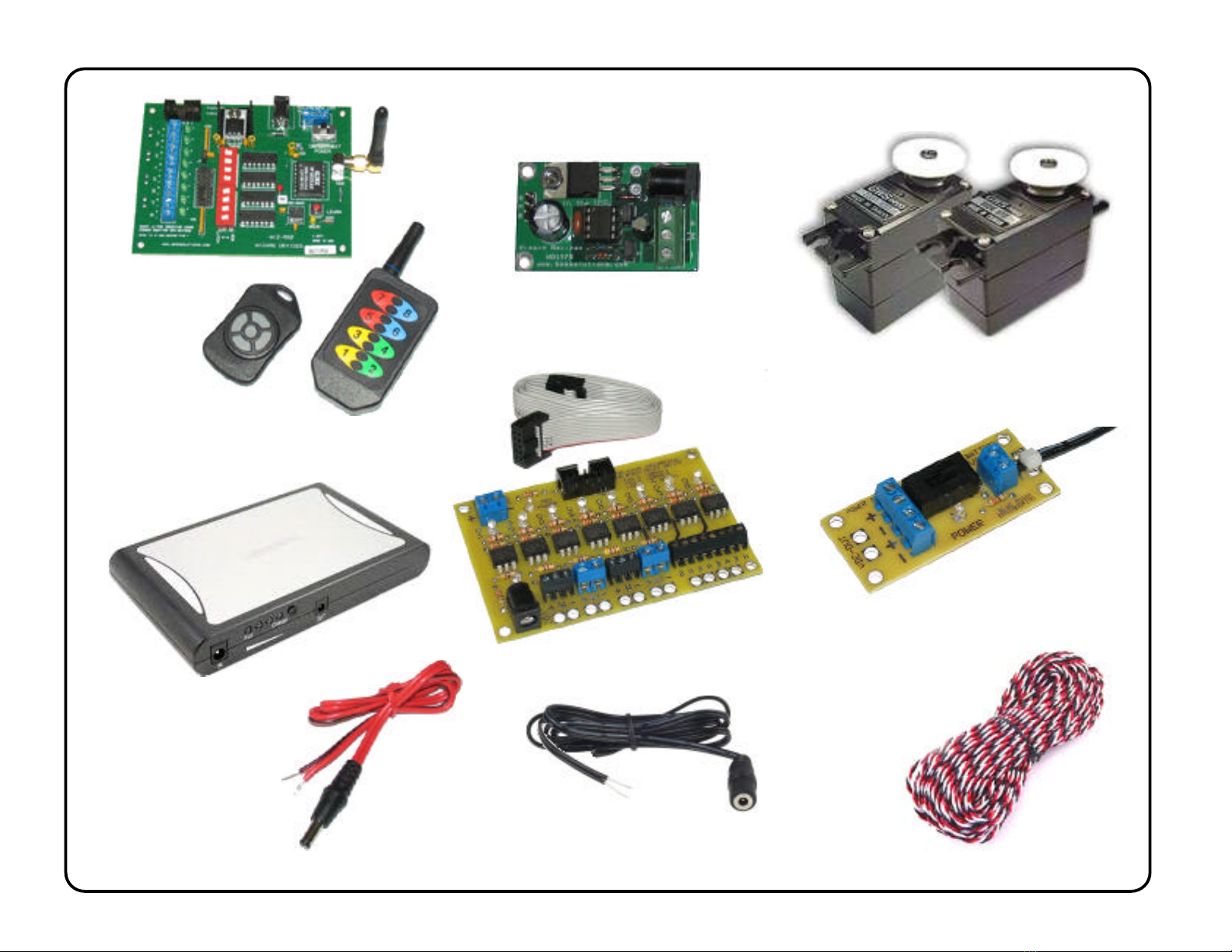
COMPONENTS / PARTS
RF Long Range
Transmitter
RF Short Range
Key fob
Transmitter
9VDC @ 2.4 Amps
2.1 x 5mm Power
Jack (Male)
2.1 x 5mm
Power Jack
(Female)
3 Wire ( Black - Red - White )
Center
Positive
Center Positive
Ribbon Cable
with Connectors

Page 3
Copyright © 2011 Blue Point Engineering All Rights Reserved
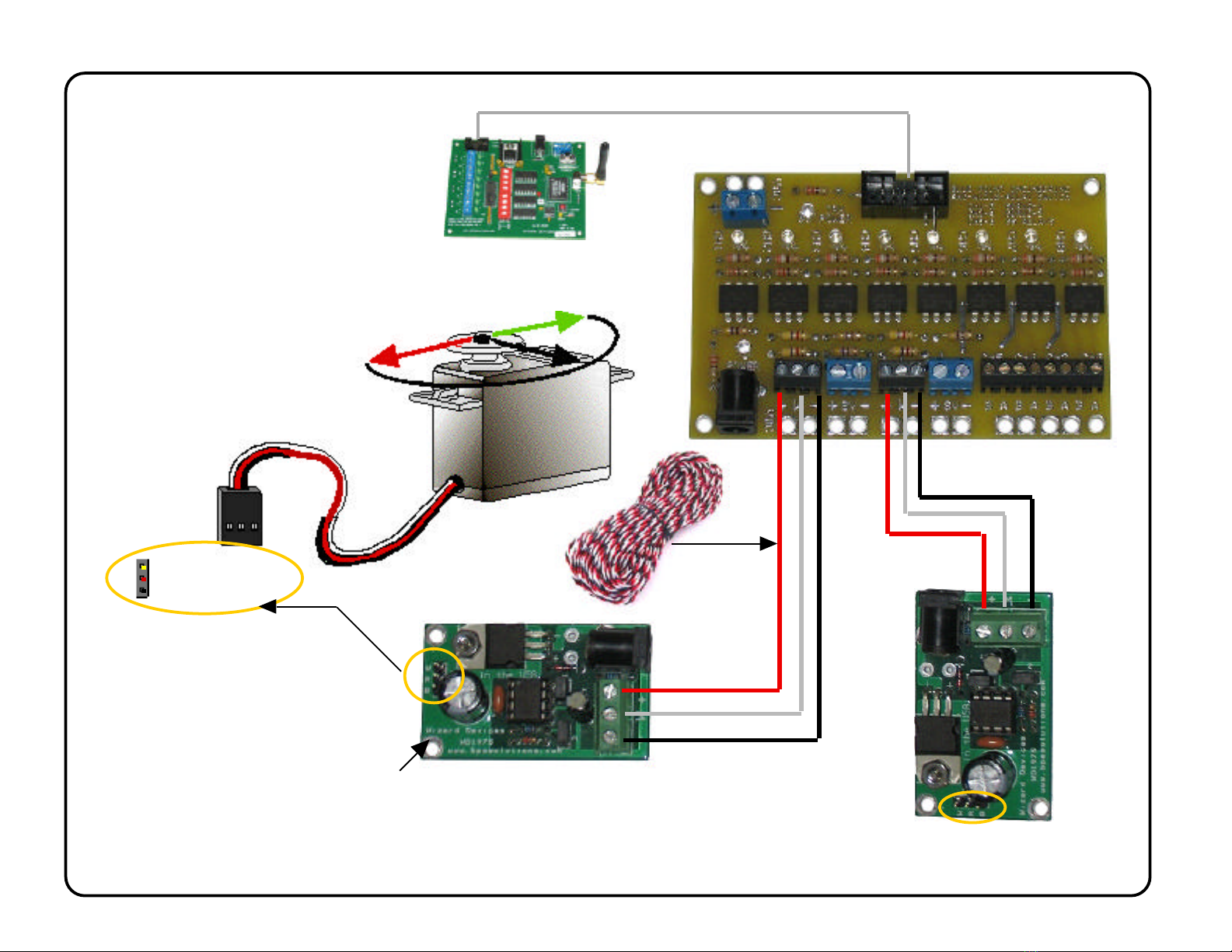
RX8-PT
RX-LT
RX-8
SRD
Servo Driver
Board (Wiz12)
Ribbon
Connector
RX8 to SRD Board
Page 4
Copyright © 2011 Blue Point Engineering All Rights Reserved
RX8-PT
RX-LT
+
W
-
-
+
W
Servo No.1
Board (Wiz12)
+-
W
+-
W
Control Wire Setup
Servo No.2
Board (Wiz12)
- Black
- Red
- Yellow / White
R/C Servo
Connection
Standard +5 Vdc
R/C Servo
W
R
B
W
R
B
R/C Servo Setup
RX-8
SRD
Hook-up
Wire
See Operation Manual for info
on programming Wizard-12
Board Servo Travel Limits
Cut to needed
length
R/C Servo
Connection
R/C Servo
Connection
Servo No 1
RX8-PT
RX-LT
Page 5
Copyright © 2011 Blue Point Engineering
All Rights Reserved
Servo No.1
Board (Wiz12)
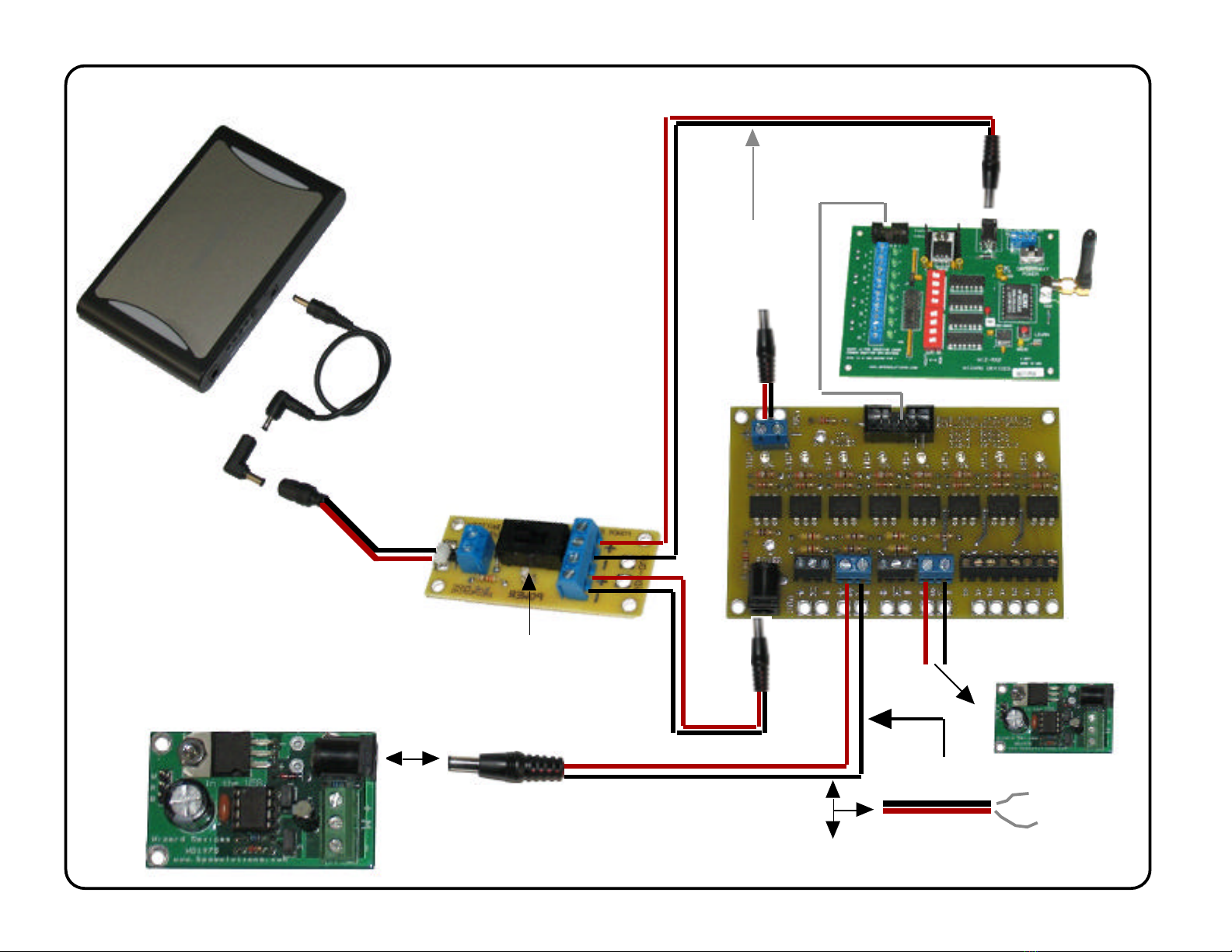
Power Setup
-
+
Black Wire = Power - (Negative)
Red Wire = Power + (Pluse)
CAUTION:
+ Power
- Power
-
+To Servo No.2
Board (Wiz12)
Battery
Power Plug
Adapter
Battery Power Cable
-
+
RX-8
-+
SRD
On/Off Switch
Optional
Power out
to RX8
Power Board
- OR -
(With Battery Accessories)
(With Battery Accessories)
-
+
2.1 x 5mm
Power Jack
2.1 x 5mm
Power Jack
RX8-PT
RX-LT
Page 6
Copyright © 2011 Blue Point Engineering
All Rights Reserved
SRD Board Overview
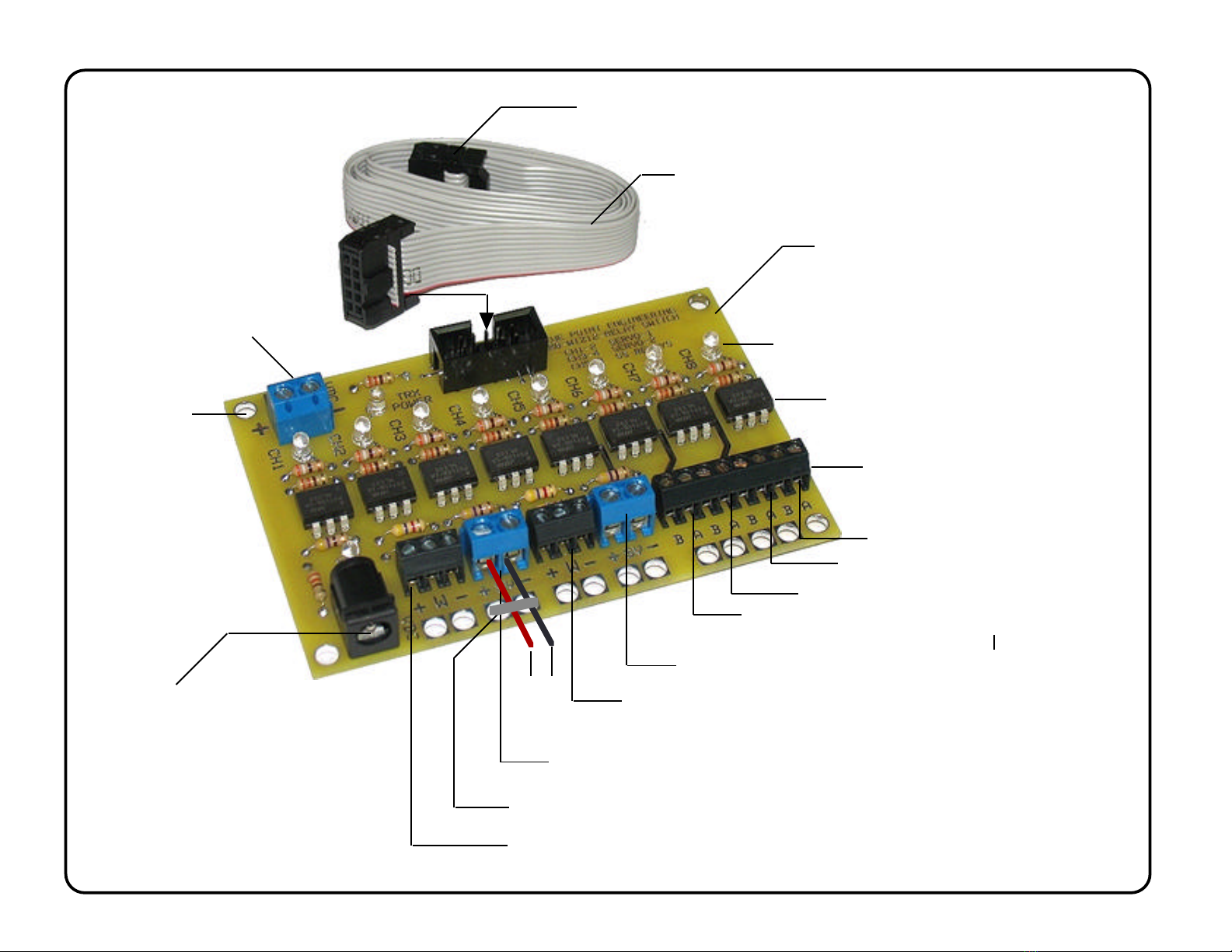
Ribbon Cable
SRD Board
To Servo Driver
Board-1 (Wiz12)
SS Relay Output Switch -Ch 5
Servo 1 Power
Connector + / -
Board Power Connector
2.1 5mm Power jack
(Center Positive +)
To Servo Driver
Board-2 (Wiz12)
Servo 2 Power
Connector + / -
SS Relay Output Switch -Ch 7
SS Relay Output Switch -Ch 6
SS Relay Output Switch -Ch 8
Servo / Relay Driver Board
Aux Power Connection
( RX8) + / - LED Status Light (Ch8)
Solid State Relay IC
Wire Terminal Block
Wire Secure Holes / Wire Tie
Mp3 Audio
Playback Module
LED Lighting
Effects Modules
Special Effects
Modules
SS Relay Closure
Output ON/OFF
Optional
Wires
Optional
To RX8 Board Connector
(Signal / Power)
Servo / Relay Driver Board
Mounting
Holes
CH-1,2
CH-3,4
RX8-PT
RX-LT
Page 7
Copyright © 2011 Blue Point Engineering
All Rights Reserved
RX-2 Overview
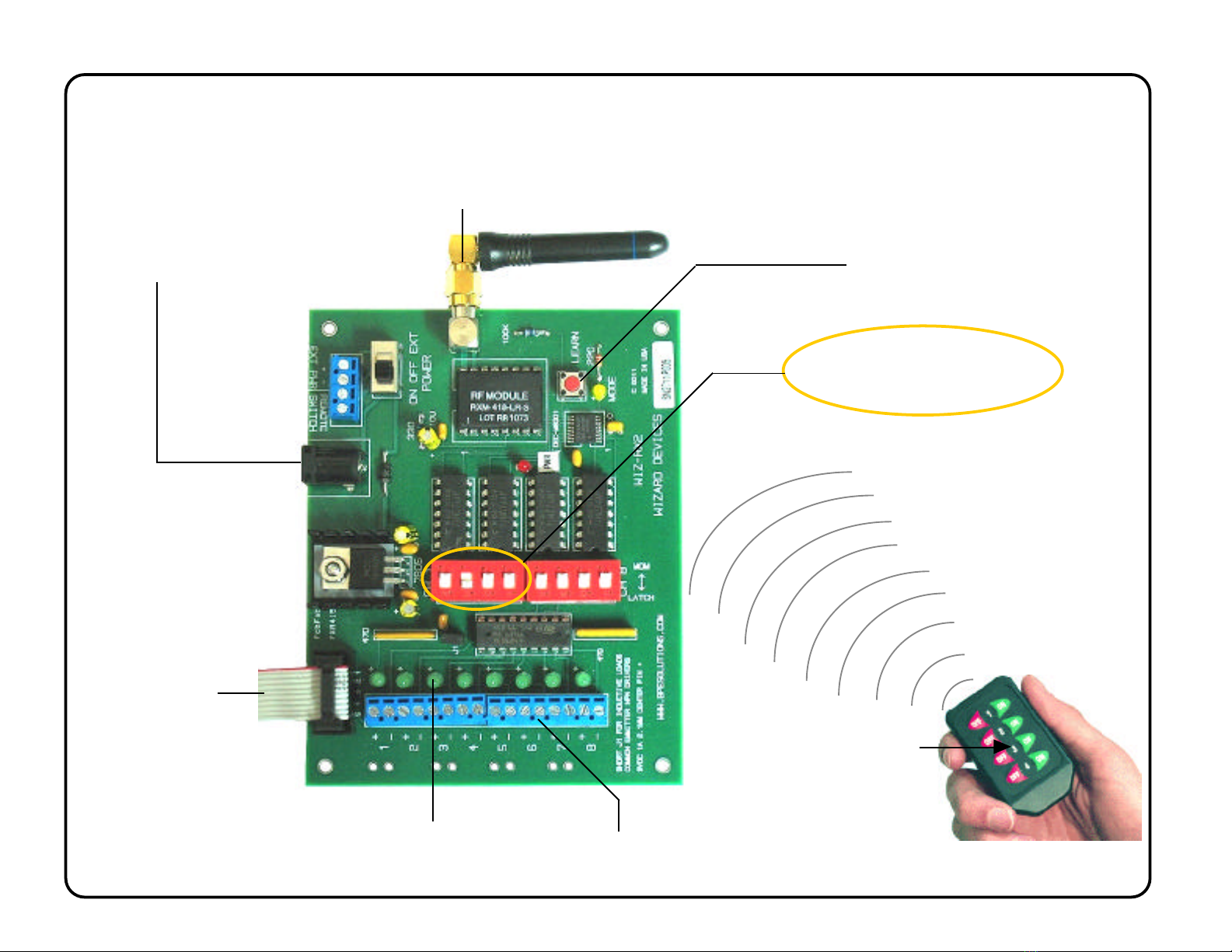
Board Power Connector
2.1 5mm Power jack
(Center Positive +)
Ribbon Cable to
SDR Board
Switch ON / Off DIP
Switches to Set Servo Travel
Movements
Left - Center - Right
Right - Center - Left
Left- Center
Right-Center
Servo Movements
Ch On/Off Status LED
RX Receiver to Hand Held Transmitter
LEARN Button
Adjustable
0-5 VDC Output Per Channel 1-8
(Switched ON / Off - Hand Transmitter)
Relay Outputs 5-8
Servo No.2
Servo No.1
Servo Playback
Optional
RF signal
Instruction I
Blue Point
Pointing the Way to Solutions!
Engineering www.BPEsolutions.com
Copyright © 2011 Blue Point Engineering Inc. , All Rights Reserved
Set - Up / Servo Travel
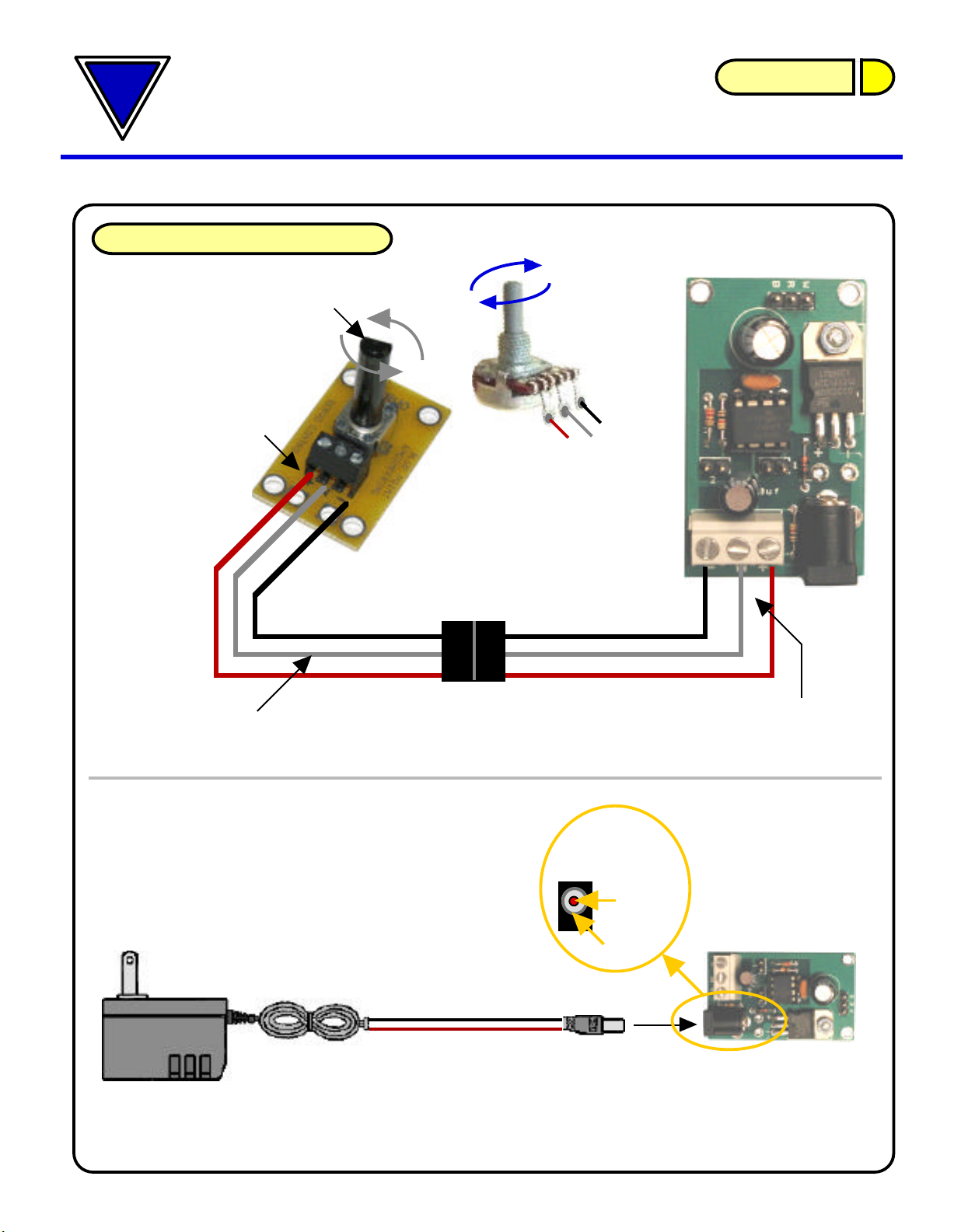
Servo Travel Adjustment
Wizard - 12
Wizard - 12
Controller
W
+
Rotational
Potentiometer
Interface Board
-Black
Wire
Red
Wire
White
Wire
+
-
Rotate
W
+-
Check Wire Connections
for correct polarity
CAUTION
-
+
POTENTIOMETER
10k Ohm
W
Optional
Connector
(M/F)
Wizard - 12
Controller
(+) Red Wire
(-) Black Wire
Power
Connection
9 Vdc @ 1 Amp
+ Vdc
center
- Vdc
outside
2.1 x 5mm
Power Jack
Power Connection
Wall or Battery Supply
- Black
- Red
- White
Caution
Check Wire Connections
for correct polarity
Wall Plug Power Supply
9 Vdc @ 1.0 Amp
Instruction I
Blue Point
Pointing the Way to Solutions!
Engineering www.BPEsolutions.com
Copyright © 2011 Blue Point Engineering Inc. , All Rights Reserved
Wizard - 12
Set - Up / Servo Travel
Servo Travel Adjustment
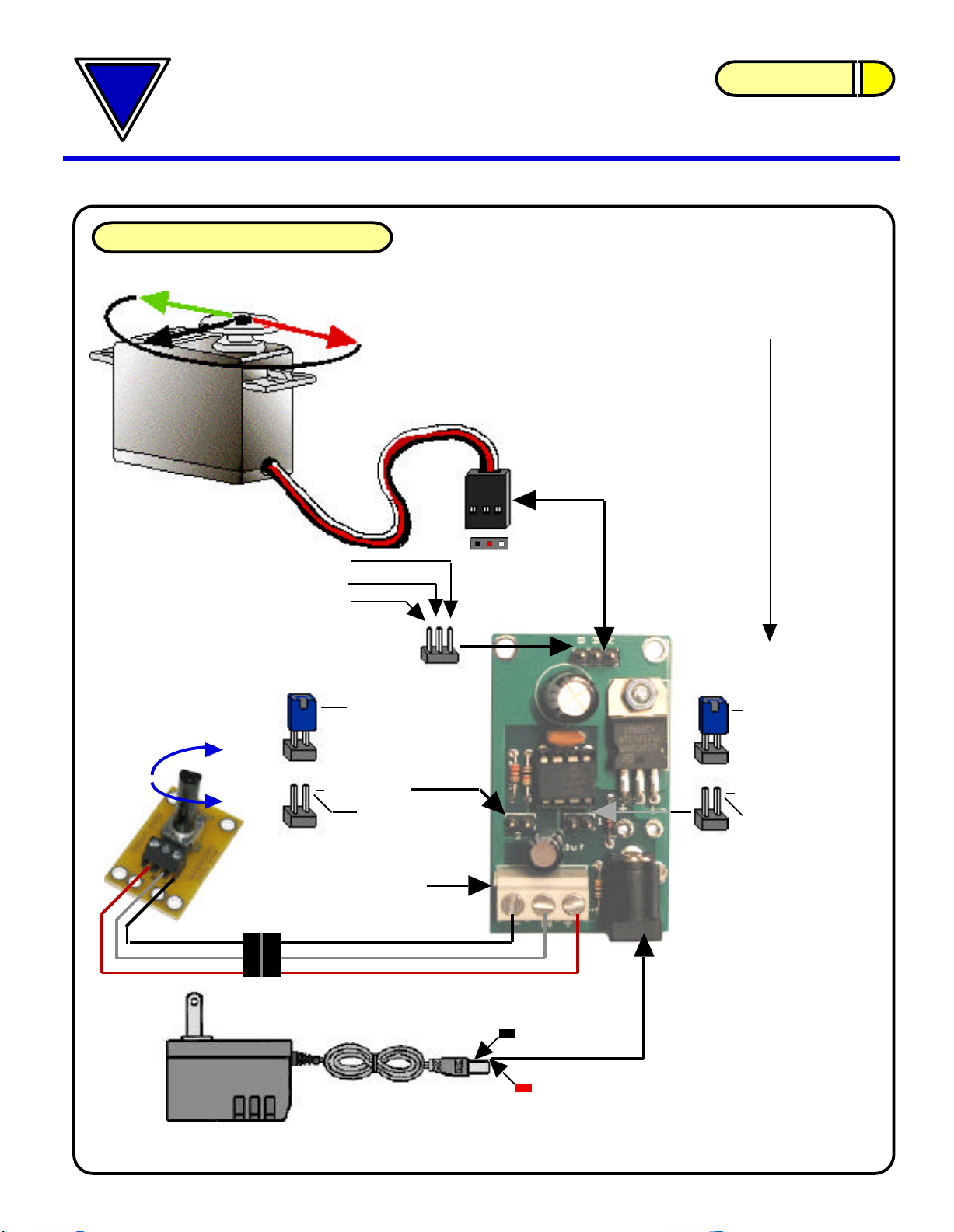
-+
R/C Servo
Connection
- Black
- Red
- White
Servo (-)
Servo (+)
Servo (S)
Caution
Check Correct
Servo Connection
Power
Connection
+ Vdc
center
- Vdc
outside
Wall Plug Power Supply
9 Vdc @ 1.0 Amp
2.1 mm
B/C
A +/-
C/B
Upper Servo
Travel Range
JP2
Configuration
Jumper Block
Momentary Short
Jumper Block OFF
when operating
Controller
JP1
Configuration
Jumper Block
Momentary Short
Jumper Block OFF
when operating
controller
Lower Servo
Travel Range
Potentiometer
Connection Terminal
POTENTIOMETER
W-+
W
See Servo Travel Calibration guide on using
the Jumper Blocks for setting the Upper and
Lower Servo Travel Movements
Rotational
R/C Servo
WBR
Optional
Connector
Analog
Servo
Travel Ranges (B-A-B)
B
R
W
2.1 x 5mm
Power Jack
Caution
Instruction I
Blue Point
Pointing the Way to Solutions!
Engineering www.BPEsolutions.com
Copyright © 2011 Blue Point Engineering Inc. , All Rights Reserved
Wizard - 12 Servo Travel Calibration
- Black
- Red
- White
Servo Travel Calibration
Troubleshooting:
Q. I am having trouble getting the servo to move when I adjust the potentiometer.
A1. Reset the Servo Lower and Upper Limit Ranges:
Temporarily short JP1 pin pain set or JP2 pin pair set by placing a jumper onto the pin pair for a
few seconds, then remove the jumper.
A2. Check to see that the Potentiometer has been wired correctly to the control board
terminal block. Wires +, - and W. Does the Wizard-12 board have power?
A3. Check to see if the servo is designed to move only a set amount (See servo
information specifications from manufacture on servo)
Connect a potentiometer, servo and power supply to the Wizard-12
controller board.
Adjusting the potentiometer will control the position of the attached servo.
The full range of the potentiometer and board electronics will generate
pulse width equivalent to a 180-degree servo movement. (1ms - 2ms)
Some servos will not accommodate this movement range. so take care
not to drive the servo into its limit stops at the extreme setting range.
Servo Travel Servo
Travel
JP1 JP1
Upper Servo
Travel Range
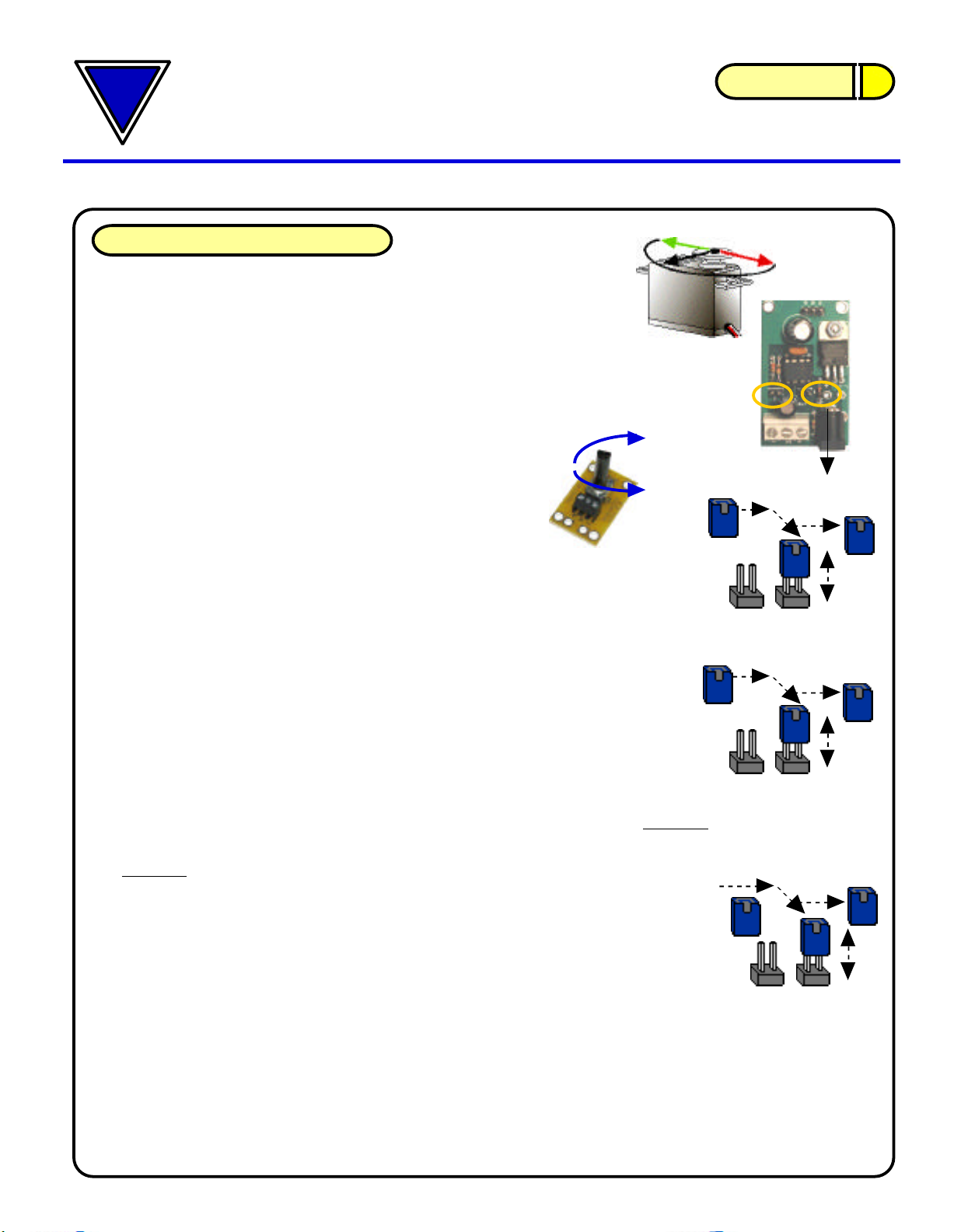
Setting the Servo Movement / Travel Range
Upper Limit Range:
Adjust the potentiometer and move the servo output
travel to the upper range point that you want the servo
to stop at. Temporarily short the JP1 pin pair set by
placing the jumper onto the pin pair for a few seconds,
then remove the jumper. This will record in memory the upper movement
travel range limit. This setting will be retained even after the power is turned
off, and will stay in memory until manually reset to a new range.
Lower Limit Range:
Adjust the potentiometer and move the servo output travel to the lower range
point that you want the servo to stop at.
Temporarily short the JP2 pin pair set by placing the jumper onto the pin pair
for a few seconds, then remove the jumper.
This will record in memory the upper movement travel range limit. This setting
will be retained even after the power is turned off, and will stay in memory until
manually reset to a new range. JP2 JP2
Lower Servo
Travel Range
JP2 JP1
JP1
-OR-
JP2
To RESET the Servo Lower and Upper Travel Limit Ranges:
Temporarily short JP1 pin pair set or JP2 pin pair set by placing a jumper onto
the pin pair for a few seconds, then remove the jumper. This will reset the servo
movement travel limit values recorded in memory to a 0 value allowing the servo
to move the full travel range of the servo.
(Note: some servos move only small travel ranges, as manufactured. For max
travel, select a servo that has the desired travel ranges you need)
Note: If the servo does not move as the potentiometer is adjusted, it may be that the upper and
lower limit travel ranges are overlapping. Try re setting the limits again or RESET the limit settings and
start again with the servo limits
Wiz-12
Potentiometer
RESET
Indice
Altri manuali Blue Point Engineering Cavi e connettori


