
boAt Rockerz 510 Manuale utente

And to maintain the continuous stability of the signal, please try to keep the Bluetooth and
mobile phone in the same direction.
3. Whether other Bluetooth phone users may hear your conversation?
When pairing the headset with a Bluetooth mobile phone, the dedicated linking route will be
created for these two Bluetooth devices only. As per the Bluetooth technology used for headset,
it is not easy for the third parties to monitor the conversations, and the RF power of Bluetooth
wireless signal is far less than that of normal mobile phone, so these signals are difficult to be
detected by third parties.
4. What happens when the distance between mobile phone and Bluetooth headset exceeds the
effective distance?
When the distance between mobile phone and Bluetooth headset exceeds the effective distance,
the connection between mobile phone and Bluetooth headset will be broken automatically.
When it comes back in the effective distance, mobile phone and Bluetooth headset will be
connected automatically without any setting. But some phones do not support this function, the
Bluetooth device should be searched in the design list and then connect.
5. How to charge the Bluetooth headset?
A) Insert the charger plug in the headset, and put the release label side of the charger down, and
put the headset right side up;
B) Insert the other end of the charger into a power outlet, when charging, the headset indicator is
on until the end of charging. The first charging takes about eight hours, and about three hours
afterwards;
C) When charging is completed (indicator is off), remove the charger from the power outlet, and
press the release button on the charger plug, and remove the charger from the headset. (Note:
When you are driving a vehicle, charge the Bluetooth headset with the original vehicle power
charger.)
1. To avoid damage to your ears, please limit the time using the headset at high volumes, and set
the volume at a safe level. The higher the volume, the shorter of safe listening time;
2. If you are in a potentially hazardous site, please stop using the headset to prevent damage or
malfunction;
3. Please do not expose the headset to high temperature in places such as near heating facilities or
in the car exposed to direct sunlight;
4. Please do not immerse the headset in water;
5. Please do not use any alcoholic ammonia for cleaning. If necessary, please use soft cloth to clean
it;
6. Do not store the headset where the temperature is below -15 degrees or above 35 degrees. The
battery life may be shortened at low temperatures;
7. Please use the specified USB charging device. (Charging voltage DC4.7V-6V)
MATERIAL PARTICULARS
510
Warranty Card
Customer Name: _________________________________________________________________________________________________
For Service please contact :-
Imagine Marketing Pvt. Ltd, 131, Guru Gobind Ind Est Jay Coach Goregaon, East Mumbai- 400063,
Product Namer: ___________________________________________________Model No.: ____________________________________
Address: __________________________________________________________Date of Purchase: _____________________________
Dealer Namer: ____________________________________________________Phone No.: ____________________________________
3
1. When Line In inserting is detected, switch to Line In mode, disconnect Bluetooth and all indicator
lights are off. When pull out Line In, reboot and connect to Bluetooth automatically;
2. In Bluetooth mode without connection, and there is no connection during search time, power off
automatically;
3. Low voltage alarming, when the voltage is under 3.3V, it makes “beep” alarm tone. Insert the
DC power source and it works normally;
4. Under voltage automatic power off, when the voltage is under 3.3V, Bluetooth automatically
turns off the device. And after re-charging, press the power button to reboot.
5. Intelligent charging management, insert the DC power source, red light of two-colour LED
indictor light is on. When charging is completed, red light is off.
6. When receiving a call, the music automatically disconnects, and Bluetooth headset switches to
the phone function. End the call, short press the multifunction button, music automatically
connects. When the caller ends the call, music automatically connects without any action.
7. When playing music, short press the phone button twice to redial the last incoming call or
outgoing call.
1. If the computer does not come with Bluetooth capabilities, please purchase additional Bluetooth
adapter;
2. IInsert the Bluetooth adaptor in the USB interface of computer, install Bluetooth adapter driver
according to the computer tips, and the specific steps are as follows:
A) Open the control panel and select the "Sounds and Audio Devices"
B) Select the "Audio" tab, and select the installed Bluetooth sound device in the "Playback Device"
and "Recording Device, and select OK after setting and then exit.
C) Then select the “Voice” tab, and select the installed Bluetooth sound device in the "Playback
Device", and select OK after setting and then exit.
3. Turn on the Bluetooth headset (long press the power on button on the headset until the
Bluetooth indicator flashes once every few seconds regularly, it indicates that the headset is in
the process of power on);
4. Open the Bluetooth management software, and press the function button on the Bluetooth
headset for about ten seconds. When the two-colour indicator light flashes alternately every few
seconds, it indicates that the Bluetooth headset is in pairing state, only in this case, Bluetooth
adapter is likely to search for the Bluetooth headset;
5. Click "My Bluetooth" and select“Search for Bluetooth Devices" to search the surrounding
Bluetooth devices such as Bluetooth headset;
6. If there are Bluetooth devices nearby, then the searched devices will be listed;
7. Right-click on the searched device and then select "pair";
8. Enter "0000" as the pairing code in the dialog box;
9. If the computer comes with a Bluetooth adapter, and the drivers and software are installed, first
start searching. If the Bluetooth headset is searched, connect directly and try the Bluetooth
headset, if there is sound, then setting is successful.
OTHER FUNCTIONS
1.Mobile phone can’t search the Bluetooth headset?
A) Confirm if Bluetooth headset is power on or off (if power on, blue and red indictor light flash
alternately)
B) If it is power on and still can’t search, please reboot Bluetooth and mobile phone.
2. After connecting the Bluetooth headset and mobile phone, disconnection or noise occurs?
A) Bluetooth power is low, you need to charge the Bluetooth headset as soon as possible;
B) There is obstruction between the phone and the Bluetooth or the distance exceeds the signal
reception distance, please do not place your hands between your device and Bluetooth headset.
ANAMOLIES SOLUTION
CONNECTION BETWEEN THE BLUETOOTH HEADSET & COMPUTER
1.Power on: Long press the power button (about 3 seconds), and after the "beep" tone, Bluetooth
is power on.
2.. Pairing: When power is off, long press the power on button (about 3 seconds) and boot, and do
not release the button, and continue to press the power button until "beep" tone. During
Bluetooth pairing, red and blue lights alternately flash; set search, and when the manual
connection is successful, blue light is on for long. Short press phone button once to enjoy the
wonderful music.
3.. Power off: When power on, long press the power on button (about 3 seconds), and after the
“Beep" tone, power off process is initiated, red light is on till power off; red light is off.
4.When playing music, short press pause button to pause music, and short press again to restore
music.
Product type
Speaker diameter:
Speaker impedance
Battery capacity
Battery type
Charging time
dynamic earphone
50MM
16Ω±15%
400mAh
polymer lithium battery
2 hours
≥10Hr
10 m
3.7V
≤DC5V
Rockerz510 headphone/ USB
charging cable/Line IN connection
cable
Earphone
accessories
Duration time
Transmission distance
Working voltage
Charging voltage
PRODUCT PARAMETERS
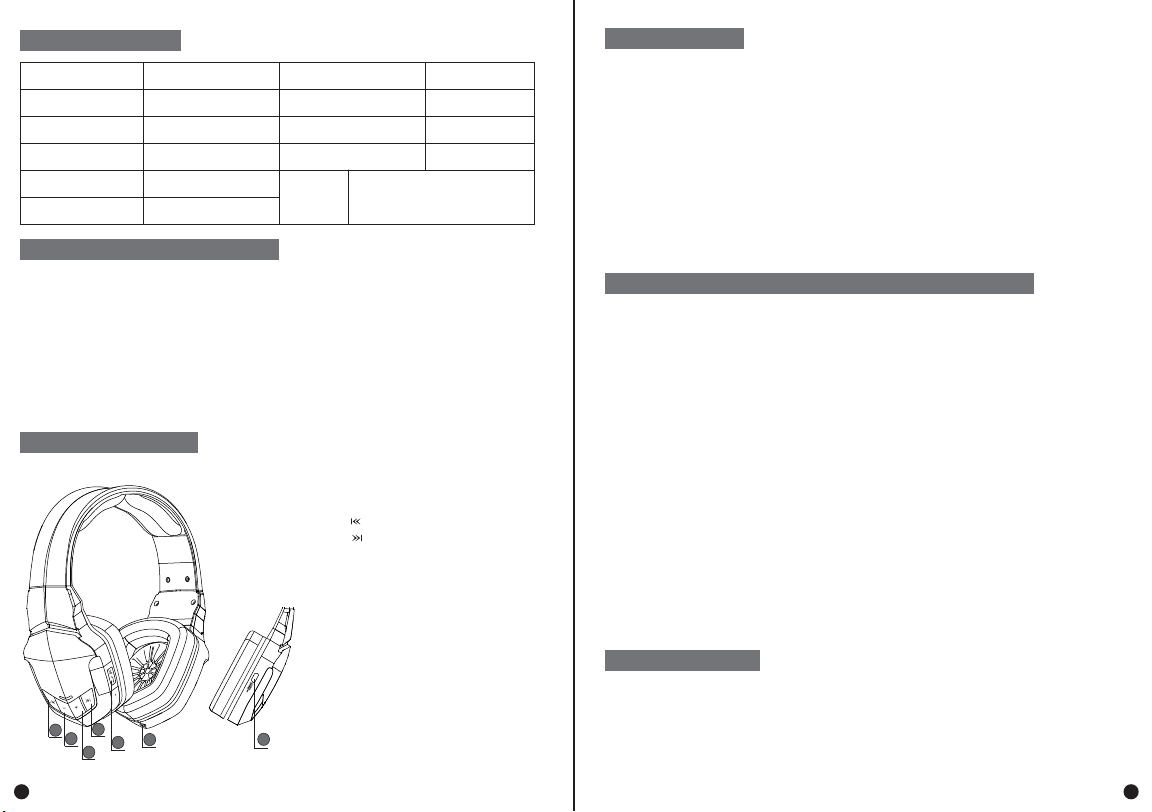
CONNECT TO BLUETOOTH HEADPHONE
1.Press “+” button to increase the volume,
and there will be "beep" tone.
2.Press “-” button to reduce the volume
3.Press “ ” button to switch to
previous music
4.Press “ ” button to switch to next
music
5.Power on/off button; dial/answer/hang up
button; pause/play button
6.LINE IN port
FUNCTION INTRODUCTION
6
2
1
4
3
57
21
Altri manuali boAt Cuffia


