
BOBPERRY AUDIO ATC 2 Manuale utente

Bob Perry ATC 2 – Manual – Page 1/8
ATC 2
(Automatic Talkback Controller)
Manual
Preface
Thank you for purchasing Bob Perry ATC 2. To be able to get the best out of this pro uct, we
recommen you carefully rea these instructions.
Bob Perry ATC 2 (Automatic Talkback Controller) is a useful tool to spee up your recor ing
workflow an makes manually pressing a talkback button obsolete.
System Requirements
To use Bob Perry ATC 2, a Digital Au io Workstation (DAW) with support for AU (Mac), VST2
(PC, Mac), VST3 (PC, Mac) or AAX 64 bit (PC, MAC) is require . We thoroughly teste the
plug-in with various versions of the following DAWs:
Steinberg Cubase (Mac, PC)
Steinberg Nuen o (Mac, PC)
PreSonus Stu io One (Mac, PC)
Image-Line FL Stu io (PC)
A obe Au ition (Mac, PC)
Reaper (Mac, PC)
Logic Pro X (Mac)
Avi Pro Tools (Mac, PC)
Harrison Mixbus (Mac, PC)
Cakewalk Sonar (PC)
Installation – macOS
Extract the ownloa e .zip file, if it hasn’t been extracte automatically. Then simply open
the .pkg file an follow the installer’s instructions.
Installation – Windows
Extract the ownloa e .zip file, then open the installer file an follow the instructions.
The first installation path you will be prompte for will be the location of the manuals an the
uninstaller.
Then you will be aske for your VST2 paths. If you want to install the VST2 plug-ins, select the
VST2 path of your preferre DAW. If you on’t want to install the VST2 plug-ins, you will be
able to eselect the VST2 components after clicking ‘Next’.
Bob Perry ATC 2 Copyright © 2009-2021 Jonas Peters
VST is a software an tra emark of Steinberg Me ia Technologies GmbH. 011321160820

Bob Perry ATC – Manual – Page 2/8
What does Bob Perry ATC do?
Bob Perry ATC 2 can automatically mute your talkback channel when start recor ing or
playback in your DAW. So the musician in the recor ing room can always hear the engineer
when not recor ing or reviewing a recor ing. In a ition to this, it incorporates a compressor
for the talkback channel, which can be use to enhance intelligibility.
Definition of Terms
TALKBACK: A way for the engineer to talk to the musician
LISTENBACK: A way for the musician to talk to the engineer (an for the engineer to “listen”
to the musician)
Quick Start
Setting up Bob Perry ATC
1) Make a new track (mono). Call it “Talkback” or something similar.
2) On this track, select the input your talkback microphone is connecte to.
3) Loa Bob Perry ATC 2 into one of the track’s insert/FX slots.
4) Assign the output of this track to the hea phones mix of the musician.
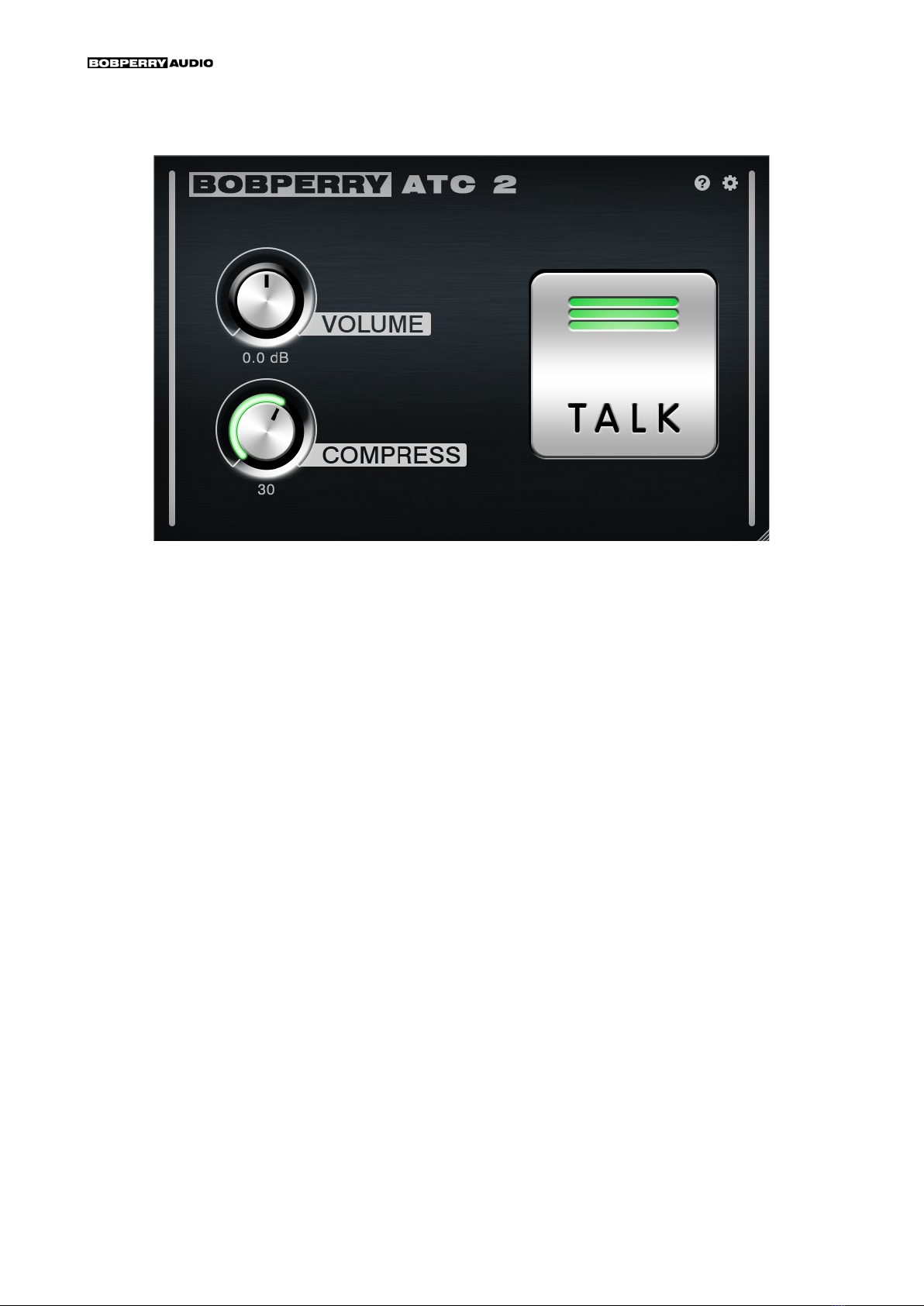
5) Fine tune this channel with the VOLUME an COMPRESS knobs.
6) (optional) Enable MIDI TRIGGER an assign a MIDI controller to control the TALK button.
7) (optional) a an ATC 2 plug-in instance to your master bus an enable
MASTER BUS MODE in it.
Bob Perry ATC Copyright © 2009-2021 Jonas Peters
VST is a software an tra emark of Steinberg Me ia Technologies GmbH. 011321160820
Bob Perry ATC – Manual – Page 3/8
User Interface
VOLUME
A justs the talkback volume.
COMPRESS
A justs the compression of the talkback signal. Higher values result in less ynamics.
Technically, this knob lowers the threshol of the integrate compressor. (higher value =
lower threshol )
This results in a more compresse talkback signal. The “make up gain” is automatically
increase to suit the integrate compressor's gain re uction.
TALK
Click an hol the TALK button to talk to the musician uring recor ing or playback.
Tip: You can use an external controller like a mi i keyboar or pe al to control the button. So
you on't have to open your plug in win ow to speak to the musician uring recor ing or
playback. To o so, enable MIDI TRIGGER. See below.
Talk Button LED
Lights up when talkback is active.
The colour in icates the amount of compression. (green = no compression, amber =
me ium compression, re = high compression)
Bob Perry ATC Copyright © 2009-2021 Jonas Peters
VST is a software an tra emark of Steinberg Me ia Technologies GmbH. 011321160820

Bob Perry ATC – Manual – Page 4/8
Preferences
Click the gear icon to isplay the plug-in’s Preferences. You will be greete with the
Preferences win ow:
MORE SETTINGS
MIDI TRIGGER
Enable MIDI TRIGGER mo e to control the TALK button with a key on your MIDI keyboar , or
your sustain pe al.
Refer to your DAW’s manual for information on how to make a plug-in receive MIDI data.
nder macOS, you can directly select your MIDI device under MIDI INP T.
After enabling MIDI TRIGGER, you will be greete with the MIDI NOTE knob. Use it to set the
note which shall trigger the TALK button.
Turn the knob all the way to the left for OMNI mo e. In OMNI mo e, all notes will trigger the
TALK button.
Turn the knob all the way to the right for SUSTAIN mo e. In SUSTAIN mo e, you can trigger
the TALK button with the sustain pe al of your MIDI evice.
Bob Perry ATC Copyright © 2009-2021 Jonas Peters
VST is a software an tra emark of Steinberg Me ia Technologies GmbH. 011321160820

Bob Perry ATC – Manual – Page 5/8
MASTER BUS
To further facilitate communication with a musician uring a recor ing session, you can use
MASTER BUS mo e as follows:
• Loa a Bob Perry ATC 2 into one of your DAW’s Master insert/FX slots.
• Enable MASTER BUS in this ATC 2 instance.
In the main interface win ow of this ATC 2 win ow, controls for DIM LEVEL an
LISTEN VOL will appear.
• Set a esire DIM LEVEL.
Now, each time you use the TALK button, or trigger it via MIDI, ATC 2 will im the
master mix by the set amount.
• (optional) Route a live listenback microphone input signal to the si e chain of this ATC 2
instance.
This will give you the possibility to hear the musician talking while the rest of your
recor ing is imme . A just the volume of the listenback signal with LISTEN VOL.
TALK buttons of all Bob Perry ATC 2 instances are synchronise , so pressing TALK on a non-
master bus ATC 2 will also trigger the imming of the master bus mo e-enable ATC 2.
Hint: If you want to use MIDI TRIGGER, you only need to set up MIDI TRIGGER in one instance
of Bob Perry ATC, as it will always trigger all instances simultaneously.
MANUAL MODE
When MANUAL MODE is enable , ATC 2 will remain mute even when playback or recor ing
is stoppe . You have to then always press TALK when you want to speak to the musician.
PREFERENCES
SAVE WINDOW SIZE
Saves the win ow size of the plug-in. When enable , all
Bob Perry ATC 2 instances will open with the same (last use ) win ow size.
SAVE PREFS GLOBALLY
When enable , the following settings will be store globally:
LO CUT FILTER, SAVE WINDOW SIZE, your win ow size
To restore Global Preferences to their default settings, double-click on
RESET PREFERENCES.
Bob Perry ATC Copyright © 2009-2021 Jonas Peters
VST is a software an tra emark of Steinberg Me ia Technologies GmbH. 011321160820

Bob Perry ATC – Manual – Page 6/8
LO CUT FILTER
Sets the low cut frequency for your talkback signal. Enable it to make your talkback signal
easier on your musician’s ears.
LO C T FILTER is not available in MASTER B S mode.
MIDI NOTE
When MIDI TRIGGER is enable , use this knob to select which MIDI note shall trigger the
TALK button.
Twist the knob all the way to the left for OMNI: ATC 2 will now react to all MIDI notes.
Twist the knob all the way to the right for SUSTAIN: ATC 2 will now react to presses of the
sustain pe al of your MIDI evice.
OPEN MANUAL
If you have selecte the manual option when installing the plug-in, you can click OPEN
MANUAL to open this manual.
CHECK FOR UPDATES
This will open a browser win ow with the Bob Perry Au io Up ate Checker. Click to see if
there is a new version available to ownloa .
WWW.BOBPERRY-AUDIO.COM
Click to visit our website.
Bob Perry ATC Copyright © 2009-2021 Jonas Peters
VST is a software an tra emark of Steinberg Me ia Technologies GmbH. 011321160820

Bob Perry ATC – Manual – Page 7/8
Appendix
Common plug-in installation paths
Windows
32-bit VST3 plug-ins in 32-bit environments
C:\Program Files\Common Files\VST3
32-bit VST3 plug-ins in 64-bit environments
C:\Program Files (x86)\Common Files\VST3
64-bit VST3 plug-ins in 64-bit environments
C:\Program Files\Common Files\VST3
VST2 plug-ins are usually installe into a subfol er of your DAW, calle “VSTplugins”
or “plug-ins”. Examples are:
C:\Program Files\Steinberg\Cubase\VSTPlugins (64-bit)
C:\Program Files (x86)\Steinberg\Cubase\VSTPlugins (32-bit)
AAX plug-ins in 64-bit environments
C:\Program Files\Common Files\Avid\Audio\Plug Ins
MacOS
VST3 plug-ins
/Library/Audio/Plug Ins/VST3/
VST2 plug-ins
/Library/Audio/Plug Ins/VST2/
Au io Unit plug-in components
/Library/Audio/Plug Ins/Components/
AAX plug-ins
/Library/Application Support/Avid/Audio/Plug Ins
You cannot use the Win ows 64-bit version in a Win ows 32-bit environment / DAW!
The macOS versions are 64-bit only.
Technical Notes
Signal processing floating point
Hea room theoretically over 1500 B, epen ing on your DAW. But more than
enough.
Bob Perry ATC Copyright © 2009-2021 Jonas Peters
VST is a software an tra emark of Steinberg Me ia Technologies GmbH. 011321160820

Bob Perry ATC – Manual – Page 8/8
We hope this manual leaves no questions unanswere .
If you still have questions, feel free to contact us:
support@bobperry-au io.com
Bob Perry ATC Copyright © 2009-2021 Jonas Peters
VST is a software an tra emark of Steinberg Me ia Technologies GmbH. 011321160820
Indice


