Bogen LUMDMU Guida

Lucent Technologies
Bell Labs Innovations
Multiple Digital Message Unit
Installation and Use Manual
Issue 1, October 1999
© 1999 Bogen Communications, Inc.
All rights reserved. 54-2024-01 9910
Model: LUMDMU
PEC Code: 5325-100
COM Code: 408184000
Select Code: 701-000-117

© 1999 Bogen Communications, Inc.
All Rights Reserved. Printed in U.S.A.
Repairs to this equipment, other than routine repairs, can be
made only by the manufacturer or its authorized agents.
Notice
Every effort was made to ensure that the information in this
guide was complete and accurate at the time of printing.
However, information is subject to change.
If the equipment causes harm to the telephone network, the
local telephone company may temporarily discontinue your
service and, if possible, notify you in advance. If advance notice
is not practical, you will be notified as soon as possible. You will
be given the opportunity to correct the problem and informed
of your right to file a complaint with the FCC.
FCC Statement (Part 15) - Radio Frequency
Interference
The Multiple Digital Message Unit generates and uses radio
frequency energy and if not installed and used in strict accor-
dance with the manufacturer's instructions, may cause interfer-
ence to radio and television reception. Testing is being con-
ducted for compliance with the limits for a Class B device in
accordance with the specifications in Part 15 of the FCC Rules
and Canadian D.O.C. regulations. This testing is designed to
provide reasonable protection against such interference.
However, there is no quarantees that interference will not
occur in a particular installation. If this equipment does cause
interference to radio or television reception, which can be
determined by turning the Multiple Digital Message Unit off
and on, the user is encouraged to try to correct the interfer-
ence by one or more of the following measures:
The local telephone company may make changes in its facilities,
operations, or procedures that could affect the proper func-
tioning of your equipment. If they do, you will be given ade-
quate notice in writing to allow you an opportunity to main-
tain uninterrupted telephone service.
Important Safety Information
Always follow these basic safety precautions when installing
and using the system:
- Reorient the radio or TV receiving antenna.
- Relocate the Multiple Digital Message Unit with respect to
the radio or TV receiver or vice-versa.
- Plug the Multiple Digital Message Unit unit into a different
outlet so that it and the radio or TV receiver are on different
branch circuits.
1. Read and understand all instructions.
2. Follow all warnings and instructions marked on the products.
3. DO NOT block or cover the ventilation slots and openings.
They prevent the product from overheating. DO NOT place
the product in a separate enclosure or cabinet, unless proper
ventilation is provided.
4. Never spill liquid on the product or drop objects into the
ventilation slots and openings. Doing so may result in serious
damage to the components.
5. Repair or service must be performed by a factory author-
ized repair facility.
6. The product is provided with a CSA approved, 3-wire
ground type plug. This is a safety feature. DO NOT defeat the
safety purpose of the grounding type plug. DO NOT staple or
otherwise attach the AC power supply cord to building sur-
If necessary, the user should consult the dealer or an experi-
enced radio/television technician for additional suggestions. The
user may find the following booklet. "How To Identify and
Resolve Radio-TV Interference Problems," helpful. This booklet
was prepared by the Federal Coommunications Commission
(FCC) and is available from the U.S. Government Printing
Office, Washington, DC 20402. Stock order No. 004-000-
00345-4.
Federal Communications Commission (FCC)
Statement (Part 68)
This equipment is component registered with the Federal
Communications Commission (FCC) in accordance with Part
68 of its rules. In compliance with the rules, be advised of the
following:
faces.
7. DO NOT use the product near water or in a wet or damp
place (such as a wet basement).
8. DO NOT use extension cords. The product must be
installed within 6 feet of a grounded outlet receptacle.
9. DO NOT install telephone wiring during a lightning storm.
10. DO NOT install telephone jacks in a wet location unless
the jack is specifically designed for wet locations.
11. Never touch uninsulated wires or terminals, unless the line
has been disconnected at the paging or controller interface.
12. Use caution when installing or modifying paging or control
lines.
Registered eqipment may not be used with Coin Telephone
Lines. Equipment may be used with Party Lines in areas where
state tariffs permit such connections and when equipment is
adaptable for such service.
Support Information
Paging systems integrated with small phone systems such as
Merlin Legend and Partner are supported by the National
Service Assistance Center (NSAC). The main number for the
NSAC is 800-628-2888. Paging systems integrated with large
switches such as the DEFINITY G3 are supported by the
Technical Service Center (TSC). The main number for the TSC
is 800-242-2121.
This equipment is registered as follows:
Registration Number - F4PCAN-20988-AN-N
Ringer Equivalence -1.6B
If trouble is experienced, the equipment should be disconnect-
ed from the interface to determine if this equipment, or the
telephone line is the trouble source. If the equipment is deter-
mined to be malfunctioning, it should not be reconnected until
repairs are effected.
Domestic and International Approvals
CSA Certified LR55025;NRTL/C Certified: FCC Part 15 and
Part 68.

Table of Contents
■
■
■
■
■
■
■
■
■
■
■
■
■
■
Introduction 1
Before You Start 1
Installation Steps 2
Power Up System 6
Front Panel Operation 7
Controls and Indicators 7
Recording Messages 7
Listening to Recorded Messages 9
Playing Messages 10
Playing Messages in Sequence 11
Adding a Time Delay Between Message Plays 12
Clearing a Message Sequence 13
Checking Message Times 14
Reset Delay Times to Default 15
Audio and Memory Tests 15
Audio Test 15
Memory Test 16
Telephone Access Operation 17
Recording Messages 17
Listening to Recorded Messages 17
Playing Messages 18
Clearing a Message Sequence 18
Specifications 19
iii

Introduction
The Multiple Digital Messaging Unit (MDMU) is a micro processor based
digital voice announcement system. It outputs prerecorded messages
through a public address system. Up to 99 messages can be placed in
the units digital memory for queued replay. Up to eight messages can
be programmed to play in sequence with timed delays.
Depending on the amount of memory option configured in the MDMU,
multiple messages can range from 32 seconds up to 8 minutes 44
seconds in length. Voice and audio messages can be stored into
memory through dial-up telephone, microphone interface, or tape input.
(The MDMU is programmed by dial-up telephone DTMF tones.)
This guide gives installation, recording, and programming steps. Since
messages are digitally stored, and there are no moving parts, the MDMU
should give years of uninterrupted service.
Before You Start
Before installing your system, read and understand the safety instructions
on page ii. Be sure you have all the necessary parts, tools, and test
equipment, listed below.
1
2
Read important Safety Information on Page ii.
Check Shipping Container Contents.
■
■
■
■
Multiple Digital Messaging Unit
Mounting Hardware (screws and brackets)
Cables, RJ-21 to wire lug end and power cord
This Installation and Configuration guide
1

3
Have Required Tools
The following tools are required for the installation of the MDMU
hardware an cabling.
■
■
■
■
■
■
■
Phillips screwdriver (small and large)
Standard blade screwdriver (small and large)
Wire strippers (24 AWG - 12 AWG)
Telephone test set
Tone out circuit tester (optional, for troubleshooting)
Volt-ohm Meter (optional for troubleshooting)
4 wood screws, if mounted on wall
Installation Steps
1
Mount the MDMU to either a wall, cabinet or a rack
(near the paging equipment if possible).
Figure 1. Wall Mounted Unit
2

Figure 2. Rack Mounted MDMU
2
Connect the MDMU to the Telephone System
MOST
TELEPHONE
SYSTEM
AUX. CONNECTOR
J1
REM
OPTION
BATTERY
SWITCH
OFF ON
TIP AND RING FROM
ANALOG STATION
Figure 3 MDMU Connection to Telephone System
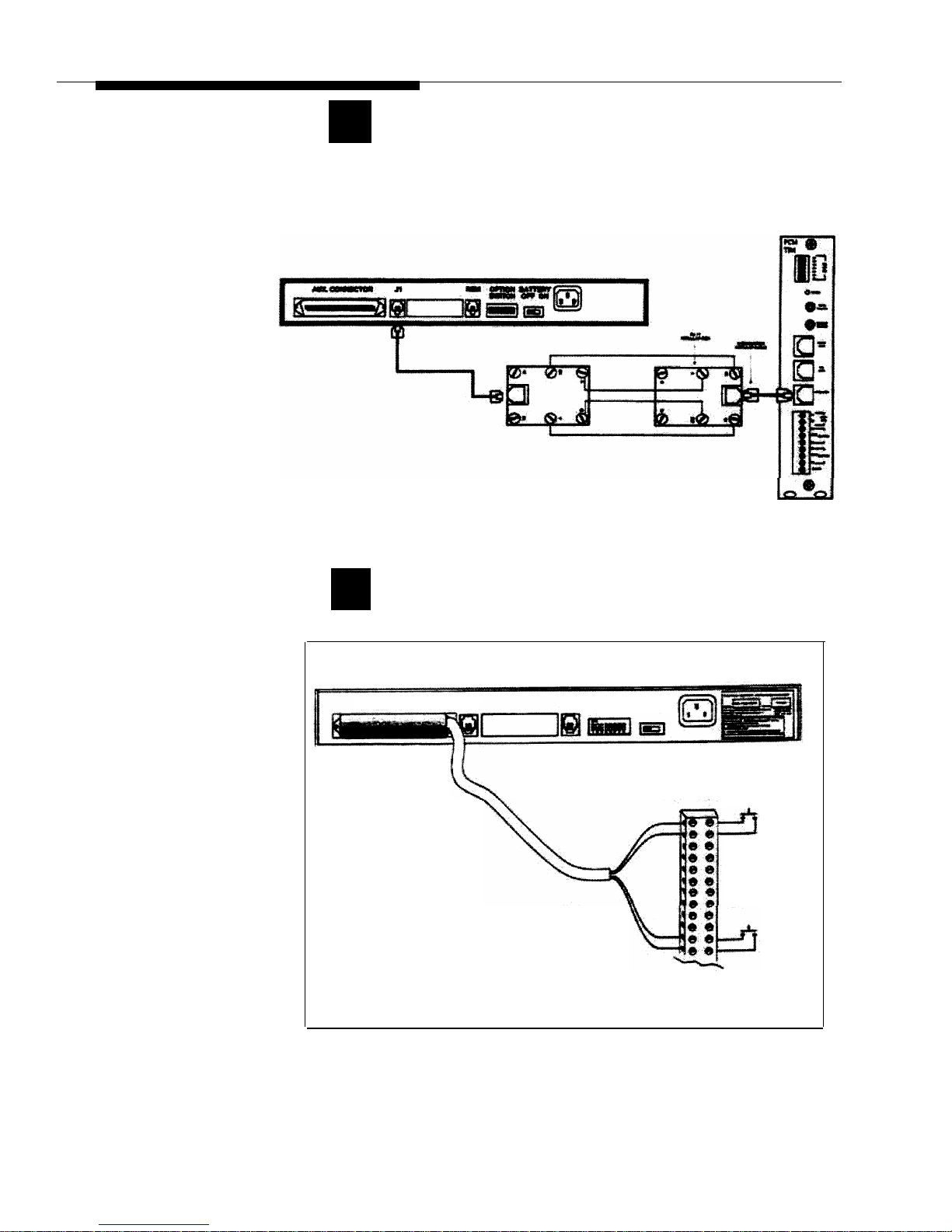
3

3
Plug the modular cord into connector J1 on MDMU
and connect the wires on the other end to the
Over Ride terminal.
Figure 4. MDMU Connection to Over Ride
4
Connect the RJ-21 cable/connector to the MDMU Aux.
Interface and to terminal block.
NOTE: For specific pin-out
information for this connector
refer to Figure 9 at the end of
this guide. Messages 1
through 6 correspond to
message starts 1 through 6.
AUX. CONNECTOR
J1
REM
OPTION BATTERY
SWITCH OFF ON
RJ-21 CABLE AND
CONNECTOR
SCREW LUG
TERMINAL BLOCK
MESSAGE #1
TYPICAL CONNECTION
TO MOMENTARY
CONTACT CLOSURE
TO START MESSAGE
MESSAGE #6
TYPICAL
CONNECTION TO
TERMINAL BLOCK
Figure 5 Connection of RJ-21 Cable to MDMU.
4

5
Set the MDMU options on the DIP switch. Refer to
the table below.
NOTE: Switches 1, 2, and 3
sets the number of messages in
a single queue sequence. The
timing between those
messages is set by switches 4,
5, and 6. Switch 7 sets the
total possible number of
messages for the unit. Switch
8 is always in the ON position.
REM
OPTION BATTERY
SWITCH OFF ON
Figure 6 Set MDMU Options on DIP Switch
Table 1. DIP Switch Setting Definitions
MAX. No. of
MESSAGES IN
SEQUENCE:
SET
SWITCH
# 1 TO
SET
SWITCH
# 2 TO
SET
SWITCH
# 3 TO
SET
SWITCH
# 4 TO
SET
SWITCH
# 5 TO
SET
SWITCH
# 6 TO
SET
SWITCH
# 7 TO
1
ON ON ON
————
2
OFF
ON ON
— — ——
3
ON OFF ON
— — — —
4
OFF
OFF ON
————
5
ON ON
OFF
— — — —
6
OFF
ON
OFF
————
7
ON OFF
OFF
— — — —
8
OFF
OFF
OFF
————
DEFAULT DELAY BETWEEN MESSAGES:
0:05
—— —
ON ON ON
—
0:10
———
OFF ON ON
—
0:30
———
ON
OFF
ON
—
1:00
———
OFF
OFF
ON
—
5:00
—— —
ON ON
OFF
—
15:00
— — —
OFF ON
OFF
—
30:00
———
OFF
OFF
OFF
—
NUMBER OF MESSAGES AVAILABLE:
1 TO 9
ON
01 TO 99
——————
OFF
5

Power Up System
Plug the power cord into the A.C. input connector on
the MDMU, then into the wall oulet.
The MDMU will display three messages in sequence:
MDMU 2.00
Software version of unit.
3.16
Total time available in memory for
recording.
IDLE
Indicates the status MDMU: Idle = no
activity; PLY = A message is being
played out through connector J1; Delay =
the time delay between successive
messages is active.
Push the Battery slide switch to the ON position.
1
2
NOTE: The internal battery
maintains the recorded
messages two hours in the
event of a power failure or
brownout. Allow 48 hours to
fully charge.
The MDMU is now ready to record and play meassages.
If power is to be removed from
the MDMU for an extended
period of time, turn the battery
switch to the Off position to
avoid permanent damage to
the battery.
REM
OPTION BATTERY
SWITCH OFF ON
NOTE: The suggested reliable
lifetime of the rechargeable
battery used in the equipment
is 36 months. To ensure the
system has reliable battery
backup, it is recommended
the battery be replaced every
30 months.
Figure 7 Battery Switch
6

Front Panel Operation
The MDMU can record messages input from the front panel through the
Hand Set, Tape, and Mic connectors. The unit also record and store
messages input remotely through telephone access to the REM port using
a DTMF (touch tone) telephone.
Controls and Indicators
FRONT VIEW
HAND
FUNC RUN SET
TAPE
MIC
MULTIPLE DIGITAL
IDLE
MESSAGING UNIT
FUNCTION FUNCTION RUN TAPE MIC
DISPLAY SELECTION FUNCTION INPUT INPUT
BUTTON BUTTON HANDSET
INPUT
REAR VIEW
AUX. CONNECTOR J1 REM OPTION BATTERY
SWITCH OFF ON
50 PIN RJ-21 MESSAGE TELEPHONE OPTION BATTERY POWER
CONNECTOR OUTPUT ACCESS SWITCH SWITCH INPUT
Figure 8 Controls and Indicators.
Recording Messages
The highest priority message should be recorded on the lowest message
number (1) to ensure fastest replay (i.e. Fire in Building...).
1
2
3
Plug the telephone handset, microphone, or tape
player into the appropriate connector on the front
panel.
Press the (black) FUNC button until the RECORD
message is displayed.
RECORD
Press the (red) RUN button to display the message
number #1.
7
Indice
Altri manuali Bogen Telefono