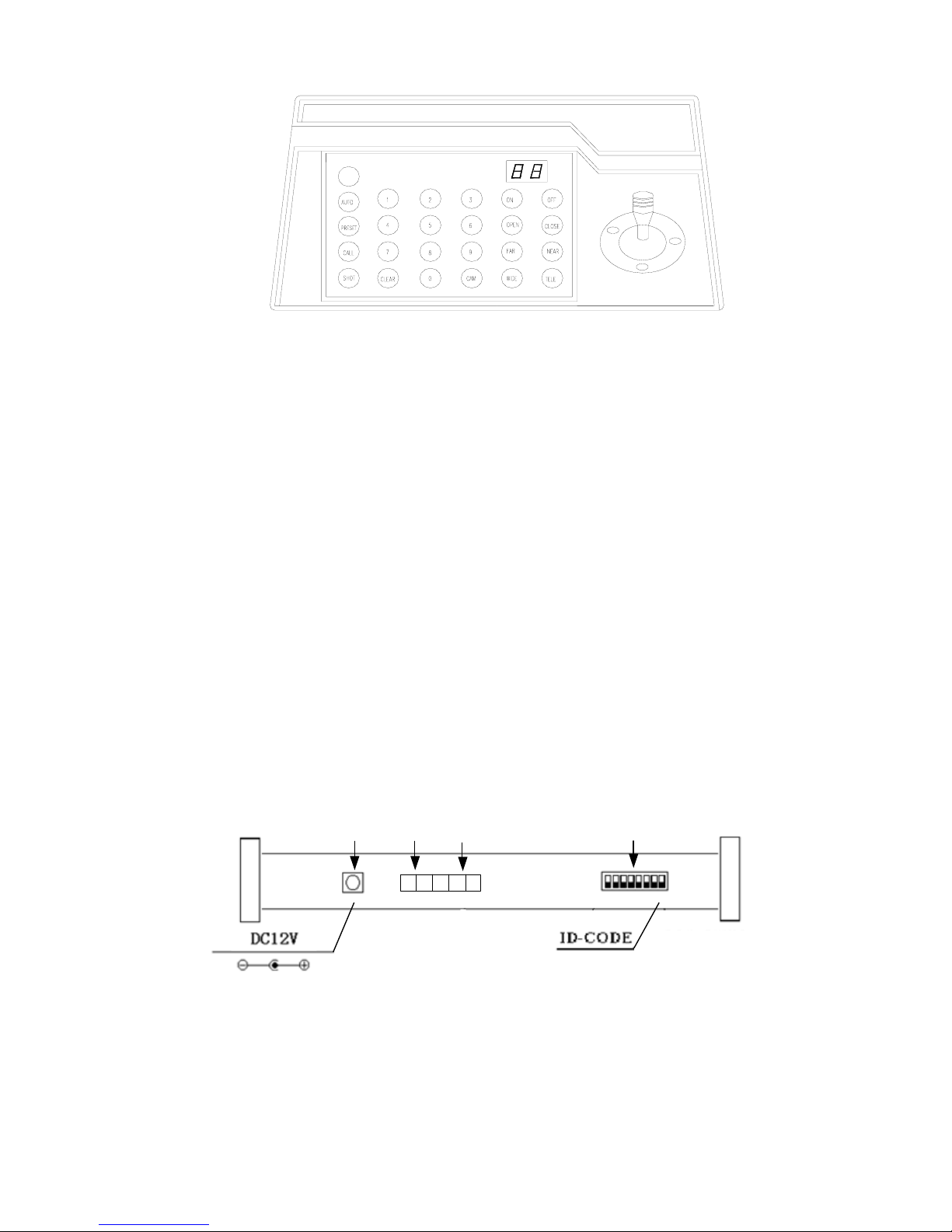
1. Select Address of Speed Dome Camera /Decoder:[N]+[ CAM]
Description:N –– No. of camera from 0 to 64
Function:Select the address of the camera to be controlled. When the value N is in conformity with the
address of the speed dome, it will be under control.
2. To set preset position:[N]+[ PRESET]
Description:N –– No. of preset position from 1 to 64.
Function:Store current position and refer it as No. N position.
3. Call the Preset position:[N]+[ CALL]
Description::N –– No. of preset position from 1 to 64.
Function:Transfer the camera to the position of No. N preset position.
4. Cancel the Preset position: [N]+[CLEAR]
Description:N –– No. of preset position from 1 to 64.
Function:Delete the No. N Preset position stored.
5. Tour the Track:[N]+ [SHOT]
Description:N –– No. of the track from 1 to 6.
Function:Tour the No. N track and stop tour by pushing the joystick.
6. To turn onAuto Pan (Operation of NEON、SAMSUNG Protocol):[AUTO]+[P1]+[ON]+[P2]+[OFF]
Description:P1 –– the starting scan No. of preset point from 1 to 64, which should be set already.
Description:P2 – the ending scan No. of preset point from 1 to 64, which should be set already. If P1 =
P2 or P1 and P2 are coincided, the speed dome will make scan in range of 360°.
Note:
①For PELCO-D、PELCO-P Protocol the way of operation is as follows:
Set the starting scan position: Transfer the Speed Dome to the starting scan position, operation
[AUTO]+[ON]
Set the ending scan position: Transfer the Speed Dome to the ending scan position,operation
[AUTO]+[OFF]
Run Auto Pan:[AUTO]+[SHOT]
②Auto Pan operation takes the following parameters. You must set these parameters before using a
Auto Pan command to begin the scan operation. You can use the scan stop command ot PT scan stop
command to stop the scan. Setting scan condition.
zAuto Pan Position(First specify position, second specify position)
zAuto Pan Speed and Direction
7. Stop Auto Pan:[AUTO]+[OFF]( Only A01、B01 Available) or push the joystick to stop scan
8. Control the zoom of the Camera:[WIDE]/[TELE]
9. Control the Focus of the Camera:[FAR]/[NEAR]
10. Control the Iris of the Camera:[OPEN]/[CLOSE]
11. Auxiliary Control of the Camera:By combination of [MENU] and [ON], [OFF] buttons, you can set
some data of the camera, and functions are listed as follows(operations of NEON Protocol):
Definition of Keyboard Operation
No. of
Value N Control Object [MENU]+N+[ON] [MENU]+N+[OFF]
0 Camera power supply/reset
control Power ON/OFF Switching Recover Initial
Values of Camera
1 Back Light Compensation ON OFF
2 Zero Illumination (refer to
function of camera) ON OFF
6