
Bornia Sound Enhancer Manuale utente


Package Content........................................................1
Bornia Specifications..........................2
Getting Started...........................................................3
Installation.............................................................4
Bornia Technology.................................................... ..5
Connecting your Bornia to a PC................................5
Connecting your Bornia to a CD or DVD Player............6
Connecting your Bornia to a Home Audio System........7
Connecting your Bornia to a Game Console........ ........ 8
Troubleshooting Guide...............................................9
Warranty Information................................................10
Index
-1-
-2-
We appreciate your purchase of the Bornia Sound Enhancer.
We hope that the Bornia Sound Enhancer provides you with
a rich sound experience.
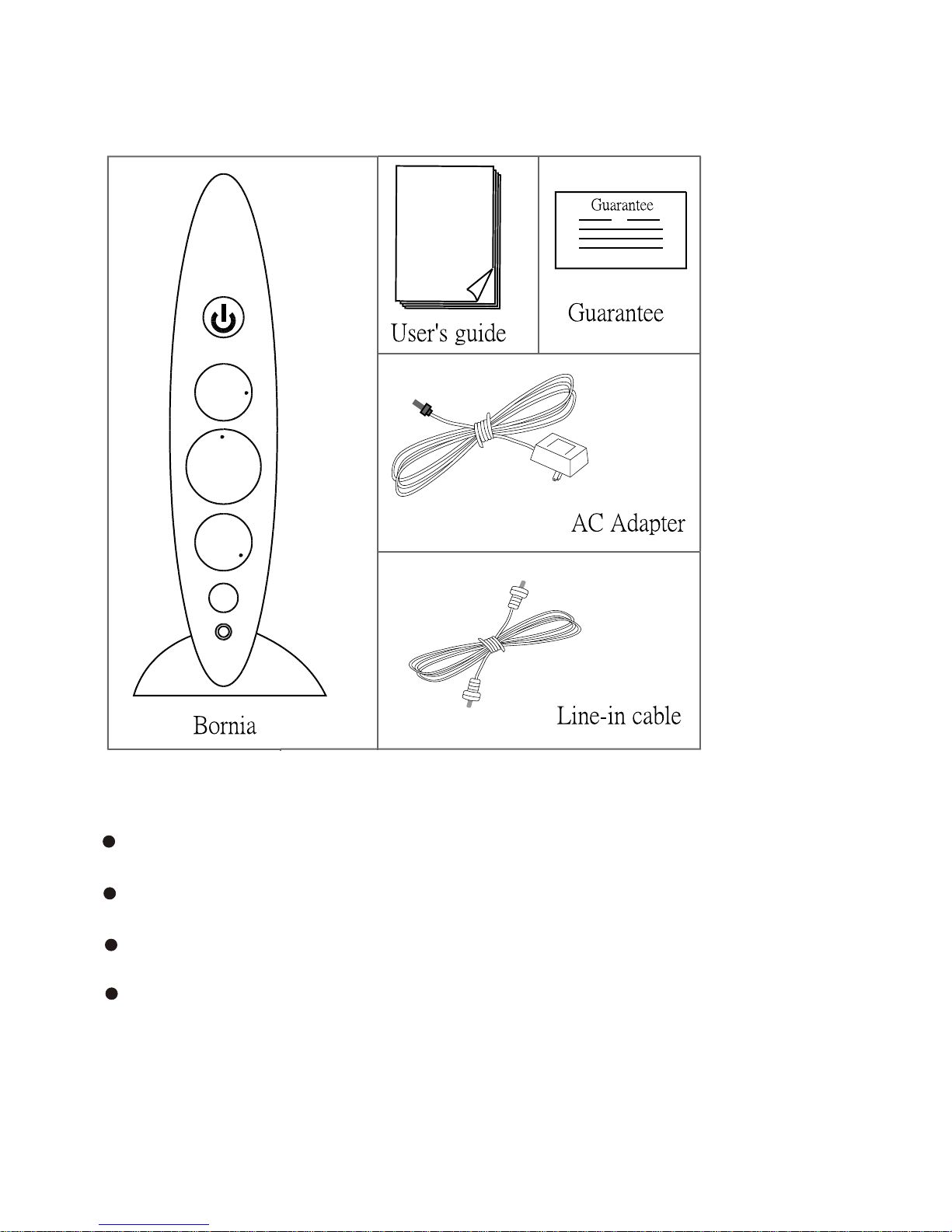
Items included in this package:
Bornia Sound Enhancer
Power Adapter
Stereo Line-in cable
User manual
Note: Additional audio cables may be required to install
the Bornia Sound Enhancer to your specific system.
Please refer to the installation section of this user
manual for your specific setup requirements.
Bornia Specifications
-3-
Mechanical:
Size: 232x140x50 (HxLxW) in mm
Weight: 0.7 kg(N.W)
Stereo IN/OUT
Headphone Output
Stereo Connection Cable
110 V AC/DC Power Adapter
Electrical:
Frequency Response: 20Hz to 20kHz Maximum Input
Maximum WOW on 2Vrms@1KHz
THD + N (-10dBu input, 20 Hz to 20 kHz) <0.4%
Power Output:
Headphones 400mW/Channel 2 (@32 Ohms)
Back of Bonia
9
8
7
Bonia
1
2
3
4
5
6

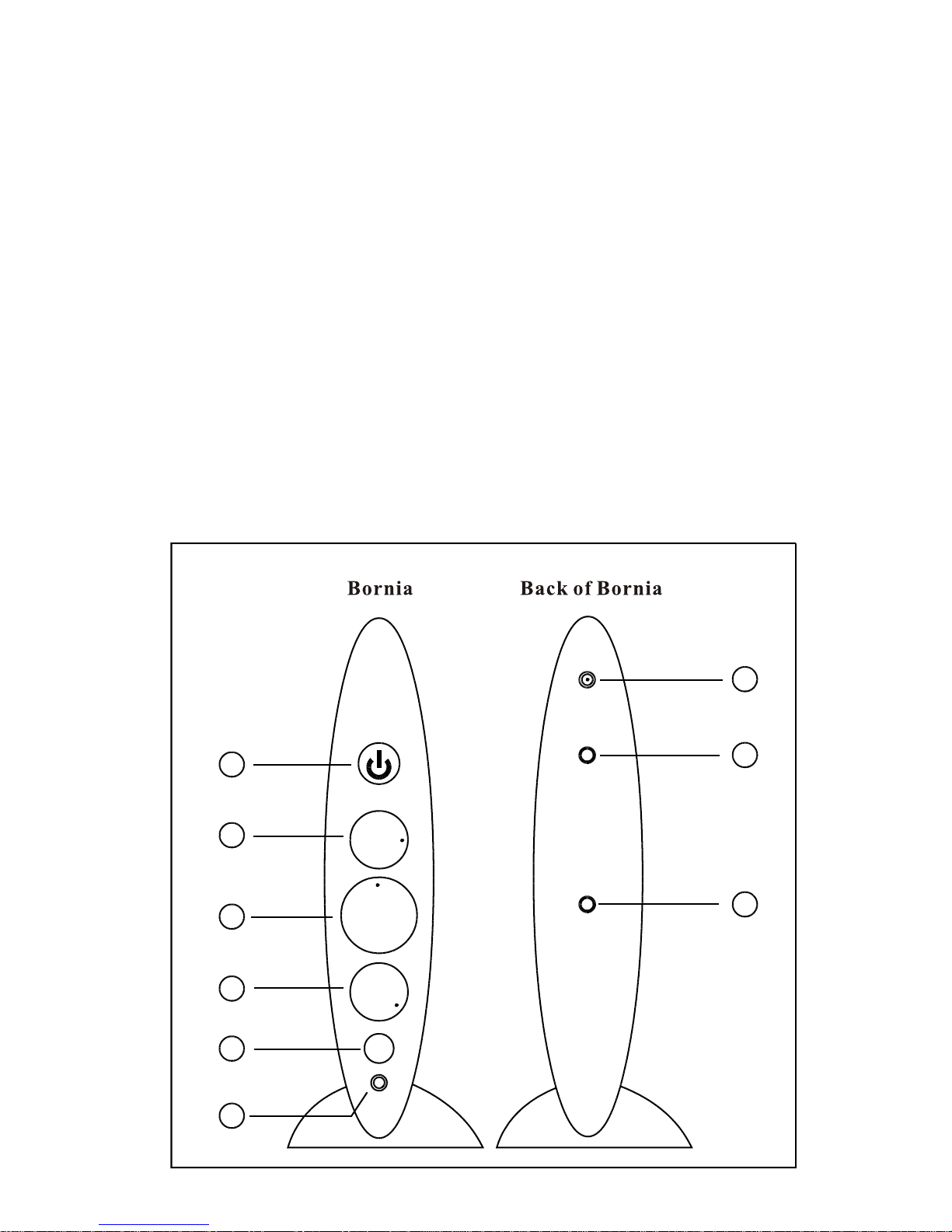
Description of Bornia Controls
1. Power switch Pushed: ON Pulled: OFF
2. WOW-SPACE :MAX :MIN
3. Volume Control :MAX :MIN
4. TruBass :MAX :MIN
5. WOW system or Bypass
Pushed: WOW system ON Pulled: Bypass
6. Headphone
7. ACInput
8. Audio source Input (Line-In)
9. Audio Output (Line-Out)
-4-
-5-
The Bornia Sound Enhancer can be connected directly to the
Line/Speaker output of any game station.
The Bornia Sound Enhancer connects line level inputs and outputs.
Amplification of your speaker system is required (e.g. Sub woofer),
so the output of the Bornia Sound Enhancer must be connected to
powered speakers, home Hi-Fi stereos, Stereo TV's, etc.
In addition the Bornia Sound Enhancer has a built-in headphone
connector providing high-quality personal sound experience with
any headphone.
Bornia Sound Enhancer Technology Overview
The Bornia Sound Enhancer combines proven technology used
exclusively in high-end audio systems and WOW' a sophisticated
digital audio enhancement technology developed by SRS Labs, Inc.
and exclusively licensed to the Bornia Sound Enhancer. The Bornia
Sound Enhancer delivers sound enhancements to any amplified
stereo audio signal of any Hi-FI stereo system, PC, portable CD,
MP3 player, Cassette player, Game Consoles, Karaoke System
or Home Theater System. Bornia enhances digitally the stereo
image and provides rich and realistic bass to any speaker or
headphone.
BORNIA EX
Back of Bornia
AC
Line In
Line Out
AC Adapter
Installation
-6-
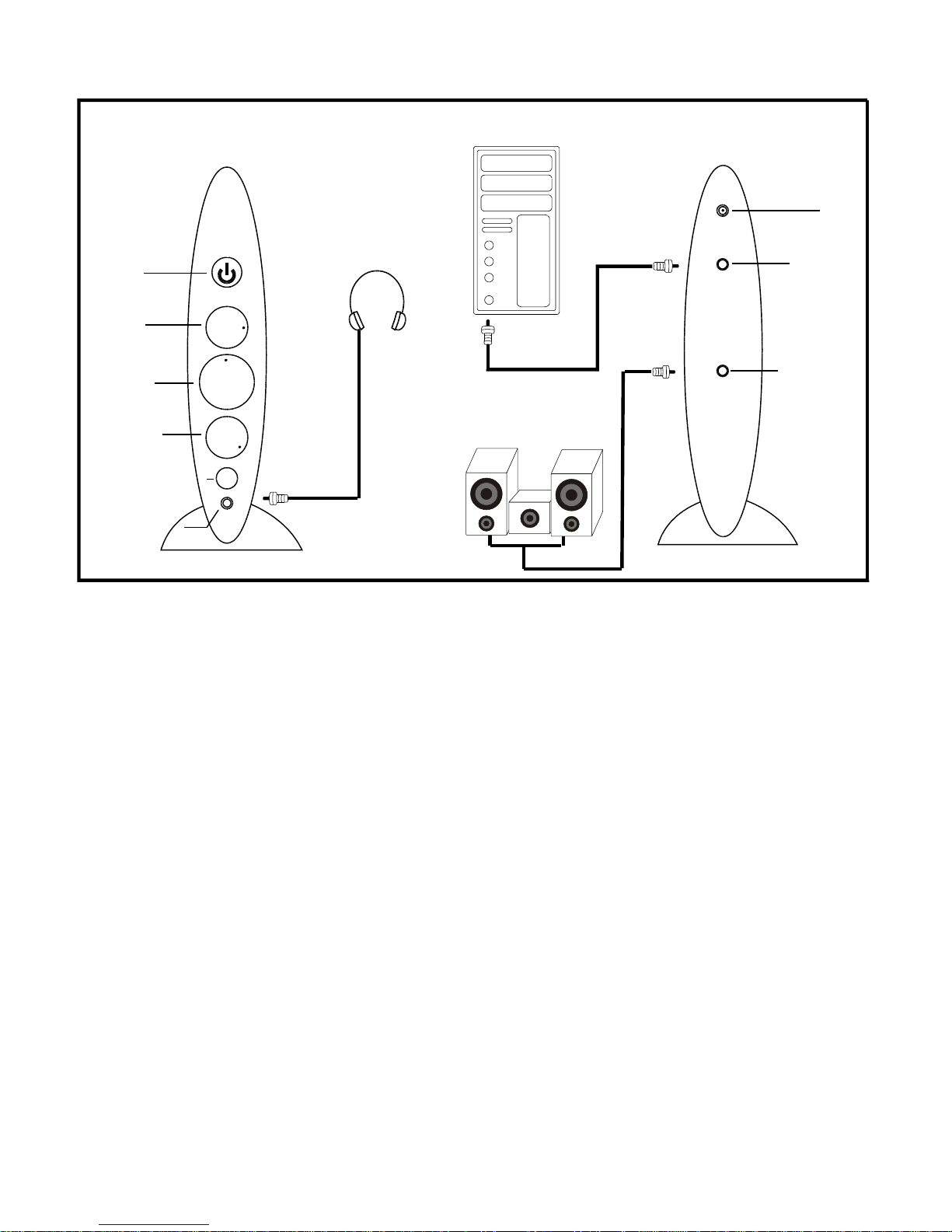
This installation requires a stereo-mini-to-stereo-mini cable.
Connect the audio sound card output jack (Line level output)
of your computer to BORNIA's input jack with a stereo-mini cable.
If your computer sound card does not have a line output, use
the speaker-out jack and adjust the level on the portable player
to roughly 75% of its volume level.
Connect the powered speakers system and audio system to
BORNIA's output jack.
If headphone is used, adjust the gain knob to minimum level (min)
before connecting the headphone.
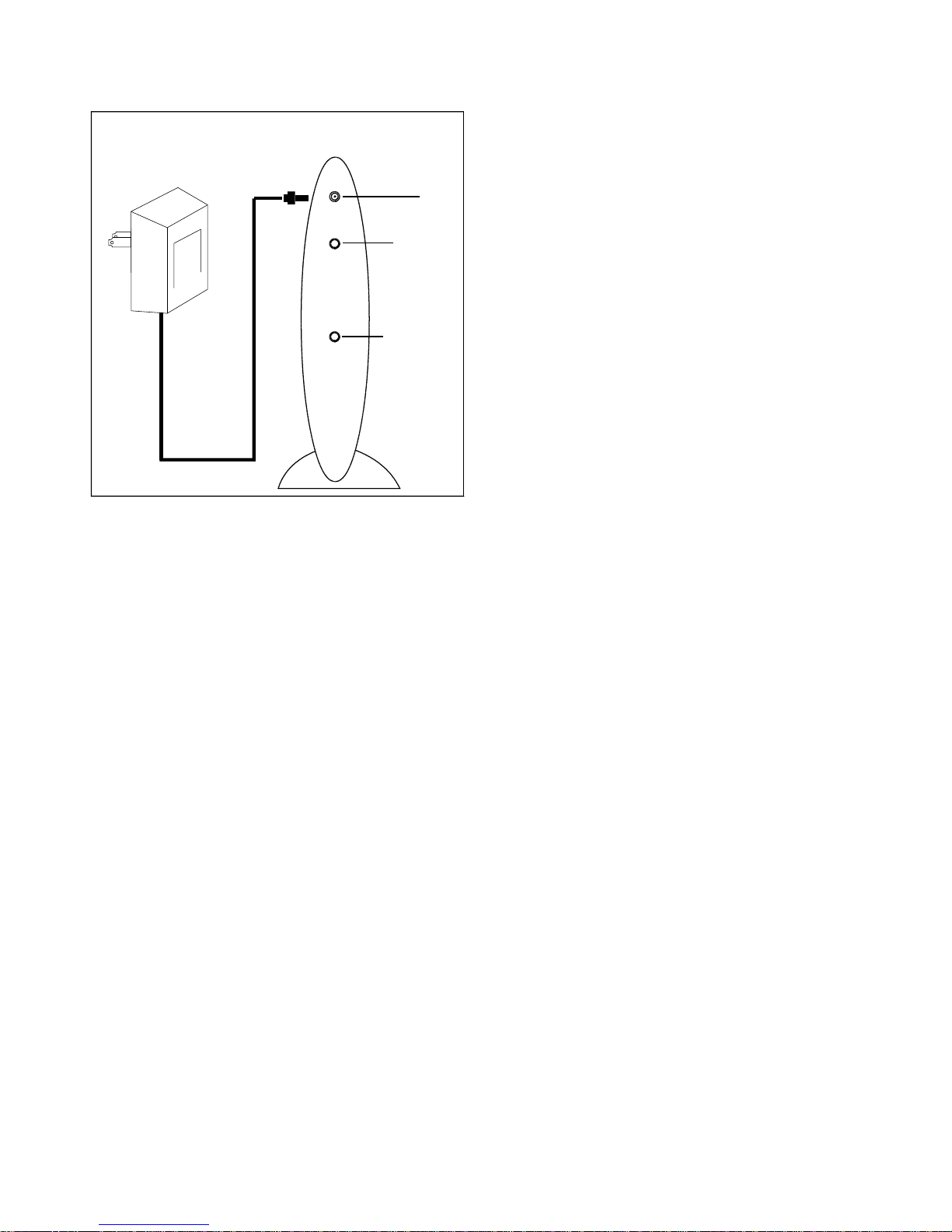
Connect the power adapter to the power connector and
to a standard outlet.
Connection your Bornia to a PC
Back of Bornia
AC
Line In
Line Out
Back of Computer Sound Card
Headphones
2+1Speakers
Power
WOW
volume
TruBass
WOW/Bypass
Headphone
Bornia
V
-7-
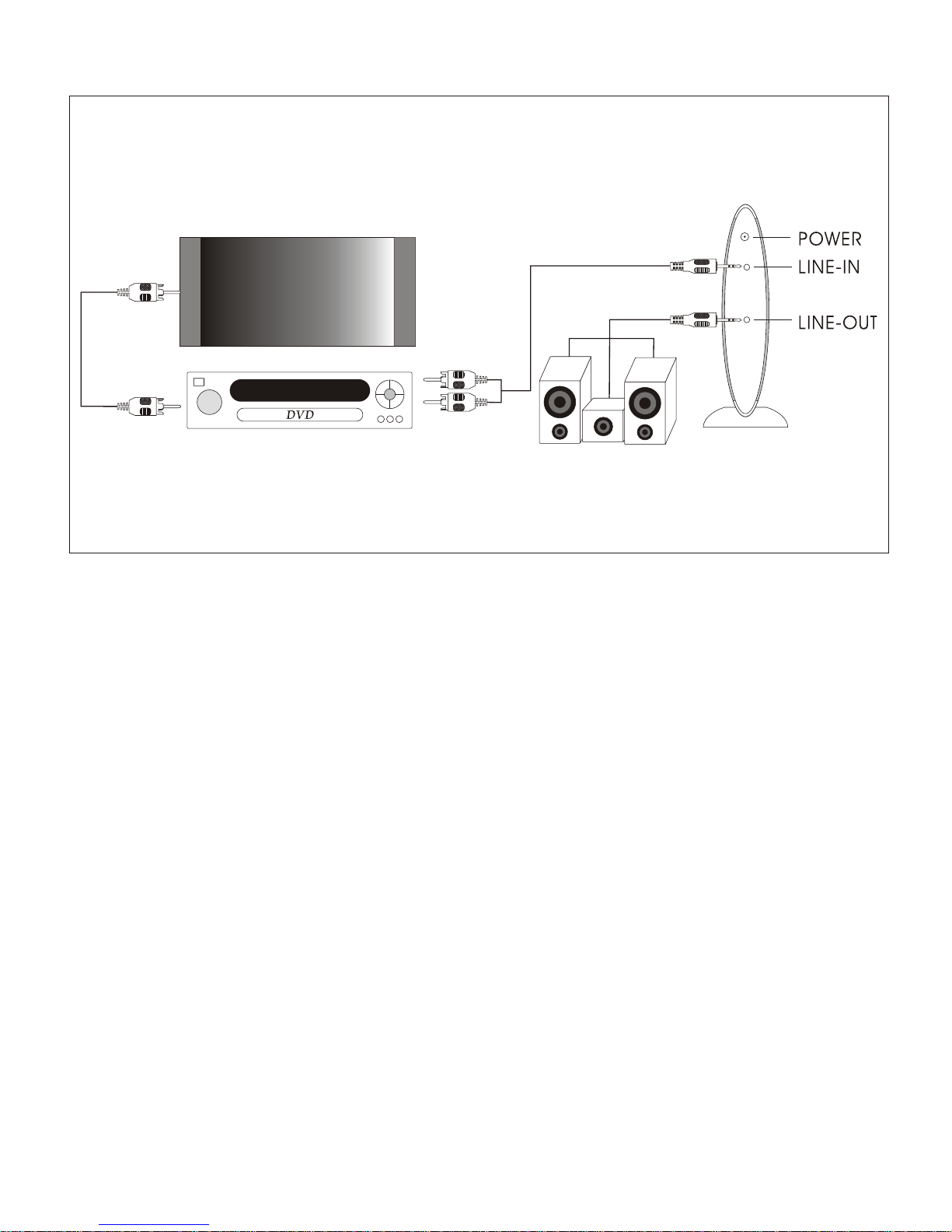
This installation requires one stereo-mini to stereo-mini or RCA
to stereo-mini cables. It will provide enhancement to all audio
components connected to the CD/VCD/DVD Player.
Connect the Audio output of the CD/VCD/DVD Player to the
input of BORNIA by stereo-mini to stereo-mini or RCA to stereo
mini cable.
Connect the powered speakers system and audio system to
BORNIA's output jack.
If headphone is used, adjust the gain knob to minimum level (min)
before the headphone.connecting
Connect the power adapter to the power connector and
to a standard outlet.
TV
Video Out
Audio Out
Connecting your Bornia to a PC
-8-
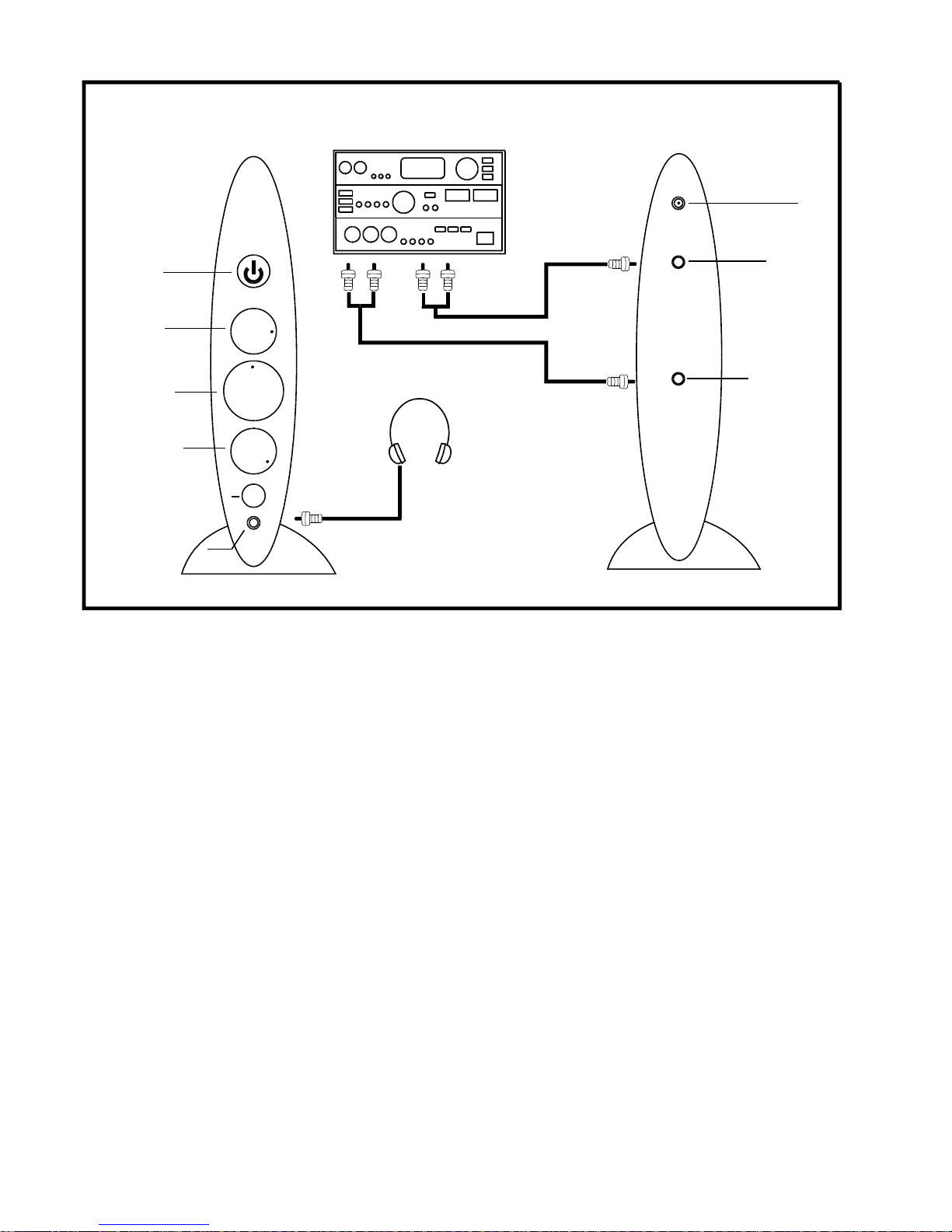
This installation requires two RCA to stereo-mini cables.
Connect the BORNIA to only one Audio component such as a CD
player or tuner by:
Connect the audio output of the component to BORNIA'sinput by
stereo-mini to stereo-min or RCA to stereo-mini cable.
Connect the output of BORNIA to any Aux input (CD,tuner, tape-in,
etc) of the stereo or A/V amplifier by RCAto stereo-mini cable.
If headphone is used, adjust the gain knob to minimum level (min)
The input selector of the stereo or A/V amplifier must be
set at the correct input setting.
before connecting the headphone.
Connect the power adapter to the power connector and to
a standard outlet.
Connecting your Bornia to a CD or DVD Player
Back of Bornia
AC
Line In
Line Out
Power
WOW
volume
TruBass
WOW/Bypass
Headphone
Bornia
Headphones
Stereo Audio
RLRL
V
Indice


