
Boss Audio Systems ELITE BV965NV Manuale utente

Congratulations on your purchase of a
Specifications....................................................................................................
Safety Notice....................................................................................................2
Accessories......................................................................................................3
Unit Installation.................................................................................................
Remote Control Operation...............................................................................
Wires Connection Description..........................................................................5
Panel Introduction............................................................................................
Main Menu Operation Instruction.....................................................................
Access Setup Interface....................................................................................
General Settings.......................................................................................
Camera Settings.......................................................................................
Clock Settings...........................................................................................
Audio Settings...........................................................................................
Tuner Settings.........................................................................................10
IIIumination Settings................................................................................
About Settings.........................................................................................
Tuner Operation.............................................................................................
DISC/CD/USB/SD Playback...........................................................................
DVD Mode Operation.............................................................................
Media Playing—CD Audio.....................................................................
CD Source Menu ...................................................................................
USB/SD Music/Video/Picture.................................................................
Bluetooth Operation.......................................................................................
Bluetooth Operation Menu.....................................................................
Bluetooth Keypad...................................................................................14
Bluetooth Call.........................................................................................14
Bluetooth Phonebook.............................................................................15
Bluetooth Phone Call History.................................................................
Bluetooth Music Steaming-A2DP...........................................................15
Bluetooth Pair Device.............................................................................
Photos............................................................................................................
Camera/Aux/AV Menu...................................................................................
Troubleshooting.............................................................................................
BOSS Audio Systems®
Multimedia Receiver.
It has been designed, engineered and manufactured to bring you
the highest level of performance and quality, and will offer you
years of entertainment pleasure.
4
6
7
7
8
8
9
9
10
11
11
12
12
13
13
13
14
14
15
15
16
16
17
1
3
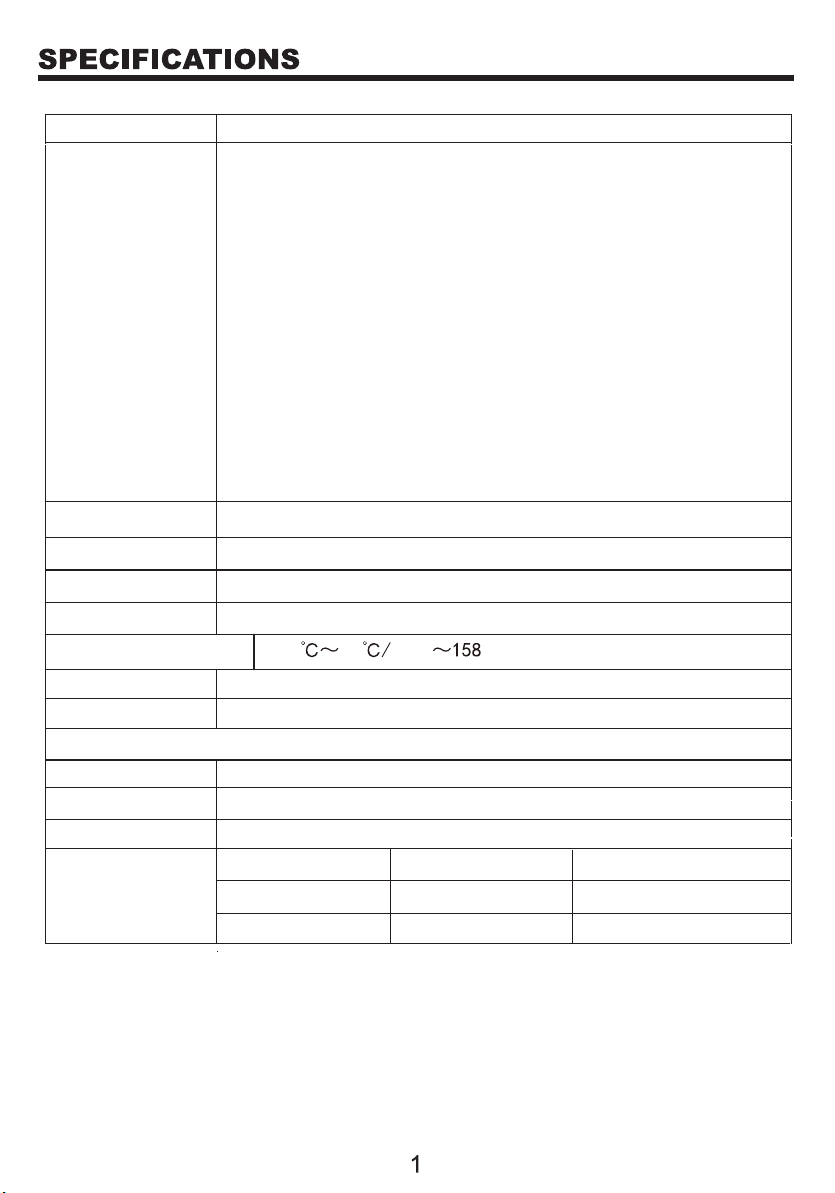
Model No.
General
features
800 x 480 pixelsTFT screen
SD
Working power
Max Output
Working Temperature
Installation Size
Weight
Compatible Media
Picture
Disc
Audio file MP3/WMA/FLAC
CD/CD-R/CD-RW/DVD/DVD±R/DVD±RW
JPG/JPEG/BMP
1.86 kg / 4.1 lbs
6.71" x 3.8" x 5.67" (170.5 x 96.5 x 144 mm)
-20 70 -4 F F
。。
4 x 80W
12V
Up to 32G
BV965NV
FM/AM radio
DVD fully compatible with
DVD/VCD/CD/MP3/MPEG4/JPEG
AUX input
AV input
Video output
Front/Rear view camera support
Format
MPEG1
MPG
MPEG1
MPEG2
MP2
MP2
Video file
Video code Audio code
GPS support
Fixed front panel with 6.2 inch TFT screen
USB and SD card media play support
Bluetooth audio stream and hands-free phone call
Front, rear and subwoofer pre-amp output
Max. 4 x 80W power output
Steering wheel control (SWC)

Please read and understand the following safety information before operating this unit.
The unit is suitable for 12V power supply (requires grounding). Do not connect
it to 24V power supply in trucks or buses, or else it will be damaged.
Please use genuine discs instead of incompatible discs or the unit will be
damaged and/or the service live will be shortened.
Do not replace the fuse without the guidance of qualified personnel or the unit
may be damaged and/or catch fire.
Please follow the traffic laws and regulations and do not watch programs or
operate the unit when you are driving to avoid accidents (excluding passengers
watching through rear monitor).
To ensure safety and normal unit operation, please ask qualified personnel to
install the unit. Do not disassemble or repair the unit without authorization.
To avoid damage and accidents, please contact a local car audio distributor for
details.
Do not put the unit in a moist environment or water to avoid electric shock,
damage, and/or fire due to a short circuit.
The mechanical drive part of the monitor uses an automatic precision transmission
component. Do not pull, push or rotate the unit by force or impact the TFT screen
to avoid damaging the unit.
Do not insert the audio plug of the vehicle into the master unit directly. Please
convert with the dedicated end cable provided by our company.
When installing the unit, prevent metal objects from falling into the master unit
from the vents to avoid a short circuit and damaging the unit.
Safety Statement
For the safety of yourself and others, do not watch programs or operate the unit
when you are driving. It is prohibited by law.
The back up camera function should be used as an auxiliary view only. We are not
responsible for any accidents occurred during backing.
UNIT INSTALLATION
GPS Antenna................................................................
Remote control..............................................................
Wire harness.................................................................
Mounting brackets........................................................
Bracket screws. .............................................................
Trim ring........................................................................
1
1
2
8
1
1
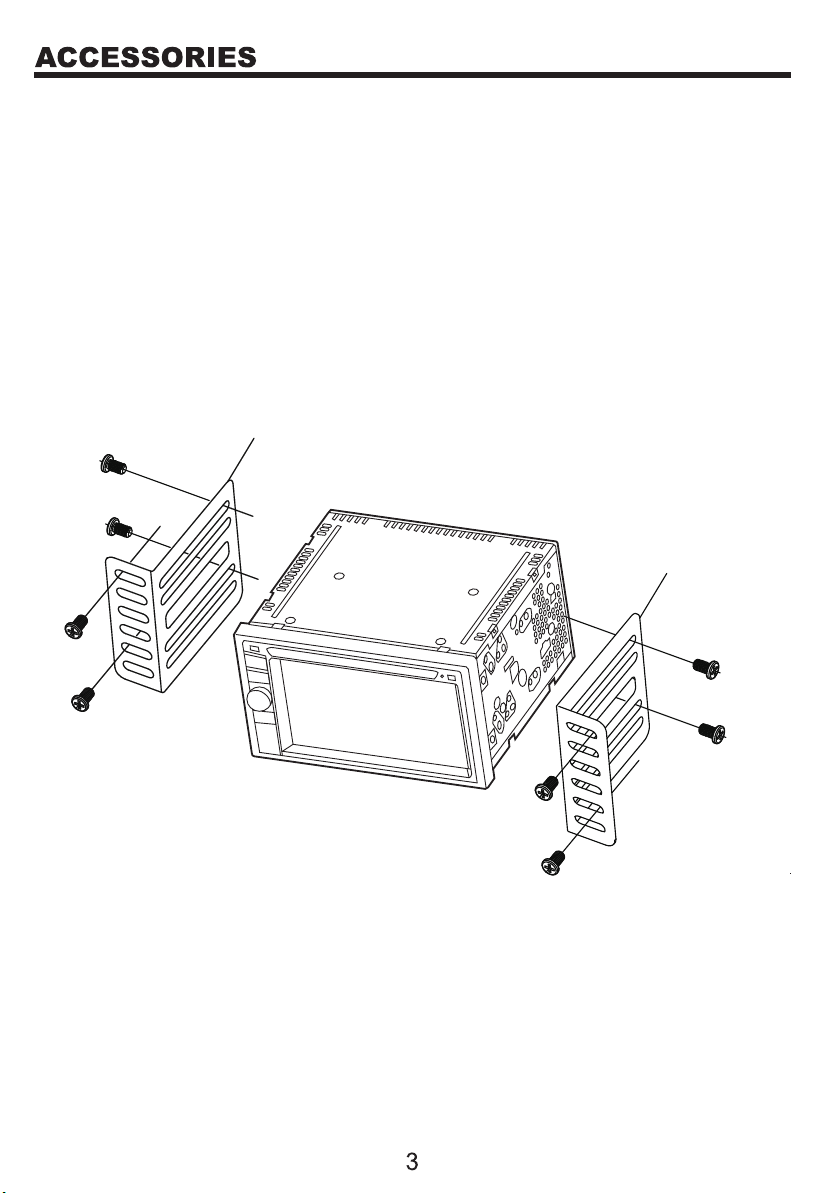
1. Put the 2 brackets to the left and right side of the unit.
2. Use the supplied screws to attach the brackets to the unit.
3. Once the screws are attached, the brackets can be adjusted forward
or backward depending on the installation requirements.
Bracket
Screw
Bracket
Screw
2
3
1
19
20
4
5
6
21
17
18
16
15
12
13
14
7
8
9
10
1
1
1
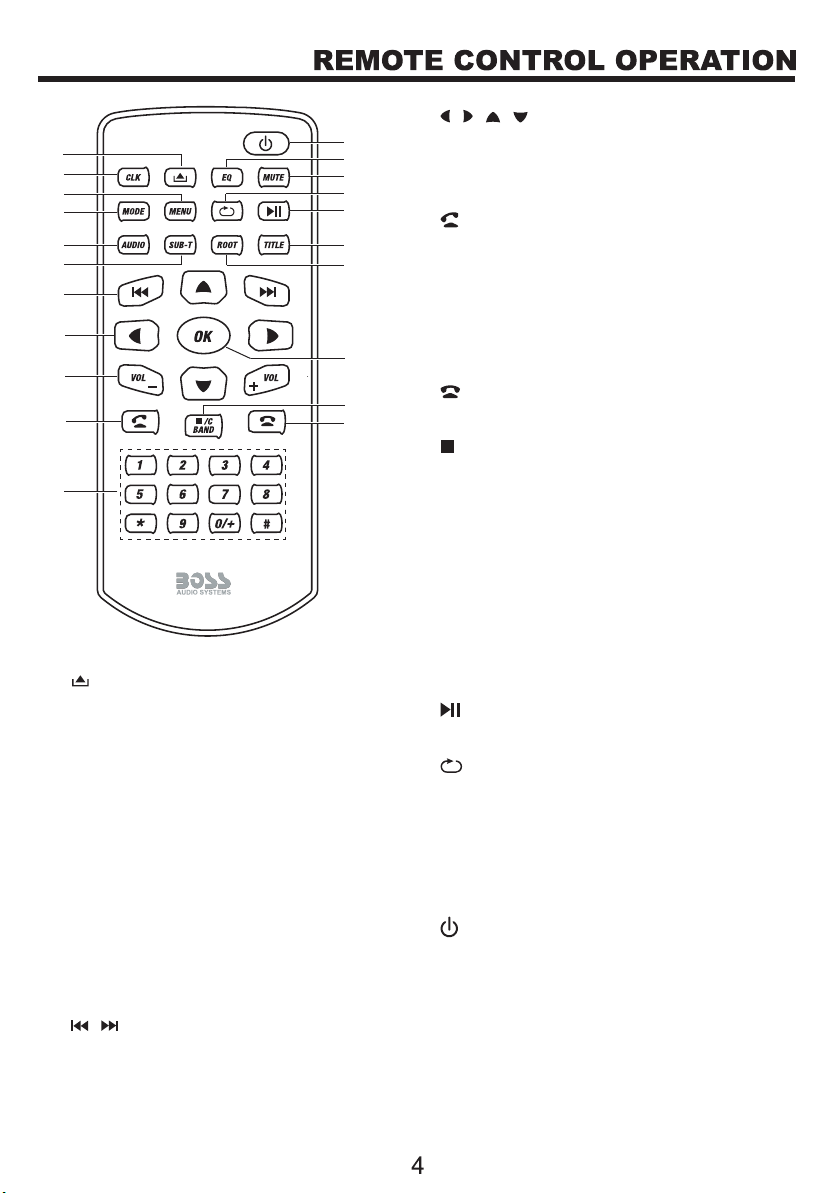
Eject the disc.
2
Display clock.
3
Switch between the home menu and
the last selected source.
4
5
Select an audio language or channel
for video.
6
Select a subtitle language for video.
8/ / /
Navigation menus.
9
Increase or decrease volume.
10
Answer or make a phone call.
11
12
End or reject a phone call.
13 /
• Stop playback.
Confirm an entry or selection.
• In radio mode, select a tuner band.
• Select a title/chapter/track.
• In radio mode, select a preset station.
•In Bluetooth phone mode, enter a phone
number or a special symbol.
14
15
Access the disc menu.
16
Display the main menu of a video disc and
start playback from the beginning.
17
Start, pause or resume playback.
18
Select a repeat play mode.
19
Mute or restore volume.
20
Select a preset sound mode.
21
Switch the unit on or to standby.
Switch between modes.
7/
• Skip to the previous or next chapter,
track or file.
• In radio mode, tune to a station.
CLK
MENU
MODE
AUDIO
SUB-T
VOL +/-
OK
ROOT
TITLE
MUTE
EQ
C BAND
Numeric buttons
WIRES CONNECTION DESCRIPTION
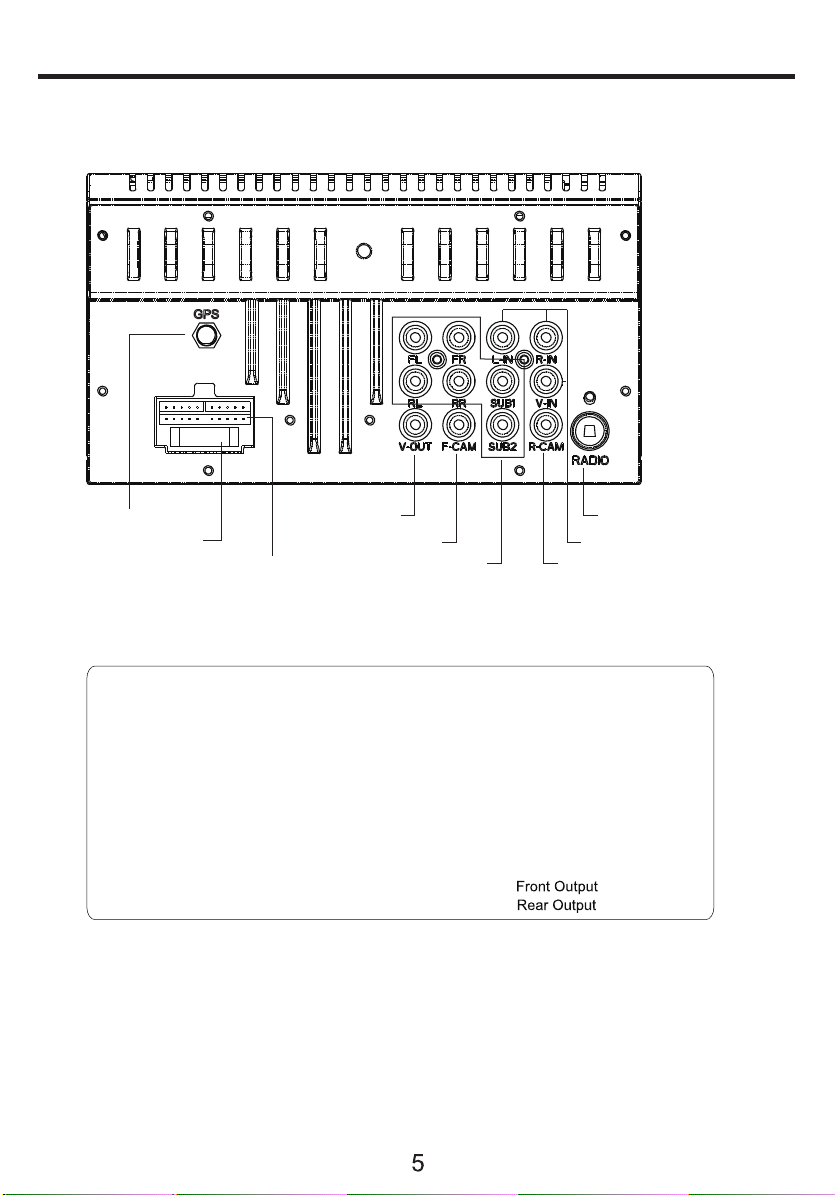
The Description of the Input/Output Interface
Power
Yellow................................... Constant (+12v)
Red..................................... Accessory (+12v)
Black.............................................. Ground (-)
Orange..................... Illumination Input (+12v)
Violet/Wht..................... Reverse Input (+12v)
Blue.................... Ant. Output (+12v, 500 mA)
Blue/Wht........... Rem. Output (+12v, 500 mA)
Lt.Green......................... Parking Brake Input
Control
3.5mm........................................... SWC Input
Speaker Outputs
White......................................... Left Front (+)
White/Blk.................................... Left Front (-)
Gray......................................... Right Front (+)
Gray/Blk................................... Right Front (-)
Green......................................... Left Rear (+)
Green/Blk.................................... Left Rear (-)
Purple...................................... Right Rear (+)
Purple/Blk................................. Right Rear (-)
Camera Power
Red/Violet......... (+12v, 500 mA)
Red/White......... (+12v, 500 mA)
Video Output AM/FM Antenna Jack
Front Camera Input
Wire Harness Connector
A/V Input
Rear Camera InputPre-Amp Audio Output
GPS antenna jack
Fuse
Wire Harness Explanation
PANEL INTRODUCTION
6
1
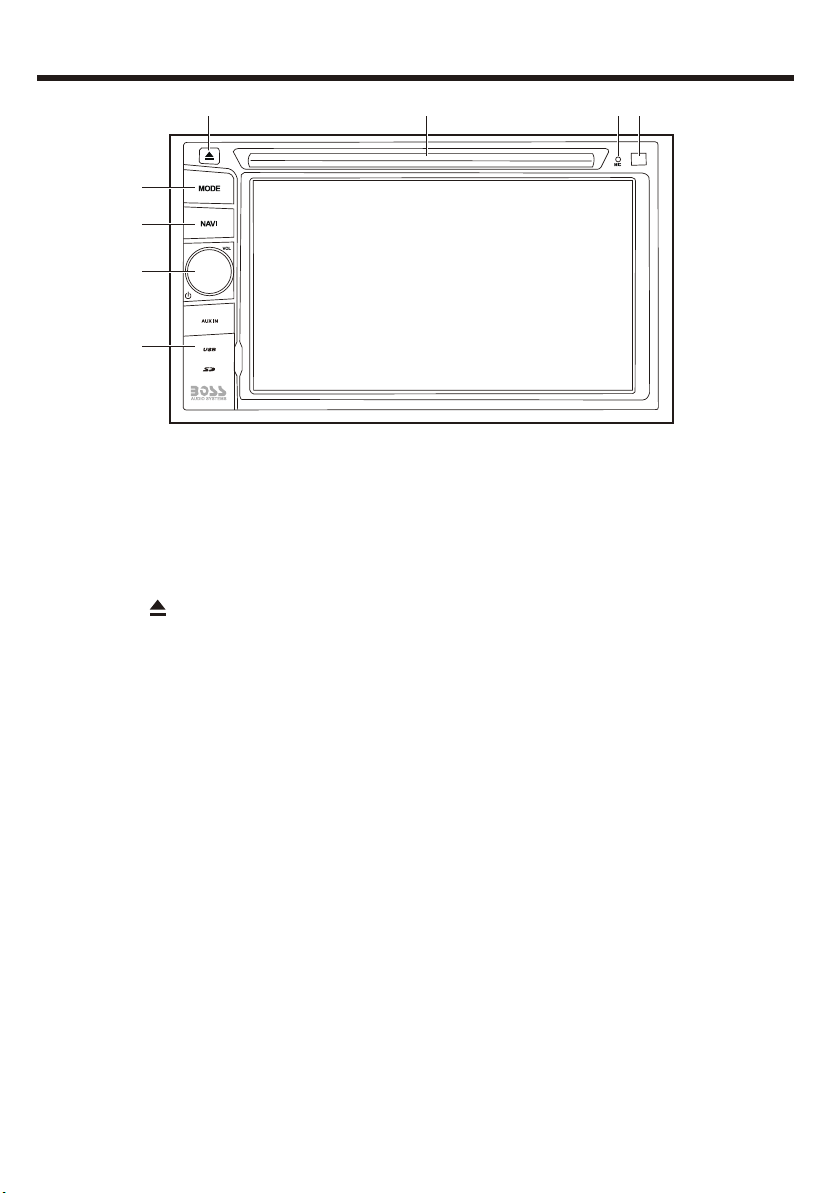
Eject the disc.
2
3
Insert a disc.
Disc slot
Pick up sound in Bluetooth operation.
Built-in microphone
Aim the remote control directly at the sensor.
Remote sensor
4
5
●
Press the reset button to reset the unit if it fails to operate properly.
Switch a system mode.
Connect to an external audio device for audio input.
●
●
Connect to a USB flash drive for media play.
USB port
AUX jack (3.5mm)
Connect to a GPS card to store GPS information.
●GPS card slot
Connect to a Micro SD card for media play.
SD card slot
8
●
Open to access the following button or connectors.
Reset/AUX/USB/SD/GPS cover
Reset button
7
- Press and hold to turn the unit on or off.
- Rotate to adjust volume.
- In power on mode, press briefly to mute or restore volume.
Function knob
MODE
6
Enter or exit GPS navigation interface.
NAVI
1234
5
6
7
8
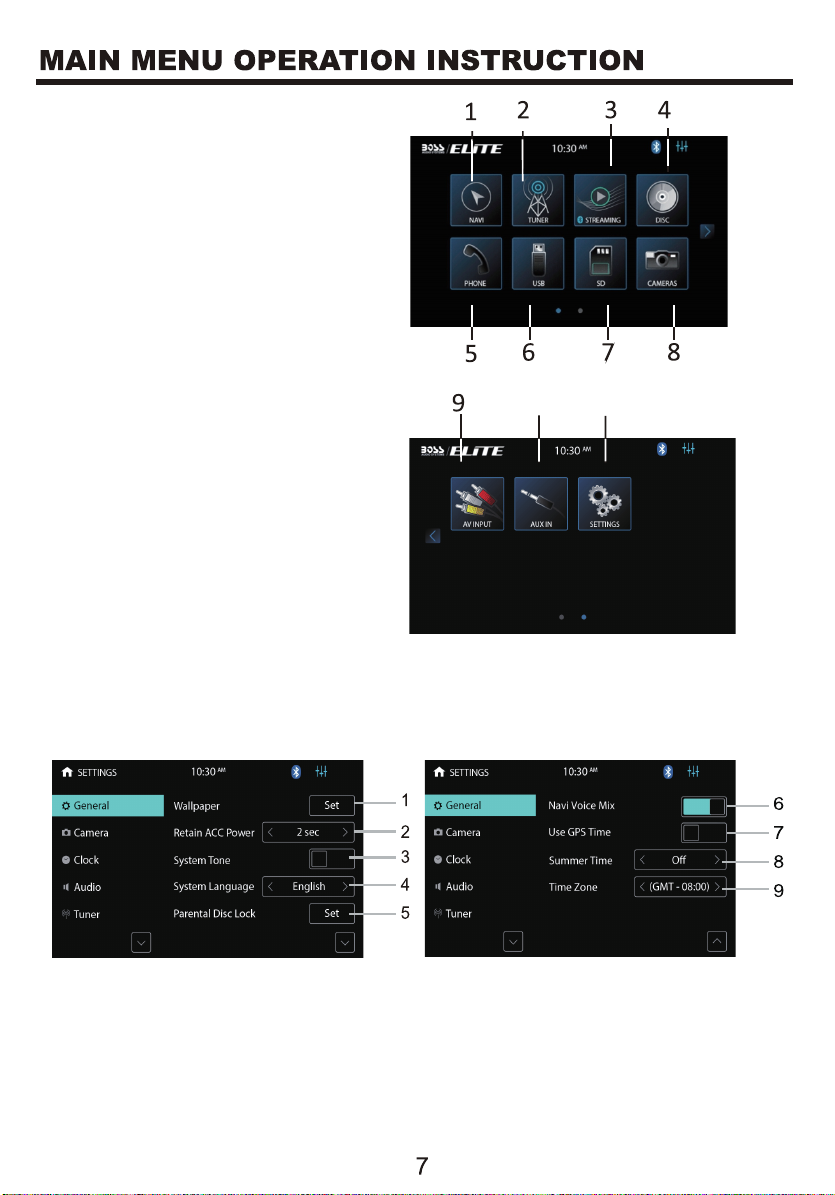
2. Tuner Interface
3. Streaming Interface
4. DISC Interface
5. Phone Interface
6. USB Interface
7. SD Interface
8. Front/Rear Camera Interface
9. AV INPUT Interface
10. AUX IN Interface
11. Setting Interface
GENERAL SETINGS-Menu 1
MAIN MENU 1
MAIN MENU 2
There are seven Setting Menus
2. Retain ACC Power: Select how many seconds to delay shut down after
the vehicle powers down.
1. NAVI Interface
1. Touch to set wall paper for the home menu background.
10 11
Altri manuali per ELITE BV965NV
1
Indice
Altri manuali Boss Audio Systems GPS


