Boundless VGB10 Manuale utente

VGB10/VGB11 VideoTerminal
InstallationandOperatingInformation
Installations-undBetriebshinweise
Informacióndeinstalaciónyfuncionamiento
Guided'installationetd'utilisation
Informazionidiinstallazioneeguidaoperativa
Installatie-engebruikshandleiding
Part Number: 598-0013029

VGB10/VGB11VideoTerminal
InstallationandOperatingInformation
Order Number: 598-0013029

November 2007
Boundless Technologies makes no representations that the use of its products
in the manner described in this publication will not infringe on existing or
future patent rights, nor do the descriptions contained in this publication
imply the granting of licenses to make, use, or sell equipment or software in
accordance with the description.
DEC, OpenVMS, ULTRIX, VMS, and VT are trademarks of Digital Equipment
Corporation.
ADDS is a trademark of Applied Digital Data Systems, Inc.
IBM, ProPrinter, and PS/2 are registered trademarks of International Business
Machines Corporation.
SCO is a trademark of Santa Cruz Operations, Inc.
TVI is a trademark of TeleVideo, Inc.
UNIX is a registered trademark of UNIX System Laboratories, Inc.
WY and WYSE are registered trademarks of Wyse Technologies.
All other trademarks and registered trademarks are the property of their
respective holders.
© Boundless Technologies, Inc. 2007
All Rights Reserved.
Printed in USA
FCC ID: CR8-VGB10—NOTE:The North American version of this equipment
has been tested and found to comply with the limits for a Class A digital
device, pursuant to Part 15 of FCC Rules. These limits are designed to provide
reasonable protection against harmful interference when the equipment is
operated in a commercial environment. This equipment generates, uses, and
can radiate radio frequency energy and, if not installed and used in accordance
with the instruction manual, may cause harmful interference to radio
communications. Operation of this equipment in a residential area is likely to
cause harmful interference, in which case, the user will be required to correct
the interference at his own expense.
Canadian Standards Association (CSA) Statement
This digital apparatus does not exceed the Class A limits for radio noise
emissions from digital apparatus as set out in the radio interference regulations
of the Canadian Department of Communications.
Le présent appareil numérique n'émet pas de bruits radioélectriques dépassant
les limites applicables aux appareils numériques de class A prescrites dans le
règlement sur le brouillage radioélectrique édicté par le Ministère des
Communications du Canada.

Overview iii
Use of Ozone Depleting Substance (ODS)
The VGB10 / VGB11 is in full compliance with the labeling requirements in the
US Clean Air Act Amendments of 1990. It does not contain, nor is it
manufactured with, a Class 1 ODS, as defined in Title VI Section 611 of this
act.

i
chapter
1
Contents
Preface v
Overview...........................................................................................v
Environment.....................................................................................v
Before you Start................................................................................v
Conventions....................................................................................vii
Proper Setup and Use.....................................................................vii
1 InstallationandSet-Up 1-1
Install the tilt/swivel stand..........................................................1-1
Install your terminal.....................................................................1-2
Connect the cables to the terminal......................................1-2
Plug in the power cord and push the power switch on.......1-3
Set the Brightness and Contrast controls............................1-3
“Selftest OK” appears on the screen....................................1-4
Set up your terminal....................................................................1-4
Entering Set-Up .....................................................................1-4
Moving within a Set-Up Menu..............................................1-5
Keyboards......................................................................................1-5
Select the Set-Up language .........................................................1-7
Select the emulation mode terminal type................................... 1-8

ii
Select the keyboard language......................................................1-8
Select the communications/printer port configuration..............1-9
Select the communication word size...........................................1-9
Select the communications parity.............................................1-10
Select the communication transmit speed................................1-10
Select the communication receive speed..................................1-11
Select the printer type................................................................1-11
Save your settings.......................................................................1-12
Restore the settings.............................................................1-12
Exit the Set-Up menu..........................................................1-12
2DesktopFeatures 2-1
Invoking Desktop Features...........................................................2-1
Overview.................................................................................2-1
Clock feature..........................................................................2-2
Calculator feature..................................................................2-3
Show Character Sets feature................................................2-4
Banner message.....................................................................2-4
3 MaintenanceandTroubleshooting 3-1
Cleaning your Video Terminal......................................................3-1
Cleaning the Screen..............................................................3-1
Cleaning the Keyboard..........................................................3-1
Troubleshooting............................................................................3-1
Identifying and Correcting Problems.....................................3-1
Troubleshooting Table ..........................................................3-2
Disposing of your Terminal...........................................................3-4
Installing the ROM Cartridge........................................................3-4
Installing and Removing the ROM Cartridge ........................3-4
4 DefiningKeys 4-1

iii
Define Key Editor..........................................................................4-1
Moving Standard Functions..................................................4-1
Customization........................................................................4-2
Modifier Keys..........................................................................4-2
Creating a New Function.......................................................4-2
Correcting a Mistake..............................................................4-3
Examples of Uses...................................................................4-3
A Specifications A-1
Video Terminal.............................................................................A-1
Adapters........................................................................................A-5
B KeyboardFunctionKeys B-1
User Definable Keys......................................................................B-1
Local Functions.....................................................................B-1
Compose Characters.....................................................................B-6

v
chapter
1
0Preface
Overview
This guide is for users who wish to install and configure the
VGB10 / VGB11 video terminal. This guide describes how to
connect cables and enter the Set-Up Menu to make changes, as
needed. This guide also has reference tables for troubleshooting,
specifications, and compose sequences.
For more detailed information on programming the terminal, refer
to the VGB10 / VGB11 Video Terminal Programmer Information.
See the inside back cover for ordering information.
Environment
This product has been designed and manufactured to minimize
the impact to the environment. The packaging is recyclable and
the terminal can be returned for proper disposal.
BeforeyouStart
Ensure that you have received the following:
◊Video terminal
◊Keyboard
◊Power cord, if not attached to the terminal unit

vi Preface
A small flat-blade screwdriver may be needed to install the
communication or the printer cables.
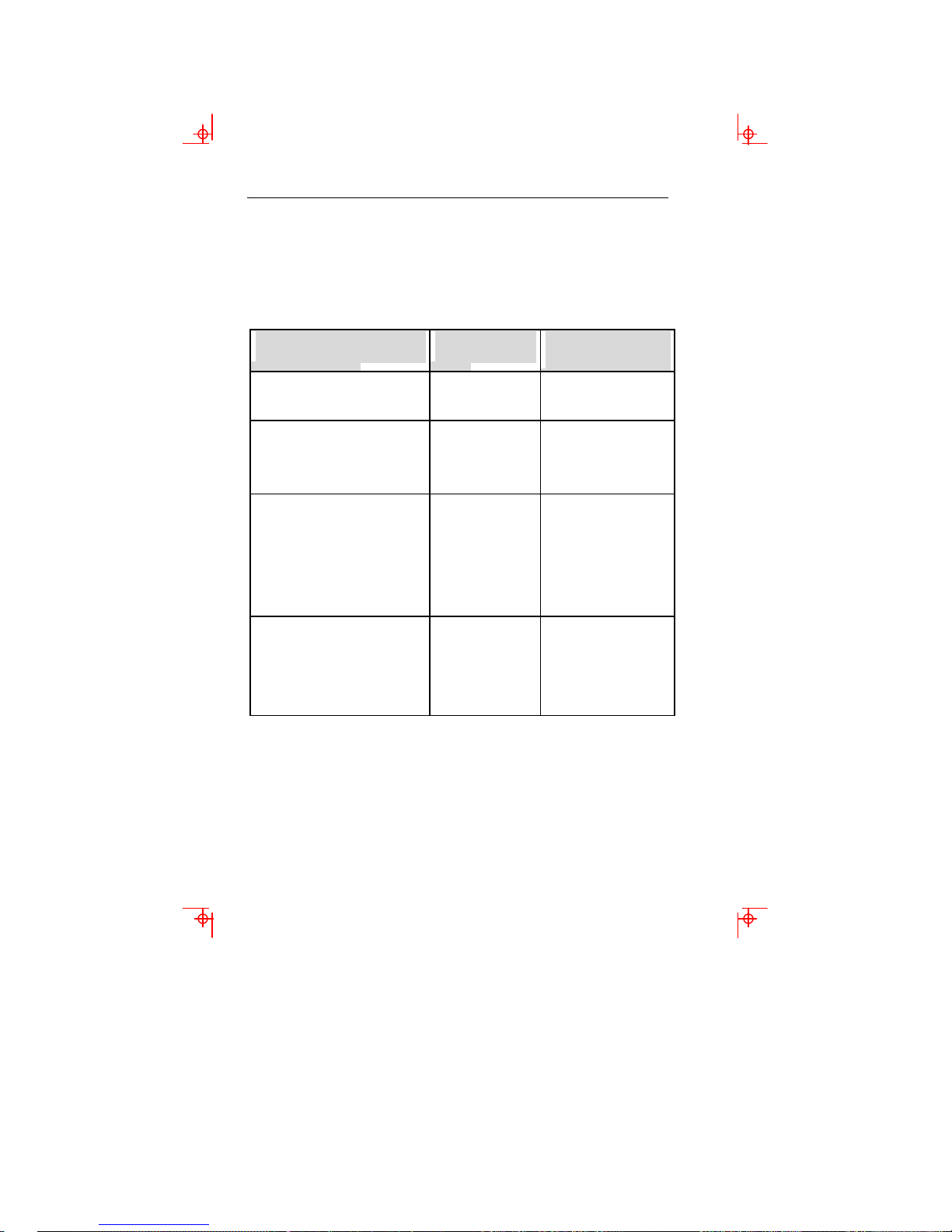
Obtain the following information before installing your VGB10 /
VGB11 video terminal. Write any changes to the default settings
in the column on the right.
InformationNeeded ObtainFrom… ChangestoDefault
Setting
The keyboard country
language that you have. Bottom of the
keyboard
Terminal Emulation:
ANSI-style, PC Term, ADDS,
SCO, TVI, WYSE
System Manager
Communication Information:
Word size: 8bits, 7 bits
Parity: none, even, odd, mark,
space
Transmit speed: 9600
System Manager
Printer Information:
Printer type: DECVT, IBM
ProPrinter, DEC + IBM
Printer serial speed: 4800
System Manager
The factory defaults are in boldface type.

Conventions vii
Conventions
The following conventions are used in this document:
Convention Meaning
Shift+Tab Indicates two keys that you must press in
combination. Press and hold the first
key while you press the second key.
Shift–Enter Indicates two keys that you must press in
sequence. Press and release the first key
before you press the second key.
CapsLock+Alt+F11 Indicates three keys that you must press
in combination, hold the first two down
while pressing the third.
terminal Describes the VGB10 / VGB11 video
terminal
Display Menu items are in boldface type.
Provides general information
Caution Provide information to prevent damage
to equipment.
Warning Provides information to prevent injury.
ProperSetupandUse
ImportantInformation: Certain recent scientific literature suggests
that poor posture, work habits, or office equipment setup may
cause injuries. Other literature suggests that there is no cause
and effect. Because the safety of our users is a great concern, it is
important to take the precautions described in Table 1.
Altri manuali per VGB10
1
Questo manuale è adatto per i seguenti modelli
1
Indice
Lingue:
Altri manuali Boundless Scrivania

Boundless
Boundless 2900/260 LF Manuale utente

Boundless
Boundless ADDS 4000/160 Manuale utente

Boundless
Boundless VT525 Manuale utente

Boundless
Boundless ADDS 5700 Manuale utente

Boundless
Boundless ADDS 4000/260 Manuale utente

Boundless
Boundless Capio II Manuale di installazione

Boundless
Boundless VT520 Manuale utente

Boundless
Boundless VGB10 Manuale utente

Boundless
Boundless ADDS 4000/260 Manuale utente

Boundless
Boundless ADDS 60 Manuale utente