
Brähler Systems DIGIMIC SMic133 Manuale utente
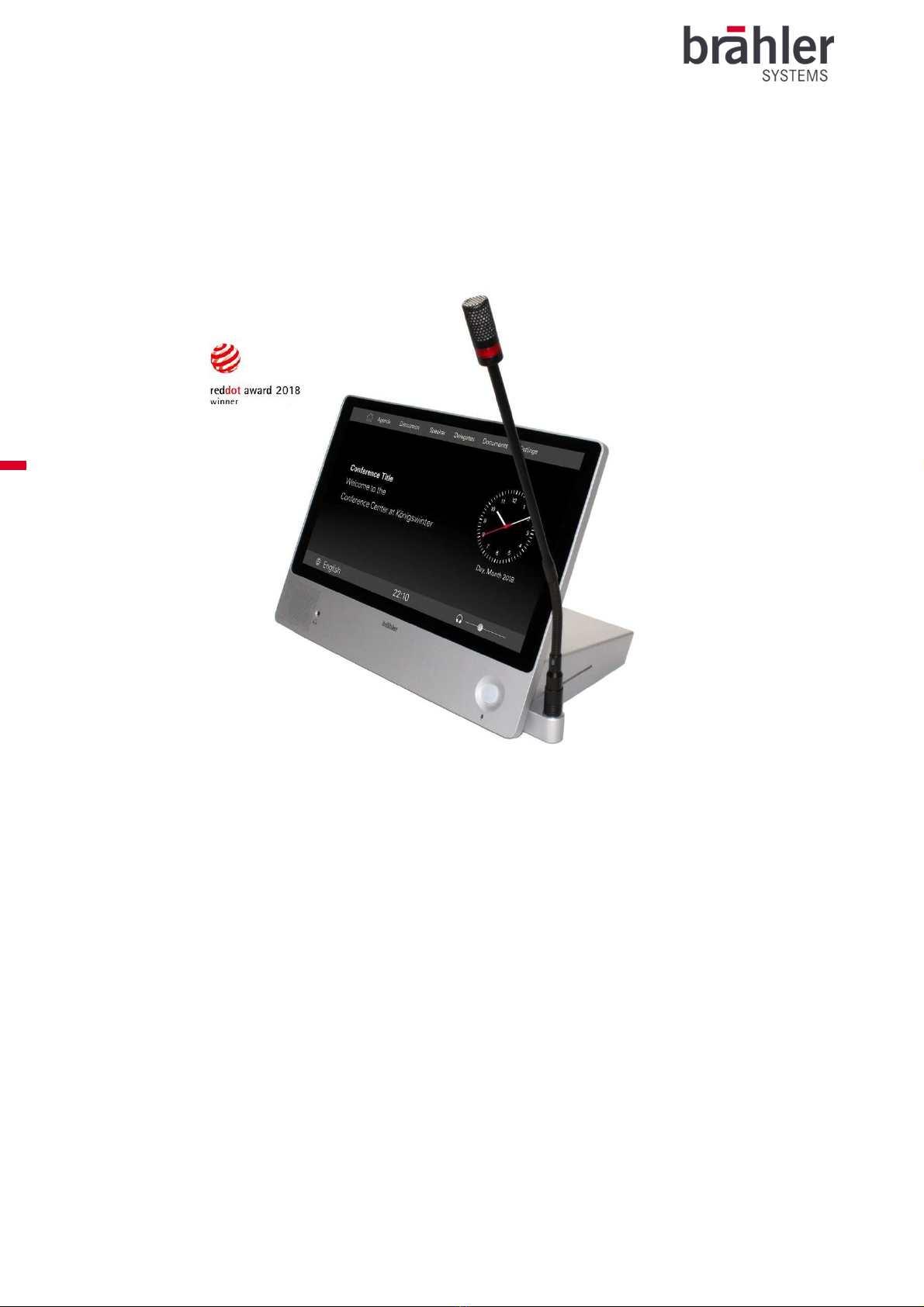
Quick Guide
DIGIMIC
SMic133
Multimedia Unit
Article no.: 05.1920
SMic133
DIGIMIC
SMic133
Quick Guide
2
BRÄ LER Systems Gmb
Auf der Alten Burg 6
53639 Königswinter
Germany
T
+4
9 (0)
224
4
930
-
0
F +49 (0)2244 930-450 sales@braehler.com
www.braehler-systems.com
05.1920 190529 V1.0 BRÄ LER Systems is committed to continually improving its products and so reserves the right to make technical modifications without notice.
Introduction and ports
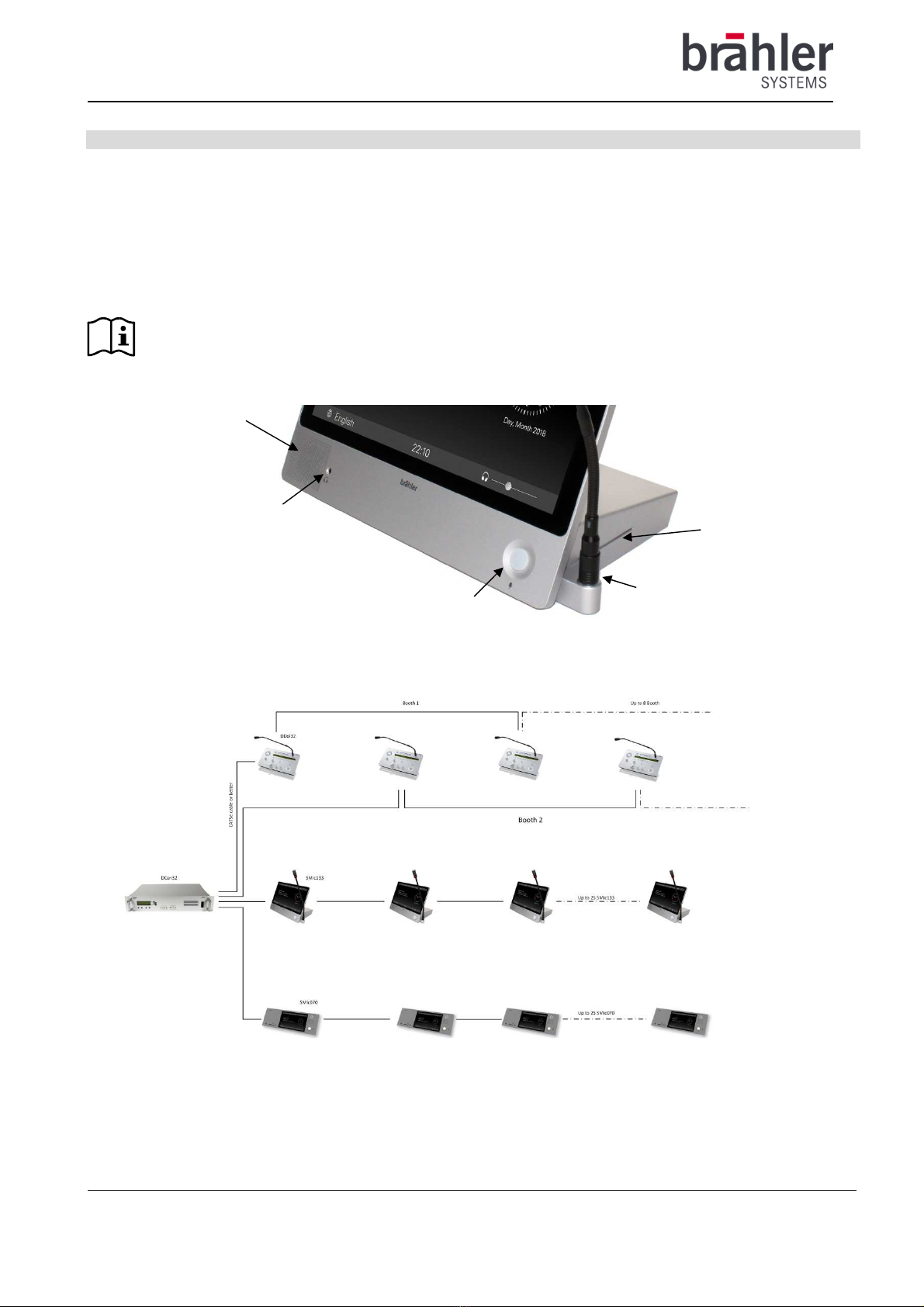
With the SMic series of the DIGMIC family, you have optimally supplied your delegates with multimedia. The
SMic133 has a microphone, headphone jack, loudspeaker, channel selector, voting function, identification
feature and offers access to session-relevant information. The SMic is operated via a touch screen in
combination with the brählerOS software. The software offers a clear and understandable arrangement that
makes the SMic intuitive to use.
The language channels can be fed in externally via DANTE® via DCen32 or internally via the DDol32 interpreter
console. The SMic works with the DCen32 in standalone mode. The units are connected via RJ45 connectors.
The software brählerOS MicControl and Delegate are mandatory for operation.
Connect the SMic units to the DCen32 - the system is then ready for use.
e
adphone jack
Microphone button
Microphone jack
L
oudspeaker
RFID card reader
Example system image
DIGIMIC
SMic133
Quick Guide
3
BRÄ LER Systems Gmb
Auf der Alten Burg 6
53639 Königswinter
Germany
T
+4
9 (0)
224
4
930
-
0
F +49 (0)2244 930-450 sales@braehler.com
www.braehler-systems.com
05.1920 190529 V1.0 BRÄ LER Systems is committed to continually improving its products and so reserves the right to make technical modifications without notice.
eadphone
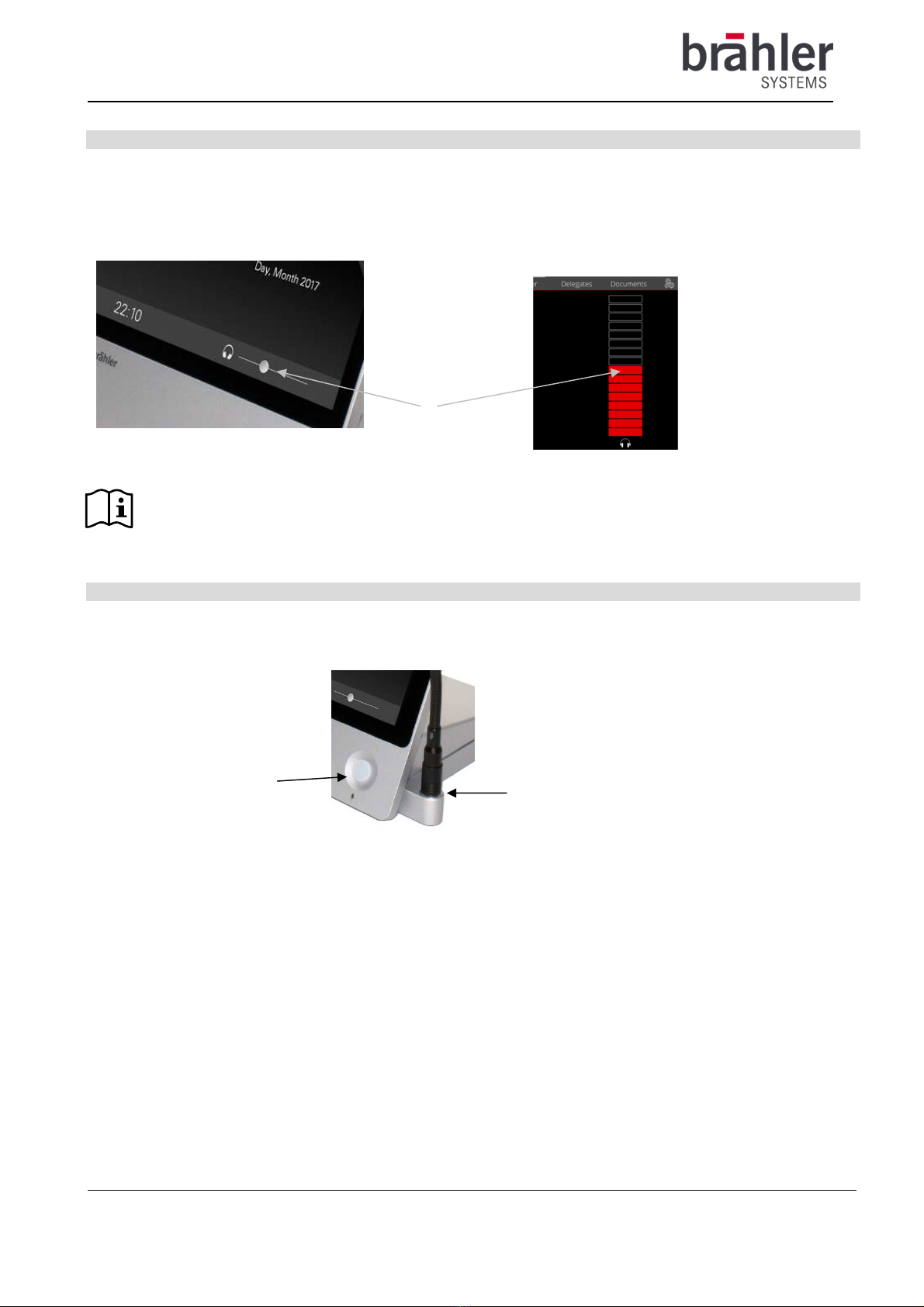
You can hear the audio signal in two ways - through the built-in speaker or through headphones. Connect the
headphones and adjust the volume. Tap on the volume control on your screen (left picture). A volume control
opens (right picture). Use your finger to "drag" the volume louder and quieter. The SMic starts with a standard
volume. The set volume is displayed on the screen. The volume of the loudspeaker is controlled centrally.
Language channels can only be received via headphones. If no headphones are connected, you can
hear the original channel (floor) via loudspeakers.
Microphone
Plug in the microphone. Pay attention to the notch on the microphone plug and the Minicon jack. Screw the
microphone on to fix it in place.
Press the microphone button to turn on the microphone. Press the microphone button again to turn the
microphone off.
The SMic units operate in different mode settings. These are determined by the operator of the conference.
After pressing the microphone key, you have the following options.
The key and ring light up red: The microphone is open. You can speak to the other delegates.
The button and ring are off: The maximum number of speakers has been reached - you must try to switch on
your microphone again at a later time.
Button flashes red: The maximum number of speakers has been reached. You must wait (request to speak).
Your microphone is automatically activated as soon as it is your turn to speak.
Minicon
jack
Microphone button
Volume control
DIGIMIC
SMic133
Quick Guide
4
BRÄ LER Systems Gmb
Auf der Alten Burg 6
53639 Königswinter
Germany
T
+4
9 (0)
224
4
930
-
0
F +49 (0)2244 930-450 sales@braehler.com
www.braehler-systems.com
05.1920 190529 V1.0 BRÄ LER Systems is committed to continually improving its products and so reserves the right to make technical modifications without notice.
Channel selector
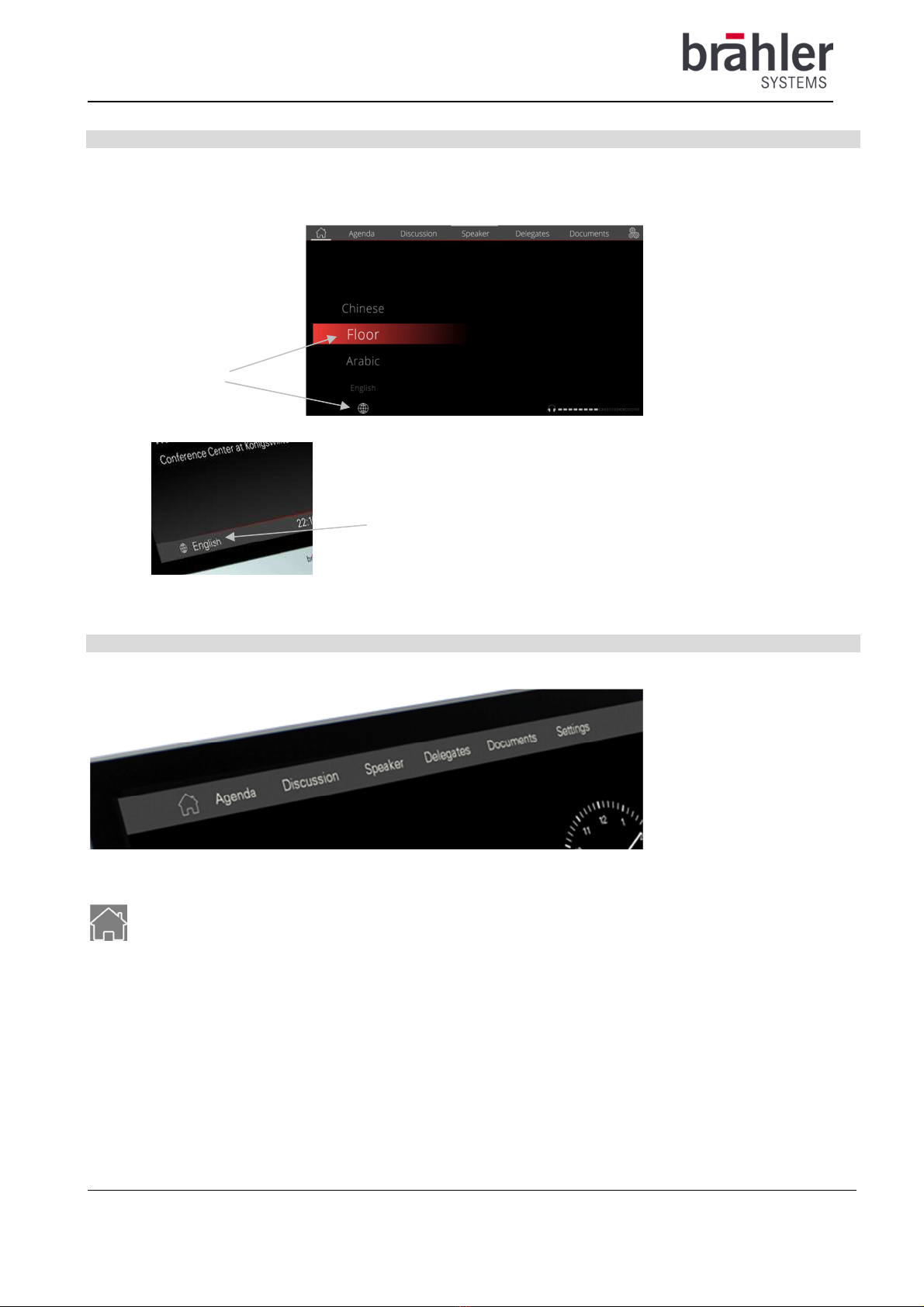
The DIGIMIC SMic070 receives up to 32 channels - original and 31 language channels. Channel and language
assignments are made at the central DCen32. Tap the globe on your screen. A list of all translated languages
appears. Use your finger to scroll through the possible languages - tap on the desired language to transmit it.
The set language is displayed on the screen.
Multimedia features
ome Button
Via the home button you can always return to the start page.
Agenda
Tap on "Agenda". An overview of all agenda items appears on your screen. Use your finger to scroll up and
down the agenda. Touch the agenda items to get detailed information. The planned speakers are listed under
"Speakers" - tap to get further information on the individual persons.
Discussion
Under "Discussion" you will find a list of the current discussion participants. One is the active speaker. On the
other hand a list of the participants who have asked for a word request and are waiting for the release of their
microphone.
Channel selector
DIGIMIC
SMic133
Quick Guide
5
BRÄ LER Systems Gmb
Auf der Alten Burg 6
53639 Königswinter
Germany
T
+4
9 (0)
224
4
930
-
0
F +49 (0)2244 930-450 sales@braehler.com
www.braehler-systems.com
05.1920 190529 V1.0 BRÄ LER Systems is committed to continually improving its products and so reserves the right to make technical modifications without notice.
Speaker
By tapping on "Speaker" you will get an overview of the planned speakers and information about the person and
presentations. If other documents, such as pictures or graphics, are stored, you can view them by tapping on
them.
Delegates
Tap on "Delegates" and you will get an overview of all registered delegates of the conference and information
about yourself.
Documents
The "Documents" field gives you access to session-relevant documents. You can open them by tapping on
them.
Settings
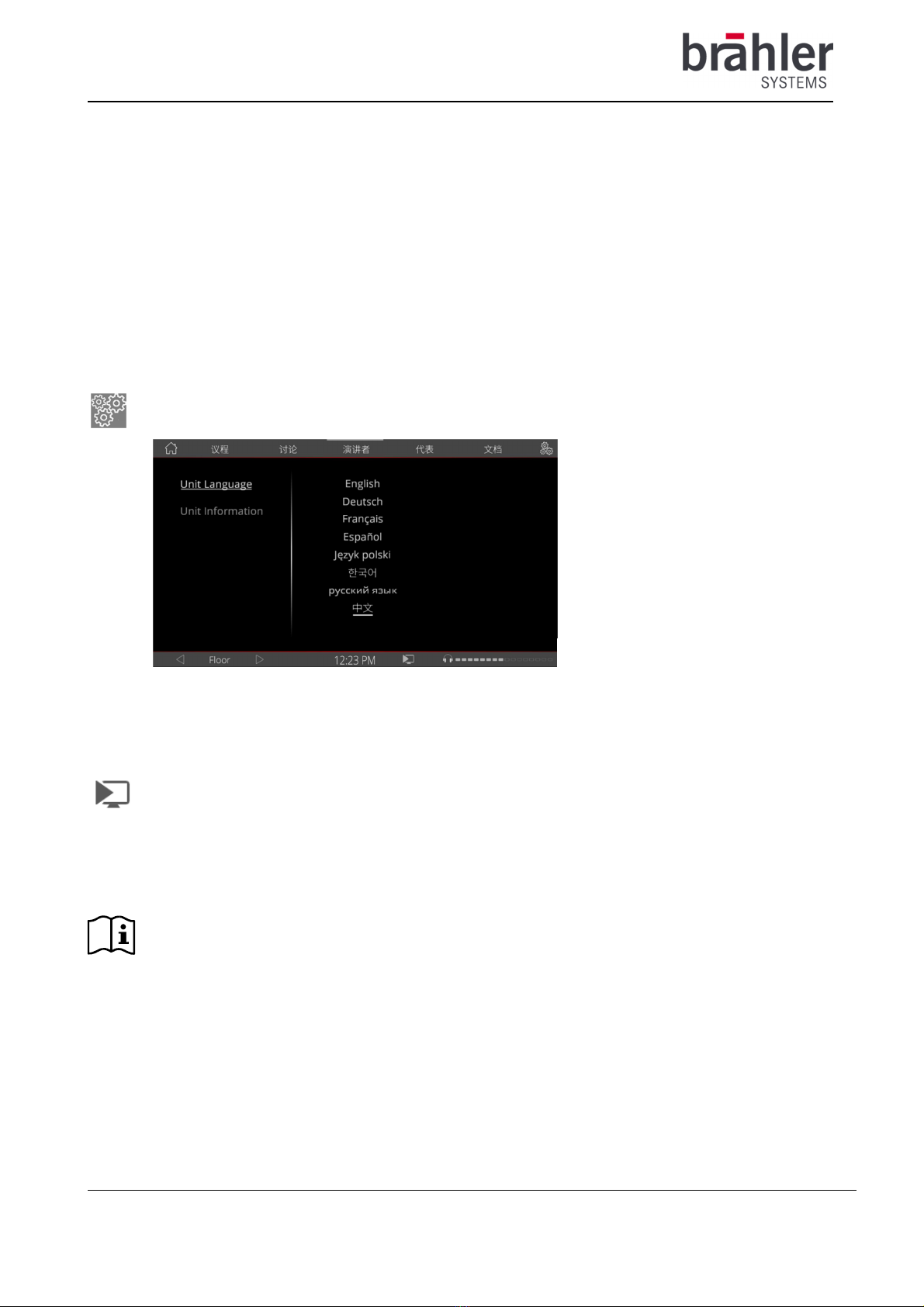
Press the "Setting" field to access the settings. For example, you can set the working language of the
SMic - all data will then be displayed in native language.
Streaming
With the SMic133 it is possible to receive video streams. These must be fed in by the operator of the
conference. The following symbol appears in the lower bar of the screen:
Click on the icon to see the stream.
X
To close opened documents and images, click on the X in the upper right corner.
Personal data, images, documents can only be viewed if they have been previously stored by the
conference operator.
Example: SMic set to Mandarin
DIGIMIC
SMic133
Quick Guide
6
BRÄ LER Systems Gmb
Auf der Alten Burg 6
53639 Königswinter
Germany
T
+4
9 (0)
224
4
930
-
0
F +49 (0)2244 930-450 sales@braehler.com
www.braehler-systems.com
05.1920 190529 V1.0 BRÄ LER Systems is committed to continually improving its products and so reserves the right to make technical modifications without notice.
Voting
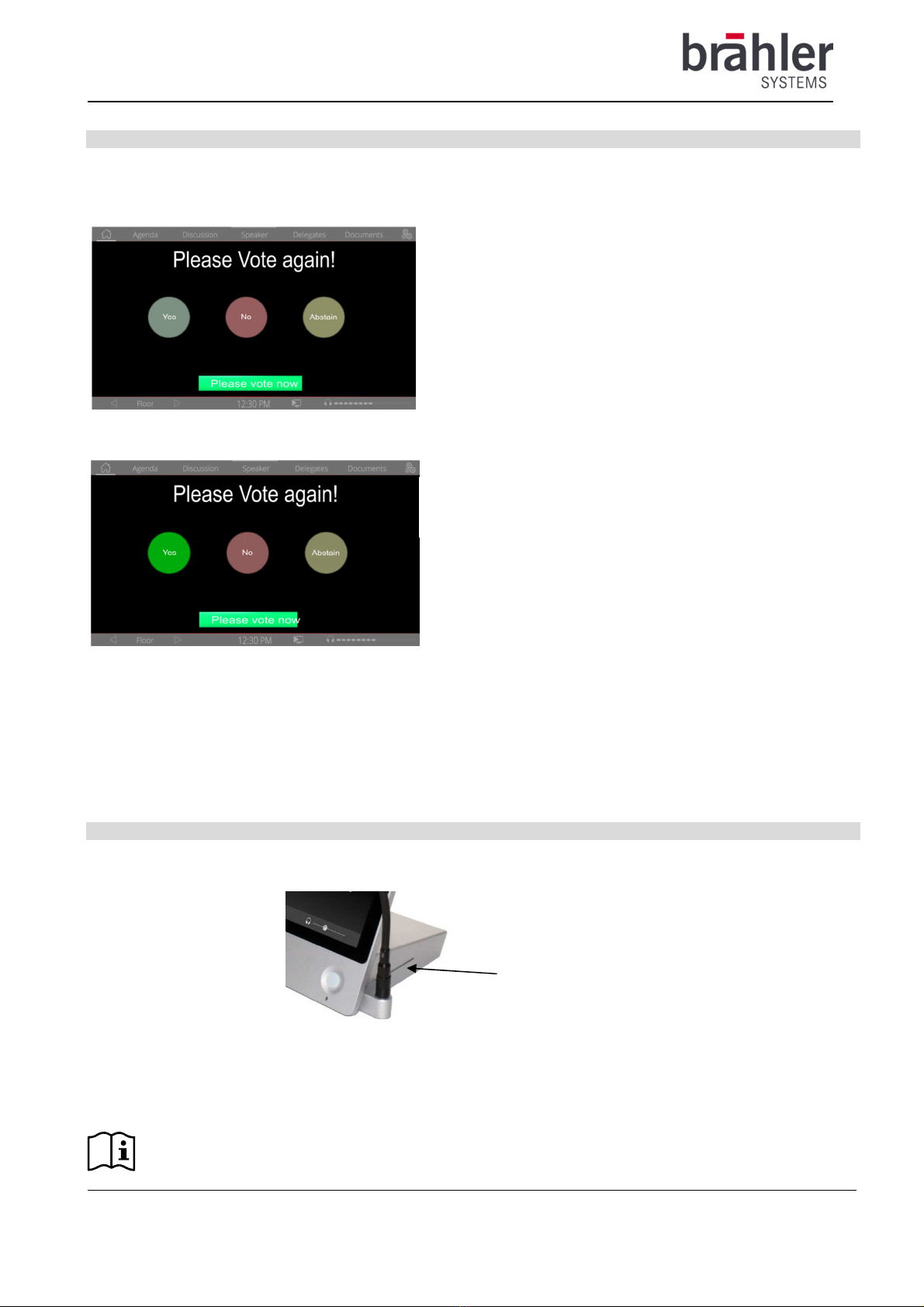
With the SMic133 voting procedures are possible. When a vote starts, the vote options appear on your screen.
Depending on the setting, the display changes - for example, letters (A-E), numbers (1-5) or "yes/no/abstention"
can be selected.
Your vote is cast by tapping on the desired field.
The voting procedure shall be determined in advance by the operator of the conference. For example, multiple
nominations, changes or one-time selections are possible.
After the vote, the result can be shown on the display. The form of presentation is determined by the operator
of the conference.
RFID-Kartenleser
The SMic is equipped with an RFID card reader. All delegates can be registered and identified by using an RFID
card.
Your data is stored on your personal card for a specific purpose. Insert your RFID card into the RFID card
reader. The SMic automatically recognises you and assigns you the appropriate rights, for example to take part
in voting.
The RFID cards are not automatically personalized. The cards must be programmed by the conference
operator before being issued.
RFID
card reader
An example with three choic
es
The delegate has selected „Yes“
DIGIMIC
SMic133
Quick Guide
7
BRÄ LER Systems Gmb
Auf der Alten Burg 6
53639 Königswinter
Germany
T
+4
9 (0)
224
4
930
-
0
F +49 (0)2244 930-450 sales@braehler.com
www.braehler-systems.com
05.1920 190529 V1.0 BRÄ LER Systems is committed to continually improving its products and so reserves the right to make technical modifications without notice.
Chairman version
In addition to the delegate units, the SMic models are also available as a chairman version. The chairman
version gives special priority to the chairman of a conference. Press the Override button to mute all delegate
units. Two variants can be set on the DCen32:
Permanent: Press the Override button to mute all delegate units. Delegates must turn on their microphones
again to speak.
Temporary: Pressing and holding the override button mutes the delegate units. When you release the Override
button, the previously muted delegate units are turned on again.
Warnings
Set the SMic to an appropriate volume. Do not listen too loudly through the headphones.
The connections of the SMic are only suitable for further SMic or DExt. Do not connect any other
devices!
In case of faults, contact a technician, do not attempt to repair, unscrew or similar the SMic yourself.

DIGIMIC
SMic133
Quick Guide
8
BRÄ LER Systems Gmb
Auf der Alten Burg 6
53639 Königswinter
Germany
T
+4
9 (0)
224
4
930
-
0
F +49 (0)2244 930-450 sales@braehler.com
www.braehler-systems.com
05.1920 190529 V1.0 BRÄ LER Systems is committed to continually improving its products and so reserves the right to make technical modifications without notice.
Further information about our products can be found on the Internet under:
www.braehler.com
© 2019
Copyright by BRÄ LER Systems Gmb , Königswinter
All rights reserved, in particular (also in extracts) those of translation, reprinting, reproduction by copying or
similar procedures.
BRÄ LER Systems reserves the right to make technical changes without prior notice.
Brähler Systems Gmb
Auf der Alten Burg 6
53639 Königswinter, Germany
T +49 2244 930-0
F +49 2244 930-450
Questo manuale è adatto per i seguenti modelli
1
Indice
Altri manuali Brähler Systems Lettore multimediale


