8
bx_digital V2 manual
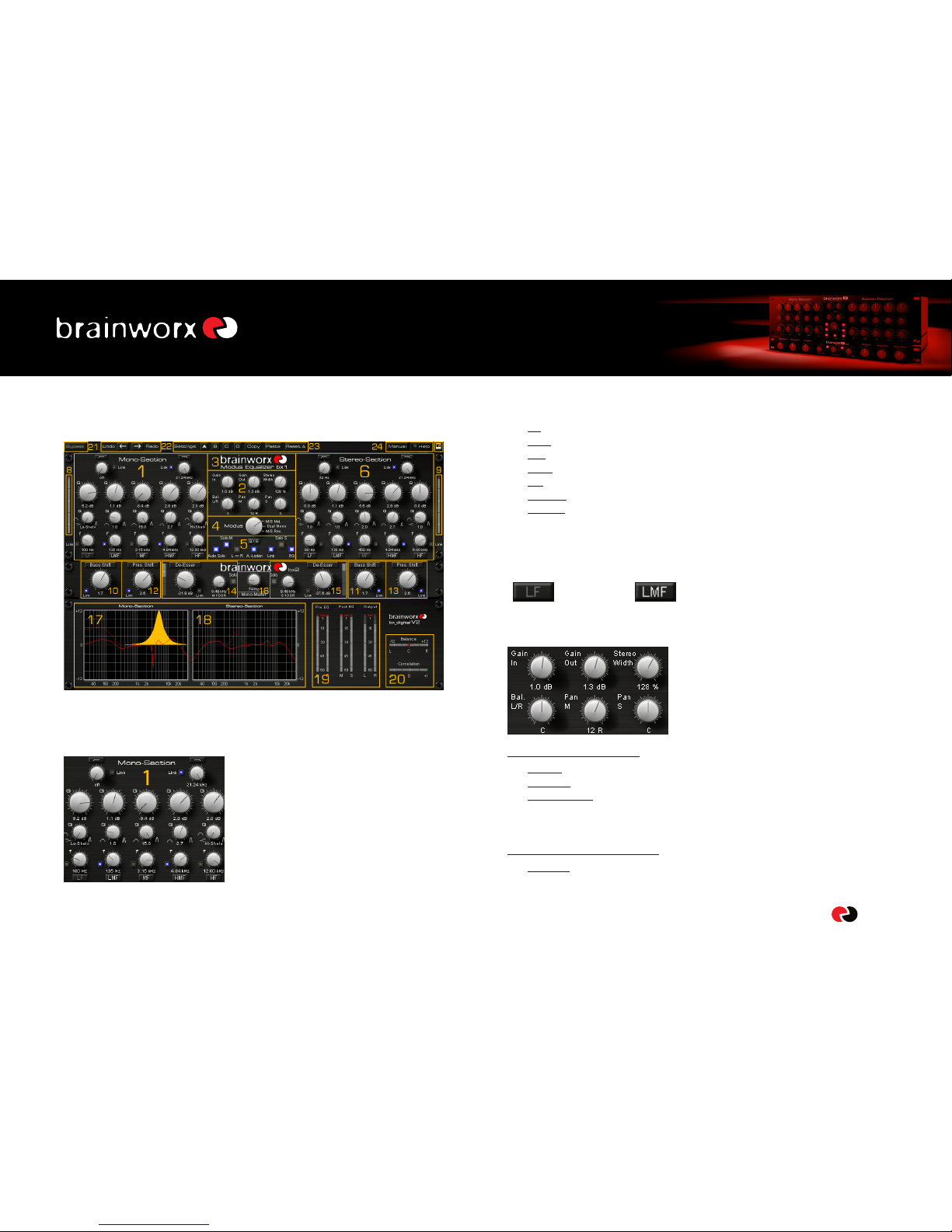
• Pan M: with this unique and new feature you can center un-centered mixes, or
create great effects by panning the “center only” (drums, vocals, bass, etc.) of
your recording to the sides!
tMixes from analogue consoles often have the problem that the “theoretical
center” (these are the elements that should be in the center, like lead vocals,
snares, etc.) are slightly off-axis because of analogue inserts (compressors,
EQs, etc.) in the master sum. With the Pan M you can easily correct this,
without effecting the stereo information (guitars, keys, reverbs, etc.) too much,
and without tilting the whole stereo image (see Bal. L/R)
• Pan S: tilt the stereo information without changing the center section of your
mix too radically. Mixes with uneven stereo information (doubled guitars that
are not perfectly centered for example) can easily be adjusted.
tThe results of Pan S are much more subtle than Pan M, and we do not
recommend doing drastic changes here.
7.3. The Brainworx logos in the GUI
Click them to get credit info, release versions,
etc.
7.4. The Modus knob
The Modus knob lets you select between the 3
different “modes” the bx_digital plug-in can
work in:
• M/S-MASTERING-mode: for individual processing of the mono-sum and the
stereo-difference of any regular Stereo-Signal.
• L/R-mode: for conventional L/R-processing, linked or un-linked.
• M/S-RECORDING-mode: this mode will provide a Stereo signal at the master
output if bx_digital is fed with separate M&S-microphone signals or audio
tracks.
7.5. Auto Listen, Solo, Auto Solo, Channel swap, Linked features, EQ off
• Auto Solo:
Auto Solo is taken from the TDM version of bx_digital V1, and is now available
for all versions. When enabled bx_digital will automatically switch to Solo M/
Solo L as soon as a knob of the left EQ section is being clicked, until you release
the knob again. The same goes for the right EQ section (Solo S/Solo R,
depending on the mode bx_digital works in). Auto solo also works with touch
sensitive controllers, such as digidesign´s C24 or icon controllers.
• Solo M/Solo S (Solo L / Solo R):
To listen to only the M or S signal phase corrected and mono-ed on both
speakers just enable Solo M/Solo S. In the L/R mode these selectors become
Solo L/Solo R, of course, but work just the same way.
• L<>R (channel swap, pre EQ):
This feature swaps left and right channels within bx_digital V2. As stereo
mixes sound very different when channels are swapped this can be a creative
tool in mastering sessions.
• Link LED:
The Link LED will be ON as soon as any feature of bx_digital is linked. This can
be an EQ band, the De-Esser, or a Shifter.
Also, you can link/unlink all bands and features clicking the Link LED.
A click on any Link button will copy the setting of the button you click to the
other side.
Accidentally clicking the Link button can destroy your whole EQ settings – but
we have a 32 step undo /redo on board now, so this won´t be a problem
anymore.
tPls see “22” (Undo/Redo).