
Brava DM-993 Manuale utente
i
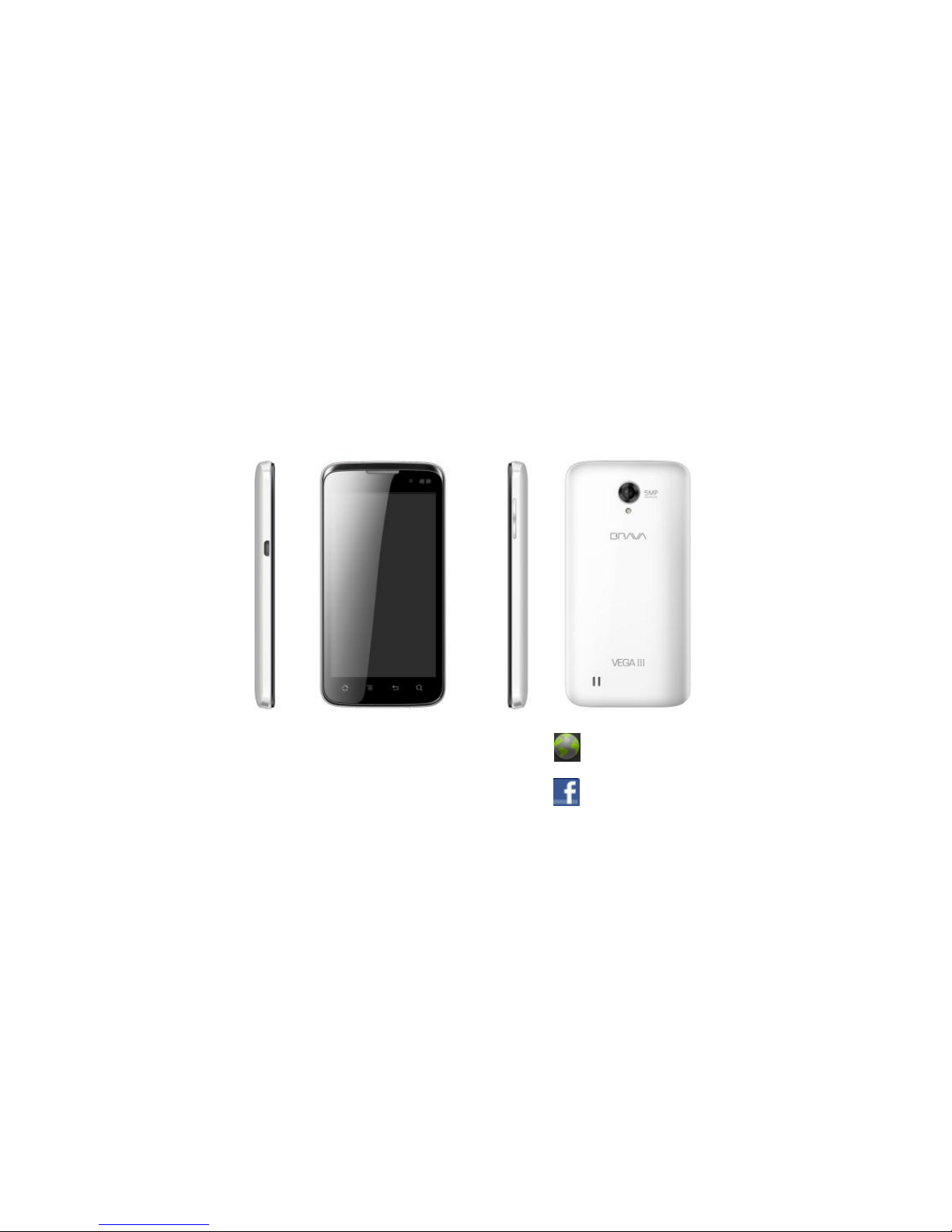
VEGA III DM-993 from Brava
User Manual
www.bravatechno.com
www.facebook.com/brava.mobiles

ii
INTRODUCTION
Thank you for choosing the VEGA III DM-993, the Dual Mode Android smart phone from Brava. This
smartphone is running on Android OS 4.0.4 (ice cream sandwich). If you’d like your phone to live a
long and fruitful life, please read this guide carefully and keep it for future reference. You never know
when you might need it.
Android 4.0.4 (Ice Cream Sandwich) is the Operating System for your Touch Screen Smartphone
And don’t worry if the pictures we use to demonstrate your phone’s functions look a little different
from what you see on its screen. It’s the functions that matter.
Copyright©2013 Brava Techno Corporation Ltd.
All Rights Reserved
No part of this manual is allowed to be reproduced or forwarded in any form or by any means without
prior written consent of Brava.

iii
Table of Contents
1Safety ................................................................................................................................................. 1
Safety Precautions.................................................................................................................................. 1
Using your phone safely......................................................................................................................... 1
2Basics ................................................................................................................................................. 5
Inside the box .......................................................................................................................................... 5
Product Overview.................................................................................................................................... 5
Before turning on your phone ................................................................................................................ 12
3Getting started ................................................................................................................................ 15
Turning on your phone............................................................................................................................ 15
Turning off your phone............................................................................................................................ 15
Preinstalled widgets and applications ................................................................................................... 15
Home .........................................................................................................................................18
Phone status and notifications............................................................................................................... 20
Personalize your phone.......................................................................................................................... 24
Copying files to and from the Storage card .......................................................................................... 27
4Phone calls........................................................................................................................................ 28
Making Calls ............................................................................................................................................ 28
Received Calls......................................................................................................................................... 30
During Call options.................................................................................................................................. 31
Call Log (History)..................................................................................................................................... 32
Favorites .................................................................................................................................................. 32
5Contacts............................................................................................................................................. 33
Managing your Contacts ........................................................................................................................ 34

iv
6Text Input and keyboard ............................................................................................................. 36
Using the onscreen keyboard ................................................................................................................ 36
Changing the onscreen keyboard layout .............................................................................................. 36
7Messages........................................................................................................................................... 37
Sending text and multimedia messages ............................................................................................... 37
Setting text and multimedia message options ..................................................................................... 40
8Emails and Accounts...................................................................................................................... 43
Email Setup.............................................................................................................................................. 43
Delete Email Account.............................................................................................................................. 44
Read Email messages............................................................................................................................ 44
Send Email messages............................................................................................................................ 45
Gmail Setup ............................................................................................................................................. 45
9Internet ............................................................................................................................................. 46
10 Tools ................................................................................................................................................... 51
11 Camera............................................................................................................................................... 53
12 Gallery................................................................................................................................................ 56
Viewing photos and videos .................................................................................................................... 56
Watching video ........................................................................................................................................ 56
13 Music .................................................................................................................................................. 57
Access and play music........................................................................................................................... 57
Add songs to new play list...................................................................................................................... 57
Delete play lists ....................................................................................................................................... 58
14 Maps and location .......................................................................................................................... 59
Using Google Maps ................................................................................................................................ 59
15 Wireless communication .............................................................................................................. 61

v
Wi-Fi Connection..................................................................................................................................... 61
Bluetooth® ............................................................................................................................................... 62
FM Radio.................................................................................................................................................. 63
16 Settings.............................................................................................................................................. 64
Dual SIM Settings ................................................................................................................................... 69
Wireless & networks ............................................................................................................................... 65
Call Settings............................................................................................................................................. 69
Sound .........................................................................................................................................70
Display .........................................................................................................................................71
Location & security.................................................................................................................................. 73
Applications.............................................................................................................................................. 74
Accounts & sync...................................................................................................................................... 76
Privacy .........................................................................................................................................77
Storage ................................................................................................................................................... 79
Language & keyboard............................................................................................................................. 80
Accessibility ............................................................................................................................................. 81
Date & time .............................................................................................................................................. 81
About phone ............................................................................................................................................ 82
17 Maintenance Guideline ................................................................................................................. 84
1
1Safety
Safety Precautions
Please read through the following briefings carefully, and act in accordance with these rules, so
as to prevent causing any danger or violating any law.
Your mobile phone model has been designed to compile with applicable safety requirements for
exposure to radio waves. The radio wave exposure guidelines employ a unit of measurement
called Specific Absorption Rate (SAR). The recommended SAR limit for mobile handset is 1.6
W/Kg averaged over a 6 minutes period and taken over a volume containing a mass 1g of
human tissue.
The highest SAR value for this mobile phone model is 1.150w/kg averaged over a 6 minutes
period and taken over a volume containing a mass 1g of human tissue.
Use cell phone when the signal strength is good.
If you are using a Bluetooth headset device, please make sure it has a low power emitter.
Using your phone safely
On The Road
Using a phone while driving is illegal in many countries. Please follow local laws and drive safely at all
times.

2
Near Sensitive Electronics
Don’t use your phone near sensitive electronic equipment – particularly medical devices such as
pacemakers –as it could cause them to malfunction. It can also interfere with the operation of fire
detectors and other automatic-control equipment.
For more information about how your phone affects pacemakers or other electronic equipment,
please contact the manufacturer or your local distributor.
Your phone may cause interference when used near TVs, radios or automated office equipment.
While Flying
Your phone can cause interference with aircraft equipment. So it’s essential you follow airline
regulations. And if airline personnel ask you to switch off your phone, or disable its wireless
functions, please do as they say.
In Hospital
Your phone may interfere with the normal operation of medical equipment. Follow all hospital
regulations and turn it off when you’re asked to by posted warnings or medical staff.
At a Petrol Station

3
Don’t use your phone at petrol stations. In fact, it’s always best to switch off whenever you’re near
fuels, chemicals or explosives.
Around Water
Keep your phone away from water (or any other liquid). It’s not a waterproof model.
Making Repairs
Never take your phone apart. Please leave that to the professionals. Unauthorized repairs could break
the terms of your warranty.
Broken Antenna
Don’t use your phone if the antenna is damaged, as it could cause injury.
Around Children
Keep your mobile out of children’s reach. It should never be used as a toy and it might not be good
for their health.
Original Accessories
4
Only use the original accessories supplied with your phone or those approved by the manufacturer.
Using unapproved accessories may affect performance, make the warranty void, break national
regulations on the use of mobile phones, or even cause injury.
Near Explosives
Turn off your phone in or near areas where explosive materials are used. Always obey local laws and
turn off your phone when requested.
Emergency Calls
To make an emergency call your phone must be turned on and in an area where there’s network
coverage. Dial the national emergency number and press ‘send’. Explain exactly where you are and
don’t hang up until help has arrived.
Working Temperature
The working temperature for the phone is between 0 Degree and 40 Degree Celsius. Please don’t use
the phone outside the range. Using the phone under too high or too low temperature might cause
problems.
At very high volume, prolonged listening to a mobile phone can damage your hearing.

5
2Basics
Inside the box
You will find the following inside the box:
Phone
USB cable
Battery
AC Charger
3.5mm cord headset
User manual and running guide
Warranty card
Product Overview
This section provides an overview of the smart phone, including the locations of the connectors and
controls and phone specifications.
Questo manuale è adatto per i seguenti modelli
2
Indice
Altri manuali Brava Telefono cellulare

Brava
Brava DM-994 Manuale utente

Brava
Brava Cube1 Manuale utente

Brava
Brava VEGA II DM-992 Manuale utente

Brava
Brava Win-Duo DM-985 Manuale utente

Brava
Brava SLIK DS-197 Manuale utente

Brava
Brava GARNET DM-976 Manuale utente

Brava
Brava E-SOLO CS-585 Manuale utente

Brava
Brava Win-Duo DM-985 Manuale utente

Brava
Brava DM-270 Manuale utente

Brava
Brava SOLO CS-570 Manuale utente


