
Briggs & Stratton Model 040205-0 Manuale utente
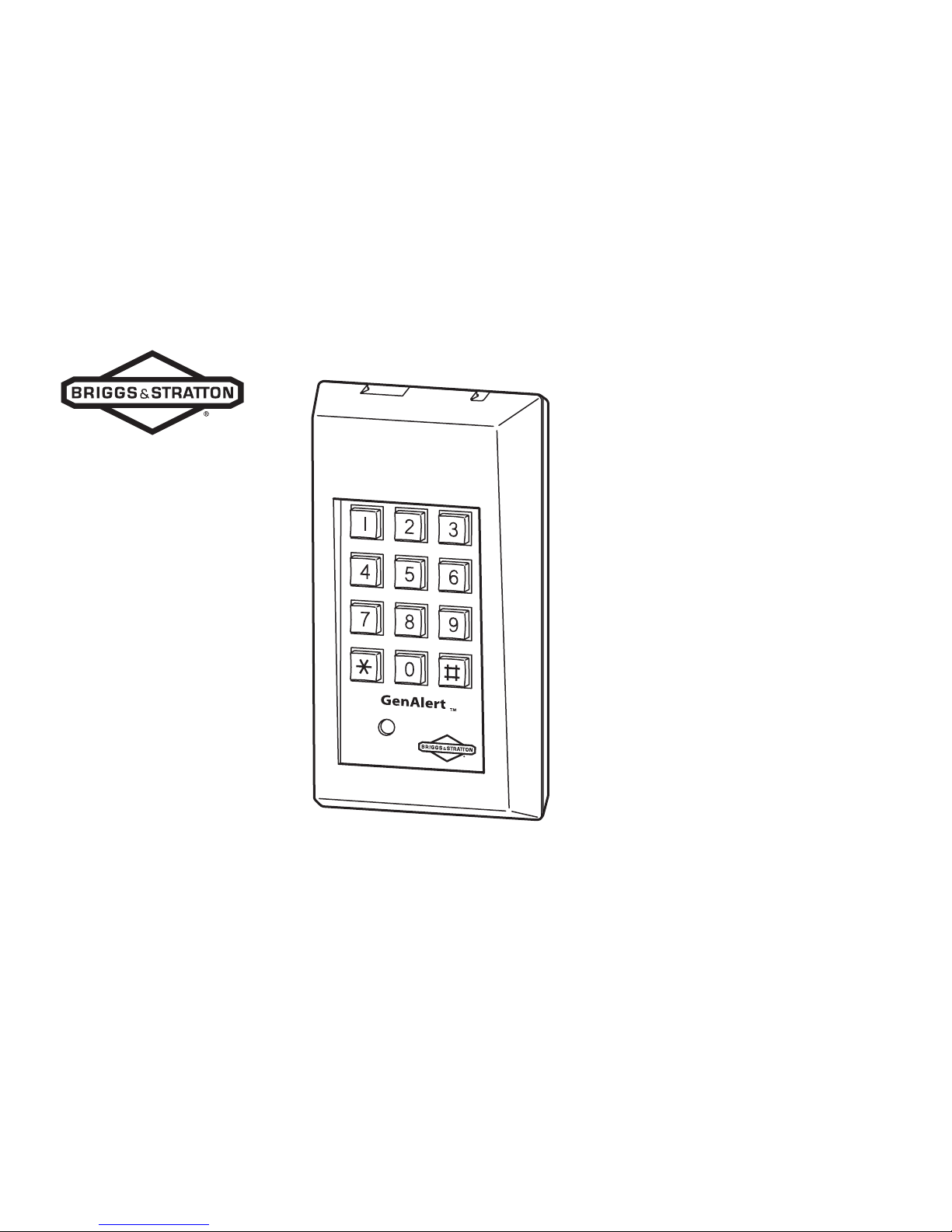
GenAlerttM
telephone DiAler

Thank you for purchasing this quality-built Briggs & Stratton accessory. We are pleased that you’ve placed your confidence in the
Briggs & Stratton brand. When operated and maintained according to the instructions in this manual, your Briggs & Stratton accessory
will provide years of dependable service.
This manual contains safety information to make you aware of the hazards and risks associated with generator products and how to
avoid them. Because Briggs & Stratton does not necessarily know all the applications this accessory could be used for, it is important
that you read and understand these instructions. Keep this manual for future reference.
This accessory requires installation and programming before use. Refer to the Installation section of this manual for instructions on
installation and programming procedures. Follow the instructions completely.
Make note of the product identification below:
Model Number _______________________________
Serial Number _______________________________
Date Purchased _______________________________
Store Purchased _______________________________
Where to Find Us
You never have to look far to find Briggs & Stratton support and service for your product. Consult your Yellow Pages. There are over
30,000 Briggs & Stratton authorized service dealers worldwide who provide quality service. You can also contact Briggs & Stratton
Customer Service by phone at 1-800-743-4115 or on the Internet at BRIGGSandSTRATTON.COM.
Briggs & Stratton Power Products Group, LLC
900 North Parkway
Jefferson, WI 53549
Copyright © 2007 Briggs & Stratton Power Products Group, LLC. All rights reserved.
No part of this material may be reproduced or transmitted in any form by any means
without the express written permission of Briggs & Stratton Power Products Group, LLC.

Table of Contents
Safety ........................................... 2
Important Safety Rules........................................2
Hazard Symbols and Meanings ..........................2
Special Installation Considerations:.....................3
Installation .................................... 5
Items Required for Installation............................5
Controls ......................................... 8
Operation ...................................... 8
Programming GenAlert........................................8
Star Key Function ................................................9
Important Tips.....................................................9
During an Alarm ................................................10
Canceling the Alarm ..........................................10
Resetting GenAlert.............................................10
GenAlert & Voice Mail .......................................11
Calling GenAlert.................................................11
Voice Mail & the Programmed Number ............11
Maintenance ..................................12
Testing Your GenAlert .......................................12
Battery Replacement .........................................12
Troubleshooting ..............................13
Specifications ................................15
FCC Statement...................................................16
Warranty .......................................17
BRIGGSandSTRATTON.COM2
Safety
Important Safety Rules
The safety alert symbol ( ) is used with a signal
word (DANGER, CAUTION, WARNING), a pictorial
and/or a safety message to alert you to hazards.
DANGER indicates a hazard which, if not avoided, will
result in death or serious injury. WARNING indicates a
hazard which, if not avoided, could result in death or
serious injury. CAUTION indicates a hazard which, if
not avoided, might result in minor or moderate injury.
NOTICE indicates a situation that could result in
equipment damage. Follow safety messages to avoid
or reduce the risk of injury or death.
The manufacturer cannot possibly anticipate every
possible circumstance that might involve a hazard.
The warnings in this manual, and the tags and decals
affixed to the unit are, therefore, not all-inclusive.
If you use a procedure, work method or operating
technique that the manufacturer does not specifically
recommend, you must satisfy yourself that it is safe
for you and others. You must also make sure that the
procedure, work method or operating technique that
you choose does not render the generator unsafe.
Hazard Symbols and Meanings
Electrical Shock
Failure to follow above warning could cause
personal injury, damage and/or malfunction of
equipment.
Low voltage wire cannot be installed in
same conduit as power voltage wiring.
WARNING
3
IMPORTANT: Read the warranty information and the
FCC statement before using this product.
The performance of local and long distance telephone
lines vary and may affect operation of this equipment.
Therefore, it is important that this equipment be
fully tested after installation to confirm telephone
compatibility. Please see Testing your GenAlert in
Maintenance for complete instructions.
Special Installation Considerations:
This equipment requires a single line telephone,
but does not require this line to be dedicated for
its use.
You must have Touch-Tone® telephone service
for this equipment to properly operate.
This equipment will not work on pulse or rotary
dialing telephone systems.
This equipment may not be compatible with some
PBX (Private Branch eXchange ) or other multi-
line business telephone systems.
A dual plug adapter or “splitter” (not included),
is required only if you share the same phone line
through the connection of a single wall jack.
NOTICE: Connecting this equipment to a commercial
telephone system may cause internal damage to both
systems. This equipment can share a wall phone jack
with a telephone.
•
•
•
•
•
To prevent possible injury, always de-energize
the generator and transfer switch before making
connections to the generator.
The unit must be installed in accordance
to generally accepted low voltage wiring
techniques.
WARNING

BRIGGSandSTRATTON.COM4
IMPORTANT: DO NOT program emergency phone
numbers for the police, fire or other emergency
personnel or departments unless you have specific
approval from such agencies. This equipment does
not identify the location that is calling and therefore
cannot provide an audible notification of what address
this phone call originated from.
Statement of Use
GenAlert is designed to alert you by telephone if your
generator either fails while running or fails to turn on.
GenAlert automatically calls one phone number when
the alarm is triggered and relays a factory recorded
message.
NOTICE: The GenAlert Warranty is VOID unless
the system is installed by a licensed electrical
professional.
5
Installation
If your home has specially wired alarm equipment
connected to the telephone line, ensure the installation
of your GenAlert Plus does not disable your alarm
equipment. If you have questions about what will
disable alarm equipment, consult your alarm system
installer.
Items Required for Installation
One 9-Volt alkaline or lithium battery
(not included)
Phillips screwdriver (not included)
2 conductor wire
(20 AWG or larger, not included)
A single line telephone jack
The telephone line does not need to be a dedicated
phone jack. A phone can share the jack with GenAlert
through the use of a telephone line splitter (not
included).
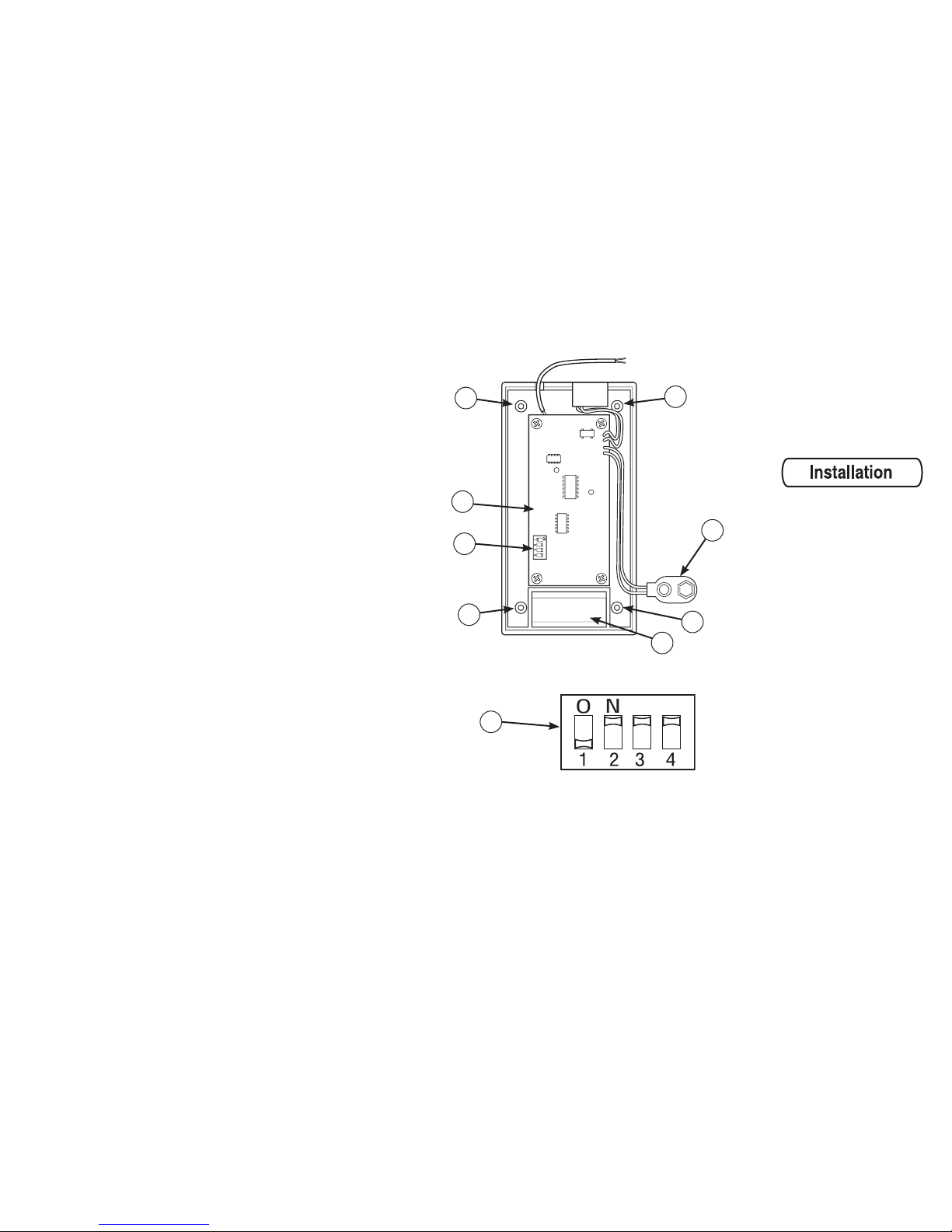
Installation
Remove four cover screws (A) from back cover.
Attach the 9V battery to connector (B) and place
battery in the battery compartment (C).
Locate the four DIP switches (D) on the circuit
board (E).
•
•
•
•
1.
2.
3.
A
B
C
D
E
A
AA
D
BRIGGSandSTRATTON.COM6
Change switch positions as desired. See
following table for switch settings
Properly position and replace the GenAlert’s back
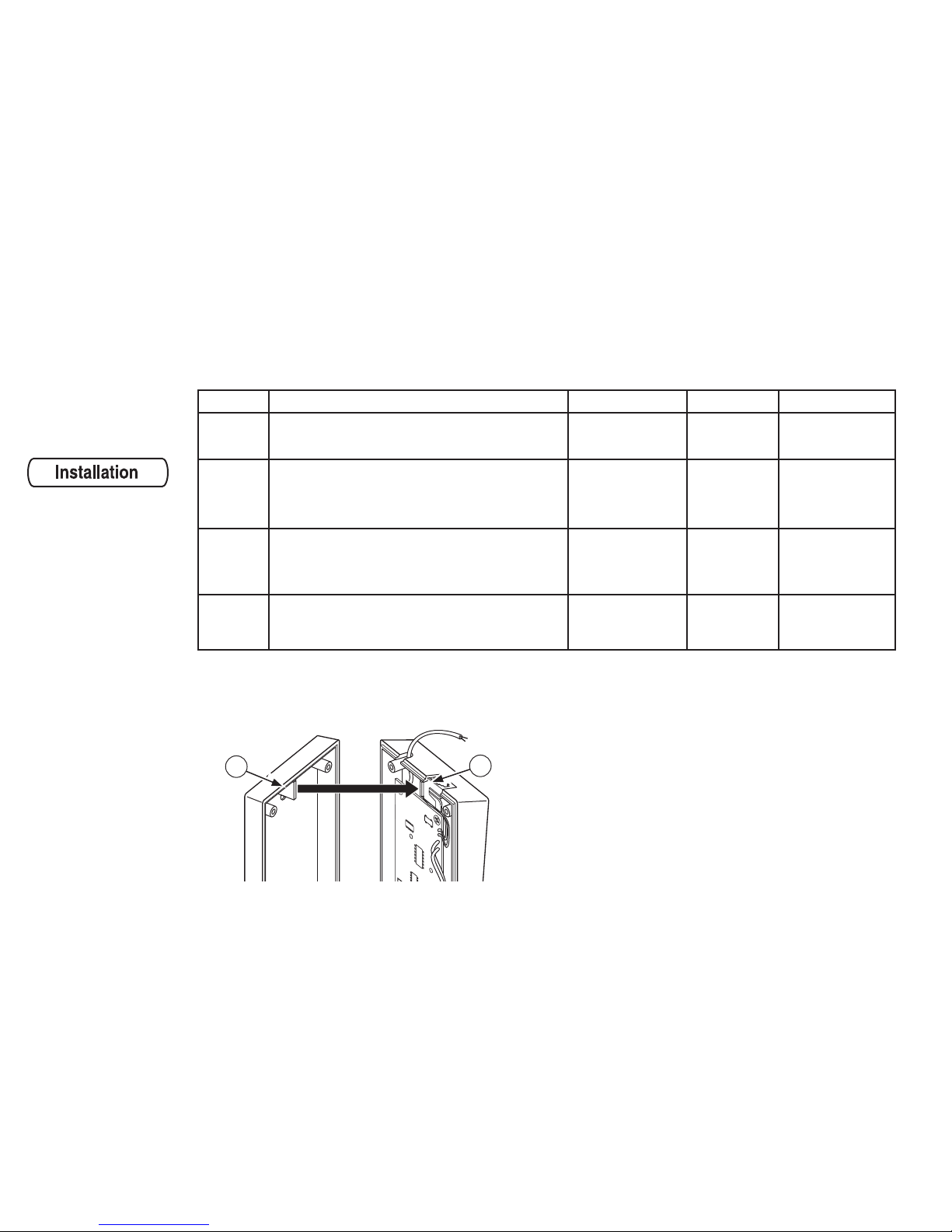
cover with the phone jack tab (A) over the phone
jack (B).
4.
5. Plug one end of the telephone cord into GenAlert.
Plug the other end of the telephone cord into the
wall jack of the single line telephone.
Using generally accepted low voltage wiring
techniques, route the two-conductor wire from
GenAlert to the home generator control panel. If
necessary, extend wire lengths as described in
Extending Wire Lengths.
6.
7.
Switch # Function OFF Position ON Position Default Position
1FACTORY USE ONLY
Do not change N/A N/A OFF
2
Pick Up Ring Count.
When you call your monitored location, should
the dialer pick up after 5 rings or 10 rings?
10 rings 5 rings ON
3
Call out frequency during an alarm. How often
should the dialer call the pre-programmed
telephone number?
Every
15 minutes
Every
2 hours ON
4Alarm Input Position.
Normally
Closed
Position
Normally
Open
Position
ON
B
A
7
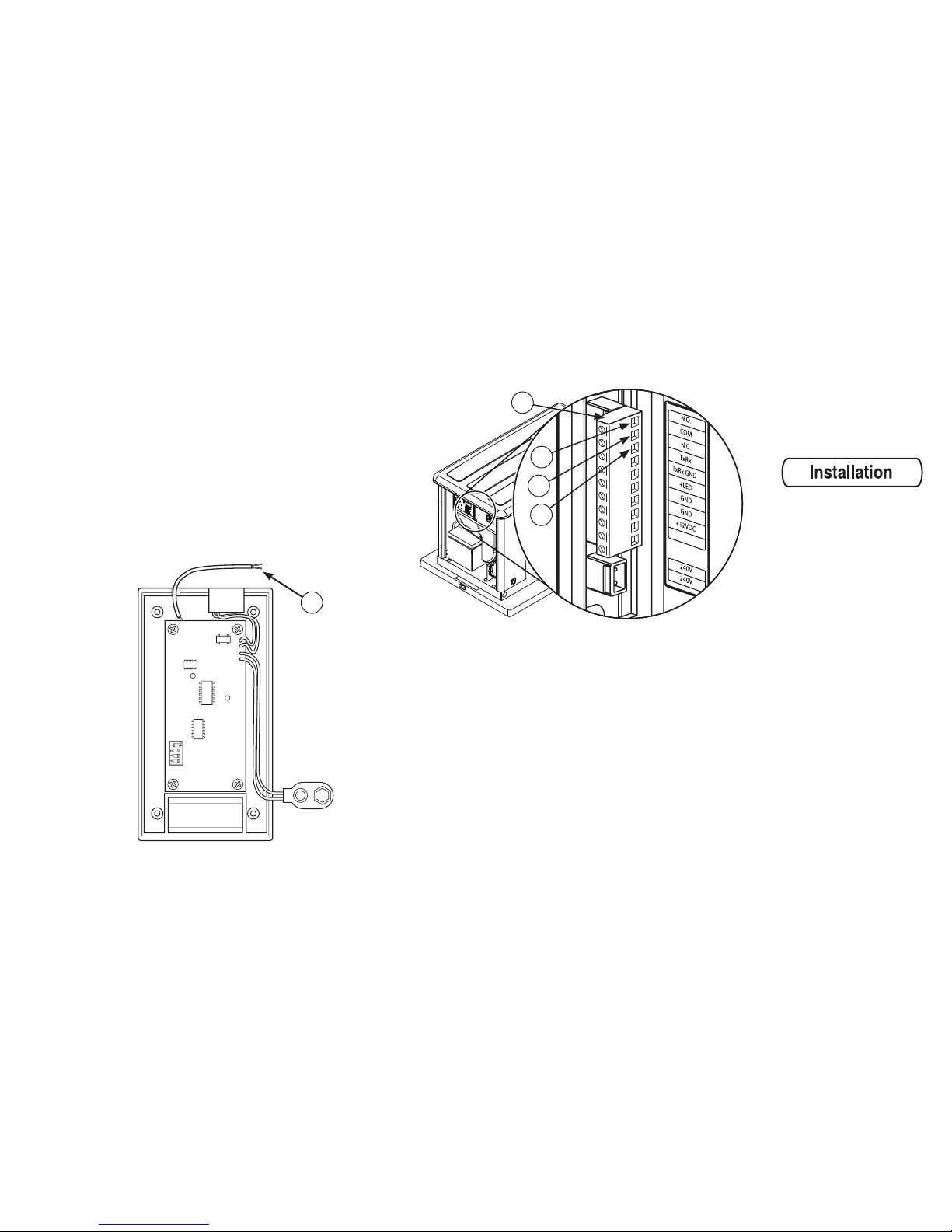
Connect the wire leads (C) from GenAlert to
the generator system’s terminal strip (D).
Polarity does not matter. One wire connects to
the common terminal screw (E) and the other
connects to the normally open terminal screw (F).
Dip Switch #4 must be in the default (ON)
position.
Should the above connection not be an option,
GenAlert can be modified to use the normally
closed terminal screw (G). Dip Switch #4 must be
changed to the (OFF) position.
C
8. NOTE: Either of the two wires from GenAlert can
connect to the common port.
F
E
G
D
Extending Wire Lengths
If necessary, the phone cord or wire leads may be
extended up to 1,000 ft. (304 m).
Use a 2-conductor wire, 20 AWG or larger.
BRIGGSandSTRATTON.COM8
Controls
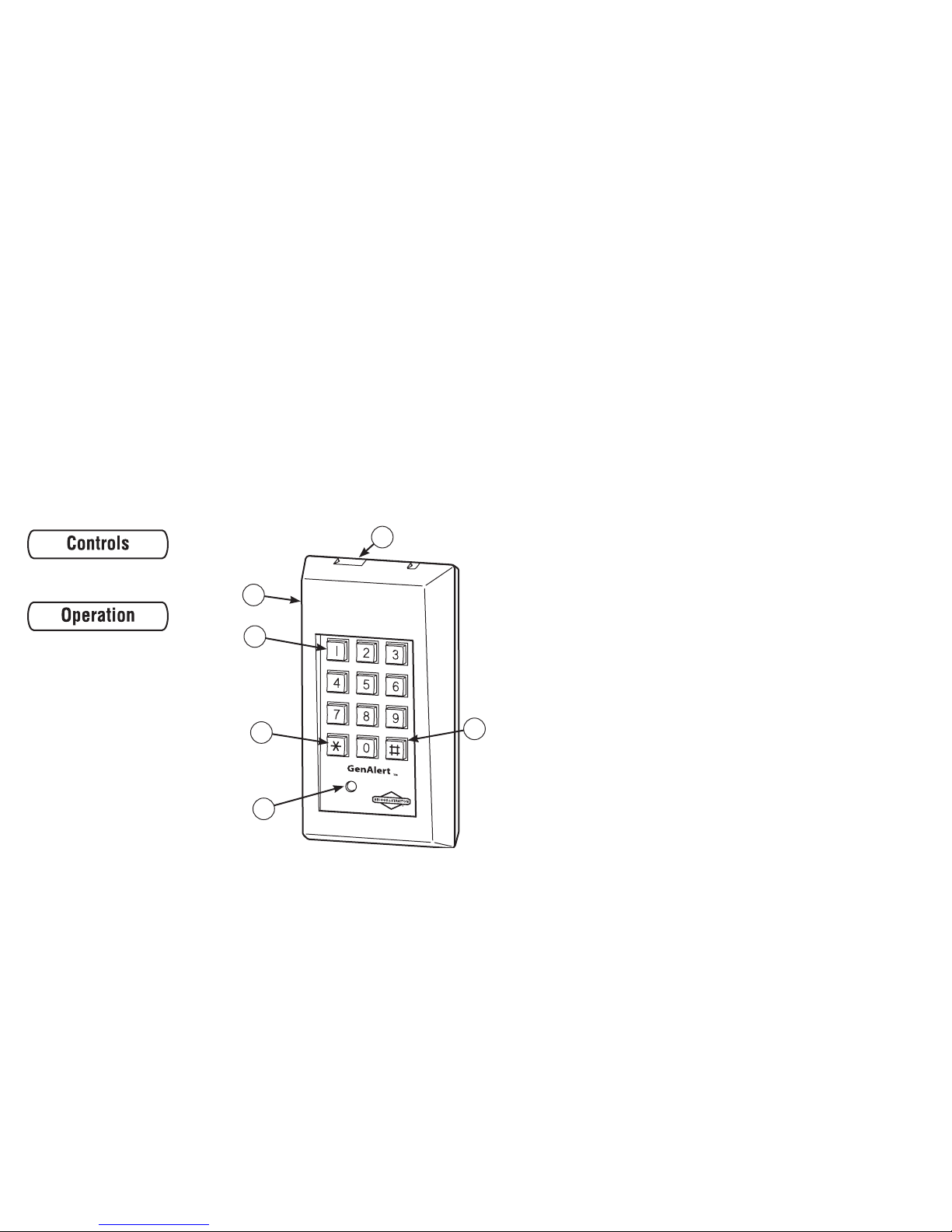
A - Front Cover.
B - Key Pad.
C - Star Key.
D - LED Light.
E - Pound Key.
F - Telephone Connector Jack.
D
E
C
B
A
F
Operation
Programming GenAlert
The programmed telephone number is the number
you want your GenAlert to call if your home standby
generator fails during operation. The phone number
is remembered even if you disconnect the battery and
the phone line from the unit.
You may program up to forty (40) digits in a phone
number. The pound key (E) and star key (C) are used
to program and test GenAlert.
Before programming, make sure your phone line is
connected to GenAlert and the wall telephone jack.
Press and hold the pound key (E) on the
GenAlert’s keypad.
While holding the pound key (E), use the keypad
(B) to enter the telephone number you want
GenAlert to call.
Keep holding down the pound key (E) until the entire
phone number is entered.
1.
2.
Questo manuale è adatto per i seguenti modelli
2
Indice
Lingue:


