
Broadcast Tools SR-4 G2 Manuale utente

Installation and Operation Manual
PROBLEM SOLVED
Due to the dynamic nature of product design, the information contained in this
document is subject to change without notice. Broadcast Tools, Inc., assumes no
responsibility for errors and/or omissions contained in this document. Revisions
of this information or new editions may be issued to incorporate such changes.
Broadcast Tools® is a registered trademark of Broadcast Tools, Inc.
All Sentinel® labeled products are registered trademarks of Broadcast Tools, Inc.
Copyright® 1989 - 2021 by Broadcast Tools, Inc. All rights reserved.
No part of this document may be reproduced or distributed without permission.
Visit www.broadcasttools.com for important product update information.
Manual update: 8/2/2021
Firmware Version: 1.07 or higher
If you need a firmware upgrade, contact Broadcast Tools®
No part of this document may be reproduced or distributed without permission.
ALL SPECIFICATIONS AND FEATURES FOR THIS PRODUCT ARE SUBJECT TO
CHANGE WITHOUT NOTICE
NOTE: We recommend the use of Chrome, Firefox or Safari as your browser.
Smart Relay 4 G2 (SR-4 G2)
Four Channel Smart GPIO Converter
INC
®

Smart Relay 4 G2 Installation and Operation Manual
Table of Contents
Section Title Page #
Introduction . . . . . . . . . . . . . . . . . . . . . . . . . . . . . . . . . . . . . . . . . . . . . 3
Safety Information . . . . . . . . . . . . . . . . . . . . . . . . . . . . . . . . . . . . . . . . 3
Who to Contact for Help . . . . . . . . . . . . . . . . . . . . . . . . . . . . . . . . . . . 3
Product Overview . . . . . . . . . . . . . . . . . . . . . . . . . . . . . . . . . . . . . . . . 4
Features/Benefits . . . . . . . . . . . . . . . . . . . . . . . . . . . . . . . . . . . . . . . . . 4
Inspection . . . . . . . . . . . . . . . . . . . . . . . . . . . . . . . . . . . . . . . . . . . . . . . 4
Installation/Operation. . . . . . . . . . . . . . . . . . . . . . . . . . . . . . . . . . . . . . 5
Power . . . . . . . . . . . . . . . . . . . . . . . . . . . . . . . . . . . . . . . . . . . . . . . 5
Surge Protection . . . . . . . . . . . . . . . . . . . . . . . . . . . . . . . . . . . . . . . 5
UPS Standby Power System. . . . . . . . . . . . . . . . . . . . . . . . . . . . . . 5
LED Indicators . . . . . . . . . . . . . . . . . . . . . . . . . . . . . . . . . . . . . . . . 5
USB Serial PGM Port. . . . . . . . . . . . . . . . . . . . . . . . . . . . . . . . . . . 5
Inputs. . . . . . . . . . . . . . . . . . . . . . . . . . . . . . . . . . . . . . . . . . . . . . . . 6
Input Jumper Configuration . . . . . . . . . . . . . . . . . . . . . . . . . . . . . . 7
Relay Outputs . . . . . . . . . . . . . . . . . . . . . . . . . . . . . . . . . . . . . . . . . 7
Operation Overview . . . . . . . . . . . . . . . . . . . . . . . . . . . . . . . . . . . . 8
Channel Pinouts . . . . . . . . . . . . . . . . . . . . . . . . . . . . . . . . . . . . . . . 8
Mode Settings . . . . . . . . . . . . . . . . . . . . . . . . . . . . . . . . . . . . . . . . . 9
Programming
Programming Steps. . . . . . . . . . . . . . . . . . . . . . . . . . . . . . . . . . . . 11
Set Timers . . . . . . . . . . . . . . . . . . . . . . . . . . . . . . . . . . . . . . . . . . . 11
Set Modes . . . . . . . . . . . . . . . . . . . . . . . . . . . . . . . . . . . . . . . . . . . 12
Restoring Factory Defaults . . . . . . . . . . . . . . . . . . . . . . . . . . . . . . 12
Specifications . . . . . . . . . . . . . . . . . . . . . . . . . . . . . . . . . . . . . . . . . . . 13
Warranty. . . . . . . . . . . . . . . . . . . . . . . . . . . . . . . . . . . . . . . . . . . . . . . 14
Front and rear panel drawings . . . . . . . . . . . . . . . . . . . . . . . . Appendix
Connector and configuration jumper layout . . . . . . . . . . . . . Appendix
Fractional schematic . . . . . . . . . . . . . . . . . . . . . . . . . . . . . . . Appendix
WEBSITE:
Visit our web site for
product updates and
additional information.
2
CONTENTS

Smart Relay 4 G2 Installation and Operation Manual
INTRODUCTION
INTRODUCTION
Thank you for your purchase of the Smart Relay 4 G2 Four Channel Smart GPIO
Converter, which we will refer to throughout the manual as the Smart Relay 4 G2.
We are confident this product will give you many years of dependable service. This
manual is intended to give you all the information needed to install and operate the
Broadcast Tools® Smart Relay 4 G2.
SAFETY INFORMATION
Only qualified technical personnel should install the Smart Relay 4 G2. Any attempt
to install this device by a person who is not technically qualified could result in a
hazardous condition to the installer or other personnel or damage to the Smart Relay
4 G2 or other equipment. Please ensure that proper safety precautions have been
taken before installing this device. If you are unfamiliar with this type of equipment,
please contact a properly qualified engineer to handle the installation and setup of
the Smart Relay 4 G2. Broadcast Tools, Inc., is unable to support NON-Broadcast
Tools software, hardware, or NON-Broadcast Tools computer/hardware/software
problems. If you experience these problems, please research your hardware/software
instruction manuals, or contact the manufacturers technical support department.
WHO TO CONTACT FOR HELP
If you have any questions regarding your product or you need assistance, please con-
tact your distributor from whom you purchased this equipment. If you would like
more information about BROADCAST TOOLS® products, you may reach us at:
Broadcast Tools, Inc.
131 State Street
Sedro-Woolley, WA 98284-1503 USA
Voice: 360.854.9559
Fax: 866.783.1742
Internet Home Page: www.broadcasttools.com
E-mail:[email protected]
THANK YOU FOR CHOOSING
BROADCAST TOOLS® BRAND PRODUCTS!
CAUTION!
Broadcast Tools®
Products, as with any
electronic device, can
fail without warning.
Do not use this product
in applications where a
life threatening condition
could result due to failure.
NOTE:
This manual should be
read thoroughly before
installation and operation.
WEBSITE:
Visit our web site for
product updates and
additional information.
Broadcast Tools is a Veteran Owned Business
Designed, Assembled and Supported in WA State, USA

Smart Relay 4 G2 Installation and Operation Manual
OVERVIEW
Product Overview
The Smart Relay 4 G2 provides four independent GPIO interfaces in one box, each
equipped with two optically isolated inputs (wet or dry) and a 2PDT relay output.
The Smart Relay 4 G2 is perfect for converting differing logic levels to contact clo-
sures. Additional features include: Independent user programmable Boolean logic
and pulse stretching (delays) from 50ms to 99 hours, 59 minutes, 59.99 seconds.
Features/Benefits
• All I/O connections via pluggable screw terminal blocks.
• Each 2PDT relay channel can be configured with two independent optically
isolated inputs configurable for dry signals or wet signals (5-24 VDC, or 25-
48 VDC via an external resistor.)
• LED status indicators are provided for each relay, input, and power.
• Fifteen logic functions include, sustained, toggle, set-reset (flip-flop), dual
alternate action or failing/rising edge, along with additional Boolean logic
functions.
• Independent pulse stretcher or time delays may be user programmed from
50ms to 99 hours, 59 minutes, 59.99 seconds.
• Timing and mode configuration from a non-dedicated PC using the USB-
serial connection.
Applications
• Convert differing logic levels to 2PDT contact closures.
• Time delay relays
• Pulse stretcher
• Sustained contact to pulse converters
• Rising and/or falling edge pulse converters
• Latching (flip-flop) relays
• Toggle action relays
• Dual alternate action relays
• Additional Boolean logic functions include: XOR, AND, NAND, OR, NOR.
Inspection
Please examine your Smart Relay 4 G2 carefully for any damage that may have been
sustained during shipping. If any damage is present, please notify the shipper imme-
diately and retain the packaging for inspection by the shipper. The package should
contain the Smart Relay 4 G2, a power supply, and a USB-A/B cable. Manuals may
be downloaded from our web site.
WEBSITE:
Visit our web site for
product updates and
additional information.

Smart Relay 4 G2 Installation and Operation Manual
INSTALLATION
Installation/Operation
Power
Connect the 2.1mm barrel type center positive power connector into the unit and the
included 9 to 12 VDC power supply with domestic connector into a 120 Vac 50-60 Hz
power source.
NOTE: Never use any type of power supply other than the specified/supplied
power supply. Check the power jack on the back of the unit to determine which
power supply is required.
Surge Protection
The Smart Relay 4 G2 has built-in resistance to voltage changes; we recommend that
you use a power surge protector or line conditioner on the incoming AC line.
Lightning strikes and/or other high voltage surges may damage your Smart Relay 4 G2
and connected equipment if it is not properly protected. For lightning protection
devices, check out www.polyphaser.com and www.itwlinx.com.
UPS Standby Power System
We recommend that you connect your Smart Relay 4 G2 to a UPS standby power
system. A UPS helps minimize the risk to the Smart Relay 4 G2 and provides power
during a power outage.
Wire Prep
The Smart Relay 4 G2 interfaces to external equipment through removable euro-block
screw terminals. The terminals accommodate wire sizes from 16 - 28 AWG solid or
stranded wire. Before installing a wire, remove the euro-block screw terminal plug and
turn each capture screw fully counterclockwise. Strip each conductor to a length of
0.25” and insert the conductor fully into the terminal. Turn the capture screw fully
clockwise to secure the conductor.
WEBSITE:
Visit our web site for
product updates and
additional information.

Smart Relay 4 G2 Installation and Operation Manual
INSTALLATION
Inputs
Each optically isolated input has a terminal labelled “xA” and a terminal labelled
“xB”. Inputs can be configured for either wet or dry operation via internal jumpers.
The factory default configuration is dry, where the “A” side of the input is ground
(GND) and the “B” side of the input is the cathode (-) of the opto-isolator. In this
configuration 5V is applied internally to the anode (+) of the opto-isolator. This con-
figuration is best for interfacing with external dry contact relay outputs, switches,
and open collector outputs.
In the “wet” configuration an external voltage must be applied to the input to acti-
vate the opto-isolator. When configured for wet operation the “A” side of the input
is the anode (+) and the “B” side of the input is the cathode (-). This configuration
is best where full isolation is preferred or when interfacing with external
voltage/logic level outputs.
Each optically isolated input is connected through an internal 2.2k ohm series cur-
rent-limiting resistor directly to an opto-coupler circuit so no external resistor is nec-
essary if the input voltage is between 5 and 24 VDC. Higher DC voltages, from 25
to 48 VDC, can be used but must be reduced with an additional external resistor of
the appropriate value and power rating to limit the input current.
Here is how to calculate the value and power rating of an external current limiting resis-
tor for DC voltages up to 48 VDC: Each opto-isolated input has an internal 2.2K ohm
series resistor. The opto-isolator works well with an input current of 9 mA and has a
voltage drop of around 1.2V. With this information we can determine the correct exter-
nal series current limiting resistor value needed for other voltages using the equation:
R = ((Vin-1.2)/0.009)-2200
Where:
R = External resistor value required
Vin = Desired input voltage
1.2 V = Forward voltage drop of the LED in the opto-isolator
0.009 A = Nominal LED current
2200 ohms = Internal resistor
For example:
To connect a 48 VDC signal voltage to an input on the Smart Relay 4 G2 in “wet”
configuration the completed equation for the external resistor value would be:
R = ((48-1.2)/0.009)-2200 = 3000 ohms
To calculate the power dissipated by the external resistor, the equation would be:
P = I x I x R, so the resistor must be at least .009 x .009 x 2200 = 0.243 Watts,
use a 1/2 Watt rated resistor.
WEBSITE:
Visit our web site for
product updates and
additional information.
Smart Relay 4 G2 Installation and Operation Manual
INSTALLATION
Input Jumper Configuration
Each input is equipped with an internal four-position header and two jumpers. The
headers are labeled JPx and are numbered IN-1 through IN-8. The factory default
configuration is for a DRY input (relay contact, switch, open collector) with a
jumper over pins 1 & 2 and another jumper over pins 3 & 4. To change the input to
WET (user supplied voltage between 5 and 24 VDC, or 25-48 VDC with an exter-
nal resistor), remove both jumpers and place ONE jumper over pins 2 & 3.
Relay Outputs
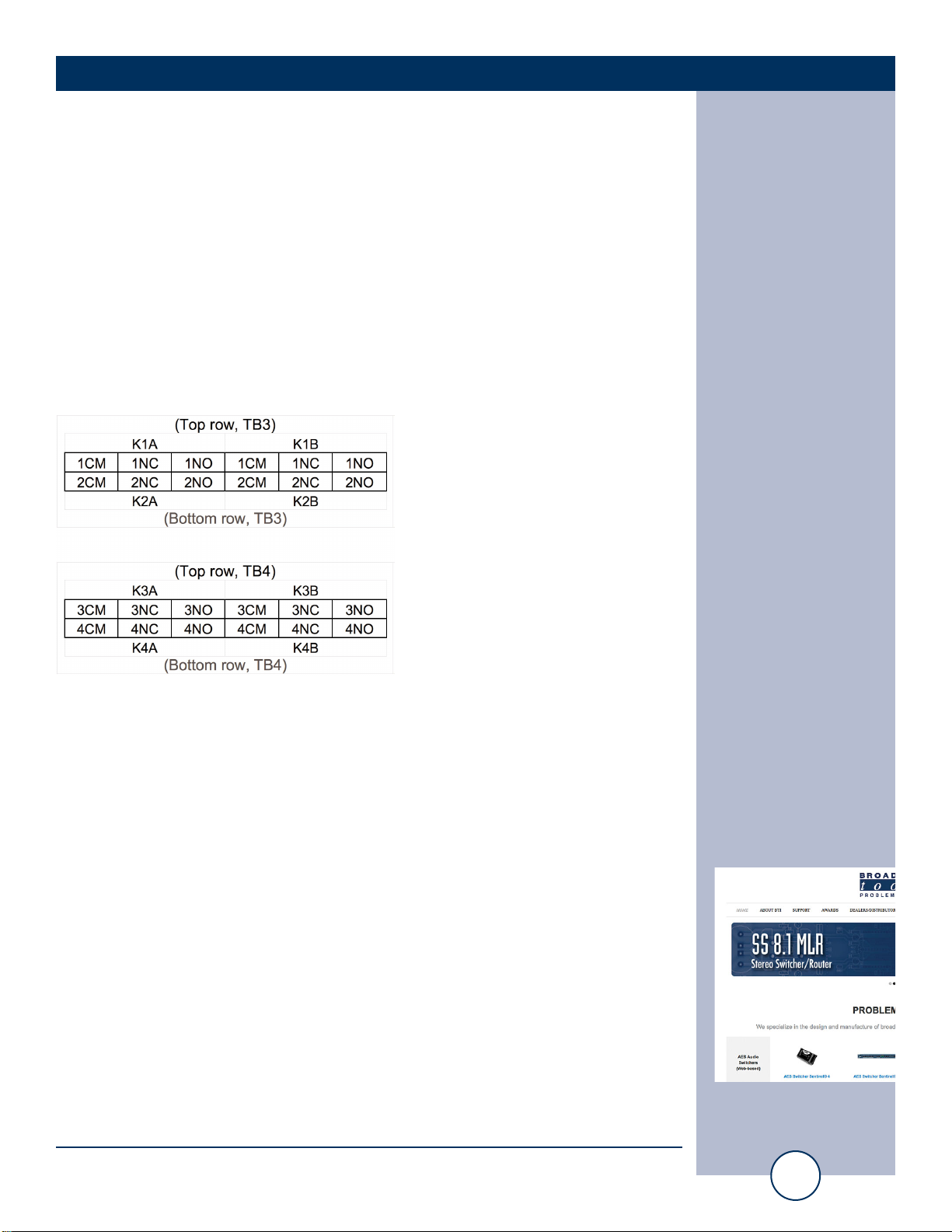
The Smart Relay 4 G2’s relays are 2PDT normally open/dry. Make your connections
to the desired relays K1 A/B thru K4 A/B. Front panel LEDs indicate when a relay
is active.
CM = Common Relay Contact (Wiper)
NO = Normally Open Relay Contact
NC = Normally Closed Relay Contact
LED Indicators
• “PWR”: Power LED (Green).
• “K1”- “K4” Relay LEDs: Lit when the corresponding relay is on. (Green)
• “1-8” Input LEDs: Lit when the corresponding input is on. (Yellow)
USB PGM Port
The front-panel USB type-B port is used to connect the Smart Relay 4 G2 to a com-
puter for configuration via a virtual COM port. See the “Programming” section of
this manual for more information on setting modes and timers for each channel.
WEBSITE:
Visit our web site for
product updates and
additional information.

Smart Relay 4 G2 Installation and Operation Manual
OPERATION
Operation Overview
Each of the four GPIO channels consist of two optically isolated inputs and one
2PDT relay output. The first input in each channel is referred to as the “odd” input
(1, 3, 5, 7) and the second input is referred to as the “even” input (2, 4, 6, 8.)
Each relay’s factory default mode setting is Mode 00, where the relay closes when the
odd input is active and opens when the odd input is inactive. See the Mode Settings
and Programming sections of the manual for more information on configuring the
relay section for different logic and timing functions using the USB serial port.
A third non-isolated override input labelled “Rx” is present and allows the user to
trigger the channel’s relay outputs via a sustained closure to ground, overriding the
opto-isolated inputs and the logic functions.
WEBSITE:
Visit our web site for
product updates and
additional information.

Smart Relay 4 G2 Installation and Operation Manual
OPERATION
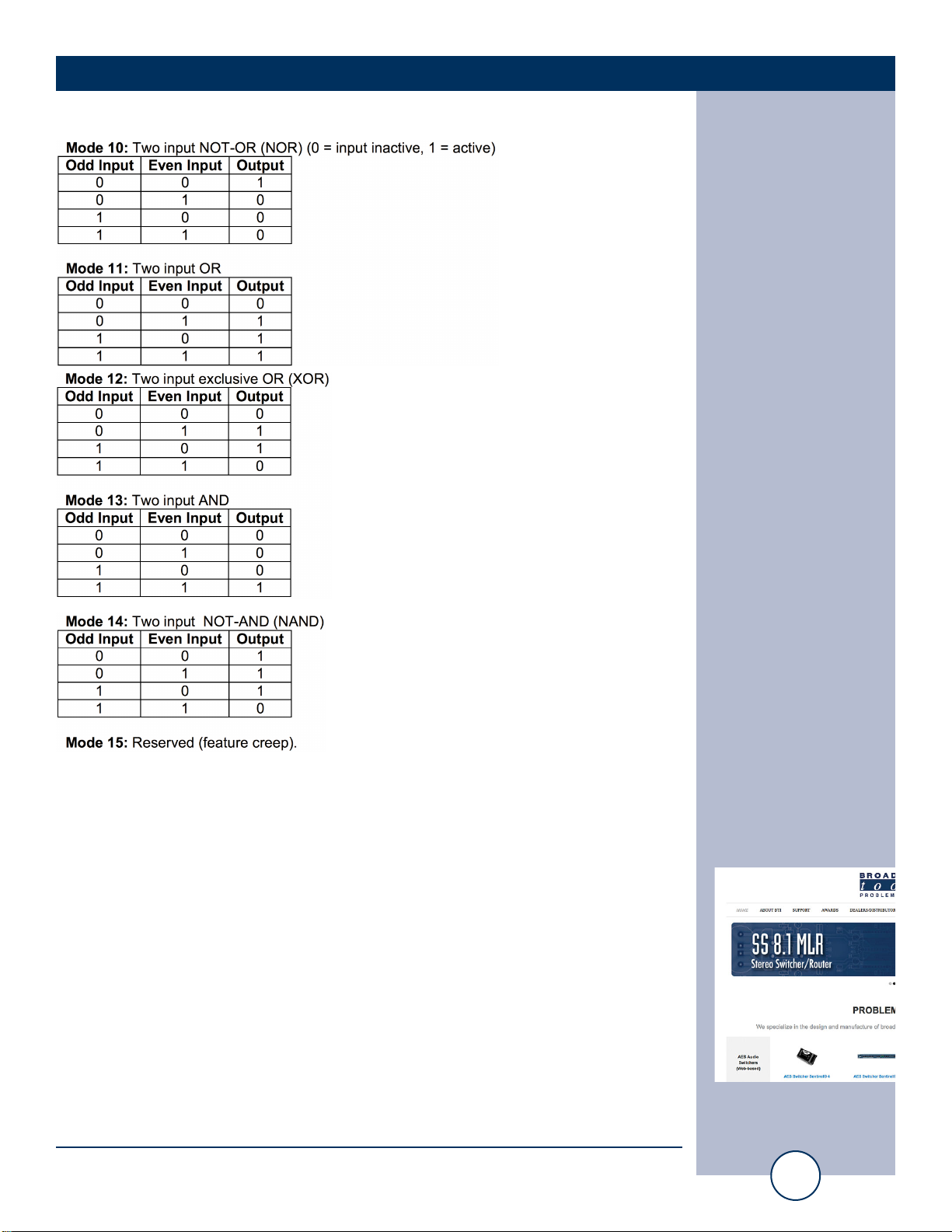
Mode Settings
Mode 00: Relay output closes when the odd input is active and opens when the odd
input is inactive. (Factory Default)
Mode 01: Relay output toggles on leading edge of the odd input.
Mode 02: Relay output closes on the leading edge of the odd input. Relay remains
closed until the leading edge of the even input is active.
Mode 03: Relay output closes after the odd input has been active for the pro-
grammed time period. It opens after the even input is closed for the time period.
Mode 04: Relay closed on the leading edge of the odd input. The relay opens after
the trailing edge is closed for the time period.
Mode 05: Relay output closes on leading edge of the odd input for time period.
Mode 06: Relay output closes for the time period on the trailing edge of the odd
input.
Mode 07: Relay output closes for the time period on the leading or trailing edge of
the
odd input.
Mode 08: Relay output closes on leading edge of the odd input and remains closed
for at least the time period. If the odd input stays active for longer than the time peri-
od, the relay will open on the trailing edge of the odd input.
Mode 09: Relay output closes on the leading edge of the odd input for no longer than
the time period. If a trailing edge is encountered before the time has expired, the
relay will open with the edge. Otherwise, the relay opens when the time period
expires.
WEBSITE:
Visit our web site for
product updates and
additional information.
Smart Relay 4 G2 Installation and Operation Manual
OPERATION
WEBSITE:
Visit our web site for
product updates and
additional information.
Indice
Altri manuali Broadcast Tools Convertitore multimediale

Broadcast Tools
Broadcast Tools DTD-16 Manuale utente

Broadcast Tools
Broadcast Tools DTD-16 + G2 Manuale utente

Broadcast Tools
Broadcast Tools ADCS-III Manuale utente

Broadcast Tools
Broadcast Tools DTD-16 + G2 Manuale utente

Broadcast Tools
Broadcast Tools DAC-1 Manuale utente

Broadcast Tools
Broadcast Tools ADC-1 Plus Manuale utente

Broadcast Tools
Broadcast Tools DTE-16 Plus Manuale utente

Broadcast Tools
Broadcast Tools ADC-1 Manuale utente

Broadcast Tools
Broadcast Tools DTD-16 Plus Manuale utente


