
BT XD56 Scheda tecnica

Block Nuisance Calls
Quick Set-up and User Guide
BT XD56
Digital Cordless Phone with Answer Machine

If you need some help, call us on 0800 218 2182* or go to bt.com/producthelp
Important – please read first2
• Only use the line cord, power supply (item code: 066773) and rechargeable
batteries supplied with your phone.
• Make sure that the power supply is connected to a known working socket.
• Connect your phone to the power supply and allow the batteries to charge for
16 hours before connecting the line cord to your telephone socket.
• To make sure you get the best range and reception from your handset, avoid
interference by placing the base unit away from large metal objects such as
fridge freezers and microwave ovens or electronic products such as computers
and TVs.
If you need some help, call us on 0800 218 2182* or go to bt.com/producthelp
3
If you need some help, call us on 0800 218 2182* or go to bt.com/producthelp
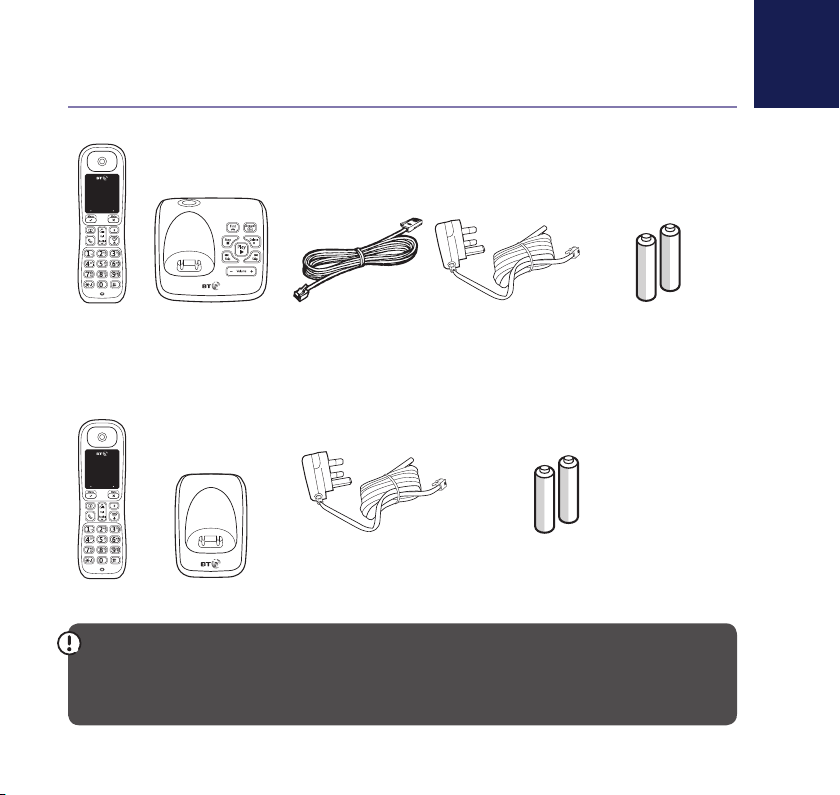
Check box contents
IMPORTANT
Only use the mains power adaptors, cables and rechargeable batteries supplied in this box, or this
product may not work. Any replacement rechargeable batteries must be of the same type. BT accepts
no responsibility for damage caused to your BT XD56 by using any other type of batteries.
Contents for each additional handset (multipacks only)
Handset
Handset
Mains power adaptor
(item code 066773)
Mains power adaptor
(item code 066773)
Telephone line cord
(pre-installed)
2x AAA NiMH 500mAh
rechargeable batteries
(already in handset)
2x AAA NiMH 500mAh
rechargeable batteries
(already in handset)
Base
Charger
If you need some help, call us on 0800 218 2182* or go to bt.com/producthelp
Where to put your phone
• Place the base within
3 metres of a mains power
socket and 1.8 metres of a
phone socket so the cables
will reach.
• Don’t place the phone or
base in a bathroom or
other humid area.
• The product works by
sending radio signals
between the handset and
base. The strength of the
signal depends on where you
position the base. Putting it
as high as possible can help
give you the best signal.
IMPORTANT
• The base station should
be plugged into the mains
power socket all the time.
Quick set-up guide4
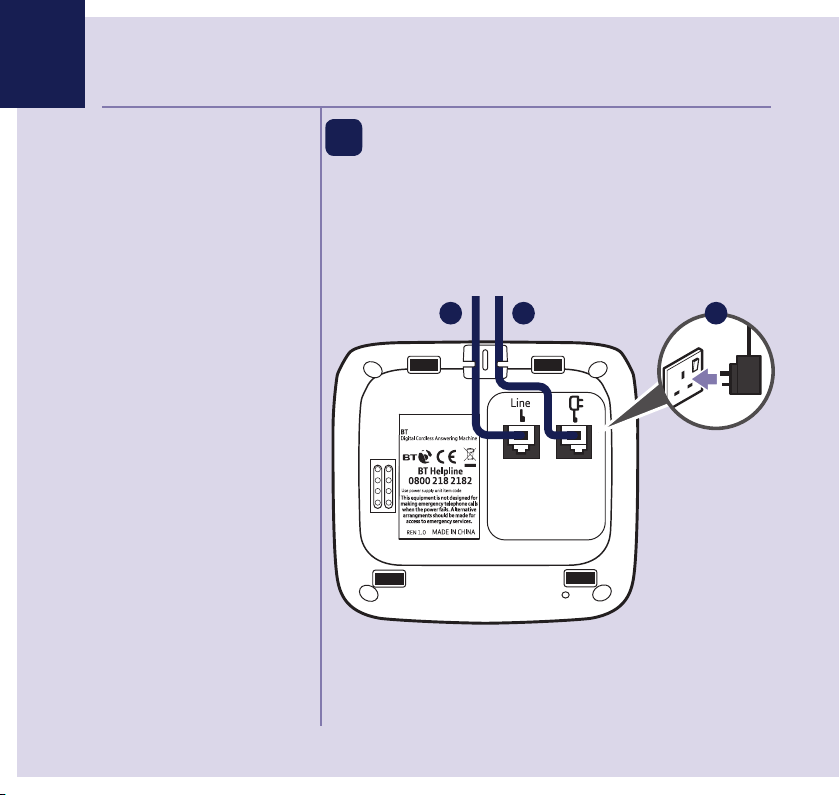
1 Plug in
1. Plug the mains power
adaptor into the base,
with the cable clipped
in the groove provided.
2. Plug the other end
of the power adaptor
into the wall power
socket and switch on.
3. The telephone line cord is already fitted, plug the
other end into the wall socket.
066773
XD56
1 23

Quick set-up guide 5
If you need some help, call us on 0800 218 2182* or go to bt.com/producthelp
Talk/Standby time
Under ideal conditions, the
handset batteries should give
up to 10 hours talk time or
100 hours standby on a single
charge.
Please note that new Ni-MH
rechargeable batteries don’t
reach full capacity until
they’ve been in normal use
for several days.
Battery low warning
The icon will flash, you’ll
hear a warning beep every
minute, to indicate that you
need to recharge your handset
before you can use it.
If the battery charge completely
runs out, you must recharge the
handset batteries before you
can use the handset. Place the
handset on the base or charger
to charge.
When a handset is charging
from a low charge, the display
shows four characters scrolling
in a circle on the bottom line of
display.
Quick set-up guide 5
2 Activate the batteries
1. Activate the batteries by pulling
the plastic tab away from the
back of the handset.
2. The handset will check for a
link with the base station.
Once found, the screen will
show the handset name i.e.
HANDSET 1
.
Press the Left option button on the handset
to set up date and time. You can press the Right
option button to skip any further options
until setup is complete (you can always set these
up later).
Remove this tab
and charge batteries
for 16 hours before use.
Rechargeable batteries
already fitted
HANDSET 1

If you need some help, call us on 0800 218 2182* or go to bt.com/producthelp
Quick set-up guide6
Battery performance
• To keep the batteries in the
best condition, leave the
handset off the base for a
few hours at a time.
• Running the batteries right
down at least once a week
will help them last as long
as possible.
• After charging your handset
for the first time, subsequent
charging time for the
batteries is approximately
8 hours.
• The charge capacity of
rechargeable batteries will
go down over time, which
will reduce the talk and
standby time. Eventually
they’ll need replacing.
For details on how to get
replacement batteries,
call the helpline on
0800 218 2182*.
3. Once set-up is complete your handset will display
the handset name, place the handset on the base
to charge.
4. After 16 hours, plug the phone line cord into the
phone wall socket.
IMPORTANT
Charge the handset batteries for 16 hours or your
phone might not work.
Quick set-up guide 7
If you need some help, call us on 0800 218 2182* or go to bt.com/producthelp
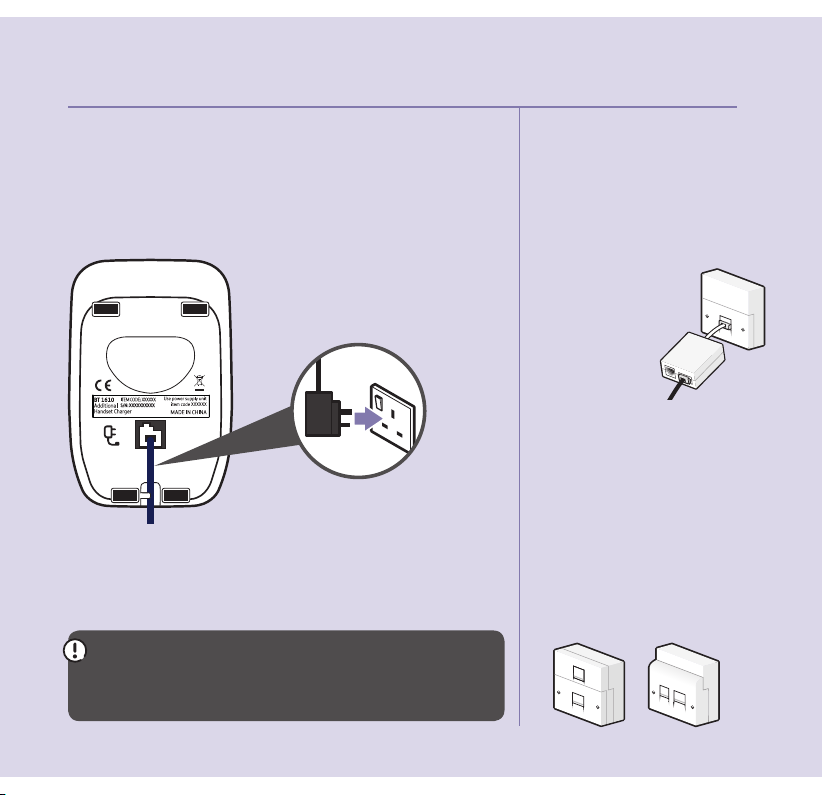
Set up your additional handsets (multipacks only)
1. For additional handsets and chargers: plug the
mains power adaptor into the underside of the
charger and plug the other end into the mains wall
socket and switch on the power.
2. Activate the batteries as explained on page 5.
3. Place the handset on the charger to charge for
16 hours.
If you ever need to remove the batteries, slide
open the battery compartment cover then gently
ease the batteries out.
Using your BT XD56 on a line
with broadband?
To avoid problems with your
broadband or noise on your
phone line, you might need to
plug your telephone line cord
into the wall socket via a
microfilter (not supplied).
If your main phone
socket has a single
socket, you do need
to use microfilters,
like this:
You’ll need a microfilter for every
phone socket where you’ve
got equipment plugged in – up
to a maximum of four per line
– including alarm sytems and
digital TV boxes.
You can get BT ADSL micro filters
from bt.com/shop
You don’t need to use microfilters
if your main phone socket has
two separate sockets, like these:

Quick set-up guide
If you need some help, call us on 0800 218 2182* or go to bt.com/producthelp
8
3 Go!
Your BT XD56 is now ready for you to use
• For help setting the date and time, go to page 47.
• For instructions on making a call, go to page 19.
• For help personalising your phone’s settings, go to
page 42.
• For instructions on using the answer machine,
go to page 32.
Or, you may find the answer in the Help section
on page 52 or see our online frequently asked
questions at bt.com/producthelp
Alternatively, call the Helpline on 0800 218 2182*.
* Calls made from within the UK mainland network are free. Mobile and
international call costs may vary.
If you cannot find the answer
to your problem in this user
guide, then please call our free
Helpline on 0800 218 2182*.
Our dedicated advisors are
more likely to be able to help
you than the retailer where you
made your purchase.

If you need some help, call us on 0800 218 2182* or go to bt.com/producthelp
9In this guide
Getting to know your phone
Handset buttons ..............................12
Handset display and icons ................13
Finding your way around
your phone ......................................14
Menu map .......................................15
Base ................................................18
Using the phone
Make an external call .......................19
Preparatory dialling .........................19
End a call.........................................19
Switch the handset on or off .............19
Receive a call ...................................20
Call Waiting .....................................20
Mute ...............................................21
Incoming speech volume ..................21
Redial .............................................21
Voicemail (1571) .............................22
Turn the handset ringer on or off .......22
Finding handset (paging) .................22
Phonebook
Store entry in phonebook .................23
Dial entry in phonebook ...................23
Character map .................................24
View/dial entry in phonebook...........24
Edit entry in phonebook ...................25
Delete entry in phonebook ...............25
Delete all entries in phonebook.........26
View the phonebook memory status . . 26
Call Blocking
Block incoming call number in
your Calls list ...................................27
Turn call blocking on to enable ..........27
blacklist
Add, view, edit or delete a number
in your blacklist ...............................28
Block incoming call by call type ........28
Caller Display and the Calls list
Caller Display ...................................29
Calls list ...........................................29

In this guide
If you need some help, call us on 0800 218 2182* or go to bt.com/producthelp
10
Missed call notification .....................30
View/dial an entry in the Calls list ......30
Save a Calls list entry to your
contacts ..........................................30
Delete an entry in the Calls list ..........31
Delete the entire Calls list .................31
Answer machine
Using the answer machine from
the handset .....................................32
Switch the answer machine on or off .. 32
Outgoing messages..........................32
Record your own outgoing message..33
Play the current outgoing message ...33
Set the answer mode
(Answer & Record or Answer Only) ....34
Set the answer delay ........................34
Set the maximum message length .....35
Call screening ..................................35
Message playback using
the handset .....................................36
Delete all old (played) messages .......36
Using the answer machine from
the base ..........................................37
Switch the answer machine on or off .. 37
Message playback using the base ......37
Delete all old (played) messages .......38
Remote access .................................39
Change the remote access PIN ..........39
Turn remote access on/off ................39
If you forget to switch on your
answer machine ...............................40
Operating your answer
machine remotely ............................40
Settings
Set the handset ringtone for external
or internal calls ................................42
Set the handset ringer volume ..........42
Turn the handset tones on or off .......43
Change the handset name ................44
Change the call settings ...................44
Indice
Altri manuali BT Telefono senza fili

BT
BT DIVERSE 1010 Manuale utente

BT
BT BT3960 Manuale utente

BT
BT Studio Manuale utente

BT
BT Freelance XT 3500 Manuale utente

BT
BT Diverse 3010 Manuale utente

BT
BT Concero 1400 Manuale utente

BT
BT Freestyle 710 Manuale utente

BT
BT Diverse 7110 Plus Manuale utente

BT
BT ON-AIR 2100 SMS Manuale utente

BT
BT Graphite 2500 Manuale utente

BT
BT QUARTET 3500 Manuale utente

BT
BT GRAPHITE 1100 Manuale utente

BT
BT DIVERSE 5000 SOLO Manuale utente

BT
BT FREESTYLE 3200 Manuale utente

BT
BT SYNERGY 3205 SMS Manuale utente

BT
BT Synergy 6500 Manuale utente

BT
BT BT3110 Manuale utente

BT
BT CALYPSO 120 Manuale utente

BT
BT FREELANCE XC 1100 Manuale utente

BT
BT Versatility V8 Manuale utente


