Bush CBAR1000BF Manuale utente

Instruction manual
CBAR1000BF Soundbar

If you require any technical guidance or find that your product is not operating as intended, a simple solution can often be found in the Troubleshooting section of these instructions,
You’ll soon be enjoying your new Soundbar.
It all begins here, with your instructions. Don’t worry,
there’s nothing too technical coming up. Just simple,
step-by-step guidance to get you up and running
quickly. Sound good? Then let’s get started.
Help and Guidance
We’re here to help you get the most from your Soundbar. Should you require any
guidance, a simple solution can often be found online at:
www.argos-support.co.uk
If you still require further assistance, call one of our experts on 0345 600 3021.

3
or online at www.argos-support.co.uk If you still require further assistance, call one of our experts on 0345 600 3021.
Contents
Safety information
Safety information 6
Getting to know your Soundbar
Ready? Let’s begin 8
Accessories 8
Control panel and remote control 9
Making the connections 11
Installing the remote batteries 12
Using your Soundbar
Standby mode 14
Switching inputs 14
Adjusting the volume 14
EQ presets 14
Mute function 14
Pairing a bluetooth device 14
Controlling a paired device 15
Bluetooth notes 15
Other information
Wall mounting the soundbar 18
Technical specification 19
Care & maintenance 19
Product support
Troubleshooting 22
Help and assistance 23
Disposal 24
Guarantee 25
1
2
3
4
5

This page is left intentionally blank

1
Safety information

Safety information
Important - Please read these instructions fully before
installing or operating
Safety information6
If you require any technical guidance or find that your product is not operating as intended, a simple solution can often be found in the Troubleshooting section of these instructions,
Power source
• This symbol means that this unit is double
insulated. An earth connection is not
required.
• The appliance must be connected to
a 100-240 volt 50/60Hz AC supply by
means of a three pin socket.
• Unplug this apparatus during lightning
storms or when unused for long periods of
time - to prevent damage to this product.
• Opening or removing covers may expose
you to dangerous voltages or other
hazards.
• To prevent risk of fire or electric shock,
avoid overloading wall outlets, extension
cords, or integral convenience receptacles.
• Use suitable power sources - Plug the
product into a suitable power source, as
described in the operating instructions or
as marked on the product.
• The supply voltage should be the
same as that indicated in the technical
specifications and the appliance rating
plate.
• If the socket outlets in your home are not
suitable for the plug supplied with this
unit check with a qualified electrician for
replacement.
• In order to disconnect the apparatus from
the mains completely, switch off the outlet
and remove the mains plug completely.
• Do not bend, stretch or pull the supply
cable in order to avoid electric shock.
• When installed, the power socket must be
within easy reach.
• Do not install the unit in a confined space.
Allow adequate ventilation to prevent heat
build-up.
• For indoor use only.
Heat build up
• During use the unit will heat up, this is not a
malfunction. If the unit is used continuously at
high volume levels, the unit temperature will
rise considerably. Do not touch the unit to avoid
potential burns.
Colour irregularity on TV screen
Colour irregularities may be seen on certain types of
TV.
• If such an irregularity is seen turn off the TV, then
turn on again after 15 to 30 minutes.
• If the colour irregularity is still seen place the
soundbar unit further away from the TV.
Moisture and water
• Do not use this apparatus near water or moisture.
• Do not use this product near a bathtub, washbowl,
kitchen sink, and laundry tub, in a wet basement,
near a swimming pool, or anywhere else that water
or moisture is present.
Heat sources and flames
• Batteries shall not be exposed to excessive
heat such as sun, fire or the like
• To prevent risk of fire or electric shock,
avoid overloading wall outlets, extension
cords, or integral convenience receptacles.
Servicing and repairs
• Refer all servicing to qualified service personnel
• Servicing is required when the apparatus has been
damaged in any way: such as liquid has been
spilled or objects have fallen into the apparatus; the
apparatus has been exposed to rain or moisture,
does not operate normally, or has been dropped.

Getting to know your Soundbar 2

Getting to know your Soundbar
8
If you require any technical guidance or find that your product is not operating as intended, a simple solution can often be found in the Troubleshooting section of these instructions,
Getting to know your Soundbar
You’ll be up and running in no time
Ready? Let’s begin...
Please read these instructions carefully. They contain
important information which will help you get the
best from your Soundbar and ensure safe and correct
installation and operation.
If you require any further assistance, our technical
experts are happy to help. For full details, refer to
the product support section at the end of these
instructions.
Accessories
1. CBAR1000BF Soundbar
2. Remote control
3. 2 x AAA batteries
4. Digital optical audio cable
5. Mains adapter
6. Instruction manual
CBAR1000BF Soundbar
Digital Optical cable
Remote control
Mains power adapter
2 x AAA batteries

Getting to know your Soundbar 9
or online at www.argos-support.co.uk If you still require further assistance, call one of our experts on 0345 600 3021.
Getting to know your Soundbar
You’ll be up and running in no time
1. STANDBY/SOURCE button: Enter standby mode
or switch input mode between Bluetooth, AUX or
Optical.
2. PLAY/PAUSE button: START, PAUSE or
RESUME Bluetooth playback.
3. SKIP / VOLUME+ button: Skip next button for
bluetooth playback / Press and hold for Volume +.
4. SKIP / VOLUME- button: Skip previous
button for bluetooth playback / Press and hold for
Volume -.
5. IR sensor: Aim the remote control in this direction.
6. WALL-MOUNT key holes: Use these key holes to
mount the soundbar to a wall.
7. AUX AUDIO INPUT (3.5mm): Connect the
analogue earphone output from a smartphone or
similar using a 3.5mm audio cable.
8. OPTICAL AUDIO INPUT: Connect the digital
optical audio output from a TV, DVD or Blu-ray
player.
9. MAINS POWER DC INPUT: Connect the supplied
power adapter.
12
6
7 8 9
543

Getting to know your Soundbar
You’ll be up and running in no time
Getting to know your Soundbar
10
If you require any technical guidance or find that your product is not operating as intended, a simple solution can often be found in the Troubleshooting section of these instructions,
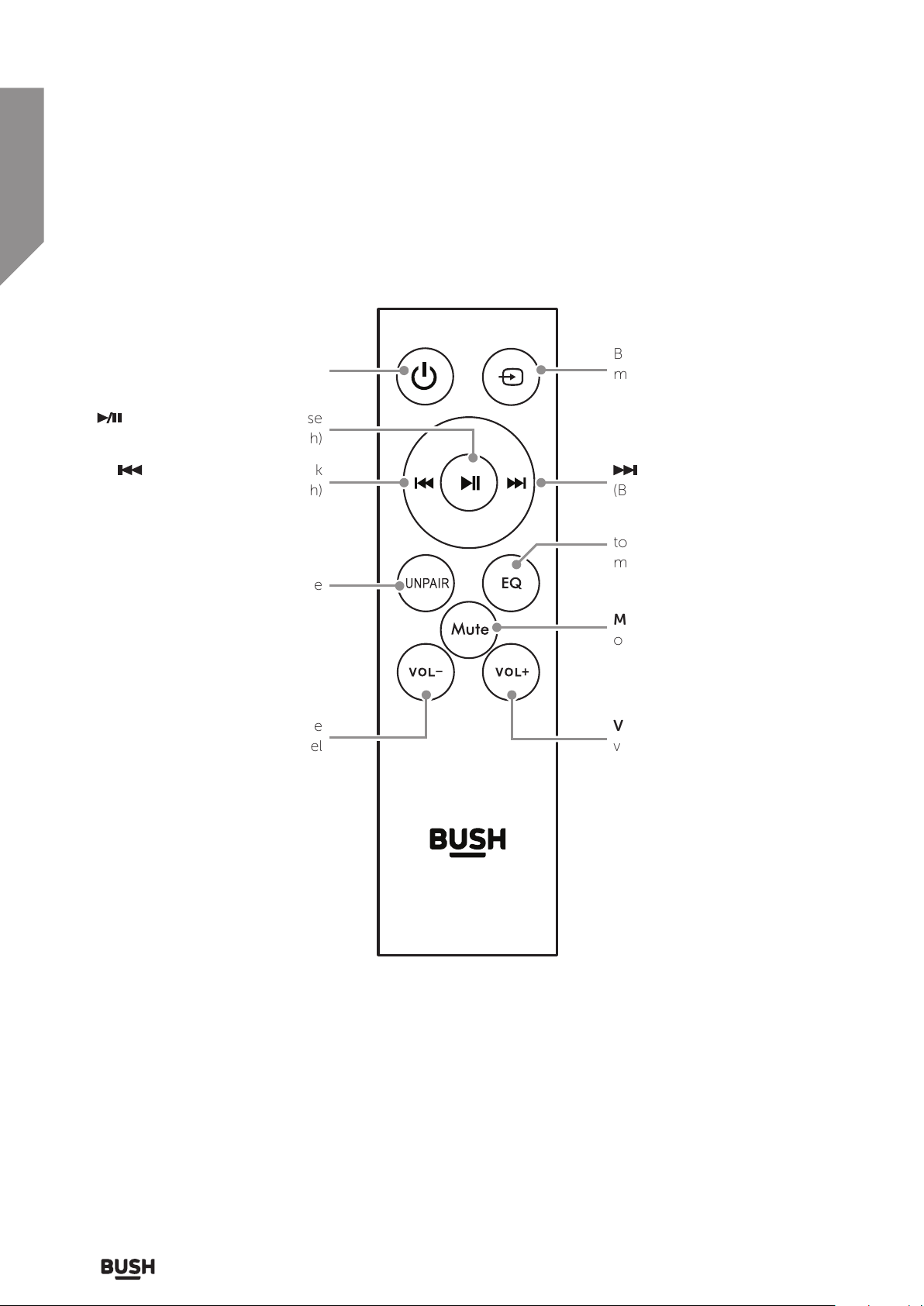
PLAY/PAUSE: Begin or pause
playback (bluetooth)
: Skip to the previous track
(Bluetooth)
Volume -: Press to decrease the
volume level
Unpair: Press to ‘Unpair’ a
connected Bluetooth device
Sound EQ modes: Press repeatedly
to assign different sound EQ
modes.
Mute: Press to mute the sound
output
Volume +: Press to increase the
volume level
Source: Press to cycle between
BLUETOOTH, AUX & OPTICAL
modes
: Skip to the next track
(Bluetooth)
Standby power: Standby mode
ON/ OFF button
Indice
Altri manuali Bush Sistema di altoparlanti

Bush
Bush CBAR4 Istruzioni di montaggio

Bush
Bush B-3363A Manuale utente

Bush
Bush B-3515A Manuale utente

Bush
Bush CBAR7W Istruzioni di montaggio

Bush
Bush BAS520BT Manuale utente

Bush
Bush CAB-91667 Manuale utente

Bush
Bush SR215Y Manuale utente

Bush
Bush BAS950BT Manuale utente

Bush
Bush DC826B Manuale utente

Bush
Bush SR190DG Manuale utente
Manuali Sistema di altoparlanti popolari di altre marche

Sondpex
Sondpex Active Speaker System and Digital Music... Manuale utente

JVC
JVC NX-PN7 Manuale utente

Marshall Amplification
Marshall Amplification AR-DM61-BT Manuale utente

Yamaha
Yamaha NX-A01 - Speaker Sys Manuale utente

SE Audiotechnik
SE Audiotechnik I-LINE Manuale utente

Gemini
Gemini WRX-843 Series Manuale utente