
BZB Gear BG-UDA-E18 Manuale utente

BG-UDA-E18
1X8 4K 18Gbps UHD HDMI HDBaset Splitter/Distribution Amplifier
over Single Category 5e/6/7 Cable
User Manual

BZBGEAR BG-UDA-E18 PRODUCT MANUAL
Address: 830 National Drive #140, Sacramento, CA 95834, USA ·Tel: +1(888)499-9906 ·Email: support@bzbgear.com 2

BZBGEAR BG-UDA-E18 PRODUCT MANUAL
TABLE OF CONTENTS
Statement 4
Safety Precaution 4
Introduction 5
Features 5
Packing List 5
Specifications 6
Operation Controls and Functions 7
EDID Management 10
ASCII Commands 11
Application Example 13
Tech Support 14
Warranty 14
Mission Statement 15
Copyright 16
Address: 830 National Drive #140, Sacramento, CA 95834, USA ·Tel: +1(888)499-9906 ·Email: support@bzbgear.com 3

BZBGEAR BG-UDA-E18 PRODUCT MANUAL
Statement
Please read these instructions carefully before connecting, operating, or configuring this
product. Please save this manual for future reference.
Safety Precaution
●To prevent damaging this product, avoid heavy pressure, strong vibration, or immersion
during transportation, storage, and installation.
●The housing of this product is made of organic materials. Do not expose to any liquid,
gas, or solids which may corrode the shell.
●Do not expose the product to rain or moisture.
●Unplug this device during lightning storms
●Clean only with a soft dry microfiber cloth.
●To prevent the risk of electric shock, do not open the case. Installation and maintenance
should only be carried out by qualified technicians.
●Do not use the product beyond the specified temperature, humidity, or power supply
specifications.
●This product does not contain parts that can be maintained or repaired by users.
Damage caused by dismantling the product without authorization from BZBGEAR is not
covered under the warranty policy.
●Installation and use of this product must strictly comply with local electrical safety
standards.
●Only use accessories specified by the manufacture
●Product specifications may be subject to technical upgrades without further notice
Address: 830 National Drive #140, Sacramento, CA 95834, USA ·Tel: +1(888)499-9906 ·Email: support@bzbgear.com 4

BZBGEAR BG-UDA-E18 PRODUCT MANUAL
Introduction
The BG-UDS-E18 is an 18Gbps HDMI 1x8 HDBaseT Splitter that can distribute 1 source
signal to any 8 display devices. The HDMI signal transmission distance can be extended up
to 120 meters at the resolution of 4K2K@60Hz, 150 meters at 1080P@60Hz via a single
CAT6/6a/7 cable. The product supports up to 7.1CH HD audio pass-through. Audio extract
function and advanced EDID management are supported.
Features
●HDMI 2.0b, HDCP 2.2 and HDCP 1.x compliant
●Support 18Gbps video bandwidth
●Support video resolution up to 4K2K@60Hz 4:4:4
●Support HDR, HDR10+, HLG and Dolby vision
●Support up to 7.1CH HD audio pass-through
●Support digital and analog audio de-embedded output
●Extend the signal transmission distance up to 120 meters at the resolution of
4K2K@60Hz, 150 meters at 1080P@60Hz via a single CAT6/6a/7 cable
●Support 1 HDMI input, 1 HDMI loop output and 8 HDBaseT outputs.
●IR, RS-232 routed to HDBaseT output
●Advanced EDID management
●Support one-way POC function (only from transmitter to receiver)
●Compact design for easy and flexible installation
Packing List
●1x 18Gbps HDMI 1×8 HDBaseT Splitter
●8x HDBaseT Receiver
●9x IR Blaster Cable (1.5 meters)
●9x 20K~60KHz IR Receiver Cable (1.5
meters)
●9x 3-pin Phoenix Connector
●1x 5-pin Phoenix Connector
●18x Mounting Ear
●1x 24V/3.75A DC Locking Power Adapter
●1 × User Manual
●1 × Quick Start Guide
Address: 830 National Drive #140, Sacramento, CA 95834, USA ·Tel: +1(888)499-9906 ·Email: support@bzbgear.com 5

BZBGEAR BG-UDA-E18 PRODUCT MANUAL
Specifications
Technical
HDMI Compliance
HDMI 2.0b
HDCP Compliance
HDCP 2.2/1.x
Video Bandwidth
594 MHz/18Gbps
Video Resolution
Up to 4K2K@60Hz 4:4:4
Color Depth
8-bit, 10-bit, 12-bit (1080p@60Hz)
8-bit (4K2K@60Hz YUV4:4:4)
8-bit, 10-bit, 12-bit (4K2K@60Hz YCbCr 4:2:2/4:2:0)
Color Space
RGB 4:4:4, YCbCr 4:4:4 / 4:2:2 / 4:2:0
HDR
Support HDR, HDR10+, HLG, Dolby vision
HDMI Audio Formats
LPCM 2.0/2.1/5.1/6.1/7.1, Dolby Digital, Dolby TrueHD,
Dolby Digital Plus(DD+), DTS-ES, DTS HD Master, DTS HD-HRA, DTS-X
Coaxial Audio Formats
PCM 2.0, Dolby Digital / Plus, DTS 2.0/5.1
Analog Audio Formats
PCM 2.0CH
ESD Protection
Human body model:
±8kV (Air-gap discharge) & ±4kV (Contact discharge)
Connection
Input
1x HDMI Type A (19-pin female)
Output
1x HDMI Type A (19-pin female)
8x HDBaseT OUT [RJ45]
1x Coaxial Audio OUT [RCA]
1x L/R Audio OUT [5-pin phoenix connector]
Control
1x RS-232 (3-pin phoenix connector)
1x EDID DIP switch [5-pin]
1x IR IN [3.5mm Stereo Mini-jack]
1x IR OUT [3.5mm Stereo Mini-jack]
Mechanical
Housing
Metal Enclosure
Silkscreen Color
Black
Dimensions
Transmitter: 17.3”(W) x 5.1”(D) x 1.7”(H) [440mm (W) x 130mm (D) x 44mm (H)]
Receiver: 5.5”(W) x 2.6”(D) x 0.7”(H) [140mm (W) x 65mm (D) x 18mm (H)]
Weight
Transmitter: 3.57lbs [1.62kg]
Receiver: 0.54lbs [246g]
Power Supply
Input: AC100 - 240V 50/60Hz, Output: DC 24V/3.75A
(US/EU standards, CE/FCC/UL certified)
Power Consumption
72W
Operation Temperature
32°F ~ 104°F / 0°C ~ 40°C
Storage Temperature
-4°F ~ 140°F / -20°C ~ 60°C
Relative Humidity
20~90% RH (non-condensing)
Address: 830 National Drive #140, Sacramento, CA 95834, USA ·Tel: +1(888)499-9906 ·Email: support@bzbgear.com 6

BZBGEAR BG-UDA-E18 PRODUCT MANUAL
Operation Controls and Functions
Transmitter
Front Panel
NO.
Name
Function Description
1
POWER LED
When the device is powered on, the red power LED will be on.
2
IN LED
When the HDMI IN port connects an active source device, the green LED will be on.
3
LOOP LED
When the HDMI LOOP OUT port connects an active display device, the green LED will
be on.
4
OUT(1~8) LED
When the HDBT OUTPUT port connects an HDBaseT Receiver, the corresponding green
OUT LED will be on.
Rear Panel
No.
Name
Function Description
1
EDID DIP switch
Used to set EDID mode. Please refer to Section “6. EDID Mode” for details.
2
RS-232
Connect to a PC or control system via a 3-pin phoenix connector cable for three
functions:
1. Firmware update;
2. Control the Splitter via RS-232 commands;
3. RS-232 signal pass-through (from transmitter to receiver or from receiver to
transmitter).
3
IR IN
Connect to IR receiver cable, the IR receive signal will emit to “IR OUT" port of the
HDBaseT Receiver.
4
IR OUT
Connect to IR blaster cable, the IR emit signal is from “IR IN” port of the HDBaseT
Receiver.
5
AUDIO OUT (COAX, L/R)
Coaxial/balanced audio output port, connect to amplifier or speaker.
6
HDMI port
●IN: HDMI input port, connect to HDMI source device such as DVD or set-top box
with an HDMI cable.
●LOOP OUT: HDMI loop output port, connect to the HDMI display device such as TV
or Monitor with an HDMI cable
7
HDBT OUTPUT port (1-8)
Connect to the HDBT IN port of the HDBaseT receiver with a CAT cable.
8
DC 24V
Plug the DC 24V power supply into the unit and connect the adaptor to an AC outlet.
(Note: The transmitter can power the receiver via a CAT cable.)
9
POWER switch
Press this switch to power on/off the device.
Address: 830 National Drive #140, Sacramento, CA 95834, USA ·Tel: +1(888)499-9906 ·Email: support@bzbgear.com 7

BZBGEAR BG-UDA-E18 PRODUCT MANUAL
Data Signal
Indicator Lamp
Connection Signal
Indicator Lamp
●Illuminating: HDMI signal with HDCP.
●Flashing: HDMI signal without HDCP.
●Dark: No HDMI signal.
●Video (OUT)
●Illuminating: Matrix and HDBaseT
Receiver are in good connection
status.
●Flashing: Matrix and HDBaseT
Receiver are in poor connection status.
●Dark: Matrix and HDBaseT Receiver
are not connected.
HDBaseT Receiver Panel
No.
Name
Function Description
1
Power LED
When the receiver is powered on, the power indicator will be on.
2
SERVICE port
Used for firmware update.
3
DC 24V
Plug DC 24V/1A power supply into the unit and connect the adapter to an AC outlet.
(Note: The HDBaseT receiver also can be powered by the transmitter via a CAT cable.)
4
HDBT IN
Connect to the HDBT OUTPUT port on the transmitter with a CAT cable.
5
HDMI OUT
HDMI output port, connect to HDMI display device such as TV or Projector with an HDMI
cable.
6
AUDIO OUT
Audio output port, connect to amplifier or speaker
7
IR IN
Connect to the IR Receiver cable. The IR signal will send to the IR OUT port of the
transmitter
8
IR OUT
Connect to the IR blaster cable, the IR signal is from IR IN port of the transmitter.
9
RS-232
3-pin Phoenix connector for RS-232 command transmission. The RS-232 command will
pass-through from transmitter to receiver or from receiver to transmitter
Address: 830 National Drive #140, Sacramento, CA 95834, USA ·Tel: +1(888)499-9906 ·Email: support@bzbgear.com 8

BZBGEAR BG-UDA-E18 PRODUCT MANUAL
IR Cable Pin Assignment
Address: 830 National Drive #140, Sacramento, CA 95834, USA ·Tel: +1(888)499-9906 ·Email: support@bzbgear.com 9
BZBGEAR BG-UDA-E18 PRODUCT MANUAL
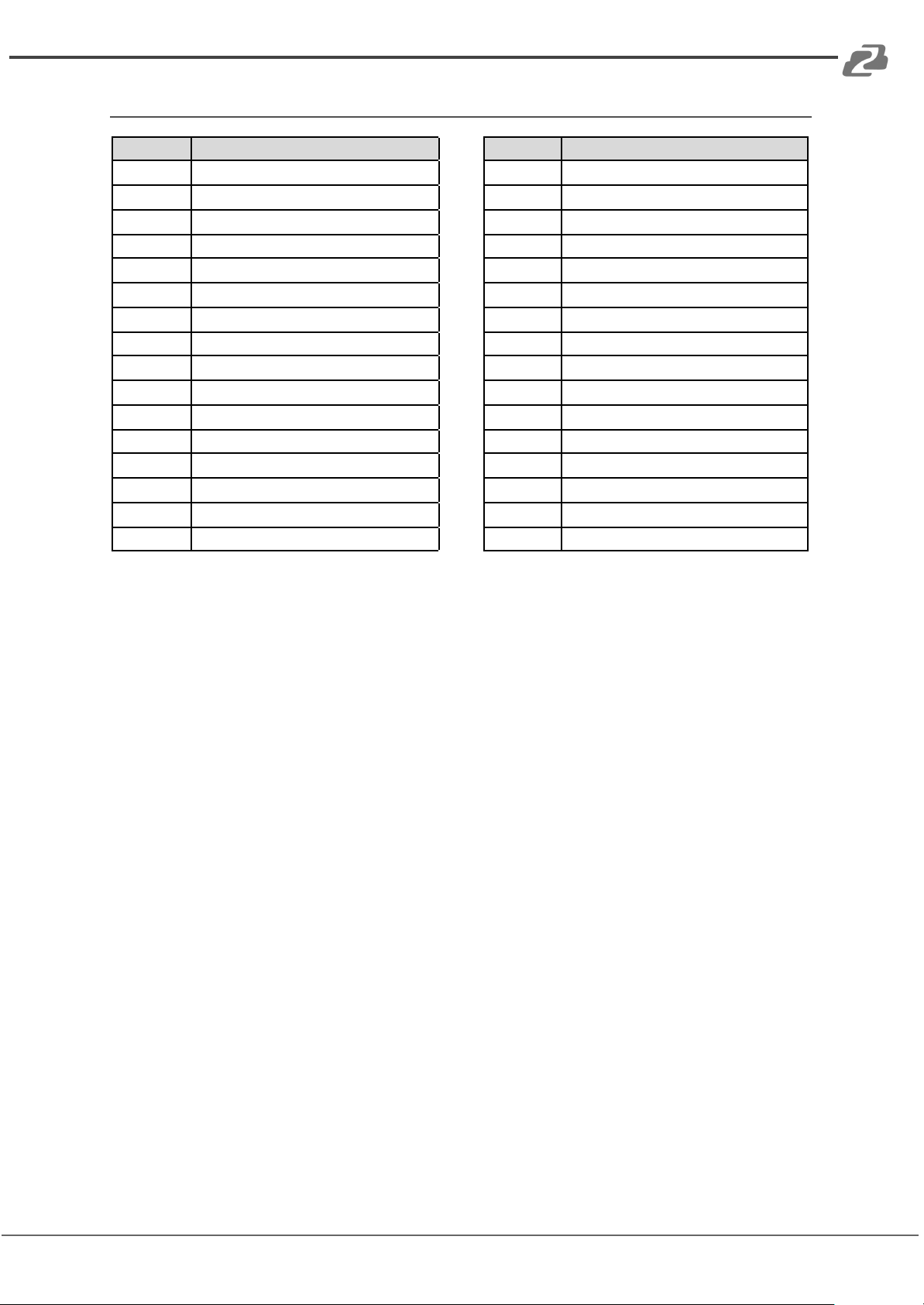
EDID Management
EDID Mode
EDID Description
EDID Mode
EDID Description
11111
1080P, Stereo Audio 2.0
01111
4K2K60Hz_444, Dolby/DTS 5.1
11110
1080P, Dolby/DTS 5.1
01110
4K2K60Hz_444, HD Audio 7.1
11101
1080P, HD Audio 7.1
01101
4K2K60Hz_444, Stereo Audio 2.0 HDR
11100
10801, Stereo Audio 2.0
01100
4K2K60Hz_444, Dolby/DTS 5.1 HDR
11011
10801, Dolby/DTS 5.1
01011
4K2K60Hz_444, HD Audio 7.1 HDR
11010
10801, HD Audio 7.1
01010
COPY_FROM_LOOP OUT
11001
1080P 3D, Stereo Audio 2.0
01001
COPY_FROM_HDBT OUT1
11000
1080P 3D, Dolby/DTS 5.1
01000
COPY_FROM_HDBT OUT2
10111
1080P 3D, HD Audio 7.1
00111
COPY_FROM_HDBT OUT3
10110
4K2K30Hz_444, Stereo Audio 2.0
00110
COPY_FROM_HDBT OUT4
10101
4K2K30Hz_444, Dolby/DTS 5.1
00101
1080P, Stereo Audio 2.0
10100
4K2K30Hz_444, HD Audio 7.1
00100
1080P, Stereo Audio 2.0
10011
4K2K60Hz_420, Stereo Audio 2.0
00011
1080P, Stereo Audio 2.0
10010
4K2K60Hz_420, Dolby/DTS 5.1
00010
1080P, Stereo Audio 2.0
10001
4K2K60Hz_420, HD Audio 7.1
00001
1080P, Stereo Audio 2.0
10000
4K2K60Hz_444, Stereo Audio 2.0
00000
PC control mode
Address: 830 National Drive #140, Sacramento, CA 95834, USA ·Tel: +1(888)499-9906 ·Email: support@bzbgear.com 10
Altri manuali per BG-UDA-E18
1
Indice
Altri manuali BZB Gear Amplificatore

BZB Gear
BZB Gear BG-HDA-E18 Manuale utente

BZB Gear
BZB Gear BG-DA-12GS1X4 Manuale utente

BZB Gear
BZB Gear BG-AMP2X50 Manuale utente

BZB Gear
BZB Gear BG-DA-12GS1X8 Manuale utente

BZB Gear
BZB Gear BG-AMPC40 Manuale utente

BZB Gear
BZB Gear BG-AMPC40 Manuale utente

BZB Gear
BZB Gear BG-DA-12GS1X4 Manuale utente

BZB Gear
BZB Gear BG-DA-12GS1X2 Manuale utente

BZB Gear
BZB Gear BG-HDA-E14 Manuale utente

BZB Gear
BZB Gear BG-UDAIC-E14 Manuale utente


