
C-COR Optiworx HW Series Guida di riferimento
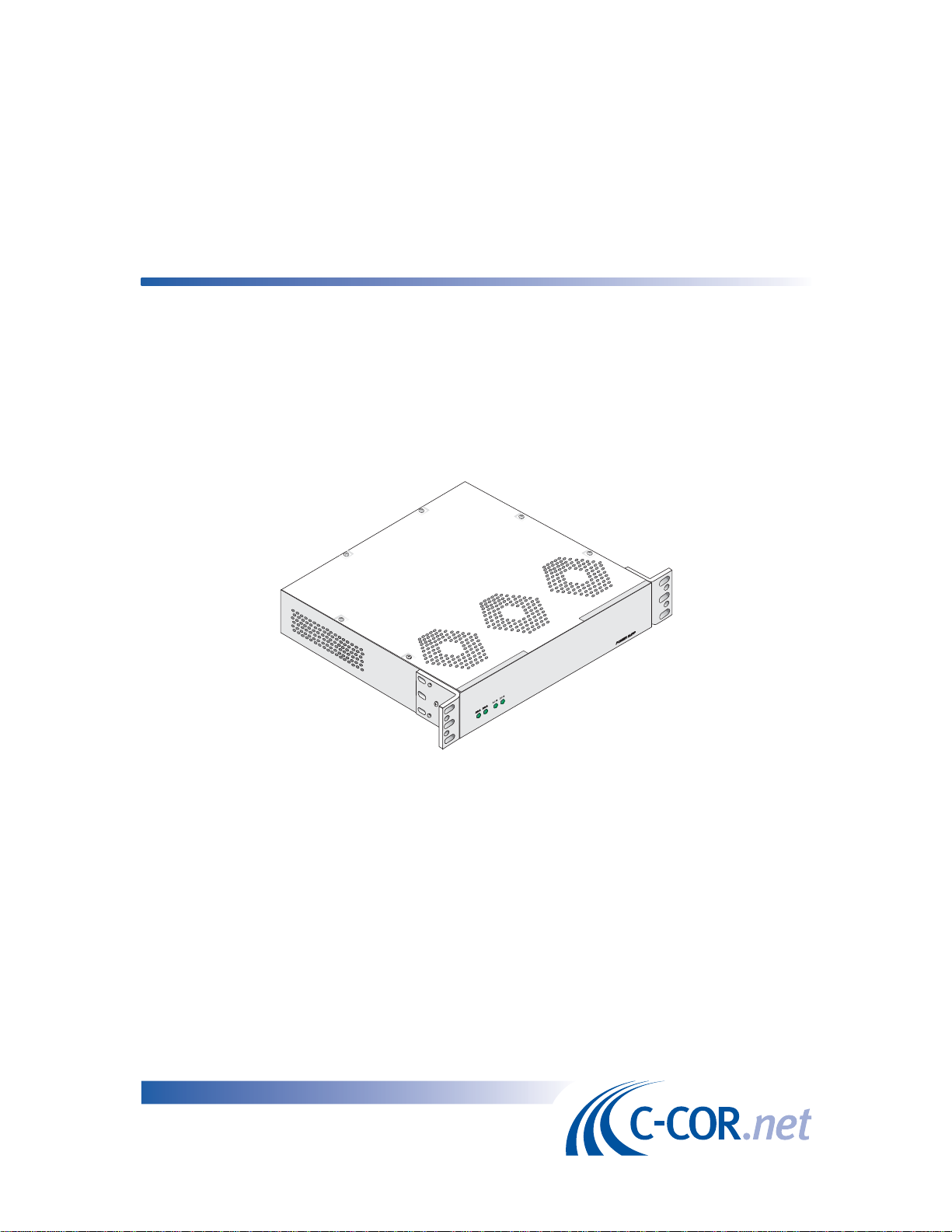
IntegratedFan/PowerSupply
Procedures Manual
060914-000RevC


Procedures Manual
for
OptiworxHWX
Integrated Fan/Power Supply
HW-PSFAN-1-110
HW-PSFAN-2-110
HW-PSFAN-1-220

Integrated Fan/Power Supply
C-COR.net Document Number: 060914-000, Revision C
Copyright 2001 C-COR.net Corp. All rights reserved.
Trademarks
C-COR, C-COR Electronics, DV6000, FlexNet, I-Flex, LITEAMP, and SMART-NETT are registered trade-
marks and Cable Network Manager, CNM, COR-Convergence, COR-Connect, FlexNode, lumaCOR, naviCOR,
Transfer Linearization, and TL Technology are trademarks of C-COR.net Corp. All other brand and product
names are trademarks or registered trademarks of their respective companies.
Contents and specifications within this manual are subject to change without notice.

060914-000 Rev C FRONT MATTER v
Contacting C-COR.net Technical Support
ContactInformation
You can contact C-COR.net by phone, e-mail, Internet, fax, or mail. When contacting C-COR.net
Technical Support, please be prepare to provi e the information liste below:
Your company name an a ress
Your phone an fax number
Your e-mail a ress
The system site
A escription of the problem(s) you are experiencing
Any equipment part/mo el numbers relate to your specific problem(s)
The best way to contact you (phone, fax, e-mail, or mail)
The best time to contact you
Phone
Call the C-COR.net worl wi e hea quarters 24 hours a ay, 7 ays a week on the
C-COR.net Technical Support Hotline:
Technical Support Hotline: 888-827-2267
Or, call C-COR.net worl wi e hea quarters Mon ay through Fri ay (8 AM to 5 PM ET [+5GMT]) an
ask for the Applications Engineering and Training Department:
State College Office: +1-814-231-4422
Toll Free: 8 -233-2267
E-Mail
Sen an e-mail inclu ing the contact information liste in Contact Information:
Internet
Visit us on the Worl Wi e Web at:
http://www.c-cor.net
From the C-COR.net home page, you can:
Submit your problem or Technical Publication request electronically;
(Services > Technical Support > Technical Support Form)
or
Download a product manual (if currently available);
(Services > Technical Support > Technical Documentation)
Fax
Sen a fax with a cover sheet inclu ing the information liste in Contact Information.
814-237-5831

vi FRONT MATTER 060914-000 Rev C
Mail
Sen your letter inclu ing the information liste in Contact Information:
Attn: Applications Engineering and Training Department
C-COR.net Corp.
6 Decibel Road
State College, PA 168 1-758 USA
Providing Feedback on this Publication:
C-COR.net welcomes your suggestions an assistance in i entifying any errors, inaccuracies, or
mislea ing information. Please contact our Technical Publications Department with an e-mail
referencing the ocument number an page number(s) to which the fee back applies.
Send your e-mail to:

060914-000 Rev C FRONT MATTER vii
ABOUT THIS MANUAL
This document provides procedures for installation of the Optiworx HWX Integrated
Fan/Power Suppl . These procedures cover the single and dual power suppl assemblies.
Revision History
REVISION DATE REASON FOR CHANGE
A 1/98 Initial release
B 12/99 Change to Corporate format, updated installation DLPs.
C 1 / 1 Trademark Update
Related Publications
Listed below are related manuals that ma be useful to users of this one.
Title/Description Part Number
HWX Equipment Shelf and Power Supply/Controller Installation and 06067 -001
User Instruction Manual
Contains information required for installation and operation of the
HWX HX1281EC Equipment Shelf and the Power Suppl /Controller Mod-
ules (HX1481PC and HX3481PC) used in that shelf.
The HWX Universal Equipment Shelf and Power Supply/Controller 107 320
Installation and User Instruction Manual
Contains information required for installation and operation of the HWX
HX2281EC Equipment Shelf and the Power Suppl /Controller Modules
(HX1481PC, HX3481PC and HX1AC1PC) used in that shelf.
viii FRONT MATTER 060914-000 Rev C
Admonishments
Important safet admonishments are used throughout this manual to warn of possible hazards to
persons or equipment. An admonishment identifies a possible hazard and then explains what ma
happen if the hazard is not avoided. The admonishments in the form of Dangers, Warnings, and
Cautions must be followed at all times. These warnings are flagged b use of the triangular alert
icon (seen below), and are listed in descending order of severit of injur or damage and likelihood of
occurrence.
Danger: Danger is used to indicate the presence of a hazard that will cause severe
personal injury, death, or substantial property damage if the hazard is not avoided.
Warning: Warning is used to indicate the presence of a hazard that can cause severe
personal injury, death, or substantial property damage if the hazard is not avoided.
Caution: Caution is used to indicate the presence of a hazard that will or can cause
minor personal injury or property damage if the hazard is not avoided.
General Safety Precautions
Electronic equipment can be damaged b static electrical discharge. Alwa s follow Electrostatic
Discharge (ESD) protection practices. Wear a grounded wrist strap when ou touch a unit and
when working on a unit, alwa s place it on an approved electricall grounded antistatic mat.
FCC Compliance Statement
Warning: This equipment generates, uses, and can radiate radio frequency energy
and if not installed and used in accordance with the instruction manual, may cause
interference to radio communications. t has been tested and found to comply with
limits for a Class A digital device pursuant to Subpart B of Part 15 of FCC Rules,
which are designed to provide reasonable protection against such interference when
operated in a commercial environment. Operation of this equipment in a residential
area is likely to cause interference to TV and radio reception in which case the user, at
their own expense, will be required to take whatever measures may be required to
correct the interference.
This equipment does not exceed Class A limits for radio emission for digital apparatus, set
out in the radio interference regulation of the authorization methods of ndustry
Canada. Operation in a residential area may cause unacceptable interference to TV
and radio reception requiring the owner or operator to take whatever steps are
necessary to correct the interference.
This product conforms to all applicable standards of 21 CFR 1040.

060914-000 Rev C FRONT MATTER ix
TABLE OF CONTENTS
Content Page
SECTION 1
DESCRIPTION
1. GENERAL DESCRIPTION . . . . . . . . . . . . . . . . . . . . . . . . . . . . . . . . . . . . . . . . . . . . . . . . . . . . . . . . . . . . . . . . . . . . 1-1
2. PHYSICAL DESCRIPTION. . . . . . . . . . . . . . . . . . . . . . . . . . . . . . . . . . . . . . . . . . . . . . . . . . . . . . . . . . . . . . . . . . . . 1-1
3. FUNCTIONAL DESCRIPTION . . . . . . . . . . . . . . . . . . . . . . . . . . . . . . . . . . . . . . . . . . . . . . . . . . . . . . . . . . . . . . . . 1-3
4. SPECIFICATIONS . . . . . . . . . . . . . . . . . . . . . . . . . . . . . . . . . . . . . . . . . . . . . . . . . . . . . . . . . . . . . . . . . . . . . . . . . . . 1-4
SECTION 2
INSTALLATION
1. GENERAL . . . . . . . . . . . . . . . . . . . . . . . . . . . . . . . . . . . . . . . . . . . . . . . . . . . . . . . . . . . . . . . . . . . . . . . . . . . . . . . . . 2-1
2. HOW TO USE THIS SECTION . . . . . . . . . . . . . . . . . . . . . . . . . . . . . . . . . . . . . . . . . . . . . . . . . . . . . . . . . . . . . . . . . 2-1
3. SAFETY INFORMATION . . . . . . . . . . . . . . . . . . . . . . . . . . . . . . . . . . . . . . . . . . . . . . . . . . . . . . . . . . . . . . . . . . . . . 2-2
INSTALLATION TASK INDEX LIST. . . . . . . . . . . . . . . . . . . . . . . . . . . . . . . . . . . . . . . . . . . . . . . . . . . . . . . . . . . . . . . . . 2-3
TOPPROCEDURES . . . . . . . . . . . . . . . . . . . . . . . . . . . . . . . . . . . . . . . . . . . . . . . . . . . . . . . . . . . . . . . . . . . . . . . . . . . . . . 2-4

x FRONT MATTER 060914-000 Rev C
(This page deliberatel blank)
Questo manuale è adatto per i seguenti modelli
3
Indice


