Campbell CM110 Manuale utente

INSTRUCTION MANUAL
Tripod Installation Manual
Models CM110, CM115, CM120
1/05
Copyright (c) 2005
Campbell Scientific, Inc.

Warranty and Assistance
The CM110, CM115, AND CM120 are warranted by CAMPBELL
SCIENTIFIC, INC. to be free from defects in materials and workmanship under
normal use and service for twelve (12) months from date of shipment unless
specified otherwise. Batteries have no warranty. CAMPBELL SCIENTIFIC,
INC.'s obligation under this warranty is limited to repairing or replacing (at
CAMPBELL SCIENTIFIC, INC.'s option) defective products. The customer
shall assume all costs of removing, reinstalling, and shipping defective products
to CAMPBELL SCIENTIFIC, INC. CAMPBELL SCIENTIFIC, INC. will
return such products by surface carrier prepaid. This warranty shall not apply
to any CAMPBELL SCIENTIFIC, INC. products which have been subjected to
modification, misuse, neglect, accidents of nature, or shipping damage. This
warranty is in lieu of all other warranties, expressed or implied, including
warranties of merchantability or fitness for a particular purpose. CAMPBELL
SCIENTIFIC, INC. is not liable for special, indirect, incidental, or
consequential damages.
Products may not be returned without prior authorization. The following
contact information is for US and International customers residing in countries
served by Campbell Scientific, Inc. directly. Affiliate companies handle repairs
for customers within their territories. Please visit www.campbellsci.com to
determine which Campbell Scientific company serves your country. To obtain
a Returned Materials Authorization (RMA), contact CAMPBELL
SCIENTIFIC, INC., phone (435) 753-2342. After an applications engineer
determines the nature of the problem, an RMA number will be issued. Please
write this number clearly on the outside of the shipping container.
CAMPBELL SCIENTIFIC's shipping address is:
CAMPBELL SCIENTIFIC, INC.
RMA#_____
815 West 1800 North
Logan, Utah 84321-1784
CAMPBELL SCIENTIFIC, INC. does not accept collect calls.

i
Tripod Installation Table of Contents
PDF viewers note: These page numbers refer to the printed version of this document. Use
the Adobe Acrobat® bookmarks tab for links to specific sections.
1. General........................................................................1
2. Specifications .............................................................2
3. Tools List.....................................................................3
4. Tripod Components....................................................3
5. Tripod Installation.......................................................4
5.1 Tripod Base...............................................................................................4
5.2 Mast ..........................................................................................................5
5.3 Installing the Guy Kit................................................................................9
5.4 Staking the Tripod Feet...........................................................................11
5.5 Tripod Grounding ...................................................................................12
5.6 Crossarm Attachment..............................................................................14
5.7 Enclosure Attachment .............................................................................14
6. Mounting Brackets....................................................17
6.1 CM210 Crossarm-to-Pole Mounting Kit.................................................18
6.2 CM215 Sensor Mounting Kit for Top of Mast of CM110, CM115,
or CM120...............................................................................................19
6.3 CM220 Right Angle Mounting Kit .........................................................20
6.4 CM225 Mounting Stand .........................................................................21
6.5 CM230 Adjustable Angle Mounting Kit.................................................22
6.6 CM235 Magnetic Mounting Stand..........................................................22
6.7 RM Young Gill Radiation Shields ..........................................................24
Appendix
A. Tripod Tote Bag......................................................A-1
Figures
1-1. CM110 tripod with optional guy kit and CM204 Crossarm ....................1
2-1. 60-Degree Guy Angle..............................................................................2
4-1. Tripod Components .................................................................................3
5-1. Tripod Leg, Slide Collar Components.....................................................4
5-2. Tripod Mast and Insert ............................................................................5

Tripod Installation Table of Contents
ii
5-3. Mast Attachment to Tripod Base ............................................................ 6
5-4. Mast Lock Bracket.................................................................................. 8
5-5. Upper Guy Ring...................................................................................... 9
5-6. Guy Hook and Lever Arm..................................................................... 10
5-7. Mechanical Drawing of Guy Hook and Case........................................ 11
5-8. Staking the Tripod Feet......................................................................... 11
5-9. Ground Rod and Clamp ........................................................................ 12
5-10. Lightning Rod and Tripod Grounding Lug ......................................... 13
5-11. CM204 Crossarm................................................................................ 14
5-12. ENC 12/14 Enclosure Attached to the Tripod Base............................ 15
5-13. ENC 12/14 .......................................................................................... 16
5-14. Enclosure Slide Lock .......................................................................... 17
6-1. CM210 Crossarm-to-Pole Mounting Kit............................................... 18
6-2. CM215 Sensor Mounting Kit for Top of Mast ..................................... 19
6-3. CM220 Right Angle Mounting Kit ....................................................... 20
6-4. CM225 Pyranometer Mounting Stand .................................................. 21
6-5. CM230 Adjustable Angle Mounting Kit............................................... 22
6-6. CM235 Magnetic Mounting Stand........................................................ 23
6-7. RM Young Gill Radiation Shield.......................................................... 24

1
Tripod Installation Manual
Models CM110, CM115, CM120
1. General
The CM110 (10 feet), CM115 (15 feet), and CM120 (20 feet) tripods are
corrosion-resistant aluminum instrument mounts that support the attachment of
sensors, solar panels, and environmental enclosures. The tripods are shipped
with brackets for the attachment of enclosures, and UV-resistant cable ties for
securing cables. A guy kit is included with the CM115 and CM120 models,
and is an option for the CM110. A durable Tripod Tote Bag is also available
as an option.
FIGURE 1-1. CM110 tripod with optional guy kit and CM204 Crossarm

Tripod Installation Manual Models CM110, CM115, CM120
2
2. Specifications
Height (with mast insert) Shipping Weight
CM110 10.0 ft (3m) 30 lbs (13.6 kg)
CM115 15.5 ft (4.7m) 36 lbs (16.3 kg)
CM120 21.0 ft (6.4m) 42 lbs (19.0 kg)
Vertical Load Limit: 100 lb (45 kg)
Mast: 66” long (167.6 cm), 78” (198.1 cm) with insert, 1.9” (48.2mm) OD
Base Diameter with legs extended: 10 ft (3m)
Wind Load recommendations:
CM110 *CM110 *CM115 *CM120
Unguyed Guyed at feet Guyed at 60° Guyed at 60°
Sustained Wind (mph / m/sec) 75 / 33 80 / 35 75 / 33 65 / 29
Gust Tolerance (mph / m/sec) 95 / 42 100 / 44 95 / 42 85 / 37
**Wind Speed Reduction Factor
(WSRF) when guyed at tripod feet .75 .65
* Guy wire anchors must be able to hold at least 400 lbf (182 kgf)
** For example, Sustained Wind for a CM120 guyed at the feet is: 65 mph * .65 (WSRF) = 42 mph
60º
60º
FIGURE 2-1. 60-Degree Guy Angle
Anchors must hold at least
400 lbf in both x, y axis

Tripod Installation Manual Models CM110, CM115, CM120
3
3. Tools List (for tripod, mast and crossarm)
1/2” and 7/16” open end wrenches
adjustable wrench
socket wrench with 1/2”and 7/16” deep sockets (optional)
Phillips head screw driver (medium)
Straight bit screwdriver (large)
12” torpedo level
side-cut pliers
pencil
tape measure
compass and site declination angle
shovel
sledge hammer (for driving ground rod and stakes)
step ladder
4. Tripod Components
Figure 4-1 shows the tripod components packaged for shipment. The tripod
base is packaged with the mast, ground rod, lightning rod and (6) stakes. The
ground rod clamp, lightning rod, and grounding wires are enclosed in a bag.
The guy kit (optional for the CM110), and tripod tote bag (optional) are
packaged separately. The CM115 and CM120 tripods include additional mast
sections. A diagram showing how to stow the components inside the tote bag
is shown in Appendix A.
FIGURE 4-1. Tripod Components

Tripod Installation Manual Models CM110, CM115, CM120
4
5. Tripod Installation
5.1 Tripod Base
Tripod installation near power lines is dangerous. The
minimum safe recommended distance from overhead
power lines is 2 times the height of the tripod and mast
combined. Call Blue Stakes to locate buried utilities
prior to installation.
All three models of tripods use the same tripod base. Each leg is adjustable,
which allows the tripod to be adjusted for non-level terrain.
Prepare the area where the tripod will be installed. The tripod requires an area
approximately 10 feet in diameter. Natural vegetation and the ground surface
should be disturbed as little as possible, but brush and tall weeds should be
removed.
Stand the tripod base up on end, and rotate the feet perpendicular to the legs.
Each leg has a slide collar with a black plastic T-bolt, and a spring loaded pin
that locks in holes located on the underside of the leg as shown in Figure 5-1.
Loosen the T-bolts and extend each leg until the pin engages in the center hole
(depress the tab to disengage the pin from a hole). With the legs extended,
orient the tripod so that the open channel of the tripod base faces North.
FIGURE 5-1. Tripod Leg, Slide Collar Components
WARNING

Tripod Installation Manual Models CM110, CM115, CM120
5
5.2 Mast
The CM110, CM115, and CM120 have one, two, or three mast sections
respectively. The bottom mast section has two hanger brackets for attaching an
instrument enclosure.
The top of each mast section has an insert that needs to be extended above the
mast. Remove the bolt and extend the insert 12 inches as shown in Figure 5-2.
Align the holes in the insert and mast, and replace the bolt.
FIGURE 5-2. Tripod Mast and Insert
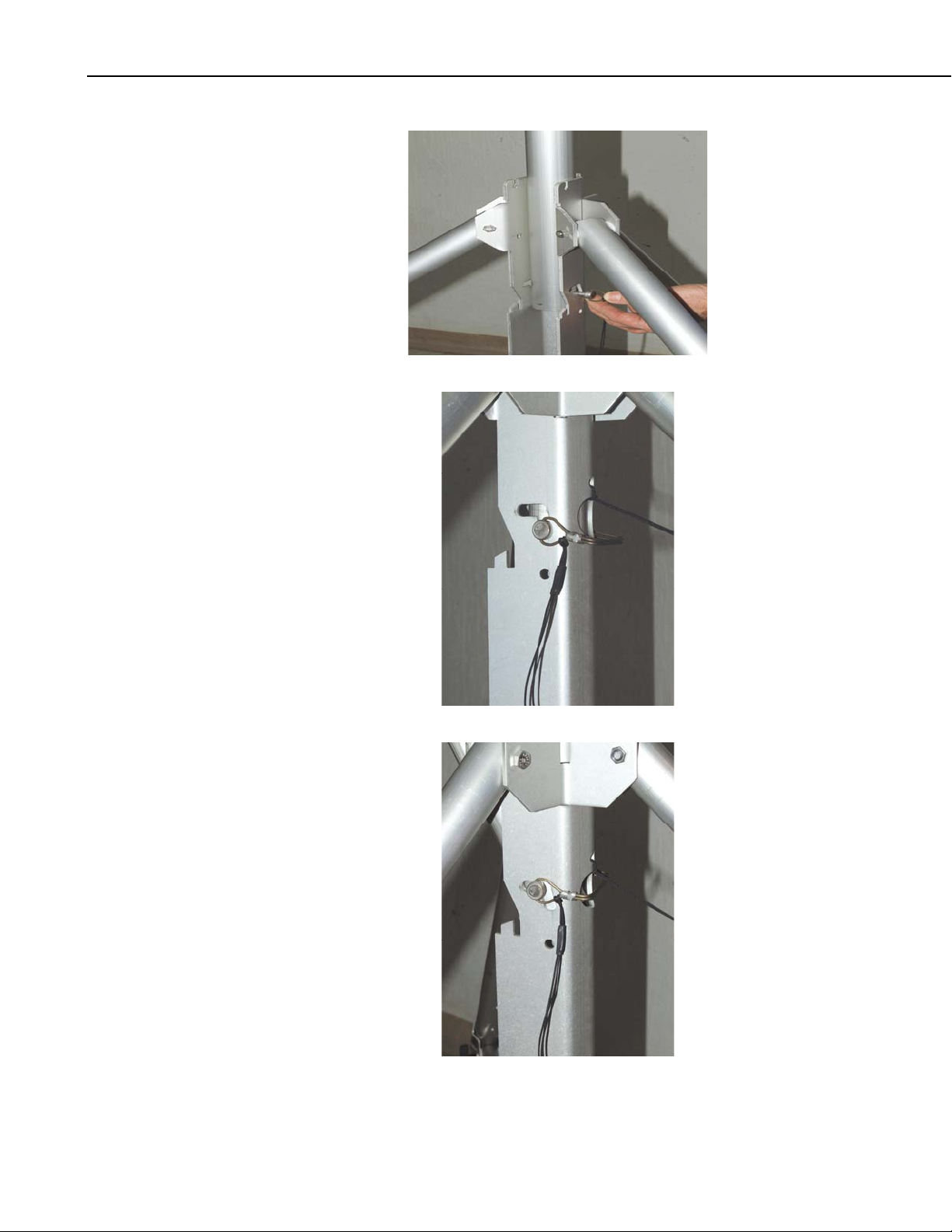
The tripod base has three sets of slanted holes for attaching the mast; typically
the upper set is used. The mast is attached to the base with a pin, and secured
in the upright position with a locking bracket. Both the pin and the locking
bracket are attached to the base with lanyards.
To attach the lower mast section, hold the mast upright (with the enclosure
hangar brackets facing North) and align the hole in the bottom of the mast with
the slanted holes in the tripod base. Insert the pin through the holes, and rotate
the wire retainer over the end of the pin as shown in Figure 5-3A. The pin
should be in the bottom of the slanted hole when the mast is upright. Lift the
mast up so that the pin is in the upper end of the slanted hole (Figure 5-3B) to
allow the mast to be tilted down to a horizontal position.

Tripod Installation Manual Models CM110, CM115, CM120
6
FIGURE 5-3. Mast Attachment to Tripod Base
Altri manuali per CM110
4
Questo manuale è adatto per i seguenti modelli
2
Indice
Altri manuali Campbell Accessori per fotocamere

Campbell
Campbell CM110 Manuale utente

Campbell
Campbell CM106K Manuale utente

Campbell
Campbell CM106 Manuale utente

Campbell
Campbell CM106B Manuale utente

Campbell
Campbell CM106B Manuale utente

Campbell
Campbell CM106 Manuale utente

Campbell
Campbell CM10K Manuale utente

Campbell
Campbell CM106BK Manuale utente

Campbell
Campbell CM110 Manuale utente

Campbell
Campbell CM106B Manuale utente