
CAS Corporation ER PLUS Series Manuale utente

ERPLUS Service Manual
1 9/27/2010
ERPLUS SERVICE MANUAL

ERPLUS Service Manual
2 9/27/2010
< Table of Contents >
1. Introduction ............................................................................................................................... 4
1.1. Preface .................................................................................................................................... 4
1.2. Precaution............................................................................................................................. 4
1.3. Specification ........................................................................................................................ 5
1.3.1. Kilogram (kg) Version.............................................................5
1.3.2. Pound (lb) Version .................................................................6
1.4. ERPLUS LCD Version............................................................................................................ 7
1.5. ERPLUS VFD Version ........................................................................................................... 7
1.6. ERPLUS LED Version............................................................................................................ 7
1.7. ERPLUS-M LCD Version........................................................................................................ 7
1.8. ERPLUS-M LED Version........................................................................................................ 7
1.9. Dimension.............................................................................................................................. 8
1.10. Sealing Method.......................................................................................................... 9
2. Calibration................................................................................................................................. 11
2.1. General Calibration........................................................................................................ 11
2.1.1. C4 Setting........................................................................... 12
2.1.1.1. C4-1 Setting (AD) ........................................................ 12
2.1.1.2. C4-2 Setting (Sale functions) ...................................... 12
2.1.1.3. C4-3 Setting (Sale functions) ...................................... 13
2.1.1.4. C4-4 Setting (Sale functions) ...................................... 13
2.1.1.5. C4-5 Setting (Sale functions) ...................................... 13
2.1.2. SPAN Calibration Setting (C-3)............................................... 14
2.1.3. Gravity Constant Value Setting (C-9) ...................................... 14
2.1.4. Calibration factor Setting (C-10). ........................................... 14
2.1.5. Displaying Raw A/D Value (C-5) ............................................. 16
2.1.6. Allocate Function Key Codes to Changeable keys (C-6).............. 17
2.1.7. Percent Calibration (C-7)....................................................... 19
2.1.8. Battery Calibration (C-8)....................................................... 19
3. The Schematics and Diagram......................................................................................... 20
3.1. System Block Diagram................................................................................................. 20
4. Exploded View......................................................................................................................... 21
5. Load Cell drawing.................................................................................................................. 23
6. Part Location............................................................................................................................ 24
6.1. ERPLUS LCD Version.......................................................................................................... 24
6.1.1.1. Main PCB Part Location................................................ 24

ERPLUS Service Manual
3 9/27/2010
ERPLUS LCD MAIN .................................................................................. 24
6.1.1.2. FRONT DISPLAY PCB Part Location.............................. 25
ERPLUS LCD FRONT DISPLAY.................................................................... 25
6.1.1.3. REAR DISPLAY PCB Part Location ................................ 26
ERPLUS LCD REAR DISPLAY...................................................................... 26
6.1.1.4. POLE DISPLAY PCB Part Location ................................ 27
ERPLUS LCD FRONT DISPLAY.................................................................... 27
ERPLUS LCD REAR DISPLAY...................................................................... 28
6.1.2. ERPLUS VFD Version ............................................................... 29
6.1.2.1. Main PCB Part Location................................................ 29
ERPLUS VFD MAIN .................................................................................. 29
6.1.2.2. VFD FRONT DISPLAY PCB Part Location..................... 30
ERPLUS VFD FRONT DISPLAY.................................................................... 30
6.1.2.3. VFD REAR DISPLAY PCB Part Location......................... 31
ERPLUS VFD REAR DISPLAY...................................................................... 31
6.1.2.4. POLE DISPLAY PCB Part Location ................................ 32
ERPLUS VFD POLE DISPLAY TYPE #1 ......................................................... 32
ERPLUS VFD POLE DISPLAY TYPE #2 ......................................................... 33
6.1.3. ERPLUS LED Version ............................................................... 34
6.1.3.1. Main PCB Part Location................................................ 34
6.1.3.2. FRONT DISPLAY PCB Part Location.............................. 35
6.1.3.3. REAR DISPLAY PCB Part Location ................................ 36
6.1.4. ERPLUS-M LCD Version ............................................................. 37
6.1.4.1. Main PCB Part Location................................................ 37
6.1.4.2. Front Display PCB Part Location .................................. 38
6.1.4.3. Rear Display PCB Part Location.................................... 39
6.1.5. ERPLUS-M LED Version ............................................................. 40
6.1.5.1. Main PCB Part Location................................................ 40
6.1.5.2. Front Display PCB Part Location .................................. 41
6.1.5.3. Rear Display PCB Part Location.................................... 42
6.1.6. COMMON PCB...................................................................... 43
6.1.6.1. RS-232 MODULE PCB Part Location.............................. 43
RS-232 PCB (TOP) ................................................................................ 43
RS-232 PCB (BOTTOM) ......................................................................... 43
6.1.6.2. KEY PCB Part Location (Pb) ......................................... 44
7. Error Messages & Solution............................................................................................... 45
8. Part List....................................................................................................................................... 46

ERPLUS Service Manual
4 9/27/2010
Introduction
1.1. Preface
Thank you for purchasing of our CAS scale.
This scale has been designed with CAS reliability, under rigid quality control
and with outstanding performance.
We hope that your departments enjoy with high quality of CAS product.
This manual will help you with proper operations and care of the ER series.
Please keep it handy for the future references.
1.2. Precaution
•Make sure that you plug your scale into the proper power outlet.
•Place the scale on a flat and stable surface.
•Plug into a power outlet 30 minutes before operations.
•Keep the scale away from strong EMI noises may cause incorrect weight readings.
•This scale must be installed in a dry and liquid free environment.
•Do not subject the scale to sudden temperature changes.
•Do not subject the platter to sudden shocks.
•If the scale is not properly level, please adjust the 4 legs at the bottom of the
scale (turn legs clockwise or counterclockwise) so as to center the bubble of the
leveling gauge inside the indicated circle.
ERPLUS Service Manual
5 9/27/2010
1.3. Specification
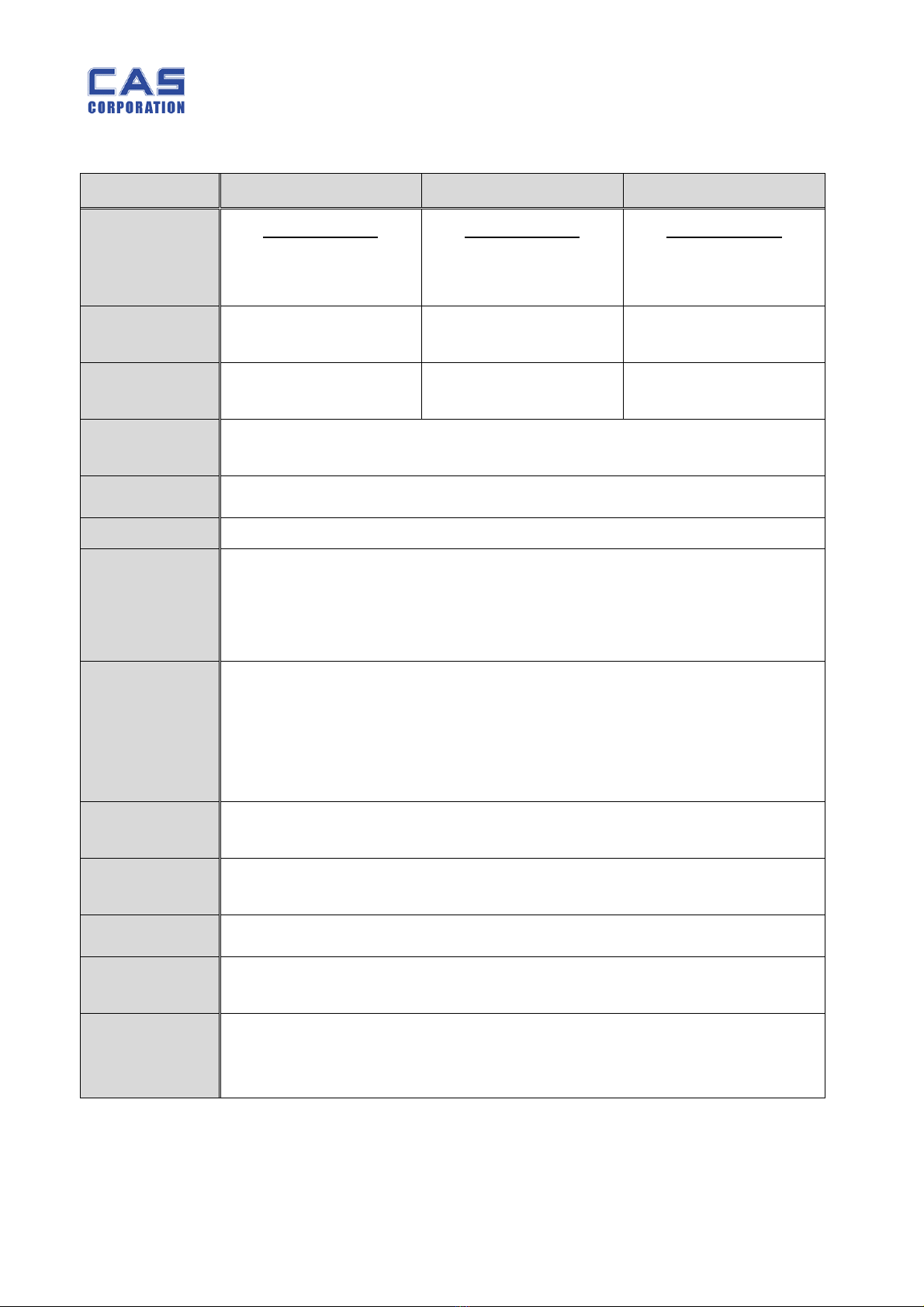
1.3.1.Kilogram (kg) Version
ERPLUS – 6 ERPLUS – 15 ERPLUS – 30
Capacity
Dual Interval
3 kg / 0.001 kg
6 kg / 0.002 kg
Dual Interval
6 kg / 0.002 kg
15 kg / 0.005 kg
Dual Interval
15 kg / 0.005 kg
30 kg / 0.01 kg
Internal
Resolution 1 / 60,000 1 / 60,000 1 / 60,000
External
Resolution 1 / 3,000 1 / 3,000 1 / 3,000
Display ER PLUS : 5 / 6 / 6 (Weight/Unit Price/Total Price)
ER PLUS-M : 6 / 6 / 8 (Weight/Unit Price/Total Price)
Symbols Power, Zero, Tare, Low battery, Backlight (Option for LCD version)
Interface RS – 232C (Printer Option)
Keys
ZERO(ESC), TARE, MODE, SET(ENTER),
NUMERICAL KEY(0~9),C, POWER ON/OFF, ‘+’,’-‘,’x’,’Σ’,
DIRECT PLU KEY(M1~M5), PLU SAVE, CALL-UP KEY
€ (Euro currency convertible keys)
Function
Weighting
AUTO POWER OFF
BACK LIGHT AUTO ON/OFF
PLU
PRINTER INTERFACE (RS-232)
Product Size Pole Type : 360 (W) x 350 (D) x 410 (H)
Standard Type : 360 (W) x 350 (D) x 106 (H)
Product
Weight
Pole Type : 5.5kg
Standard Type : 4.7kg
Platter Size 304 (W) X 220 (D)
Operating
Temperature - 10 °C ~ +40 °C
Options
Rechargeable Battery
BACK LIGHT (LCD ONLY)
Dry Battery
ERPLUS Service Manual
6 9/27/2010
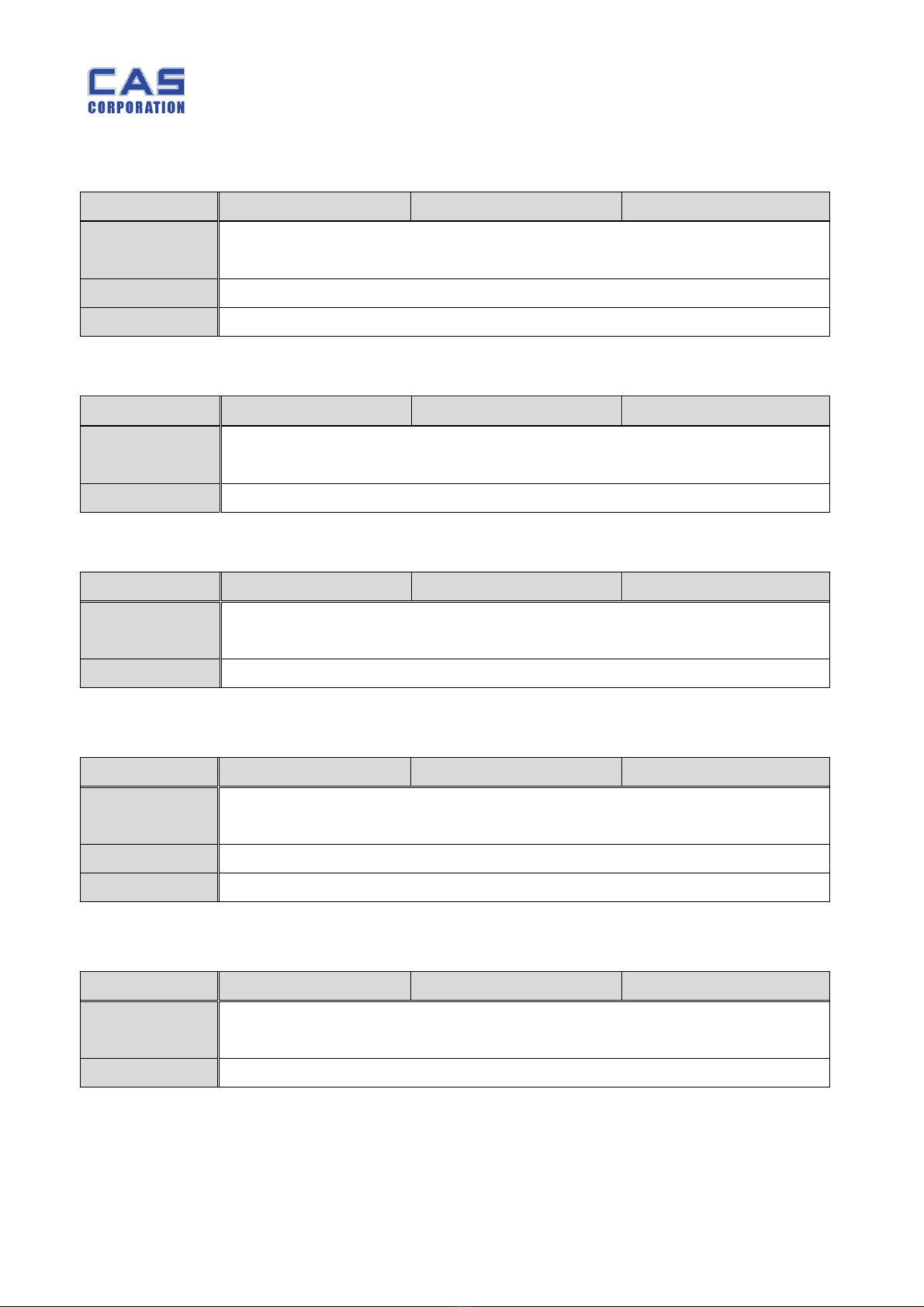
1.3.2.Pound (lb) Version
ERPLUS – 15LB ERPLUS – 30LB ERPLUS – 60LB
Capacity
Dual Interval
6 lb / 0.002 lb
15 lb / 0.005 lb
Dual Interval
15 lb / 0.005 lb
30 lb / 0.01 lb
Dual Interval
30 lb / 0.01 lb
60 lb / 0.02 lb
Internal
Resolution 1 / 60,000 1 / 60,000 1 / 60,000
External
Resolution 1 / 3,000 1 / 3,000 1 / 3,000
Display ER PLUS : 5 / 6 / 6 (Weight/Unit Price/Total Price)
ER PLUS-M : 6 / 6 / 8 (Weight/Unit Price/Total Price)
Symbols Power, Zero, Tare, Low battery, Backlight (Option for LCD version)
Interface RS – 232C (Printer Option)
Keys
ZERO(ESC), TARE, MODE, SET(ENTER),
NUMERICAL KEY(0~9),C, POWER ON/OFF, ‘+’,’-‘,’x’,’Σ’,
DIRECT PLU KEY(M1~M5), PLU SAVE, CALL-UP KEY
€ (Euro currency convertible keys).
Functions
Weighting
AUTO POWER OFF
BACK LIGHT AUTO ON/OFF
PLU
PRINTER INTERFACE (RS-232)
Product Size Pole Type : 360 (W) x 350 (D) x 410 (H)
Standard Type : 360 (W) x 350 (D) x 106 (H)
Product
Weight
Pole Type : 5.5kg
Standard Type : 4.7kg
Platter Size 304 (W) X 220 (D)
Operating
Temperature - 10 °C ~ +40 °C
Options
Rechargeable Battery
BACK LIGHT (LCD ONLY)
Dry Battery
ERPLUS Service Manual
7 9/27/2010
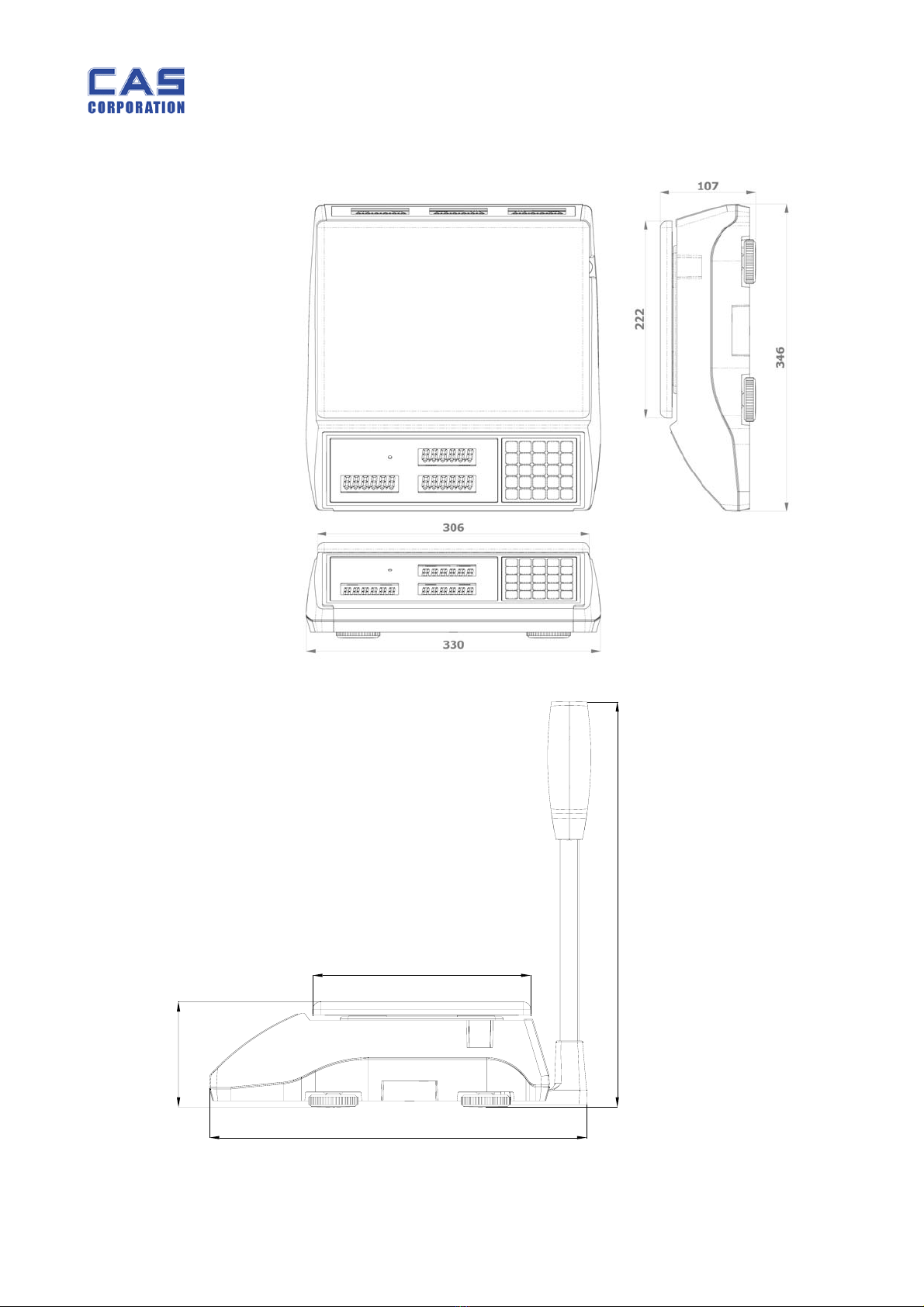
1.4. ERPLUS LCD Version
1.5. ERPLUS VFD Version
1.6. ERPLUS LED Version
1.7. ERPLUS-M LCD Version
1.8. ERPLUS-M LED Version
ER-6KG/15LB ER-15KG/30LB ER-30KG/60LB
Display Three LCD displays for Weight, Unit price and Total price(6/6/6digits)
POWER LED
Power 12 V Adaptor or PB BATTERY (6V 4AH/20HR)
Option Backlight
ER-6KG/15LB ER-15KG/30LB ER-30KG/60LB
Display Three VFD displays for Weight, Unit price and Total price(6/6/6digits)
POWER LED
Power 12 V Adaptor or PB BATTERY (6V 4AH/20HR)
ER-6KG/15LB ER-15KG/30LB ER-30KG/60LB
Display Three LED displays for Weight, Unit price and Total price(6/6/6digits)
POWER LED
Power 12 V Adaptor or PB BATTERY (6V 4AH/20HR)
ER-6KG/15LB ER-15KG/30LB ER-30KG/60LB
Display Three LCD displays for Weight, Unit price and Total price(6/6/8digits)
POWER LED
Power 12 V Adaptor or PB BATTERY (6V 4AH/20HR)
Option Backlight
ER-6KG/15LB ER-15KG/30LB ER-30KG/60LB
Display Three LED displays for Weight, Unit price and Total price(6/6/8digits)
POWER LED
Power 12 V Adaptor or PB BATTERY (6V 4AH/20HR)
ERPLUS Service Manual
8 9/27/2010
1.9. Dimension
107
222
384
413
ERPLUS Service Manual
9 9/27/2010
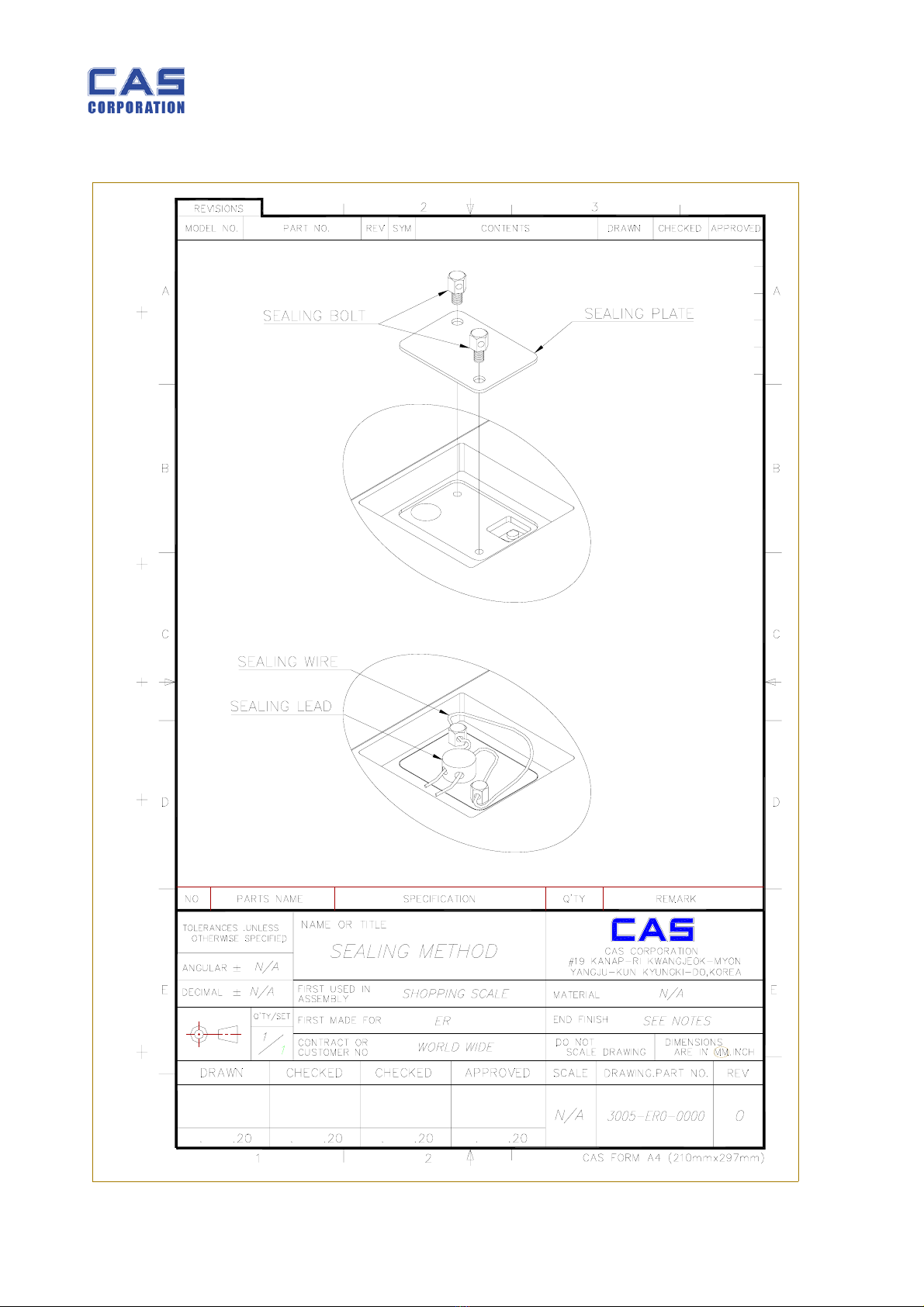
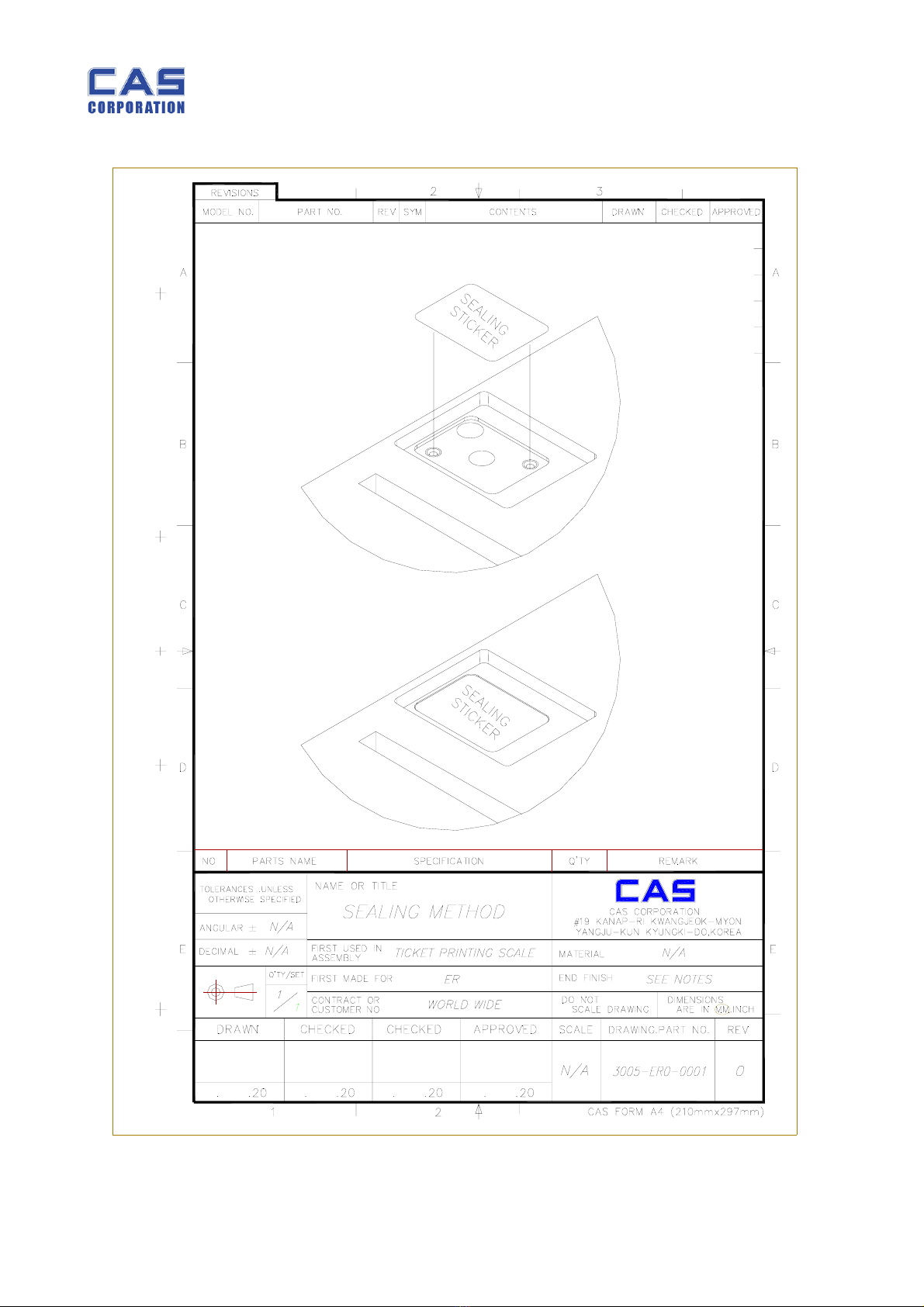
1.10.Sealing Method
ERPLUS Service Manual
10 9/27/2010
Questo manuale è adatto per i seguenti modelli
8
Indice
Altri manuali CAS Corporation Scala

CAS Corporation
CAS Corporation PD-II Series Manuale utente

CAS Corporation
CAS Corporation SW-1S Manuale utente

CAS Corporation
CAS Corporation EB Manuale utente

CAS Corporation
CAS Corporation DB-II Manuale utente

CAS Corporation
CAS Corporation SW-2 Manuale utente

CAS Corporation
CAS Corporation nBody-EP Manuale utente

CAS Corporation
CAS Corporation SW-1S Manuale utente

CAS Corporation
CAS Corporation CAW Series Manuale utente


