
Casio YA-P10 Manuale utente
取扱説明書
本書は、お読みになった後も大切に保管してください。 日本語
User’s Guide
Be sure to keep all user documentation handy for future reference. English
Bedienungsanleitung
Bitte bewahren Sie die gesamte Benutzerdokumentation für späteres Nachschlagen auf. Deutsch
Mode d’emploi
Conservez la documentation à portée de main pour toute référence future. Français
Guía del usuario
Asegúrese de tener a mano toda la documentación del usuario para futuras consultas. Español
Guida dell’utilizzatore
Conservare l’intera documentazione dell’utente a portata di mano per riferimenti futuri. Italiano
Instruktionshäfte
Förvara all användardokumentation nära till hands för framtida referens. Svenska
Guia do Usuário
Certifique-se de guardar toda a documentação do usuário à mão para futuras referências.
Português
JEGFSISwChKTrRPo
Interactive Pointer YA-P10
Interactive Pointer YA-P10
Z
YA-P10_Pointer.book 1 ページ 2011年3月16日 水曜日 午後5時19分

E-1
Safety Precautions . . . . . . . . . . . . . . . . . . . . . . . . . . . . . . . . . . . . . . . . . . . . . . . . . . . . . . . . . . . .E-3
Operating Precautions. . . . . . . . . . . . . . . . . . . . . . . . . . . . . . . . . . . . . . . . . . . . . . . . . . . . . . . . . .E-7
Unpacking . . . . . . . . . . . . . . . . . . . . . . . . . . . . . . . . . . . . . . . . . . . . . . . . . . . . . . . . . . . . . . . . . . .E-8
Using the CD-ROM . . . . . . . . . . . . . . . . . . . . . . . . . . . . . . . . . . . . . . . . . . . . . . . . . . . . . . . . . . . .E-9
General Guide . . . . . . . . . . . . . . . . . . . . . . . . . . . . . . . . . . . . . . . . . . . . . . . . . . . . . . . . . . . . . . .E-10
Setup . . . . . . . . . . . . . . . . . . . . . . . . . . . . . . . . . . . . . . . . . . . . . . . . . . . . . . . . . . . . . . . . . . . . . .E-11
Using the Pointer. . . . . . . . . . . . . . . . . . . . . . . . . . . . . . . . . . . . . . . . . . . . . . . . . . . . . . . . . . . . .E-15
Indicators. . . . . . . . . . . . . . . . . . . . . . . . . . . . . . . . . . . . . . . . . . . . . . . . . . . . . . . . . . . . . . . . . . .E-18
Troubleshooting . . . . . . . . . . . . . . . . . . . . . . . . . . . . . . . . . . . . . . . . . . . . . . . . . . . . . . . . . . . . .E-19
Disposing of a Pointer . . . . . . . . . . . . . . . . . . . . . . . . . . . . . . . . . . . . . . . . . . . . . . . . . . . . . . . . .E-21
Specifications . . . . . . . . . . . . . . . . . . . . . . . . . . . . . . . . . . . . . . . . . . . . . . . . . . . . . . . . . . . . . . .E-23
Contents
YA-P10_Pointer_02_e.book 1 ページ 2011年3月23日 水曜日 午後3時5分

E-2
zThe term “pointer” in this manual refers the YA-P10 interactive pointer.
zThe contents of this User’s Guide are subject to change without notice.
zCopying of this manual, either in part or its entirety, is forbidden. You are allowed to use this
manual for your own personal use. Any other use is forbidden without the permission of
CASIO COMPUTER CO., LTD.
zCASIO COMPUTER CO., LTD. shall not be held liable for any lost profits or claims from third
parties arising out of the use of this product or this manual.
zCASIO COMPUTER CO., LTD. shall not be held liable for any loss or lost profits due to loss of
data caused by malfunction or maintenance of this product, or any other reason.
YA-P10_Pointer_02_e.book 2 ページ 2011年3月23日 水曜日 午後3時5分

E-3
About safety symbols
Various symbols are used in this User’s Guide and on the product itself to ensure safe
use, and to protect you and others against the risk of injury and against material
damage. The meaning of each of the symbols is explained below.
Icon Examples
Safety Precautions
*Warning This symbol indicates information that, if ignored or applied incorrectly, could
possibly create the risk of death or serious personal injury.
*Caution This symbol indicates information that, if ignored or applied incorrectly, could
possibly create the risk of personal injury or material damage.
’A triangle indicates a situation against which you need to exercise caution. The example shown
here indicates you should take precaution against electric shock.
!A circle with a line through it indicates information about an action that you should not perform.
The specific action is indicated by the figure inside the circle. The example shown here means
disassembly is prohibited.
$A black circle indicates information about an action that you must perform. The specific action
is indicated by the figure inside the circle. The example shown here indicates you must unplug
the power cord from the power outlet.
YA-P10_Pointer_02_e.book 3 ページ 2011年3月23日 水曜日 午後3時5分

E-4
zAvoid water and other liquids.
zDo not disassemble or modify the pointer in any way.
zDo not dispose of the pointer by burning it.
zDo not use or leave the pointer in any of the following locations.
Doing so creates the risk of fire and electric shock.
• Areas subject to large amounts of moisture or dust
• In a kitchen or other areas exposed to oil smoke
• Near a heater, on a heated carpet, or in an area exposed to direct sunlight
• Other areas subjected to temperature extremes
zNever leave the pointer in a bathroom or anywhere else there is the
chance that it will become wet.
Warning
Never allow the pointer to become wet. Water and other liquids create the risk of fire and
electric shock.
Never try to take the pointer apart or modify it in any way. Doing so creates the risk of electric
shock, burn injury, personal injury, or operational malfunction. Disassembling or modifying the
pointer can void its warranty or make it ineligible for servicing. Request all servicing and repair
from your original retailer or the contact specified for repair.
Never try to dispose of the pointer by burning it. Doing so can cause an explosion, which
creates the risk of fire and personal injury.
*
+
!
-
YA-P10_Pointer_02_e.book 4 ページ 2011年3月23日 水曜日 午後3時5分

E-5
zImmediately stop using the pointer whenever any one of the following
conditions exists.
Failure to do so creates the risk of fire, electric shock, or overheating of batteries, and explosion.
• When the pointer is damaged due to dropping
• When the pointer is emitting smoke or strange odor, when the pointer does not operate
normally even when used as instructed by the user's guide, or any other time malfunction of
the pointer is suspected
In any of the above cases request servicing and repair from your original retailer or the contact specified
for repair.
z
Avoid dropping the pointer or otherwise subjecting it to impact or shock.
Failure to do so creates the risk of fire, electric shock, or overheating of batteries, and explosion.
z
Use only the special cable that comes with the pointer when charging it.
Failure to do so creates the risk of fire, electric shock, or overheating of batteries, and explosion.
zRadio waves emitted by the pointer
• If you are using a pace maker or any other electronic medical device, be sure to consult your physician
or device manufacturer before using this product.
Never use this product inside of an aircraft or medical facility, or in any other location where use
of such devices is prohibited. Radio waves can have an effect on the operation of electronic
equipment and medical equipment, and cause accidents.
Do not use this product in the vicinity of high-precision electronic instruments or electronic
devices that handle weak radio signals. Radio waves can have an effect on the operation of
such equipment, and cause accidents.
-
-
YA-P10_Pointer_02_e.book 5 ページ 2011年3月23日 水曜日 午後3時5分

E-6
zBe sure to follow all applicable local laws and regulations when disposing of
the pointer.
Caution
*
YA-P10_Pointer_02_e.book 6 ページ 2011年3月23日 水曜日 午後3時5分

E-7
zNever use or store the pointer in the following locations. Doing so creates the risk of malfunction
of and damage to the pointer.
• Locations prone to electrostatic charge
• Locations subjected to temperature extremes
• Locations where there is extreme moisture
• Locations subjected to sudden temperature changes
• Locations where there is a lot of dust
• Locations where there is the danger of getting wet
zDo not use the pointer in environments subjected to temperature extremes.
The pointer is designed for use within the temperatures of 5ºC to 35ºC (41ºF to 95ºF). Use
outside of this temperature range creates the risk of malfunction of and damage to the pointer.
zWhen cleaning the pointer, wipe it with a soft, dry cloth. Any other type of cleaning method
creates the risk of malfunction or breaking of the pointer.
zUse in Other Countries
This product has been certified as complying with the wireless regulations in the country of
purchase. Be sure to use it only in the country where you purchased it. Use of this product in
another country may be illegal.
Operating Precautions
YA-P10_Pointer_02_e.book 7 ページ 2011年3月23日 水曜日 午後3時5分
E-8
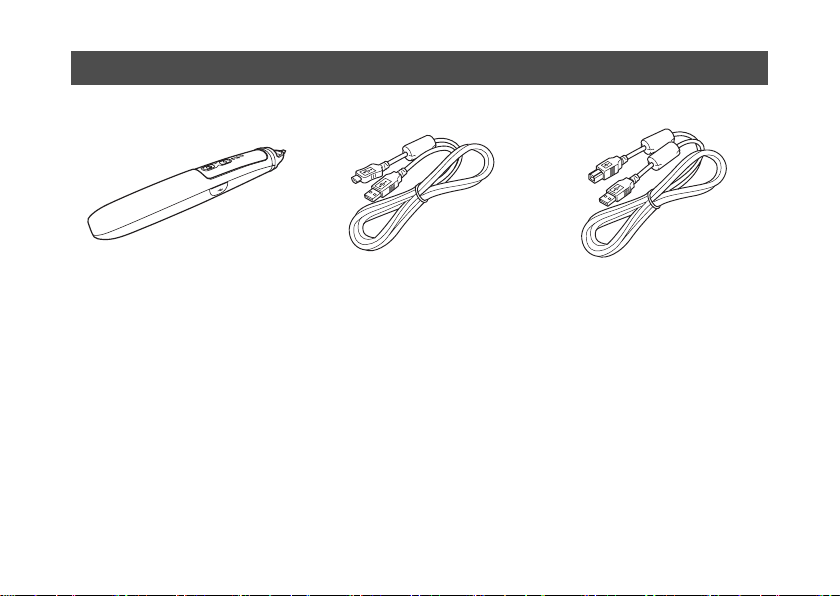
zStrap
zCD-ROM
zUser’s Guide (This Manual)
zWarranty
Unpacking
Pointer USB Cable
(Type A to Type Mini B)
(For pointer charging)
USB Cable
(Type A to Type B)
YA-P10_Pointer_02_e.book 8 ページ 2011年3月23日 水曜日 午後3時5分

E-9
The CD-ROM that comes with the pointer contains a Presentation Draw application that
provides various projector presentation tools, and a PDF file version of its User’s Guide.
Your computer will need to have Adobe®Reader®installed in order for you to view the
PDF User’s Guide.
The PDF User’s Guide also includes information about the minimum computer system
requirements for Presentation Draw, and the procedure for installing it. Be sure to read
the User’s Guide before installation.
To view the contents of a User’s Guide (PDF)
1. Place the CD-ROM that comes with the pointer into your computer’s CD-ROM drive.
2. Perform either of the following operations.
• If the CD-ROM menu screen appears:
• If the CD-ROM menu screen does not appear:
3. Double-click the User’s Guide file.
Using the CD-ROM
1On the menu screen, click the [Open Folder] button to the right of “User’s Guide”.
2When the User’s Guide folder opens, open the folder that corresponds to the
language you want to use.
1On your computer, navigate to the CD-ROM and then open it.
2Open the User’s Guide folder and then open the folder that corresponds to the
language you want to use.
YA-P10_Pointer_02_e.book 9 ページ 2011年3月23日 水曜日 午後3時5分
Altri manuali per YA-P10
1
Indice
Altri manuali Casio Accessori


