Casio PCR-360 Istruzioni per il montaggio

ELECTRONIC CASH REGISTER
PCR-360
OPERATOR'S INSTRUCTION MANUAL
CI CANADA
PCR-360
Canada model
U.S. model
PCR-360
£60
£60

Introduction
2

3
Introduction
GUIDELINES LAID DOWN BY FCC RULES FOR USE OF THE UNIT IN THE U.S.A.
(Not applicable to other areas)
WARNING: This equipment generates, uses and can radiate radio frequency energy and if not installed and used
in accordance with the instruction manual, may cause interference to radio communications. It has been tested and
found to comply with the limits for a Class A computing device pursuant to Subpart J of Part 15 of the FCC Rules,
which re designed to provide reasonable protection against such interference when operated in a commercial envi-
ronment.
Operation of this equipment in a residential area is likely to cause interference in which case the user at his/her own
expense will be required to take whatever measures may required to correct the interference.
This digital apparatus does not exceed the ClassA limits for radio noise emissions from digital apparatus as set out in
the Radio Interference Regulations of the Canadian Department of Communications.
Welcome to the CASIO PCR-360!
Congratulations upon your selection of a CASIO Personal Cash Register, which is designed to
provide years of reliable operation.
Operation of a CASIO cash register is simple enough to be mastered without special training.
Everything you need to know is included in this manual, so keep it on hand for reference.
Consult your CASIO dealer if you have any questions about points not specifically covered in this
manual.
CASIO AUTHORIZED SERVICE CENTER
If your Casio product needs repair, or you wish to purchase re-
placement parts, please call 1-800-YO-CASIO for the authorized
service center nearest your home.
If for any reason this product is to be returned to the store where
purchased, it must be packed in the original carton/package.
Ifyouneedprogrammingassistance,pleasecall1-800-638-9228.
In Canada, Call 1-800-661-2274.
Thank you.
The main plug on this equipment must be used to disconnect mains power.
Please ensure that the socket outlet is installed near the equipment and shall be easily accessible.

Introduction
4
Introduction .......................................................................................... 2
Unpacking the register......................................................................................................... 6
Getting Started ..................................................................................... 8
Remove the cash register from its box ................................................................................ 8
Remove the tape holding parts of the cash register in place............................................... 8
Install the three memory backup batteries........................................................................... 8
Plug the cash register into a wall outlet ............................................................................. 10
Insert the mode key marked "PGM" into mode switch ...................................................... 10
Turn the mode key to the "REG" position .......................................................................... 10
Install receipt/journal paper ............................................................................................... 10
To load 1-ply paper for printing of receipts.............................................................................. 11
To load 1-ply paper for printing of journal ............................................................................... 12
To load 2-ply paper for printing of receipts.............................................................................. 13
Set the date ....................................................................................................................... 14
Set the time ....................................................................................................................... 14
Select printouts receipt or journal ...................................................................................... 14
Programming automatic tax calculation............................................................................. 15
Programming the U.S. Tax Table procedure ........................................................................... 15
Programming Canadian Tax table procedure ......................................................................... 20
Setting the store telephone number .................................................................................. 21
Introducing PCR-360.......................................................................... 22
General guide .................................................................................................................... 22
Mode key, Mode switch .......................................................................................................... 23
Drawer .................................................................................................................................... 23
Displays .................................................................................................................................. 25
Keyboard ................................................................................................................................ 26
Basic Operation and Setups ............................................................. 28
How to read the printouts .................................................................................................. 28
How to Use Your Cash Register ........................................................................................ 29
Displaying the time and date .................................................................................................. 30
Preparing coins for change..................................................................................................... 30
Preparing and using department keys............................................................................... 31
Registering department keys .................................................................................................. 31
Programming department keys............................................................................................... 33
Registering department keys by programming data ............................................................... 35
Preparing and using PLUs................................................................................................. 36
Programming PLUs ................................................................................................................36
Registering PLUs.................................................................................................................... 38
Preparing and using discounts .......................................................................................... 40
Programming discounts .......................................................................................................... 40
Registering discounts ............................................................................................................. 41
Preparing and using reductions......................................................................................... 42
Programming or reductions .................................................................................................... 42
Registering reductions ............................................................................................................ 43
Calculating the merchandise subtotal................................................................................ 44
Contents

5
Introduction
Shifting the taxable status of an item................................................................................. 45
Registering charge and check payments .......................................................................... 46
Registering returned goods in the REG mode................................................................... 47
Registering returned goods in the RF mode...................................................................... 48
Registering money received on account ........................................................................... 49
Registering money paid out............................................................................................... 49
Making corrections in a registration................................................................................... 50
No sale registration............................................................................................................52
Printing the Daily sales RESET report............................................................................... 53
Convenient Operations and Setups ................................................. 54
About the clerk control function ......................................................................................... 54
About post-finalization receipt ........................................................................................... 55
Programming general printing control ............................................................................... 56
Programming compulsory and clerk function .................................................................... 57
Programming READ/RESET report printing control .......................................................... 58
Setting a store/machine number........................................................................................ 58
Setting/editing the store telephone number....................................................................... 59
High digit limitation for departments .................................................................................. 59
Single-Item-Sales for departments and PLUs ................................................................... 60
Registering Sub-departments............................................................................................ 61
Registering discounts and premiums ................................................................................ 65
Registering manually entered tax amounts ....................................................................... 67
Other programmable options............................................................................................. 68
Calculator functions ........................................................................................................... 69
Printing READ/RESET reports .......................................................................................... 71
Printing the cash register's program.................................................................................. 76
Troubleshooting ................................................................................. 78
When an error occurs ........................................................................................................ 78
When the register does not operate at all.......................................................................... 79
In case of power failure ..................................................................................................... 80
When the L sign appears on the display ........................................................................... 80
User Maintenance and Options ........................................................ 81
To replace the ink ribbon ................................................................................................... 81
To replace journal paper .................................................................................................... 82
To replace receipt paper .................................................................................................... 83
Specification....................................................................................... 84
Index.................................................................................................... 85

Introduction
6
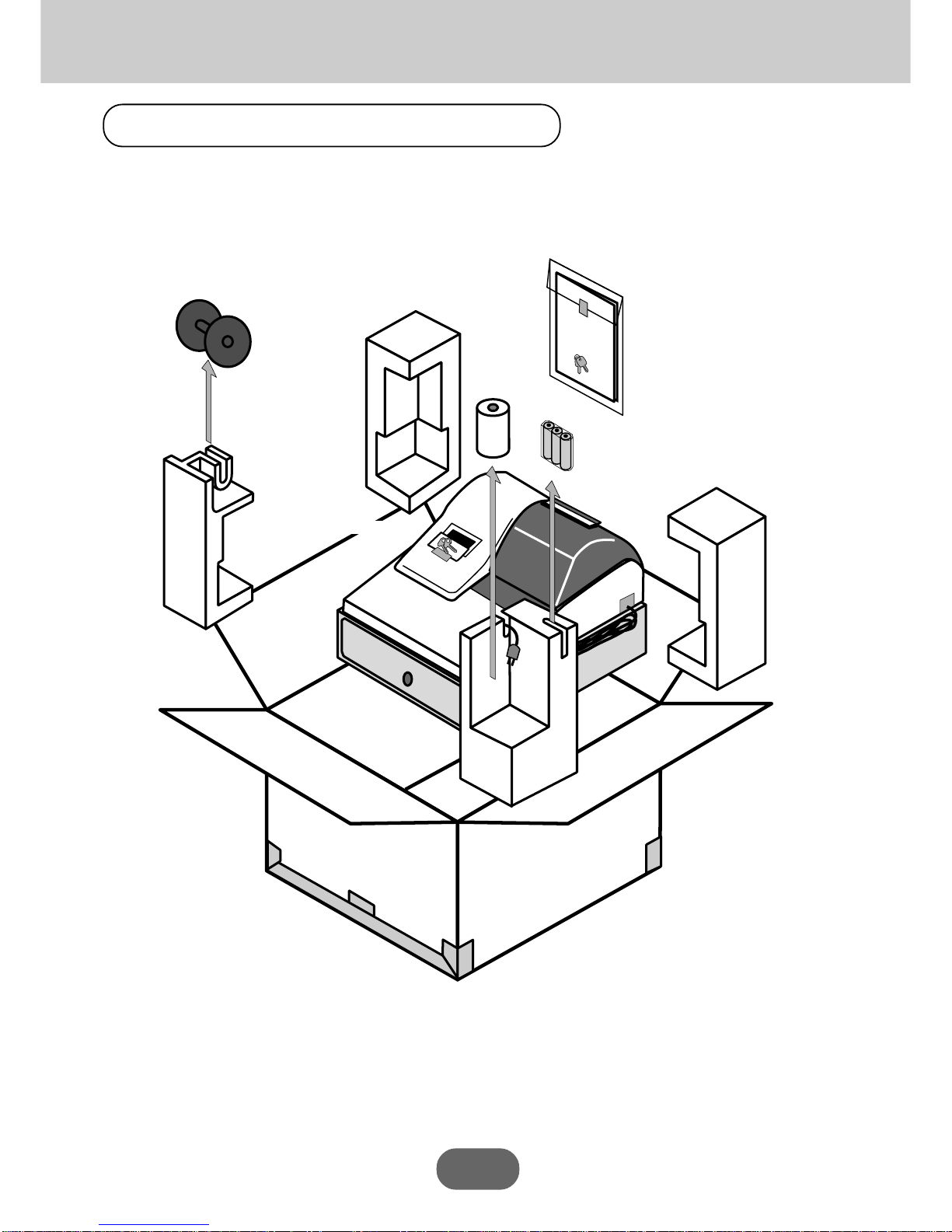
Unpacking the register
Operators
Instruction
Manual
Take-up reel
Memory backup batteries
(UM-3 x 3)
Roll paper
Operator's
instruction manual/
Drawer key
Operator/Program key

7
Introduction
Never try to open the cash register or attempt your
own repairs. Take the cash register to your author-
ized CASIO dealer for repairs.
PCR-360
PCR-360
ECR
ECR
ECR
PCR-360
PCR-360
Important!
Before you do anything, be sure to note the following important precautions!
Be sure to check the sticker on the side of the cash
register to make sure that its voltage matches that
of the power supply in the area.
Use a soft, dry cloth to clean the exterior of the cash
register. Never use benzene, thinner, or any other
volatile agent.
Never operate the cash register while your hands
are wet.
Do not locate the cash register where it will be sub-
jected to direct sunlight, very high humidity, splash-
ing with water or other liquids, or high temperature
(such as near a heater).

8
Getting Started
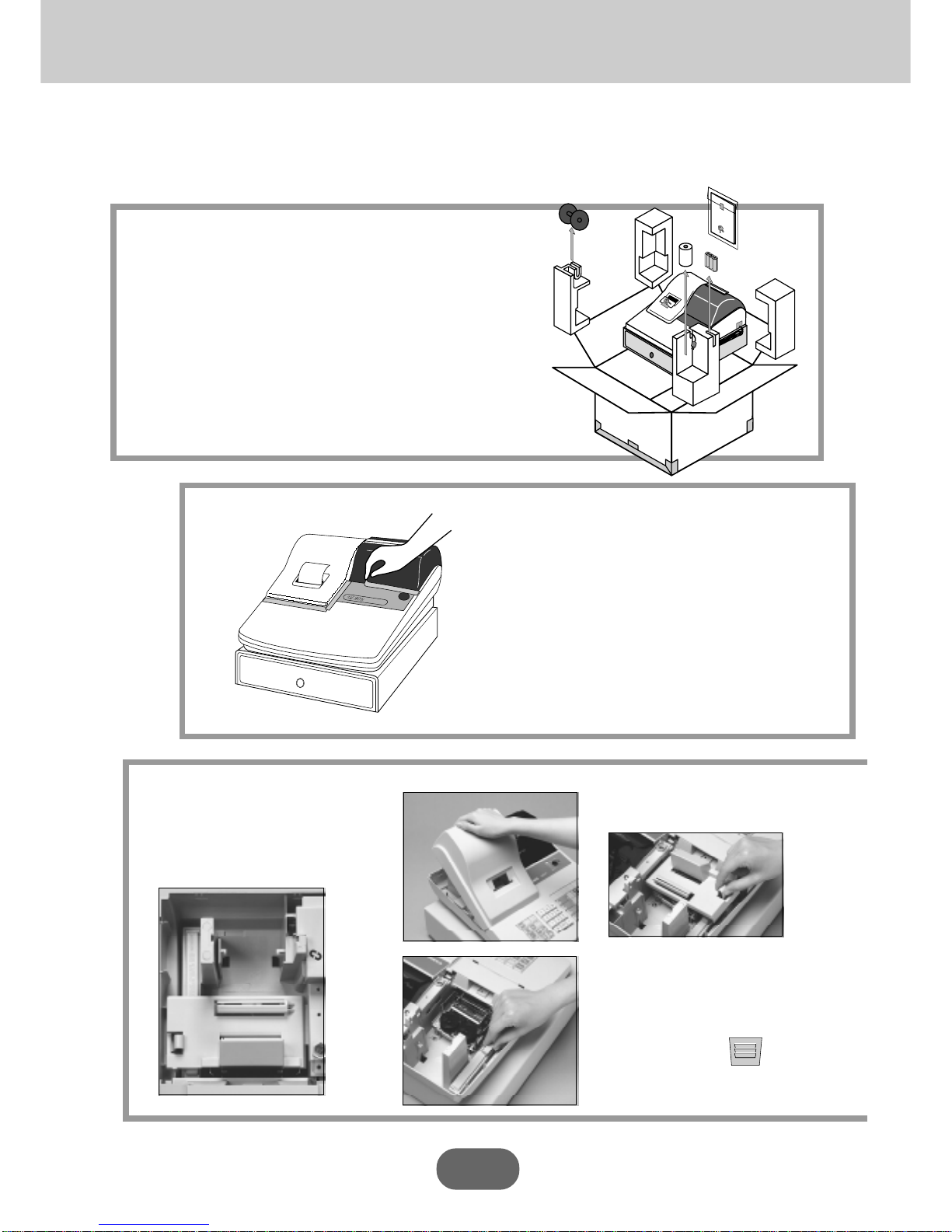
Thissectionoutlineshowtounpackthecashregisterandgetitreadytooperate. Youshouldreadthispartof
themanualevenifyouhaveusedacashregisterbefore. Thefollowingisthebasicsetupprocedure,along
withpagereferenceswhereyoushouldlookformoredetails.
2.
1.
Remove the cash register from its box,
makingsurethatallofthepartsandaccessories
areincluded.
Remove the tape holding parts of the cash
register in place.
Alsoremovethesmallplasticbagtapedtotheprinter
cover.Insideyouwillfindthemodekeys.
ECR
Install the three memory
backup batteries.
2. Remove the battery compartment
cover. Pressing down where the
cover is marked " " and put it
up.
3.
Operators
Instruction
Manual
1.Removetheprintercoverand
innercover.

9
Getting Started
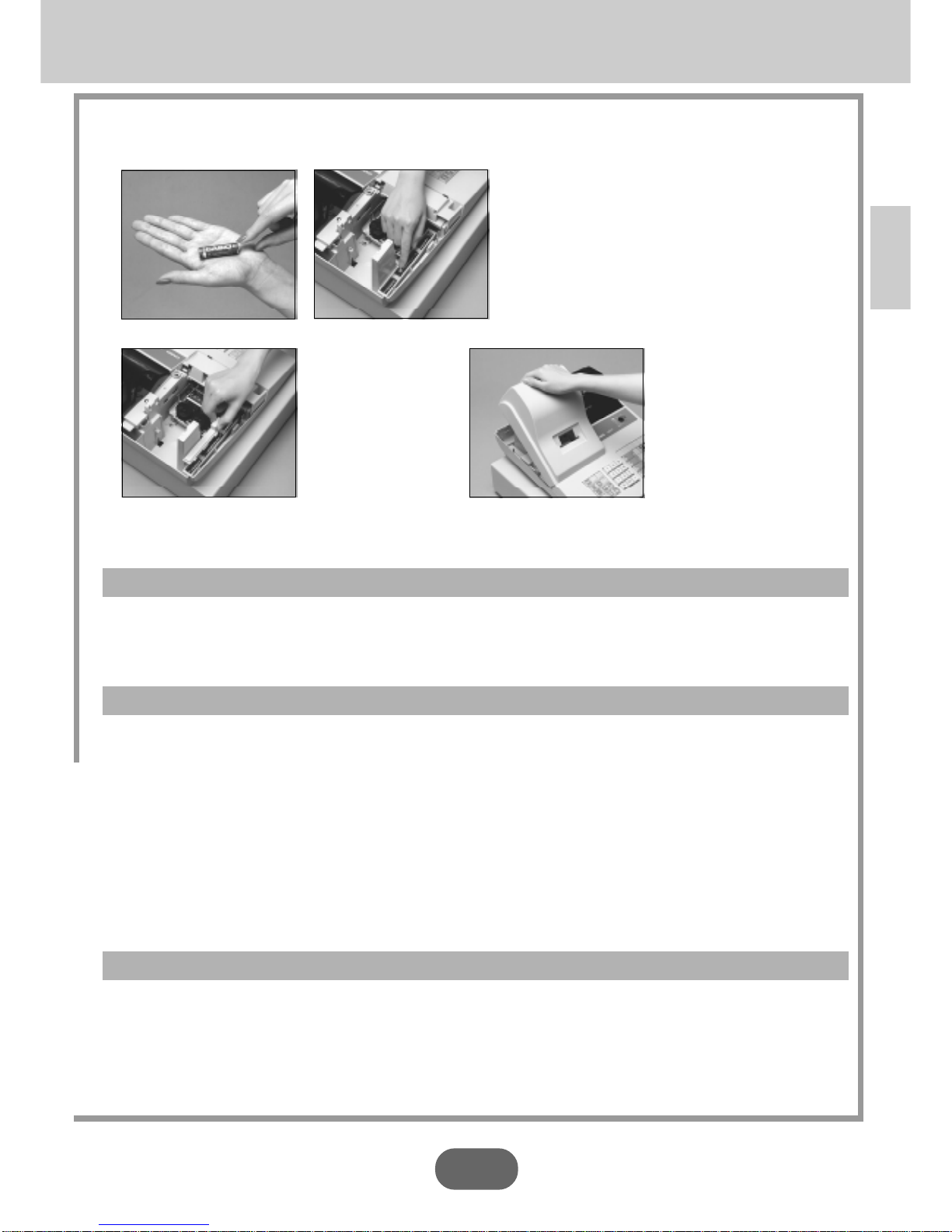
3.
Install the three memory backup batteries. (continued…)
4.Replacethebatterycompartmentcover .
3. Note the (+) and (-) markings in the battery
compartment.LoadasetofthreenewSUM-3
(UM-3)batteriessothattheirpositive(+)and
negative(-)endsarefacingasindicatedbythe
marking.
WARNING!
• Never try to recharge the batteries supplied with the unit.
• Do not expose batteries to direct heat, let them become shorted or try to take them apart.
Keep batteries out of the reach of small children. If your child should swallow a battery, consult a physician
immediately.
Important!
Thesebatteriesprotectedinformationstoredinyourcashregister'smemorywhenthereisapower
failureorwhenyouunplugthecashregister .Besuretoinstallthesebatteries.
Precaution!
Incorrectly using batteries can cause them to burst or leak, possibly damaging the interior of the
cash register. Note the followings.
• Be sure that the positive (+) and negative (-) ends sides of the batteries are facing as marked in the
battery compartment when you load them into the unit.
• Never mix batteries of different types.
• Never mix old batteries with new ones.
• Never leave dead batteries in the battery compartment.
• Remove the batteries if you do not plan to use the cash register for long periods.
• Replace the batteries at least once every two years, no matter how much the cash register is used
during the period.
5.Replacetheinnercoverprintercover .

10
Getting Started
Z
X
Z
PGM
A-A08
REG
OFF
RF
PGM
CAL
4.
5.
6.
7.
Insert the mode key marked "PGM" into the Mode Switch.
Plug the cash register into a wall outlet.
Besuretocheckthestickeronthesideofthecashregistertomakesurethat
itsvoltagematchesthatofthe power supply inyourarea. Theprinter will
operateforafewseconds.
Install receipt/journal paper
Important!
Never operate the cash register without paper.
It can damage the printer.
Turnthemode keytothe
"REG" position.
Thedisplayshouldchangeto
thefollowing.
X
Z
CAL
REG
OFF
RF
PGM
OP
A-A08
PGM
A-A08
Indice
Altri manuali Casio Registratore di cassa

Casio
Casio SE-S3000 Manuale utente

Casio
Casio CE-6100 Manuale utente

Casio
Casio SE-C450 Manuale utente

Casio
Casio PCR-T273 Manuale utente

Casio
Casio CE-4000 Istruzioni per il montaggio

Casio
Casio TE-2200 Manuale utente

Casio
Casio PCR-275 Manuale utente

Casio
Casio QT-6100 Manuale utente

Casio
Casio SE-S10 Manuale utente

Casio
Casio PCR-T2000 Manuale utente

Casio
Casio CE-250 Istruzioni per il montaggio

Casio
Casio TK-6000 Series Manuale utente

Casio
Casio SE-G1 Manuale utente

Casio
Casio TK-T200 Manuale utente

Casio
Casio 120CR-B Manuale utente

Casio
Casio PCR-T276 Manuale utente

Casio
Casio 130CR Manuale utente

Casio
Casio PCR-T500 Manuale utente

Casio
Casio SE-S400 Manuale utente

Casio
Casio TE-7000S Manuale utente