
CBI Astute Series Manuale utente

low voltage
CBI Astute Range
Instruction Manual
Wi-Fi enabled
Scheduled energy management
Energy monitoring
Automation and IoT
Device automation sharing
CBI Home App and more
CBI Astute
Instruction Manual
Page 2
3990A963 REV B
Installation - Astute Smart Controller (ASC)
1. This device must be installed by a qualied electrician
2. Isolate supply before installing the ASC
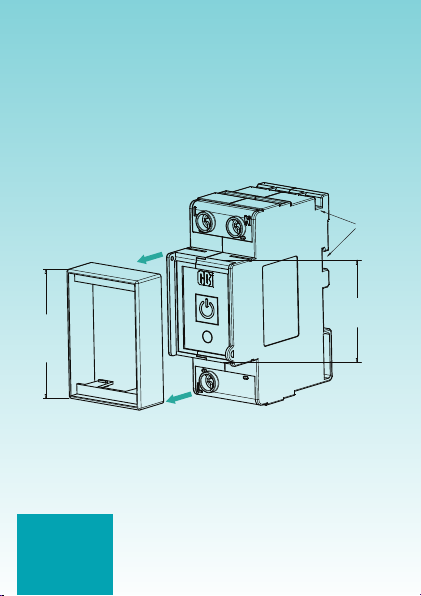
3. Install the ASC on either mini rail or DIN rail (remove the
escutcheon adaptor for DIN, see Figure 1)
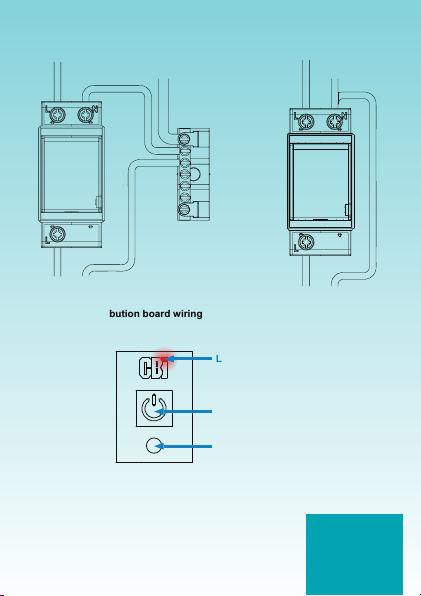
4. Connect the ASC according to Figure 2 or 3. Observe markings
for line and load terminals.
5. Download and install the CBI Home App from either the App Store
or on Google Play
57 mm
Mini Rail
escutcheon
adaptor
45 mm
DIN
Dual
Mount
Figure 1: Escutcheon adaptor removal
CBI Astute
Instruction Manual
Page 3
3990A963 REV B
Figure 2: Distribution board wiring
Neutral
Bar
Load
ASC
Neutral
(black wire)
Neutral
Live (red wire)
Figure 3: Stand alone wiring
Load
ASC
Neutral
(black wire)
Neutral
Live (red wire)
LED (BLUE / RED)
POWER BUTTON
REBOOT BUTTON
Figure 4: ASC front face
Reboot Button - If needed, press and hold the reboot
button for 1 second to reboot the ASC.

CBI Astute
Instruction Manual
Page 4
3990A963 REV B
Installation - Astute Smart Isolator (ASI)
1. This device must be installed by a qualied electrician
2. Isolate supply before installing the ASI
3. Install the ASI in the outlet box
4. Connect the ASI according to Figure 5. Observe markings for line
and load terminals.
5. To power the ASI press the isolation switch to ON (refer to
Figure 6). Once power is ON the LED will light up.
6. Download and install the CBI Home App from either the App Store
or on Google Play
Figure 5: ASI installation
LED (BLUE / RED)
POWER BUTTON
ISOLATION SWITCH
Figure 6: ASI front face
Isolation Switch - Turn off isolation switch to isolate the
load. Always turn off isolation switch before performing
an insulation resistance test on the installation. Turning
the isolation switch off for 1 second will reboot the ASI.
PLEASE NOTE:
Line and load cannot be
reversed. If reversed the
device will not power up.
TERMINALS

CBI Astute
Instruction Manual
Page 5
3990A963 REV B
Installation - Astute Smart Plug (ASP)
1. This device must be installed by a qualied electrician
2. Isolate supply before installing the ASP
3. Install the ASP in the outlet box
4. Connect the ASP according to Figure 7
5. To power the ASP press the isolation switch (refer to Figure 8).
Once power is ON the LED will light up.
6. Download and install the CBI Home App from either the App Store
or on Google Play
Figure 7: ASP installation
LED (BLUE / RED)
POWER BUTTON
ISOLATION SWITCH
Figure 8: ASP front face
Isolation Switch - Always turn off isolation switch before performing an
insulation resistance test on the installation. Turning the isolation switch off for
1 second will reboot the ASP.
TERMINALS

CBI Astute
Instruction Manual
Page 6
3990A963 REV B
CBI Astute Smart Controller (ASC) / Astute Smart
Isolator (ASI) / Astute Smart Plug (ASP)
• ONLY compatible with 2.4 GHz Wi-Fi with internet connection
• Free CBI Home App available to control these devices
• Manual ON / OFF switch (Power Button)
• Multiple ON / OFF programs
Specication
ASC ASI ASP
Voltage 230 V, 50 Hz ~,1 Ph 230 V, 50 Hz ~,1 Ph 230 V, 50 Hz ~,1 Ph
Current 30 A resistive,
10 A inductive
30 A resistive,
10 A inductive 16 A
Connecting the CBI ASC / ASI / ASP to Wi-Fi
Step 1 - Download the App
Option 1: Search for CBI Home
on the App Store or on Google
Play and install. See App icon
below:
Option 2: Scan the QR code
below and select App Store or
Google Play:
Available on the App Store or on Google Play:
Apple and the Apple logo are trademarks of Apple Inc., registered in the U.S.
and other countries and regions. App Store is a service mark of Apple Inc.
Google Play and the Google Play logo are trademarks of Google LLC.

CBI Astute
Instruction Manual
Page 7
3990A963 REV B
Step 2 - Register a new account
Once installed, open the CBI
Home App, tap “Allow” on the
pop-up message if you would like
to receive notications.
The following screen will appear,
tap on “Sign Up”:
A privacy policy pop-up message will appear, read and tap “Agree” to
proceed:

CBI Astute
Instruction Manual
Page 8
3990A963 REV B
Register with an email address.
Once the chosen email address
has been entered, tick the “I
agree User Agreement and
Privacy Policy” box and tap on
“Get Verication Code”.
A six digit verication code will be
sent to the email address provided.
Enter the 6 digit verication code
to register a user prole.

CBI Astute
Instruction Manual
Page 9
3990A963 REV B
Once the verication code
has been entered, create a
personalised password and tap
“Done”.
The password must contain 6 to
20 letters and numbers, do not
use special characters.
Allow the App to use your location,
tap “Allow”.

CBI Astute
Instruction Manual
Page 10
3990A963 REV B
Step 3 - Pair device to App
Tap “Add Device” to add the
device to your App (smartphone /
tablet should be connected to the
same 2.4 GHz Wi-Fi connection).
For adding additional devices tap
the “+” in the right-hand corner.
Step 4 - Select ASC (Wi-Fi), ASI
(Wi-Fi) or ASP (Wi-Fi)
Questo manuale è adatto per i seguenti modelli
3
Indice


