CDA 3U10 Guida rapida

Customer Care Department • The Group Ltd. • Harby Road • Langar • Nottinghamshire • NG13 9HY
T : 01949 862 012 F : 01949 862 003 E : customer.care@cda.eu W : www.cda.eu
www.cda.eu
3U10 Extractor
Installation, Use and Maintenance

2
Important
The CDA Group Ltd cannot be held responsible for injuries or losses
caused by incorrect use or installation of this product. Please note
that CDA reserve the right to invalidate the guarantee supplied with
this product following incorrect installation or misuse of the appliance
or use in a commercial environment.
This appliance is not designed to be used by people (including
children) with reduced physical, sensorial or mental capacity, or
who lack experience or knowledge about it, unless they have had
supervision or instructions on how to use the appliance by someone
who is responsible for their safety.
Under no circumstances should any external covers be removed for
servicing or maintenance except by suitably qualified personnel.
Appliance information:
Please enter the details on the appliance rating plate below for
reference, to assist CDA Customer Care in the event of a fault with
your appliance and to register your appliance for guarantee purposes.
Appliance Model
Serial Number
CE Declarations of Conformity:
This appliance has been manufactured to the strictest standards and
complies with all applicable legislation, including Gas safety, Electrical
safety (LVD) and Electromagnetic Interference Compatibility (EMC).

3
IMPORTANT INFORMATION FOR CORRECT DISPOSAL OF THE
PRODUCT IN ACCORDANCE WITH EC DIRECTIVE 2002/96/EC.
At the end of its working life, the product must be taken to a special
local authority waste collection centre or to a dealer providing
appliance recycling services.
Disposing of a household appliance separately avoids possible
negative consequences for the environment and health. It also
enables the constituent materials to be recovered, saving both energy
and resources. As a reminder of the need to dispose of household
appliances separately, the product is marked with a crossed-out
wheeled dustbin .
Please note:
•Under no circumstances should the extractor be
connected to any gas ventilation system, flue system or
hot air ducting system.
• Do not vent the extractor into an attic or loft space.
•Only install the extractor in rooms with adequate
ventilation. Remember that the extractor is powerful and
whatever air is extracted needs to be replaced.
•Do not tile the extractor in. It should be removable for
service or maintenance.
•Do not use silicone sealant to secure the extractor to the
wall.
•You must be able to isolate the extractor from the mains
electrical supply after installation.
4
•Steam cleaners must not be used when cleaning this
appliance.
•The performance of your extractor will vary depending
on a number of factors, such as supply voltage and
cleanliness of the filters.
Note:
For best performance, you should switch on the extractor 15 minutes
before starting to cook and leave it to run for approximately 15
minutes after the end of cooking.
Using Your Extractor
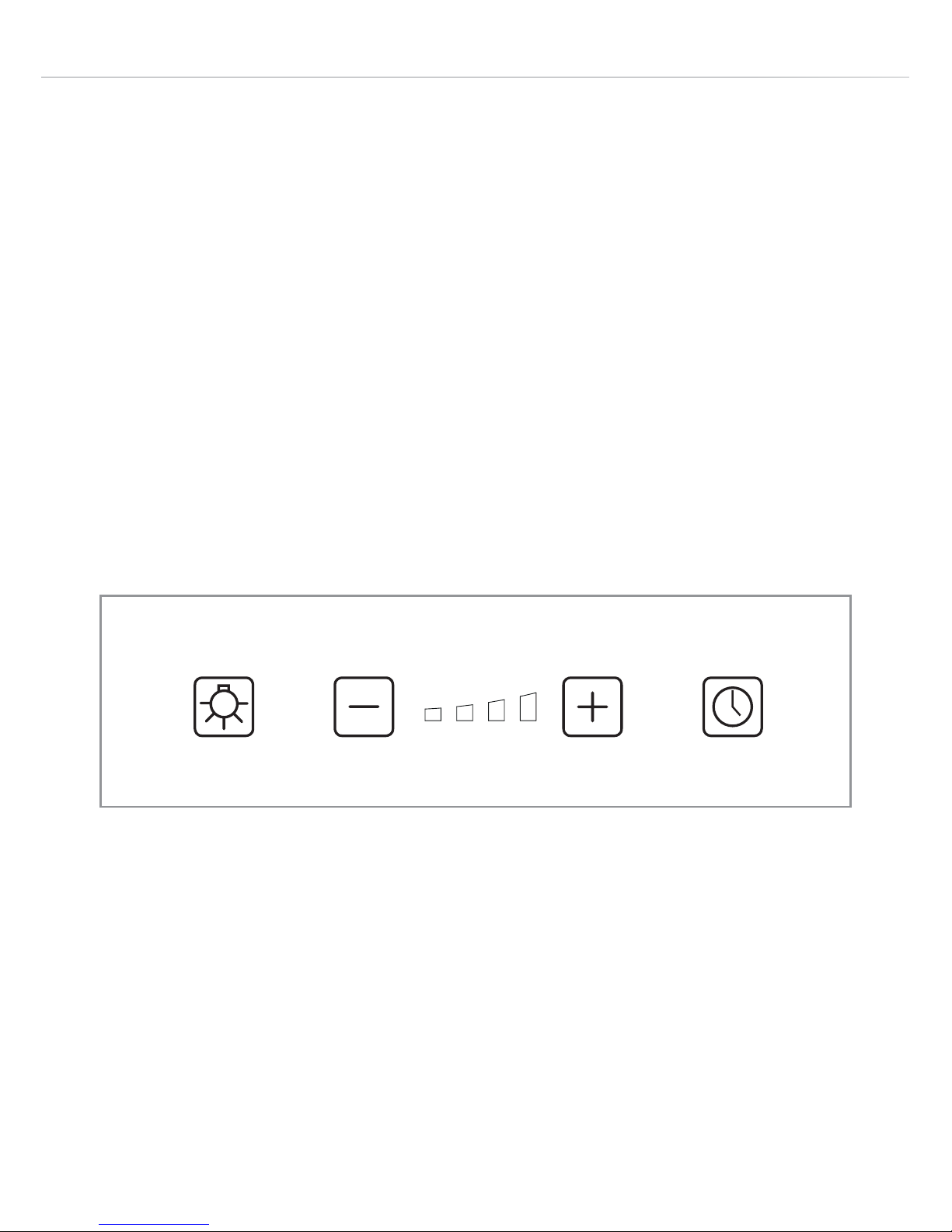
A - Light key
B - Minus key
C - Speed indicator
D - Plus key
E - Timer key
Fig. 1
A EDCB

5
To switch the extractor on:
• Touch the “Plus” key (D) to start the extractor running at the lowest
speed.
Setting the extractor speed when it is running:
The extractor may run at a choice of 4 speeds, indicated by the
“Speed indicator” lights (C) on the control panel.
• To increase the speed touch the “Plus” key (D). The speed will
increase by one increment for each touch of this key.
• To decrease the speed touch the “Minus” key (B). The speed will
decrease by one increment for each touch of this key.
Energy saving functions:
To help save energy:
• After 5 minutes of running at the 4th (highest) speed the motor
automatically reduces to the 2nd speed.
• After 7 minutes of running at the 3rd speed the motor automatically
reduces to the 2nd speed.
To switch the extractor o:
• Touch the “Minus” key (B) several times to turn the extractor to its
lowest speed setting, then once more to turn it o.
To switch the light on or o:
• Touch the “Light” key (A).

6
The timer function:
The timer function sets the extractor to switch itself o after ten
minutes have passed. This is ideal when you leave the kitchen after
cooking as the extractor can be left to clear the air then switch o to
save power, without you disturbing your meal to switch it o.
• To set this function, touch the “Timer” key “E”. The “Speed
indicator” will start to flash to show this function has been activated.
• To cancel this function, press either the “Plus” or “Minus” button (D)
or (B).
Care and Maintenance
IMPORTANT : DO NOT PERFORM MAINTENANCE OR CLEANING
OF THE EXTRACTOR WITHOUT FIRST SWITCHING OFF THE
ELECTRICITY SUPPLY.
Cleaning
You should use a nonabrasive cleaner. Any abrasive cleaner
(including Cif) will scratch the surface.
You can clean your extractor eectively by simply using a dilute
solution of water and mild detergent and drying to a shine with a clean
cloth, for example the CDA E-Cloth.
Cleaning the grease filters
The grease filters should be kept clean to minimise the risk of fire.
The grease filters may be removed then cleaned with hot soapy
water. You can also wash the grease filters in a dishwasher, ensuring
that you place them in an upright position to prevent damage from
other items in the dishwasher.
7
Please note:
Cleaning the grease filters in the
dishwasher may lead to discolouration.
This is normal and does not constitute a
fault with the appliance.
To remove the aluminium grease
filters for cleaning
• With the electricity supply still switched on, touch the “Plus” key
once to lower the moving panel and start the motor at its lowest
speed.
• Switch o the electricity supply to the extractor.
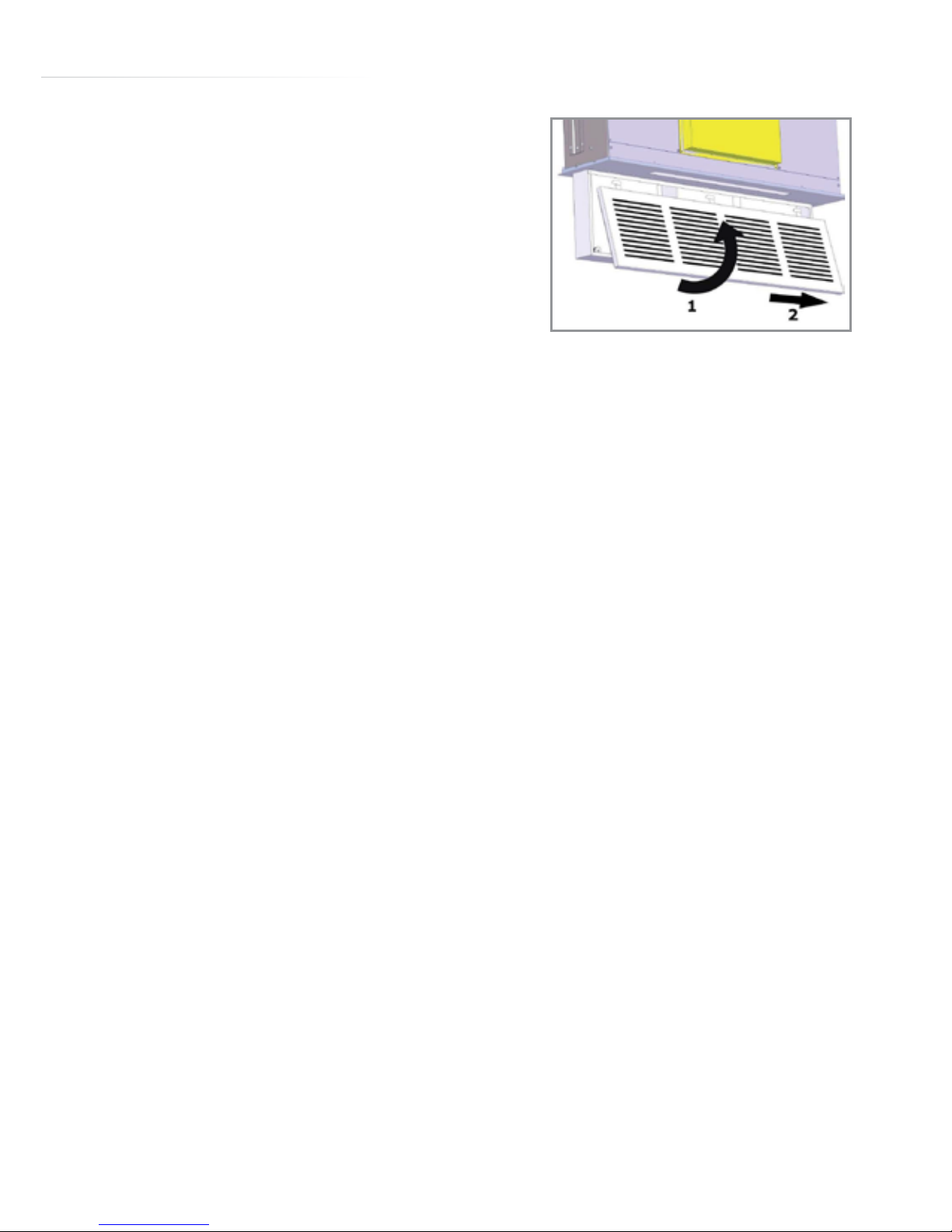
• Pull the lower edge of the filter panel toward you slightly to release
it from its lower retaining magnets (Fig. 2).
• Slide the filter panel to the right to release its upper locating tabs in
their slots (Fig. 2).
• Carefully lower the filter panel from the extractor.
• The grease filters may be removed from the filter panel (for
cleaning) by first sliding the black plastic locating pillars aside: This
releases the filters so they can be slid out.
To re-fit the aluminium grease filter after cleaning
• With the electricity supply still switched o, reverse the removal
process to fit the filters into the filter panel, then the panel to the
extractor.
• Switch the electricity supply to the extractor back on.
• Touch the “Plus” key once to start the motor at its lowest speed.
• Touch the “Minus” key once to stop the motor and retract the
moving panel back to its rest position.
0
Fig. 2

8
Changing the charcoal filters (re-circulating only)
To ensure best performance of your extractor, you should replace the
charcoal filters every four to six months, depending on use.
To attach the charcoal filters:
• Remove the grease filter panel as described above.
• Position the charcoal filters in the slots at the rear of the filter panel.
• Replace the grease filter panel as described above.
IMPORTANT: Steam cleaners must not be used to clean this
appliance.
If your extractor is not working:
1. Check that the mains supply has not been switched o.
2. Check that the fuse in the spur has not blown.
If the speed drops without you touching a button:
This is likely to be the energy saving feature described above: The
fan speed automatically reduces from the higher speeds after a pre-
set running time, to save power.
The LED Lamps
The LED lamps are long-life items that are not designed to be
replaced by the user. In the unlikely event of a lamp failure, contact
CDA Customer Care for assistance.

9
Mains Electricity Connection
THIS APPLIANCE MUST BE CONNECTED TO THE MAINS SUPPLY
BY A COMPETENT PERSON, USING FIXED WIRING VIA A DOUBLE
POLE SWITCHED FUSED SPUR OUTLET AND PROTECTED BY A
3A FUSE.
We recommend that the appliance is connected by a qualified
electrician, who is a member of the N.I.C.E.I.C. and who will comply
with the I.E.T. and local regulations.
The wires in the mains lead of this appliance are coloured in
accordance with the following code:
Green & Yellow = Earth
Blue = Neutral
Brown = Live
As the colours of the wires in the
mains lead for the appliance may not
correspond with the coloured markings
identifying the terminals connecting to
the fused spur, proceed as follows:
•The wire which is coloured green
and yellow must be connected to the terminal marked “E” (Earth) or
coloured green.
•The wire which is coloured blue must be connected to the terminal
marked “N” (Neutral) or coloured black.
•The wire which is coloured brown must be connected to the
terminal marked “L” (Live) or coloured red.
DOUBLE POLE
SWITCHED
FUSED SPUR OUTLET
USE A 3 AMP FUSE
Fig. 3

10
Note: Use a 3A Fuse.
Assembly and electrical connection should be carried out by
specialised personnel.
When installing this product we recommend you seek the help of
another individual.
Do not mount the isolation switch behind the chimney section. It is a
requirement that you must be able to isolate the extractor from the
mains electrical supply after installation.
This appliance is intended to be connected to the mains electrical
supply by means of an isolation switch and fused spur and is intended
to be protected by a 3A fuse. The use of a 13A fuse can cause
damage to the internal wiring in the event of a fault, and may also
invalidate the warranty.
Electrical Information
Mains electrical voltage: 230Vac
Total rated power consumption: 90W
Indice
Altri manuali CDA Cappa di ventilazione

CDA
CDA ECR90CM Istruzioni per l'installazione e il funzionamento

CDA
CDA EVPK9 Manuale utente

CDA
CDA EVX101 Guida rapida

CDA
CDA ECN62 Manuale di riferimento

CDA
CDA EDD9BL Manuale di riferimento

CDA
CDA ECNK90 Guida rapida

CDA
CDA EVC4 Manuale

CDA
CDA CHX10 Manuale utente

CDA
CDA 3S10BL Guida rapida

CDA
CDA CIGE9 Manuale utente