
Celtic Magic FEATHER Manuale utente

1
www.CelcMagic.org 1
USER MANUAL
Ver 280421
FEATHER
Light Force & Customisable
Joysck / Mouse

2
www.CelcMagic.org 2
Warnings
The Feather uses small magnets
within its construcon and
although no stronger then what
would be found in headphones
those users with pacemakers
should be aware and take
precauons and advice before
using a Feather device.
The Feather joysck has an
exchangeable knob that would be
a choking hazard to small
children.
The Feather is a very sensive
device. Avoid leaving the in
direct sunlight that may cause
small distorons aecng its
accuracy.

3
www.CelcMagic.org 3
1 Introducon
1.1 Models
1.2 Hardware view
1.3 Conguraon Applicaon
1.3.1 Basic Joysck Controls
1.4 Mounng
1.5 Adjusng the force
1.6 Knob selecon
1.7 Opons
1.8.1 External displays
1.8.2 Sip & Pu
2 Operaon
2.1 Mouse Model CM/FM
2.1.1 Conguraon
2.1.2 Manual / Auto Scanning
2.2 Joysck Model CM/FJ
2.2.1 Conguraon
`2.3 Game Control Mixer Model CM/FGCM
2.3.1 FGCM Buon inputs
2.3.2 Conguraon
2.3.3 Connecng things up
2.3.4 Changing J-modes basics
2.3.5 Changing J-modes detailed
2.3.6 J-mode summary
2.3.7 Single sck Walking & Driving
3 Specicaon & Support
3.1 Dimensions
3.2 Spec details
3.3 Support & Recalibraon
3.4 Legal & Conformity
3.5 Warranty
Contents

4
www.CelcMagic.org 4
1 Introduction
1.1 Models
There are three models, the hardware is the same between each model but the
soware within the Feather models diers.
Models:
CM/FM Feather: Mouse model
CM/FJ Feather: Joysck model
CM/FGCM Feather: Game Control Mixer (an advanced gaming version)
1.2 Hardware View

5
www.CelcMagic.org 5
1.3 Conguraon Applicaon
The PC Feather Conguraon App can be
downloaded from the Celc Magic website and
is used to congure any model of Feather.
Angular Sensivity: This sets the angle of movement to achieve 100% output.
Full = +/- 6 degrees | Mid = +/- 4.5 degrees | Tight = +/- 3 degrees
Deadband: The amount of movement that is ignored before the output starts.
Orthogonal control: Restricts movement to Up/Down and Le/Right only ie all
angles in between are ignored. Auto allows any angle at high values of movement
and restricts to orthogonal for ne movements.
Tremor Filter: Slows down inputs to reduce the eects of hand tremor at the cost
of speed.
Polaries: Swaps the axis and axis polaries to allow for novel installaons
Led Bright: Sets the brightness of any external Led displays if used
1.3.1 Basic Joysck Controls

6
www.CelcMagic.org 6
1.4 Mounng
Feathers can be mounted either by simple Vel-
cro tape or using the 4mm mounng holes.
Any screws must not enter the Feather further
than 5mm or damage may occur.
Adaptors supplied with the Feather
1) Camera Mount 1/4” UNC threaded
2) Triform Mount on three cushioned feet
Camera Mount
Part CM/F-CAM_MNT Tri Mount
Part CM/F-TRI_MNT
Oponal Feather Hand Support System
Part CM/F-HSS

7
www.CelcMagic.org 7
1.5 Adjusng the Force
The force necessary to move the Feather is adjustable
in four steps ranging from approx. 5 grams to 20
grams. The force is set by ng one, two, three or
four magnets. These being ed under the 3mm grub
screw at the centre of the of the base.
Spare magnets are stored under the second grub screw.
Normally 2 magnets are ed as standard giving approx. 10 grams of force.
Magnets
Fied
Approx.
Force
note
15g Min
210g Normal
315g
420g Max
Important that:
• No more than 4 magnets are ed.
• The magnets polarity is preserved
else the joysck will not centre.
• The grub screw is NOT SCREWED IN
FURTHER THAN FLUSH else damage
can occur

8
www.CelcMagic.org 8
Minimum force
1 Magnet
Maximum force
4 Magnets
Warnings
DO NOT mix up the
storage grubscrew
with the centre grub-
screw as they are
slightly dierent.
To avoid damage only
screw the grub screw
unl level (ush) with
the body of the
Feather.
1.5 Adjusng the Force
connued
Carefully remove the 3mm grub screw taking
care not to reverse the polarity & to insert
the new arrangement of magnets at.

9
www.CelcMagic.org 9
1.6 Knob selecon
The knob can be replaced . The
standard knob is a low prole
20mm cork sphere and is suita-
ble for all conguraons of
force from 5g to 20g.
See secon 1.5
Other knob opons are not rec-
ommended for the lightest (5g)
force opon as the heavier
knobs can tend to hold the
Feather o centre.
Large Rubber
Suitable for opera-
on
15g-20g
Part
CM/Knob-LR
Small Cork (20mm)
Standard
Suitable for ultra
light operaon
5g-20g.
Part
CM/Knob-SC
Extended Cork
Suitable light
operaon
10g-20g
Part
CM/Knob-EC
Large Cork
35mm diameter
Suitable for ultra
light operaon
5g-20g.
Part
CM/Knob-LC
10
www.CelcMagic.org 10
1.7 Opons
Dependant on the model of Feather several addional opons are available
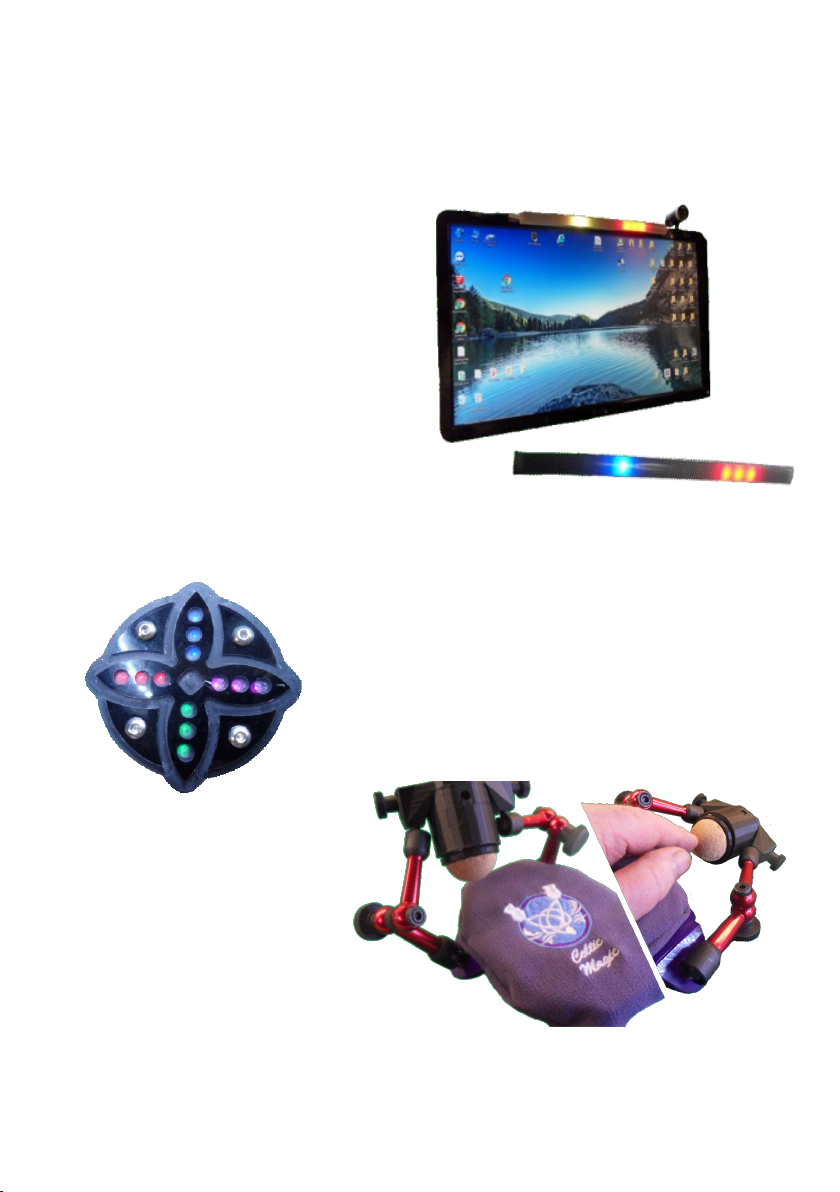
1.7.1 External Displays
Feather Mouse : display type CM/ED1
If the user requires scanning to select
controls then the Celc Magic external
Display bar type CM/ED1 is required.
This ts to the top or to the side of a
monitor screen indicang the mode that
the mouse can be put into.
Ie clicks/ Drag / scroll etc.
Feather FGCM: display type CM/ED2
The advanced game play possible with the FGCM mod-
el is greatly enhanced by using the a compass style CM/
ED2 external display that shows the current games
mode selected in a colour coded compass paern.
1.7.2 Sip & Pu
Feature Pending
Feather Hand Support System
Part CM/F-HSS
Allows the Feather to be accu-
rately posioned at any angle-
close to your hand .
Indice


