Centrality PA168S Manuale utente

Centrality PA168S IP Phone User Manual (V1.32)
Beijing Centrality Communication Inc
PA168S IP Phone User Manual
¾
Breif Introduction of Centrality PA168S IP phone
........................................................... 2
¾
Suitable Uses of Centrality PA168S IP phone
................................................................. 3
¾
Centrality PA168S IP phone Appearance Introduction:
................................................. 4
¾
Function Keys of PA168S IP Phone Introduction (Normal State)
................................. 5
¾
Features
................................................................................................................................5
¾
Standard and Protocol
......................................................................................................... 6
¾
Operating requirements
...................................................................................................... 7
¾
Electric requirements
........................................................................................................... 8
¾
Size
........................................................................................................................................ 8
¾
Installation
............................................................................................................................. 8
¾
Configuration
......................................................................................................................... 9
¾
Phone Keypad set
................................................................................................................ 9
¾
Configured by WEB
........................................................................................................... 15
¾
Configured by PalmTool
.................................................................................................... 35
¾
Telnet Configuration
.......................................................................................................... 36
¾
Upgrade Centrality PA168S IP phone
............................................................................ 54
¾
Usage of the phone
............................................................................................................ 55

Centrality PA168S IP Phone User Manual (V1.32)
Beijing Centrality Communication Inc 2
¾Breif Introduction of Centrality PA168S IP phone
IP is abbreviation of Internet Protocol. An IP phone is a telephone
transporting voice using grouping data package of IP protocol. The
networking using IP protocol such as LAN within the enterprise, LAN
within a city and Internet work all support using IP phone.
The mostly significant features of IP phone is transporting voice message
over data communication network at an extremely low price with excellent
sound quality. Using IP phone, you will save dramatically on international
calls and long distance calls.
Centrality PA168 series IP net phone uses unique generalized outline and
inner line modes. It functions much like an ordinary telephone switching
between inner line and out line, so it supplies great conveniences to the
users. When Centrality PA168 series IP net phone is in generalized inner
line mode, it can call another Centrality PA168 series IP net phone
worldwide free. When Centrality PA168 series IP net phone is in
generalized out line mode, it can places calls to ordinary telephones
worldwide at a dramatically low price, because Centrality PA168 series IP
net phone supports using prepaid card supplied by ISP such as Net2phone
or eTalk. Moreover, it possesses excellent sound quality just like ordinary
phones. PA168S phone has 2X16 English LCD and supports being set by
keypad.

Centrality PA168S IP Phone User Manual (V1.32)
Beijing Centrality Communication Inc 3
¾Suitable Uses of Centrality PA168S IP phone
Centrality PA168S IP Phone is the ideal choice for those who always place
international or long distance calls. If two parties both use Centrality PA168
serial IP Phone, they can communicate with each other even free.
●Telecom Service Provider and Internet Phone Service Provider;
●Foreign capital or joint venture companies; offices, representative
offices or agencies of foreign companies in China;
●Abroad hotel(Can be arranged at guest rooms or commercial central);
●Large enterprises, multinational enterprise(Used for international call
and long distance call)
●Middle and small enterprise with import or export business, abroad
travel agencies; study abroad or immigrant mid-agencies;
●Departments relating with international affairs, such as foreign trade
department, association for friendship with foreign countries,
turnvereins, athenaeums, foreign experts bureau and other
departments involving foreign affairs
●Colleges and study institutions, such as dorm for abroad students,
professors with close connection with foreign countries;

Centrality PA168S IP Phone User Manual (V1.32)
Beijing Centrality Communication Inc 4
●Families or persons with close connection with foreign countries, such
as foreigners in China and those who prepare the study abroad
¾Centrality PA168S IP phone Appearance Introduction:
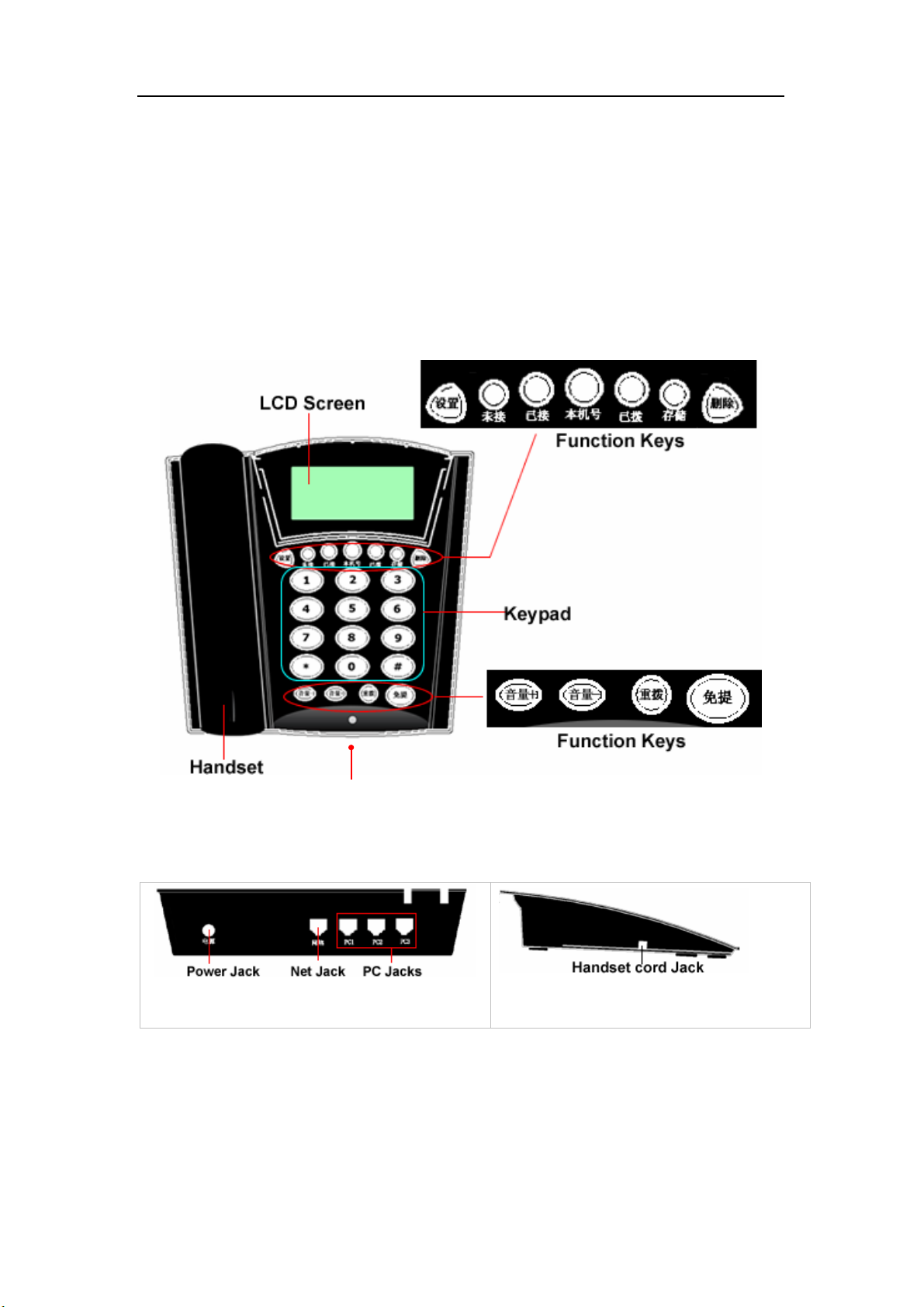
●PA168S IP Phone Front Illustration (Refer to Fig 1.1):
Fig 1.1 PA168S IP Phone Front Illustration
●PA168S IP Phone Back and Side Illustrations(Refer to Fig 1.2 and 1.3):
Fig 1.2 PA168S IP Phone Back Illustration
Fig1.3 PA168S IP phone Side Illustration

Centrality PA168S IP Phone User Manual (V1.32)
Beijing Centrality Communication Inc 5
¾Function Keys of PA168S IP Phone Introduction (Normal State):
Keys Function
Set With handset hung, press this key to get local IP address of the phone
Missed With handset hung, press this key to review missed number
Received With handset hung, press this key to review received number
Phone
number
With handset hung, press this key to get phone number
Dialed With handset hung, press this key to review dialed number
Save Save speed dial number
Delete While reviewing missed, received or dialed number, press this key to delete current
number
Redial While reviewing missed, received or dialed number, press this key to dial current number
Speaker Press this key to have a call without lifting the handset
Volume+ Increase the volumes of handset or speaker; turn over the record backward
Volume- Decrease the volumes of handset or speaker; turn over the record forward
Keypad With handset picked or pressing speaker, press this key to dial number
¾Features
¾Hardware
●Main chip—PA1688 50MHz
●Data Memory—2MB SDRAM
●Program Memory—1 MB Flash memory
●Ethernet Jack—Four 10/100M jacks

Centrality PA168S IP Phone User Manual (V1.32)
Beijing Centrality Communication Inc 6
●AC/DC adapter—Input AC100--- 230V,Output 9V DC, 1A
¾Software
●DHCP support for LAN or Cable modem
●PPPoE support for ADSL or Cable modem
●Set phone by HTTP web browser (IE6.0) or Telnet
●Upgrade by FTP
●Support major G.7XX and gsm610 audio codec
●VAD(Voice active detect)
●CNG (Comfort noise generation)
●Dynamic voice jitter buffer
●G.168/165 compliant 16ms echo cancellation
●Tone generation and Local DTMF re-generation according with ITU-T
●E.164 dial plan and customized dial rules
●100 entries for quick dial
●80 entries each for missed calls, answered calls and dialed calls
●Adjustable volume for both handset and speaker
●Voice prompt
●Hotline
¾Standard and Protocol
Centrality PA168S IP Phone supports following standard and protocol:
● IEEE 802.3 /802.3 u 10 Base T / 100Base TX

Centrality PA168S IP Phone User Manual (V1.32)
Beijing Centrality Communication Inc 7
● Major G.7XX and gsm610 audio codec
● H.323 V4
● MGCP RFC2705
● SIP RFC3261
● Net2phone private protocol
● TCP/IP: Internet transfer and control protocol
● RTP: Real-time Transport Protocol
● RTCP:Real-time Control Protocol
● VAD/CNG save bandwidth
● DHCP:Dynamic Host Configuration Protocol
● PPPoE:Point to Point Protocol over Ethernet
● DNS:Domain Name Server
● Telnet:Internet's remote login protocol
● FTP:File Transfer protocol
● HTTP:Hyper Text Transfer protocol
● Build in H.323 proxy
¾Operating requirements:
●Operation temperature: 0 to 50° C (32° to 122° F)
●Storage temperature: -30° to 65° C (-22° to 149° F)
●Humidity: 10 to 90% no dew

Centrality PA168S IP Phone User Manual (V1.32)
Beijing Centrality Communication Inc 8
¾Electric requirements:
●Voltage: 9V DC
●Power: 9W (max.)
●Power adapter: AC/DC input 100-230V,output 9V 1A
●Network interface:4X RJ-45 Ethernet Connectors
¾Size:
170 x 175 x 85 mm (L x W x H)
¾Installation:
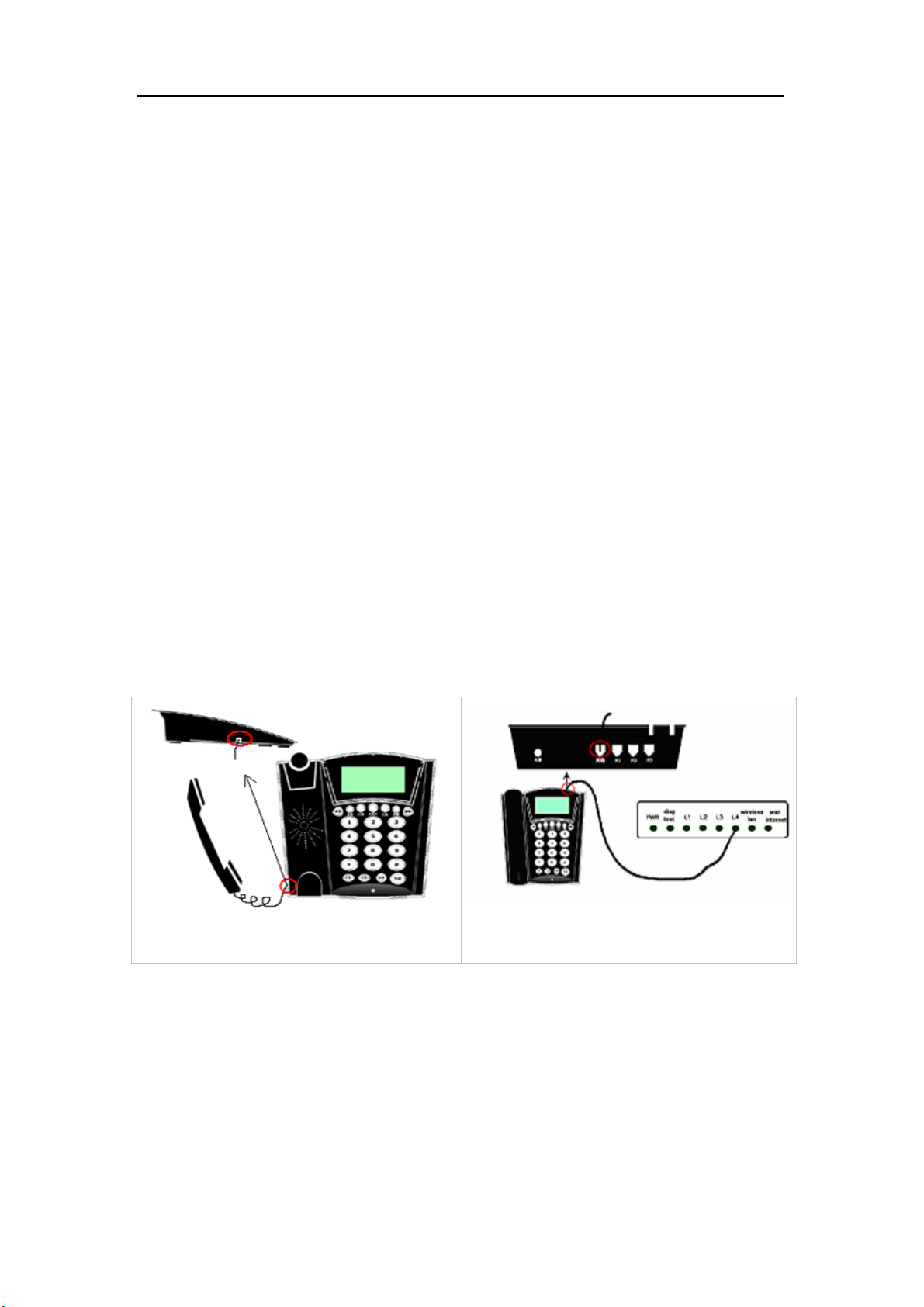
1. Connect handset to base: insert handset cord into handset cord jack at the
left side of the base. Refer to Fig 2.1 please.
Fig 2.1 Connect handset and base Fig 2.2 Connect IP phone to Internet
2. Connect IP phone to Internet: plug the RJ-45 Ethernet cable into the
Ethernet Jack. Plug the other end of the cable into HUB. Refer to Fig 2.2
please.
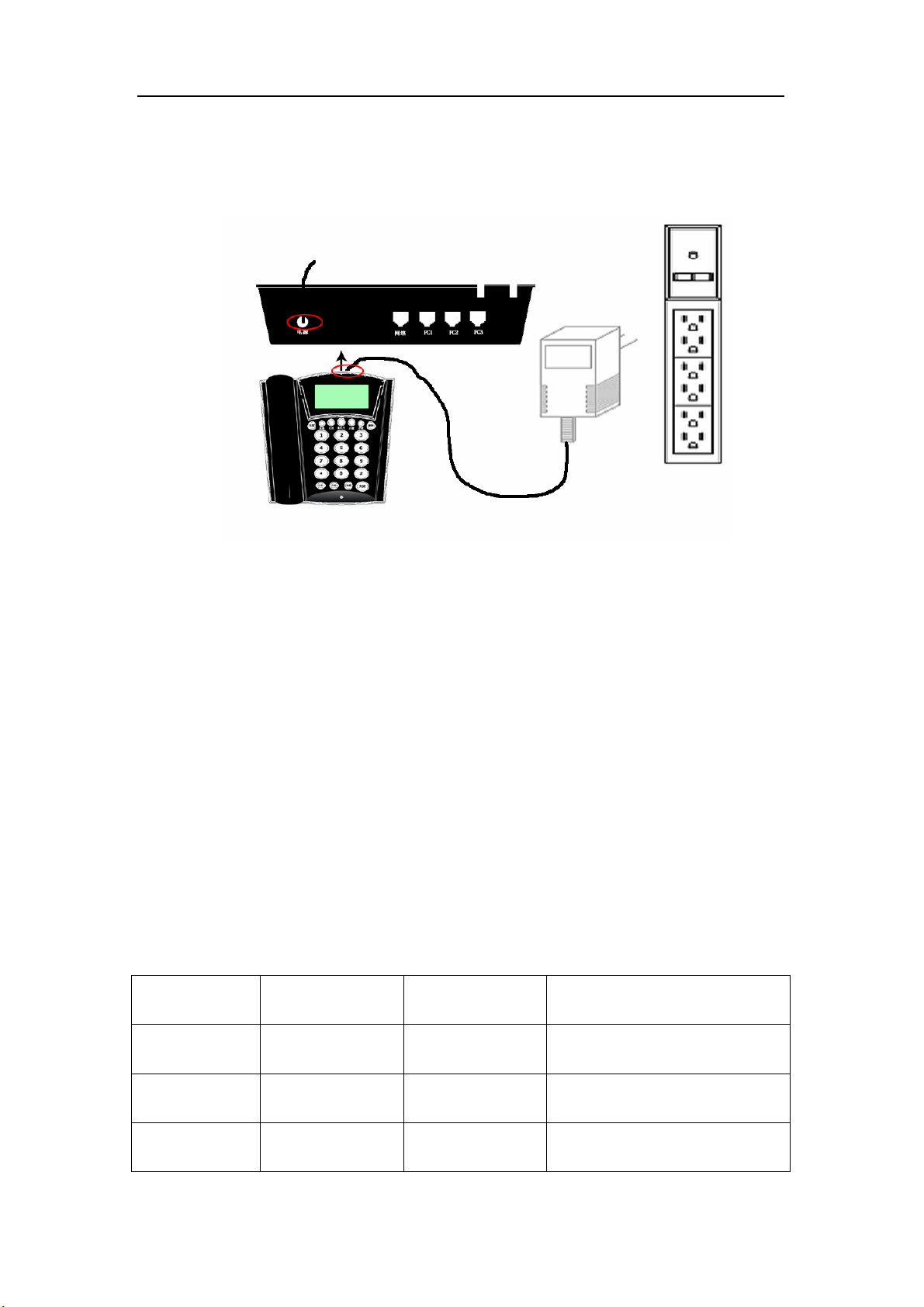
3. Power on IP phone: plug the power cord adapter into the Power Jack. Then

Centrality PA168S IP Phone User Manual (V1.32)
Beijing Centrality Communication Inc 9
plug the other end of the power cord adapter into the appropriate wall
outlet. Refer to Fig 2.3.
Fig 2.3 Power on IP phone
¾Configuration
Four different ways can be used to configure Centrality PA168S IP
phone: phone keypad set; web browser, Telnet commands and PalmTool
configuration on computer.
¾Phone Keypad setup
●Function Keys Introduction: While using keypad and LCD to configure
the setting of IP phone, following keys will be used:
Keys Function Keys Function
Set Enter change mode Speaker Enter submenu; confirm change
Vol+ Turn over menu
backward Vol - Turn over menu forward; move
cursor back in change mode
Keypads Modify values Redial Exit current menu; exit change mode

Centrality PA168S IP Phone User Manual (V1.32)
Beijing Centrality Communication Inc 10
●Configuration operation: We tack enabling eTalk prepaid card and
setting the ID and pin as an example to explain how to change setting:
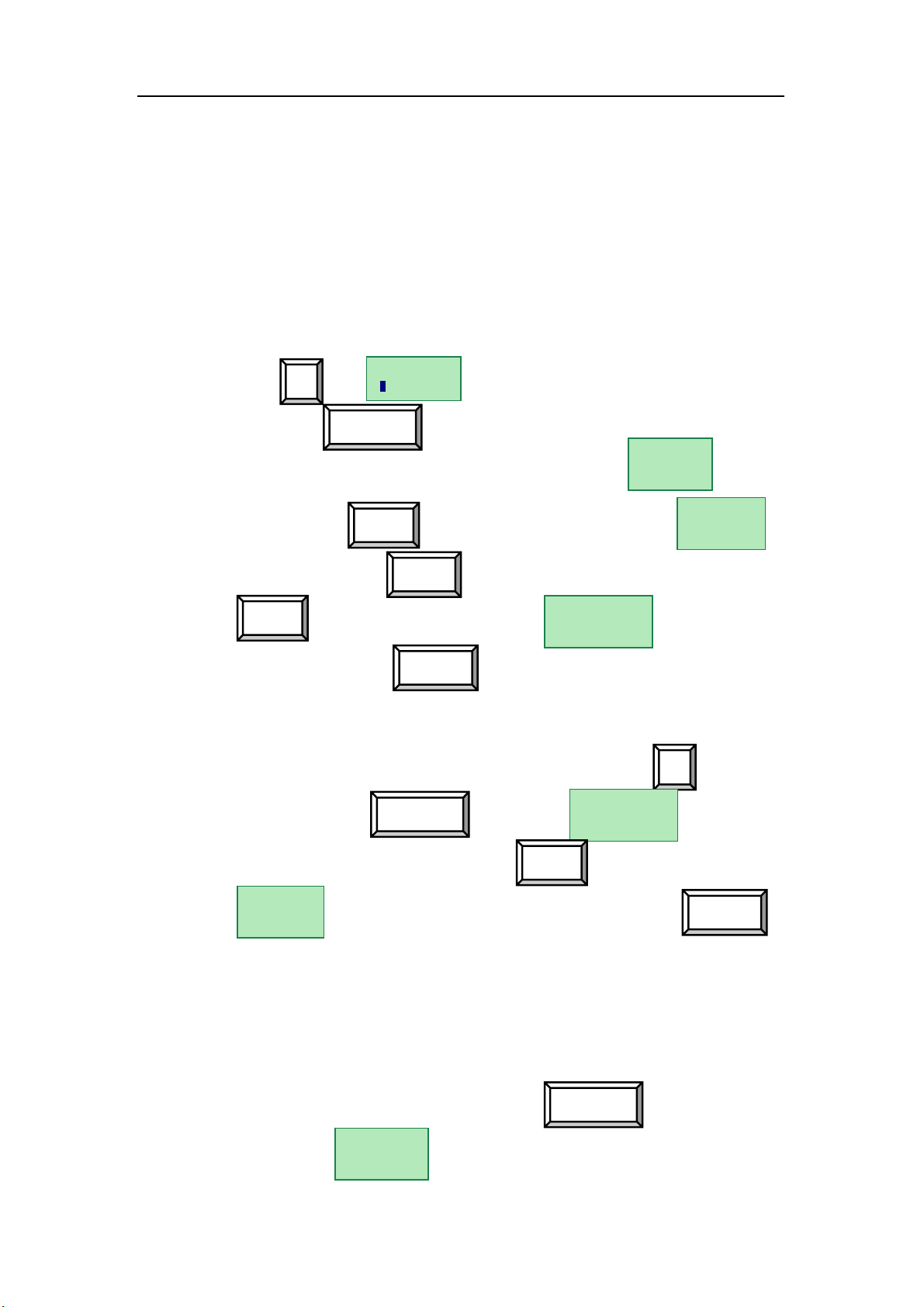
1. Enter setting mode: use the dial pad to enter the password of the phone
(when debug is not set as 0[disable], default password is 1234; when
debug is set as 0[disable], please use super password 19750407), and
then press , till is displayed. Then enter the password
again and press to let the phone enter setting mode.
2. Enable eTalk: Once the phone enter setting mode, will be
seen, then press to turn over the menu, until is
displayed. Please press to enter submenu and then continually
press to turn over the menu until is displayed on
the screen. Please press to enter change mode, then you will
see a cursor flashing at the beginning of the second line. It indicates that
you can change the setting of this item. Then press to enable
eTalk and then press to confirm. will be seen.
3. Set eTalk account (0117ETNS):press to turn over the menu,
once is displayed on the screen, please press to
enter change mode, then you will see a cursor flashing at the beginning
of the second line. It indicates that you can change the setting of this
item. Then press 0117 keys once respectively, 3 key thrice, 8 key twice,
6 key thrice and 7 key quintic. Then press to confirm. After
above operation, will be displayed on the LCD.
Password:
network
settings
protocol
settings
calling card
0[normal]
Local IP
#
Speaker
Vol+
2
account
Vol+
Speaker
Speaker calling card
2[etalk]
Vol+
Local IP
Speaker
account
0117ETNS
Indice
Altri manuali Centrality Telefono IP