
Chord Electronics Mojo 2 Manuale utente

Chord Electronics
Product Communication | English
The Pumphouse, Farleigh Lane, East Farleigh, Kent,
ME16 9NB. United Kingdom.
+44 (0) 1622 721 444
info@chordelectronics.co.uk
chordelectronics.co.uk
Mojo 2
Manual
-
V.1

Chord Electronics
Mojo 2 | User manual
2
1 Contents
2 Introduction 3
3 Registering Mojo 2 3
4 Getting to know Mojo 2 4
5 Getting started 5
6 Basic operation 5
7 Advanced operation 10
8 Adding wireless streaming with Poly 17
9 Technical specifications 18

Chord Electronics
Mojo 2 | User manual
3
2 Introduction
Mojo 2 is a next-generation portable DAC/headphone amplifier that builds on the success of the original
and oers exciting new features, enhanced functionality, plus improved sound and battery performance.
2.1 Safety
Please take note of the following safety instructions before using Mojo 2:
•Never allow Mojo 2 to come into contact with water or other liquids.
•Never spray cleaning products onto Mojo 2. Only use a clean micro-fibre cloth to clean the casing.
•Before using this product please read the safety document included in the box.
•There are no user-serviceable components within Mojo 2. Never attempt to open, dismantle or apply
internal third-party devices, doing so will invalidate your warranty.
3 Registering Mojo 2
Mojo 2 comes with a one-year
warranty that covers defects in
materials and workmanship through
fair wear and tear.
•Register your Mojo 2 via the Chord Electronics website: www.chordelectronics.co.uk/register-product
•Registering your product helps us to provide you with the best possible after-sales support.
In the unlikely event of a claim, contact your supplying dealer.

Chord Electronics
Mojo 2 | User manual
4
4 Getting to know Mojo 2
ABCDE H IK
GJ
F
ACoaxial input (single
input or dual data only)
Connect compatible digital devices using a 3.5mm coaxial digital cable. Single coax:
tip: signal, sleeve: ground. Dual data coax: tip: signal 1, ring: signal 2 sleeve: ground (for
use with Hugo M-Scaler)
BUSB-C input Connect compatible digital devices using a USB-C cable for playback
CMicro-USB input Connect compatible digital devices using a Micro-USB cable for playback
DMicro-USB charging
input
Connect to power using the supplied Micro-USB cable (use with a charger capable of a
2 A minimum output)
EOptical input Connect compatible digital devices using an optical cable for playback
FCharge status LED Displays charge and battery status using a polychromatic scale (see section 6.2)
GMenu Press to cycle through the menu options
HVolume down/menu ‘-‘ Decrease volume or adjust the selected menu mode
IVolume up/menu ’+’ Increase volume or adjust the selected menu mode
JPower button (Displays
sample rate)
Press and hold to power on/o
KHeadphone outputs Connect up to two pairs of headphones (not independently controllable - 3.5 mm x2)

Chord Electronics
Mojo 2 | User manual
5
5 Getting started
The Mojo 2 manual is divided into two key sections: basic operation and advanced operation. Basic
operation (6.0) covers everything needed to get started and enjoy using Mojo 2. More advanced menu
options are explained in 7.0.
6 Basic operation
6.1 Connecting to power
Mojo 2 can be used while constantly connected to power, or on the go, thanks to powerful, rechargeable
batteries. A charger capable of outputting a minimum of 2 A (amps) is recommended for Mojo 2; please
check your charger specifications. Connect the supplied cable to Mojo 2’s Micro-USB charging input (see
D, above) and then to a 5 V power source to begin charging.

Chord Electronics
Mojo 2 | User manual
6
6.2 Battery status indicator
With Mojo 2 connected to power, the charge status LED (see F, above) will pulse and show battery
charge status using colour (see chart below); the charge status is also displayed when operating on
battery power alone.
NOTE A blue charge status LED indicates the maximum battery capacity range has been reached.
If Mojo 2 is left constantly on charge, it will enter intelligent desktop mode to protect the battery from
overcharging. This will be indicated by a purple battery status light.
Battery status Battery charge
75 % to 100 %
40 % to 75 %
10 % to 40 %
2 % to 10 %
Flashing
0 to 2 %
Intelligent desktop mode
6.3 Depleted battery
Following full depletion of the batteries, the charge status LED will flash red for ten seconds. If coupled with the
device shutting down, a recharge is required.
If following a period of inactivity the device fails to power-on (suggesting a severely depleted battery) then the
device needs to be recharged overnight, with the unit switched o.

Chord Electronics
Mojo 2 | User manual
7
6.4 Connectivity: inputs
Connect compatible digital devices, including laptops, smartphones, tablets and more to Mojo 2’s
corresponding digital inputs. These include: 3.5 mm coaxial (single coax: tip: signal, sleeve: ground. Dual data
coax [for use with Hugo M-Scaler]: tip: signal 1, ring: signal 2 sleeve: ground, USB-C, Micro-USB and optical
inputs. If all four inputs are connected simultaneously, Mojo 2 will auto-select the correct input when music is
played to the device. Mojo 2 will prioritise specific inputs if all four are connected simultaneously. USB has
priority followed by coaxial and then optical. It is only possible to connect one USB at a time (Micro-USB takes
priority over USB-C).

Chord Electronics
Mojo 2 | User manual
8
6.5 Connectivity: outputs
Connect up to two pairs of (3.5 mm mini-jack) headphones to Mojo 2, simultaneously. The device’s volume
control (see section 6.8) will adjust both headphone outputs together (there is no independent volume control
for each headphone).
6.6 Powering on/o
Press and hold the power button (see section 4) until it becomes illuminated, then release. Mojo 2 will perform
a number of start-up checks indicated by the power button cycling through a range of colours. During this
process, the menu button will also automatically cycle through its designated colours; any previously saved
menu settings will be displayed using colour on the ‘+’ and ‘- ‘ buttons (see section 7 for menu options and a
full guide to colours). Mojo 2 is ready to use once the colours have stopped cycling. To power down, press and
hold the power button until the lights are extinguished.

Chord Electronics
Mojo 2 | User manual
9
TIP Mojo 2 will auto-shutdown after 10 minutes without an input signal.
6.7 Brightness adjustment
Mojo 2 oers two levels of button brightness: normal and low. Normal is activated as standard, however, to
alternate between low and normal brightness modes, press menu once (menu button will show blue) then
‘-’ repeatedly to move between normal and low modes; any lit buttons will increase or decrease in
brightness accordingly. Once chosen, the selection will be remembered and Mojo 2 will automatically exit
the menu settings in 10 seconds. Alternatively, press and hold menu to exit the menu immediately.
6.8 Volume adjustment
Mojo 2 benefits from two main volume ‘ranges’: low and high, as indicated by the colour of the menu
button: unlit (low); white (high). As the volume is changed, Mojo 2 moves automatically into the respective
volume ranges; the menu button colour changes accordingly.
With chosen devices and headphones now connected (but not on/in ear), and Mojo 2 powered on, the
volume can be reduced to zero using the volume down ‘-‘ controls until both volume buttons and menu
button are unlit. From unlit, the volume can be slowly increased by pressing the volume up ‘+’ button. Both
buttons slowly change colour with changing volume level.
Always set the volume level to zero before commencing initial playback and take precautions
when using Mojo 2 in high volume mode to protect from hearing damage.
Chord Electronics
Mojo 2 | User manual
10
7 Advanced operation
Mojo 2 benefits from a cutting-edge UHD DSP control which provides a number of advanced features,
accessible via the menu button. Pressing the menu button sequentially, cycles through the various
features explained in this section.
7.1 Menu: button colour information
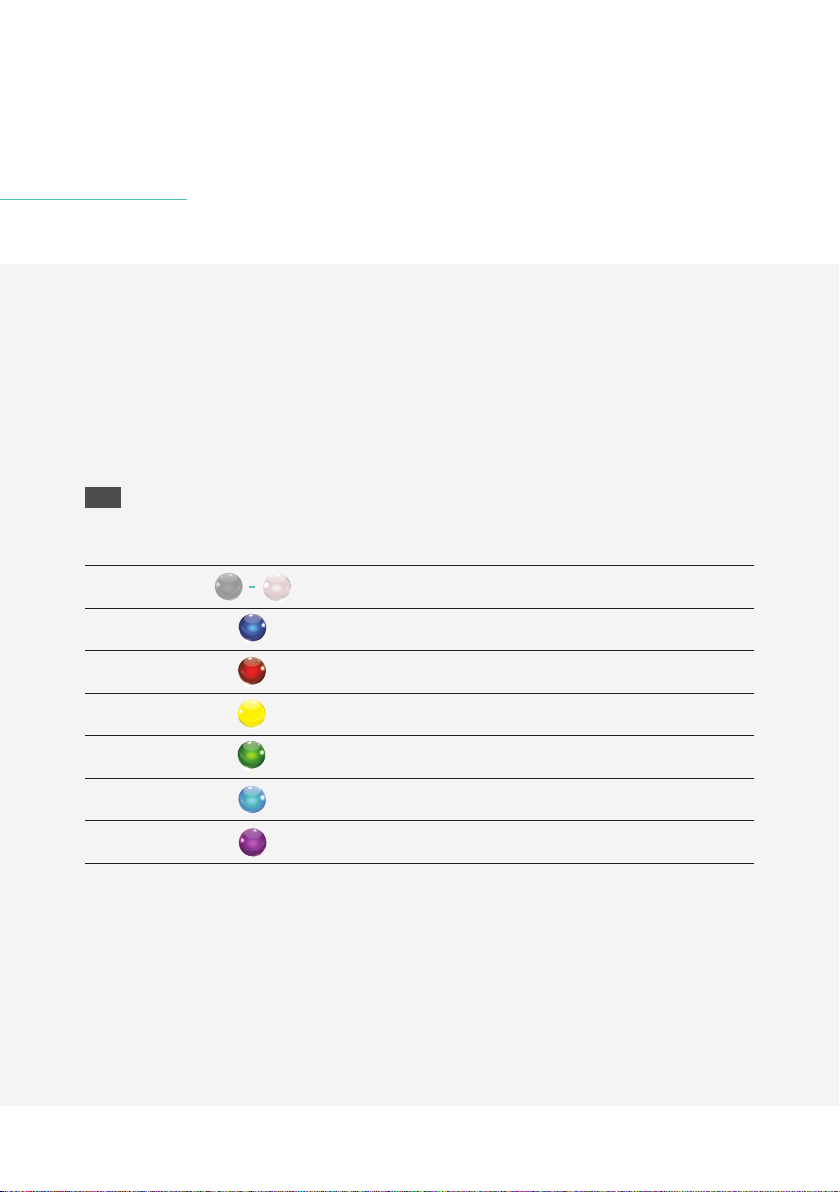
The menu button changes colour as menu options are selected. The chart below provides a guide.
TIP Lift fingers between menu button presses to see the menu button colour and function selected.
Menu colour Menu mode
Volume range
Brightness adjustment/Crossfeed mode
Bass 20 Hz
Bass 125 Hz shelf
Treble 3 kHz shelf
Treble 20 kHz
Lock control
Indice
Altri manuali Chord Electronics Convertitore multimediale


