
CiA TVV424S Manuale utente

TVV424S
4 channels digital videorecorder
User Manual

2
Table of Contents
1. Introduction
1-1 Safety Warning …………………………………………………………………………………
1-2 Features ………………………………………………………………………………………….
1-3 Specifications …………………………………………………………………………………...
2. Installation
2-1 Package contents ……………………………………………………………………………….
2-2 Connection ………………………………………………………………………………….….
2-3 Rack mount installation …………………………………………………………….…………..
2-4 RS232 /RS485 Remote protocol ……………………………………………………………..…
3. Configuration
3-1 Install HDD …………………………………………………………………………………….…
3-2 Front panel keypad ……………………………………………………………………………..
3-3 Back panel connection ………………………………………………………………………….
3-4 Menu setup ……………………………………………………………………………………….
3-5 System setup …………………………………………………………………………………….
3-6 TIMER setup (Schedule Time-Lapse record mode setup)……………………………..…....
3-7 Camera setup……………………………………………………………………………..…….…
3-8 Record Setup …………………………………………………..………………………….…. ..
3-9 Alarm Setup…………...……………………………………………………………………….….
3-10 Dwell setup ……………..…………..…………………………………………………….…
3-11 Remote Setup ………………………………………………………………………….…..
3-12 Event ………………………………………………………………………………………………
4. Operation
4-1 Power on …………………………………………………………………………………………
4-2 Recording ………………………………………………………………………………………...
4-3 Camera Select (1-4) ………... ……………………………………………………………….….
4-4 Quad……. ………………………………………………………………………………………...
4-5 Play ………….………..…………………………..……………………………………………...
4-6 Key Lock ………………………………………………………………………………………………
5. Trouble shooting & appendix
5-1 Trouble shooting …………………………………………………………………………………
5-2 Compatible HDD brands …………………………………………………………………...…...
1. Introduction
Thank you for choosing this high quality Digital Quad Recorder. The DQR converts analog NTSC
or PAL video to digital images and records them to a removable hard disk drive. Digitally recorded
video has many advantages compared to analog video recorded on tape. There is no need to
adjust tracking. Digital video can be indexed by time schedule or events, and you can instantly
view video after selecting the time or event. You can freeze frames, fast-forward, and fast-
reverse, slow forward, and slow reverse without image streaking or tearing. It can be used as a
replacement for both a time-lapse VCR and a Quad in a security installation.
3
4
5
6
6
7
8
9
11
13
17
17
22
24
25
27
29
32
34
36
36
37
37
38
38
39
40

3
1.1 Safety Warning
All the safety and operating instructions should be read before the operation. The improper
operation may cause permanent damage.
1.1.1 Please use the adaptor provided from AV TECH.
1.1.2 Please lift and place this equipment gently.
1.1.3 Do not expose this equipment to open sunlight.
1.1.4 Do not use this equipment near water or in contact with water.
1.1.5 Do not spill liquid of any kind on the equipment.
1.1.6 Please power down the unit before unplugging.
1.1.7 This equipment should be operated only with power source from standard package.
1.1.8 Unauthorized repair or parts substitutions may result in fire, electric shock or other
hazards.
1.1.9 Do not switch the Power On & Off within short period o time (within 3 seconds).
1.1.10 Do not attempt to service this equipment by yourself. Refer all servicing and repair to
qualified service personnel.
1.1.11 This unit should be operated only from power source indicated on the manufacturer’s
label.
1.1.12 Installation should be made by a qualified service personnel and should conform to all
local safety codes and regulations.
1.2 Features
1.2.1 Wavelet Compression Format replaces Time-Lapse VCR and Quad
1.2.2 4 Audio inputs / 2 Audio outputs
1.2.3 On Screen Display and RTC (Real time clock) Function
1.2.4 Resolution
Screen Modes Resolution
Full screen 704(H) x 468(V) <NTSC> / 704(H) x 564(V) <PAL>
4 channels 352(H) x 234(V) <NTSC> / 352(H) x 282(V) <PAL>
1.2.5 Main monitor output allows simultaneous viewing of 4 cameras and full screen viewing.
1.2.6 Multi Screen Display Mode
zBelow display modes are selectable for in surveillance & DQR playback mode:

4
1.2.7 Digital Zoom can be up to 2 X 2 in DQR playback modes
1.2.8 4 channels and each channel has independent title generator (up to 10 characters).
1.2.9 Video Quality Adjustable on Each Channel
1.2.10 Alarm Input & Output Function
z4 channels alarm input, ALARM display and one alarm output.
zVideo loss detection on each channel.
zRecord 160 events.
1.2.11 Power-loss memory function: set up parameter will remain, in case of power failure.
1.2.12 Support 1 Removable HDD, IDE Type
1.2.13 Timer: Schedule recording
1.2.14 Display refresh rate up to 60 IPS (50 IPS for PAL)
1.2.15 Record refresh rate up to 60 IPS (50 IPS for PAL)
1.2.16 Quick Multiple Search by date/time, alarm, full list
1.2.17 Fast and slow playback in multiple speeds.
1.2.18 Security password protection
1.2.19 RS-232, RS-485 communication protocol
1.3 Specifications
Video format NTSC/EIA or PAL/CCIR
Hard disk storage IDE type, UTMA 66 above, 1 removable HDD supported
Record mode Manual / Alarm / Timer
Camera Input Signal Composite video signal 1 Vp-p 75ΩBNC, 9 channels
Camera Loop Back Composite video signal 1 Vp-p 75ΩBNC, 9 channels
Main Monitor Output Composite video signal 1 Vp-p 75ΩBNC
Motion Detect Area 15 * 12 targets per camera (NTSC) / 15 * 14 targets per camera (PAL)
Audio input 4 audio inputs, (RCA)

5
Audio output 2 audio outputs, (RCA)
Motion Detect Sensitivity 256 Levels
Video Loss Detection Yes
Refresh Rate 60 images/sec. for NTSC / 50 images/sec. for PAL
Recording Rate 60 images/sec. for NTSC / 50 images/sec. for PAL
Dwell Time Programmable (1~10 Sec)
Key Lock Yes
Picture Zoom 2 x 2
Camera Title 8
Video Adjustable Color/Contrast/Brightness Adjustable
Alarm Input TTL input, Hi (5V), Low (GND)
Alarm Output COM,/N.O/N.C.
Remote Control RS-232 or RS-485
Time Display Format YY/MM/DD, DD/MM/YY, MM/DD/YY, OFF
Power Source AC90~240V+ 10% switching adaptor
Power Consumption <27W
Operation Temperature 10 ~ 40
℃
RS-232C / RS-485 (bps) 115200
、
57600
、
19200
、
9600
、
4800
、
3600
、
2400
、
1200
Dimension 380 x 270 x 65mm (W x L x H)
Net Weight 5.2Kgs
Specifications are subject to change without notice.
2. Installation
2.1 Package contents
The package contents the following items.
zDigital Quad Recorder
zHDD cartridge
zKey for cartridge (Attached in HDD cartridge)
zPower cord
zUser manual
zRack mounting kit (Optional)
2.2 Connection
2.2.1 Connect with cameras

6
Main Monitor
Sensor
Alarm Input
Alarm
PC
RS232
432 1
Video Camera
Video Output
Video Input
Audio Input
Audio Output
2.3 Rack mount installation

7
Front Angle with Rock Mount
Side View with Rack Mount
2.4 RS232/ RS485 Remote Protocol
You can use the PC keyboard to simulate DQR keypad.
DATA: REMOTE PROTOCOL using 8 bit data、1 start bit、1stop bit
ACT C0H ID FUNCTION STOP
(FFH) (7FH)
FUNCTION CODE ASCII FUNCTION CODE ASCII
Menu 0x4D M Play 0x50 P
Enter 0x0D ENTER REC 0x72 r
Search 0x48 H CH1 0x31 1
Slow 0x53 S CH2 0x32 2
Up 0x55 U CH3 0x33 3
Down 0x4E N CH4 0x34 4
Left 0x4C L QUAD 0x51 Q
Right 0x52 R AUTO 0x41 A

8
3. Configuration
3.1 HDD Installation
3.1.1 Installing Hard Drive into Cartridge
3.1.1.1. Please find the Key in the Cartridge.
3.1.1.2. Use the provided miniature key and insert into the keyhole, turning the key
counter-clockwise.
3.1.1.3. Pull the handle outwards to remove the carrier body away from the cartridge
frame.
3.1.1.4. Push the open button to slide the top cover backwards and remove.
3.1.1.5. Insert the DC power cable and IDE cable on the HDD.
3.1.1.6. Position the HDD into carrier body and secure the HDD with the four 6#-32
screws provided.
3.1.1.7. Slide the top cover back to the carrier body by sliding it forward to secure.
3.1.1.8. Slide the carrier body back into the cartridge frame.
3.1.2 Function Settings and Operation
3.1.2.1 Power Indicator and HDD Access indicator
When power is ON, the indicator will display the following message:
3.1.3 Key lock
Status
Segment
Power
status Security status
Item Indicator
Power Indicator Green LED
HDD Access Indicator Yellow LED

9
A ON Locked (Irremovable)
B OFF Unlocked (Removable)
You must turn key lock to “ A ” position before powering on the unit. Otherwise HDD will
not operate properly.
3.1.4 The Record Time differs on Record Speed and Record Quality. Please Refer to the
following table.
NTSC SYSTEM
IPS 60 30 15 8 4 2 1
Best 12hr 24hr 48hr 90hr 180hr 360hr 720hr
High 15hr 30hr 60hr 112.5hr 225hr 450hr 900hr
Normal 24hr 48hr 96hr 180hr 360hr 720hr 1440hr
Record
Quality
Basic 40hr 80hr 160hr 300hr 600hr 1200hr 2400hr
HDD Type 120GB
PAL SYSTEM
IPS 50 25 12 6 3 2 1
Best 12hr 24hr 50hr 101hr 203hr 304hr 608hr
High 15hr 30hr 63hr 127hr 253hr 380hr 760hr
Normal 24hr 49hr 101hr 203hr 405hr 608hr 1220hr
Record
Quality
Basic 41hr 81hr 168hr 338hr 675hr 1013hr 2025hr
HDD Type 120GB
Note: Above data is from actual test data obtained from recording normal TV program.
(Reference only)
10
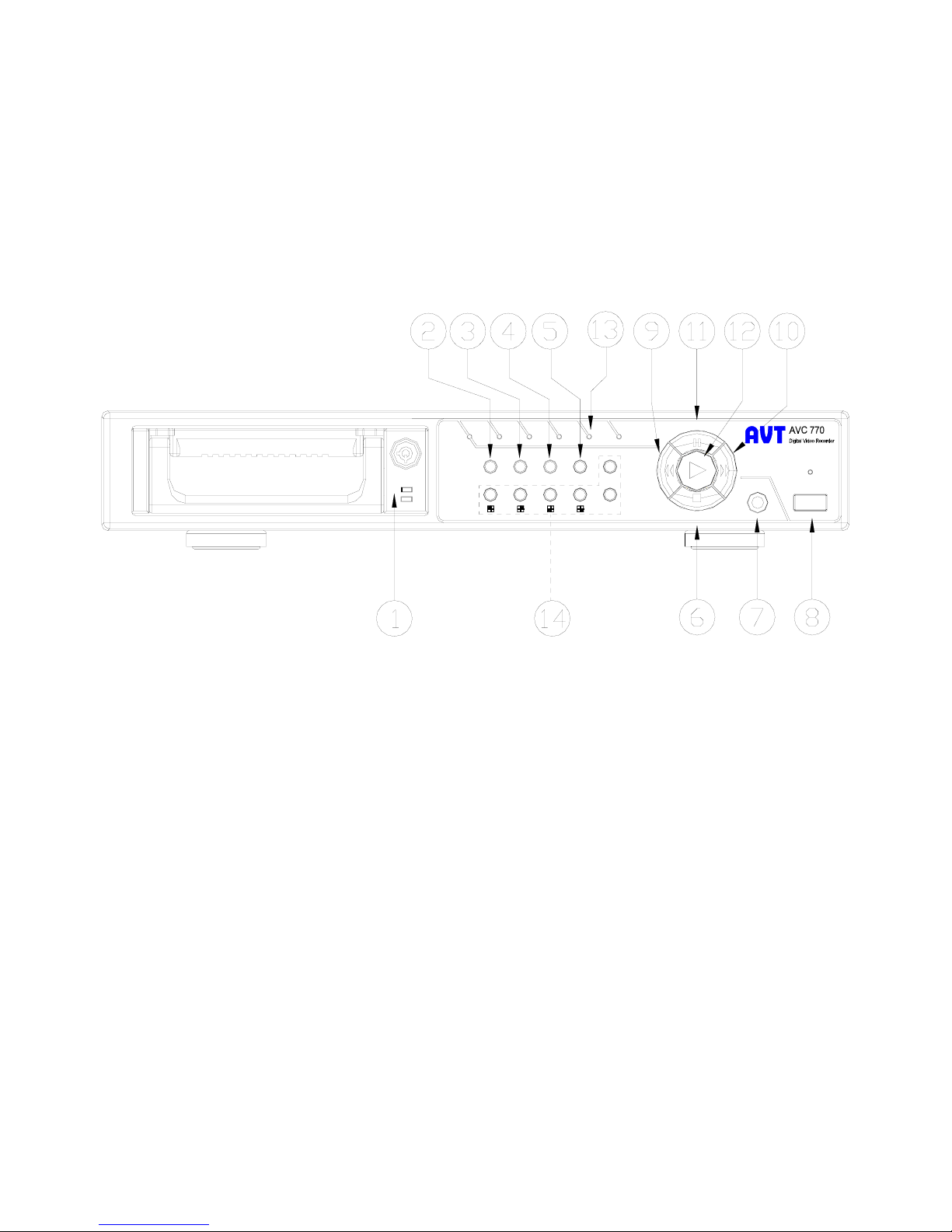
3.2 Front panel keypad
MENU SEARCH
ENTER SLOW
Full
HDD TIMERALARM PLAY
FF
Right
REW
Left
QUAD
AUTO
STOP / Down
REC
REC AUTO
PAUSE / Up
POWER
Please follow the instructions below to operate this unit.
1. Install HDD :This unit is with a removable hard disk drive tray. Before turning on this device, you
must install hard disk drive (not included in standard package) for proper operation.
2. MENU :Press MENU to enter main menu operation mode, and press Administrator Password
(default:0000) to access main menu.
3. ENTER :Press ENTER for confirmation.
4. SEARCH
Press SEARCH for period recording video searching.
5. SLOW : To press SLOW to slow down speed of play mode.
6. STOP / Down :
STOP : Under DQR Record/Play mode, it will stop recording / playing.
DOWN : Under setup mode , it can work as DOWN button.
7. REC :Press REC to start recording.
8. POWER : To power on, press power button.
To power off, press power button again.
9. REW / Left :
REW :Under DQR play mode, it can play video backward at high speed, and press REW again
to adjust speed at 1, 2, 4, 8, 16, 32 times
LEFT: Under setup mode , it can work as LEFT button.
10.FF / Right :
Indice
Altri manuali CiA Registratore digitale


