CiTO Power POLO Series Manuale utente

USER MANUAL
for
CiTO Power - POLO Series
CiTO Power Line-Interactive CPL-B1000/CPL-B1400/CPL-B2000
Uninterruptible Power System

IMPORTANT SAFETY INSTRUCTIONS
SAVE THESE INSTRUCTIONS – This manual
contains important instructions for models Line
Interactive CPL-B1000/CPL-B1400/CPL-B2000
that should be followed during installation and
maintenance of the UPS and batteries.

Safety – CAUTION!
zThis UPS utilizes voltages that may be hazardous. Do not attempt to
disassemble the unit. The unit contains no user serviceable parts.
Only factory service personnel may perform repairs.
zInternal battery voltage is 24Vdc. Sealed, lead-acid, 6 cells battery.
zConnection to any other type of receptacle other than a two-pole,
three-wire grounding receptacle may result in a shock hazard as well
as violate local electrical codes.
zIn the event of an emergency, turn the power switch to the “off”
position and disconnect the power cord from the AC power supply to
properly disable the UPS
zDo not allow any liquids or any foreign object to enter the UPS. Do not
place beverages or any other liquid-containing vessels on or near the
unit.
zThis unit intended for installation in a controlled environment
(temperature controlled, indoor area free of conductive contaminants).
Avoid installing the UPS in locations where there is standing or
running water, or excessive humidity.
zDo not plug the UPS input into its own output.
zDo not attach a power strip or surge suppressor to the UPS.
zDo not attach non-computer-related items, such as medical
equipment, life-support equipment, microwave ovens, or vacuum
cleaners to UPS
zTo reduce the risk of overheating the UPS, do not cover the UPS’
cooling vents and avoid exposing the unit to direct sunlight or
installing the unit near heat emitting appliances such as space
heaters or furnaces.
zUnplug the UPS prior to cleaning and do not use liquid or spray
detergent.
zDo not dispose of battery or batteries in a fire. The battery may
explode.
zDo not open or mutilate the battery or batteries. Released
electrolyte is harmful to the skin and eyes. It may be toxic.
zA battery can present a risk of electrical shock and high short circuit
current. The following precautions should be observed when working
on batteries :
1) Remove watches, rings, or other metal objects from the hand.
2) Use tools with insulated handles.
3) Wear rubber gloves and boots.
4) Do not lay tools or metal parts on the top of batteries.
5) Disconnect charging source prior to connecting or disconnecting
batteries terminal.

zServicing of batteries should be performed or supervised by qualified
personnel knowledgeable of batteries and the required precautions.
Keep unauthorized personnel away from batteries.
zWhen replacing batteries, replace with the same number of the sealed
lead-acid batteries.
zThis pluggable type A equipment with battery already installed by the
supplier is operator installable and may be operated by laymen.
zDuring the installation of this equipment it should be assured that the
sum of the leakage currents of the UPS and the connected loads
does not exceed 3.5mA.
zThe mains socket outlet that supplies the UPS shall be installed near
the UPS and shall be easily accessible.
★Wichtige Sicherheitshinweise
Bitte lesen Sie diese Hinweis sorgfaltig durch.
Vor jedem rcinigen ist das Gerät vom Stromnetz zu trennen.
Verwenden Sie Keine Flüssig-oder Aerosolreiniger. Am besten
eignet sich ein angefeuchtetes Tuch zur Reinigung.
Das Gerät ist vor Feuchtigkeit zu schützen.
Öffncn Sie niemals das Gerät. Das Gerät darf aus Gründen der
elektrischen Sicherheit nur von authorisicrtem Servicepersonal
geöffnct Wcrdcn.
Bei der Installation is darauf zu achten, das der Gesamtableitstrom
der USV und der and der USV angeschlossenen Verbraucher den.
Maximalwert von 3.5mA nicht überschreiten.
VORSICHT: Explosionsgetahr bei unsachgemäßen Austausch der
Batterie. Ersatz nur durch denselben order einem vom Hersteller
empfoblenem ähnlichen Typ. Entsorgung gebrauchter Batterien nach
Angaben des Herstellers.

System Description
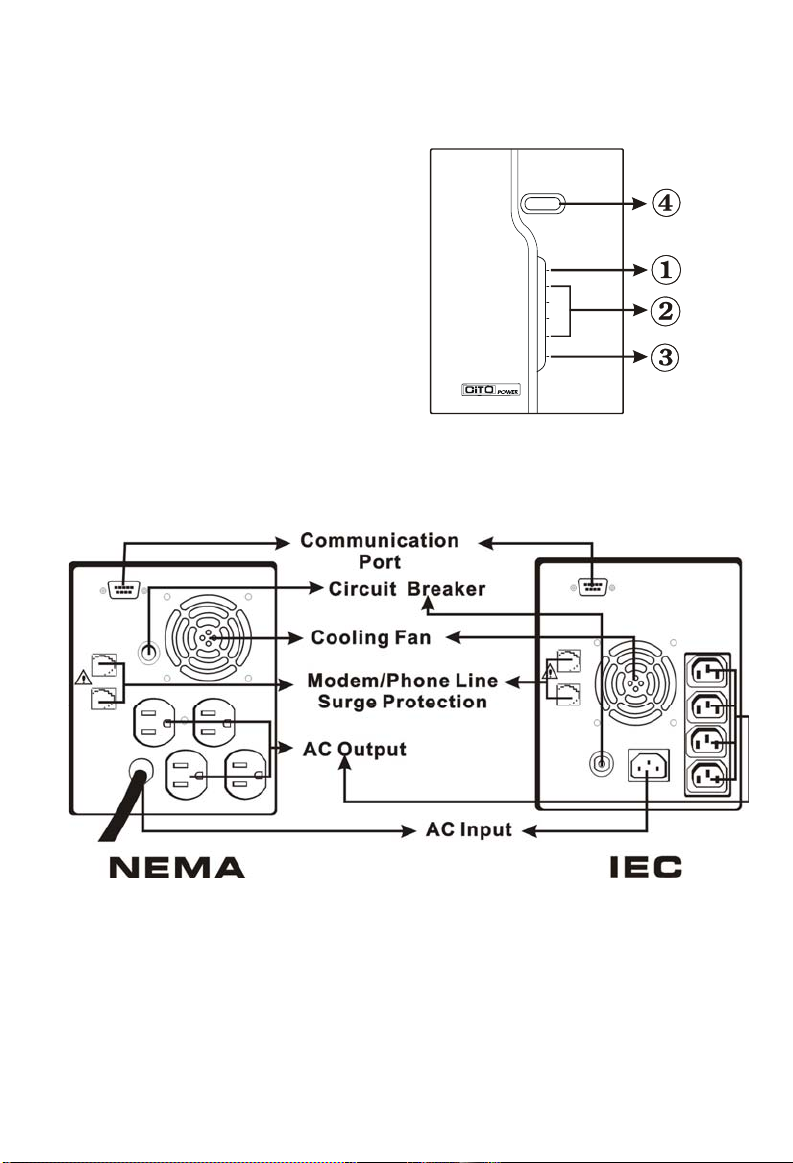
Front Panel—
1. Fault LED
2. AC Mode: Load Level LEDs
Backup Mode: Battery
Capacity LEDs
3. AC Mode: Green Lighting
Backup Mode: Green Flashing
4. Power “ON/OFF” Switch
Back Panel—

Installation and Operation
Installing the UPS is as easy as following the steps shown. Be aware of the
Power Switch must be kept in the “ON” position, otherwise, the UPS will be
disabled and your equipment will not be protected during a power failure.
1. Inspection
Remove the UPS from its packaging and inspect it for damage that
may have occurred during shipping. If any damage is discovered,
repack the unit and return it to the place of purchase.
2. Placement
Install the UPS unit in any protected environment that provides
adequate airflow around the unit, and is free from excessive dust,
corrosive fumes and conductive contaminants. Do not operate your
UPS in an environment where the ambient temperature or humidity is
high. On the other hand, place the UPS unit away from monitor at least
20cm to avoid interference.
3. Charging
This unit is shipped from the factory with its internal battery fully
charged, however, some charge may be lost during shipping and the
battery should be recharged prior to use. Plug the unit into an
appropriate power supply and allow the UPS to charge fully by leaving
it plugged in for at least 8 hours.

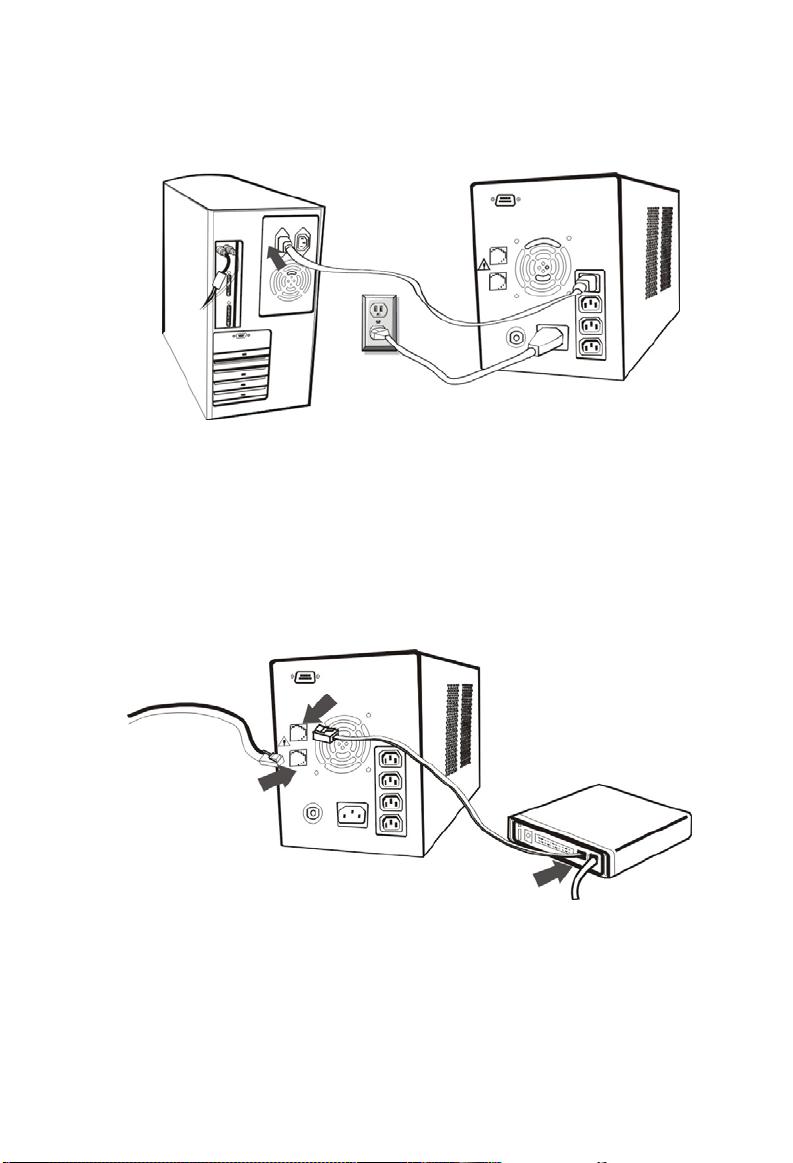
4. Computer Connection
Connect one computer-related device into each of the power
receptacles supplied on the back of the UPS (maximum of three
devices).
5. Modem/Phoneline Connection
Plug incoming internet line into the “In” socket at the back of the UPS.
Use one more Internet line cable and plug one end of the Internet line
cable to the “Out” socket at the back of the UPS. Plug the other end to
the modem input socket as shown.
Incoming
Internet line

6. Serial Cable Connection
To allow for unattended system shutdown for your operating system,
connect the serial cable as per diagram below.
7. Turn On/Off
To turn on the UPS unit, press the power switch lightly. To turn off the
UPS unit, press the power switch again.
8. DC Start Function
DC Start Function enables UPS to be started up when AC utility power
is not available and battery is fully charged. Just simply press the
power switch to turn on the UPS.

9. Battery Removal
Follow the Chart 1 to Chart 3 to replace the batteries. Disconnect all
source of supply before battery replacement.
Remove the front panel
Chart 1
Remove the battery cover
Chart 2
After removing battery cover, gently extract the battery by
disconnecting the two wires connecting to the Polo series. Be sure to
replace the same type of batteries and dispose of old batteries properly
at an appropriate recycling facility.
Chart 3

Software Installation
-- WinPower --
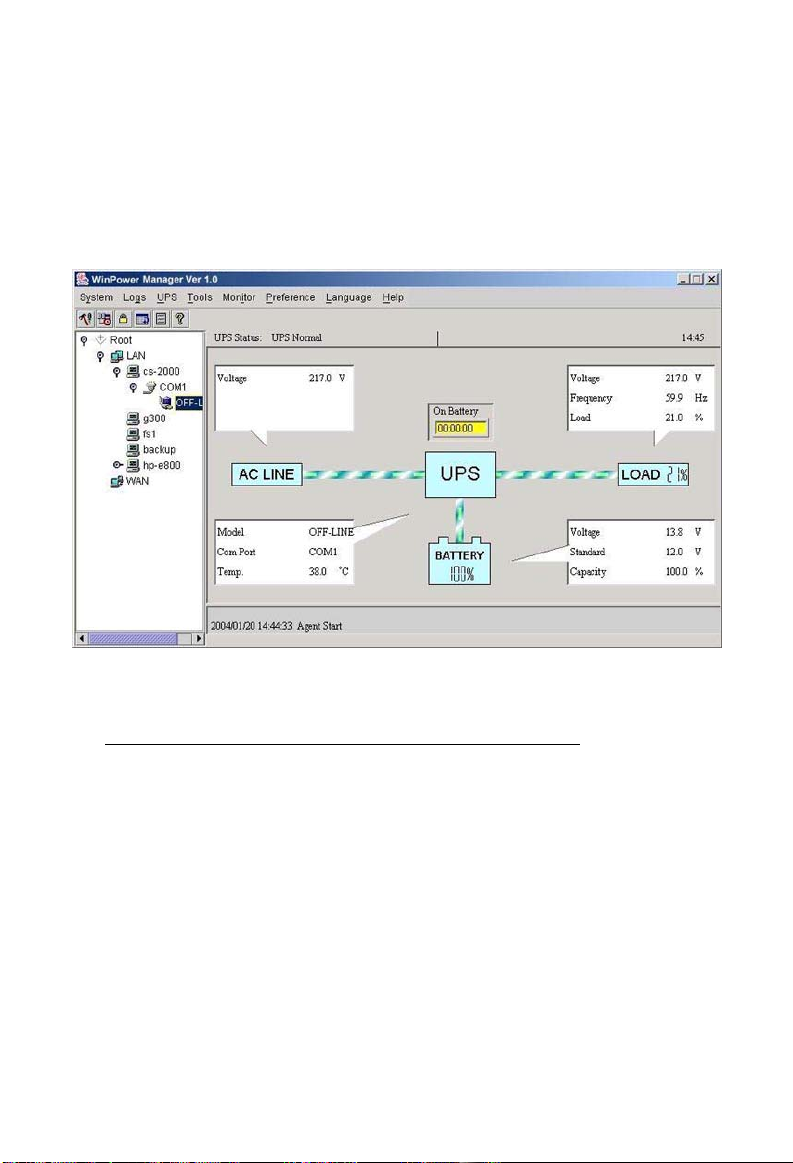
WinPower is a brand new UPS monitoring software, which provides
user-friendly interface to monitor and control your UPS. This unique
software provides safely auto shutdown for multi-computer systems while
power failure. With this software, users can monitor and control any UPS
on the same LAN no matter how far from the UPS.
Installation procedure:
1. Go to the website:
http://www.ups-software-download.com/winpower.htm
2. Choose the operation system you need and follow the instruction
described on the website to download the software.
3. When downloading all required files from the internet, enter the serial
No: 511C1-01220-0100-478DF2A to install the software.
When your computer restarts, the WinPower software will appear as a
green plug icon located in the system tray, near the clock.
Questo manuale è adatto per i seguenti modelli
3
Indice
Altri manuali CiTO Power UPS
Manuali UPS popolari di altre marche

Pylontech
Pylontech Victron & Pylontech US5000 Manuale utente

Tecnoware
Tecnoware EVO DSP PLUS MM 6.8 Manuale utente

Mecer
Mecer ME-1000-WTU Manuale utente

Mustek
Mustek PowerMust 530(B) Plus Manuale di installazione e funzionamento

Emerson
Emerson Liebert NXL series Manuale utente

MAKELSAN
MAKELSAN BOXER SERIES Manuale utente