
Clare Controls CM-BT10-TXRX70 Manuale utente
Doc ID 2014-04-350 • Rev 03
HDBaseT Extender Set 70m
User Guide
Model CM-BT10-TXRX70


Doc ID 2014-04-350 • Rev 03
Copyright
© 24APR14 Clare Controls, Inc. All rights reserved.
This document may not be copied in whole or in part or otherwise
reproduced without prior written consent from Clare Controls, Inc.,
except where specifically permitted under US and international
copyright law.
Trademarks and
patents
HDBaseT Extender Set 70m, Model CM-BT10-TXRX70 name is a
trademark of Clare Controls, Inc.
Other trade names used in this document may be trademarks or
registered trademarks of the manufacturers or vendors of the
respective products.
Manufacturer
Clare Controls, Inc.
7519 Pennsylvania Ave., Suite 104, Sarasota, FL 34243, USA
Version
This document applies to HDBaseT Extender Set 70m User Guide,
Model CM-BT10-TXRX70.
Contact information
For contact information, see www.clarecontrols.com.


HDBaseT Extender Set 70m User Guide i
Content
Limitation of liability...ii!
Introduction...1!
Features...1!
Packagecontents...1!
Product appearance...2!
System connection...4!
Usage precautions...4!
Application examples...4!
Connection procedure...6!
Application...6!
Twisted pair cable connection...7!
Specifications...8!
Panel drawings...9!
Troubleshooting and maintenance...10!
Safety operation...11!
After-sales service...12!

ii HDBaseT Extender Set 70m User Guide
Limitation of liability
To the maximum extent permitted by applicable law, in no event will Clare
Controls, Inc. be liable for any lost profits or business opportunities, loss of use,
business interruption, loss of data, or any other indirect, special, incidental, or
consequential damages under any theory of liability, whether based in contract,
tort, negligence, product liability, or otherwise. Because some jurisdictions do not
allow the exclusion or limitation of liability for consequential or incidental damages
the preceding limitation may not apply to you. In any event the total liability of
Clare Controls, Inc. shall not exceed the purchase price of the product. The
foregoing limitation will apply to the maximum extent permitted by applicable law,
regardless of whether Clare Controls, Inc. has been advised of the possibility of
such damages and regardless of whether any remedy fails of its essential
purpose.
Installation in accordance with this manual, applicable codes, and the instructions
of the authority having jurisdiction is mandatory.
While every precaution has been taken during the preparation of this manual to
ensure the accuracy of its contents, Clare Controls, Inc. assumes no responsibility
for errors or omissions.

HDBaseT Extender Set 70m User Guide 1
Introduction
The extender set consists of a transmitter and receiver pair. HDMI signals are input into
the transmitter and HDBaseT technology is used to transmit the signals to the receiver
up to 230 ft. (70 m) via a Cat5e/Cat6 cable. The receiver then outputs the HDMI signal.
Bi-directional IR and RS232 are also transmitted across the Cat5e/Cat6 cable. The
extender set supports CEC, bi-directional RS232 and IR control, and PoC, which can
be used to power the receiver via the Cat5e/Cat6 cable. This eliminates the need for
power at the receiver end.
Features
•Supports full HD: Delivers high-resolution image (1080p at 60 Hz, 3D, 4K*2K)
•Maximum transmission distance is 230 ft. (70 m) over single a CAT5e/CAT6 cable
•High bandwidth: 10.2 Gbps
•HDTV compatible: Uses HDMI 1.4 and is HDCP-compliant
•Support PoC (Power Over Cable) and CEC
•Connects with a displayer to transmit EDID and Hot Plug Detect (HPD) signals
constantly via the CAT5e/Cat6 cable
•Uses HDBaseT technology for extended capability and reliability
•Bi-directional RS232/IR control
•LED indicators show working status to aid in troubleshooting
•Wall or table mount aluminum enclosure
•External power supply (100~240 VAC, 50/60 Hz)
Package contents
•1 x CM-BT10-TX70 HDbaseT transmitter
•1 x CM-BT10-RX70 HDbaseT receiver
•1 x 3.5 mm male mono to 3.5 mm male stereo IR adapter cable
•4 x detachable mounting ears
•2 x RS232 cables (DB9 to 3-pin connector)
•8 x screws
•1 x power adapter (24 VDC)
•1 x user manual
•1 x IR emitter
Notes: Ensure all the accessories are included. If not, contact your dealer.
2 HDBaseT Extender Set 70m User Guide
Product appearance
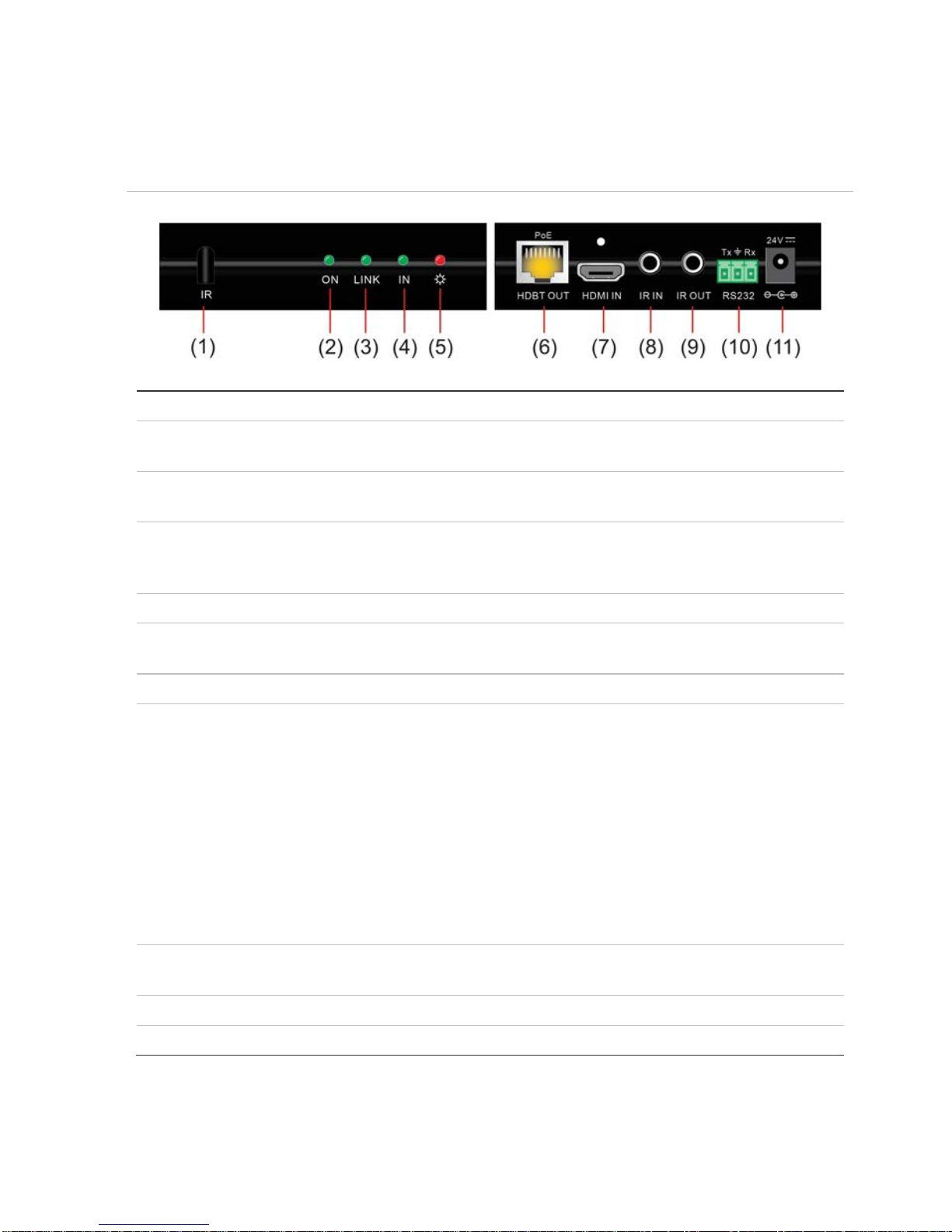
Figure 1: The CM-BT10-TX70 transmitter
(1) IR
IR receiver.
(2) ON
Working status indicator of this device. When the CM-BT10-TX70 is on
and working properly, the green LED blinks.
(3) LINK
HDBaseT link status indicator, green LED. It remains illuminated when
the device has a connection.
(4) IN
The LED remains on when connected with devices that support HDCP
and are working normally. If the devices do not support HDCP, this
green LED blinks.
(5) POWER LED
The red LED illuminates and stays on when power is connected.
(6) HDBT OUT
Connects via a single Cat5e/Cat6 cable to the HDBaseT port on the
CM-BT10-RX70 receiver.
(7) HDMI IN:
Connect to the HDMI source device.
(8) IR IN:
Connects to an IR receiver. The IR signal received from this port will be
transmitted via HDBaseT to the transmitter unit for use at the source
location.
Notes
When using a control system such as Clare Controls, Crestron, or URC,
the 3.5 mm male mono to 3.5 mm male stereo adapter cable (included)
must be used. The male mono end connects to the control system; the
male stereo end connects to the CM-BT10-TX70.
When an IR receiver connects to this port, the front IR port (1) is
unavailable.
(9) IR OUT:
IR signals received by the CM-BT10-RX70 and sent via HDBaseT to the
CM-BT10-TX70 are available for emitter use from this port.
(10) RS232:
RS232 connector. Supports bi-directional RS232 communication.
(11) 24V DC:
Connects to the power supply.
HDBaseT Extender Set 70m User Guide 3
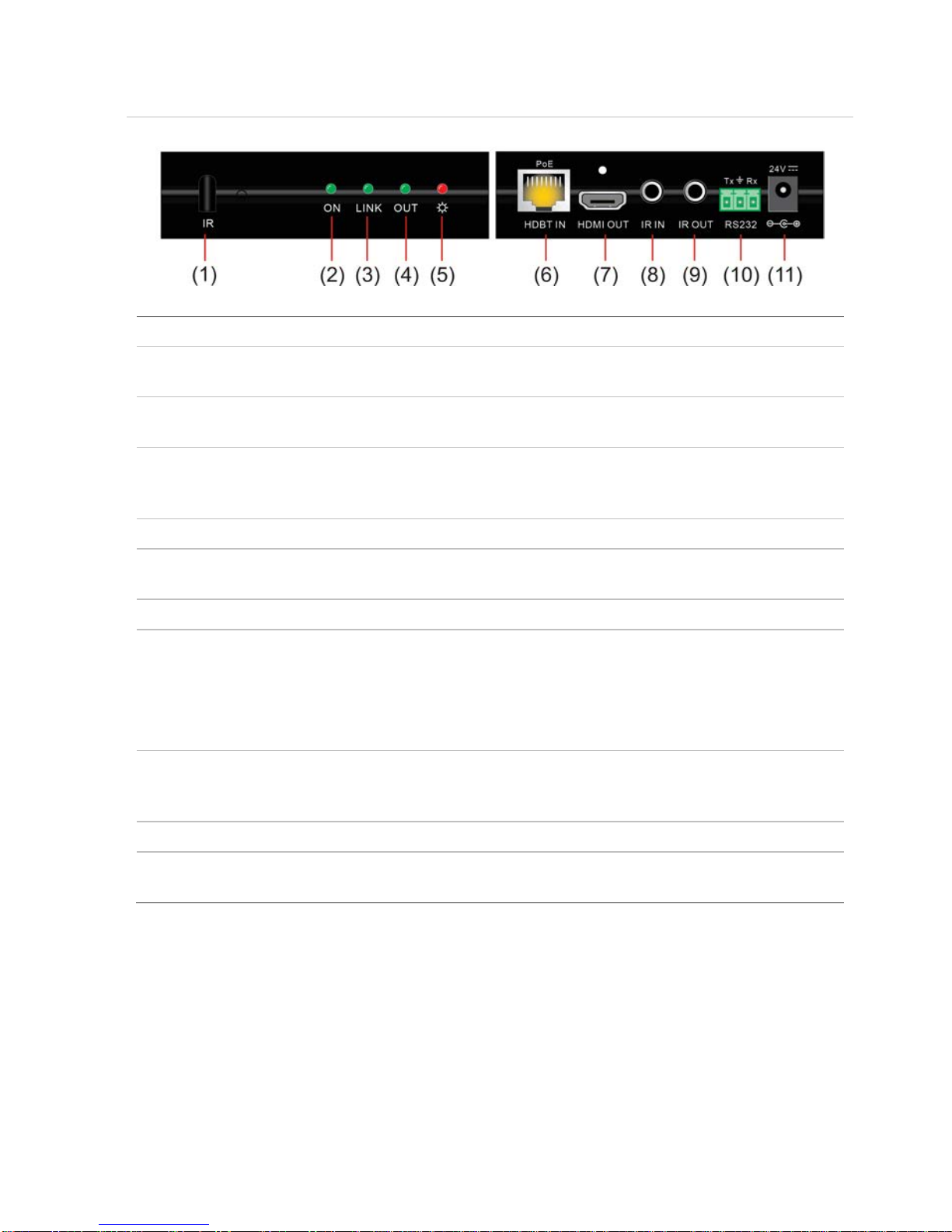
Figure 2: The HDBaseT Extender Set receiver
(1) IR
IR receiver.
(2) ON
Working status indicator of this device. When the CM-BT10-RX70 is on
and working properly, the green LED blinks.
(3) LINK
HDBaseT link status indicator, green LED. Remains illuminated when
there is a connection.
(4) OUT
The LED remains illuminated when connected with devices that support
HDCP, and the HDCP handshake is working normally. If the devices do
not support HDCP, this green LED blinks.
(5) POWER LED
The red LED illuminates and stays illuminated when power is connected.
(6)HDBT IN
Connects via single Cat5e/Cat6 cable to the HDBaseT port in the
CM-BT10-TX70 transmitter or the CM-MT4410-BT-70 matrix switch.
(7) HDMI OUT:
Connect to the HDMI display device.
(8) IR IN:
Connects to an IR receiver. The IR signal received from this port is
transmitted via HDBaseT to the transmitter unit for use at the source
location.
Note: When an IR receiver connects to this port, the front IR port (1) is
unavailable.
(9) IR OUT:
IR signals received by the CM-BT10-TX70 or CM-MT4410-BT-70 and
sent via HDBaseT to the CM-BT10-RX70 are available for emitter use
from this port.
(10) RS232:
RS232 connector. Supports bi-directional RS232 communication.
(11) 24V DC:
Connects to the power supply. Not required when using PoC supplied by
the CM-BT10-TX70 or CM-MT4410-BT-70.

4 HDBaseT Extender Set 70m User Guide
System connection
Usage precautions
•System should be installed in a clean environment and have proper temperature
and humidity controls.
•All of the power switches, plugs, sockets, and power cords should be insulated for
safety.
•All devices should be connected before powering on.
•The Cat5e/Cat6 terminations for HDBaseT devices should be a straight-thru
TIA/EIA T568B standard.
Application examples
The CM-BT10-RX70 HDBaseT receiver works in conjunction with the CM-BT10-TX70
HDBaseT transmitter or an HDBaseT matrix switch, such as the CM-MT4410-BT-70.
By transmitting signals across reliable Cat5e/Cat6 cables, the video signal can be used
at far greater distances from the source device than would be capable with traditional
HDMI cables. Additionally, control signals can be sent bi-directionally across the same
Cat5e/Cat6 cable. The following figures show you some application examples for the
CM-BT10-TXRX70 extender set and/or the CM-BT10-RX70 receiver.
Note: When using a control system, such as Clare Controls, Crestron, or URC, the
3.5 mm male mono to 3.5 mm male stereo adapter cable (included) must be used. The
male mono end connects to the control system; the male stereo end connects to
CM-BT10-TX70.
Indice
Altri manuali Clare Controls Estensione


