
Clare Controls CM-MT8810-HD Manuale utente
Doc ID 2014-12-354 • Rev 04
HDMI 8x8 Matrix Switcher
User Guide
Model CM-MT8810-HD


Copyright
© 11DEC14 Clare Controls, Inc. All rights reserved.
This document may not be copied in whole or in part or
otherwise reproduced without prior written consent from Clare
Controls, Inc., except where specifically permitted under US and
international copyright law.
Trademarks and
patents
HDMI 8x8 Matrix Switcher User Guide, Model CM-MT8810-HD
name is a trademark of Clare Controls, Inc.
Other trade names used in this document may be trademarks or
registered trademarks of the manufacturers or vendors of the
respective products.
Manufacturer
Clare Controls, Inc.
7519 Pennsylvania Ave., Suite 104, Sarasota, FL 34243, USA
Version
This document applies to HDMI 8x8 Matrix Switcher User Guide,
Model CM-MT8810-HD version 1.
Contact information
For contact information, see www.clarecontrols.com.


HDMI 8x8 Matrix Switcher User Guide i
Content
Limitation of liability...ii
Introduction...1
Features...1
Package contents...1
Operation of the control panel and the IR remote...2
Operation of the panel...2
Using the IR remote...3
External connection...4
Introduction to the input and output connectors...4
How to connect with the input and output terminals...4
Connecting the RS232 communication port...5
Connecting with the computer...6
System diagram...6
EDID management...6
EDID automatic shake hand...6
Communication protocol and command codes...8
TCP/IP control...11
Specifications...16
Troubleshooting and maintenance...17
Safety operation...18
After-sales service...19

ii HDMI 8x8 Matrix Switcher User Guide
Limitation of liability
To the maximum extent permitted by applicable law, in no event will Clare
Controls, Inc. be liable for any lost profits or business opportunities, loss of
use, business interruption, loss of data, or any other indirect, special,
incidental, or consequential damages under any theory of liability, whether
based in contract, tort, negligence, product liability, or otherwise. Because
some jurisdictions do not allow the exclusion or limitation of liability for
consequential or incidental damages the preceding limitation may not apply
to you. In any event the total liability of Clare Controls, Inc. shall not exceed
the purchase price of the product. The foregoing limitation will apply to the
maximum extent permitted by applicable law, regardless of whether Clare
Controls, Inc. has been advised of the possibility of such damages and
regardless of whether any remedy fails of its essential purpose.
Installation in accordance with this manual, applicable codes, and the
instructions of the authority having jurisdiction is mandatory.
While every precaution has been taken during the preparation of this
manual to ensure the accuracy of its contents, Clare Controls, Inc. assumes
no responsibility for errors or omissions.

HDMI 8x8 Matrix Switcher User Guide 1
Introduction
The HDMI 8x8 Matrix Switcher is a matrix switcher with eight female HDMI
inputs and eight female HDMI outputs. It enables cross-point switching from any
input to any output, or all outputs, and supports 3D, 4K x 2K, and 1080P. It can
be used in both residential and commercial applications to allow sharing of HD
source content to multiple displays.
Features
HDMI 1.4a, supports 3D.
HDTV compatible with high definition transmission resolution up to 1920 x
1200 at 60 Hz, and supports 1080P.
HDCP compliant and DVI compatible, supporting DVI1.0.
RS232 controllable EDID management.
Matrix switch is controllable via RS232, IR (remote included), or the front
panel.
RS232 serial control port for serial commands and third-party control.
RS232 controllable front panel security lock to avoid unauthorized or
accidental use when the matrix is installed in an unsecure environment.
Built-in gain compensation technique and synchronous signal correction
technology. Switching speed is less than 200 ns (maximum).
LEDs indicate the real-time running state of the matrix switch.
Internal power supply (100 to 240 VAC, 50/60 Hz).
Package contents
1 x CM-MT8810-HD 8x8 HDMI matrix switcher with integrated rack
mounting
1 x power cord
1 x IR remote
4 x plastic feet for shelf mounting
1 x RS232 cable (male to female) for connection to a control system
1 x user manual
2 HDMI 8x8 Matrix Switcher User Guide
Operation of the control panel and the IR
remote
Operation of the panel
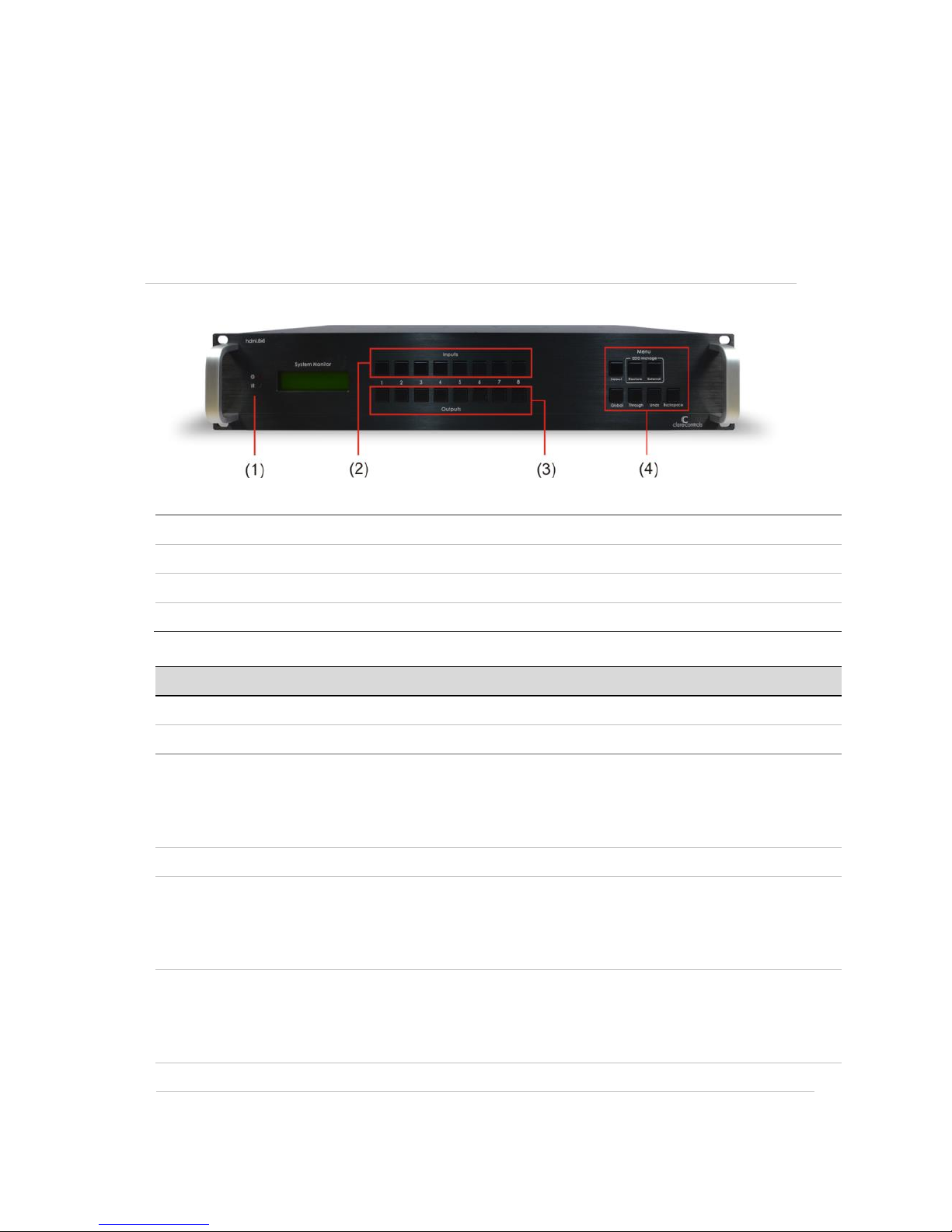
Figure 1: Front panel
(1) Power indicator
Power indicator light and IR receive window.
(2) Input channel
Input buttons range from 1 to 8.
(3) Output channel
Output buttons range from 1 to 8.
(4) Function buttons
Controls device functions
Buttons
Function description
INPUTS
Allows direct selection of the input channel from 1 to 8.
OUTPUTS
Allows direct selection of the output channel from 1 to 8.
SELECT
Used to transfer video and audio signal (HDMI) from an input to an output.
Example To transfer both the video and audio signals from input channel 3
to output channel 4, press the buttons as follows:
Input "3" + "SELECT" + Output "4".
INITIAL
Used to restore EDID management to factory default.
EXTERNAL
Used to manually control EDID management.
Example: To learn the EDID data of the display on output channel 2 to
input channel 3, press the buttons as follows:
Input “3” + “EXTERNAL” + Output "2".
GLOBAL
Used to transfer video and audio signal (HDMI) of all input channels to all
output channels.
Example: To transfer HDMI signal from input channel 7 to all output
channels, press the buttons as follows: Input “7” + “GLOBAL”.
UNDO
Used to undo the last issued command.
HDMI 8x8 Matrix Switcher User Guide 3
THROUGH
Used to transfer HDMI signal directly to the corresponding output.
Example 1: To transfer HDMI signal from input channel 3 to output
channel 3, press the buttons as follows: Input “3” + “THROUGH”.
Example 2: To transfer all HDMI input signals to the corresponding
output respectively (i.e. In 1 to Out 1, In 2 to Out 2, etc.), press the
buttons as follows: “GLOBAL” + “THROUGH”.
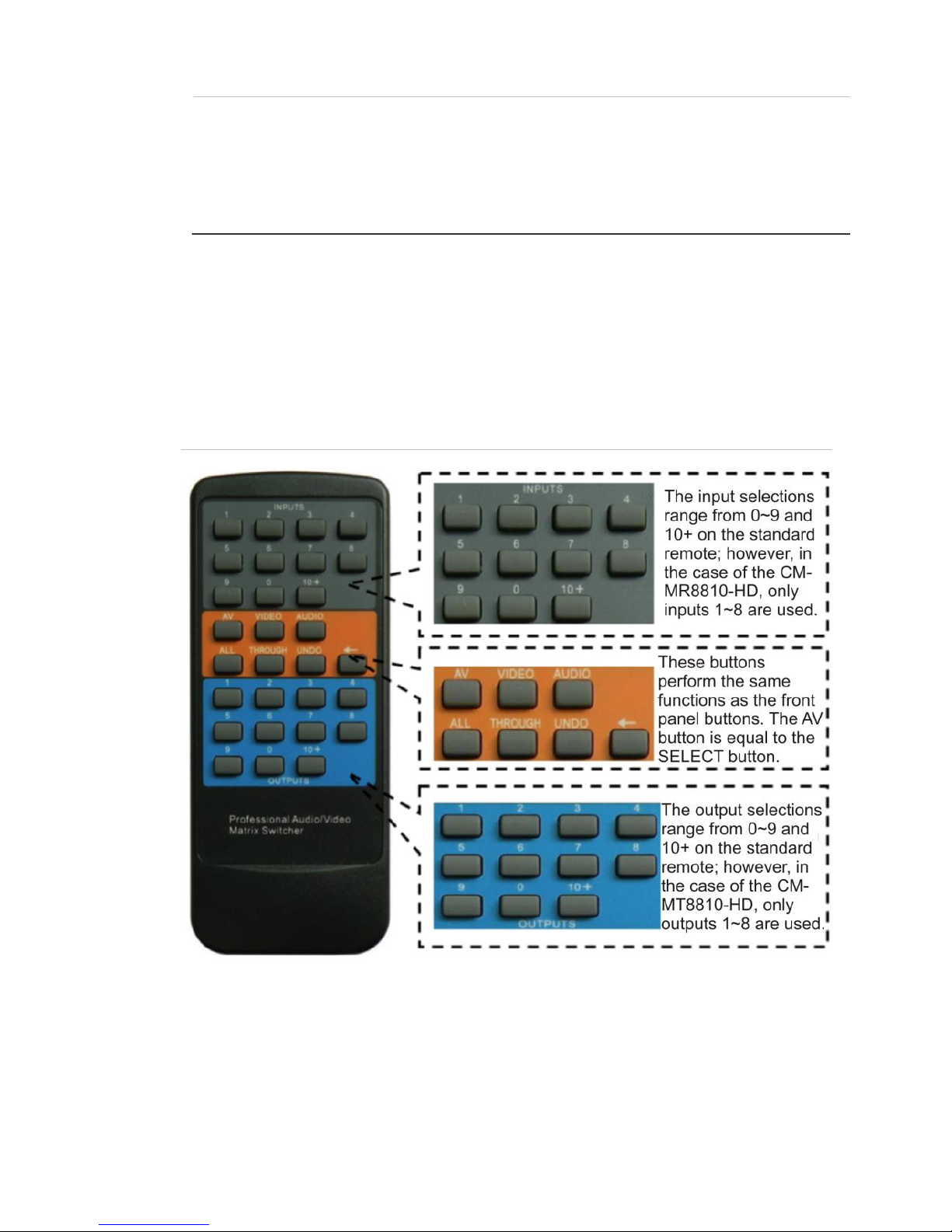
Using the IR remote
You can control the switcher remotely using the infrared IR remote. The function
buttons on the IR remote are the same as the ones on the front control panel.
The IR remote shares the same control operation and command format as the
control panel.
Figure 2: Panel of the IR remote
4 HDMI 8x8 Matrix Switcher User Guide
External connection
Introduction to the input and output connectors
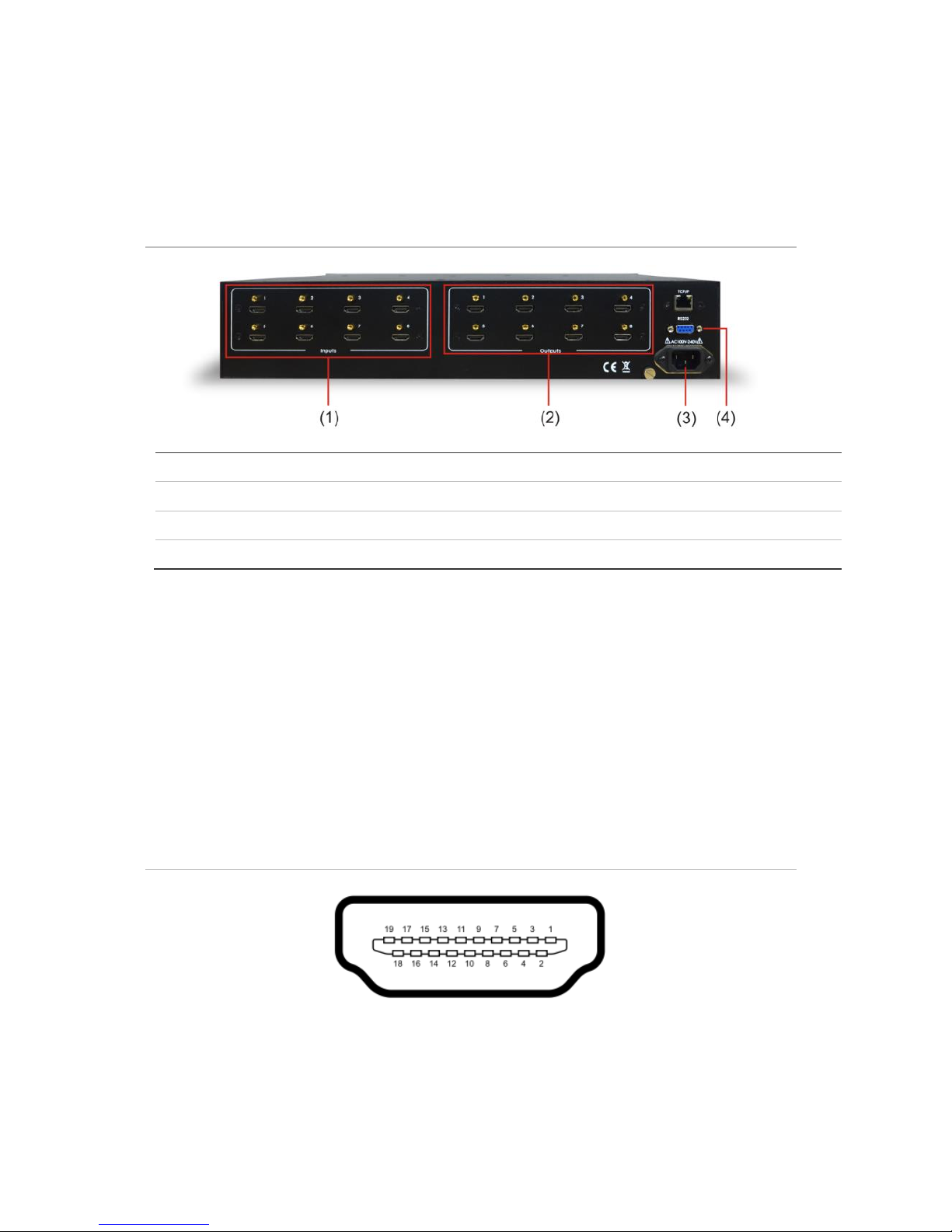
Figure 3: Panel of the IR remote
(1) HDMI inputs
HDMI-I connector
(2) HDMI outputs
HDMI-I connector
(3) 100 to 240 VAC
Alternating current for power supply
(4) RS232
Serial port, 9-pin, female connector
How to connect with the input and output terminals
The HDMI matrix switcher accepts all standard HDMI video sources (Blu-ray
DVD, cable TV STB, media player, PC, etc.). It sends the signal from any source
device to any of the four HDMI outputs individually, or simultaneously to more
than one output. Outputs can be connected via HDMI to a variety of destinations
(flat panel TV, projector, AV receiver, etc.) or can be connected to an HDMI
extender set
(CM-BT10-TXRX70), if the device destination does not exceed 230 ft. (70 m).
Figure 4: HDMI connector
Indice
Altri manuali Clare Controls Commutatore a matrice


