
Clas Ohlson MS6812 Manuale utente

EnglishSvenskaNorskSuomiDeutsch
Cable Tracker
Kabelsökare
Kabeldetektor
Kaapelinhakulaite
Kabelnder
Art.no. Model
41-1665 MS6812 Ver. 20181019

2

English
3
1
2
3
4
5 6 7 8 9 10 11
Mastech MS 6812 Cable Tracker
Art.no 41-1665 Model MS6812
Please read theentire instruction manual before using theproduct and then
save it for future reference. We reserve theright for any errors in text or
images and any necessary changes made to technicaldata. In theevent of
technical problems or other queries, please contact our Customer Services
(see address details on theback).
Safety
• Handle theproduct withcare. Donot subject it to unnecessary shocks or
impacts.
• Keep theproduct away from water and moisture.
Warning: Neverconnect theproduct to anenergised AC or DC conductor.
Product description
4
English
1. Sender
2. “CONT” LED indicator for continuity testing
3. “TONE” LED indicator for tone indication
4. [CONT-OFF-TONE] Function selection/off
5. 3.5 mm headphone socket
6. Loudspeaker
7. Receiver
8. Receiver activation button
9. On/off and sensitivity adjustment switch
10. Positive crocodileclip (red)
11. Negative crocodileclip (black)
Instructions foruse
Batteries
Sender
Open thebattery compartment on theback of thesender and insert
1×6LR61, 9 V battery.
Receiver
Unscrew theretaining screw and remove thebattery cover on theback of
thereceiver and insert 1×6LR61, 9 V battery.
Finding breaks in theboundary wires of robotic lawnmowers
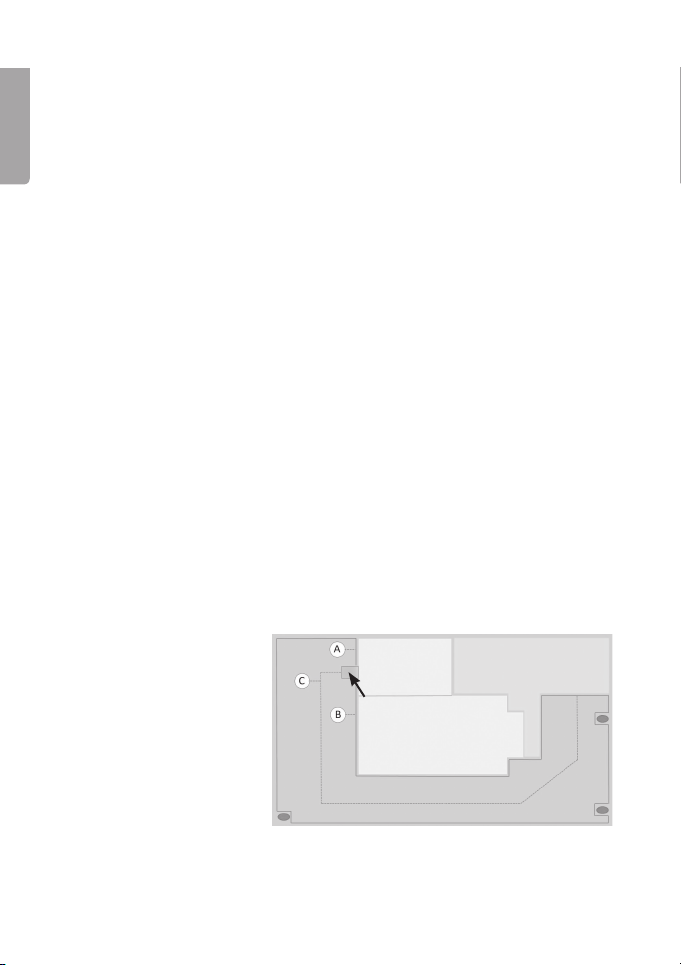
Some robotic lawnmower systems have aguide wire to guide thelawnmower
to and from its charging station. Othersystems only have aboundarywire.
Inthis example, thesystem is equipped with aboundary wire and aguidewire.
A: boundary wire
B: boundarywire
C: guidewire Charging station
Garage
Residence
Driveway

English
5
Note: Theboundary
wire is divided into
two sections (Aand
B) at thepoint where
theguide wire (C) is
connected toit.
In this example,
theboundary wire
system is not equipped
with aguidewire.
Fault finding on asystem with aguidewire
To find which section of theboundary wire/guide wire has afault in it, do as
follows:
1. First check that thecharging station is indicating anerror. Referto the
instruction manual for your robotic lawnmower system if you are unsure.
2. Disconnect thecables from theconnections on thecharging station.
Make anote of how thecables were connected. Somecharging
stations have connections where thecables are connected directly using
spring clamps. Othercharging stations use cable terminals.
Charging station
Garage
Residence
Driveway
Charging station
Garage
Residence
Driveway

6
English
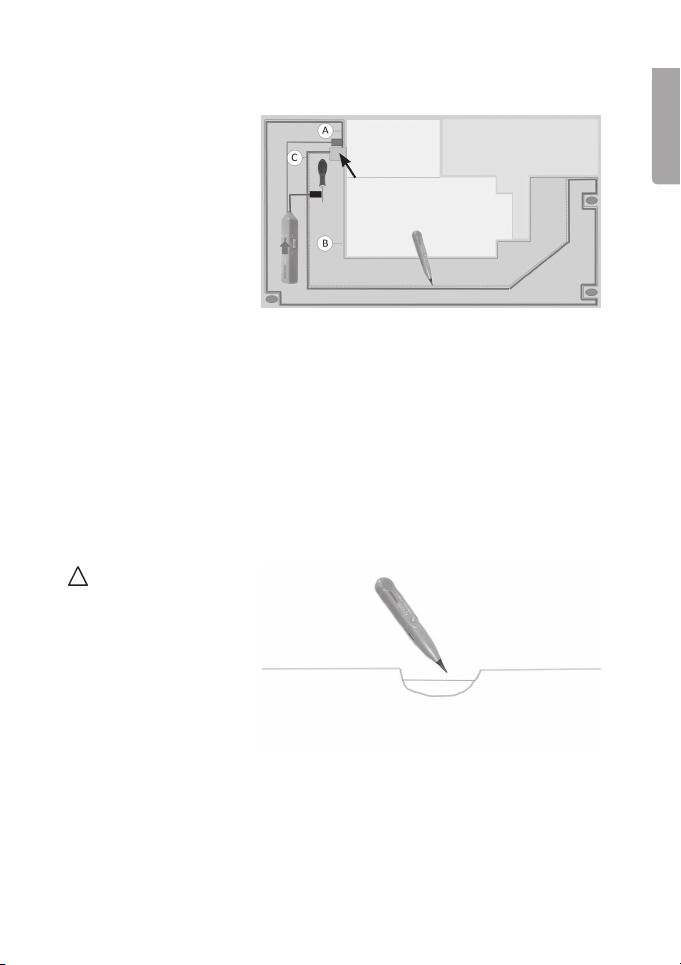
3. Attach thered
crocodile clip to
the “A” section
of theboundary
wire and theblack
crocodile clip to
the “B” section.
Settheswitch (4) to
CONT.
- Ifthe “CONT” LED indicator lights up, you know that theentire
boundary wire is intact. Inwhich case, thefault must be in
theguidewire.
- If theLED indicator does NOT light up, you know that there is fault
somewhere along theboundarywire.
4. If the “CONT”
indicator does
NOT light up
when checking
thecontinuity of
theboundary wire,
it is time to find out
in which section of
thewire thefaultlies.
Movetheblack
crocodile clip to
theguidewire.
- Ifthe “CONT” LED indicator does not light up, you know that thefault
is in the “A” section of theboundarywire.
- Ifthe “CONT” LED indicator lights up, you know that thefault must
be in the “B” section of theboundarywire.
Tip: Ifthecables are fitted with cable
terminals, you could for example
take ashort cable fitted with aspade
connector and connect it to thecable
terminal and then connect thecrocodile
clip to theother end of theshortcable.
Charging station
Garage
Residence
Driveway
Charging station
Garage
Residence
Driveway
English
7
You now know in which section thefault lies in thethewire. Tolocate thefault
do as follows:
5. Leave thered
crocodile clip
connected to
theboundary wire
section A. Connect
theblack crocodile
clip to ascrewdriver,
tent peg or
other electrically
conductive metal
rod which you stick
into theground.
Themetal rod will
act as anEarth Rod.
Settheswitch (4) to
TONE.
6. Turn on thereceiver with switch (9), push thebutton (8) to activate
thereceiver and scan along thelength of boundary wire Aat regular
intervals. Youneed to hold thesender close to wire to pick up asignal.
Usingheadphones plugged into theheadphone jack (5) will help you hear
thesignal more easily. Aslong as thereceiver emits anaudible signal,
theboundary wire is intact.
If thewire is buried
too deeply, you may
need to uncover it in
some places in order to
make contact. Becareful
not to damage thewire
by digging.
Charging station
Garage
Residence
Driveway

8
English
Fault finding on asystem without aguidewire
1. Attach thered
crocodile clip to one
end of theboundary
wire and theblack
crocodile clip to
theotherend.
Settheswitch (4) to
CONT.
- Ifthe “CONT” LED indicator lights up, you know that theentire
boundary wire is intact.
- IftheLED indicator does NOT light up, you know that there is fault
somewhere along theboundarywire.
2. To locate thefault
do as follows:
Leavethered
crocodile clip
attached to
theboundarywire.
Connect theblack
crocodile clip to
ascrewdriver,
tent peg or other
electrically conductive
metal rod which you
stick into theground.
Themetal rod will
act as anEarth Rod.
Settheswitch (4) to
TONE.
3. Turn on thereceiver using switch (9), push thebutton (8) to activate
thereceiver and scan along thelength of theboundary wire at regular
intervals. Youneed to hold thesender close to thewire to pick up
asignal. Usingheadphones plugged into theheadphone jack (5) will help
you hear thesignal more easily. Aslong as thereceiver emits anaudible
signal, theboundary wire is intact.
Charging station
Garage
Residence
Driveway
Charging station
Garage
Residence
Driveway

English
9
If thecharging station indicates afault in thewire but no fault can be
found using thecable tracker, it might mean that thewire is only damaged,
not completely broken, or that one of thejoints in thewire has apoor
connection. Thisusually occurs when theground is verywet. Thiscould result
in thelawnmower system working fine in dry weather but ceasing to work
in wet conditions. Ifthis occurs, it is necessary to measure theresistance of
theboundarywire. Referto theinstruction manual of your lawnmower system
to find out how high theresistance of your boundary wire is permitted tobe.
Thismodel of cable tracker cannot be used for such resistance measurement.
Care and maintenance
Clean thecable tracker using adampcloth. Useonly mild cleaning agents,
never solvents or corrosive chemicals.
Responsible disposal
This symbol indicates that this product should not be disposed
of with general householdwaste. Thisapplies throughout
theentire EU. Inorder to prevent any harm to theenvironment
or health hazards caused by incorrect waste disposal,
theproduct must be handed in for recycling so that thematerial
can be disposed of in aresponsible manner. Whenrecycling
your product, take it to your local collection facility or contact
theplace of purchase. Theywill ensure that theproduct is
disposed of in anenvironmentally sound manner.
Specifications
Sender
Frequency 1.5kHz
Battery 6LR61, 9 V (sold separately)
Size 145×35×25mm
Weight 90g
Receiver
Frequencyrange 100–300kHz
Battery 6LR61, 9 V (sold separately)
Size 238×43×26mm
Weight 100g

10
Svenska
1
2
3
4
5 6 7 8 9 10 11
Kabelsökare Mastech MS 6812
Art.nr 41-1665 Modell MS6812
Läs igenom hela bruksanvisningen före användning och spara den sedan
för framtidabruk. Vireserverar oss förev. text- och bildfel samt ändringar av
tekniskadata. Vidtekniska problem eller andra frågor, kontakta vår kundtjänst
(se adressuppgifter på baksidan).
Säkerhet
• Hantera produkten varsamt. Utsätt den inte för slag och stötar.
• Håll produkten på avstånd från vatten ochfukt.
Varning! Anslut aldrig produkten till strömförande ledningar, AC eller DC.
Produktbeskrivning
Indice
Lingue:
Altri manuali Clas Ohlson GPS


