Clavister NetWall E80B Manuale utente

Clavister NetWall E80B
Getting Started Guide
Clavister AB
Sjögatan 6J
SE-89160 Örnsköldsvik
SWEDEN
Head office/Sales: +46-(0)660-299200
Customer support: +46-(0)660-297755
www.clavister.com
Published 2019-04-03
Copyright ©2019 Clavister AB

Clavister NetWall E80B
Getting Started Guide
Published 2019-04-03
Copyright ©2019 Clavister AB
Copyright Notice
This publication, including all photographs, illustrations and software, is protected under
international copyright laws, with all rights reserved. Neither this manual, nor any of the material
contained herein, may be reproduced without the written consent of Clavister.
Disclaimer
The information in this document is subject to change without notice. Clavister makes no
representations or warranties with respect to the contents hereof and specifically disclaims any
implied warranties of merchantability or fitness for a particular purpose. Clavister reserves the
right to revise this publication and to make changes from time to time in the content hereof
without any obligation to notify any person or parties of such revision or changes.
Limitations of Liability
UNDER NO CIRCUMSTANCES SHALL CLAVISTER OR ITS SUPPLIERS BE LIABLE FOR DAMAGES OF
ANY CHARACTER (E.G. DAMAGES FOR LOSS OF PROFIT, SOFTWARE RESTORATION, WORK
STOPPAGE, LOSS OF SAVED DATA OR ANY OTHER COMMERCIAL DAMAGES OR LOSSES)
RESULTING FROM THE APPLICATION OR IMPROPER USE OF THE CLAVISTER PRODUCT OR
FAILURE OF THE PRODUCT, EVEN IF CLAVISTER IS INFORMED OF THE POSSIBILITY OF SUCH
DAMAGES. FURTHERMORE, CLAVISTER WILL NOT BE LIABLE FOR THIRD-PARTY CLAIMS AGAINST
CUSTOMER FOR LOSSES OR DAMAGES. CLAVISTER WILL IN NO EVENT BE LIABLE FOR ANY
DAMAGES IN EXCESS OF THE AMOUNT CLAVISTER RECEIVED FROM THE END-USER FOR THE
PRODUCT.
2

Table of Contents
Preface................................................................................................................ 5
1.E80BProductOverview ...................................................................................... 7
1.1.E80BModelsandDifferences .................................................................... 7
1.2.UnpackingtheE80B ................................................................................ 9
1.3.InterfacesandPorts ................................................................................11
1.4.ZeroTouchSupport ...............................................................................12
1.5.HardwareSensorMonitoring ...................................................................13
2.RegisteringwithClavister ..................................................................................15
3.E80BInstallation ...............................................................................................20
3.1.GeneralInstallationGuidelines .................................................................20
3.2.FlatSurfaceInstallation ...........................................................................22
3.3.RackMounting ......................................................................................23
3.4.ManagementComputerConnection .........................................................25
3.5.Mini-USBConsolePortConnection ...........................................................28
3.6.ConnectingPower ..................................................................................30
4.cOSCoreConfiguration .....................................................................................33
4.1.WebInterfaceandWizardSetup ...............................................................33
4.2.ManualWebInterfaceSetup ....................................................................43
4.3.ManualCLISetup ...................................................................................58
4.4.LicenseInstallationMethods ....................................................................66
4.5.SetupTroubleshooting ...........................................................................68
4.6.GoingFurtherwithcOSCore ....................................................................70
5.ResettingtoFactoryDefaults ..............................................................................73
6.WarrantyService ..............................................................................................76
7.SafetyPrecautions ............................................................................................78
A.E80BSpecifications ...........................................................................................81
B.DeclarationsofConformity ................................................................................82
3

List of Figures
1.1.AnUnpackedClavisterE80B ............................................................................. 9
1.2.ClavisterE80BConnectionPorts .......................................................................11
3.1.TheE80BMini-USBLocalConsolePort ...............................................................28
3.2.RearviewoftheClavisterE80B .........................................................................30
3.3.E80BPowerInletSocket ..................................................................................30
5.1.FactoryResetUsingtheWeb Interface ...............................................................74
4

Preface
Target Audience
The target audience for this guide is the administrator who has taken delivery of a packaged
Clavister E80B appliance and is setting it up for the first time. The guide takes the user from
unpacking and installation of the device through to power-up, including network connections
and initial cOS Core configuration.
Text Structure
The text is divided into chapters and subsections. Numbered subsections are shown in the table
of contents at the beginning of the document.
Notes to the main text
Special sections of text which the reader should pay special attention to are indicated by icons
on the left hand side of the page followed by a short paragraph in italicized text. There are the
following types of such sections:
Note
This indicates some piece of information that is an addition to the preceding text. It may
concern something that is being emphasized or something that is not obvious or
explicitly stated in the preceding text.
Tip
This indicates a piece of non-critical information that is useful to know in certain
situations but is not essential reading.
Caution
This indicates where the reader should be careful with their actions as an undesirable
situation may result if care is not exercised.
Important
This is an essential point that the reader should read and understand.
Warning
This is essential reading for the user as they should be aware that a serious situation
may result if certain actions are taken or not taken.
5

Text links
Where a "See section" link is provided in the main text, this can be clicked on to take the reader
directly to that reference. For example, see Appendix A, E80B Specifications.
Web links
Web links included in the document are clickable. For example, http://www.clavister.com.
Trademarks
Certain names in this publication are the trademarks of their respective owners.
cOS Core is the trademark of Clavister AB.
Windows,Windows XP,Windows Vista,Windows 7,Windows 8 and Windows 10 are either
registered trademarks or trademarks of Microsoft Corporation in the United States and/or other
countries.
Apple,Mac and Mac OS are trademarks of Apple Inc. registered in the United States and/or other
countries.
Preface
6

Chapter 1: E80B Product Overview
• E80B Models and Differences, page 7
• Unpacking the E80B, page 9
• Interfaces and Ports, page 11
• Zero Touch Support, page 12
• Hardware Sensor Monitoring, page 13
1.1. E80B Models and Differences
There are two E80B models:
• The older E80A.
• The newer E80B.
This guide is applicable only for the newer E80B model.
Important: Some earlier cOS Core versions are not supported
The supported cOS Core versions are as follows:
• The E80A can run any cOS Core version from 10.22.01 onwards.
• The E80B can run any cOS Core version from 12.00.03 onwards.
Earlier versions than those stated above are not supported and a downgrade should not
be attempted.
E80B Differences
The principal differences in the E80B when compared with the E80A are as follows:
• The E80B has a different naming scheme for the Ethernet interface ports and includes the
7

names LAN and WAN.
• E80B Ethernet LEDs are above the Ethernet port for a better indication of link status.
• The E80B status LEDs illuminate with an amber color.
Chapter 1: E80B Product Overview
8

1.2. Unpacking the E80B
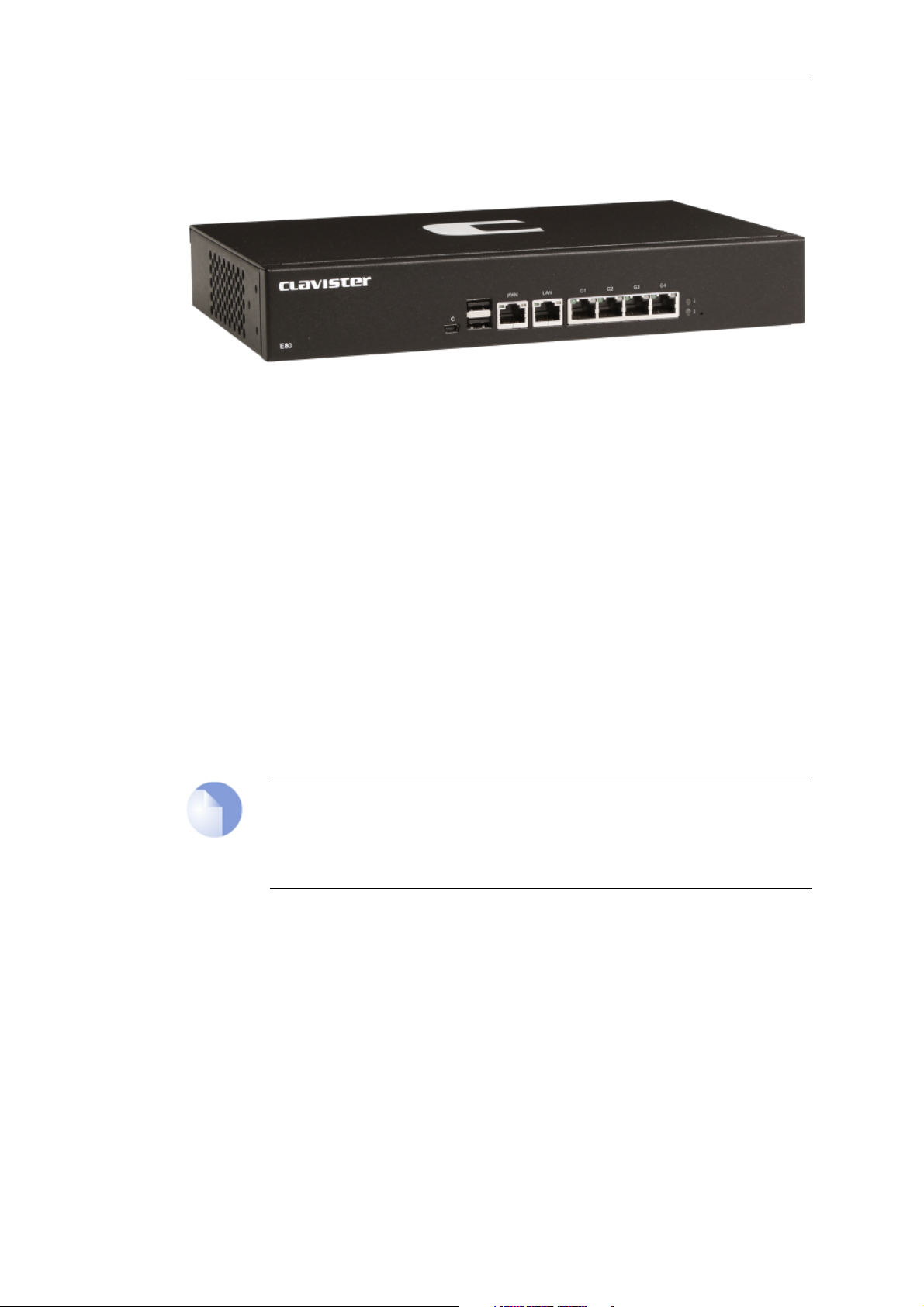
Figure 1.1. An Unpacked Clavister E80B
This section details the unpacking of a single E80B device. Open the packaging box used for
shipping and carefully unpack the contents. The packaging should contain the following:
• The Clavister E80B unit.
• Mini-USB local console cable.
• Power cable.
• Rack mount kit consisting of screws and 2 brackets suitable for a 19-inch rack.
• Pack of 4 adhesive rubber feet for flat surface mounting.
Note: Report any items that are missing
If any items are missing from the E80B package, please contact the reseller or distributor.
All relevant documentation in PDF format can be downloaded from the Clavister
website and is included in all packaged distributions of new cOS Core versions.
Support Agreements
All purchasers of Clavister hardware products should subscribe to one of the available cOS Core
support agreements. These provide access to cOS Core updates and provide a hardware
replacement service in the case of a hardware fault. Without one of these agreements, hardware
warranty is limited to 2 years. The warranty terms are described further in Chapter 6, Warranty
Service, along with a description of the hardware replacement procedure.
The Cold Standby Service
To ensure maximum uptime, a Cold Standby (CSB) Service is available from Clavister as an addition
to certain cOS Core support agreements. This service allows a second, identical E80B unit to be
purchased at a discount so that it can quickly substitute for the original unit in case of failure,
Chapter 1: E80B Product Overview
9

with the ability to quickly reassign the original cOS Core license to the standby unit. When the
faulty unit is returned to Clavister, a new cold standby unit is immediately sent back. More details
about the CSB service can be found in the separate Hardware Replacement Guide.
Downloadable E80B Resources
All documentation and other resources for the E80B can be downloaded from the E80B product
page which can be found by going to https://www.clavister.com/start and selecting the E80B
link.
Contacting Clavister Product Support
Clavister customer support can be contacted by logging in as a customer and reporting an issue
on the company website at https://www.clavister.com. Alternatively, the direct support telephone
number is +46 (0)660-29 77 55 (answered 24/7). Sales enquiries should be directed to the head
office number +46 (0)660-29 92 00.
End of Life Treatment
The E80B device is marked with the European Waste Electrical and Electronic Equipment (WEEE)
directive symbol which is shown below.
The product, and any of its parts, should not be discarded using a regular refuse disposal
method. At end-of-life, the product and parts should be given to an appropriate service that
deals with the removal of such specialist materials.
CAUTION: REPLACE INTERNAL BATTERIES CORRECTLY
THERE IS A RISK OF EXPLOSION IF AN INTERNAL BATTERY IS REPLACED WITH THE
INCORRECT TYPE. DISPOSE OF ANY USED INTERNAL BATTERIES ACCORDING TO THE
INSTRUCTIONS.
Chapter 1: E80B Product Overview
10
Indice
Altri manuali Clavister Hardware di rete

Clavister
Clavister SG50 Series Manuale utente

Clavister
Clavister NetWall W20A Manuale utente

Clavister
Clavister SG4300 Series Manuale utente

Clavister
Clavister Eagle E5 Manuale utente

Clavister
Clavister NetWall 6000 Series Manuale utente

Clavister
Clavister SG4500 Series Manuale utente

Clavister
Clavister SG3200 Series Manuale utente
Manuali Hardware di rete popolari di altre marche

Matrix Switch Corporation
Matrix Switch Corporation MSC-HD161DEL Manuale utente

B&B Electronics
B&B Electronics ZXT9-IO-222R2 Manuale utente

Yudor
Yudor YDS-16 Manuale utente

D-Link
D-Link ShareCenter DNS-320L Manuale utente

Samsung
Samsung ES1642dc Istruzioni per l’uso

Honeywell Home
Honeywell Home LTEM-PV Istruzioni per il montaggio