Clever Acoustics MA 2120 Manuale utente

USER MANUAL
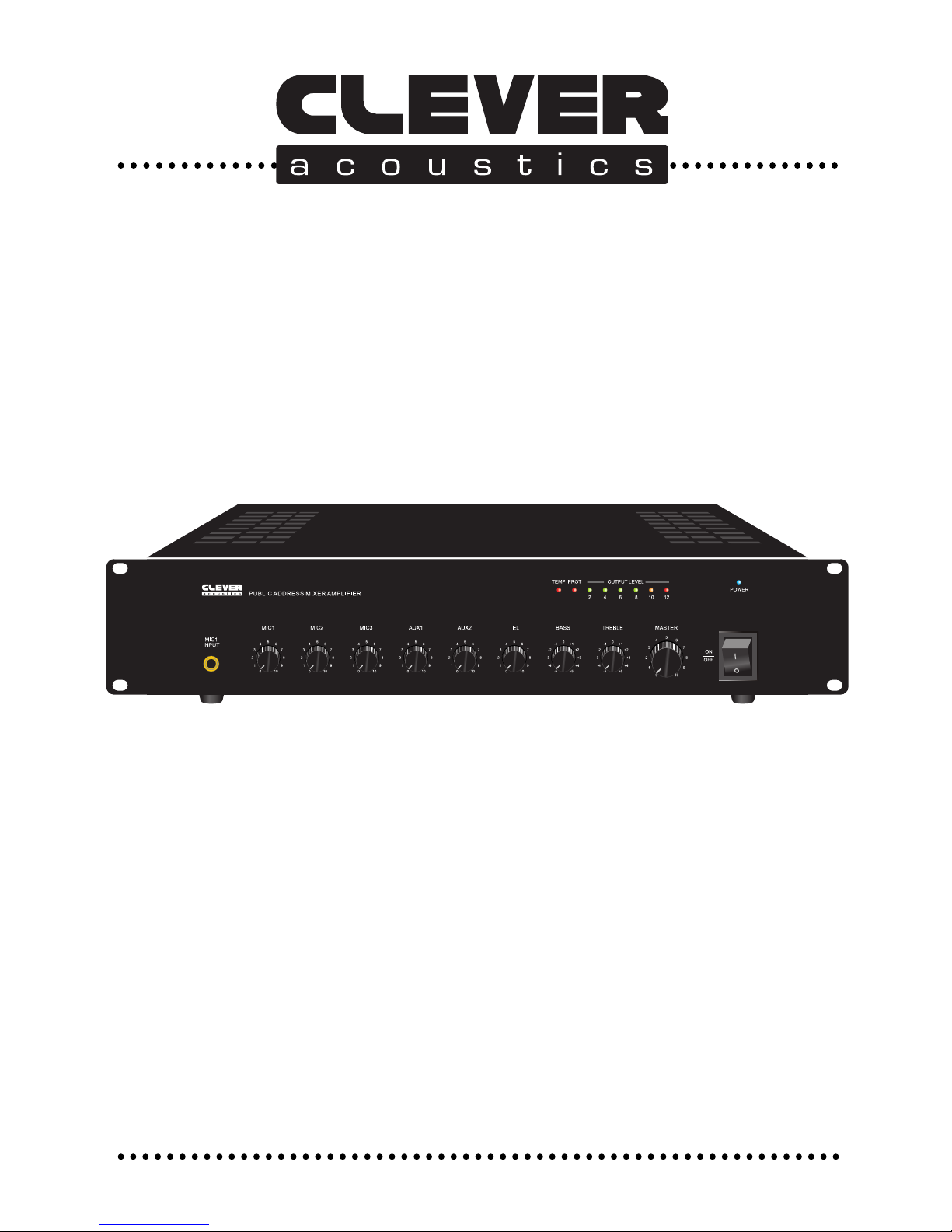
MA 2120 100V 120W Mixer Amplier
MA 260 100V 60W Mixer Amplier
Order code: CRAM06
Order code: CRAM05
www.cleveracoustics.co.uk

WARNING
FOR YOUR OWN SAFETY, PLEASE READ THIS USER MANUAL CAREFULLY
BEFORE YOUR INITIAL START-UP!
CAUTION!
Keep this equipment away from rain,
moisture and liquids.
SAFETY INSTRUCTIONS
Every person involved with the installation, operation & maintenance of this
equipment should:
- Be competent
- Follow the instructions of this manual
CAUTION! TAKE CARE USING THIS EQUIPMENT!
HIGH VOLTAGE-RISK OF ELECTRIC SHOCK!!
Before your initial start-up, please make sure that there is no damage caused during
transportation. Should there be any, consult your dealer and do not use the equipment.
To maintain the equipment in good working condition and to ensure safe operation, it is
necessary for the user to follow the safety instructions and warning notes written in this
manual.
Please note that damages caused by user modications to this equipment are not
subject to warranty.
1

2
IMPORTANT:
The manufacturer will not accept liability for any resulting damages caused
by the non-observance of this manual or any unauthorised modication to the
equipment.
• Never let the power-cable come into contact with other cables. Handle the
power-cable and all mains voltage connections with particular caution!
• Never remove warning or informative labels from the equipment.
• Do not open the equipment and do not modify the equipment.
• Do not switch the equipment on and off in short intervals, as this will reduce the
system’s life.
• Only use the equipment indoors.
• Do not expose to ammable sources, liquids or gases.
• Do not carry the unit with only one handle. Always carry using both handles.
• Always disconnect the power from the mains when equipment is not in use or
before cleaning! Only handle the power-cable by the plug. Never pull out the plug
by pulling the power-cable.
• Make sure that the mains supply voltage is 240V.
• Make sure that the power-cable is never crimped or damaged. Check the
equipment and the power-cable periodically.
• If the equipment is dropped or damaged, disconnect the mains power supply
immediately.
Have a qualied engineer inspect the equipment before operating again.
• If the equipment has been exposed to drastic temperature uctuation (e.g. after
transportation), do not switch it on immediately. The arising condensation might
damage the equipment. Leave the equipment switched off until it has reached
room temperature.
• If your product fails to function correctly, discontinue use immediately. Pack the
unit securely (preferably in the original packing material), and return it to your
Prolight dealer for service.
• Only use fuses of same type and rating.
• Repairs, servicing and power connection must only be carried out by a qualied
technician. THIS UNIT CONTAINS NO USER SERVICEABLE PARTS.
• WARRANTY; One year from date of purchase.
• If this equipment is operated in any other way, than those described in this
manual, the product may suffer damage and the warranty becomes void.
• Incorrect operation may lead to danger e.g.: short-circuit, burns, electric shocks.
• Do not endanger your own safety and the safety of others!
Incorrect installation or use can cause serious damage to people and property.

This 100V line mixer amplier was designed specically for use in permanent audio
installations, where reliability and premium sound quality are a must. Highly rugged
construction and high efciency design make this amplier perfect for continuous duty
applications in situations were power will be left on for indenite periods of time.
This 100V line amplier is warranted from defects for one year from the date of purchase.
Should your amplier require service, either within or beyond that warranty period, please
contact your Prolight Dealer.
This unit includes a host of features, along with an impressive list of specications, which
are detailed over the next pages. Please take the time to read this document completely
prior to installation of this product.
The Mixer Amplier series is equiped with priority function. They are designed to suit all PA
system application in schools, ofces and stores.
Features
• 19” rack mountable chassis (removable rack ears)
• 70V, 100V and low impedance 4-16Ω loudspeaker outputs
• Three microphone inputs and two AUX inputs
• MIC 1 features VOX priority and VOX level on front panel
• MIC 1, 2 and 3, AUX 1, 2 and master volume controls and bass/treble tone control
• Switchable +48V phantom power on MIC 1
• Telephone input
• Line output via phono sockets
• Short circuit, overload and high temperature protection
• Built-in priority functions for telephone override for AUX and MIC 1, 2 and 3
• Optional DC input for use with battery backup power sources or for operation using high
capacity batteries
• LED VU meter with temperature and protect indication
• Fan cooled
3

Specications MA 260 MA 2120
Speaker:
Power output: 60Wrms / 75W peak 120Wrms / 135Wpeak
Speaker outputs: 50V, 70V, 100V & 4-16Ω50V, 70V, 100V & 4-16Ω
Level impedance: 1V/20kΩ1V/20kΩ
S/N ratio: >90dB >90dB
Frequency response: 40Hz-17kHz (±3dB) 40Hz-17kHz (±3dB)
MIC 1-2 input (CH1-2 in @
1kHz preamp out):
Input sensitivity/impedance 5mV/600Ω5mV/600Ω
S/N ratio: >62dB >62dB
Tone control (Bass: 100 kHz,
Treble: 10kHz):
+12dB +12dB
Phantom power: +48V DC +48V DC
AUX 1 input (AUX in @ 1kHz
preamp out):
Input sensitivity/impedance: 400mV/15kΩ400mV/15kΩ
S/N ratio: >76dB >76dB
Frequency response: 50Hz-18kHz (±3dB) 50Hz-18kHz (±3dB)
Preamp out: 0dBV/600Ω0dBV/600Ω
Total harmonic control: <0.5% <0.5%
Line level output: 10dBV/3kΩ10dBV/3kΩ
Cooling: Air cooled Air cooled
Power consumption: 100W 200W
DC power supply: 12V 24V
Power supply: 240V-50Hz 240V-50Hz
Dimensions (H x W x D): 88 x 484 x 303mm 88 x 484 x 303mm
Weight: 6.7kg 7.8kg
Order code: CRAM05 CRAM06
4

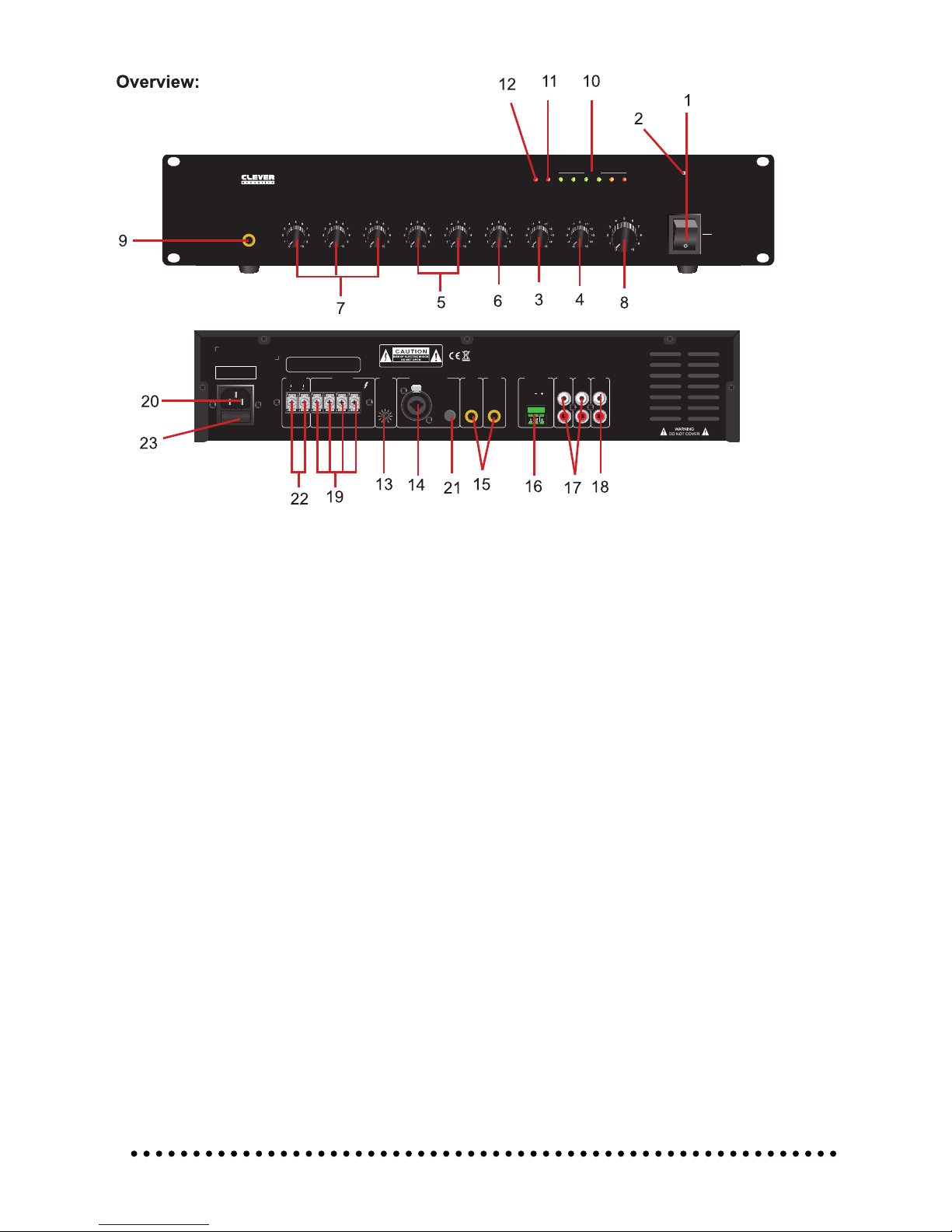
Identication:
1. POWER SWITCH
2. POWER - Power indicator
3. BASS - Adjust bass response. Rotate clockwise to increase bass output and anticlockwise to
reduce it.
4. TREBLE - Adjust treble response. Rotate clockwise to increase treble output and
anticlockwise to reduce it.
5. AUX1 & 2 - Aux 1 & 2 volume controls
6. TEL - Telephone volume control
7. MIC1 / MIC2 / MIC3 - MIC volume control (MIC1/MIC2/MIC3)
8. MASTER - Adjust volume output. Rotate clockwise to increase volume output and
anticlockwise to reduce it.
9. MIC - MIC1 input 6.35mm Microphone jack input
10. LEVEL INDICATORS - Level meters 6 output level indicators, reduce the master volume if
the RED Peak LED illuminates
11. PROT - Protection indicator LED
12. TEMP - Temperature will lit up when overheating
13. MIC1 ADJ - Adjusts the mute volume from 0-20dB when MIC1 overrides all other input
14. MIC1 XLR/6.35mm - XLR/6.35mm Jack combi socket
15. MIC2 & 3 - MIC 2 & 3 input 6.35mm Microphone jack input
16. TEL INPUT - Balanced input suitable for connection to the output of a telephone
based paging system
17. AUX1 & 2 - Line input suitable for CD players, tuners or MP3 players
18. LINE OUT - Connect to line level sources such as CD/MP3 players
19. SPEAKER TERMINALS - Connectors for 4-16 ohms or 70V and 100V speakers
20. POWER INPUT - 220-240V 50/60Hz, Fuse: F1A-250V
21. 48V PHANTOM - 48V Phantom power switch apply power to XLR input, suitable for powering
condenser microphones
22. DC connections - 12V for the MA 260, 24V for the MA 2120
23. MAINS FUSE - If mains fuse requires replacement use the same type and value as originally
supplied.
ON
OFF
MIC 1
BASS TREBLE
MIC1 MIC2 MIC3 AUX1 AUX2 TEL MASTER
POWER
2
PROTTEMP
46810 12
LEVEL
~240V 50Hz 100W
T2AL 250V
MIC2 MIC3
MUTE
G
TEL INPUT AUX2AUX1
LINE
OUT
MIC 1
XLR/6.35MM INPUT
BAL/UNBAL PHANTOM
OUTPUTSDC INPUT
12V 10A
COM 4-16Ω70V 100V
MA 260
MIXER AMPLIFIER
www.cleveracoustics.co.uk
DO NOT USE 4-16Ω, 70V AND 100V
AT THE SAME TIME
ON
OFF
MIC 1
BASS TREBLE
MIC1 MIC2 MIC3 AUX1 AUX2 TEL MASTER
POWER
2
PROTTEMP
46810 12
LEVEL
~240V 50Hz 100W
T2AL 250V
MIC2 MIC3
MUTE
G
TEL INPUT AUX2AUX1
LINE
OUT
MIC 1
XLR/6.35MM INPUT
BAL/UNBAL PHANTOM
OUTPUTSDC INPUT
12V 10A
COM 4-16Ω70V 100V
MA 260
MIXER AMPLIFIER
www.cleveracoustics.co.uk
DO NOT USE 4-16Ω, 70V AND 100V
AT THE SAME TIME
5

Rack Installation
The MA Series are rack mountable. The rack you use should be a Double Door Rack where you
can open the front and rear panel. When mounting the amplier into the rack, please make sure
that there is enough space around the amplier.
Be careful when mounting the amplier into the rack. Put the heaviest products into the lower part
of the rack.
The front panel is not designed to absorb acceleration forces occuring during transportation.
Inputs
Short cables runs improve the sound quality remarkably. Input cables should be short and direct,

since high frequencies will mostly be absorbed if the cables are unnecessarily long. Besides that
a longer cable may lead to humming and noise problems. If the cable runs are unavoidable, you
should use balanced cables.
Outputs
The high damping factor of your amplier supplies a clear sound reproduction. Unnecessarily long
and thin cables used for low impedance (4-16Ω) speakers will inuence the damping factor and
thus the low frequencies in a negative way. In order to safeguard good sound quality, the damping
factor should lie around 50. The longer a cable has to be the thicker it should be. For longer cable
runs please ensure the 100V outputs are used for 100V speakers.
Connect your speaker systems via the speaker terminals (COM = -VE)
Examples: 1) COM + 4-16Ω
2) COM + 70V
3) COM + 100V
Note: Please do not use more than one pair of output terminals
Connections To The Mains
Before connecting the amplier to the local mains voltage outlet should be checked to ensure the
available supply is 240V~AC 50Hz. This product is CLASS1 and requires a protective mains earth
to be connected at all times. DO NOT remove or disconnect the earth.
Power On/Off Procedure
After connecting your amplier to the mains, turn all controls counter clockwise to the “min”
position. Turn on audio sources (MP3 players, CD players, Microphones etc) before powering the
amplier ON. The last product to be switched on is the amplier.
If you wish to power off the system, turn the amplier’s master volume control counter clockwise
to the “min” position before switching the amplier OFF before any audio sources are switched off.
By following this procedure it will prevent acoustic shocks to the speakers or potential damage to
system components.
6

MACHINE OPERATION
1. After connecting all audio sources and powering on the mixer amplier, adjust the level of each
audio input to achieve the desired “mix”. Care should be taken to when adjusting microphone
input volumes and the master volume, adjust both of these in small increment’s to avoid feedback
(howl around). The goal is to achieve a clear balance between music and voice ensuring an-
nouncements can be clearly heard.
2. The Telephone and Microphone input No.1 feature adjustable voice operated override (VOX),
this will mute all other inputs. After 3 seconds of no signal to the TEL or MIC1 inputs the other
inputs will return to their original state. The VOX mute level can be adjusted on the rear panel. The
TEL input has highest priority, followed by the MIC1.
3. The Clever Acoustics ampliers all feature output VU meter’s with PEAK indication. Should the
PEAK indicator illuminate (ashing) the output of the amplier is too high, turn the master volume
anti-clockwise to reduce the output.
4. The Clever Acoustics ampliers all feature protection with LED indication. Should the PRO-
TECT indicator illuminate, turn the master volume control anti-clockwise fully and switch off the
amplier for 15 seconds as the amplier may have entered PROTECT mode temporarily due to a
peak signal, care should then be taken to ensure all input levels are set correctly. If the amplier
persists to enter PROTECT mode the amplier should be switched off and left to cool for 5-10
minutes before switching back on. If the PROTECT indicator remains lit this indicates a problem
with the amplier or amplier load (ie Short Circuit).
5. The Clever Acoustics ampliers all feature protection with LED indication. Should the TEMP
(over temperature protection) indicator illuminate, turn the master volume control anti-clockwise
fully and switch off the amplier for 15 seconds as the amplier may have entered TEMP (over
temperature protection) mode temporarily due to the internal temperature reaching the preset
limit, care should then be taken to ensure all input levels are set correctly and that all ventilation
slots are clear of obstruction. If the amplier persists to enter TEMP mode the amplier should
be switched off and left to cool for 5-10 minutes before switching back on. If the TEMP indicator
remains lit this indicates a problem with the output level (ie bass heavy music), amplier cooling or
amplier load (ie Short Circuit).
6. Speaker & Amplier systems can produce high sound pressure levels, please operate all
controls with caution to ensure people are not exposed to excessive or dangerous sound pressure
levels.
7

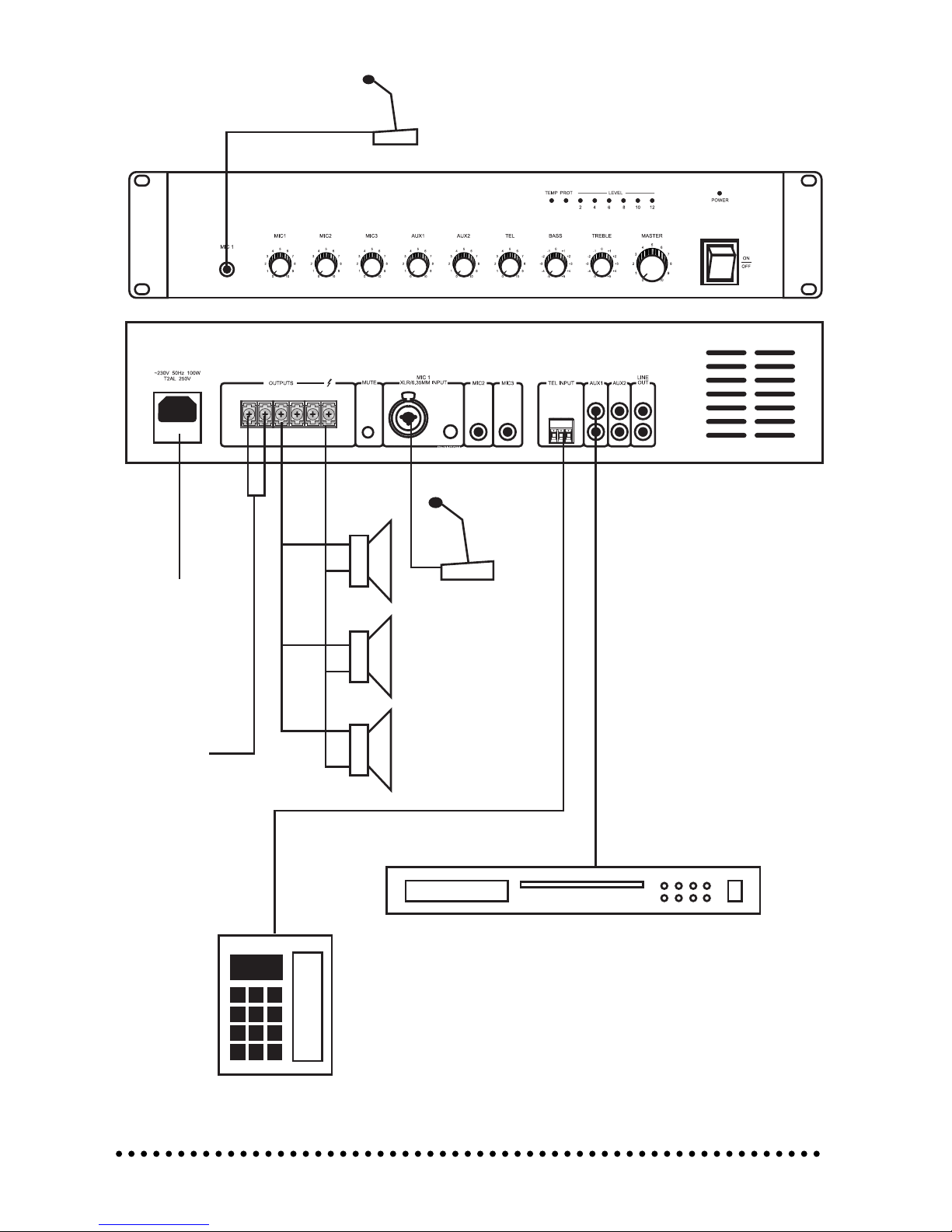
Panel Connections:
TEL INPUT
MAINS
AUDIO SOURCES
24V DC INPUT
(MA 2120)
12V DC INPUT
(MA 260)
MIC 1
MIC 1
8

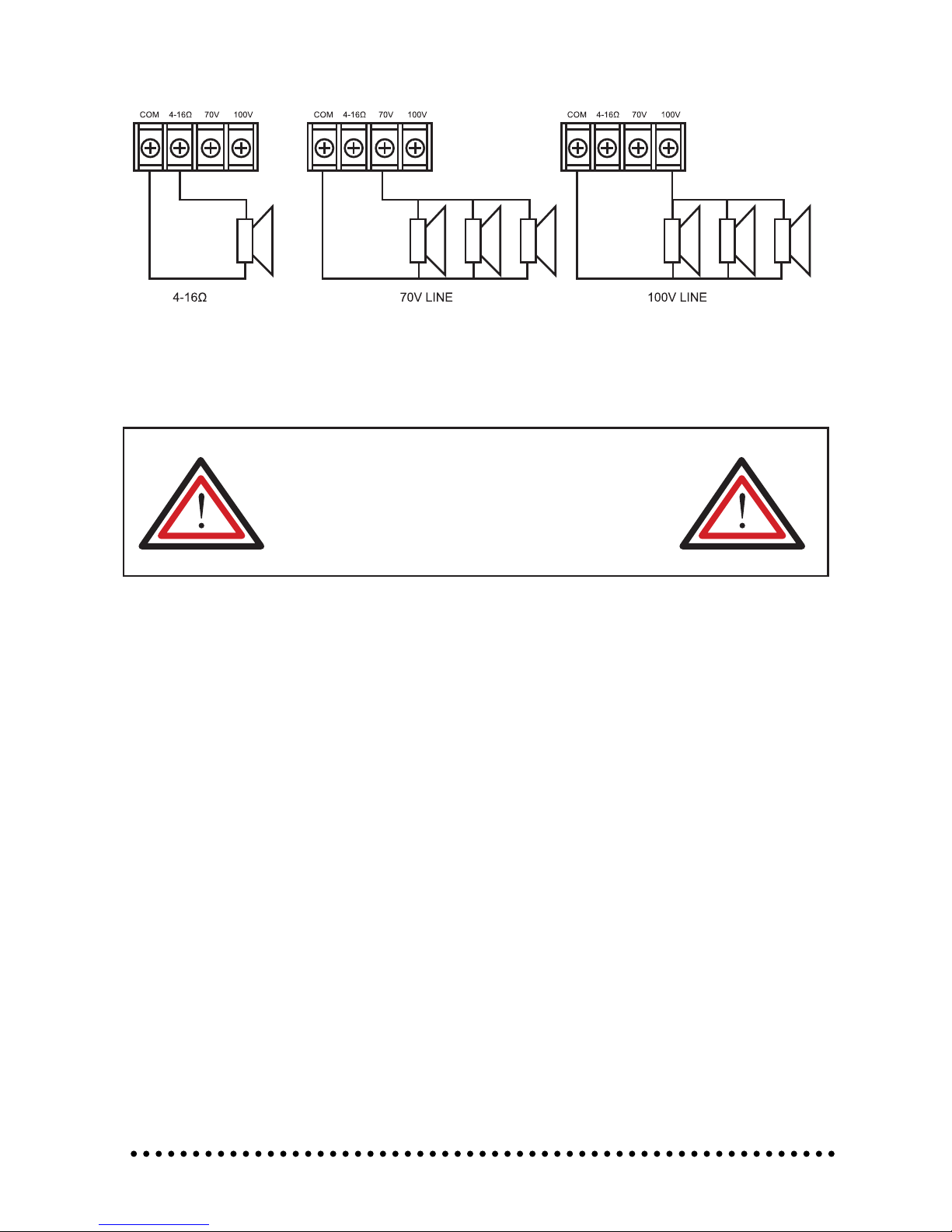
Speaker connections:
Notes:
• Both the 4 - 16Ω and 100V terminals cannot be used at the same time.
• Impedances indicated in the gures represent the total speaker system (load) impedances.
Loads presented to the amplier must be equal to or greater than listed above. Speaker
impedances must be measured using a true impedance meter, do not standard multimeters.
WARNING!
Be sure to attach the supplied terminal cover attached after
connection. Because high voltage is applied to the speaker termi-
nals, care should be taken never touch these terminals to avoid
electric shock.
All speaker connections should be made using bare wire or suitable
insulated crimp terminals. Please ensure no loose strands are present
as these may short across terminals causing damage to the amplier
Total impedance
81Ω (MA 260)
41Ω (MA 2120)
Total impedance
167Ω (MA 260)
83Ω (MA 2120)
Connection With The Mains
Connect the unit to the mains via the IEC mains
inlet using the 13A UK - IEC cord supplied.
The earth has to be connected.
Switch the unit on. After switching on the speaker system, wait 8 - 10 seconds before you turn the
volume control up in order to avoid speaker damage.
CAUTION! Increase the level of each channel up to the point where the clip LEDs illuminate.
Always check the sound pressure level with a meter in order to keep to the legal threshold.
9
Indice
Altri manuali Clever Acoustics Amplificatore

Clever Acoustics
Clever Acoustics CRAM39 Manuale utente

Clever Acoustics
Clever Acoustics CRAM37-SL 4060 100V 4 x 60W Manuale utente

Clever Acoustics
Clever Acoustics CPA 40 Manuale utente

Clever Acoustics
Clever Acoustics MA 120 Manuale utente

Clever Acoustics
Clever Acoustics SL 4240 Manuale utente

Clever Acoustics
Clever Acoustics CRAM19A Manuale utente

Clever Acoustics
Clever Acoustics MA 135 Manuale utente

Clever Acoustics
Clever Acoustics MA 240Z5 Manuale utente

Clever Acoustics
Clever Acoustics MA 4040 Manuale utente

Clever Acoustics
Clever Acoustics MA 130 100V 30W Manuale utente