Co2meter SAN-10 Manuale utente

PERSONAL CO2 SAFETY MONITOR
AND DATA LOGGER
User Manual
SAN-10
User Manual R2.0
CO2Meter, Inc. 06321
© Copyright 2021, CO2Meter, Inc. All Rights Reserved. Last modified June 2, 2021

CONTENTS
INTRODUCTION ................................................................................................................................. 2
FEATURES .........................................................................................................................................2
MONITOR ...........................................................................................................................................3
LCD DISPLAY ..................................................................................................................................... 3
OPERATION .......................................................................................................................................4
Power button ................................................................................................................................4
Temperature Units Button ............................................................................................................. 4
Menu Status ................................................................................................................................. 4
Alarm Threshold ...........................................................................................................................5
Automatic Atmospheric Pressure Compensation .......................................................................... 6
Man Down Alarm ..........................................................................................................................6
Reset Button................................................................................................................................. 6
DOWNLOADING DATA LOGS............................................................................................................ 7
CALIBRATION................................................................................................................................... 10
MAINTENANCE ................................................................................................................................ 11
Calibration .................................................................................................................................. 11
Cleaning and Storage ................................................................................................................. 11
SPECIFICATIONS............................................................................................................................. 12
Device Specifications.................................................................................................................. 12
CO2 Sensor Specifications ......................................................................................................... 12
Temperature Sensor Specifications ............................................................................................ 12
Relative Humidity Sensor Specifications..................................................................................... 12
TROUBLESHOOTING....................................................................................................................... 13
SUPPORT & WARRANTY................................................................................................................. 14
© Copyright 2021, CO2Meter, Inc. All Rights Reserved. Last modified June 2, 2021

2
INTRODUCTION
Congratulations on your purchase of the SAN-10 Personal CO2 Monitor and Data Logger. It is
designed to alert employees who work in enclosed areas where carbon dioxide buildup may
cause personal harm. If CO2 buildup occurs, it will show the level on screen, flash, alarm and
vibrate. In addition the SAN-10 includes built-in data logging and a man-down alarm that uses
an accelerometer to set off the alarm if a sudden shock to the unit (like the wearer falling down)
occurs.
The SAN-10 uses a non-dispersive infrared CO2 sensor to provide long term stability. It is
shipped fully tested and calibrated and, with proper use, will provide years of reliable service.
FEATURES
•Audible, visual strobe and vibrating alarms
•Large LCD display
•Rugged design with protective rubber enclosure
•Heavy duty metal clip
•Front facing sensor unit
•Rechargeable Battery 4.2v, 1500mAh
•Micro USB cable and Wall USB charger
•Rechargeable Li-Ion battery – 20+ hours per charge
•Man down alarm - leveraging accelerometer technology
•Dual calibration methods: Ambient Air (300-600ppm) and Nitrogen (0-200ppm)
•Automatic atmospheric pressure compensation for CO2 concentrations
•No over-exposure or negative memory effects
•Stable NDIR sensor for CO2detection.
•CO2, and alarm!log data logging with time stamping
•Up to 149,500 time-stamped records in internal memory. Data can be exported via!
USB
© Copyright 2021, CO2Meter, Inc. All Rights Reserved. Last modified June 2, 2021

3
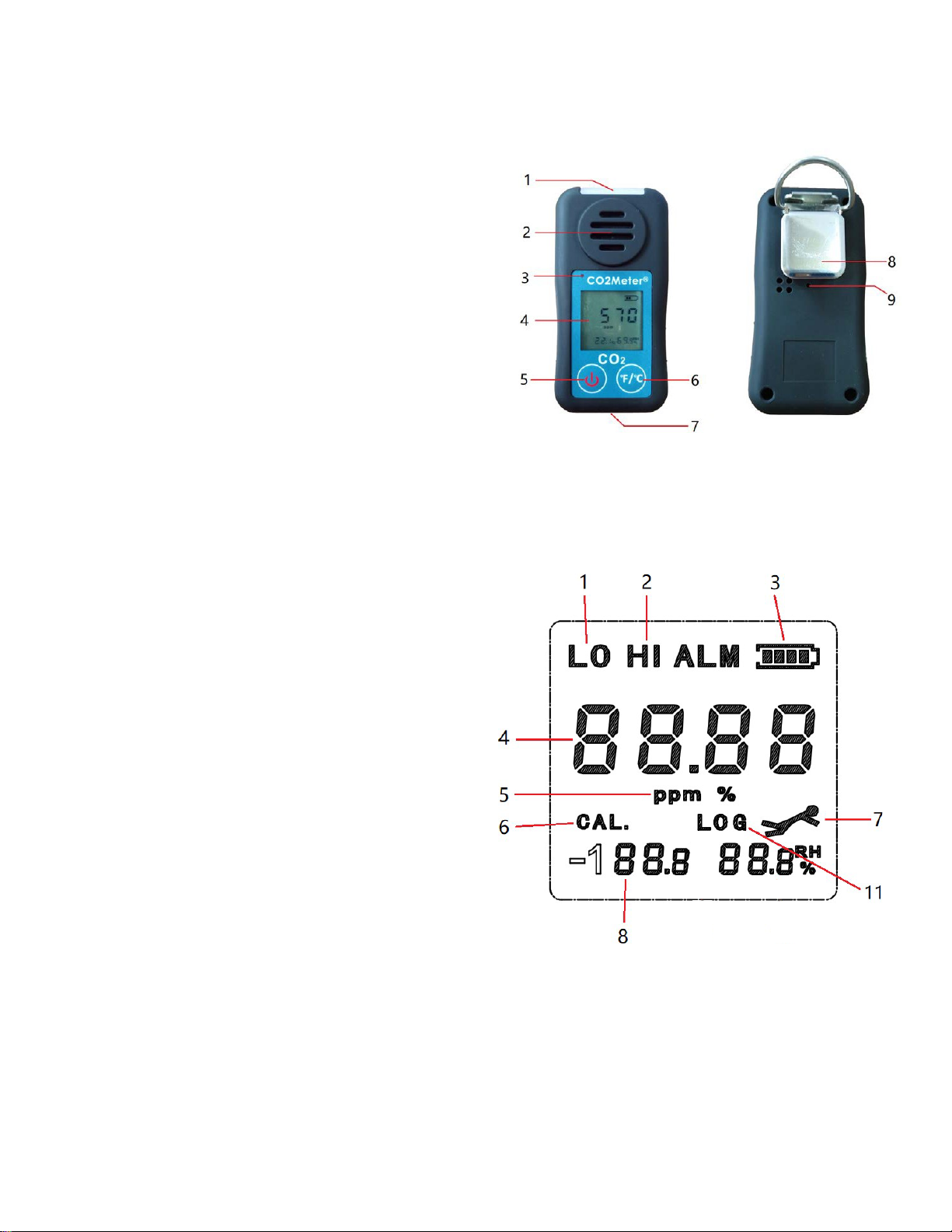
MONITOR
1. Visual alarm/strobe
2. Front facing sensor
3. Charging indicator
4. LCD display
5. Power button
6. Menu button
7. USB port and charging inlet (bottom
side)
8. Heavy duty metal clip
9. Factory reset button
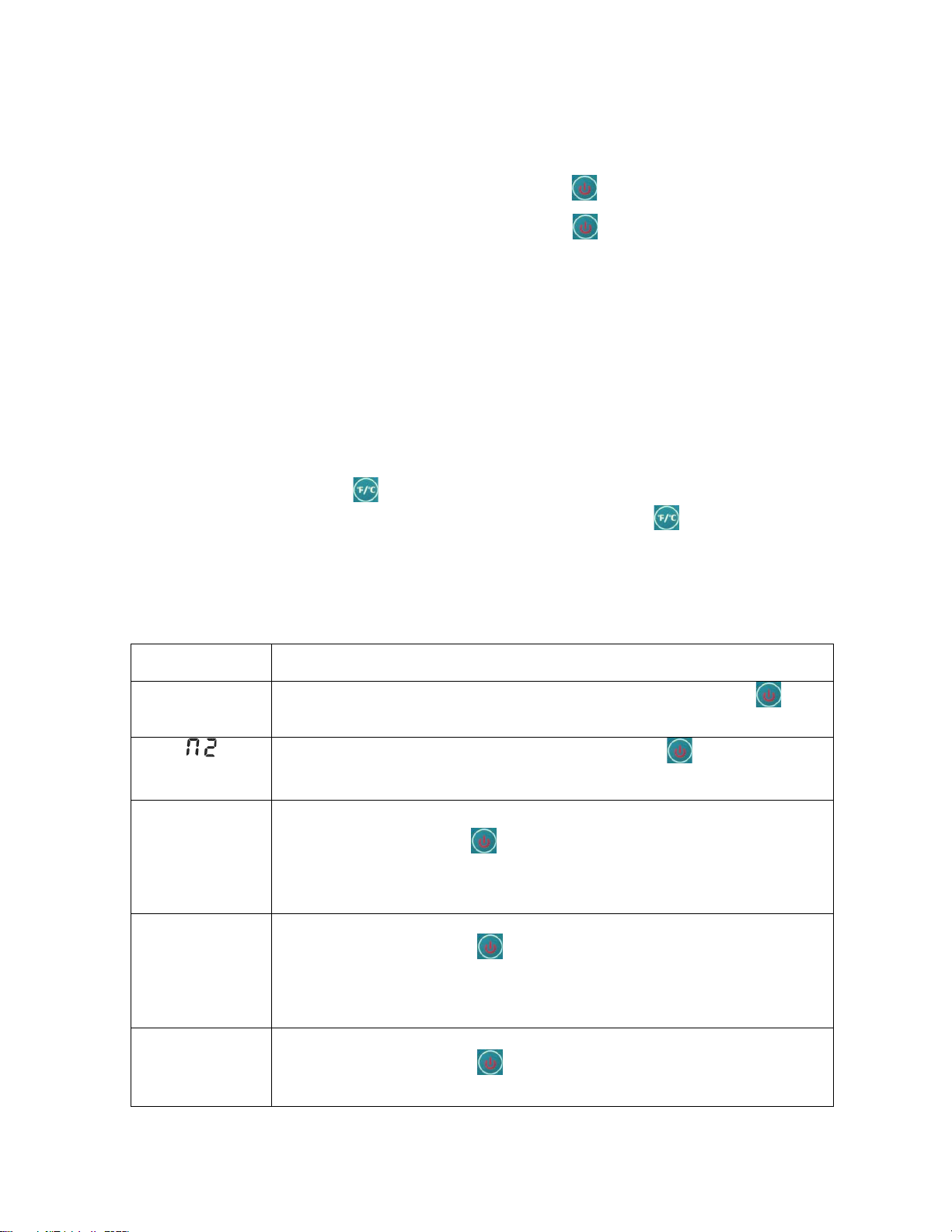
LCD DISPLAY
© Copyright 2021, CO2Meter, Inc. All Rights Reserved. Last modified June 2, 2021
1. Low alarm indicator
2. High alarm indicator
3. Battery indicator
4. CO2 concentration
5. CO2 concentration units (ppm or %
when >9,999 ppm)
6. Calibration icon
7. Man down alarm
8. Data logging indicator

4
© Copyright CO2Meter.com. All rights reserved.
OPERATION
2.0 Power button
1.!When the Monitor isturned off, press the power button to turn on the unit.
2.!When the Monitor isturned on, press the power button for 3 seconds to turn off the
unit.
When the unit is first turned on, it performs 5 seconds countdown for Monitor warm up, then
enters normal display with current CO2 readings displayed. The monitor starts taking
measurements when power on and updates readings every 2seconds.
2.1 Menu Status
Menu Items
Functional
Description
AIR (“AIR”)
Ambient Air Calibration. User presses the power button to
implement Ambient Air Calibration (300~600ppm).
N2 (“ ”)
Nitrogen Calibration. Press the power button to start
nitrogen calibration (0~200ppm).
High Alarm Threshold setup.
L0.5/L0.5T/L1.0
/L1.5/L3.0
Low Alarm Threshold setup.
Press the power button to switch the low alarm threshold:
L0.5 (5000 ppm), L0.5T (5000 ppm TWA), L1.0 (10000 ppm),
L1.5
(15000 ppm), and L3.0 (30000 ppm).
A ON
A OFF
Man down alarm set on/off.
Press the power button to switch “A ON” to turn on the man
down alarm or “AOFF” to turn off the man down alarm)
© Copyright 2021, CO2Meter, Inc. All Rights Reserved. Last modified June 2, 2021
By pressing the menu button for 5 seconds, the unit enters into "Menu
status". There are six menu items by pressing the menu button shortly to
loop switching between AIR, N2, Hx.x, Lx.x, A ON/AOFF, SC, Px, Log and E
(exit).
The menu times are further described in the table below:
H0.5/H0.5T/
H1.0/H1.5/H2.
0/H2.5/H3.0/
H3.5/H4.0
User presses the power button to switch the high alarm
threshold: H0.5 (5000ppm), H0.5T (5000 ppm TWA), H1.0
(1000ppm), H1.5 (15000ppm), H2.0 (20000ppm), H2.5 (25000ppm),
H3.0 (30000 ppm), H3.5 (35000 ppm) and H4.0 (4000ppm).

5
SC (“ ”)
Real time clock setup
Press the power button to enter the real time clock setup:
a. Press the button to switch between Year ( ), Month (),
Day ( ), Hour ( ), Minute ( ), Second ( ) and . to exit.
b. Press the power button to increase the value until the
correct time is set. This value is a cyclic change. Press the
power button again to save and exit the menu status.
For example, set the month to February by pressing the
power button in “ ”:
Px
Data logging period setup
Press the power button to switch the data logging period
between: P30 (30 seconds), P60 (60 seconds), P120 (120
seconds or 2 minutes), P300 (300 seconds or 5 minutes), P600
(600 seconds or 10 minutes) or P900 (900 seconds or 15
minutes).
Log (“ ”)
Data logging memory operation
Press the power button to switch the data logging memory
operation between:
•EP (Export data logging by USB)
•RES (Reset the memory)
•E (Exit without operation).
E
Exit. Press the power button to exit the menu status.
3.0 Alarm Threshold
The SAN-10 is equipped with audible, visual and vibration alarms to alert users when the
ambient oxygen concentration exceeds either of the two factory preset alarm levels:
•Danger High Alarm: LED will flash and audible alarm will sound 3x / sec.
•Warning Low Alarm: LED will flash and audible alarm will sound 2x / sec.
© Copyright 2021, CO2Meter, Inc. All Rights Reserved. Last modified June 2, 2021
There are high and low alarm thresholds in the SAN-10. Both high and low alarms have
five thresholds: 5000ppm, 5000ppm TWA, 1.0%, 1.5%, 2.0%, 2.5%, 3.0%, 3.5% and
4.0%. Obviously, the high alarm threshold should not be less than the low threshold.
They can be the same alarm level.

6
Automatic Atmospheric Pressure Compensation
The CO2 measurement is affected by atmospheric pressure or altitude changing. When
users are at high altitude, compensation is made internally to ensure maximum monitor
accuracy.
This device has automatic atmospheric pressure compensation for CO2 concentrations by
means of a digital atmospheric pressure sensor integrated in the unit.
Man Down Alarm
Falling by breathing dangerous gases can cause serious injury and even fatality to workers.
If the Man downalarm function in SAN-10is set on, SAN-10 can detect falls and send a
man down alert which will activate the audible and visual alarms and alert other people in
the area.
The man-down detection uses a three-axis accelerometer to automatically monitor the user’s
movements in order to identify a sudden fall or impact and a lack of movement for a period of
6 seconds.
Once alerted, you can turn off the man-down alarm by pressing either of the two buttons.
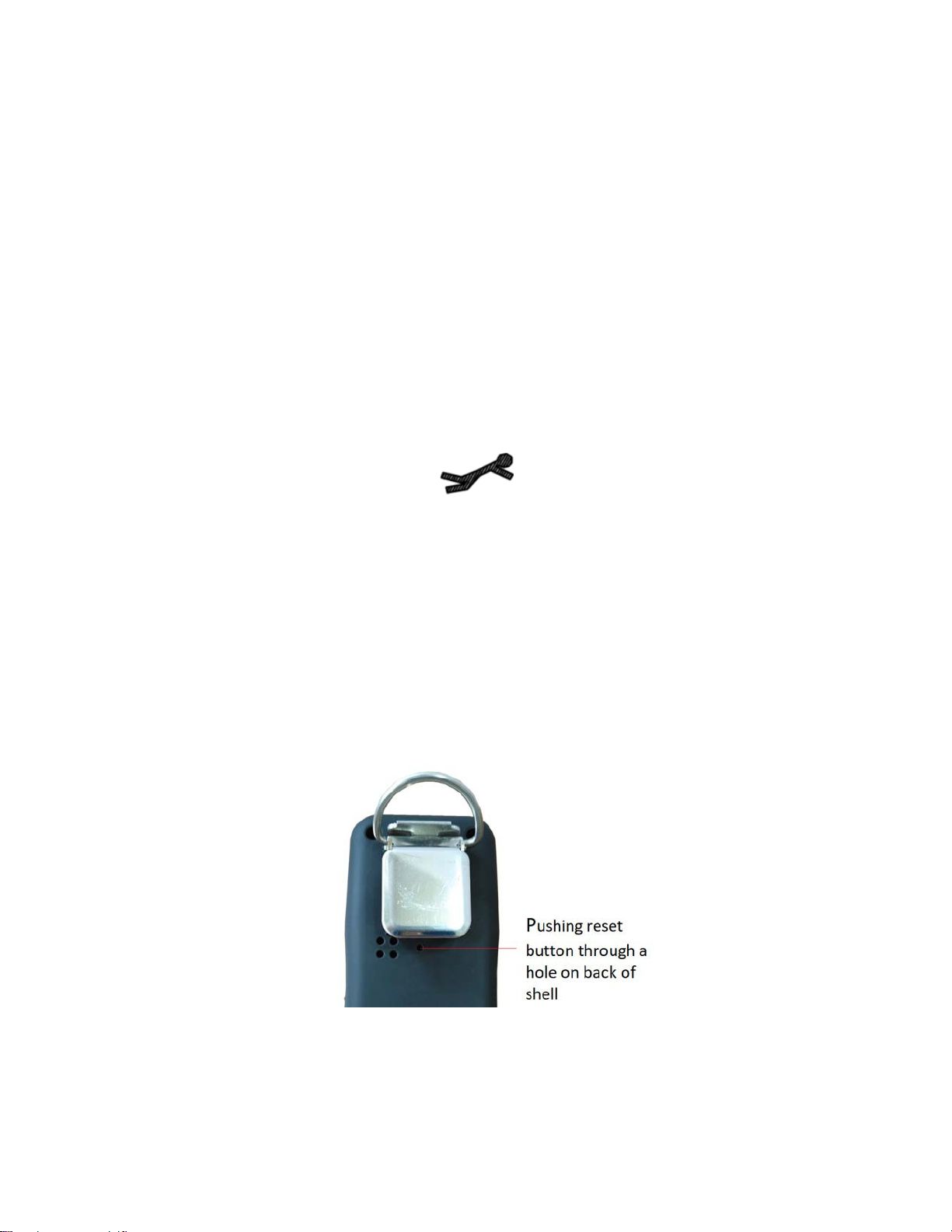
Reset Button
Users can reset the unit by pushing a reset button through a hole on back of shell.
© Copyright 2021, CO2Meter, Inc. All Rights Reserved. Last modified June 2, 2021

7
© Copyright CO2Meter.com. All rights reserved.
DOWNLOADING DATA LOGS
1. Download latest version of GasLab®: https://www.co2meter.com/pages/downloads
2. Power on the SAN-10device
3. Wait for 5 second warm upcountdown
4. Connect the SAN-10 to your Windows PC with the USB cable
5. Open the Gaslab software
6. Set Sensor Select options.
7. Select the Port in which your SAN-10 device is connected.
8. Do not select a Product.
9. Select SAN-XY under Series/Model.
© Copyright 2021, CO2Meter, Inc. All Rights Reserved. Last modified June 2, 2021

8
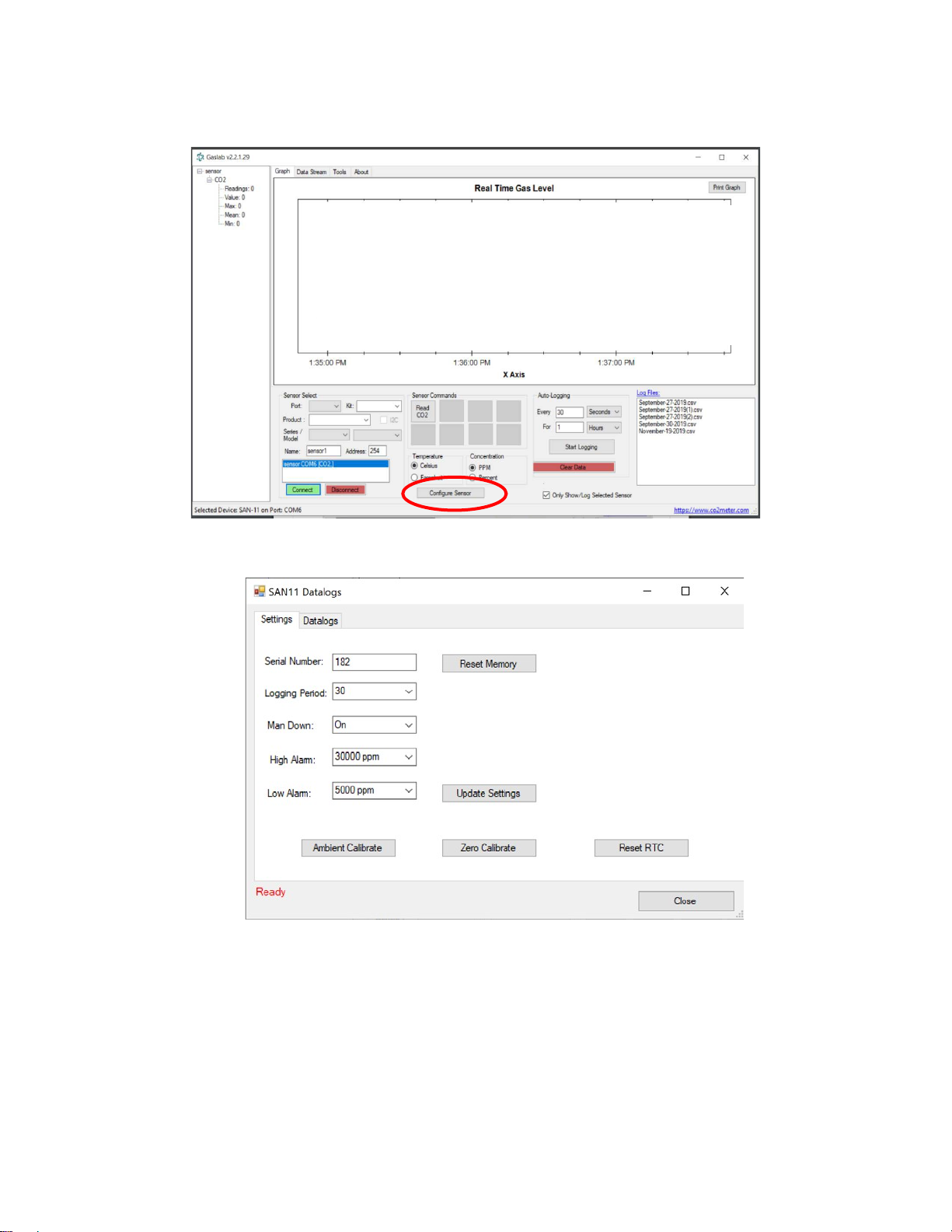
10.Press Connect. When connected the window should appear as shown below:
11.Click Configure Sensor and the following page will appear:
12.Make sure the Serial Number matches the one found on the back of your device.
© Copyright 2021, CO2Meter, Inc. All Rights Reserved. Last modified June 2, 2021

9
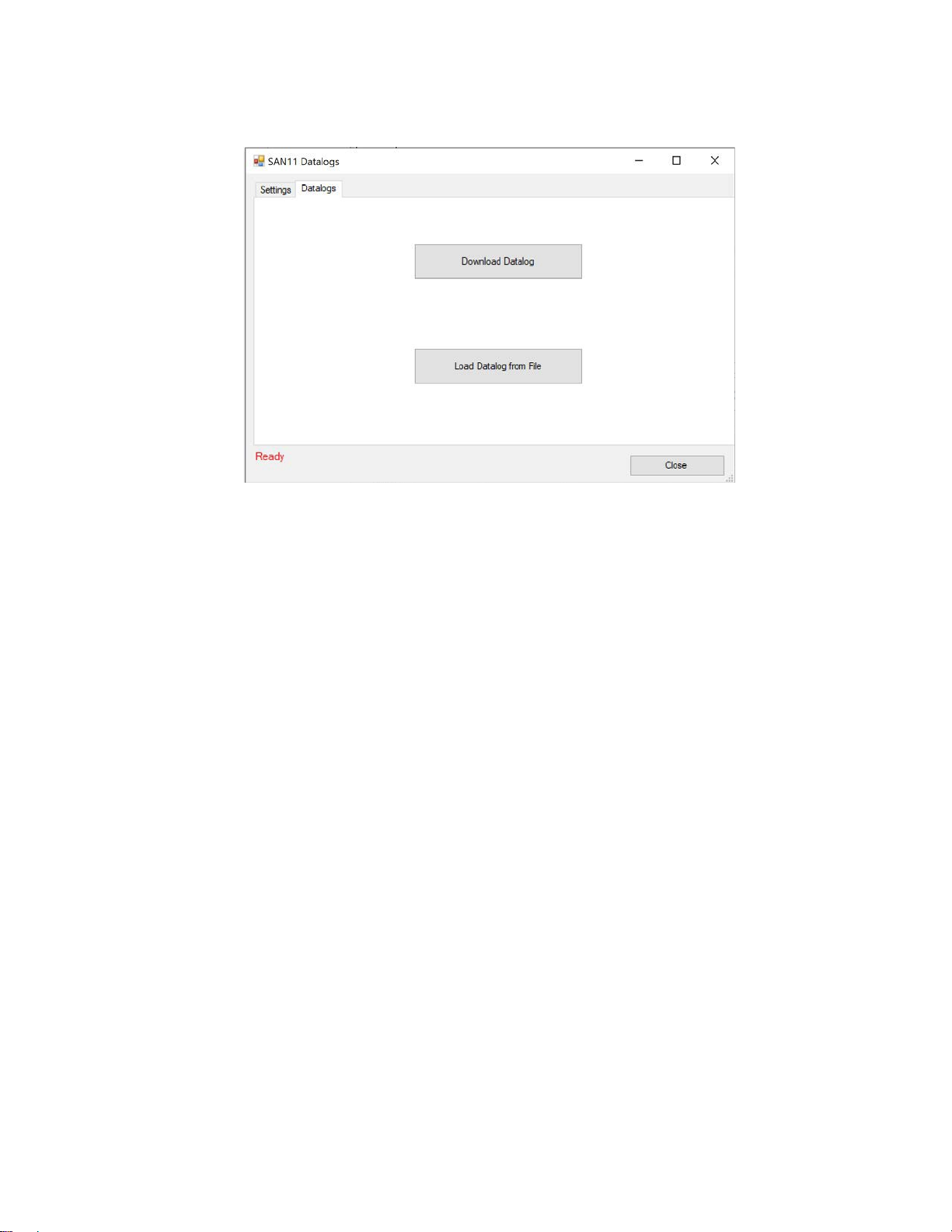
13.Select the Datalogs tab.
14.Click the Download Datalog button. Name and select a location to save your file.
Data logs are .CSV (common separated values) files which can be opened or imported into
any spreadsheet program.
© Copyright 2021, CO2Meter, Inc. All Rights Reserved. Last modified June 2, 2021
Altri manuali per SAN-10
2
Indice
Altri manuali Co2meter Rilevatore di gas