Cobb Accessport Manuale utente

UserGuide
For
BMW Accessport
06/25/2013

Copyright © 2013 COBB Tuning Products LLC. All Rights Reserved. | www.cobbtuning.com
1
Table of Contents
Product Introduction ......................................................................................................................................................................
..................................................................................................................................................................................................3
In-Box Contents ........................................................................................................................................................................4
What Is A Map? ............................................................................................................................................................................5
Accessport Installation..................................................................................................................................................................6
Pre-Installation..........................................................................................................................................................................6
Getting Started .........................................................................................................................................................................7
Vehicle Identification ....................................................................................................................................................................3
Supported Vehicle List 10
Map Selection .........................................................................................................................................................................10
Save Stock ECU Program Data ................................................................................................................................................10
Install Accessport Programming .............................................................................................................................................10
Installation Complete..............................................................................................................................................................11
Dealer Service/Visit ................................................................................................................................................................11
Accessport Features & Functionality ..........................................................................................................................................12
Monitor...................................................................................................................................................................................12
Live Data .............................................................................................................................................................................12
Data Log ..............................................................................................................................................................................12
Set Rev Warning..................................................................................................................................................................13
Set Live Data List .................................................................................................................................................................13
Set Data Log List..................................................................................................................................................................13
Reset Live List......................................................................................................................................................................13
Reset Log List ......................................................................................................................................................................13
Performance ...........................................................................................................................................................................14


Copyright © 2013 COBB Tuning Products LLC.All Rights Reserved. | www.cobbtuning.com
2
0-60 MPH ............................................................................................................................................................................14
¼ Mile .................................................................................................................................................................................14

Tune ........................................................................................................................................................................................15
Change Map........................................................................................................................................................................15
Show Current Map..............................................................................................................................................................15
Troubleshooting......................................................................................................................................................................16
Reset ECU............................................................................................................................................................................16
Read Codes .........................................................................................................................................................................16
Clear Codes .........................................................................................................................................................................16
Uninstall..................................................................................................................................................................................17
Uninstall..............................................................................................................................................................................17
Accessport ................................................................................................................................. Error! Bookmark not defined.
About ..................................................................................................................................................................................18
Settings ...............................................................................................................................................................................18
Accessport Troubleshooting .......................................................................................................................................................19
Support Contact Information......................................................................................................................................................20
Environmental Information ........................................................................................................................................................21
Operating and Storage Temperatures.....................................................................................................................................21
Do Not Get Wet ......................................................................................................................................................................21
Handling and Storage..............................................................................................................................................................21
Do Not Attempt Repairs Yourself............................................................................................................................................21

Copyright © 2013 COBB Tuning Products LLC.All Rights Reserved. | www.cobbtuning.com
3
Product Introduction
Congratulations on the purchase of the new Accessport handheld programmer. The Accessport can:
•Reprogram the factory engine control unit (ECU) with improved tuning parameters through the
on-board diagnostic (OBD-II) port
•Monitor vehicle sensor data
•Read and clear engine diagnostic trouble codes (DTCs)
Supported Vehicle List
•2008-2010: twin-turbo 135i
•2011: twin-turbo 1M
•2011: single-turbo 135i
•2007-2010: twin-turbo 335i
•2007-2008: twin-turbo 335xi
•2009-2010: twin-turbo 335i xDrive
•2011-2013: twin-turbo 335is
•2011: single-turbo 335i
•2011: single-turbo 335xi
•2008-2010: twin-turbo 535i
•2008: twin-turbo 535xi
•2009-2010: twin-turbo 535i xDrive
•2009-2013: twin-turbo Z4i
•2011-2013: twin-turbo Z4is
* Not all models will be supported at initial release. See http://cobbtuning.com for more
information.

Copyright © 2013 COBB Tuning Products LLC.All Rights Reserved. | www.cobbtuning.com
4
In-Box Contents
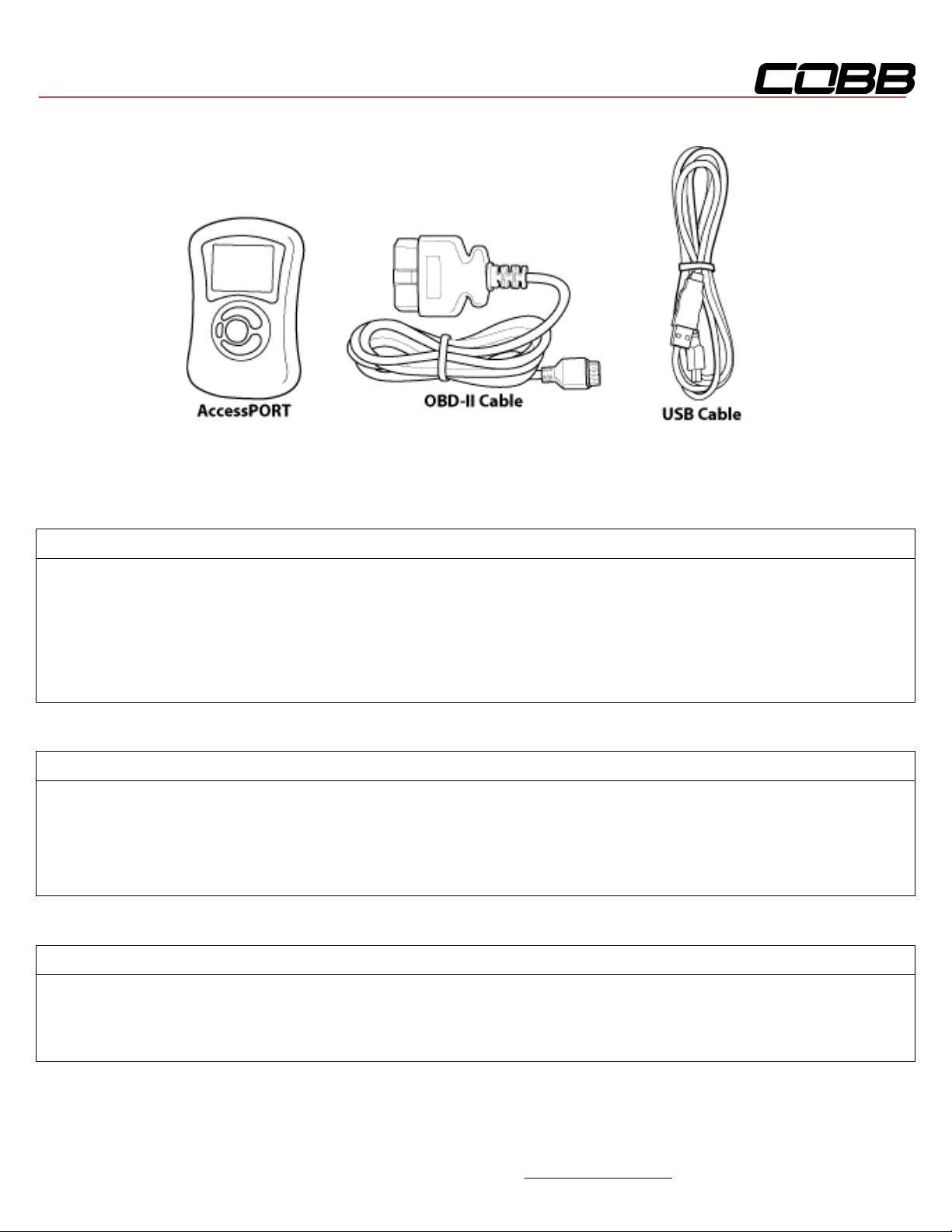
Accessport Version 2b
WARNING!
Installation and use of the Accessport may void all or a portion of the
vehicle manufacturer's standard warranty. There is no guarantee
expressed or implied by COBB Tuning or any of its affiliates for the use
of the Accessport. The user accepts all risks and responsibilities when
using the Accessport.
WARNING!
Use of the Accessport while operating a moving vehicle is strictly
prohibited by law. COBB Tuning and its affiliates accept no
responsibility for damages or injury caused by misuse of the
Accessport.
WARNING!
The Accessport may not be able to function if the vehicle's wiring has
been modified. If problems occur while using the Accessport, please
verify that all wiring to and from the ECU is correct and functional.

Copyright © 2013 COBB Tuning Products LLC.All Rights Reserved. | www.cobbtuning.com
5
What Is A Map?
The Accessport reprograms the tuning parameters inside the factory engine control unit (ECU) using
map files, which contain specially written instructions for the Accessport to follow during the
reprogramming process. A map file can contain information for any number of different modifications or
enhancements to a vehicle, ranging from a race map for a heavily modified vehicle to an economy map
for a stock vehicle. Through the use of the Accessport and different map files the ECU can be
reprogrammed to accommodate virtually any vehicle configuration.

Copyright © 2013 COBB Tuning Products LLC.All Rights Reserved. | www.cobbtuning.com
6
Accessport Installation
Pre-Installation
The Accessport comes with the most up-to-date software available at the time of shipment. However, it
is possible that updated software and/or map files have been made available since the time of shipment.
Therefore, the recommended procedure is to connect the Accessport to the AP Manager software and
download the latest software and map files for the target vehicle.
IMPORTANT!
Before installing the Accessport on the vehicle, it is important to verify that the vehicle is
adequately prepared for the installation process. Since the Accessport uses the vehicle's battery
for power and the ECU reprogramming process requires adequate battery power as well, it is
critical to verify that the vehicle's battery has a good charge. This can be done through the use
of a battery charger/conditioner or by driving the vehicle for a period of time prior to installation
to allow the alternator to recharge the battery. Furthermore, please ensure that all in-car
electronic devices are turned off to reduce power draw on the battery. This includes car stereos,
video screens, GPS units, radar detectors, interior and exterior vehicle lights, and any other
electronic device that uses the car battery for power.

Copyright © 2013 COBB Tuning Products LLC.All Rights Reserved. | www.cobbtuning.com
8
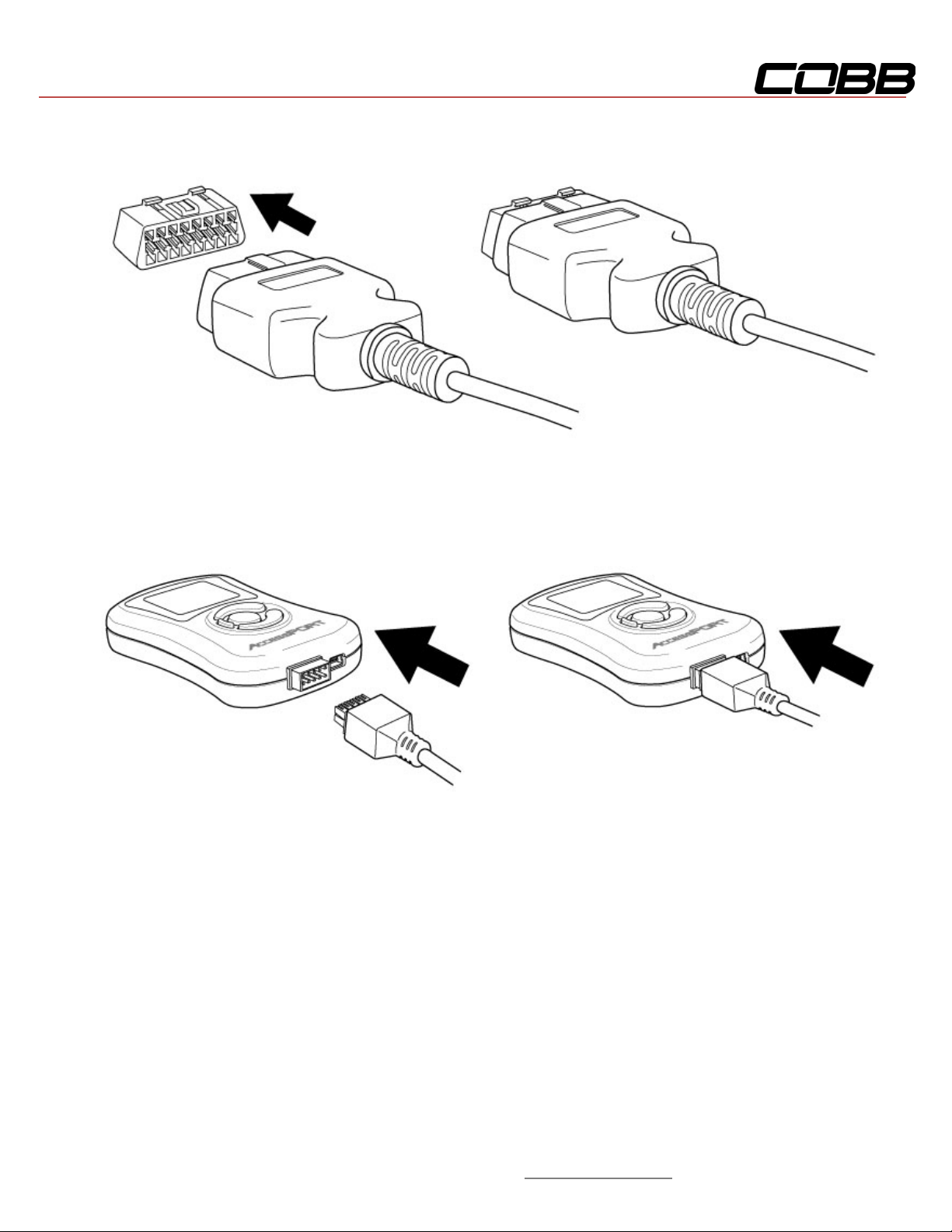
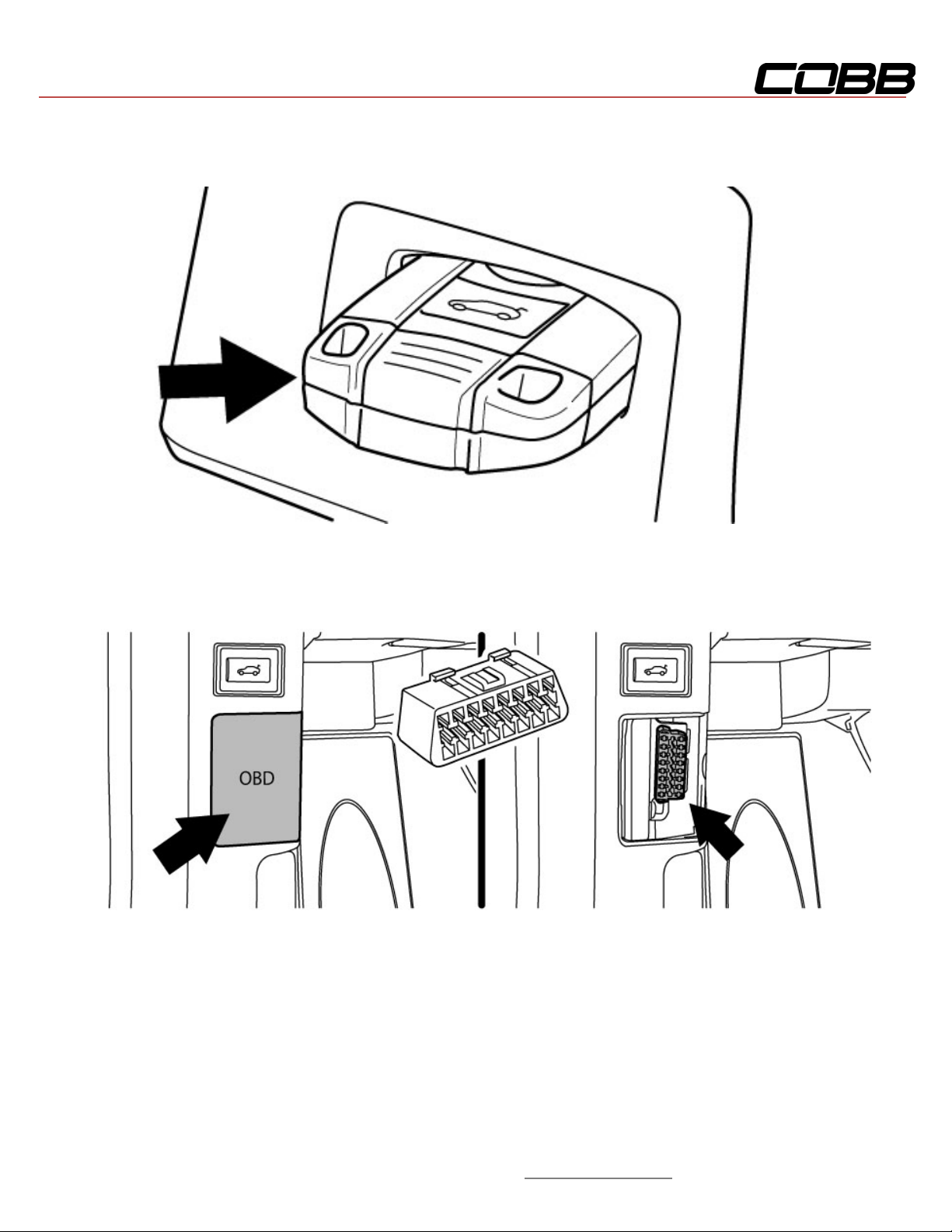
3. Plug the OBD-II cable into the OBD-II port under the dash.
4. Connect the small end of the OBD-II cable to the 10-pin port on the bottom of the Accessport. At
this point the Accessport will power up and after a few moments present the installation menu.

Copyright © 2013 COBB Tuning Products LLC.All Rights Reserved. | www.cobbtuning.com
9
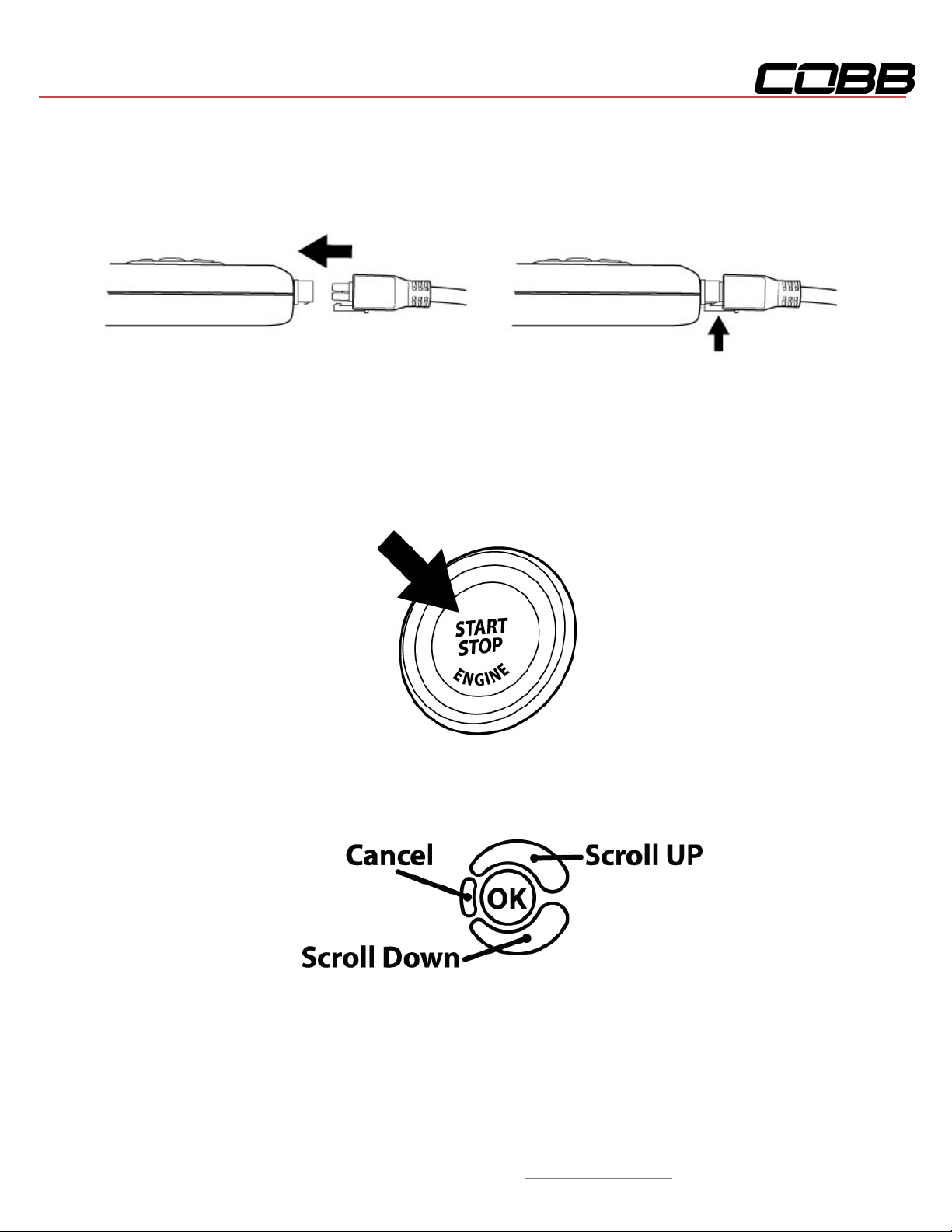
5. Make sure the clasp on the OBD-II cable firmly engages the tab on the 10-pin port.
6. Without touching the clutch or brake pedal press the START button once to put the car into the
ON position.
7. Select [Install] from the Accessport menu by pressing the [OK] button to proceed with
installation. Below is a diagram of the Accessport's keypad function.
8.
Altri manuali per Accessport
4
Questo manuale è adatto per i seguenti modelli
1
Indice
Altri manuali Cobb Elettronica per automobili