
Cobra Systems VnM 4 Manuale utente
Copyright © 2016 Cobra Systems, Inc. All rights reserved
User Manual
Updated: 4/2016
VnM SignMaker, Safety Signs & LabelsVnM SignMaker, Safety Signs & Labels
Version 3.0
VnM 4 SignMaker

Copyright © 2016 Cobra Systems, Inc. All rights reserved
TABLE OF CONTENTS
Introduction
Quick-start
Overview
Loading Ink Rolls
Loading Media
Setup
Print and Font Settings
Navigation
VnM®4 Templates
a) 1 to 5 Line Horizontal
b) 1 Line Vertical
c) Custom 1 Line
d) OSHA/ANSI Haz Com
e) GHS Template
f) Lockout Tags
g) Pipe Marking
h) Barcode/QR Code Labels
i) Formatted Signs
Font and Symbols
OSHA and ANSI Safety Identication
Pipe Marker Color Chart
Connecting to a PC
Maintenance/Troubleshooting
Accessories
Frequently Asked Questions
Technical Support/Service and Repair
2
3
4
5
6
7
8
9
10
11
12
13
14
15
16
17
18
19-20
21
22
23
24
25
25
26
1
Copyright © 2016 Cobra Systems, Inc. All rights reserved
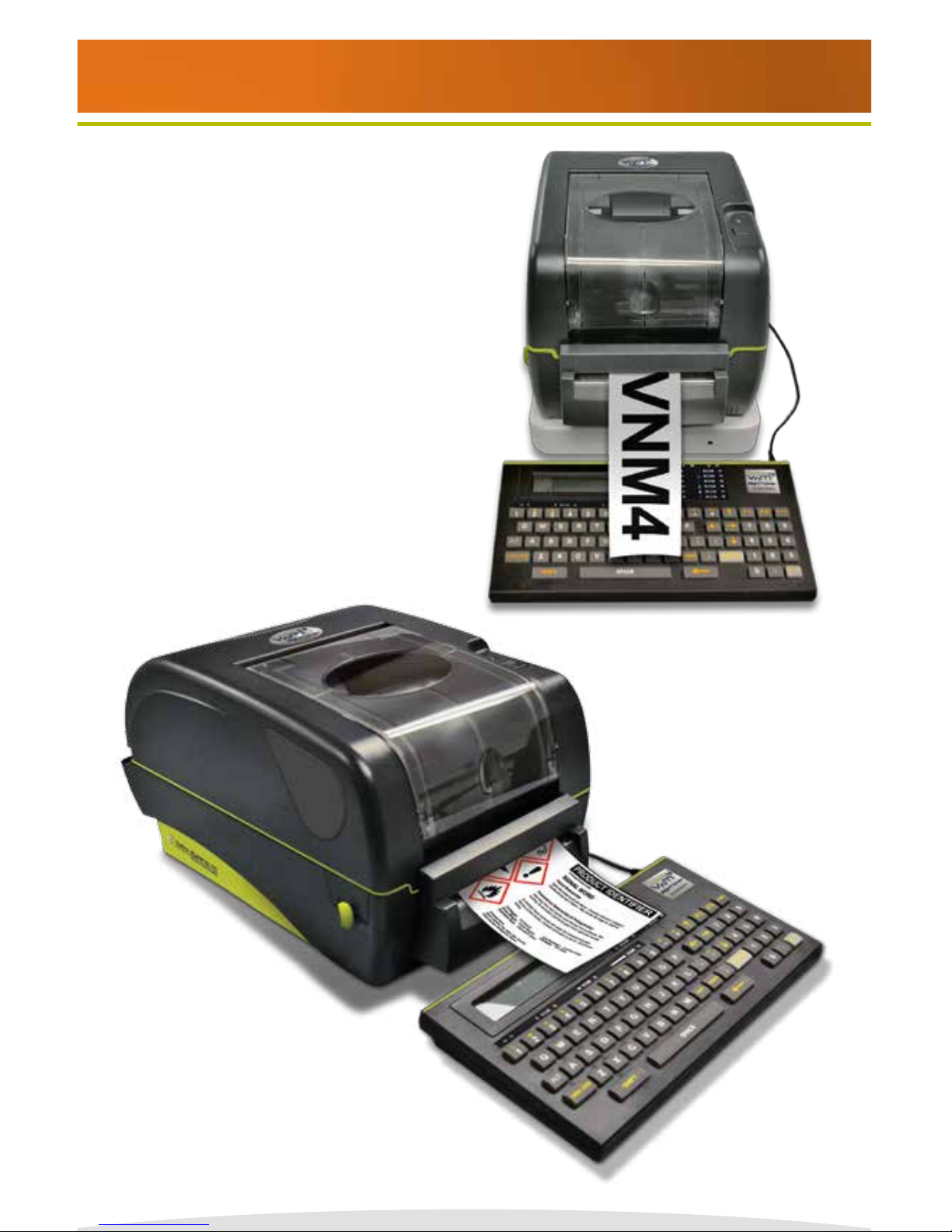
Thank you for purchasing the VnM®4 SignMaker by Cobra Systems, Inc.
The compact, high-performance VnM 4 SignMaker System has been developed to provide a
fast, easy, and hassle-free solution to all your industrial applications. Print directly from the
preprogrammed smart keyboard, or have the ability to print via USB connection (not supported
unless used with purchased VnM LabelDirect software).
Dimensions: 2.36” (L) x 8.39”(W) x 7.40” (H)
Operating Conditions: 41°-104° F (5°-40° C )
Storage Conditions: -40°-140° F (-40°-60° C )
Resolution: 203 DPI
AC Input: 100 - 240V Power Supply
DC Output: 24V 3.75A (external adapter)
Print Speed: Variable, from 2”to 7” per second
Connections: VnM® Keypad, USB, LPT
VnM®4 SignMaker comes with a Limited Lifetime Warranty, 1-Year Print-head Warranty, 6-Month
Cutter Warranty, and 1-Year Keypad Warranty.
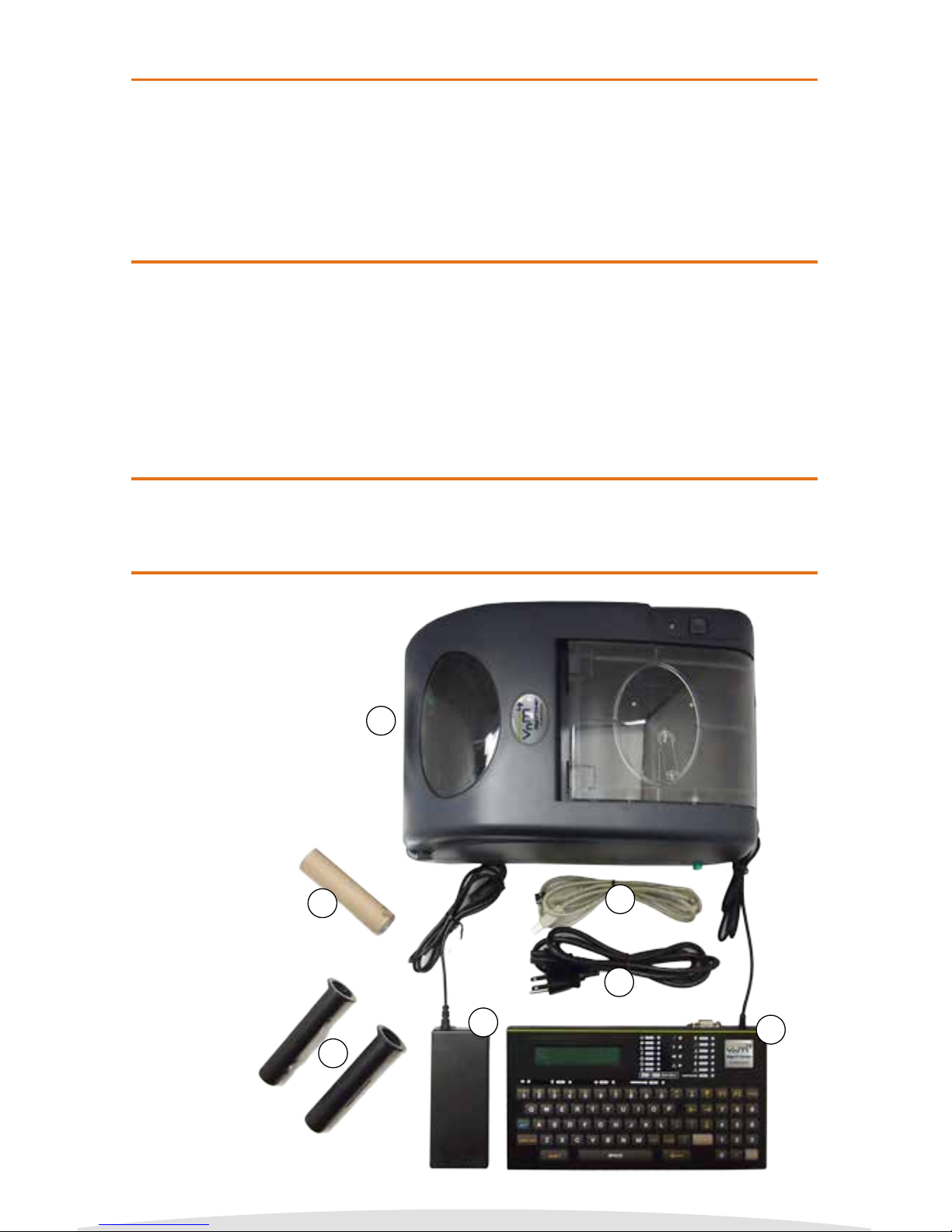
The VnM®4 SignMaker System includes:
1. VnM®4 SignMaker Printer (1)
2. VnM®4 SignMaker Keypad
with RS232 Cable (1)
3. Printer Power Supply (1)
4. Printer Power Cord (1)
5. Printer USB Cable for
PC Connection (1)
6. Take-Up Core for
VnM® Ink (1)
7. VnM® Ink Take-Up
Spindles (2)
2
1
2
3
7
4
5
6
Introduction
Warranty
Out of the Box
Specications
Copyright © 2016 Cobra Systems, Inc. All rights reserved
3
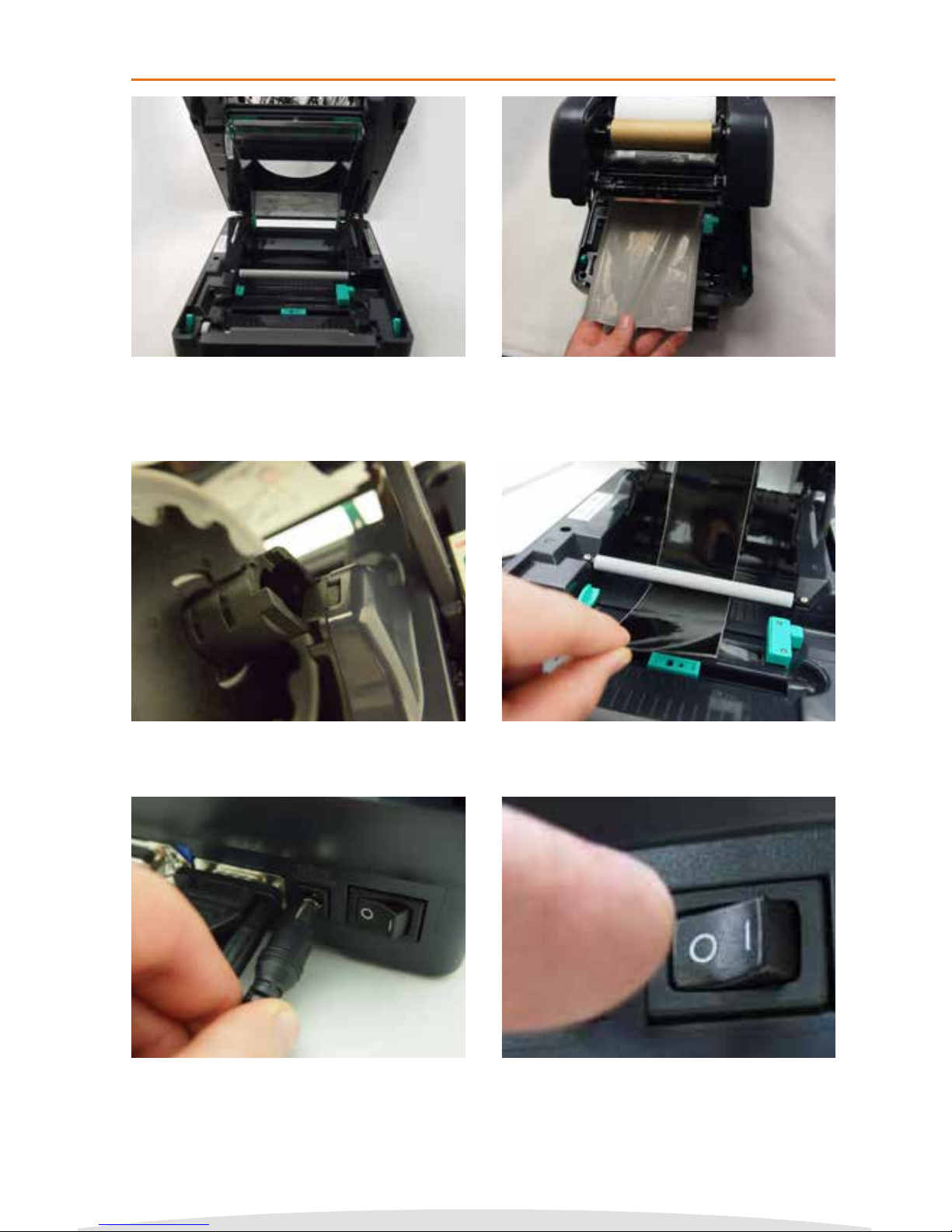
PRINTER MUST BE TURNED OFF!
1. Open printer lid by pressing the green tabs on each
side located toward the front of the printer.
2. Slide ink roll onto spindle and set in rear hub. Insert
second spindle into empty cardboard core and set in
front hub. Pass ink ribbon under the ink roll carriage
and print head. Attach ink ribbon to the empty core
and take up any slack before closing cover.
3. Slide new media onto mount. 4. Feed media, face up, under the white Teon bar
through the cutter slot. Adjust the green media
guides to t the width of the vinyl.
5. With the printer powered o, plug the keyboard and
power cord into the rear of the printer.
6. Plug the power cord into a properly grounded AC
outlet.
VnM®4 SignMaker Quickstart
NOTE: Always have the VnM printer cover closed when powering on.
Copyright © 2016 Cobra Systems, Inc. All rights reserved
4
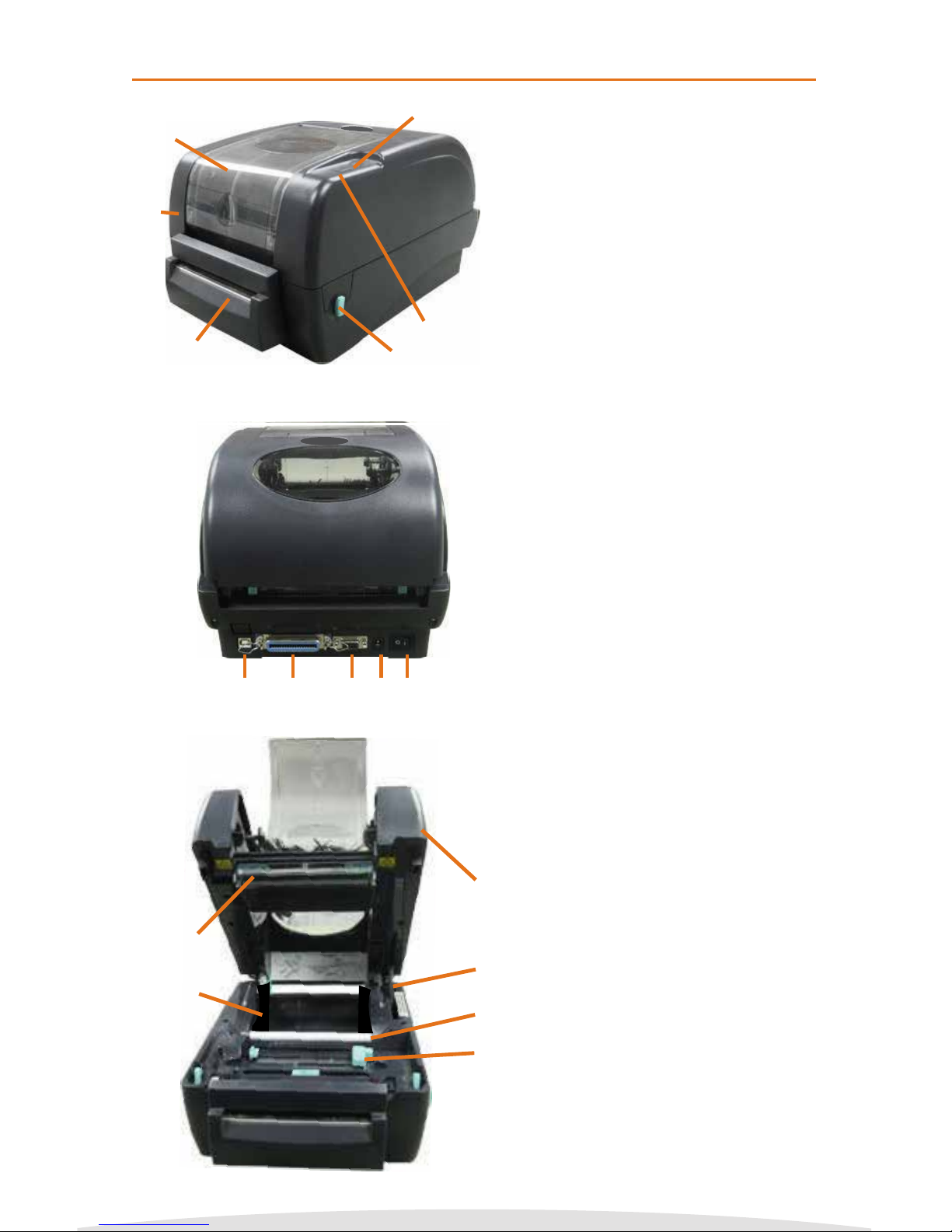
VnM4 SignMaker Top View
1. Ribbon access cover
2. LED indicator
3. Feed button
4. Printer top cover
5. Top cover latch
6. Cutter
VnM4 SignMaker Rear View
7. USB port
8. Parallel port
9. Keyboard connection (RS-232 DB-9)
10. Power receptacle
11. Power switch
VnM4 SignMaker Interior View
12. Top cover
13. Top cover support
14. Centering guides
15. Print head
16. Spindle slot
17. White Teon bar
1
2
3
4
5
6
12
13
14
15
16
17
7 8 9 10 11
VnM®4 SignMaker Overview
Copyright © 2016 Cobra Systems, Inc. All rights reserved
5
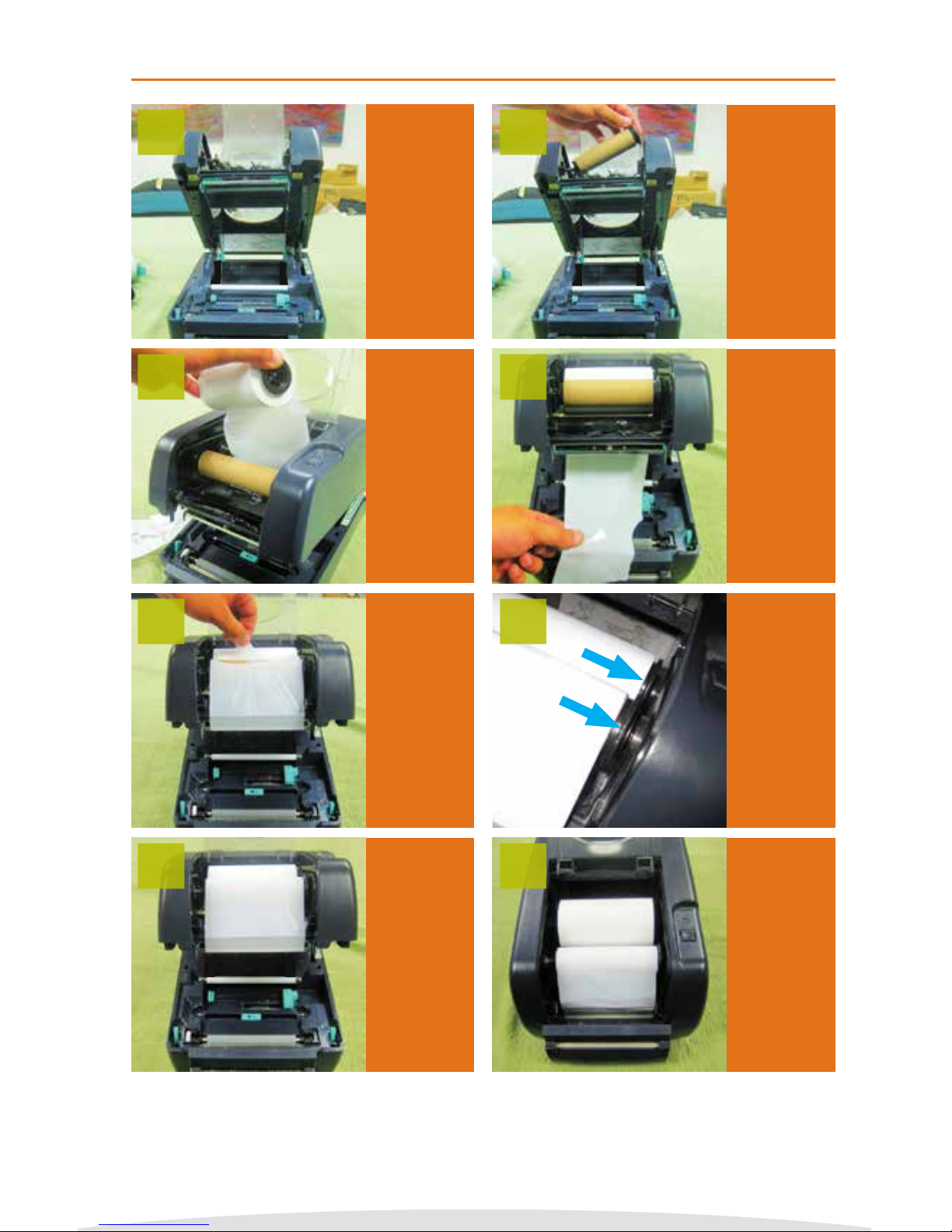
Always turn
o printer
when
changing
Ink Rolls!
Open the
ribbon
access cover.
Load front
ink spindle
with an
empty take-
up core.
1 2
Pull ink from
rear to front
going under
the print
head and up
to the empty
take-up core.
Make sure
ink spindles
are as shown.
NOTE
: Larger
circular end
on the right
side.
Close cover,
you’re ready
to load Label
Media.
Load rear
ink spindle
with the
new ink
roll.
Tape the
ink to empty
take-up
core.
Wind the
front ink
spindle to
take up the
slack, making
sure there
are no
wrinkles in
the ink.
3
5
7
4
6
8
NOTE: Always have the VnM printer cover closed when powering on.
Loading VnM®4 Ink Roll
Copyright © 2016 Cobra Systems, Inc. All rights reserved
6
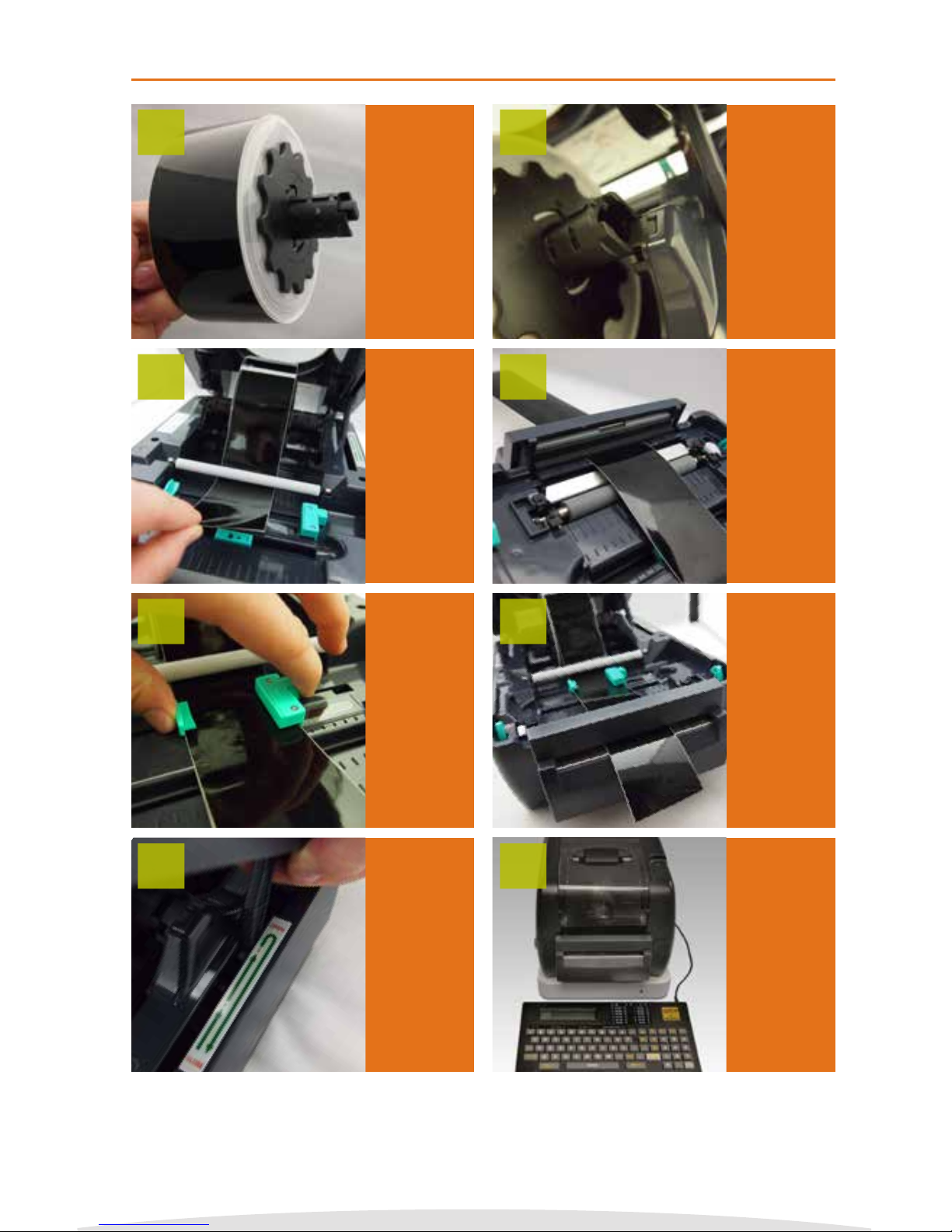
Loading VnM®4 Media
Always turn
o printer
when
changing
Media
Rolls! Use
only VnM®4
Media.
Insert the
VnM®4
media roll
into the
printer’s
spindle
mount.
Pull media
through
cutter.
Pull a short
piece of
media
through
and past the
cutter.
Turn printer
on by
ipping
the power
switch
located on
the back.
You’re ready
to start
printing!
Pull media
under the
white roller.
Adjust
guides to t
the Media.
Lift lid to
unlock hinge.
Once closed
push down
to lock cover.
NOTE: You
should hear
a clicking
sound.
1
3
5
7
2
4
6
8
NOTE: Handle media on the sides to prevent ngerprints on Vinyl.
Copyright © 2016 Cobra Systems, Inc. All rights reserved
7
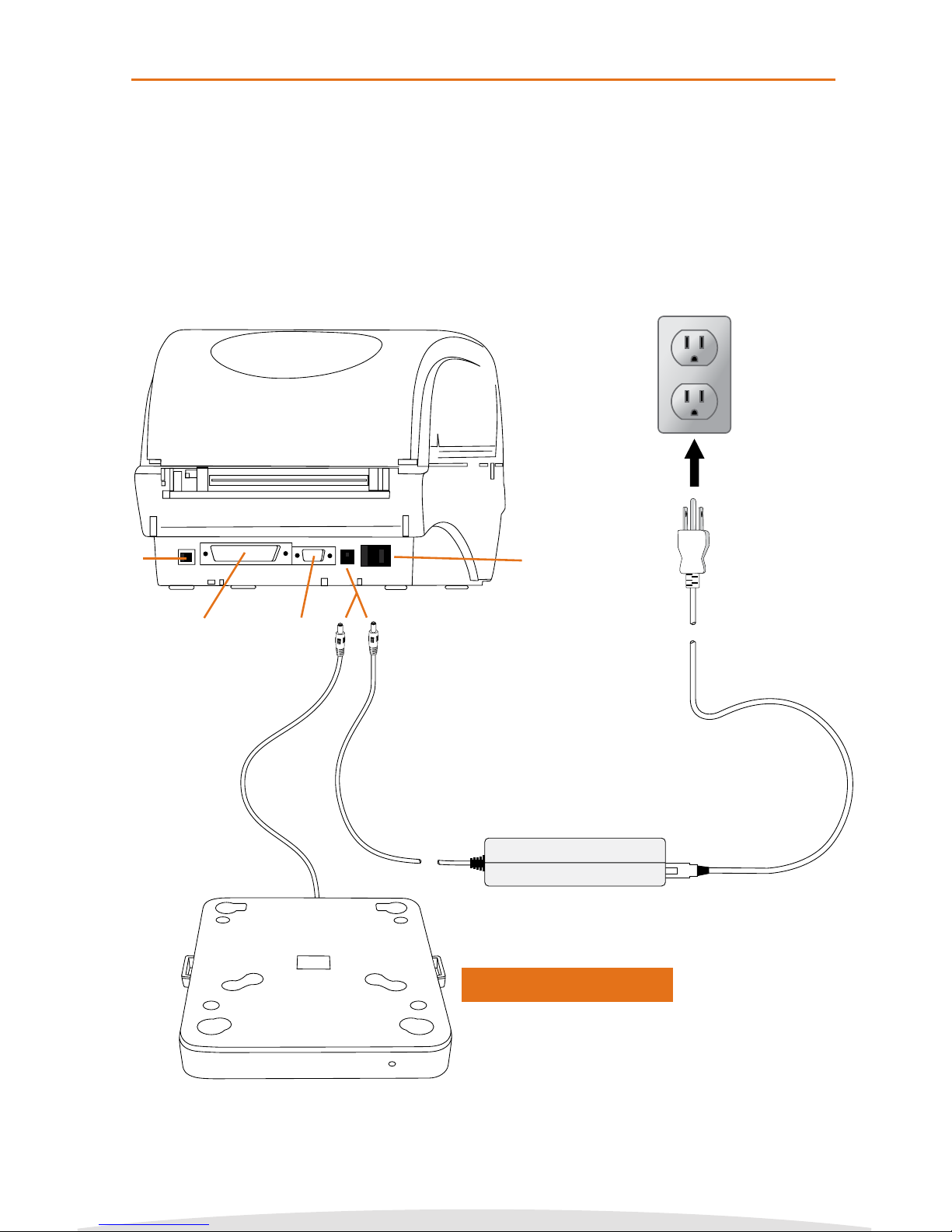
Connecting VnM®4 Keypad and Power Up
1. Place printer on a at, secure surface.
2. Make sure power switch is OFF.
3. Connect VnM4 Keypad to the VnM4 SignMaker RS-232 serial port.
4. Plug power supply into rear of the printer; plug power cord into a
properly grounded outlet.
VnM®4 SignMaker Setup
Power On/O Plug to Outlet
Power Supply
Power Cables
RS232
Parallel Port
USB
Optional Battery Pack

Copyright © 2016 Cobra Systems, Inc. All rights reserved
8
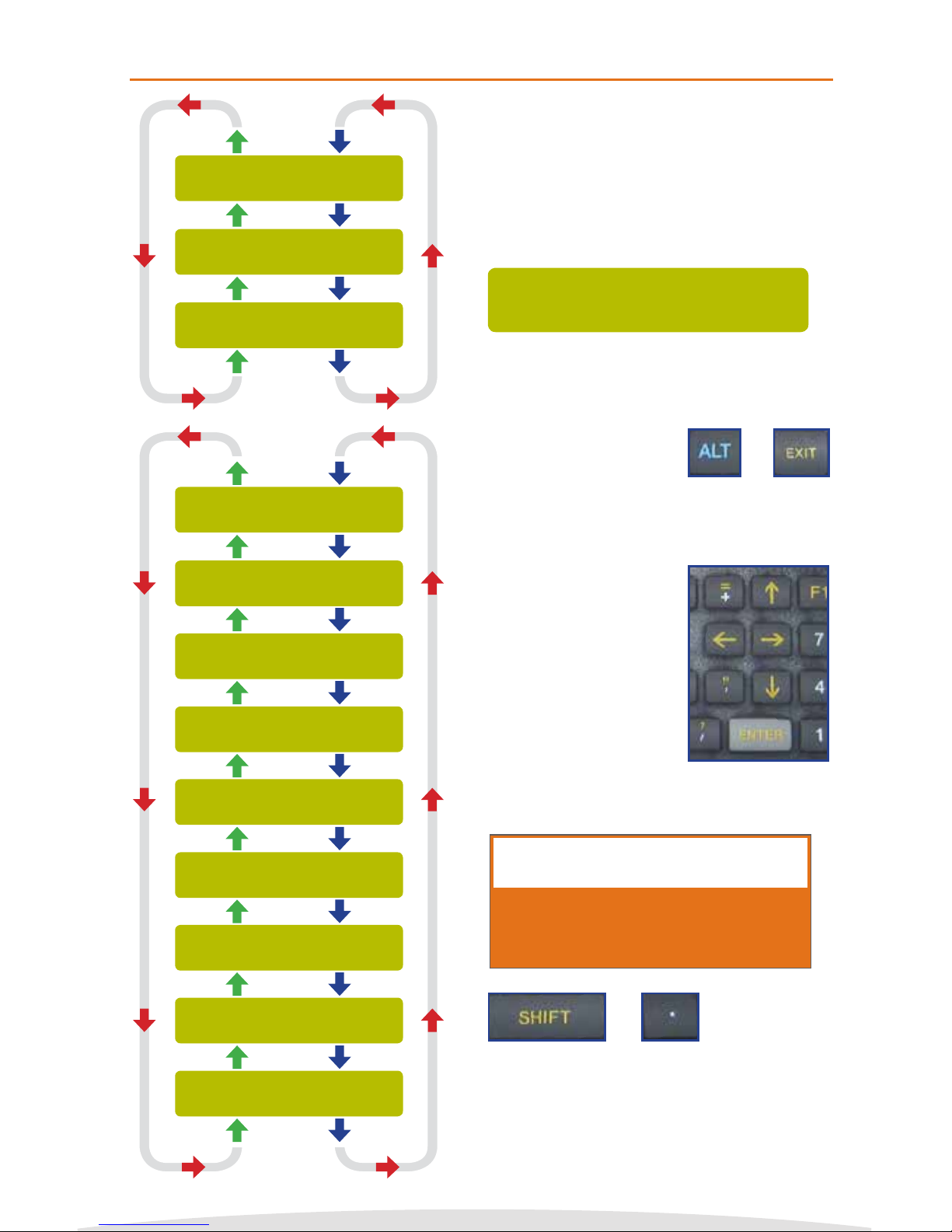
To change print settings, including font, print speed or density, make sure you are on the
main menu; press and hold the ALT + EXIT keys at the same time.
4. Enter the Printer speed and press ENTER.
Recommended at 2.
5. Enter the print density and press ENTER.
Recommended density based on the ink
color being used:
Black: 3-5, White: 10-13
Blue: 1-3, Green: 1-3, Red: 1-3
SELECT MEDIA WIDTH:
Press 1,2,3, or 4
A) To Change Print Settings
1. This should be the rst screen you see.
VNM PRINT SETTINGS
Press ENTER
2. Press the DOWN arrow key until you see
VNM PRINT SETTINGS and press ENTER.
VNM MANUAL SETTINGS
Press ENTER
3. To manually change the print speed, print
density, and/or cutter settings, press
ENTER on VNM MANUAL SETTINGS.
ENTER DENSITY:
5
ENTER SPEED:
2
SELECT MEDIA WIDTH:
Press 1,2,3, or 4
B) To Change Font Settings
1. This should be the rst screen you see.
SELECT FONT/SYMBOLS
Press ENTER
2. Press the UP arrow key until you see
SELECT FONT/SYMBOLS and press ENTER.
CHOOSE FONT/SYMBOLS:
BOLD
3. Using the up and down arrows on the
keyboard, locate your desired font and
press ENTER. To get back to the main
menu after you have selected your font,
hold down ALT and EXIT.
CHOOSE FONT/SYMBOLS:
ITALIC
CHOOSE FONT/SYMBOLS:
NORMAL
CHOOSE FONT/SYMBOLS:
PIPE MARKER
CHOOSE FONT/SYMBOLS:
UTILITY
CHOOSE FONT/SYMBOLS:
SYMBOLS2
CHOOSE FONT/SYMBOLS:
SYMBOLS1
CHOOSE FONT/SYMBOLS:
SYMBOLS3
VnM®4 Print and Font Settings
6. Select your printer cutter option.
Press 1 for On, Press 2 for O
ENTER DENSITY:
5
7. To get back to the Main Screen, use the
UP arrow or hold down ALT + EXIT.
SET CUTTER:
(1)ON (2)OFF
NOTE: See pages 19 - 21 for fonts and symbols.
Copyright © 2016 Cobra Systems, Inc. All rights reserved
FORMATTED SIGNS
Press ENTER
HOW TO PRINT
QUOTATIONS
VnM4 Tips
SELECT MEDIA WIDTH:
Press 1,2,3, or 4
SELECT FONT/SYMBOLS
Press ENTER
VNM PRINT SETTINGS
Press ENTER
+
+
SELECT MEDIA WIDTH:
Press 1,2,3, or 4
Use the UP and DOWN
arrow keys on the VnM®4
Keypad to navigate
through the templates.
Press the ENTER key to
select your template.
“SELECT MEDIA WIDTH”is the Main Menu
when powering on the VnM 4 SignMaker,
and when pressing the ALT + EXIT keys.
To begin printing, select the size of media
that is loaded in the printer.
The VnM®4 keypad navigation tree on the
left displays the ow and order of all the
available options/templates.
Detailed information about each template
starts on page 10.
If an entry error has
been made, press the
EXIT key and re-enter
the information.
In order to print quotations (“) or inch and
foot marks, press the SHIFT key + PERIOD
key (on the numeric keypad). Do not use
the keypad QUOTATION key, you will have
blank text.
1 to 5 LINE HORIZONTAL
Press ENTER
CUSTOM 1 LINE
Press ENTER
OSHA TEMPLATES
Press ENTER
GHS TEMPLATE
Press ENTER
LOCK OUT TEMPLATES
Press ENTER
PIPE MARKING TEMPLATES
Press ENTER
BARCODE TEMPLATES
Press ENTER
1 LINE VERTICAL
Press ENTER
VnM®4 SignMaker Prompt: MAIN MENU
VnM®4 Keypad Navigation
9
Indice
Altri manuali Cobra Systems Etichettatrice


