Cobra 29 LX LE Istruzioni operative

Contents
Features .........................................................................................................1
The CB Story .................................................................................................A1
FCC Regulations
FCC Warnings
Included Accessories
Controls & Indicators ................................................................................A2
Our Thanks to You .....................................................................................A3
Customer Support
Installation
Location ....................................................................................................2
Mounting and Connection ................................................................2
Antennas
CB Antenna ..............................................................................................6
Marine Installation ................................................................................6
Ignition Noise Interference....................................................................7
Operating Your 29 LX LE
Turning On Your CB .............................................................................. 8
Setting Channel Selector .................................................................... 9
Calibrate For SWR (Standing Wave Ratio) .................................... 10
To Receive ................................................................................................ 12
Selecting a Channel .............................................................................. 13
S-Meter ...................................................................................................... 13
To Transmit .............................................................................................. 14
Setting Dynamike® ............................................................................... 15
Menu Mode ............................................................................................. 16
Radio Check Mode ................................................................................ 17
Setting Display Color Mode ............................................................... 18
Setting Brightness Mode .................................................................... 19
Setting Contrast Mode ........................................................................ 19
Weather Information ............................................................................ 20
Weather Channels ................................................................................. 21
Weather Alert Mode ............................................................................. 22
Setting Weather Alert Scan................................................................ 22
Setting Weather Auto Scan ............................................................... 22
Key Tones Mode .................................................................................... 23
Software version/Factory Settings .................................................. 23
NB-ANL/Off (Noise Blanker/Automatic.......................................... 24
Noise Limiter Switch)
RF Gain Control ......................................................................................24
Program Memory Channels ............................................................... 25
Scan/Memory Scan ............................................................................... 25
Scan CB Channels .................................................................................. 29
Scan Memory Channels ...................................................................... 26
Dimmer Control ..................................................................................... 26
Setting Squelch ...................................................................................... 26
S/RF Meter ................................................................................................ 28
External Speaker .................................................................................... 29
PA (Public Address) ............................................................................... 30
Home And Office Set-Up .................................................................... 32
Temporary Mobile Set-Up .................................................................. 33
How Your CB Can Serve You .................................................................34
A Few Rules You Should Know ........................................................34
Channel 9 Emergency Messages .....................................................34
CB 10 Codes .............................................................................................36
Frequency Ranges .....................................................................................38
29 LX LE Specifications ............................................................................39
Warranty Information ..............................................................................40
Optional Accessories ................................................................................41
Optional Accessories Order Info .........................................................42
If You Need Service/Trademark Info ................................Back Cover
Features of This Product
• Selectable 4-Color LCD Display
• 10 Weather Channels
• Weather Scan
• Emergency Weather Alert
• 40 CB Radio Channels
• 40 Channel Scan
• Memory Channels
• Channel Frequency Read-Out
• Radio Check Diagnostic
• Heavy-Duty Dynamic
Microphone
• Full 4 Watts AM RF Power Output
• SWR Calibration Meter
• Instant Channel 19 and 9
• Front Panel 4-Pin Microphone
Connector
• Switchable Automatic Noise
Limiter & Noise Blanker
• Adjustable Dynamike Boost
• Tactile Controls
• 9 Ft Mic Cord
• Programmable Dimmer Control
• RF Gain
1
How to Use Your Cobra 29 LX LE

Installation
Location
2
Mounting and
Connection
Mounting and Connection
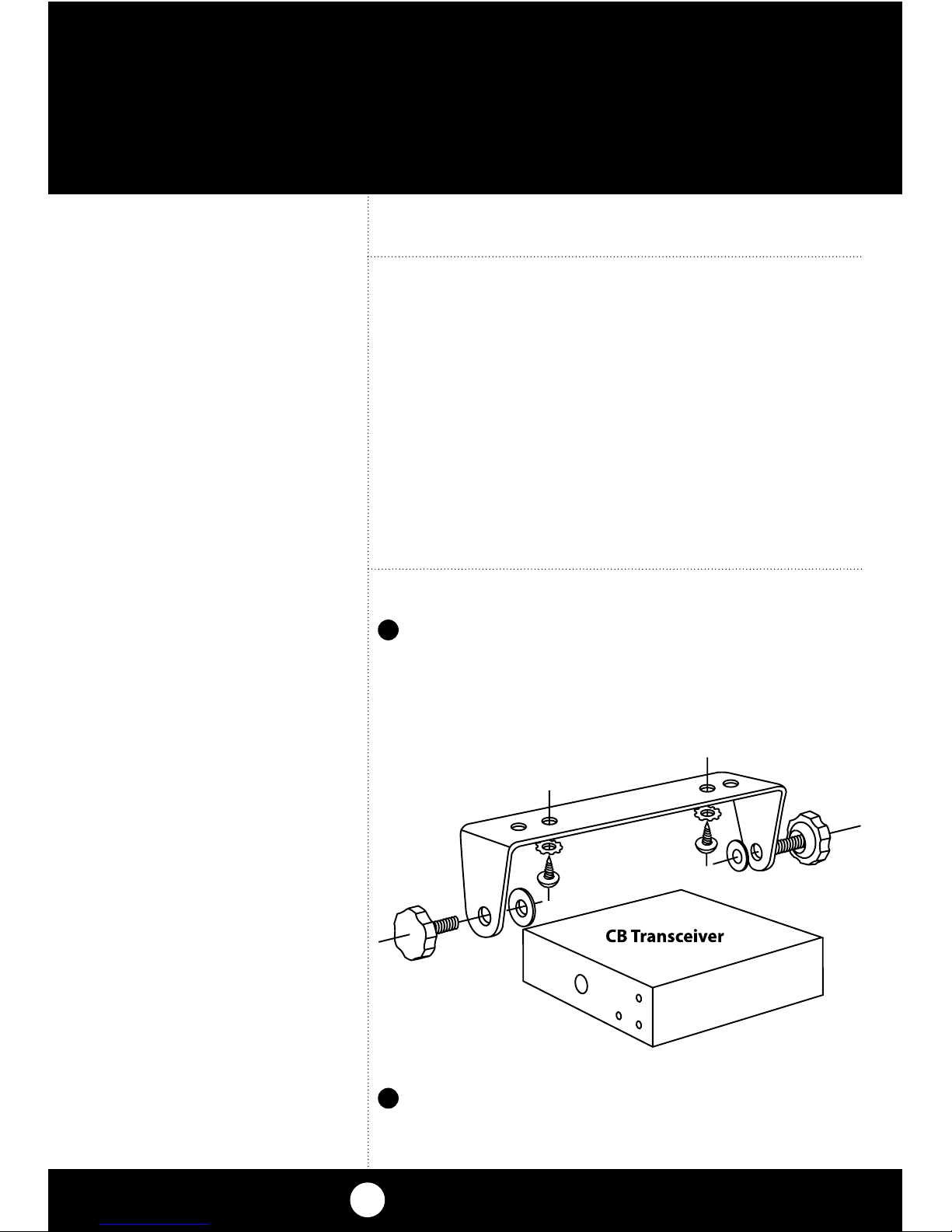
Hold the radio with the mounting bracket in
the exact desired location. If there is no inter-
ference, remove the bracket and use it as a
template to mark the location for the mount-
ing screws.
Location
Plan location of transceiver and microphone
bracket before starting the installation.
Select a location that is convenient for operation,
yet does not interfere with the driver or passenger.
The transceiver is usually mounted to the under-
side of the dash with the microphone bracket
beside it.
Note
The transceiver is held in the
universal mounting bracket by
two thumbscrews which allow
for adjustment at a convenient
angle.
The bracket includes two self-
tapping screws and star wash-
ers. The mounting must be
mechanically strong, conve-
niently located.
Drill the holes and secure the bracket.
2
1

Installation
3
continued
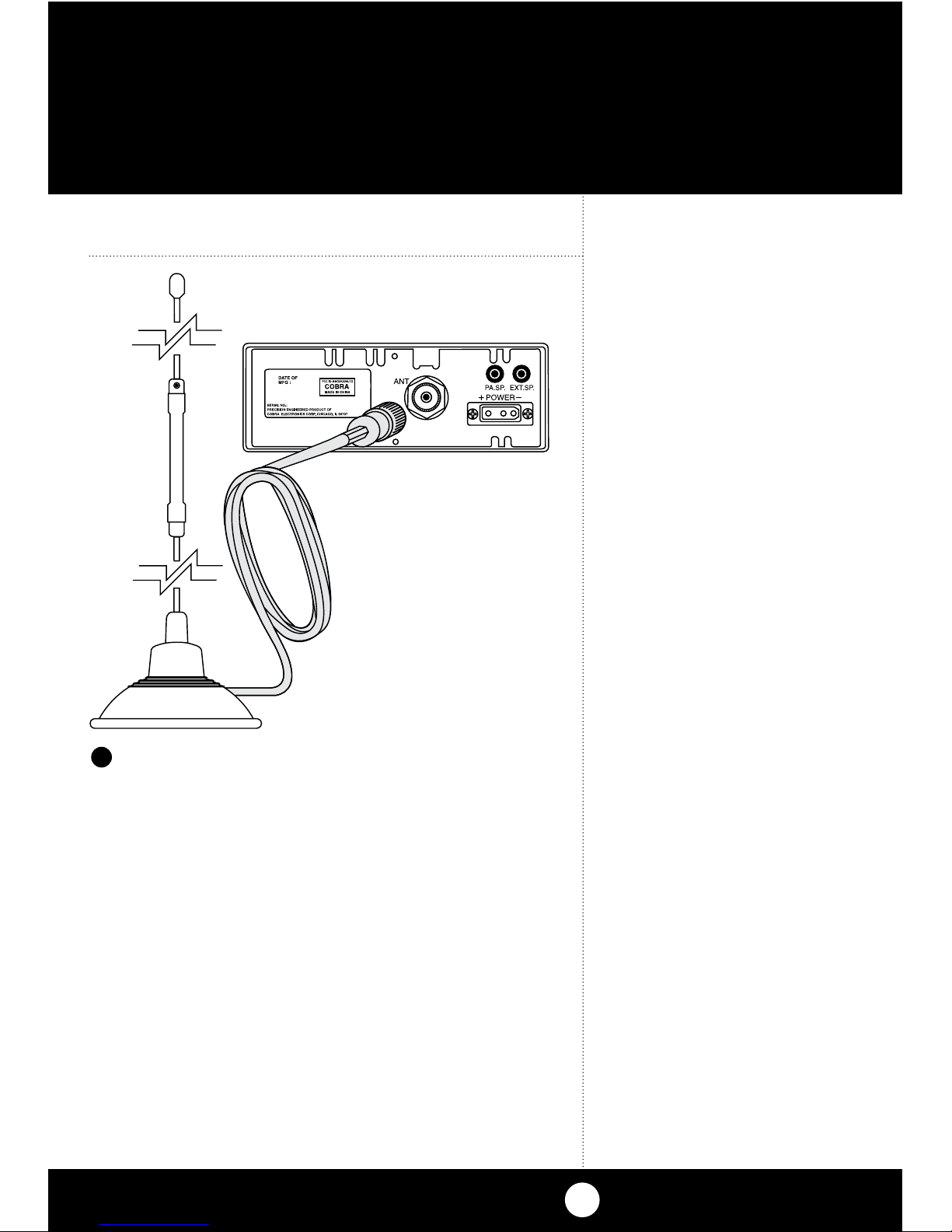
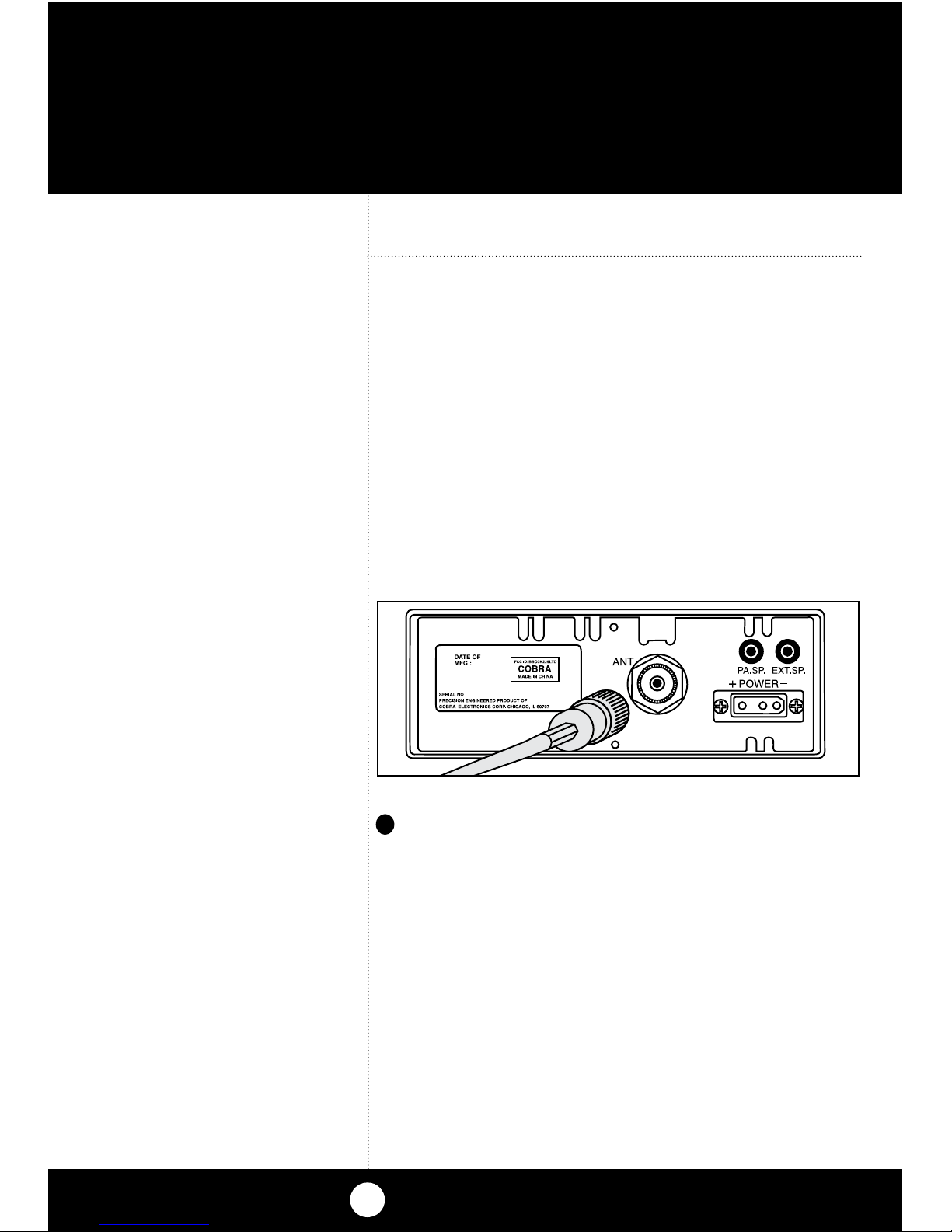
Connect the antenna cable plug to the recep-
tacle marked “ANT” on the back of the unit.
3

Installation
4
Note
Before installing the CB radio,
visually check the vehicle’s
battery connection to deter-
mine which terminal, positive
or negative, is grounded (pos-
itive is the larger of the two)
to the engine block (or chas-
sis). A negatively grounded
vehicle has its negative lead
grounded to the chassis.
Note
Connecting to an accessory fuse
prevents the unit from being left
on accidentally, and also per-
mits operating the unit without
running the engine.
Note
In positive ground vehicles the
red wire goes to the chassis and
the black wire is connected to
the ignition switch.
Note
When connected to an acces-
sory fuse, unit will self test
the emergency weather alert
automatically when ignition
is turned on. Turns itself on & off.
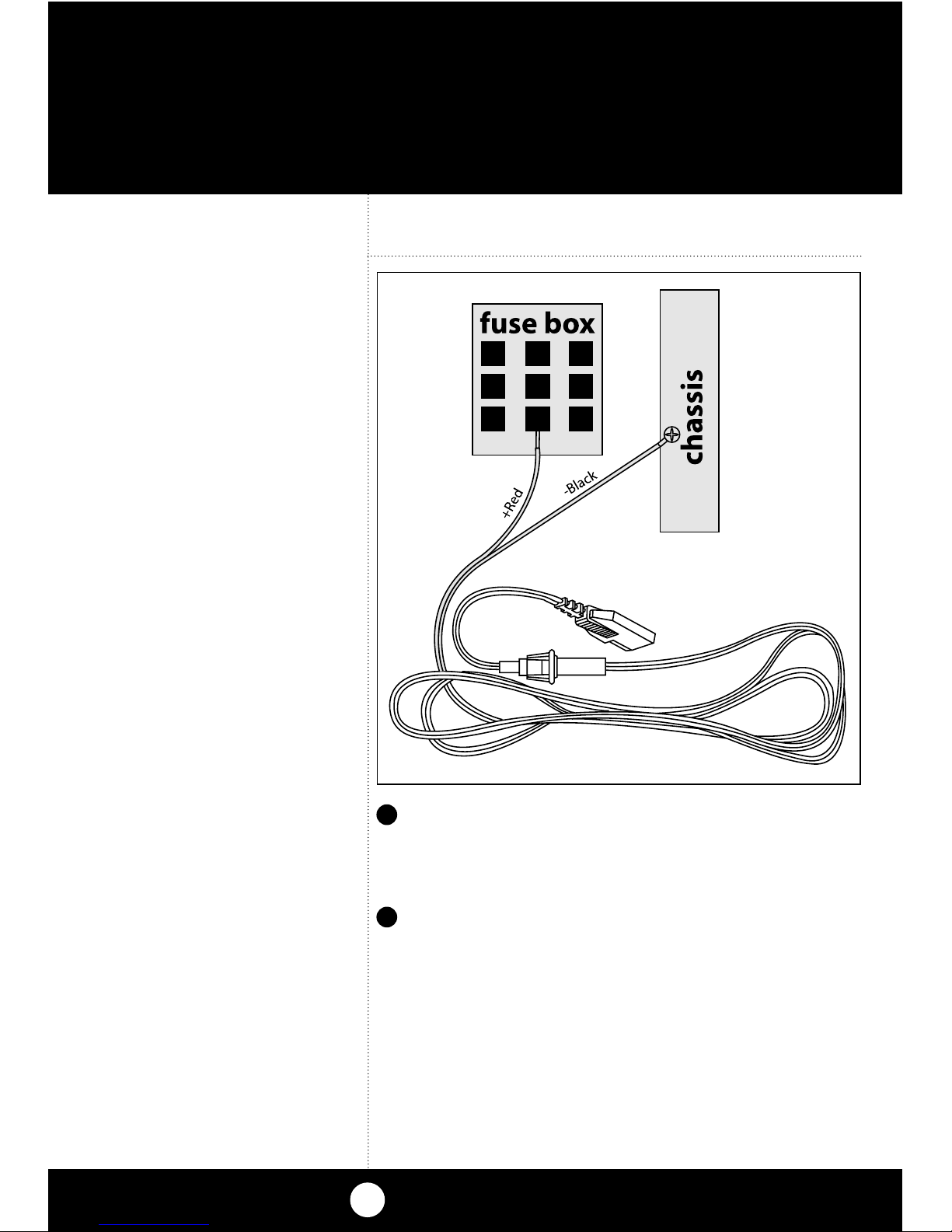
In a negative grounded vehicle, connect the
red lead of the DC power cord to an accessory
12 volt fuse.
Connect the black lead to the negative side
of the vehicle. This is usually the chassis. Any
convenient location with a good electrical
contact (remove paint) may be used.
4
5

5
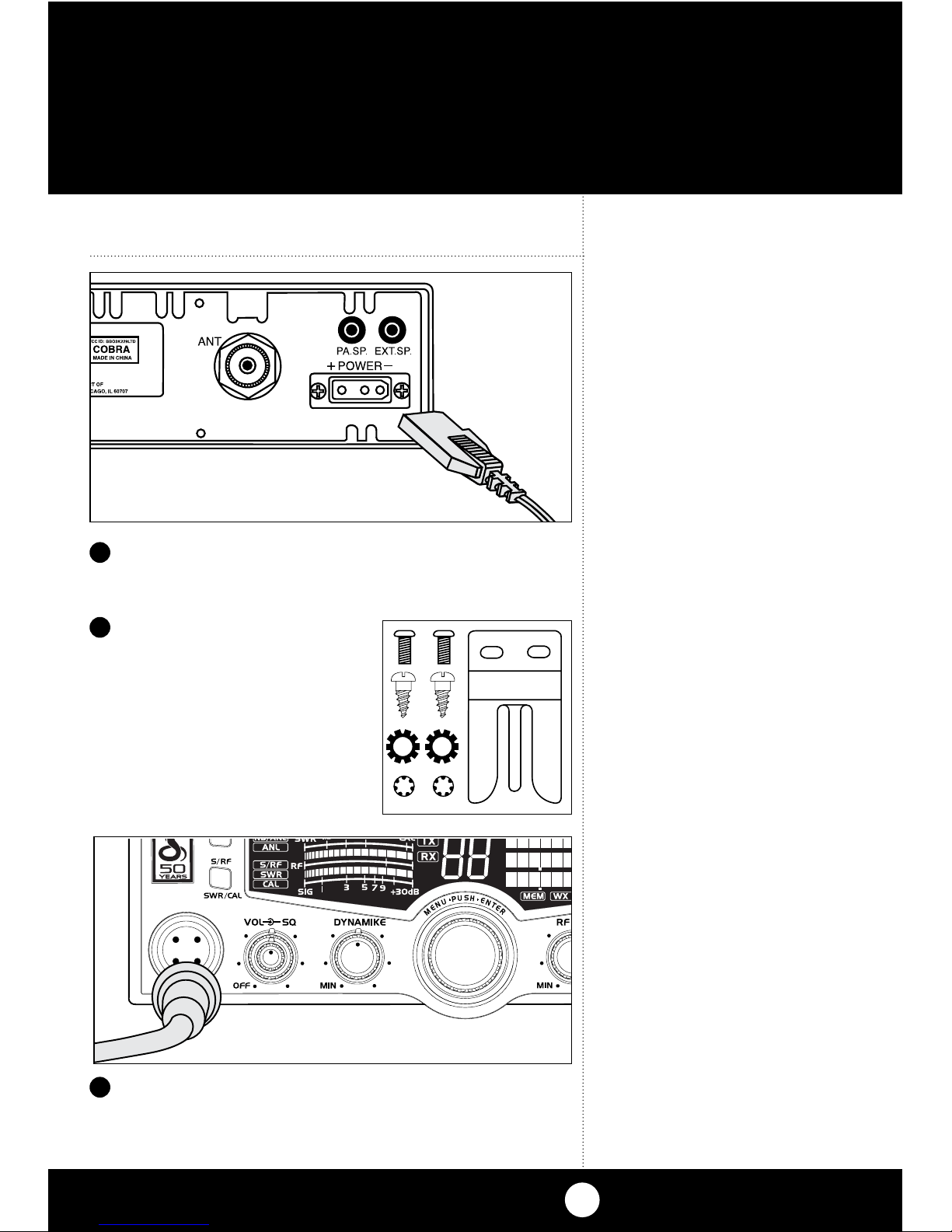
Plug power cable into back of unit marked
“Power”. Be sure to observe polarity markings.
Mount the microphone
bracket on either side
of the unit (driver’s left)
using two screws sup-
plied. Bracket should be
placed under the dash
so microphone is readily
accessible.
6
7
Attach the 4-pin microphone cable to
receptacle on front of unit and install unit
in bracket securely.
8
Installation
Note
If microphone is not
connected, audio will not
be heard at speaker.

Antennas
CB Antenna
Since the maximum allowable power output of
the transmitter is limited by the FCC, the antenna
is critical in affecting transmission distance. Only a
properly matched antenna system will allow maxi-
mum power output. Cobra loaded type antenna
models are highly recommended for most instal-
lations. For models with Weather Feature (WX),
a Dual Band (Center Load/Base Load) antenna
is recommended. Consult your Cobra dealer for
further details, or call 773.889.3087 and speak to a
Cobra representative.
Marine Installation
The transceiver will not operate at maximum
efficiency in a boat without a ground plate,
(unless it has a steel hull). Before attempting
installation , consult your dealer for information
regarding an adequate grounding system and
prevention of electrolysis between fittings in the
hull and water.
CB Antenna
Note
For optimum performance in
passenger cars the ideal anten-
na location is on the center of
the roof. Second choice is on the
center of the trunk.
Note
Because many newer trucks
feature fiberglass door skins,
the outside mirror must be
grounded to the chassis via a
ground strap, if the antenna is
mounted on the mirror bracket.
Note
3-way Combination Antennas
are also available which allow
operation of all three bands
(AM-FM & CB), using a single
antenna. However, this type
of antenna usually results in
less than normal transmit and
receive range when compared
to a standard-type “Single
Band” CB antenna. Call 773-
889-3087 for further informa-
tion.
6
1
A standard antenna connector is provided
on the transceiver for easy connection.

Ignition Noise Interference
Use of a mobile receiver at low signal levels is
normally limited by the presence of electrical
noise. The primary source of noise in automo-
biles is from the alternator and ignition system.
Typically, when signal level is adequate, the back-
ground noise does not present a serious problem.
Also, when extremely low level signals are being
received, the transceiver may be operated with
the vehicle’s engine turned off. The unit requires
very little current and therefore will not signifi-
cantly discharge the vehicle’s battery.
Even though the Cobra 29 LX LE has an auto-
matic noise limiter, in some installations ignition
interference may be high enough to make good
communications impossible. Many possibilities
exist and variations between vehicles require
different solutions. Consult your Cobra dealer or
a 2-way radio technician for help in locating the
source of a severe noise.
7

Press the CB/PA/WX button to change modes.
Operation
Turning On
8
Turning On
Make sure the power cord, antenna and micro-
phone are connected to their proper connectors
before starting.
1
SWR/CAL
NB/ANL
VOL SQ DYNAMIKE R
F GAIN DELTA TUNE T BACK SWR
CAL
OFF MIN MIN OFF
MAX
ESC
MEM SCAN
S/RF
M
E
N
U
P
U
S
H
E
N
T
E
R
SIG
RF
+30dB
1
1.5 23CAL
3579
SWR TX
RX
NB/ANL
MEM WX !
ANL
S/RF
SWR
CAL
CH 9/
19
CB/WX /
DIM
SCAN
PA
2
Rotate the On/Off Volume knob clockwise to
turn unit on and adjust to a normal listening
level.

Operation
9
Setting Channel
Selector
Setting Channel Selector
Select one of forty channels and adjust
volume. The selected channel (1 through
40) will be indicated by the readout directly
above the channel selector knob
3
SWR/CAL
NB/ANL
VOL SQ DYNAMIKE RF G
A
OFF MIN MIN
S/RF
M
E
N
U
P
U
S
H
E
N
T
E
R
SIG
RF
+30dB
1
1.5 23CAL
3579
SWR TX
RX
NB/ANL
MEM WX !
ANL
S/RF
SWR
CAL Note
Press CB/WX/PA to select CB,
weather channels or PA (public
address) modes.

Operation
Calibrate For
SWR (Standing
Wave Ratio)
10
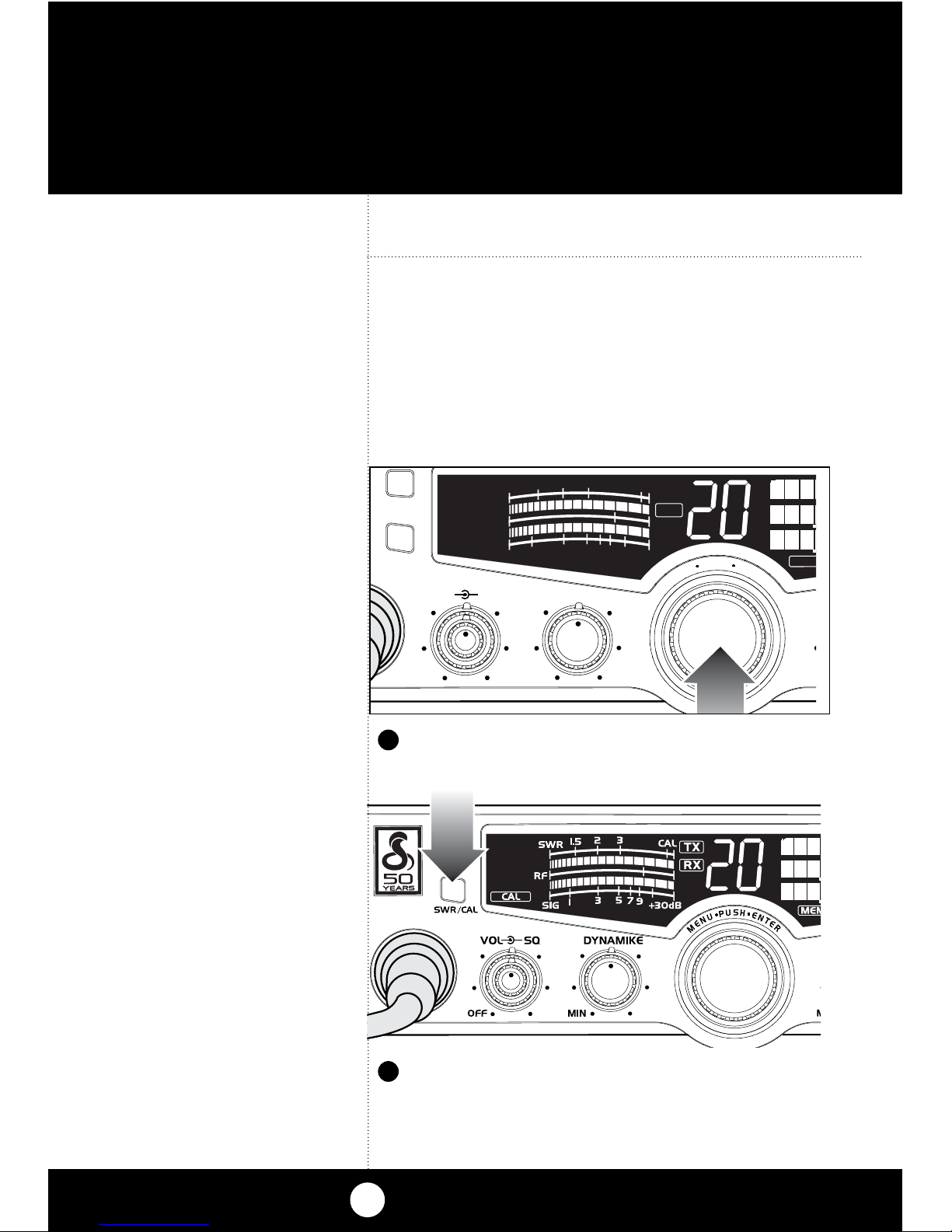
Press SWR/CAL button to select CAL.
2
1
Calibrate for SWR (Standing Wave Ratio)
SWR calibration is done to properly adjust the
length of the antenna and to monitor the quality
of the coaxial cable and all RF connections.
This calibration is critical in order to achieve opti-
mum performance.
Select channel 20.
SWR/CAL
NB/ANL
VOL SQ DYNAMIKE
OFF MIN
M
S/RF
M
E
N
U
P
U
S
H
E
N
T
E
R
SIG
RF
+30dB
1
1.5 23CAL
3579
SWR
RX
ME
M
Altri manuali per 29 LX LE
8
Indice
Altri manuali Cobra Ricevitore per auto