
Coby Vitruvian CSMP175 Manuale utente

EN Vitruvian™ Sound System for iPod® & iPhone®
Instruction Manual ...........................................................Page 2
ES Système Sonore Vitruvian™ pour iPod® & iPhone®
Manual de Instrucciones............................................... Pagina 22
FR Système Sonore Vitruvian™ pour iPod® & iPhone®
Manuel D’instruction ...................................................... Page 42
Please read carefully before use • Léa el manual antes de usar • Veuillez lire ce livret avant utilisation
For series /
Para la serie /
Pour la série
CSMP175

Page 2 Table Of Contents
English
Table of ContentsÂ
THANK YOU.....................................................................................................................................4
Package Contents..........................................................................................................................4
Features............................................................................................................................................4
CSMP175 AT A GLANCE.................................................................................................................5
Main Unit..........................................................................................................................................5
Remote Control...............................................................................................................................7
About the Remote Control Battery....................................................................................9
GETTING STARTED.........................................................................................................................10
Connections..................................................................................................................................10
Connecting Power.............................................................................................................10
Connecting an iPod®or iPhone®....................................................................................10
Connecting an Auxiliary Device......................................................................................11
Basic Controls................................................................................................................................11
USING IPOD®/IPHONE®MODE.....................................................................................................12
Controls ..........................................................................................................................................12
Browsing iPod/iPhone Menus with the Remote..............................................................13
Rotating the Dock.........................................................................................................................13

English
Table Of Contents Page 3
USING AUX MODE........................................................................................................................14
Controls ..........................................................................................................................................14
SPECIFICATIONS...........................................................................................................................15
SUPPORT........................................................................................................................................16
SAFETY & REGULATORY STATEMENTS........................................................................................... 17

Page 4 Thank You
English
Thank YouÂ
Thank you for purchasing a Coby® CSMP175 Vitruvian™ Sound System for iPod® and iPhone®. Please
read this manual carefully before using this device and retain it for future reference.
Package Contents
CSMP175
Power adapter
Remote control
3.5mm auxiliary cable
Instruction manual
If any of the above items are missing, please
contact the dealer from whom you purchased this
product.
This package may contain plastic bags
or other materials that pose a hazard
to children. Be sure to safely dispose
of all packing materials after opening.
Features
Premium sound system designed for iPod®& iPhone®
Built-in Universal dock charges and playsyour iPod/iPhone
One-touch dock rotation lets you browsewith Cover Flow or watch movies in land-
scape mode
Bass Boost circuitry for low end frequencyenhancement
Supports iPod shufe and other portable players with a 3.5mm audio connection
Adjustable ambient lighting
English
Csmp175 At A Glance Page 5
Csmp175 At A Glance Page 5
English
CSMP175 at a GlanceÂ
Main Unit
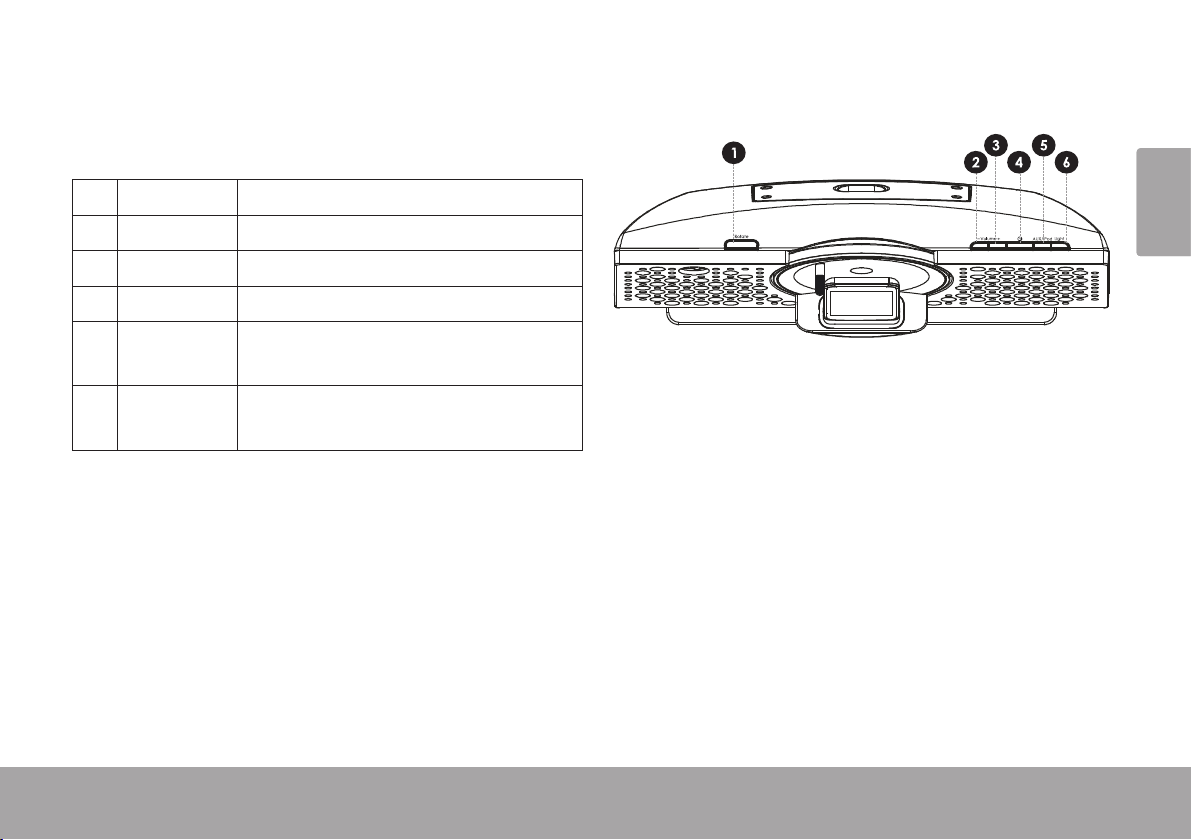
1[Rotate] Press to rotate the dock.
2 [Volume –] Press to decrease the volume level.
3 [Volume +] Press to increase the volume level
4[Power] Press to turn the unit on or off.
5[AUX/iPod] Press to switch between AUX and
iPod modes.
6[Light] Press to increase or decrease the
intensity of the background light.

Page 6 Csmp175 At A Glance
English
7 AUX IN 3.5mm auxiliary connector. Use a
3.5mm auxiliary cable to connect
portable audio devices with a 3.5mm
headphone output (e.g., iPod shufe,
Coby MP3 players).
8 DC IN Power connector. Use the AC adapter
to connect to an AC 100-240V power
outlet.
9 Universal
Dock Dock for iPod® and iPhone®. Con-
nector for your compatible iPod or
iPhone.

English
Csmp175 At A Glance Page 7
Remote Control
1[POWER] Press to turn the unit on or off.
2[ROTATE] Press to rotate the dock.
3 [LIGHT +] Press to increase the intensity of the
background light.
4 [LIGHT –] Press to decrease the intensity of the
background light.
5[BASS] Press to turn the Bass Boost en-
hancement on or off.
6[LEFT] Press to skip to the previous track.
Hold to scan in reverse quickly
through the current track.
[RIGHT] Press to skip to the next track.
Hold to scan forward quickly through
the current track.
[UP] Use to browse iPod® or iPhone®
menus.
[DOWN]
7[OK] Press to enter an iPod or iPhone
menu selection.

Page 8 Csmp175 At A Glance
English
8[MUTE] Press to disable or enable speaker
output.
9 [VOL +] Press to increase the volume level.
10 [VOL –] Press to decrease the volume level.
11 [AUX/iPod] Press to switch between AUX and
iPod modes.
12 [Play/
Pause] Presstostart or pause iPodoriPhone
playback.
13 [M] Press to access the iPod or iPhone
menu, or to return to a previous
screen.

English
Csmp175 At A Glance Page 9
About the Remote Control Battery
The remote control is powered by one (1)
CR2025-type battery. Before using the remote,
be sure to remove the plastic protective tab from
the battery compartment.
To replace the battery:
Squeeze the tab of the battery compartment1. to the right while drawing the compartment
out.
Remove the battery and replace it with a2. new “CR2025” lithium battery.
Replace the compartment.3.

Page 10 Getting Started
English
Connections
Connecting Power
This unit is powered by an AC adapter.
Connect one end of the included AC adapter
to an AC 100-240V ~50/60Hz mains outlet.
Connect the other end to the DC IN connector
located on the rear of the unit.
Do not connect the power adapter to
a power outlet other than that which is
indicated here or on the label as this
may result in the risk of re or electric
shock.
Do not handle the power plug with wet
hands. Doing so may cause electric
shock.
Connecting an iPod®or iPhone®
If you have a compatible iPod or iPhone,you can play it through the speakers of the
CSMP175.
Compatible iPod/iPhone models are listed in
the Specications section of this manual.
For the latest product information and
specications, please visit the Coby Elec-
tronics website at www.cobyusa.com.
To connect your iPod/iPhone:
If you have a dock adapter cartridge, seat1.
the adapter rmly in the Universal Dock.
Plug your compatible iPod/iPhone into the2. Universal Dock.
Getting StartedÂ
Altri manuali per Vitruvian CSMP175
1
Indice
Lingue:
Altri manuali Coby Impianto stereo

Coby
Coby CX-CD376 - 20 Watts CD Stereo System Manuale utente

Coby
Coby DVD468 - AV System Manuale utente
Coby
Coby CX CX-CD400 Manuale utente

Coby
Coby COBY CX-CD282 Manuale utente

Coby
Coby CX-266 Manuale utente

Coby
Coby DVD468 - AV System Manuale utente

Coby
Coby COBY CX CD377 Manuale utente

Coby
Coby CX-CD425 Manuale utente

Coby
Coby COBY CX-CD379 Manuale utente

Coby
Coby COBY CX-CD375 Manuale utente


