
Comelit Minitouch Manuale utente

User Manual
Programmable thermostat

2
AVVERTENZE
IT Comelit Group S.p.A. declina ogni responsabilità per un utilizzo
improprio degli apparecchi, per modifiche effettuate da altri a qualunque
titolo e scopo, per lʼuso di accessori e materiali non originali.
Attenzione! Al fine di ridurre il rischio di guasti e scosse elettriche:
• Non aprire lʼapparecchio o effettuare personalmente riparazioni. In
caso di necessità richiedere lʼintervento di personale qualificato.
• Non inserire oggetti né versare liquidi allʼinterno del dispositivo.
• Pulire con un panno inumidito con acqua. Evitare Alcool e altri prodotti
aggressivi.
3
IT
INTRODUZIONE
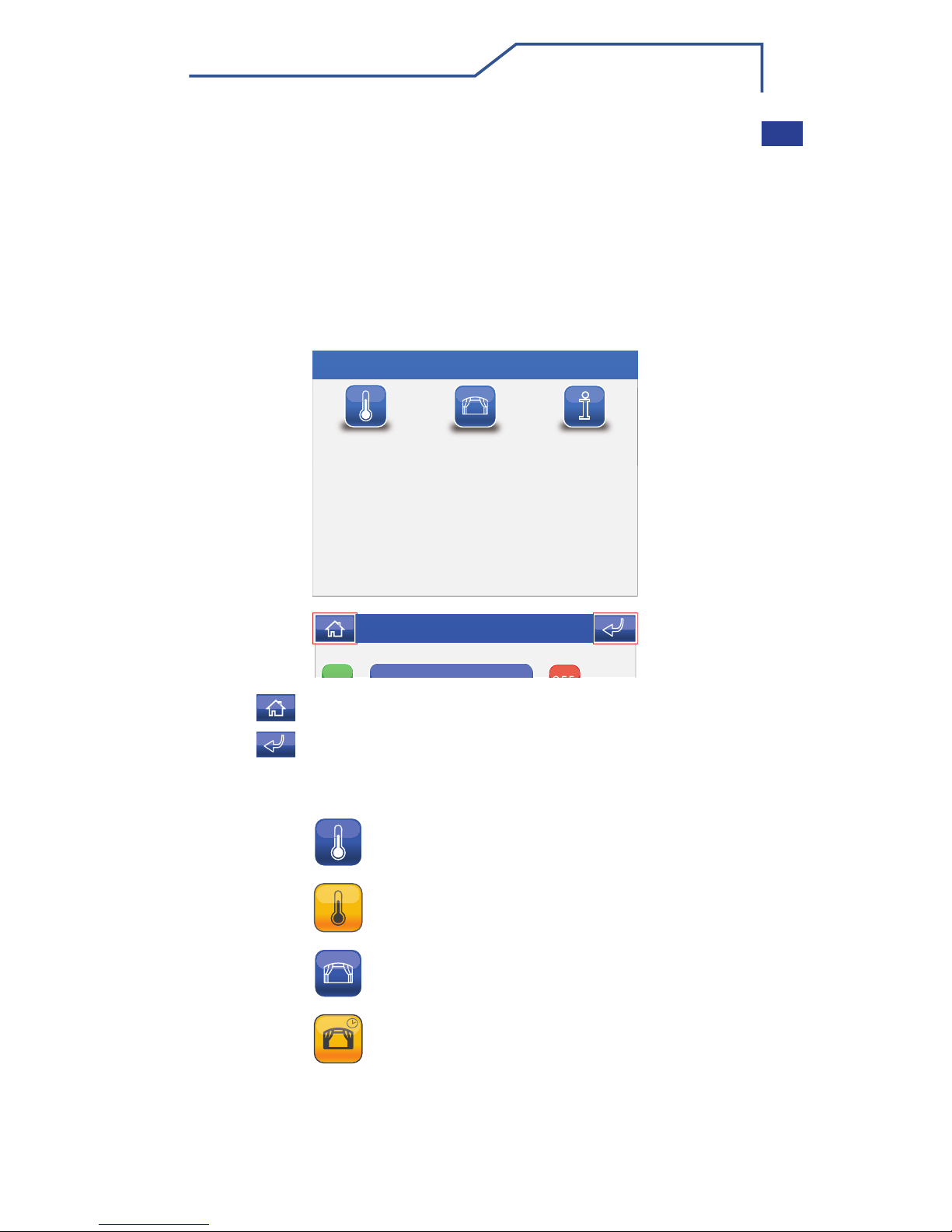
MENU MINITOUCH
LEGENDA ICONE MENU PRINCIPALE
Lun 29/10/12 - 16:07 0W
CLIMA SCENARI SET UP
In questa guida sono contenute le informazioni per poter svolgere le
funzioni base sul Minitouch Cronotermostato. Potete trovare il manuale
utente completo in versione digitale (PDF) sul sito ufficiale www.
comelitgroup.com ricercando “Minitouch Cronotermostato” nel motore di
ricerca.
NOTA GENERALE
Per accedere al menu principale premere lo schermo.
Per navigare attraverso il menu è sufficiente toccare con un dito l’icona
della funzione desiderata.
L’icona permette di tornare immediatamente al menu principale.
L’icona permette di tornare alla schermata precedente.
Video segreteria
ON
ON
OFF
Lun 29/10/12 16:07
Tutti i termostati sono inattivi
Uno o più termostati sono attivi
Nessun scenario schedulato attivo
Uno o più scenari schedulati attivi

4
IT
CLIMA
Per accedere al menu clima, premere l’icona dal menu principale.
Dal menu clima premere l’icona dell’area interessata (Es. Camera 1).
1Aree disponibili.
2 Scorrimento della pagina (presenti solo in caso di più di 4 aree
programmate).
3Area con cronotermostato attivo.
4Temperatura rilevata dal termostato dell’area.
1Area visualizzata.
2 Modalità automatica.
3Modalità manuale.
4 Forzatura manuale.
5Indicatore caldaia / climatizzatore in funzione.
6Temperatura stanza.
7Temperatura impostata attualmente.
8Accensione / spegnimento sistema (spegne / accende il cronotermostato).
9Menu schedulazione clima.
10 Selezione modalità estate / inverno.
DESCRIZIONE MENU CLIMA
CONTROLLO CLIMA
Camera 1
Camera 1
Soggiorno
Bagno
1
2
Lun 29/10/12 - 16:07 0W
20°
18°
19°
4
Camera 223°
3
Camera 1
M
AA
1
10 2
3
9
4
8
Lun 29/10/12 - 16:07 0W
20°
22,5°
765
ON
Estate: raffrescamento
Inverno: riscaldamento
5
IT
SCENARI
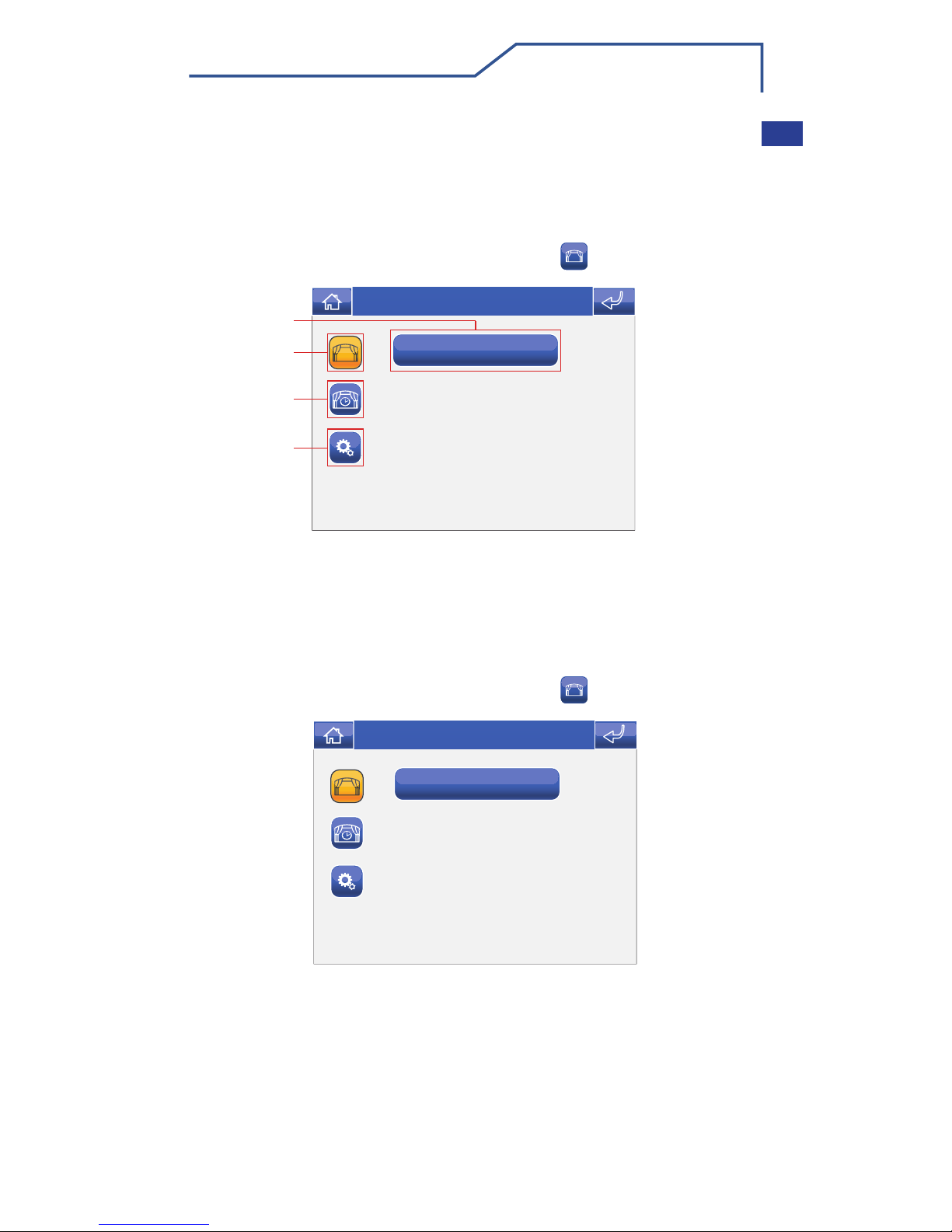
Il sistema Minitouch cronotermostato gestisce 2 tipi di scenari.
· One shot: devono essere attivati manualmente e svolgono la funzione
per cui sono stati programmati ogni volta che vengono attivati.
· Schedulati: si attivano automaticamente rispettando una
programmazione a tempo.
Per accedere al menu scenari, premere l’icona dal menu principale.
Per accedere al menu scenari, premere l’icona dal menu principale.
1Scenari disponibili.
2 Menu scenari one shot.
3 Menu scenari schedulati.
4 Menu impostazioni scenari.
DESCRIZIONE MENU SCENARI
ATTIVAZIONE SCENARIO
Scenario 1
Scenario 1
1
2
3
4
Lun 29/10/12 - 16:07 0W
Scenario 1
Scenario 1
Lun 29/10/12 - 16:07 0W

6
SCENARI
Selezionare la categoria di scenario (one shot o schedulato) e premere
l’icona dello scenario che si desidera attivare.
Premere l’icona
SI
Spegni tutte le luci
Sitttlli
Esci
Attivare lo scenario?
SI NO
Lun 29/10/12 - 16:07 0W
IT

7
EN
WARNINGS
Comelit Group S.p.A. declines any responsibility for improper use of the
apparatus, for any alterations made by others for any reason, and for the
use of non-original accessories or materials.
Caution! In order to reduce the risk of faults and electric shocks:
• Do not open the apparatus or carry out any repairs yourself. If
necessary, request the services of qualified personnel.
• Do not insert objects or pour liquids into the device.
• Clean using a damp cloth. Do not use alcohol or other aggressive
products.

8
EN
INTRODUCTION
This guide provides information on how to carry out basic Minitouch
system timer-thermostat functions.
You can find the full manual in digital format (PDF) on our official website
www.comelitgroup.com, by typing the word “Minitouch” into the search
engine.
GENERAL NOTE
To access the main menu, press the screen.
To navigate the menu, simply use your finger to touch the icon
corresponding to the desired function.
MINITOUCH MENU
Mon 29/10/12 - 16:07 0W
Climate Scenarios Setup
Video memory
ON
ON
OFF
Mon 29/10/12 16:07
MAIN MENU ICONS LEGEND
The icon can be used to return to the main menu immediately.
The icon can be used to return to the previous screen.
All thermostats inactive
One or more thermostats active
No scheduled scenario active
One or more scheduled scenarios active

9
EN
CLIMATE
To access the Climate menu, press the icon on the main menu
screen.
Press the relevant icon in the climate menu (e.g. Bedroom 1).
1Available areas.
2 Scroll through the screen (only when there are more than 4
programmed areas).
3Area with timer-thermostat active.
4Temperature recorded by the thermostat for the area.
1Area displayed.
2 Automatic mode.
3 Manual mode.
4 Manual forcing.
5Boiler / air-conditioner on indicator.
6Room temperature.
7Current set temperature.
8System activation / deactivation (the timer-thermostat switches off / on).
9 Climate scheduling menu.
10 Summer / winter mode selection.
CLIMATE MENU DESCRIPTION
CLIMATE CONTROL
Bedroom 1
Bedroom 1
Louge
Bathroom
1
2
Mon 29/10/12 - 16:07 0W
20°
18°
19°
4
Bedroom 223°
3
Bedroom 1
M
AA
1
10 2
3
9
4
8
Mon 29/10/12 - 16:07 0W
20°
22,5°
765
ON
Summer: cooling
Winter: heating

10
EN
SCENARIOS
The Minitouch system timer-thermostat controls 2 types of scenario.
· One shot: these must be activated manually and perform the function
for which they were programmed every time they are activated.
· Scheduled: these are activated automatically in accordance with timed
programming.
To access the Scenarios menu, press the icon on the main menu
screen.
To access the Scenarios menu, press the icon on the main menu
screen.
1Available scenarios.
2 One shot scenarios menu.
3 Scheduled scenarios menu.
4 Scenario settings menu.
SCENARIOS MENU DESCRIPTION
ACTIVATING SCENARIOS
Scenario 1
Scenario 1
1
2
3
4
Mon 29/10/12 - 16:07 0W
Scenario 1
Scenario 1
Mon 29/10/12 - 16:07 0W
Altri manuali per Minitouch
5
Indice
Lingue:
Altri manuali Comelit Termostato


