Compunicate em800 Manuale utente

EM800 Digital Multimedia Platform
User Manual
V1.0
Beijing Compunicate Technologies Inc.
2010-6

2
Preface
Beijing Compunicate Technologies Inc. is China’s leading supplier of DVB head-end products
and solutions.
Compunicate was founded in January 1997 by several scientists, experts, Ph.D holders with
background in image compression and digital video broadcast technology. Since 1996,
Compunicate has begun to participate in the establishment of digital TV standards and the
research and development of corresponding products and systems, accumulating a wealth of
experience in the field of digital TV.
In recent years, we have been actively cooperating with related instruction departments of the
national digital television industry, and actively participating in the standards of Chinese digital
TV studies and settings, which include core technology standards such as Audio Video
Standard (AVS), Conditional Access (CA), Interactive TV Receiving.
Compunicate has established quality guarantee system according to the international
standard and has gained ISO9001 certificate, which increases the company’s
competitiveness and establishes a firm basis for its sustainable development.
Compunicate insists on the independent R&D. Its products include different parts of head-end
infrastructure and value-added service platforms of digital TV, including:
Encoder Digital Playout System
Multiplexer MosaicGenerator
Scrambler ObjectCarouselGenerator
QAMModulator DigitalProgramInserter
CAS DTVLogoInserter
PMM StillPictureBroadcasting
SMM KaraokeSystem
SI-EPGSystem DTV-MobileShortMessagePlatform
Our conditional access products are the ones which first meet the DVB Simulcrypt Standards
in China. And New Vision Mosaic System is the first global integrated navigation system with
whole functions. Our products hold the first market share compared with similar products.
With the birth and growth of China's digital television, Compunicate has formed a positive
engineer culture, which pursues innovation and excellence, pays attention to commitment
and practice. We are willing to cooperate with colleagues in the industry to promote a healthy
and orderly development in digital television industry.


3
Introduction
About this manual
This manual describes the configurations and operational approaches of Compunicate
EM800 digital multimedia platform in details.
Please read this manual carefully, and then you will be able to operate the EM800 digital
multimedia platform correctly.
The suitable version: Hardware V1.0
SoftwareV1.0
Document structure
This manual includes the following contents:
1.Product description:Introduce the basic principles and penal structure of the product.
2.Operation guide:Introduce how to use network management and panels to complete the
functions.

4
This manual Tips
Warning
Warn that maloperation may result in equipment failure.
Attention
Remind the user of how to prevent damage to hardware or loss of data.
Note
Note signals important information that requires special attention
Terminology
TS: Transport Stream
SPTS:Single Program Transport Stream, it means there are only related streams of one
program existing in one TS stream.
MPTS: Multiple Program Transport Stream, it means there are streams of multiple programs
existing in one TS stream.
ASI: Asynchronous Serial Interface
DCT: Discrete Cosine Transform
GOP: Group of Pictures
SPI: Synchronous Parallel Interface
VBR: Variable Bit Rate
CBR: Constant Bit Rate
Attention:
Please use high quality cable and confirm good connection.
Please make sure your power meets requirement, don't use power line without grounding.
Please don't open the lid.
Please leave space in the machine to ensure good heat dissipation.
The company reserves the right to modify the manual without notice, keep
constantly the right to improve the accuracy adequacy and integrity of
information in manual. For incorrect use without the manual, we assume no
liability. In addition, only our clients are eligible for post-sale support. We
hope that the users browse the company's website to obtain the latest
information on this product, and enjoy good after-sale service.

5
Content
PREFACE..............................................................................................................................................2
CHAPTER 1 PRODUCT DESCRIPTION.........................................................................................6
1.1 PRODUCT INTRODUCTION ..............................................................................................................6
1.2 OVERALL FUNCTION FEATURES .....................................................................................................7
1.3 ENCODER CARD FUNCTION FEATURES ...........................................................................................7
1.4 EM800 INTERFACE ........................................................................................................................8
1.5 FRONT PANEL.................................................................................................................................8
1.6 MENU STRUCTURE.......................................................................................................................10
1.7 BACK PANEL ................................................................................................................................11
CHAPTER 2 OPERATION GUIDE..................................................................................................12
2.1 PANEL OPERATION GUIDE.............................................................................................................12
2.1.1 Start up ................................................................................................................12
2.1.2 Network configuration ..........................................................................................13
2.1.3 Factory reset........................................................................................................13
2.1.4 Lock keyboard .....................................................................................................13
2.1.5 Password configuration .......................................................................................15
2.2 NETWORK MANAGEMENT GUIDE .................................................................................................16
2.2.1 Search online device ...........................................................................................17
2.2.2 Enter configuration...............................................................................................18
2.2.3 Output configuration ............................................................................................19
2.2.4 Forward program .................................................................................................21
2.2.5 Login conservation...............................................................................................22

6
CHAPTER 1 PRODUCT DESCRIPTION
1.1 Product introduction
EM800 is a brand new digital media platform of Compunicate. This platform adopts the
computer card design, 1U device has the functions of encoding, multiplexing and scrambling.
It supports 8 MPEG-2/H.264 encoding at most, 16 ASI input multiplexing and scrambling at
most, and gigabit IP output. This manual is only related to the contents of encoding.
This product applies to the construction and expansion digital TV head-end system, has the
advantages of stable performance, good compatibility, high integration, and easy to operate
etc, can save a lot of maintenance costs and space for the operators.
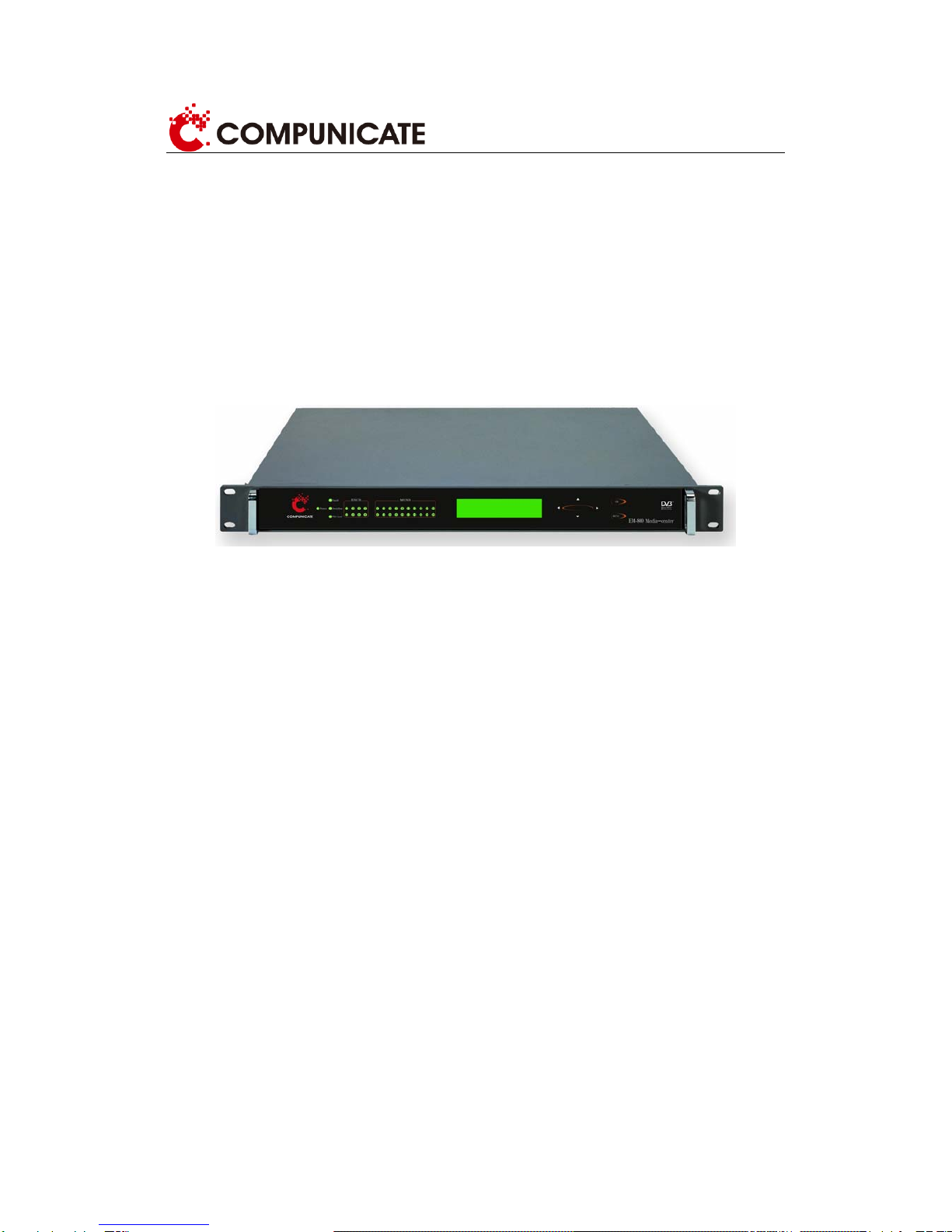
Figure 1-1 EM800 encoder external view

7
1.2 Overall function features
¾Each device supports 5 slots, 4 of them can freely configure encoder card and ASI input
card, the rest one is used for output.
¾Supporting ASI output or giga IP output
¾IP encoding output is accordance with RTP or UDP protocol
¾Local monitoring:button and LCD display screen
¾Remote monitoring:TCP/IP,XML protocol.
1.3 Encoder card function features
MPEG-2 encoder card
¾MPEG-2 4:2:0 MP@ML Video encoding
¾Video input mode NTSC/PAL adaptive
¾MPEG-1 LayerII Audio Encoding (sampling frequency 32KHz,44.1KHz,48KHz)
¾Supporting mono, double mono, stereo, joint stereo
¾Output code rate mode:VBR、CBR
H.264 encoder card
¾H.264 HP@L4 Video encoding(sampling frequency 48KHz)
¾Video input NTSC/PAL adaptive
¾MPEG-1 LayerII Audio Encoding(sampling frequency 48KHz)
¾Supporting AAC Audio Encoding (optional)
¾Supporting mono, stereo
¾Output code rate mode:VBR、CBR

8
1.4 EM800 interface
Video 2 CVBS
Analog MPEG-2
Encoder Card Audio 2 analog audio
Video 2 SDI
Digital (SDI)MPEG-2
Encoder Card Audio 2 SDI embedded audio
Video 2 CVBS
Analog H.264 SD
Encoder Card Audio 2 analog audio
Video 2 SDI video
Digital (SDI)H.264
HD/SD Encoder Card Audio 2 SDI embedded audio
Input card
ASI input card 4 ASI input(2 Mirrors)
ASI 4 ASI output
ASI output card
IP 1 100M/10M network
management
ASI 2 ASI output
Output card
Giga IP output card
IP
1 100M/10M network
management interface
1 1000M network
management interface
1.5 Front panel
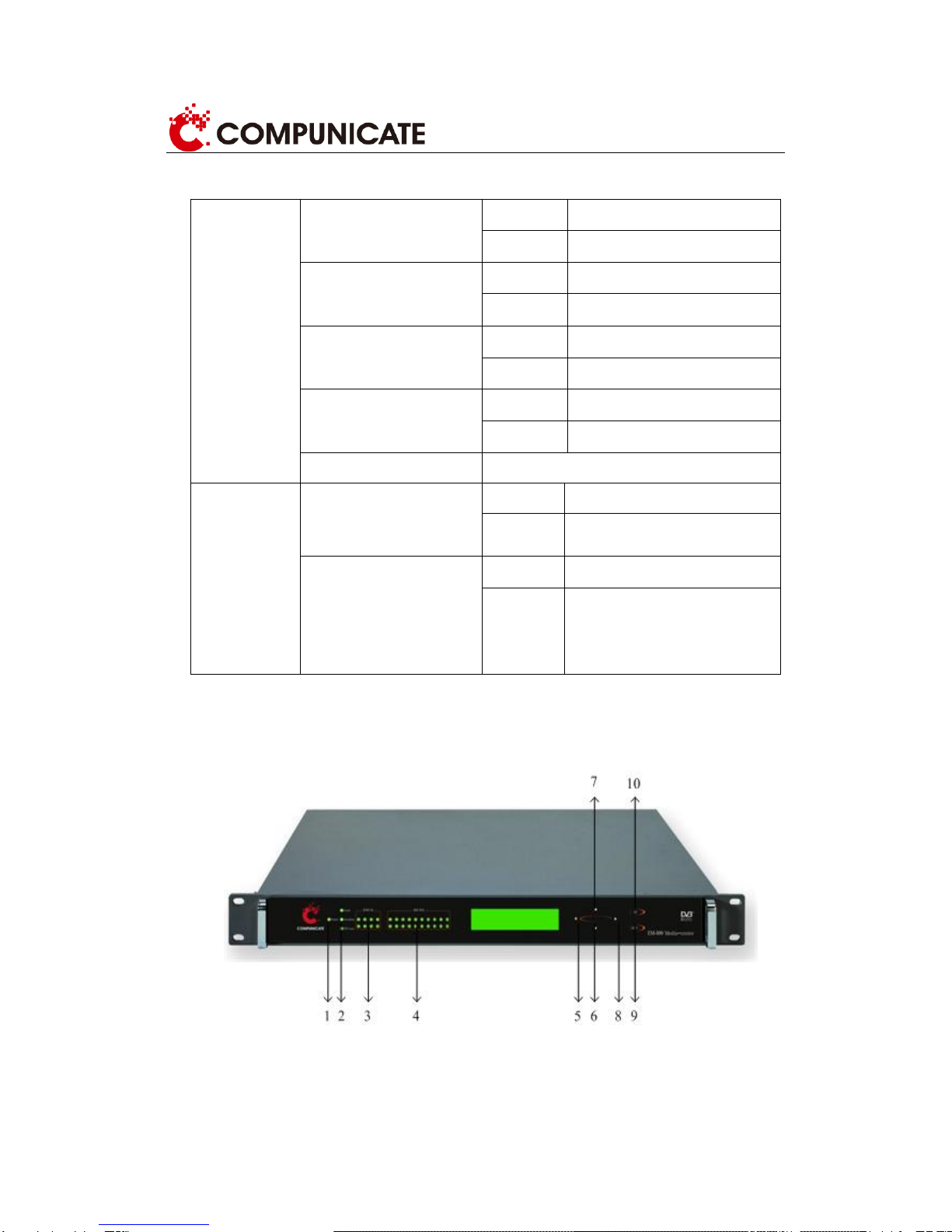
The layout of front panel is shown as figure 1.5. It includes one LCD display screen, 4 rows of
indicators and 6 buttons to form the front panel. Respective descriptions are as follows:
Figure 1.5 EM800 front panel

9
¾Six buttons
MENU、OK are used to choose menu and configure parameters.
The respective functions corresponding to digit 5、6、7、8、9、10 are:
[] change value and parameters
[] change value and parameters
[] move cursor towards to the right
[] move cursor towards to the left
[OK] 1) setting parameter: confirm current configuration is effective and return
to the upper menu.
2) browsing menu: enter into the selected submenu.
[MENU] 1)setting parameter: keep current configuration and return to the
upper menu.
2) Browsing menu: return to the previous menu.
¾Four rows of indicators, corresponding to 1、2、3、4
Indicator 1: power light, on: the encoder is powered up;
Indicator 2: status light, a) error indicator, b)overflow indicator, c)PID lose
indicator.
Indicator 3: encoding status light
The 8 encoding status lights are respectively corresponding to 8 encoding.
All of them are on: it means this encoding is chosen and signal source is
locked.
Half of them are on: it means this encoding isn’t chosen.
Off: it means there is no encoder card.
Flash: it means this coding is chosen and signal source is unlocked.
Indicator 4: multiplexing input status light

10
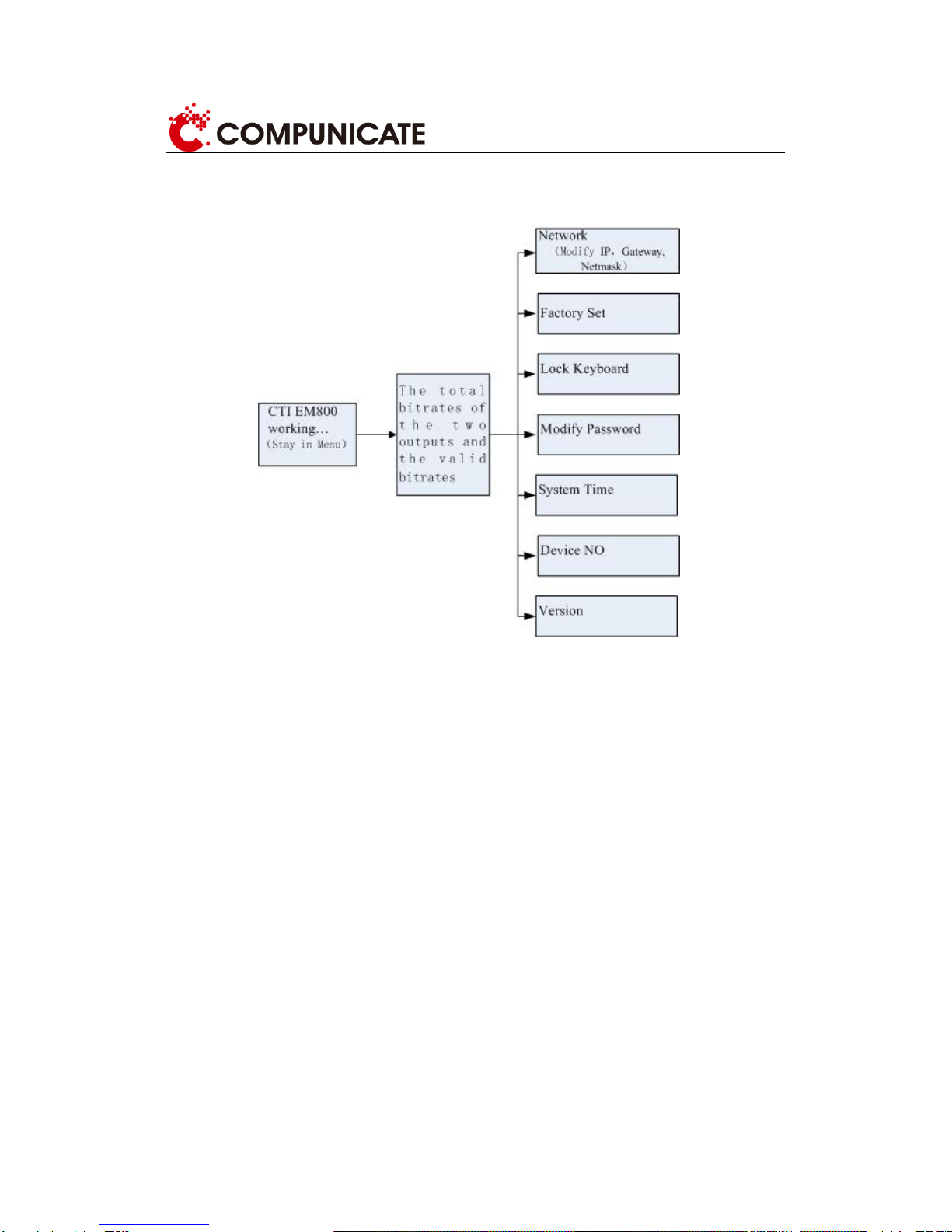
1.6 Menu structure
The operation menu is divided into three levels, shown as figure 1.6:
Figure 1.6
Indice