
COMPUTER KING DV-S1 Manuale utente

0
DVS1
DVS1
DVS1
DVS1 ActionCam
ActionCam
ActionCam
ActionCam with
with
with
with Touchscreen
Touchscreen
Touchscreen
Touchscreen
User
User
User
User Manual
Manual
Manual
Manual

1
FCC Compliance Statement
This device complies with Part 15 of the FCC Rules. Operation is subjected to the following two conditions:
(1) this device may not cause harmful interference, and
(2) this device must accept any interference received, including interference that may cause undesired operation.
This equipment has been tested and found to comply with limits for a Class B digital device, pursuant to Part 15 of the FCC rules.
These limits are designed to provide reasonable protection against harmful interference in residential installations. This
equipment generates, uses, and can radiate radio frequency energy, and if not installed and used in accordance with the
instructions, may cause harmful interference to radio communications.
However, there is no guarantee that interference will not occur in a particular installation. If this equipment does cause
interference to radio or television equipment reception, which can be determined by turning the equipment off and on, the
user is encouraged to try to correct the interference by one or more of the following measures:
-Reorient or relocate the receiving antenna.
-Move the equipment away from the receiver.
-Plug the equipment into an outlet on a circuit different from that to which the receiver is connected.
-Consult the dealer or an experienced radio/television technician for additional suggestions.
This symbol indicates that the relevant electrical product or battery should not be
disposed of as general household waste in Europe.
To
ensure the correct waste treatment
of the product and battery, please dispose them in accordance to any applicable local laws
of requirement for disposal of electrical equipment or batteries. In so doing, you will help
to conserve natural resources and improve standards of environmental protection in
treatment and disposal of electrical waste
(Waste Electrical and Electronic Equipment Directive)

2
Dear Customer,
Thank you for choosing DVS1 ActionCam with Touchscreen.
.
We look forward of you enjoying the recreation moments taking the DVS1 ActionCam with Touchscreen to the skies, forests,
and waters while you explore the world. We would feel the same delight, pleasure, and fun whenever you share the video or
pictures captured using DVS1 ActionCam with Touchscreen.
We do wish you to read through this user manual to understand the functions and make full use of it.
For any compliments or suggestions, you are always most welcome to write e-mail to:
actioncamsupport@computer-king.com.tw .
Your fulfillment with our product is our greatest success! Please enjoy!
The ActionCam Team, Computer Technology Corp.
This symbol indicates NOTES or WARNING.
You
must pay particular attention to the
text described with this symbol when you see it in this user manual. It contains important
information regarding to the usage and safety of the DVS1 ActionCam with Touchscreen.
3
Contents Checklist
Once you have opened the packaging of DVS1 ActionCam with Touchscreen, please take a few moments to check the contents
of your package. Inside this gift box, you will find:
DVS1 User manual x 1
DVS1 ActionCam x 1
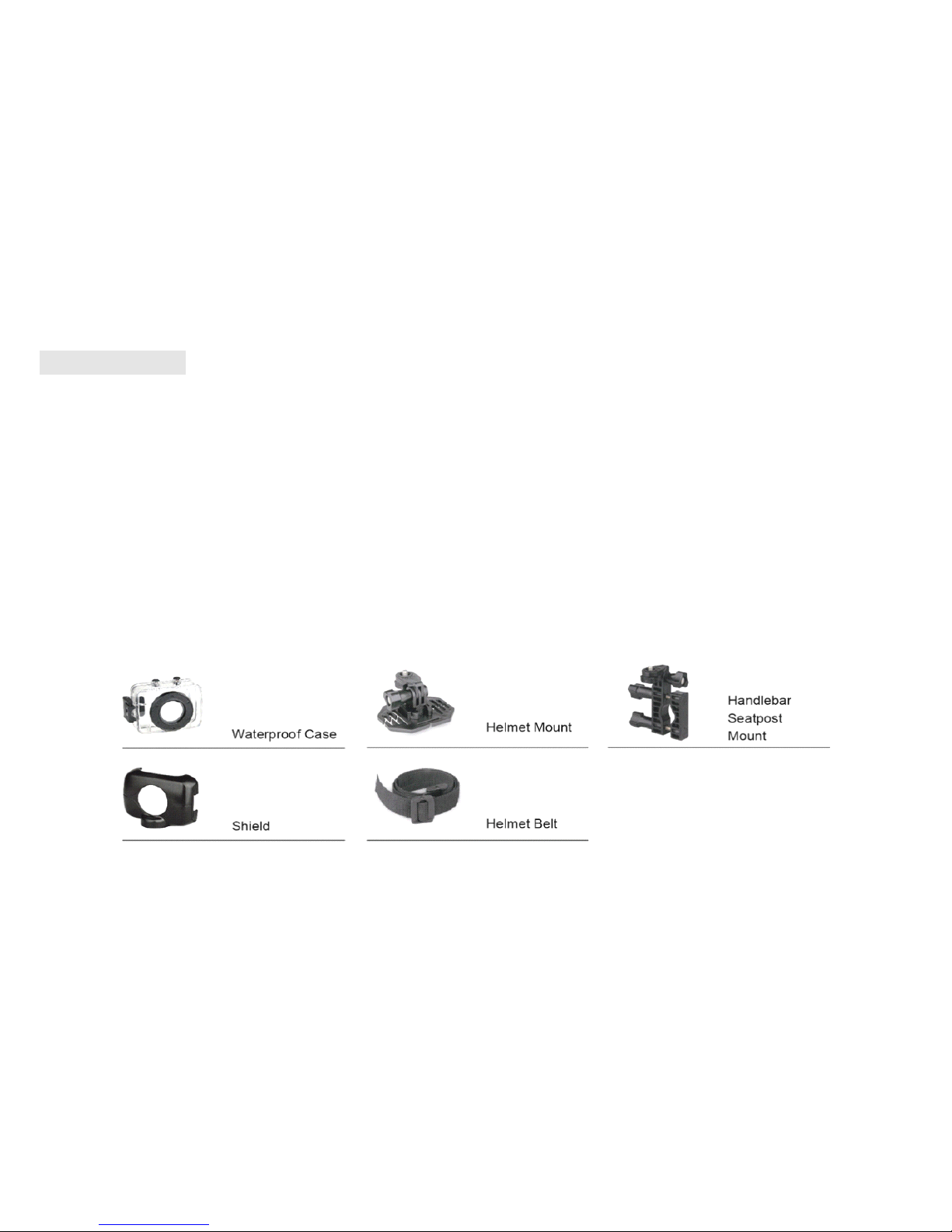
DVS1 ActionCam Waterproof Case x 1
USB Type A to Type B (male ends) cable x 1
Helmet Mount Device x 1
Helmet Belt x 1
Handlebar / Seatpost Mount Device x 1
Shield x 1
Please find the following diagram useful while checking your accessories.
4
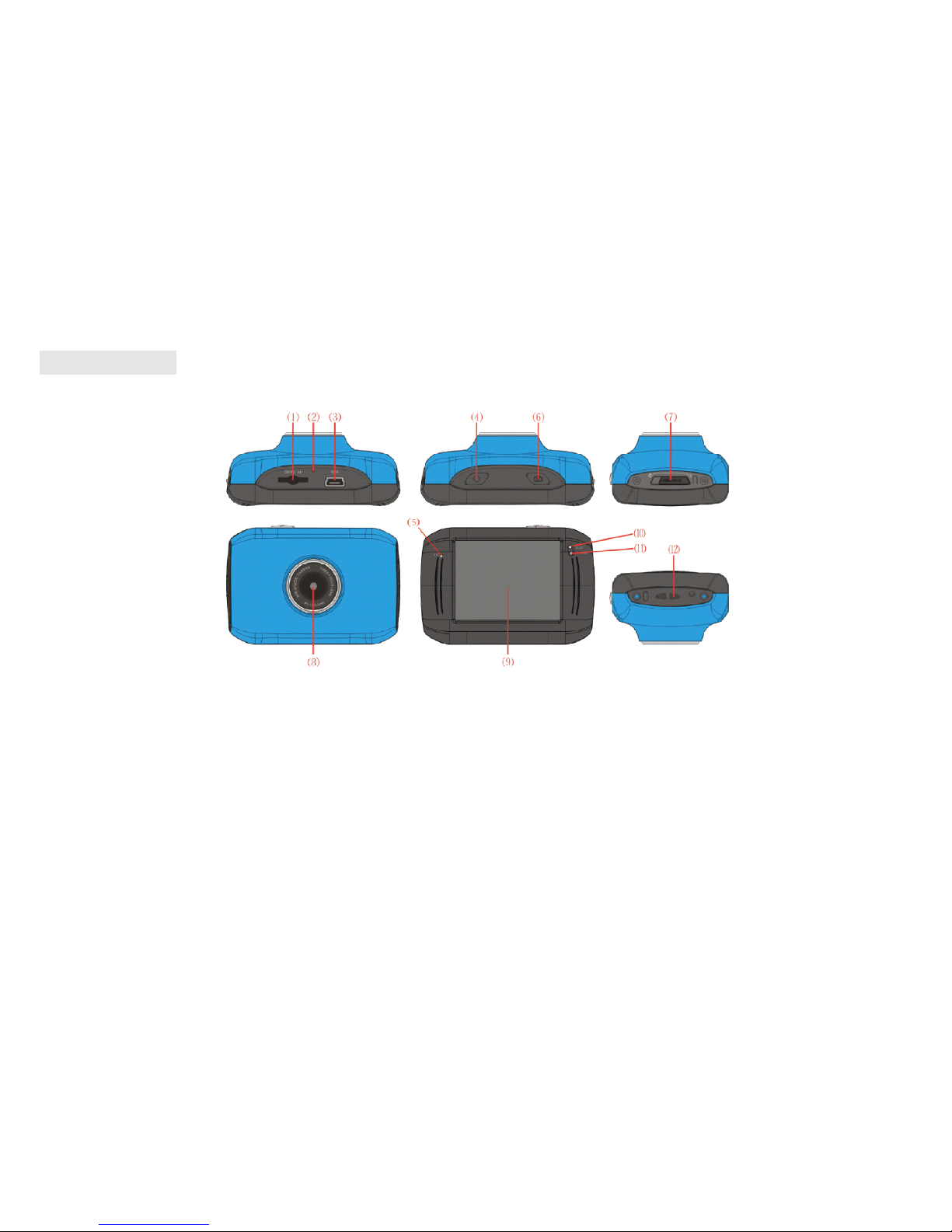
The appearance
(1) Micro SD card slot (up to SDHC 32GB)
(2) Reset
(3) Mini USB port for charging & data transfer.
(4) Power button
(5) Microphone
(6) Snapshot / Start record button
(7) Camera / Video / Vehicle mode toggle

5
(8) Lens
(9) LCD with resistive touch screen
(10) Operating indicator
(11) Charging indicator
(12) Strap holder
Quick guide
Insert the micro SD card Press the power button Toggle the mode and press start
S napshot / record button ( )
to take pictures or videos

6
Using the bike handle bar and helmet
The following diagram shows the setup of using the bike handle bar and the helmet.

7
PLEASE READ THE FOLLOWING NOTES CAREFULLY BEFORE USE!
NOTES
While using the DVS1 without the waterproof case, avoid using the DVS1 camera from extreme weather conditions such as
long-time sun exposure, dusty environments, or water.
Clean the waterproof case and the camera after each outdoor use.
Use the cleaning agent to clean the lens. Do not attempt to clean it with your fingers.
Backup the pictures or video clips inside the micro SD card.
Check the waterproof case condition before use. If the rubber around the waterproof case has cracked, do not use it under
water.
KEEP OUT OF THE REACH OF CHILDREN UNDER 6 YEARS OLD ESPECIALLY THE MICRO SD
CARD HAS BEEN INSERTED.
PARRENTAL GUIDANCE IS STRONGLY RECOMMENDED FOR CHILDREN ’ S ACCESS OF THE
CAMERA.

8
Charge your DVS1
Connect the DVS1 camera to your computer with the USB cable supplied to charge. The red charging indicator light will be on
while the DVS1 is being charged. Once the DVS1 has been fully charged, the light will be turned off. Generally, the DVS1 can be
fully charged after 2-4 hours using ordinary laptop / desktop USB ports.
Although the USB charging adaptor from your personal mobile devices such as phones
or tablets can charge the DVS1 camera, the current stronger than 1000 mA may damage
your DVS1
’
s battery life expectancy. Please use adaptors with DC output 5V only and
current output SMALLER than 1000 mA to charge the DVS1 ActionCam with
Touchscreen.
9
Use of Micro SD card
Please note that there are NO built-in memory for pictures and videos inside the DVS1 ActionCam.
You
MUST insert micro SD card in order to use it.
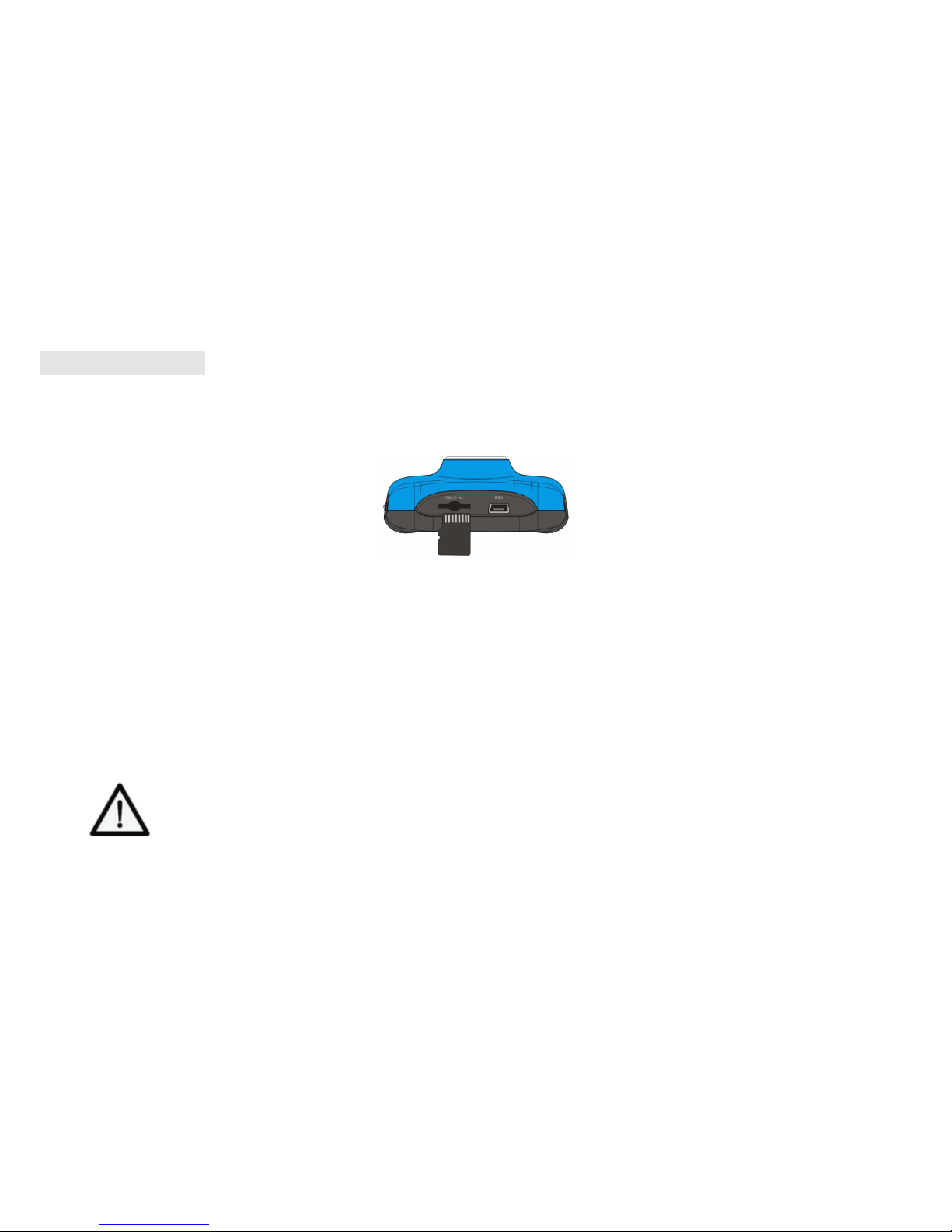
Gently push the micro SD card into the card slot.
If you have difficulties inserting the micro SD card, please check if you have inserted from the wrong direction or up-side-down.
You
should hear a small click sound after you pushed the micro SD card to the end against the spring built inside the card slot.
Do not attempt to force the micro SD card into the slot if it cannot be inserted. It may damage the
micro SD card as well as the DVS1 ActionCam.
To
remove the micro SD card, push the inserted micro SD card and you would hear a small click sound. The spring inside the
card slot will eject the card.
Take
out the micro SD card and store it in proper place.
THE MICRO SD CARDS MUST BE KEPT OUT OF THE REACH OF CHILDREN UNDER 6 YEARS OLD!
PARRENTAL GUIDANCE IS STRONGLY RECOMMENDED FOR CHILDREN ’ S ACCESS OF THE CAMERA.
Indice


