Conexant HCF 56K Manuale utente

M
Mo
on
no
o
P
Pa
ac
ck
k
P
PC
CI
I
W
Wi
in
nM
Mo
od
de
em
m
C
Co
on
ne
ex
xa
an
nt
t
H
HC
CF
F
5
56
6K
K
User’s Guide

56K Mono Pack PCI WinModem With Conexant User’s Guide
2
FCC Requirements
This equipment complies with Part 68 of the FCC Rules. On the bottom of this equipment is a
label that contains, among other information, the FCC Registration Number and Ringer
Equivalence Number (REN) for this equipment. IF REQUESTED. THIS INFORMATION
MUST BE GIVEN TO THE TELEPHONE COMPANY.
The REN is useful to determine the quantity of devices you may connect to your telephone line
and still have these entire devices ring when your telephone number is called In most. But not
all areas the sum of the REN’s of all devices connected to one line should not exceed five (5.0).
Tobecertainofthenumberofdevicesyoumayconnecttoyourline.AsdeterminedbytheREN.
You should contact your local telephone company to determine the maximum REN of the area
you are calling from. If your telephone equipment causes harm to the telephone network. The
Telephone Company may discontinue your service temporally. If possible, they will notify you
in advance. But if the advanced notice is failed, you will be notified as soon as possible. You
will be informed of your right to file a complaint with the FCC.
Your telephone company may change in its facilities, equipment, operations or procedures that
could affect the proper functions of your equipment. If this occurs, you will be notified in
advance to give you an opportunity to maintain uninterrupted telephone service.
If you experience trouble with this telephone equipment,please contact the following address
and phone number for information on obtaining service or repairs. The Telephone Company
may ask you to disconnect this equipment from the network until the problem is solved or until
that the equipment is not detected malfunctioning. This equipment may not be used on coin
service provided by the Telephone Company. Connection to party lines is subject to state
Tariffs.
Federal Communications Commission
Radio Frequency Interference Statement.
Note: This equipment has been tested and found to comply with the limitation for a lass B
digital device pursuant to Part 15 of the FCC Rules. These restrictions are designed to provide
reasonable protection against harmful interference when the equipment is operated in a
residential installation. This equipment generates, uses, and can radiate radio frequency energy
and if not installed and used in accordance with the instruction manual may cause harmful
interference to radio communications. However, there is no guarantee that interference will not
occur in a particular installation. If the equipment does cause harmful interference to radio or
television reception, which can be determine by tuning the equipment off and on, the user is
suggested to try to correct the interferenceby one or more of the following measures:
-Reorient or relocate the receiving antenna.
-Increase the distance between the equipment and receiver.
-Connect the equipment into an outlet on a circuit different from that to which the receiver
is connected. Consult the dealer or an experienced radio TV technician for help.
Notices:
(1) The changes or modifications not expressly approved by the party responsible for
compliance could void the user’s authority to operate the equipment.
(2) Shielded interface cables and AC power cord if any must be used in order to comply with
the emission limits.

56K Mono Pack PCI WinModem With Conexant User’s Guide
3
Notices to Australian users:
The modem card must only be used in a data terminal equipment (DTE) e.g. computer, that has
a screw down cover (lid). As unsafe voltages (TNV) exist on the modem card, disconnect the
modem card from the telephone line while the cover (lid) of the DTE (computer) is removed.
Installation of the modem card in a DTE (computer) which does not require a tool to open the
cover (lid) will render the permit void.
Disconnect the telephone line before opening the cover (lid) of the DTE (computer). Do not
connect the customer equipment to the telephone line while the cover (lid) of the DTE
(computer) is open.
Modems connected to the Australian telecommunications network must be marked in
accordance with the Labeling Notice. This modem has been specifically configured to ensure
compliance with the ACA Standards. Do not adjust your modem or software outside the values
indicated as below. To do so would result in your modem being operated in a non-compliant
manner.
Modem Commands:
Command Default Permissible Range
ATA -Donot use
ATB B0 Do not set to B1
AT&G &G0 &G2
AT&P &P0 &P1
ATSn see table below
S register Default Permissible Range
s6 2 2 to 6
Call Attempts/Retries:
Applications software shall be configured so that no more than 3 attempts are made to
establish a connection to a given number (Note: if the modem can detect service tones, up to
10 attempts can be made). If the call sequence is unsuccessful, there shall be a delay of at
least 30 minutes before attempting to call the number again.
Failure to set the modem and any application software used with the modem, to the values
shown as above will result in the modem being operated in a non-compliant manner.
Consequently, this would be in violation of the Labeling Notice for this equipment, andthe
Telecommunications ACT 1997 prescribes penalties for the connection of non-compliant
equipment.
WARNING
FOR SAFETY REASONS, ONLY CONNECT EQUIPMENT WITH A
TELECOMMUNICATIOS COMPLIANCE LABEL. THIS INCLUDES
CUSTOMER EQUIPMENT PREVIOUSLY LABELLED
PERMITTED OR CERTIFIED.
WARNING
ONLY CONNECT EQUIPMENT WITH A TELECOMMUNICATIONS
COMPLIANCE LABEL

56K Mono Pack PCI WinModem With Conexant User’s Guide
4
CONTENTS
Chapter 1 Introduction...........................................................................5
1.1 Introduction..............................................................................................................5
1.2 Packing.....................................................................................................................5
1.3 Features.....................................................................................................................5
Chapter 2 Specifications ........................................................................6
Chapter 3 Hardware Installation ...........................................................7
Chapter 4 Software Installation.............................................................8
4.1 Windows 95 B (OSR2) ..........................................................................................8
4.2 Windows 98 ...........................................................................................................11
4.3 Windows ME.........................................................................................................14
4.4 Windows NT 4.0...................................................................................................15
4.5 Windows 2000.......................................................................................................28
Chapter 5 Diagnostics..........................................................................31
5.1 Windows 95/98......................................................................................................31
5.2 Windows ME.........................................................................................................33
5.3 Windows 2000.......................................................................................................35
Chapter 6 Uninstalling Procedures......................................................38
6.1 Windows 95/98......................................................................................................38
6.2 Windows ME.........................................................................................................40
6.3Windows NT 4.0...................................................................................................41
6.4Windows 2000.......................................................................................................43
Chapter 7 Troubleshooting ..................................................................47

56K Mono Pack PCI WinModem With Conexant User’s Guide
5
Chapter 1 Introduction
1.1 Introduction
Thank you for selecting the internal modem. The Mono Pack HCF WinModem
is the secondgeneration of WinModem (Controlless Modem). It provides the modem
function under Windows GUI interface which also the DOS box supplied by
Windows. All of the above advances come from the special design of Windows
control function, which move the dominating of control signal of modem from
modem body to the Windows system. Therefore and it makes the Mono Pack HCF
WinModem work more smoothly than traditional RS-232 Modem. If you are just
working under Windows system, Mono Pack HCF WinModemis the best product you
need to work with.
1.2 Packing
The Mono Pack WinModem series include the following accessories:
lInternal modem card
lUser’s manual
lApplication Software (CD-ROM)
lDriver Diskette (Optional)
lPhone Cord
1.3 Features
lWinModem (controlless)
lITU 56K V.90 Standard
lPCI V2.1 compliant
lWindows 95/98/ME/2000, NT4.0 compatible
lSoftware upgradable

56K Mono Pack PCI WinModem With Conexant User’s Guide
6
Chapter 2 Specifications
Specifications:
Line data rate 56000,54000,52000,50000,48000,46000,44000,42000,
40000,38000,36000,34000,33600,31200,28800,26400,
24000,19200,16800,14400,12000,9600,7200,4800,2400
,1200,600,300
Modem protocol ITU-T V.90/K56flex/ITU-T
V.34bis/V.34/V.32bis/V.32/V.22bis/V.22/V.21/V.23
Bell 212A/103,V.80,V8/V.8bis
Chip Set Conexant RH56D/SP-PCI
Interface PCI BUS
Fax Compatibility 14.4k bps Send/Receiver G3 compatible
Error Correction MNP2-4,V.42
Data Compression MNP 5, V.42bis
Max. DTE data rate 115200bps
PnP Build in
Modem operation Dial up
Speaker phone Full duplex speaker phone
Audio Monitoring Mini-speaker and Programming Volume control
Line interface RJ-11 Line/Phone
Software Compatibility AT command set Compatible
System Requirement Pentium CPU 133+, 16M RAM+, L2 cache 256K
System compatibility OS Windows 95/98/ME/NT4.0/2000

56K Mono Pack PCI WinModem With Conexant User’s Guide
7
Chapter 3 Hardware Installation
1. Remove the computer’s case.
2. Insert the modem card into a spare PCI expansion slot.
3. Close the case.
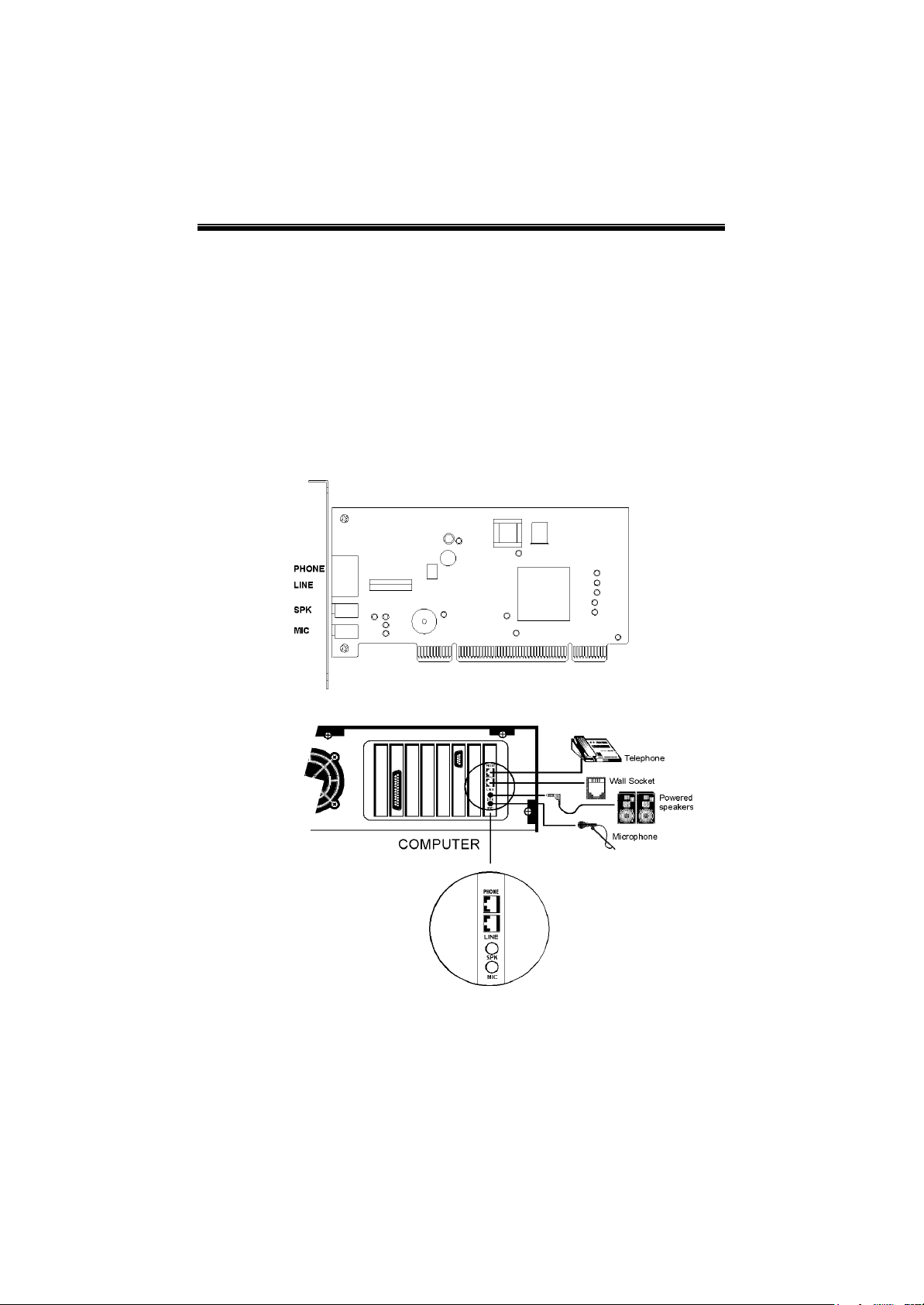
4. Unplug the telephone from the wall socket, then plug the telephone into the
socket on the back of the modem marked PHONE.
5. Plug the phone cord supplied into the socket on the back of the modem marked
LINE.
6. Plug the other end of the cord into the wall socket.
7. Proceed to Software installation.

56K Mono Pack PCI WinModem With Conexant User’s Guide
8
Chapter 4Software Installation
Power on your computer and modem then start Windows 95/98//ME//NT4.0/2000.
Windows 95/98/ME/2000 will detect the modem automatically.
4.1 Windows 95 B(OSR2)
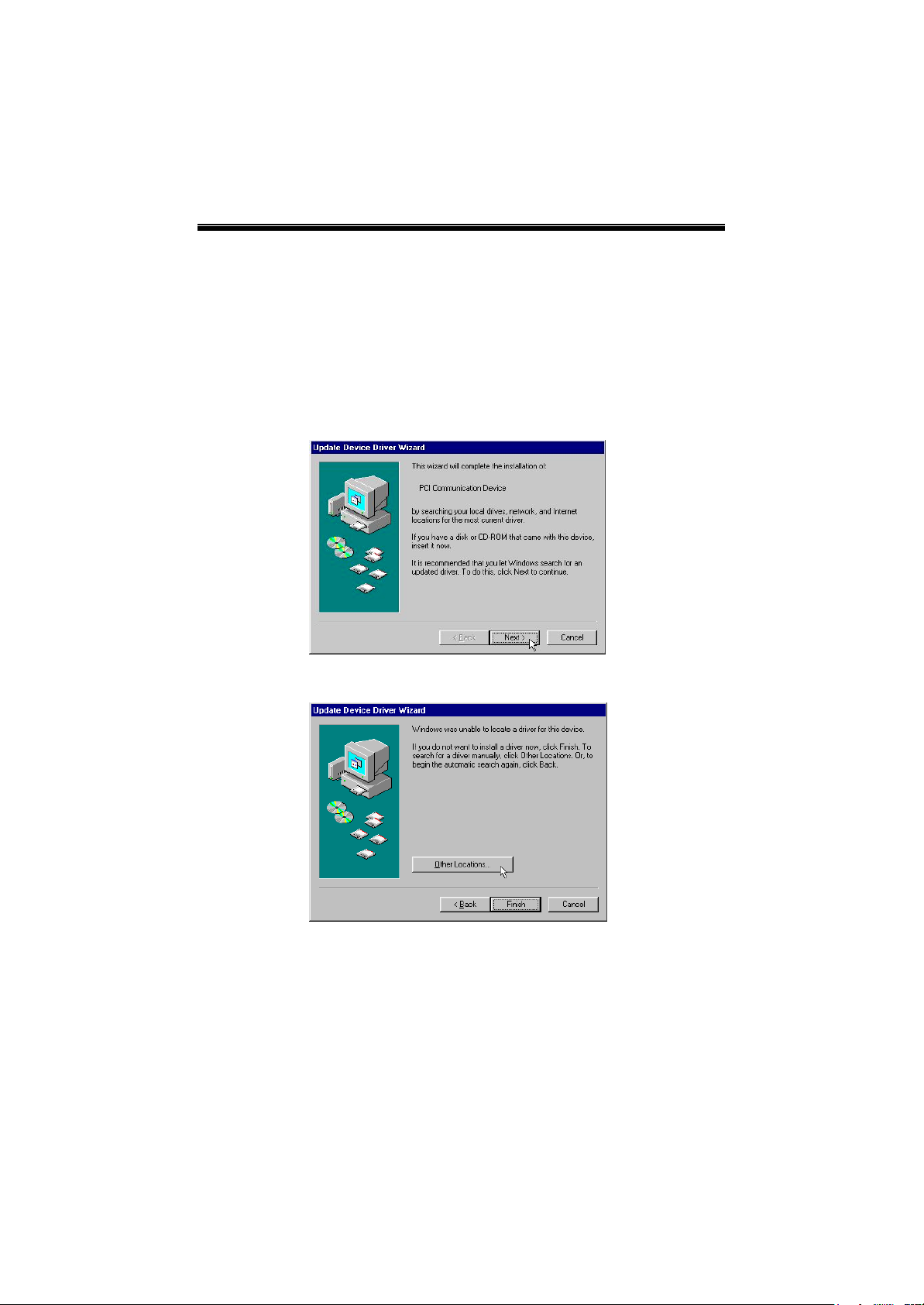
1. The message of PCI Communication Device will appear. However, it may
vary with the type of the mother board. Then insert the driver CD supplied and
click Next.
2. Click Other Locations…to find the modem driver.

56K Mono Pack PCI WinModem With Conexant User’s Guide
9
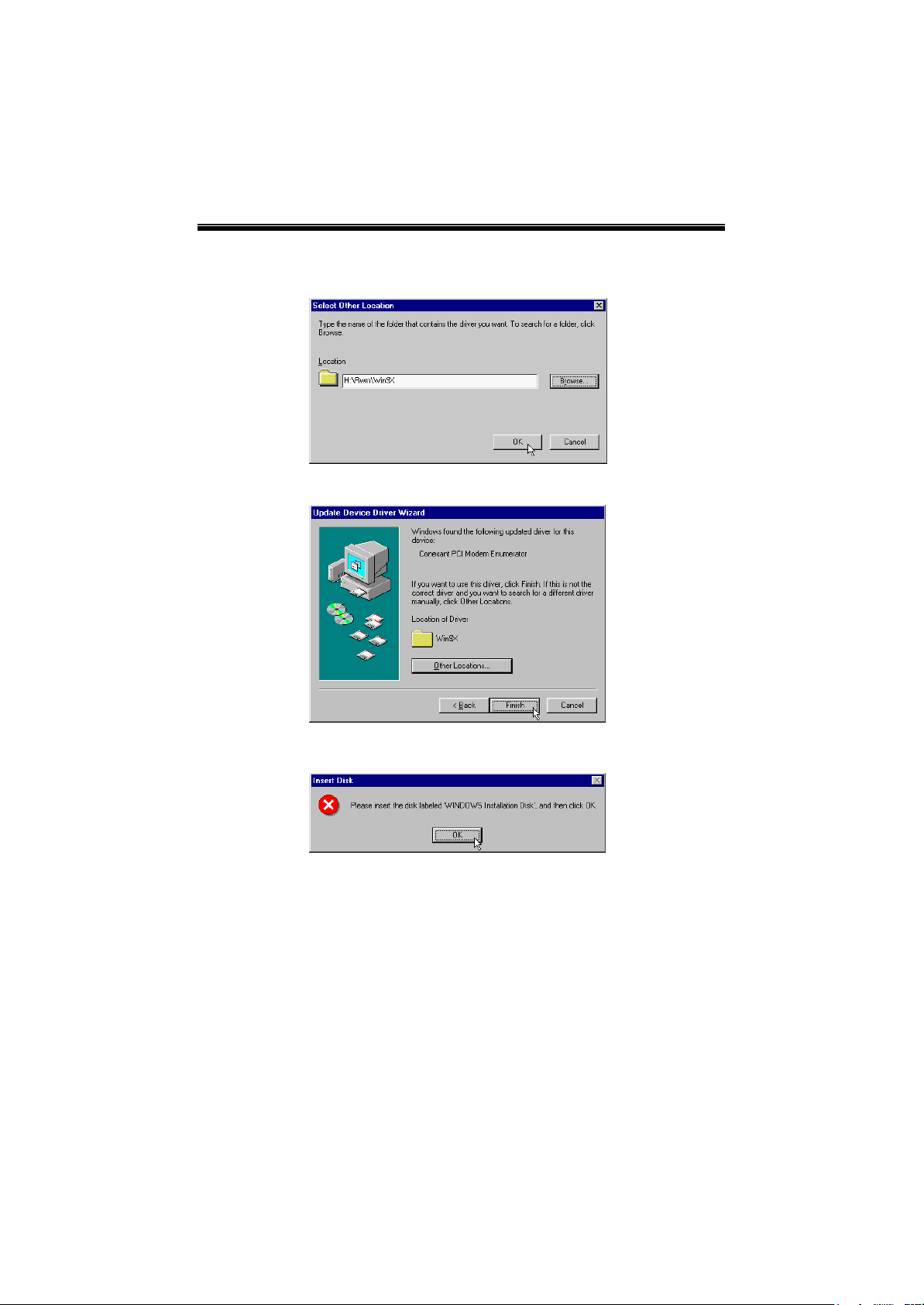
3. Please type H:\Rwm\Win9Xor use Browseto find the location of the modem
driver(H is the letter of CD-ROM drive) and click OK. If your country is
Australia, please type H:\RWM\Win9X\Aus
4. Click Finishto continue.
5. Click OK.

56K Mono Pack PCI WinModem With Conexant User’s Guide
10
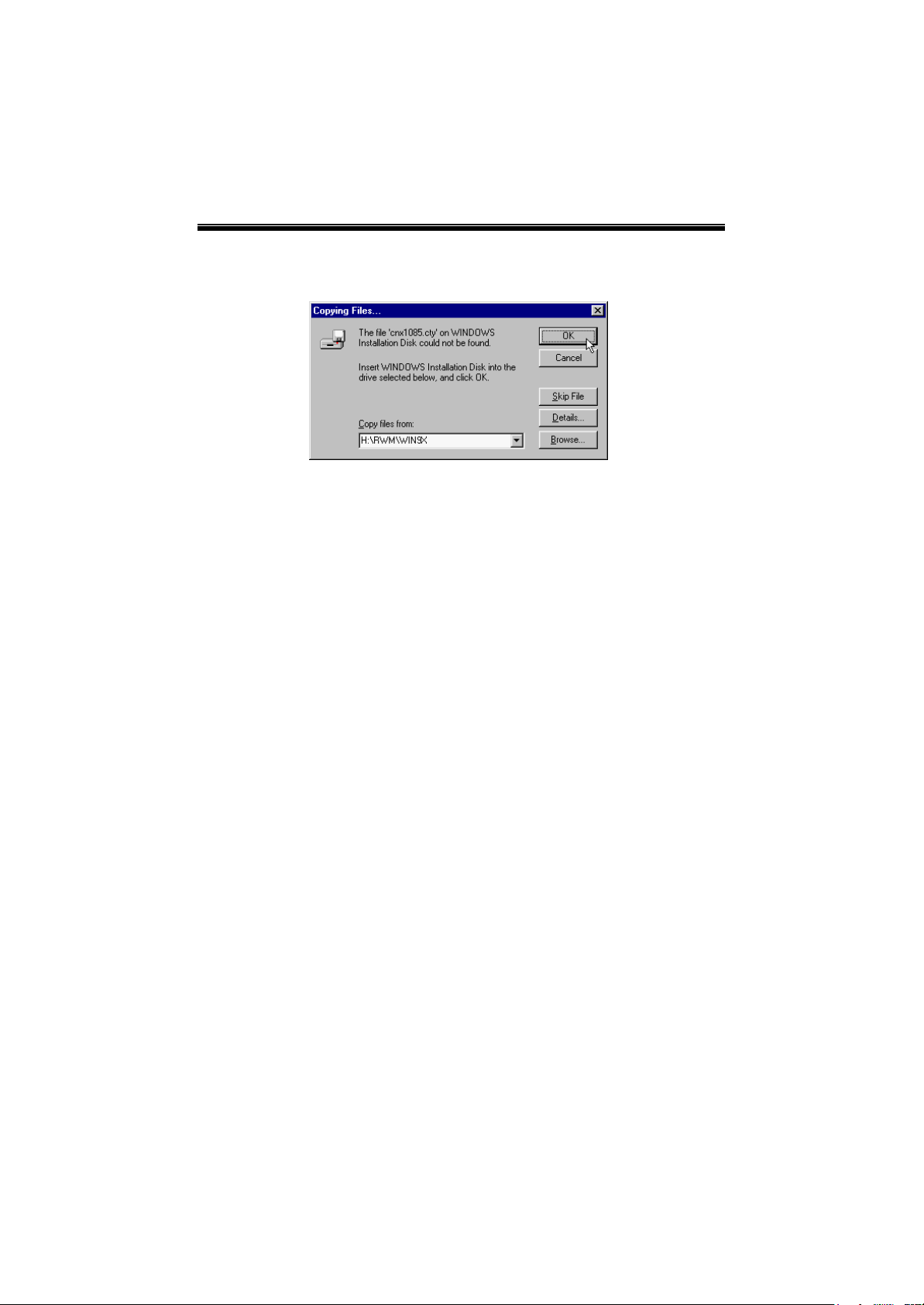
6. Please type H:\RWM\Win9Xor useBrowseto find the location of the modem
driver. Then click OKto finish the installation. If your country is Australia,
please type H:\RWM\Win9X\Aus.
Indice
Altri manuali Conexant Modem

Conexant
Conexant CX93010 Manuale utente

Conexant
Conexant 56K V.90 Manuale utente

Conexant
Conexant RC336D Manuale utente

Conexant
Conexant RC1440D Manuale utente

Conexant
Conexant AccessRunner Manuale utente

Conexant
Conexant RCV56 HSF Manuale utente

Conexant
Conexant PT-3812 Manuale utente

Conexant
Conexant 201 Manuale utente

Conexant
Conexant V92 Manuale utente

Conexant
Conexant HCF V.90 Manuale utente