- 9 -
running, it is used to adjust the speed, the adjusting interval is 0.1 for each press. It will continue
to increase or decrease if the user press and hold the button for more than 0.5 seconds.
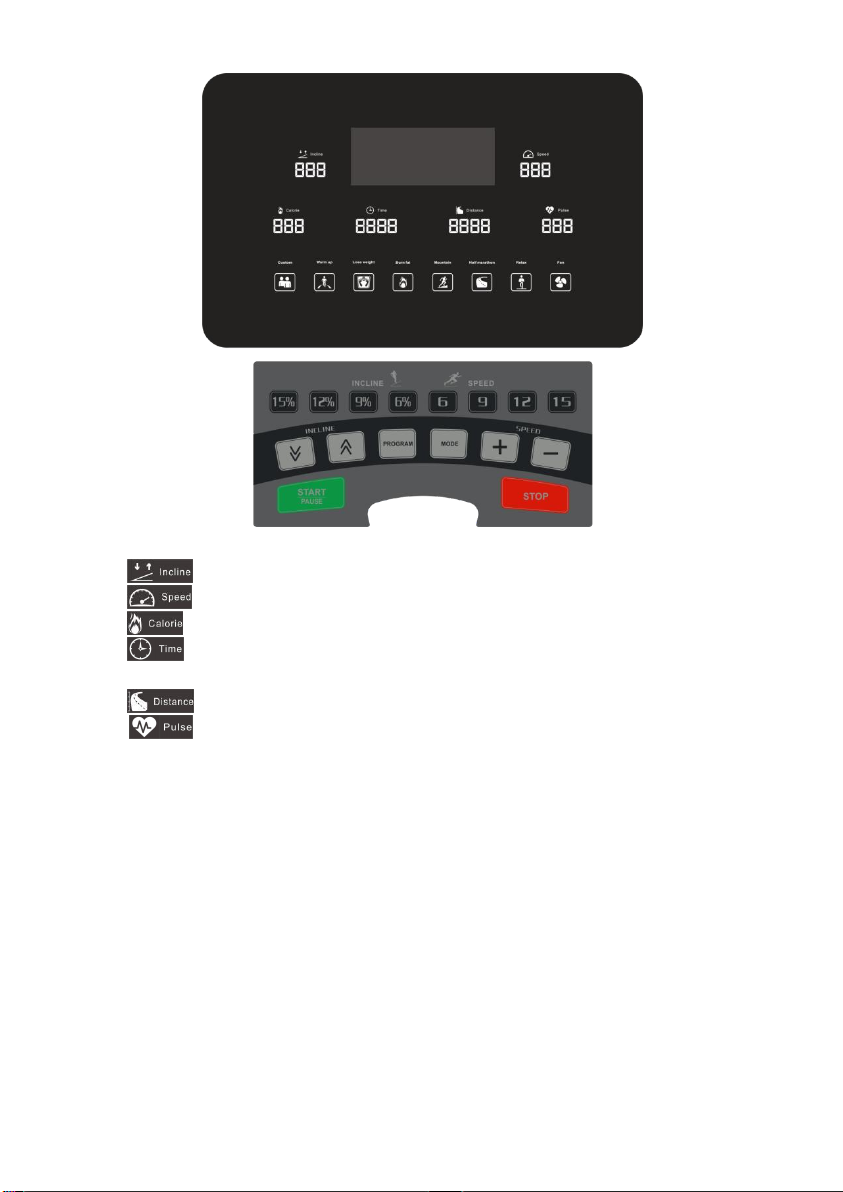
3.6 Incline︽& Incline︾buttons:In the standby state, it is used to adjust the set value. During the
running, it is used to adjust the slope of the running deck. The adjusting interval is 1 for each
press. It will continue to increase or decrease if the user press and hold the button more than 0.5
seconds.
3.7 Speed:6、9、12、15:Speed shortcut buttons, can quickly set the speed.
3.8 Incline:6%、9%、12%、15%:Incline shortcut buttons, can quickly set the slope.
3.9 Custom button:In the standby state, press this key to selecgt through the custom programs
U01 - U03.
3.10 Warm up button: In the standby mode, press this button to start a 3 minute warm-up
exercise(the time window flashes), the treadmill runs at a speed of 1.0 km/h, counts down for 3
minutes, then gradually accelerates to 6 km/h, and then stop. If the user adjust the speed during
the warm up program, the treadmill will run at the speed set by the user until the end of the 3
minutes countdown.
3.11 Lose weight button:In the standby state, press this button to start the body shaping program.
3.12 Burn fat button:In the standby state, press this button to directly select the fat burning program.
3.13 Mountain button:In the standby state, press this button to directly select the mountain run
program.
3.14 Half marathon button:In the standby state, press this button to start the half marathon, the
distance is 21.1 km.
3.15 Relax button: Press this button during the running, if the current speed is ≥8km/h, the
treadmill will automatically decelerate to 8km, and then slow down from 8km to a stop in 3
minute; if the current speed is <8 km/h and ≥2.5 km/h, , the treadmill will slowly decelerated to
stop in 2 minutes; if the current speed is less than 2.5 km/h, the treadmill will slowly
decelerated to stop in 18 seconds. In the state of relaxation program, the time window flashes
and it can only be decelerated but not accelerated. In this state, pause button is invalid.
3.16 Fan button:When the fan is off, press this button to turn on the fan, press it again to turn
off the fan.
3.17 In the standby state, press and hold both "speed+" and "speed-" buttons for 3 seconds to view
the total milage of the treadmill, the unit is KM. Press “stop” button to exit.
4. Main functions:
4.1 Quick start (manual mode):
4.1.1 Turn on the power switch and correctly attach the safety lock to the safety lock position of the
treadmill.
4.1.2 Press the "start/pause" key, the system will enter a 3-second countdown, and the buzzer will
sound a warning tone. at the same time, the speed window will show that the treadmill will start
running at a speed of 1km/h after the countdown of 3, 2, 1, and 3 seconds is completed.
4.1.3 After starting, the speed of the treadmill can be adjusted according to needs by using the
"speed+""speed-"; Use the "Slope" and "Slope" keys to adjust the slope of the treadmill.
4.2 Operation during exercise:
4.2.1 Press “Speed –” key to reduce operating speed of the treadmill.
4.2.2 Press “Speed +” key to increase operating speed of the treadmill.
4.2.3 Press “Incline ︾” key to reduce incline of the treadmill.